Š 2018 KNIME AG. All Rights Reserved.
Chemistry Data Basics
with KNIME Analytics Platform
Š 2018 KNIME AG. All Rights Reserved. 2
Chemistry basics
• Chemistry formats
• Standardization
• Saving files
Š 2018 KNIME AG. All Rights Reserved. 3
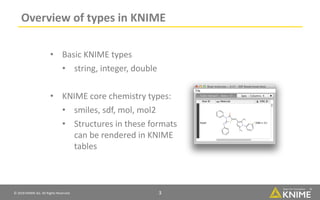
Overview of types in KNIME
• Basic KNIME types
• string, integer, double
• KNIME core chemistry types:
• smiles, sdf, mol, mol2
• Structures in these formats
can be rendered in KNIME
tables
Š 2018 KNIME AG. All Rights Reserved. 4
New Node: File Reader
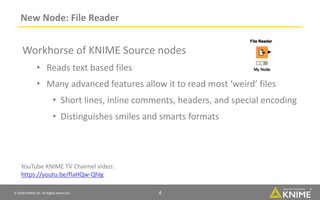
Workhorse of KNIME Source nodes
• Reads text based files
• Many advanced features allow it to read most ‘weird’ files
• Short lines, inline comments, headers, and special encoding
• Distinguishes smiles and smarts formats
4
YouTube KNIME TV Channel video:
https://youtu.be/flaHQw-Qhlg
Š 2018 KNIME AG. All Rights Reserved. 5
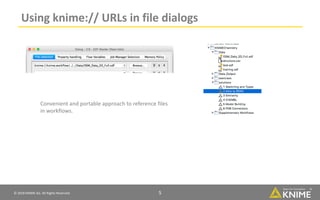
Using knime:// URLs in file dialogs
Convenient and portable approach to reference files
in workflows.
Š 2018 KNIME AG. All Rights Reserved. 6
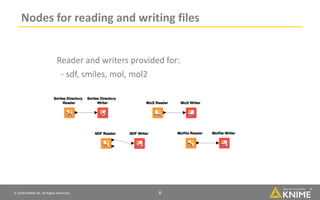
Nodes for reading and writing files
Reader and writers provided for:
- sdf, smiles, mol, mol2
Š 2018 KNIME AG. All Rights Reserved. 7
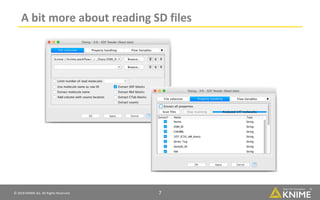
A bit more about reading SD files
Š 2018 KNIME AG. All Rights Reserved. 8
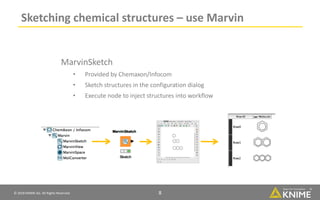
Sketching chemical structures – use Marvin
MarvinSketch
• Provided by Chemaxon/Infocom
• Sketch structures in the configuration dialog
• Execute node to inject structures into workflow
Š 2018 KNIME AG. All Rights Reserved. 9
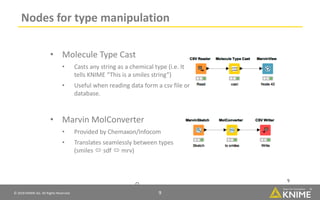
Nodes for type manipulation
9
9
• Molecule Type Cast
• Casts any string as a chemical type (i.e. It
tells KNIME “This is a smiles string”)
• Useful when reading data form a csv file or
database.
• Marvin MolConverter
• Provided by Chemaxon/Infocom
• Translates seamlessly between types
(smiles Ăł sdf Ăł mrv)
Š 2018 KNIME AG. All Rights Reserved. 10
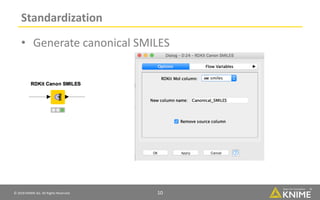
Standardization
• Generate canonical SMILES
Š 2018 KNIME AG. All Rights Reserved. 11
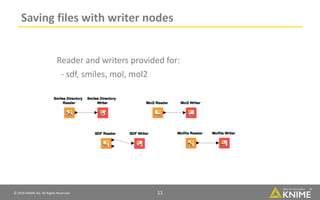
Saving files with writer nodes
Reader and writers provided for:
- sdf, smiles, mol, mol2
Š 2018 KNIME AG. All Rights Reserved. 12
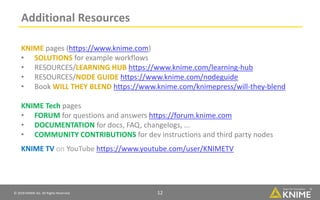
Additional Resources
12
KNIME pages (https://www.knime.com)
• SOLUTIONS for example workflows
• RESOURCES/LEARNING HUB https://www.knime.com/learning-hub
• RESOURCES/NODE GUIDE https://www.knime.com/nodeguide
• Book WILL THEY BLEND https://www.knime.com/knimepress/will-they-blend
KNIME Tech pages
• FORUM for questions and answers https://forum.knime.com
• DOCUMENTATION for docs, FAQ, changelogs, ...
• COMMUNITY CONTRIBUTIONS for dev instructions and third party nodes
KNIME TV on YouTube https://www.youtube.com/user/KNIMETV
13Š 2018 KNIME AG. All Rights Reserved.
The KNIMEÂŽ trademark and logo and OPEN FOR INNOVATIONÂŽ trademark are used by
KNIME.com AG under license from KNIME GmbH, and are registered in the United States.
KNIMEÂŽ is also registered in Germany.

Chemistry Data Basics with KNIME Analytics Platform

  • 1.
    Š 2018 KNIMEAG. All Rights Reserved. Chemistry Data Basics with KNIME Analytics Platform
  • 2.
    © 2018 KNIMEAG. All Rights Reserved. 2 Chemistry basics • Chemistry formats • Standardization • Saving files
  • 3.
    © 2018 KNIMEAG. All Rights Reserved. 3 Overview of types in KNIME • Basic KNIME types • string, integer, double • KNIME core chemistry types: • smiles, sdf, mol, mol2 • Structures in these formats can be rendered in KNIME tables
  • 4.
    © 2018 KNIMEAG. All Rights Reserved. 4 New Node: File Reader Workhorse of KNIME Source nodes • Reads text based files • Many advanced features allow it to read most ‘weird’ files • Short lines, inline comments, headers, and special encoding • Distinguishes smiles and smarts formats 4 YouTube KNIME TV Channel video: https://youtu.be/flaHQw-Qhlg
  • 5.
    Š 2018 KNIMEAG. All Rights Reserved. 5 Using knime:// URLs in file dialogs Convenient and portable approach to reference files in workflows.
  • 6.
    Š 2018 KNIMEAG. All Rights Reserved. 6 Nodes for reading and writing files Reader and writers provided for: - sdf, smiles, mol, mol2
  • 7.
    Š 2018 KNIMEAG. All Rights Reserved. 7 A bit more about reading SD files
  • 8.
    © 2018 KNIMEAG. All Rights Reserved. 8 Sketching chemical structures – use Marvin MarvinSketch • Provided by Chemaxon/Infocom • Sketch structures in the configuration dialog • Execute node to inject structures into workflow
  • 9.
    © 2018 KNIMEAG. All Rights Reserved. 9 Nodes for type manipulation 9 9 • Molecule Type Cast • Casts any string as a chemical type (i.e. It tells KNIME “This is a smiles string”) • Useful when reading data form a csv file or database. • Marvin MolConverter • Provided by Chemaxon/Infocom • Translates seamlessly between types (smiles ó sdf ó mrv)
  • 10.
    © 2018 KNIMEAG. All Rights Reserved. 10 Standardization • Generate canonical SMILES
  • 11.
    Š 2018 KNIMEAG. All Rights Reserved. 11 Saving files with writer nodes Reader and writers provided for: - sdf, smiles, mol, mol2
  • 12.
    © 2018 KNIMEAG. All Rights Reserved. 12 Additional Resources 12 KNIME pages (https://www.knime.com) • SOLUTIONS for example workflows • RESOURCES/LEARNING HUB https://www.knime.com/learning-hub • RESOURCES/NODE GUIDE https://www.knime.com/nodeguide • Book WILL THEY BLEND https://www.knime.com/knimepress/will-they-blend KNIME Tech pages • FORUM for questions and answers https://forum.knime.com • DOCUMENTATION for docs, FAQ, changelogs, ... • COMMUNITY CONTRIBUTIONS for dev instructions and third party nodes KNIME TV on YouTube https://www.youtube.com/user/KNIMETV
  • 13.
    13Š 2018 KNIMEAG. All Rights Reserved. The KNIMEŽ trademark and logo and OPEN FOR INNOVATIONŽ trademark are used by KNIME.com AG under license from KNIME GmbH, and are registered in the United States. KNIMEŽ is also registered in Germany.