PHP Form HandlingPHP Form Handling
Chapter 7
MOHAMAD RAHIMI MOHAMAD
ROSMAN
PHP Forms and User InputPHP Forms and User Input
The PHP $_GET and $_POST variables are
used to retrieve information from forms,
like user input.
The most important thing to notice when
dealing with HTML forms and PHP is that
any form element in an HTML page will
automatically be available to your PHP
scripts.
MOHAMAD RAHIMI MOHAMAD
ROSMAN
ExampleExample
Create 2 new text document.
Rename the document to index.php and
welcome.php
Open the index.php
MOHAMAD RAHIMI MOHAMAD
ROSMAN
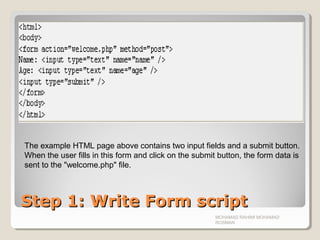
Step 1: Write Form scriptStep 1: Write Form script
MOHAMAD RAHIMI MOHAMAD
ROSMAN
The example HTML page above contains two input fields and a submit button.
When the user fills in this form and click on the submit button, the form data is
sent to the "welcome.php" file.
Step 2: Write PHP CodeStep 2: Write PHP Code
MOHAMAD RAHIMI MOHAMAD
ROSMAN
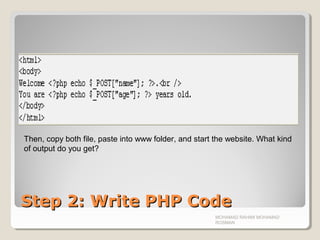
Then, copy both file, paste into www folder, and start the website. What kind
of output do you get?
Form ValidationForm Validation
User input should be validated on the browser
whenever possible (by client scripts
(JavaScript)). Browser validation is faster and
you reduce the server load.
You should consider using server validation if the
user input will be inserted into a database. A
good way to validate a form on the server is to
post the form to itself, instead of jumping to a
different page.
The user will then get the error messages on the
same page as the form. This makes it easier to
discover the error.
MOHAMAD RAHIMI MOHAMAD
ROSMAN
The $_GET VariableThe $_GET Variable
The $_GET variable is an array of variable
names and values sent by the HTTP GET
method.
The $_GET variable is used to collect
values from a form with method="get".
Information sent from a form with the
GET method is visible to everyone (it will
be displayed in the browser's address bar)
and it has limits on the amount of
information to send (max. 100
characters).
MOHAMAD RAHIMI MOHAMAD
ROSMAN
The $_GET VariableThe $_GET Variable
When using the $_GET variable all
variable names and values are displayed
in the URL.
So this method should not be used when
sending passwords or other sensitive
information!
However, because the variables are
displayed in the URL, it is possible to
bookmark the page. This can be useful in
some cases.
Note: The HTTP GET method is not
suitable on large variable values; the
value cannot exceed 100 characters.
MOHAMAD RAHIMI MOHAMAD
ROSMAN
ExampleExample
Create new text document.
Rename it to index.php and welcome.php
Open index.php and write the following
code.
MOHAMAD RAHIMI MOHAMAD
ROSMAN
Step 1: Write Form ScriptStep 1: Write Form Script
The code is just similar to previous
method, just change the POST to GET
MOHAMAD RAHIMI MOHAMAD
ROSMAN
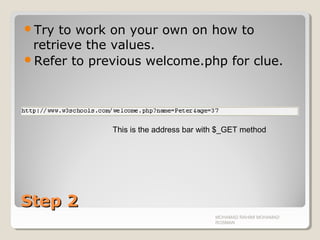
Step 2Step 2
Try to work on your own on how to
retrieve the values.
Refer to previous welcome.php for clue.
MOHAMAD RAHIMI MOHAMAD
ROSMAN
This is the address bar with $_GET method
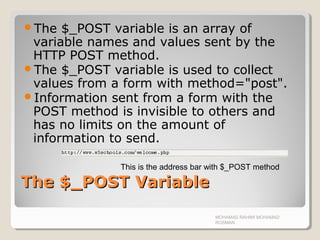
The $_POST VariableThe $_POST Variable
The $_POST variable is an array of
variable names and values sent by the
HTTP POST method.
The $_POST variable is used to collect
values from a form with method="post".
Information sent from a form with the
POST method is invisible to others and
has no limits on the amount of
information to send.
MOHAMAD RAHIMI MOHAMAD
ROSMAN
This is the address bar with $_POST method
Why use $_POST?Why use $_POST?
Variables sent with HTTP POST are not
shown in the URL
Variables have no length limit
However, because the variables are not
displayed in the URL, it is not possible to
bookmark the page.
MOHAMAD RAHIMI MOHAMAD
ROSMAN
ExerciseExercise
MOHAMAD RAHIMI MOHAMAD
ROSMAN
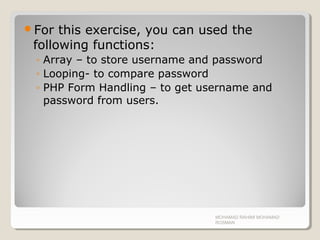
For this exercise, you can used the
following functions:
◦ Array – to store username and password
◦ Looping- to compare password
◦ PHP Form Handling – to get username and
password from users.
MOHAMAD RAHIMI MOHAMAD
ROSMAN
11stst
StepStep
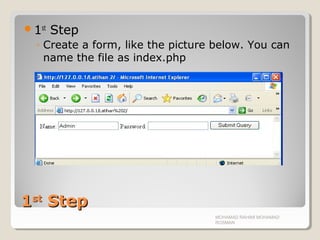
1st
Step
◦ Create a form, like the picture below. You can
name the file as index.php
MOHAMAD RAHIMI MOHAMAD
ROSMAN
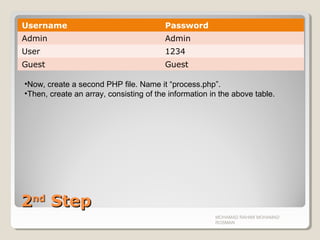
22ndnd
StepStep
Username Password
Admin Admin
User 1234
Guest Guest
MOHAMAD RAHIMI MOHAMAD
ROSMAN
•Now, create a second PHP file. Name it “process.php”.
•Then, create an array, consisting of the information in the above table.
MOHAMAD RAHIMI MOHAMAD
ROSMAN
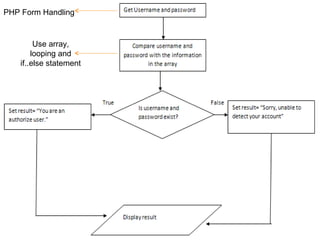
PHP Form Handling
Use array,
looping and
if..else statement
OutPutOutPut
POST n GET
MOHAMAD RAHIMI MOHAMAD
ROSMAN
MOHAMAD RAHIMI MOHAMAD
ROSMAN

Chapter 07 php forms handling

  • 1.
    PHP Form HandlingPHPForm Handling Chapter 7 MOHAMAD RAHIMI MOHAMAD ROSMAN
  • 2.
    PHP Forms andUser InputPHP Forms and User Input The PHP $_GET and $_POST variables are used to retrieve information from forms, like user input. The most important thing to notice when dealing with HTML forms and PHP is that any form element in an HTML page will automatically be available to your PHP scripts. MOHAMAD RAHIMI MOHAMAD ROSMAN
  • 3.
    ExampleExample Create 2 newtext document. Rename the document to index.php and welcome.php Open the index.php MOHAMAD RAHIMI MOHAMAD ROSMAN
  • 4.
    Step 1: WriteForm scriptStep 1: Write Form script MOHAMAD RAHIMI MOHAMAD ROSMAN The example HTML page above contains two input fields and a submit button. When the user fills in this form and click on the submit button, the form data is sent to the "welcome.php" file.
  • 5.
    Step 2: WritePHP CodeStep 2: Write PHP Code MOHAMAD RAHIMI MOHAMAD ROSMAN Then, copy both file, paste into www folder, and start the website. What kind of output do you get?
  • 6.
    Form ValidationForm Validation Userinput should be validated on the browser whenever possible (by client scripts (JavaScript)). Browser validation is faster and you reduce the server load. You should consider using server validation if the user input will be inserted into a database. A good way to validate a form on the server is to post the form to itself, instead of jumping to a different page. The user will then get the error messages on the same page as the form. This makes it easier to discover the error. MOHAMAD RAHIMI MOHAMAD ROSMAN
  • 7.
    The $_GET VariableThe$_GET Variable The $_GET variable is an array of variable names and values sent by the HTTP GET method. The $_GET variable is used to collect values from a form with method="get". Information sent from a form with the GET method is visible to everyone (it will be displayed in the browser's address bar) and it has limits on the amount of information to send (max. 100 characters). MOHAMAD RAHIMI MOHAMAD ROSMAN
  • 8.
    The $_GET VariableThe$_GET Variable When using the $_GET variable all variable names and values are displayed in the URL. So this method should not be used when sending passwords or other sensitive information! However, because the variables are displayed in the URL, it is possible to bookmark the page. This can be useful in some cases. Note: The HTTP GET method is not suitable on large variable values; the value cannot exceed 100 characters. MOHAMAD RAHIMI MOHAMAD ROSMAN
  • 9.
    ExampleExample Create new textdocument. Rename it to index.php and welcome.php Open index.php and write the following code. MOHAMAD RAHIMI MOHAMAD ROSMAN
  • 10.
    Step 1: WriteForm ScriptStep 1: Write Form Script The code is just similar to previous method, just change the POST to GET MOHAMAD RAHIMI MOHAMAD ROSMAN
  • 11.
    Step 2Step 2 Tryto work on your own on how to retrieve the values. Refer to previous welcome.php for clue. MOHAMAD RAHIMI MOHAMAD ROSMAN This is the address bar with $_GET method
  • 12.
    The $_POST VariableThe$_POST Variable The $_POST variable is an array of variable names and values sent by the HTTP POST method. The $_POST variable is used to collect values from a form with method="post". Information sent from a form with the POST method is invisible to others and has no limits on the amount of information to send. MOHAMAD RAHIMI MOHAMAD ROSMAN This is the address bar with $_POST method
  • 13.
    Why use $_POST?Whyuse $_POST? Variables sent with HTTP POST are not shown in the URL Variables have no length limit However, because the variables are not displayed in the URL, it is not possible to bookmark the page. MOHAMAD RAHIMI MOHAMAD ROSMAN
  • 14.
  • 15.
    For this exercise,you can used the following functions: ◦ Array – to store username and password ◦ Looping- to compare password ◦ PHP Form Handling – to get username and password from users. MOHAMAD RAHIMI MOHAMAD ROSMAN
  • 16.
    11stst StepStep 1st Step ◦ Create aform, like the picture below. You can name the file as index.php MOHAMAD RAHIMI MOHAMAD ROSMAN
  • 17.
    22ndnd StepStep Username Password Admin Admin User1234 Guest Guest MOHAMAD RAHIMI MOHAMAD ROSMAN •Now, create a second PHP file. Name it “process.php”. •Then, create an array, consisting of the information in the above table.
  • 18.
    MOHAMAD RAHIMI MOHAMAD ROSMAN PHPForm Handling Use array, looping and if..else statement
  • 19.
    OutPutOutPut POST n GET MOHAMADRAHIMI MOHAMAD ROSMAN
  • 20.