SYSTEM PROGRAMMING
Faiz Akram (PhD)
Subject and Code: System Programming –SE2044
4th Year, BSc. in Software Engineering
INTRODUCTION
INTRODUCTION
SOFTWARE :
 It is a general team used to describe collection of computer
program or procedure which perform a specific task.
HARDWARE:
 It can be described as a device that is physically connected to a
system which can be touched.
PROGRAM:
 Application written with the help of a PL is a program
(Programming Language).
1
Difference between system programming and windows
programming:-
The only difference is a technical one.
 While both are the same, an 'application' is
a computer program launched and dependent upon an
operating system to execute."
 When you click on a word processor, for example, it is an
application, as is that hidden file that runs the printer
spooler launched only by the OS.
2
Today: …so what is systems programming?
:
 The system program is likely to be used to support other
software and applications programs, but may also be a
complete applications package itself.
 It is designed for continued “production” use rather than a
one-shot solution to a single applications problem.
 It is likely to be continuously evolving in the number and
types of features it supports.
 A system program requires a certain discipline or structure,
both within and between modules (i.e. , “communication”)
, and is usually designed and implemented by more than
one person.
5
COMPUTER PROGRAMS
Computer Programs: There are two types of computer
programs.
 Application Program
 System Program
• Application Program: It is designed to help the user to
perform some specific task, related to real time application
point of view.
• System Program: It is designed to operate and control the
computer hardware and also provides a platform for running the
application
• Software it is requires greater degree of hardware awareness.
Example: Compiler, Assembler, Macros, Interpreter Etc.
3
Cont….
System Software:
Computer can perform a variety of task such as editing, linking,
translating, managing resources managing. I/O devices error
handling etc with the help of system software.
Thus, it is collection of system programs to perform various
operations.
Application Software:
An Application software is a computer software designed to
perform a group of coordinated functions, task, or activities for
the benefit of the user.
4
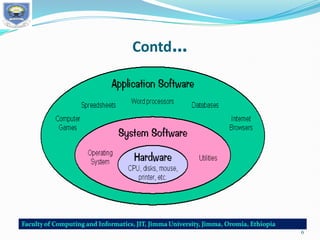
Difference between System Software Application Software
1.
 System software is used for operating computer hardware.
 Application software is used by user to perform specific task.
2.
 System softwares are installed on the computer when operating system is
installed.
 Application softwares are installed according to user’s requirements.
3.
 In general, the user does not interact with system software because it works
in the background.
 In general, the user interacts with application software.
4.
 System software can run independently. It provides platform for running
application softwares.
 Application software can’t run independently. They can’t run without the
presence of system software.
5. Some examples of system softwares are compiler, assembler, debugger,
driver, etc.
 Some examples of application softwares are word processor, web browser,
media player, etc.
5
Contd…
6
Components of a Programming System
ASSEMBLER:
It translates assembly language program(ALP) with mnemonic coded
instruction into machine code using the instruction formats, operational
codes(Op codes) and addressing mode, etc of the computer.
Example of assembler
MASM – Macro
TASM- Turbo
NASM- New micro ASM
LOADER:-
It is a program that places programs into the primary memory and prepares
them
for execution. The assembler outputs the machine language translation of
the
program onto a secondary storage device and loader is placed in the
primary
memory.
7
Cont….
LINKER:-
It is a program that links the user program to another
program or libraries to form a single module. The task of a
links is to link two more object modules to from a executable
module into memory, preparing for execution them and
executing them. It integrates the necessary function required
by the program.
MACRO--------------------------------------Start of definition
INCR------------------------------------------macro name
It is an abbreviation of a set of instruction.
8
Cont….
Need of macro
(i) Often in programming need to respect the same set of
instructions again and again.
(ii) macro facility us to write the definition once & use it many
times.
Ex;- #define printf (“---------“); p
It is called any where in program
P; - macro call
COMPLIER:-
A complier is a program that converts high level language to
assembly language. The compiler compiles the program and
translates it to assembly. An assembler then translates the
assembly program into machine code .
9
PROGRAM DEVELOPMENT CYCLE
1. Analyze-
Programmer should have a clear idea about the input and output.
2. Design-
The solution of the program is written in a step by step method.
Ex. Algorithm, flowchart
Step by step method
3. Coding
The algothim is converted to a program.
4.Testing or Debugging-
Testing means finding the error.
Debugging means correcting the error.
5.Documentation-
Organize all the information to explain or understand the program.
Program= job=task=process
10
Evaluation of Operating System
In the last 60 years operating system has gone though different Phases.
We will discuss the evolution of operating system as follows.
1. Serial Processing – Execution of programs is done serially
(1 after another)
Example :- Dos (Disk Operating system)
2. Batch Processing- Batch means a group of programs.
Example:- Group of java programs another group of C programs.
Advantage-
(i) Less time for processing
(ii) Switching time is less
One program to another
Disadvantage- CPU is idle
11
Cont…..
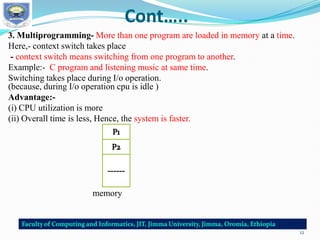
3. Multiprogramming- More than one program are loaded in memory at a time.
Here,- context switch takes place
- context switch means switching from one program to another.
Example:- C program and listening music at same time.
Switching takes place during I/o operation.
(because, during I/o operation cpu is idle )
Advantage:-
(i) CPU utilization is more
(ii) Overall time is less, Hence, the system is faster.
memory
12
Cont…..
4. Time Sharing-
It is a special case of multiprogramming. Program is given with
a fixed time. This time is called “Time Quantum”.
5. Real Time OS-
Real time refers to exact time. It guarantees that program must
complete in time.
It is two types-
(a) Hard RTOS
(b) Soft RTOS
(a) Hard RTOS:-
-Short time constraint
-No delay in time is allowed.
Ex- Vx works(missile firing system, satellite lunching system)
(b) Soft RTOS:-
-Delay in time allowed
Ex- Linux, window Area: browsing internet
13
Distributed System
•It is a multiprocessor more than one system.
•A group of computer are connected to share data.
•Each computers has its own memory.
Ex.- Internet
LAN = College
MAN = City
WAN = World
Advantages:-
Resource data sharing
 Reliability
 Communication
14
Operating System and Functions
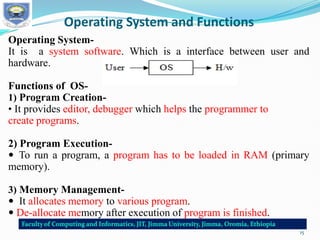
Operating System-
It is a system software. Which is a interface between user and
hardware.
Functions of OS-
1) Program Creation-
• It provides editor, debugger which helps the programmer to
create programs.
2) Program Execution-
 To run a program, a program has to be loaded in RAM (primary
memory).
3) Memory Management-
 It allocates memory to various program.
 De-allocate memory after execution of program is finished.
15
Cont….
4) Process management-
• Process is a program which is executing currently.
• Os follows a scheduling algorithm to deal with many process of
the system.
5) Error Detection-
 Detect different types of errors and take appropriate action.
Ex:- Unable to read the data due to bad sector in DVD.
6) Accounting-
 Multiuser system has more than one users.
 Os keep track of resources accessed by each user.
16
History of C language
It is a structured, high-level, machine independent language.
It allows software developers to develop programs without
worrying about the where they will be implemented.
UNIX is one of the most popular network operating systems
in use today and the heart of the internet data superhighway.
Today, C is running under a variety of operating system and
hardware platforms.
17
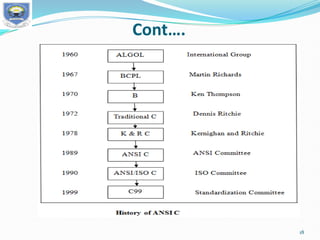
Cont….
18
Importance of C
• It is a robust language whose rich set of built-in functions.
• Operators can be used to write any complex program.
• Program written in C are efficient and fast.
• Its variety of data types and powerful operators.
Ex- A program to increment a variable from 0 to 15000 takes about one
second in C while it takes more than 50 seconds in an interpreter BASIC.
 C is highly portable.
 C programs written for one computer can be run on another with little or
no modification.
 C language is well suited for structured programming.
This modular structure makes program debugging, testing and
maintenance easier.
 Important feature of C is its ability to extend itself.
A C program is basically a collection of functions that are supported by
the C library.
 Continuously add our functions to C library.The programming task
becomes simple.
19
Some Sample C Programs and Analyze
PROGRAM 1: PRINTNG A MESSAGE
Main()
{
/*…..printing begins…….*/
printf(“I see, I remember”);
/*…..printing ends…….*/
}
Program is main and the execution begins at this line.
The main() is a special function used by the C system to tell
the computer where the program starts.
BY using more than one function compiler can not understand
which one marks the beginning of the program.
The opening brace “{” in second line mark the beginning of the
function main and the closing brace “}” in the last line indicates
the end of the function.
20
Contd…
All the statements between these two braces form the function body.
 Function body contains a set of instructions to perform the given
task.
 The line beginning with /* and ending with */ are known as
comment lines.
 The comment line /* = = = =*/ = = = =*/ = = =*/ is not valid and
therefore results in an error.
 printf() function only executable statement of the program
printf(“I see, I remember”);
 printf() is a predefined standard C function for printing output.
 Predefined means that it is a function that has already have
written and compiled and linked together with our program at
the time of linking.
 The printf function causes everything between the starting and the
ending quotation marks to be printed out . In this case , the output
will be :
I see, I remember
21
Cont…
 Every statement in C should end with a semicolon(;) mark.
 suppose we want to print the above quotation in two lines as
I see,
I remember!
The information contained between the parentheses is called
the argument of the function.
 This argument of the first Printf function is I see, /n’’ and the
second is I remember!”.
 These argument are simply strings of character to be printed
out.
 printf contains a combination of two characters  and n at the
end of the string.
 n collectively called the newline character and instruct the
computer to go to the next (new) line.
No space is allowed between  and n.
22
Contd…
 Possible to produce two or more lines of output by one printf
statement with the use of newline character at appropriate places.
e.g. printf(“I see,n I remember !”);
Will print
I see,
I remember !
while the statement
printf(“In.. See, n… …. ….In… … … … remember !”);
will print
I
.. See,
… … … I
… … … … remember !
23
Contd…
 Some authors recommend the inclusion of the statement
#include<stdio.h>
At the beginning of all programs that use any input/output
library function
This is not necessary for the function printf and scanf which
have been defined as a part of C language.
• C makes a distinction between uppercase and lowercase
letters.
• printf and PRINTF are not the same.
• In C everything is written in lowercase letter.
• Uppercase letters are used for symbolic names representing
constants.
24
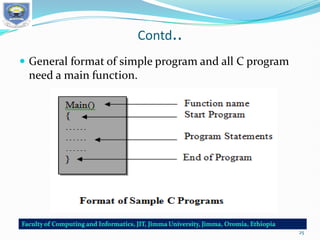
Contd..
 General format of simple program and all C program
need a main function.
25
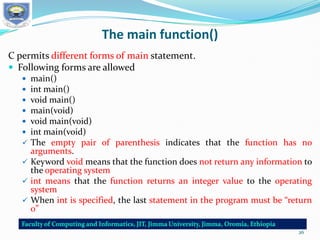
The main function()
C permits different forms of main statement.
 Following forms are allowed
 main()
 int main()
 void main()
 main(void)
 void main(void)
 int main(void)
 The empty pair of parenthesis indicates that the function has no
arguments.
 Keyword void means that the function does not return any information to
the operating system
 int means that the function returns an integer value to the operating
system
 When int is specified, the last statement in the program must be “return
0”
26
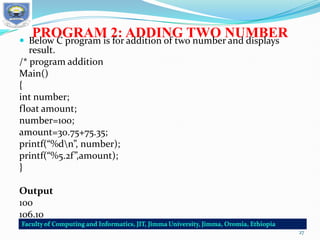
PROGRAM 2: ADDING TWO NUMBER
 Below C program is for addition of two number and displays
result.
/* program addition
Main()
{
int number;
float amount;
number=100;
amount=30.75+75.35;
printf(“%dn”, number);
printf(“%5.2f”,amount);
}
Output
100
106.10
27
Contd…
 number and amount are variable name and what types
of data they hold.
int number;
float amount;
 Tells the compiler that number is an integer(int) and
amount is a floating(float) point number.
 The word int and float are called the keywords and can
not used as a variable name.
number=100;
amount=30.75+75.35;
are called the assignment statements and have a
semicolon at the end.
28
Contd…
 Output statement that prints the value of number. The
print statement
printf(“%dn”,number);
Contains two argument. The first argument “%d” tells
the compiler that the value of second argument
number should be printed as decimal integer.
Printf(“%5.2f”,amount); prints out the value of amount
in floating point format.%5.2f tells the compiler that
the output must be in floating point with five places in
all and two places to the right of the decimal point.
29
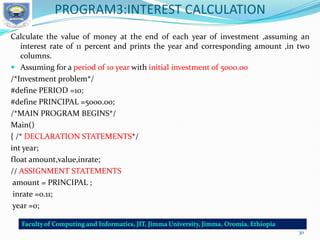
PROGRAM3:INTEREST CALCULATION
Calculate the value of money at the end of each year of investment ,assuming an
interest rate of 11 percent and prints the year and corresponding amount ,in two
columns.
 Assuming for a period of 10 year with initial investment of 5000.00
/*Investment problem*/
#define PERIOD =10;
#define PRINCIPAL =5000.00;
/*MAIN PROGRAM BEGINS*/
Main()
{ /* DECLARATION STATEMENTS*/
int year;
float amount,value,inrate;
// ASSIGNMENT STATEMENTS
amount = PRINCIPAL ;
inrate =0.11;
year =0;
30
Contd…
// COMPUTATION USING while loop
while (year <= PERIOD){
printf ("%2d %8 . 2 fn" ,year , amount );
value = amount + inrate * amount ;
year = year +1;
amount = value ;
} /* While LOOP ENDS*/
}/* PROGRAM ENDS*/
31
Contd…
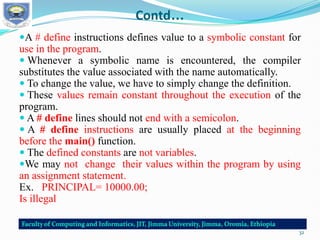
A # define instructions defines value to a symbolic constant for
use in the program.
 Whenever a symbolic name is encountered, the compiler
substitutes the value associated with the name automatically.
 To change the value, we have to simply change the definition.
 These values remain constant throughout the execution of the
program.
 A # define lines should not end with a semicolon.
 A # define instructions are usually placed at the beginning
before the main() function.
 The defined constants are not variables.
We may not change their values within the program by using
an assignment statement.
Ex. PRINCIPAL= 10000.00;
Is illegal
32
Contd…
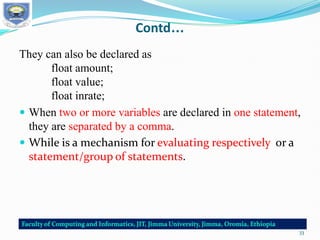
They can also be declared as
float amount;
float value;
float inrate;
 When two or more variables are declared in one statement,
they are separated by a comma.
 While is a mechanism for evaluating respectively or a
statement/group of statements.
33
SAMPLE PROGRAM 4:USE OF SUBROUTINES
 Illustrate the use of user-defined function and math function through
sample program
 A very simple program that using a user defined function i.e. mul()
function.
/*---program using function*/
int mul(int a, int b); /*----declaration ---*/
/*------Main program begins------*/
main()
{
int a, b, c;
a=5;
b=10;
c=mul( a, b);
printf(“multiplication of %d and %d is %d”, a, b,c);
}
/*----Main program ends
Mul() function starts----*/
34
Contd…
int mul(int x, int y)
{
int p;
p=x*y;
return(p);
}
/* Mul() function ends*/
The mul function multiplies the values of x and y and the
result is returned to the main() function when it is called
in the statement.
c=mul(a, b);
The mul() has two argument x and y that are declared as
integer. The value a and b are passed on to x and y
respectively when the function mul() is called.
35
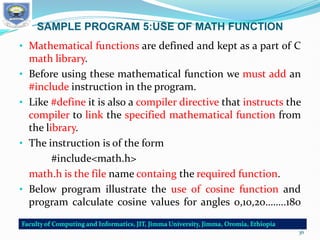
SAMPLE PROGRAM 5:USE OF MATH FUNCTION
• Mathematical functions are defined and kept as a part of C
math library.
• Before using these mathematical function we must add an
#include instruction in the program.
• Like #define it is also a compiler directive that instructs the
compiler to link the specified mathematical function from
the library.
• The instruction is of the form
#include<math.h>
math.h is the file name containg the required function.
• Below program illustrate the use of cosine function and
program calculate cosine values for angles 0,10,20……..180
36
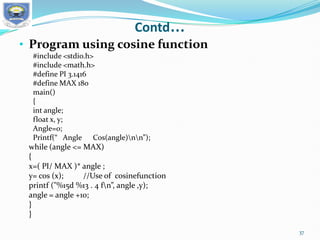
Contd…
• Program using cosine function
#include <stdio.h>
#include <math.h>
#define PI 3.1416
#define MAX 180
main()
{
int angle;
float x, y;
Angle=0;
Printf(“ Angle Cos(angle)nn”);
while (angle <= MAX)
{
x=( PI/ MAX )* angle ;
y= cos (x); //Use of cosinefunction
printf ("%15d %13 . 4 fn”, angle ,y);
angle = angle +10;
}
}
37
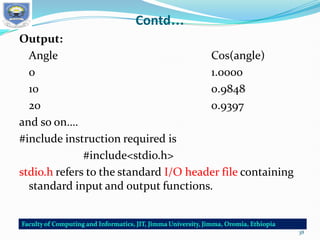
Contd…
Output:
Angle Cos(angle)
0 1.0000
10 0.9848
20 0.9397
and so on….
#include instruction required is
#include<stdio.h>
stdio.h refers to the standard I/O header file containing
standard input and output functions.
38
The #include Directive
 C programs are divided into modules or functions.
 some function are written by user and store in the C
library.
 Library functions are grouped category wise and stored in
different files known as header files.
 To access the functions stored in library, necessary to tell
the compiler about the files to be accessed.
#include<filename>
• file name is the name of library file that contains the
required function definition.
• Preprocessor directives are placed at the beginning of a
program.
39
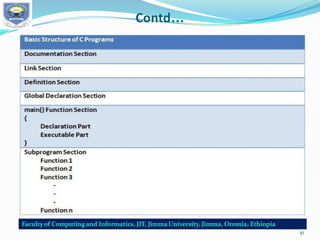
BASIC STRUCTURE OF C PROGRAMS
 Any C program is consists of 6 main
sections.
 C program can be viewed as a group of
building blocks called functions.
 A function is a subroutine that may include
one or more statements designed to perform
a specific task.
40
Contd…
41
Contd…
42
Contd…
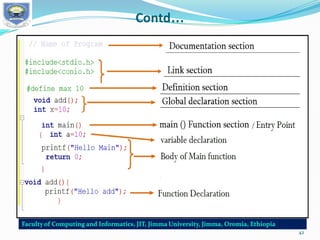
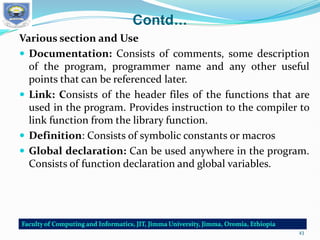
Various section and Use
 Documentation: Consists of comments, some description
of the program, programmer name and any other useful
points that can be referenced later.
 Link: Consists of the header files of the functions that are
used in the program. Provides instruction to the compiler to
link function from the library function.
 Definition: Consists of symbolic constants or macros
 Global declaration: Can be used anywhere in the program.
Consists of function declaration and global variables.
43
Contd…
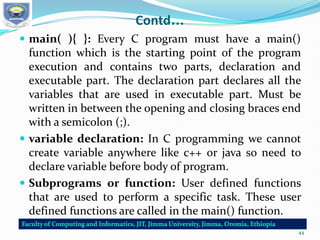
 main( ){ }: Every C program must have a main()
function which is the starting point of the program
execution and contains two parts, declaration and
executable part. The declaration part declares all the
variables that are used in executable part. Must be
written in between the opening and closing braces end
with a semicolon (;).
 variable declaration: In C programming we cannot
create variable anywhere like c++ or java so need to
declare variable before body of program.
 Subprograms or function: User defined functions
that are used to perform a specific task. These user
defined functions are called in the main() function.
44
Contd…
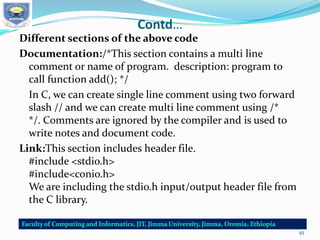
Different sections of the above code
Documentation:/*This section contains a multi line
comment or name of program. description: program to
call function add(); */
In C, we can create single line comment using two forward
slash // and we can create multi line comment using /*
*/. Comments are ignored by the compiler and is used to
write notes and document code.
Link:This section includes header file.
#include <stdio.h>
#include<conio.h>
We are including the stdio.h input/output header file from
the C library.
45
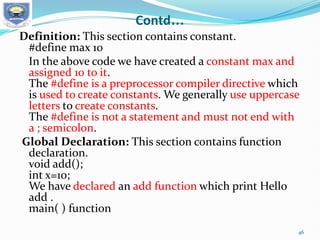
Contd…
Definition: This section contains constant.
#define max 10
In the above code we have created a constant max and
assigned 10 to it.
The #define is a preprocessor compiler directive which
is used to create constants. We generally use uppercase
letters to create constants.
The #define is not a statement and must not end with
a ; semicolon.
Global Declaration: This section contains function
declaration.
void add();
int x=10;
We have declared an add function which print Hello
add .
main( ) function
46
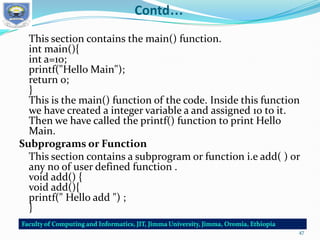
Contd…
This section contains the main() function.
int main(){
int a=10;
printf("Hello Main");
return 0;
}
This is the main() function of the code. Inside this function
we have created a integer variable a and assigned 10 to it.
Then we have called the printf() function to print Hello
Main.
Subprograms or Function
This section contains a subprogram or function i.e add( ) or
any no of user defined function .
void add() {
void add(){
printf(" Hello add ") ;
}
47
Programming style
 Also known as code style, is a set of rules or guidelines
used when writing the source code for a
computer program
 It is designed to provide information on how to
effectively use indentation, comments, and other
elements that will make your C code more readable.
48
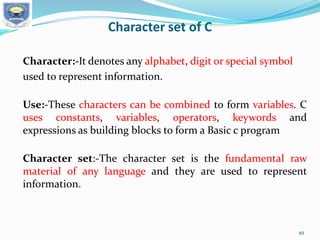
Character set of C
Character:-It denotes any alphabet, digit or special symbol
used to represent information.
Use:-These characters can be combined to form variables. C
uses constants, variables, operators, keywords and
expressions as building blocks to form a Basic c program
Character set:-The character set is the fundamental raw
material of any language and they are used to represent
information.
49
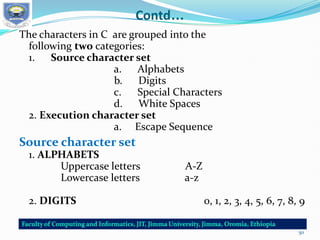
Contd…
The characters in C are grouped into the
following two categories:
1. Source character set
a. Alphabets
b. Digits
c. Special Characters
d. White Spaces
2. Execution character set
a. Escape Sequence
Source character set
1. ALPHABETS
Uppercase letters A-Z
Lowercase letters a-z
2. DIGITS 0, 1, 2, 3, 4, 5, 6, 7, 8, 9
50
Contd…
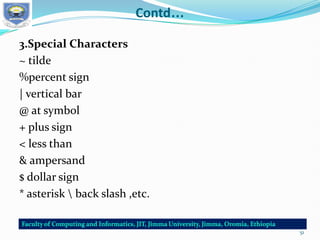
3.Special Characters
~ tilde
%percent sign
| vertical bar
@ at symbol
+ plus sign
< less than
& ampersand
$ dollar sign
* asterisk  back slash ,etc.
51
Contd…
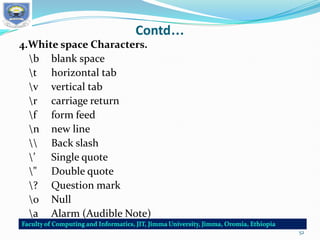
4.White space Characters.
b blank space
t horizontal tab
v vertical tab
r carriage return
f form feed
n new line
 Back slash
’ Single quote
" Double quote
? Question mark
0 Null
a Alarm (Audible Note)
52
Contd…
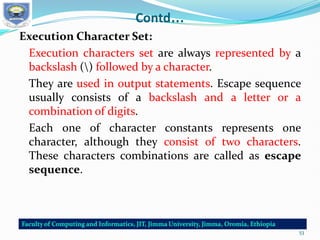
Execution Character Set:
Execution characters set are always represented by a
backslash () followed by a character.
They are used in output statements. Escape sequence
usually consists of a backslash and a letter or a
combination of digits.
Each one of character constants represents one
character, although they consist of two characters.
These characters combinations are called as escape
sequence.
53
Contd…
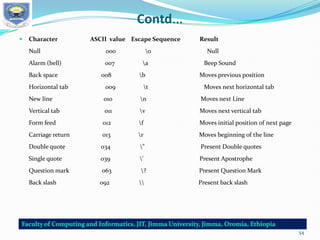
 Character ASCII value Escape Sequence Result
Null 000 0 Null
Alarm (bell) 007 a Beep Sound
Back space 008 b Moves previous position
Horizontal tab 009 t Moves next horizontal tab
New line 010 n Moves next Line
Vertical tab 011 v Moves next vertical tab
Form feed 012 f Moves initial position of next page
Carriage return 013 r Moves beginning of the line
Double quote 034 " Present Double quotes
Single quote 039 ' Present Apostrophe
Question mark 063 ? Present Question Mark
Back slash 092  Present back slash
54
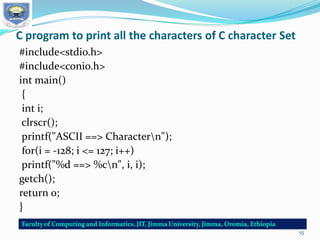
C program to print all the characters of C character Set
#include<stdio.h>
#include<conio.h>
int main()
{
int i;
clrscr();
printf("ASCII ==> Charactern");
for(i = -128; i <= 127; i++)
printf("%d ==> %cn", i, i);
getch();
return 0;
}
55
Tokens in C
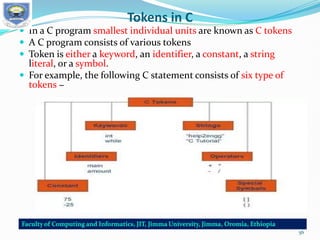
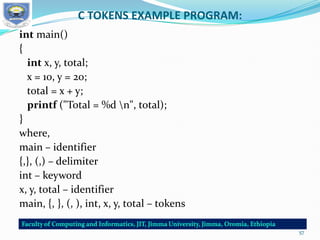
 In a C program smallest individual units are known as C tokens
 A C program consists of various tokens
 Token is either a keyword, an identifier, a constant, a string
literal, or a symbol.
 For example, the following C statement consists of six type of
tokens −
56
C TOKENS EXAMPLE PROGRAM:
int main()
{
int x, y, total;
x = 10, y = 20;
total = x + y;
printf ("Total = %d n", total);
}
where,
main – identifier
{,}, (,) – delimiter
int – keyword
x, y, total – identifier
main, {, }, (, ), int, x, y, total – tokens
57
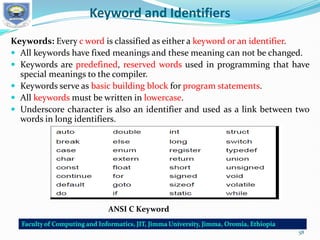
Keyword and Identifiers
Keywords: Every c word is classified as either a keyword or an identifier.
 All keywords have fixed meanings and these meaning can not be changed.
 Keywords are predefined, reserved words used in programming that have
special meanings to the compiler.
 Keywords serve as basic building block for program statements.
 All keywords must be written in lowercase.
 Underscore character is also an identifier and used as a link between two
words in long identifiers.
ANSI C Keyword
58
Contd…
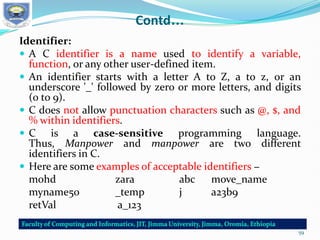
Identifier:
 A C identifier is a name used to identify a variable,
function, or any other user-defined item.
 An identifier starts with a letter A to Z, a to z, or an
underscore '_' followed by zero or more letters, and digits
(0 to 9).
 C does not allow punctuation characters such as @, $, and
% within identifiers.
 C is a case-sensitive programming language.
Thus, Manpower and manpower are two different
identifiers in C.
 Here are some examples of acceptable identifiers −
mohd zara abc move_name
myname50 _temp j a23b9
retVal a_123
59
Contd…..
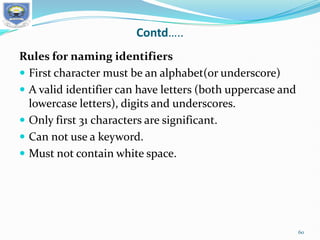
Rules for naming identifiers
 First character must be an alphabet(or underscore)
 A valid identifier can have letters (both uppercase and
lowercase letters), digits and underscores.
 Only first 31 characters are significant.
 Can not use a keyword.
 Must not contain white space.
60
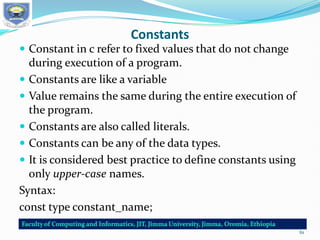
Constants
 Constant in c refer to fixed values that do not change
during execution of a program.
 Constants are like a variable
 Value remains the same during the entire execution of
the program.
 Constants are also called literals.
 Constants can be any of the data types.
 It is considered best practice to define constants using
only upper-case names.
Syntax:
const type constant_name;
61
HOW TO USE CONSTANTS IN A C PROGRAM?
By “const” keyword: when you try to change constant values after defining in
C program, it will through error.
EXAMPLE PROGRAM USING CONST KEYWORD IN C:
#include<stdio.h>
void main()
{
const int height = 100; /*int constant*/
const float number = 3.14; /*Real constant*/
const char letter = 'A'; /*char constant*/
const char letter_sequence[10] = "ABC"; /*string constant*/
const char backslash_char = '?'; /*special char const*/
printf("value of height :%d n", height );
printf("value of number : %f n", number );
printf("value of letter : %c n", letter );
printf("value of letter_sequence : %s n", letter_sequence);
printf("value of backslash_char : %c n", backslash_char);
}
OUTPUT:
value of height : 100
value of number : 3.140000
value of letter : A
value of letter_sequence : ABC
value of backslash_char : ?
62
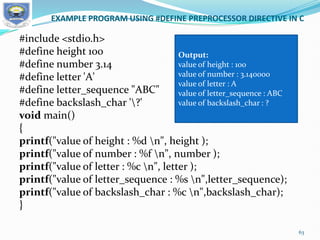
EXAMPLE PROGRAM USING #DEFINE PREPROCESSOR DIRECTIVE IN C
#include <stdio.h>
#define height 100
#define number 3.14
#define letter 'A'
#define letter_sequence "ABC"
#define backslash_char '?'
void main()
{
printf("value of height : %d n", height );
printf("value of number : %f n", number );
printf("value of letter : %c n", letter );
printf("value of letter_sequence : %s n",letter_sequence);
printf("value of backslash_char : %c n",backslash_char);
}
Output:
value of height : 100
value of number : 3.140000
value of letter : A
value of letter_sequence : ABC
value of backslash_char : ?
63
Variables
Variable is a data name that used to store a data value.
Variable may take different values at different times
during execution.
Variables are memory locations(storage area) in the C
programming language.
The primary purpose of variables is to store data in
memory for later use.
Unlike constants which do not change during the
program execution, variables value may change during
execution.
If you declare a variable in C, that means you are asking
to the operating system for reserve a piece of memory
with that variable name.
64
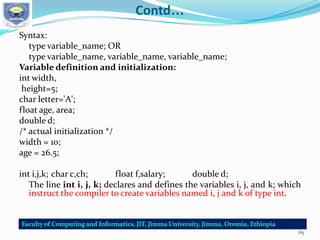
Contd…
Syntax:
type variable_name; OR
type variable_name, variable_name, variable_name;
Variable definition and initialization:
int width,
height=5;
char letter='A';
float age, area;
double d;
/* actual initialization */
width = 10;
age = 26.5;
int i,j,k; char c,ch; float f,salary; double d;
The line int i, j, k; declares and defines the variables i, j, and k; which
instruct the compiler to create variables named i, j and k of type int.
65
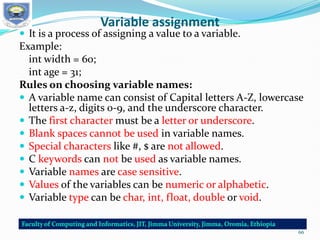
Variable assignment
 It is a process of assigning a value to a variable.
Example:
int width = 60;
int age = 31;
Rules on choosing variable names:
 A variable name can consist of Capital letters A-Z, lowercase
letters a-z, digits 0-9, and the underscore character.
 The first character must be a letter or underscore.
 Blank spaces cannot be used in variable names.
 Special characters like #, $ are not allowed.
 C keywords can not be used as variable names.
 Variable names are case sensitive.
 Values of the variables can be numeric or alphabetic.
 Variable type can be char, int, float, double or void.
66
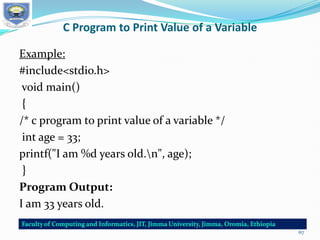
C Program to Print Value of a Variable
Example:
#include<stdio.h>
void main()
{
/* c program to print value of a variable */
int age = 33;
printf("I am %d years old.n", age);
}
Program Output:
I am 33 years old.
67
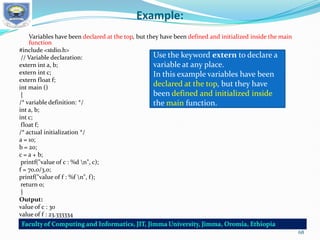
Example:
Variables have been declared at the top, but they have been defined and initialized inside the main
function
#include <stdio.h>
// Variable declaration:
extern int a, b;
extern int c;
extern float f;
int main ()
{
/* variable definition: */
int a, b;
int c;
float f;
/* actual initialization */
a = 10;
b = 20;
c = a + b;
printf("value of c : %d n", c);
f = 70.0/3.0;
printf("value of f : %f n", f);
return 0;
}
Output:
value of c : 30
value of f : 23.333334
Use the keyword extern to declare a
variable at any place.
In this example variables have been
declared at the top, but they have
been defined and initialized inside
the main function.
68
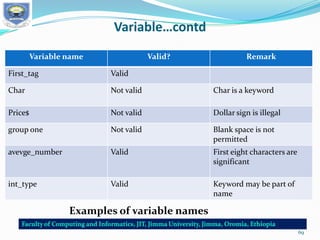
Variable…contd
Variable name Valid? Remark
First_tag Valid
Char Not valid Char is a keyword
Price$ Not valid Dollar sign is illegal
group one Not valid Blank space is not
permitted
avevge_number Valid First eight characters are
significant
int_type Valid Keyword may be part of
name
Examples of variable names
69
Data Types
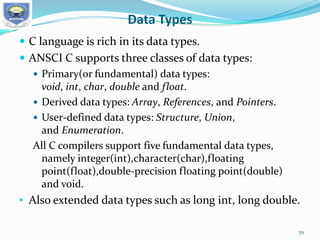
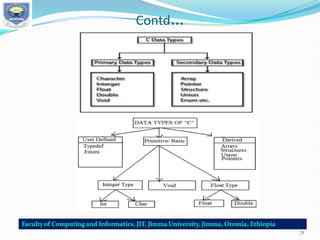
 C language is rich in its data types.
 ANSCI C supports three classes of data types:
 Primary(or fundamental) data types:
void, int, char, double and float.
 Derived data types: Array, References, and Pointers.
 User-defined data types: Structure, Union,
and Enumeration.
All C compilers support five fundamental data types,
namely integer(int),character(char),floating
point(float),double-precision floating point(double)
and void.
• Also extended data types such as long int, long double.
70
Contd…
71
Operator expression
 An operator is a symbol that tells the computer to perform
certain mathematical or logical manipulation.
 Operators are used in program to manipulate data and
variables.
 Operators, functions, constants and variables are
combined together to form expressions.
 Consider the expression A + B * 5. where, +, * are operators,
A, B are variables, 5 is constant and A + B * 5 is an
expression.
Types of c operators:
 C language offers many types of operators. They are:
1. Arithmetic operators
2. Assignment operators
3. Relational operators
4. Logical operators
72
Contd…
5. Bit wise operators
6. Conditional operators (ternary operators)
7. Increment/decrement operators
8. Special operators
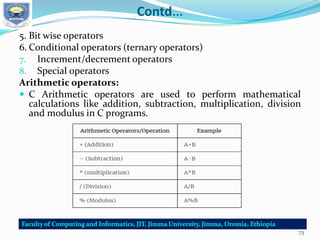
Arithmetic operators:
 C Arithmetic operators are used to perform mathematical
calculations like addition, subtraction, multiplication, division
and modulus in C programs.
73
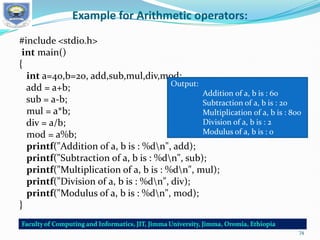
Example for Arithmetic operators:
#include <stdio.h>
int main()
{
int a=40,b=20, add,sub,mul,div,mod;
add = a+b;
sub = a-b;
mul = a*b;
div = a/b;
mod = a%b;
printf("Addition of a, b is : %dn", add);
printf("Subtraction of a, b is : %dn", sub);
printf("Multiplication of a, b is : %dn", mul);
printf("Division of a, b is : %dn", div);
printf("Modulus of a, b is : %dn", mod);
}
Output:
Addition of a, b is : 60
Subtraction of a, b is : 20
Multiplication of a, b is : 800
Division of a, b is : 2
Modulus of a, b is : 0
74
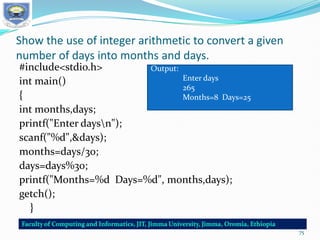
Show the use of integer arithmetic to convert a given
number of days into months and days.
#include<stdio.h>
int main()
{
int months,days;
printf("Enter daysn");
scanf("%d",&days);
months=days/30;
days=days%30;
printf("Months=%d Days=%d", months,days);
getch();
}
Output:
Enter days
265
Months=8 Days=25
75
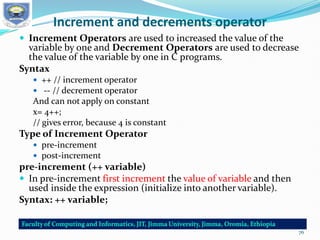
Increment and decrements operator
 Increment Operators are used to increased the value of the
variable by one and Decrement Operators are used to decrease
the value of the variable by one in C programs.
Syntax
 ++ // increment operator
 -- // decrement operator
And can not apply on constant
x= 4++;
// gives error, because 4 is constant
Type of Increment Operator
 pre-increment
 post-increment
pre-increment (++ variable)
 In pre-increment first increment the value of variable and then
used inside the expression (initialize into another variable).
Syntax: ++ variable;
76
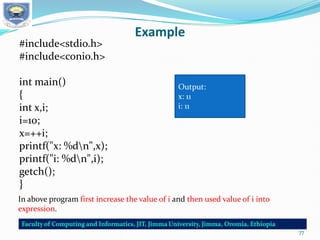
Example
#include<stdio.h>
#include<conio.h>
int main()
{
int x,i;
i=10;
x=++i;
printf("x: %dn",x);
printf("i: %dn",i);
getch();
}
Output:
x: 11
i: 11
In above program first increase the value of i and then used value of i into
expression.
77
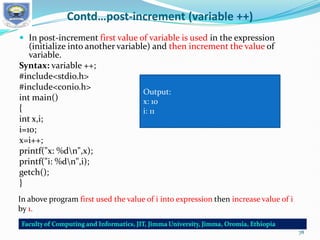
Contd…post-increment (variable ++)
 In post-increment first value of variable is used in the expression
(initialize into another variable) and then increment the value of
variable.
Syntax: variable ++;
#include<stdio.h>
#include<conio.h>
int main()
{
int x,i;
i=10;
x=i++;
printf("x: %dn",x);
printf("i: %dn",i);
getch();
}
Output:
x: 10
i: 11
In above program first used the value of i into expression then increase value of i
by 1.
78
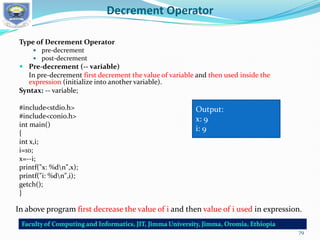
Decrement Operator
Type of Decrement Operator
 pre-decrement
 post-decrement
 Pre-decrement (-- variable)
In pre-decrement first decrement the value of variable and then used inside the
expression (initialize into another variable).
Syntax: -- variable;
#include<stdio.h>
#include<conio.h>
int main()
{
int x,i;
i=10;
x=--i;
printf("x: %dn",x);
printf("i: %dn",i);
getch();
}
Output:
x: 9
i: 9
In above program first decrease the value of i and then value of i used in expression.
79
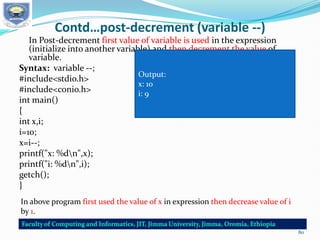
Contd…post-decrement (variable --)
In Post-decrement first value of variable is used in the expression
(initialize into another variable) and then decrement the value of
variable.
Syntax: variable --;
#include<stdio.h>
#include<conio.h>
int main()
{
int x,i;
i=10;
x=i--;
printf("x: %dn",x);
printf("i: %dn",i);
getch();
}
In above program first used the value of x in expression then decrease value of i
by 1.
Output:
x: 10
i: 9
80
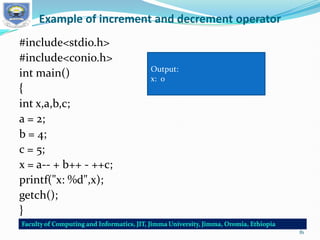
Example of increment and decrement operator
#include<stdio.h>
#include<conio.h>
int main()
{
int x,a,b,c;
a = 2;
b = 4;
c = 5;
x = a-- + b++ - ++c;
printf("x: %d",x);
getch();
}
Output:
x: 0
81
THANK YOU

CH-1SYSTEM PROGARMMING (1).pdf programing

  • 1.
    SYSTEM PROGRAMMING Faiz Akram(PhD) Subject and Code: System Programming –SE2044 4th Year, BSc. in Software Engineering
  • 2.
  • 3.
    INTRODUCTION SOFTWARE :  Itis a general team used to describe collection of computer program or procedure which perform a specific task. HARDWARE:  It can be described as a device that is physically connected to a system which can be touched. PROGRAM:  Application written with the help of a PL is a program (Programming Language). 1
  • 4.
    Difference between systemprogramming and windows programming:- The only difference is a technical one.  While both are the same, an 'application' is a computer program launched and dependent upon an operating system to execute."  When you click on a word processor, for example, it is an application, as is that hidden file that runs the printer spooler launched only by the OS. 2
  • 5.
    Today: …so whatis systems programming? :  The system program is likely to be used to support other software and applications programs, but may also be a complete applications package itself.  It is designed for continued “production” use rather than a one-shot solution to a single applications problem.  It is likely to be continuously evolving in the number and types of features it supports.  A system program requires a certain discipline or structure, both within and between modules (i.e. , “communication”) , and is usually designed and implemented by more than one person. 5
  • 6.
    COMPUTER PROGRAMS Computer Programs:There are two types of computer programs.  Application Program  System Program • Application Program: It is designed to help the user to perform some specific task, related to real time application point of view. • System Program: It is designed to operate and control the computer hardware and also provides a platform for running the application • Software it is requires greater degree of hardware awareness. Example: Compiler, Assembler, Macros, Interpreter Etc. 3
  • 7.
    Cont…. System Software: Computer canperform a variety of task such as editing, linking, translating, managing resources managing. I/O devices error handling etc with the help of system software. Thus, it is collection of system programs to perform various operations. Application Software: An Application software is a computer software designed to perform a group of coordinated functions, task, or activities for the benefit of the user. 4
  • 8.
    Difference between SystemSoftware Application Software 1.  System software is used for operating computer hardware.  Application software is used by user to perform specific task. 2.  System softwares are installed on the computer when operating system is installed.  Application softwares are installed according to user’s requirements. 3.  In general, the user does not interact with system software because it works in the background.  In general, the user interacts with application software. 4.  System software can run independently. It provides platform for running application softwares.  Application software can’t run independently. They can’t run without the presence of system software. 5. Some examples of system softwares are compiler, assembler, debugger, driver, etc.  Some examples of application softwares are word processor, web browser, media player, etc. 5
  • 9.
  • 10.
    Components of aProgramming System ASSEMBLER: It translates assembly language program(ALP) with mnemonic coded instruction into machine code using the instruction formats, operational codes(Op codes) and addressing mode, etc of the computer. Example of assembler MASM – Macro TASM- Turbo NASM- New micro ASM LOADER:- It is a program that places programs into the primary memory and prepares them for execution. The assembler outputs the machine language translation of the program onto a secondary storage device and loader is placed in the primary memory. 7
  • 11.
    Cont…. LINKER:- It is aprogram that links the user program to another program or libraries to form a single module. The task of a links is to link two more object modules to from a executable module into memory, preparing for execution them and executing them. It integrates the necessary function required by the program. MACRO--------------------------------------Start of definition INCR------------------------------------------macro name It is an abbreviation of a set of instruction. 8
  • 12.
    Cont…. Need of macro (i)Often in programming need to respect the same set of instructions again and again. (ii) macro facility us to write the definition once & use it many times. Ex;- #define printf (“---------“); p It is called any where in program P; - macro call COMPLIER:- A complier is a program that converts high level language to assembly language. The compiler compiles the program and translates it to assembly. An assembler then translates the assembly program into machine code . 9
  • 13.
    PROGRAM DEVELOPMENT CYCLE 1.Analyze- Programmer should have a clear idea about the input and output. 2. Design- The solution of the program is written in a step by step method. Ex. Algorithm, flowchart Step by step method 3. Coding The algothim is converted to a program. 4.Testing or Debugging- Testing means finding the error. Debugging means correcting the error. 5.Documentation- Organize all the information to explain or understand the program. Program= job=task=process 10
  • 14.
    Evaluation of OperatingSystem In the last 60 years operating system has gone though different Phases. We will discuss the evolution of operating system as follows. 1. Serial Processing – Execution of programs is done serially (1 after another) Example :- Dos (Disk Operating system) 2. Batch Processing- Batch means a group of programs. Example:- Group of java programs another group of C programs. Advantage- (i) Less time for processing (ii) Switching time is less One program to another Disadvantage- CPU is idle 11
  • 15.
    Cont….. 3. Multiprogramming- Morethan one program are loaded in memory at a time. Here,- context switch takes place - context switch means switching from one program to another. Example:- C program and listening music at same time. Switching takes place during I/o operation. (because, during I/o operation cpu is idle ) Advantage:- (i) CPU utilization is more (ii) Overall time is less, Hence, the system is faster. memory 12
  • 16.
    Cont….. 4. Time Sharing- Itis a special case of multiprogramming. Program is given with a fixed time. This time is called “Time Quantum”. 5. Real Time OS- Real time refers to exact time. It guarantees that program must complete in time. It is two types- (a) Hard RTOS (b) Soft RTOS (a) Hard RTOS:- -Short time constraint -No delay in time is allowed. Ex- Vx works(missile firing system, satellite lunching system) (b) Soft RTOS:- -Delay in time allowed Ex- Linux, window Area: browsing internet 13
  • 17.
    Distributed System •It isa multiprocessor more than one system. •A group of computer are connected to share data. •Each computers has its own memory. Ex.- Internet LAN = College MAN = City WAN = World Advantages:- Resource data sharing  Reliability  Communication 14
  • 18.
    Operating System andFunctions Operating System- It is a system software. Which is a interface between user and hardware. Functions of OS- 1) Program Creation- • It provides editor, debugger which helps the programmer to create programs. 2) Program Execution-  To run a program, a program has to be loaded in RAM (primary memory). 3) Memory Management-  It allocates memory to various program.  De-allocate memory after execution of program is finished. 15
  • 19.
    Cont…. 4) Process management- •Process is a program which is executing currently. • Os follows a scheduling algorithm to deal with many process of the system. 5) Error Detection-  Detect different types of errors and take appropriate action. Ex:- Unable to read the data due to bad sector in DVD. 6) Accounting-  Multiuser system has more than one users.  Os keep track of resources accessed by each user. 16
  • 20.
    History of Clanguage It is a structured, high-level, machine independent language. It allows software developers to develop programs without worrying about the where they will be implemented. UNIX is one of the most popular network operating systems in use today and the heart of the internet data superhighway. Today, C is running under a variety of operating system and hardware platforms. 17
  • 21.
  • 22.
    Importance of C •It is a robust language whose rich set of built-in functions. • Operators can be used to write any complex program. • Program written in C are efficient and fast. • Its variety of data types and powerful operators. Ex- A program to increment a variable from 0 to 15000 takes about one second in C while it takes more than 50 seconds in an interpreter BASIC.  C is highly portable.  C programs written for one computer can be run on another with little or no modification.  C language is well suited for structured programming. This modular structure makes program debugging, testing and maintenance easier.  Important feature of C is its ability to extend itself. A C program is basically a collection of functions that are supported by the C library.  Continuously add our functions to C library.The programming task becomes simple. 19
  • 23.
    Some Sample CPrograms and Analyze PROGRAM 1: PRINTNG A MESSAGE Main() { /*…..printing begins…….*/ printf(“I see, I remember”); /*…..printing ends…….*/ } Program is main and the execution begins at this line. The main() is a special function used by the C system to tell the computer where the program starts. BY using more than one function compiler can not understand which one marks the beginning of the program. The opening brace “{” in second line mark the beginning of the function main and the closing brace “}” in the last line indicates the end of the function. 20
  • 24.
    Contd… All the statementsbetween these two braces form the function body.  Function body contains a set of instructions to perform the given task.  The line beginning with /* and ending with */ are known as comment lines.  The comment line /* = = = =*/ = = = =*/ = = =*/ is not valid and therefore results in an error.  printf() function only executable statement of the program printf(“I see, I remember”);  printf() is a predefined standard C function for printing output.  Predefined means that it is a function that has already have written and compiled and linked together with our program at the time of linking.  The printf function causes everything between the starting and the ending quotation marks to be printed out . In this case , the output will be : I see, I remember 21
  • 25.
    Cont…  Every statementin C should end with a semicolon(;) mark.  suppose we want to print the above quotation in two lines as I see, I remember! The information contained between the parentheses is called the argument of the function.  This argument of the first Printf function is I see, /n’’ and the second is I remember!”.  These argument are simply strings of character to be printed out.  printf contains a combination of two characters and n at the end of the string.  n collectively called the newline character and instruct the computer to go to the next (new) line. No space is allowed between and n. 22
  • 26.
    Contd…  Possible toproduce two or more lines of output by one printf statement with the use of newline character at appropriate places. e.g. printf(“I see,n I remember !”); Will print I see, I remember ! while the statement printf(“In.. See, n… …. ….In… … … … remember !”); will print I .. See, … … … I … … … … remember ! 23
  • 27.
    Contd…  Some authorsrecommend the inclusion of the statement #include<stdio.h> At the beginning of all programs that use any input/output library function This is not necessary for the function printf and scanf which have been defined as a part of C language. • C makes a distinction between uppercase and lowercase letters. • printf and PRINTF are not the same. • In C everything is written in lowercase letter. • Uppercase letters are used for symbolic names representing constants. 24
  • 28.
    Contd..  General formatof simple program and all C program need a main function. 25
  • 29.
    The main function() Cpermits different forms of main statement.  Following forms are allowed  main()  int main()  void main()  main(void)  void main(void)  int main(void)  The empty pair of parenthesis indicates that the function has no arguments.  Keyword void means that the function does not return any information to the operating system  int means that the function returns an integer value to the operating system  When int is specified, the last statement in the program must be “return 0” 26
  • 30.
    PROGRAM 2: ADDINGTWO NUMBER  Below C program is for addition of two number and displays result. /* program addition Main() { int number; float amount; number=100; amount=30.75+75.35; printf(“%dn”, number); printf(“%5.2f”,amount); } Output 100 106.10 27
  • 31.
    Contd…  number andamount are variable name and what types of data they hold. int number; float amount;  Tells the compiler that number is an integer(int) and amount is a floating(float) point number.  The word int and float are called the keywords and can not used as a variable name. number=100; amount=30.75+75.35; are called the assignment statements and have a semicolon at the end. 28
  • 32.
    Contd…  Output statementthat prints the value of number. The print statement printf(“%dn”,number); Contains two argument. The first argument “%d” tells the compiler that the value of second argument number should be printed as decimal integer. Printf(“%5.2f”,amount); prints out the value of amount in floating point format.%5.2f tells the compiler that the output must be in floating point with five places in all and two places to the right of the decimal point. 29
  • 33.
    PROGRAM3:INTEREST CALCULATION Calculate thevalue of money at the end of each year of investment ,assuming an interest rate of 11 percent and prints the year and corresponding amount ,in two columns.  Assuming for a period of 10 year with initial investment of 5000.00 /*Investment problem*/ #define PERIOD =10; #define PRINCIPAL =5000.00; /*MAIN PROGRAM BEGINS*/ Main() { /* DECLARATION STATEMENTS*/ int year; float amount,value,inrate; // ASSIGNMENT STATEMENTS amount = PRINCIPAL ; inrate =0.11; year =0; 30
  • 34.
    Contd… // COMPUTATION USINGwhile loop while (year <= PERIOD){ printf ("%2d %8 . 2 fn" ,year , amount ); value = amount + inrate * amount ; year = year +1; amount = value ; } /* While LOOP ENDS*/ }/* PROGRAM ENDS*/ 31
  • 35.
    Contd… A # defineinstructions defines value to a symbolic constant for use in the program.  Whenever a symbolic name is encountered, the compiler substitutes the value associated with the name automatically.  To change the value, we have to simply change the definition.  These values remain constant throughout the execution of the program.  A # define lines should not end with a semicolon.  A # define instructions are usually placed at the beginning before the main() function.  The defined constants are not variables. We may not change their values within the program by using an assignment statement. Ex. PRINCIPAL= 10000.00; Is illegal 32
  • 36.
    Contd… They can alsobe declared as float amount; float value; float inrate;  When two or more variables are declared in one statement, they are separated by a comma.  While is a mechanism for evaluating respectively or a statement/group of statements. 33
  • 37.
    SAMPLE PROGRAM 4:USEOF SUBROUTINES  Illustrate the use of user-defined function and math function through sample program  A very simple program that using a user defined function i.e. mul() function. /*---program using function*/ int mul(int a, int b); /*----declaration ---*/ /*------Main program begins------*/ main() { int a, b, c; a=5; b=10; c=mul( a, b); printf(“multiplication of %d and %d is %d”, a, b,c); } /*----Main program ends Mul() function starts----*/ 34
  • 38.
    Contd… int mul(int x,int y) { int p; p=x*y; return(p); } /* Mul() function ends*/ The mul function multiplies the values of x and y and the result is returned to the main() function when it is called in the statement. c=mul(a, b); The mul() has two argument x and y that are declared as integer. The value a and b are passed on to x and y respectively when the function mul() is called. 35
  • 39.
    SAMPLE PROGRAM 5:USEOF MATH FUNCTION • Mathematical functions are defined and kept as a part of C math library. • Before using these mathematical function we must add an #include instruction in the program. • Like #define it is also a compiler directive that instructs the compiler to link the specified mathematical function from the library. • The instruction is of the form #include<math.h> math.h is the file name containg the required function. • Below program illustrate the use of cosine function and program calculate cosine values for angles 0,10,20……..180 36
  • 40.
    Contd… • Program usingcosine function #include <stdio.h> #include <math.h> #define PI 3.1416 #define MAX 180 main() { int angle; float x, y; Angle=0; Printf(“ Angle Cos(angle)nn”); while (angle <= MAX) { x=( PI/ MAX )* angle ; y= cos (x); //Use of cosinefunction printf ("%15d %13 . 4 fn”, angle ,y); angle = angle +10; } } 37
  • 41.
    Contd… Output: Angle Cos(angle) 0 1.0000 100.9848 20 0.9397 and so on…. #include instruction required is #include<stdio.h> stdio.h refers to the standard I/O header file containing standard input and output functions. 38
  • 42.
    The #include Directive C programs are divided into modules or functions.  some function are written by user and store in the C library.  Library functions are grouped category wise and stored in different files known as header files.  To access the functions stored in library, necessary to tell the compiler about the files to be accessed. #include<filename> • file name is the name of library file that contains the required function definition. • Preprocessor directives are placed at the beginning of a program. 39
  • 43.
    BASIC STRUCTURE OFC PROGRAMS  Any C program is consists of 6 main sections.  C program can be viewed as a group of building blocks called functions.  A function is a subroutine that may include one or more statements designed to perform a specific task. 40
  • 44.
  • 45.
  • 46.
    Contd… Various section andUse  Documentation: Consists of comments, some description of the program, programmer name and any other useful points that can be referenced later.  Link: Consists of the header files of the functions that are used in the program. Provides instruction to the compiler to link function from the library function.  Definition: Consists of symbolic constants or macros  Global declaration: Can be used anywhere in the program. Consists of function declaration and global variables. 43
  • 47.
    Contd…  main( ){}: Every C program must have a main() function which is the starting point of the program execution and contains two parts, declaration and executable part. The declaration part declares all the variables that are used in executable part. Must be written in between the opening and closing braces end with a semicolon (;).  variable declaration: In C programming we cannot create variable anywhere like c++ or java so need to declare variable before body of program.  Subprograms or function: User defined functions that are used to perform a specific task. These user defined functions are called in the main() function. 44
  • 48.
    Contd… Different sections ofthe above code Documentation:/*This section contains a multi line comment or name of program. description: program to call function add(); */ In C, we can create single line comment using two forward slash // and we can create multi line comment using /* */. Comments are ignored by the compiler and is used to write notes and document code. Link:This section includes header file. #include <stdio.h> #include<conio.h> We are including the stdio.h input/output header file from the C library. 45
  • 49.
    Contd… Definition: This sectioncontains constant. #define max 10 In the above code we have created a constant max and assigned 10 to it. The #define is a preprocessor compiler directive which is used to create constants. We generally use uppercase letters to create constants. The #define is not a statement and must not end with a ; semicolon. Global Declaration: This section contains function declaration. void add(); int x=10; We have declared an add function which print Hello add . main( ) function 46
  • 50.
    Contd… This section containsthe main() function. int main(){ int a=10; printf("Hello Main"); return 0; } This is the main() function of the code. Inside this function we have created a integer variable a and assigned 10 to it. Then we have called the printf() function to print Hello Main. Subprograms or Function This section contains a subprogram or function i.e add( ) or any no of user defined function . void add() { void add(){ printf(" Hello add ") ; } 47
  • 51.
    Programming style  Alsoknown as code style, is a set of rules or guidelines used when writing the source code for a computer program  It is designed to provide information on how to effectively use indentation, comments, and other elements that will make your C code more readable. 48
  • 52.
    Character set ofC Character:-It denotes any alphabet, digit or special symbol used to represent information. Use:-These characters can be combined to form variables. C uses constants, variables, operators, keywords and expressions as building blocks to form a Basic c program Character set:-The character set is the fundamental raw material of any language and they are used to represent information. 49
  • 53.
    Contd… The characters inC are grouped into the following two categories: 1. Source character set a. Alphabets b. Digits c. Special Characters d. White Spaces 2. Execution character set a. Escape Sequence Source character set 1. ALPHABETS Uppercase letters A-Z Lowercase letters a-z 2. DIGITS 0, 1, 2, 3, 4, 5, 6, 7, 8, 9 50
  • 54.
    Contd… 3.Special Characters ~ tilde %percentsign | vertical bar @ at symbol + plus sign < less than & ampersand $ dollar sign * asterisk back slash ,etc. 51
  • 55.
    Contd… 4.White space Characters. bblank space t horizontal tab v vertical tab r carriage return f form feed n new line Back slash ’ Single quote " Double quote ? Question mark 0 Null a Alarm (Audible Note) 52
  • 56.
    Contd… Execution Character Set: Executioncharacters set are always represented by a backslash () followed by a character. They are used in output statements. Escape sequence usually consists of a backslash and a letter or a combination of digits. Each one of character constants represents one character, although they consist of two characters. These characters combinations are called as escape sequence. 53
  • 57.
    Contd…  Character ASCIIvalue Escape Sequence Result Null 000 0 Null Alarm (bell) 007 a Beep Sound Back space 008 b Moves previous position Horizontal tab 009 t Moves next horizontal tab New line 010 n Moves next Line Vertical tab 011 v Moves next vertical tab Form feed 012 f Moves initial position of next page Carriage return 013 r Moves beginning of the line Double quote 034 " Present Double quotes Single quote 039 ' Present Apostrophe Question mark 063 ? Present Question Mark Back slash 092 Present back slash 54
  • 58.
    C program toprint all the characters of C character Set #include<stdio.h> #include<conio.h> int main() { int i; clrscr(); printf("ASCII ==> Charactern"); for(i = -128; i <= 127; i++) printf("%d ==> %cn", i, i); getch(); return 0; } 55
  • 59.
    Tokens in C In a C program smallest individual units are known as C tokens  A C program consists of various tokens  Token is either a keyword, an identifier, a constant, a string literal, or a symbol.  For example, the following C statement consists of six type of tokens − 56
  • 60.
    C TOKENS EXAMPLEPROGRAM: int main() { int x, y, total; x = 10, y = 20; total = x + y; printf ("Total = %d n", total); } where, main – identifier {,}, (,) – delimiter int – keyword x, y, total – identifier main, {, }, (, ), int, x, y, total – tokens 57
  • 61.
    Keyword and Identifiers Keywords:Every c word is classified as either a keyword or an identifier.  All keywords have fixed meanings and these meaning can not be changed.  Keywords are predefined, reserved words used in programming that have special meanings to the compiler.  Keywords serve as basic building block for program statements.  All keywords must be written in lowercase.  Underscore character is also an identifier and used as a link between two words in long identifiers. ANSI C Keyword 58
  • 62.
    Contd… Identifier:  A Cidentifier is a name used to identify a variable, function, or any other user-defined item.  An identifier starts with a letter A to Z, a to z, or an underscore '_' followed by zero or more letters, and digits (0 to 9).  C does not allow punctuation characters such as @, $, and % within identifiers.  C is a case-sensitive programming language. Thus, Manpower and manpower are two different identifiers in C.  Here are some examples of acceptable identifiers − mohd zara abc move_name myname50 _temp j a23b9 retVal a_123 59
  • 63.
    Contd….. Rules for namingidentifiers  First character must be an alphabet(or underscore)  A valid identifier can have letters (both uppercase and lowercase letters), digits and underscores.  Only first 31 characters are significant.  Can not use a keyword.  Must not contain white space. 60
  • 64.
    Constants  Constant inc refer to fixed values that do not change during execution of a program.  Constants are like a variable  Value remains the same during the entire execution of the program.  Constants are also called literals.  Constants can be any of the data types.  It is considered best practice to define constants using only upper-case names. Syntax: const type constant_name; 61
  • 65.
    HOW TO USECONSTANTS IN A C PROGRAM? By “const” keyword: when you try to change constant values after defining in C program, it will through error. EXAMPLE PROGRAM USING CONST KEYWORD IN C: #include<stdio.h> void main() { const int height = 100; /*int constant*/ const float number = 3.14; /*Real constant*/ const char letter = 'A'; /*char constant*/ const char letter_sequence[10] = "ABC"; /*string constant*/ const char backslash_char = '?'; /*special char const*/ printf("value of height :%d n", height ); printf("value of number : %f n", number ); printf("value of letter : %c n", letter ); printf("value of letter_sequence : %s n", letter_sequence); printf("value of backslash_char : %c n", backslash_char); } OUTPUT: value of height : 100 value of number : 3.140000 value of letter : A value of letter_sequence : ABC value of backslash_char : ? 62
  • 66.
    EXAMPLE PROGRAM USING#DEFINE PREPROCESSOR DIRECTIVE IN C #include <stdio.h> #define height 100 #define number 3.14 #define letter 'A' #define letter_sequence "ABC" #define backslash_char '?' void main() { printf("value of height : %d n", height ); printf("value of number : %f n", number ); printf("value of letter : %c n", letter ); printf("value of letter_sequence : %s n",letter_sequence); printf("value of backslash_char : %c n",backslash_char); } Output: value of height : 100 value of number : 3.140000 value of letter : A value of letter_sequence : ABC value of backslash_char : ? 63
  • 67.
    Variables Variable is adata name that used to store a data value. Variable may take different values at different times during execution. Variables are memory locations(storage area) in the C programming language. The primary purpose of variables is to store data in memory for later use. Unlike constants which do not change during the program execution, variables value may change during execution. If you declare a variable in C, that means you are asking to the operating system for reserve a piece of memory with that variable name. 64
  • 68.
    Contd… Syntax: type variable_name; OR typevariable_name, variable_name, variable_name; Variable definition and initialization: int width, height=5; char letter='A'; float age, area; double d; /* actual initialization */ width = 10; age = 26.5; int i,j,k; char c,ch; float f,salary; double d; The line int i, j, k; declares and defines the variables i, j, and k; which instruct the compiler to create variables named i, j and k of type int. 65
  • 69.
    Variable assignment  Itis a process of assigning a value to a variable. Example: int width = 60; int age = 31; Rules on choosing variable names:  A variable name can consist of Capital letters A-Z, lowercase letters a-z, digits 0-9, and the underscore character.  The first character must be a letter or underscore.  Blank spaces cannot be used in variable names.  Special characters like #, $ are not allowed.  C keywords can not be used as variable names.  Variable names are case sensitive.  Values of the variables can be numeric or alphabetic.  Variable type can be char, int, float, double or void. 66
  • 70.
    C Program toPrint Value of a Variable Example: #include<stdio.h> void main() { /* c program to print value of a variable */ int age = 33; printf("I am %d years old.n", age); } Program Output: I am 33 years old. 67
  • 71.
    Example: Variables have beendeclared at the top, but they have been defined and initialized inside the main function #include <stdio.h> // Variable declaration: extern int a, b; extern int c; extern float f; int main () { /* variable definition: */ int a, b; int c; float f; /* actual initialization */ a = 10; b = 20; c = a + b; printf("value of c : %d n", c); f = 70.0/3.0; printf("value of f : %f n", f); return 0; } Output: value of c : 30 value of f : 23.333334 Use the keyword extern to declare a variable at any place. In this example variables have been declared at the top, but they have been defined and initialized inside the main function. 68
  • 72.
    Variable…contd Variable name Valid?Remark First_tag Valid Char Not valid Char is a keyword Price$ Not valid Dollar sign is illegal group one Not valid Blank space is not permitted avevge_number Valid First eight characters are significant int_type Valid Keyword may be part of name Examples of variable names 69
  • 73.
    Data Types  Clanguage is rich in its data types.  ANSCI C supports three classes of data types:  Primary(or fundamental) data types: void, int, char, double and float.  Derived data types: Array, References, and Pointers.  User-defined data types: Structure, Union, and Enumeration. All C compilers support five fundamental data types, namely integer(int),character(char),floating point(float),double-precision floating point(double) and void. • Also extended data types such as long int, long double. 70
  • 74.
  • 75.
    Operator expression  Anoperator is a symbol that tells the computer to perform certain mathematical or logical manipulation.  Operators are used in program to manipulate data and variables.  Operators, functions, constants and variables are combined together to form expressions.  Consider the expression A + B * 5. where, +, * are operators, A, B are variables, 5 is constant and A + B * 5 is an expression. Types of c operators:  C language offers many types of operators. They are: 1. Arithmetic operators 2. Assignment operators 3. Relational operators 4. Logical operators 72
  • 76.
    Contd… 5. Bit wiseoperators 6. Conditional operators (ternary operators) 7. Increment/decrement operators 8. Special operators Arithmetic operators:  C Arithmetic operators are used to perform mathematical calculations like addition, subtraction, multiplication, division and modulus in C programs. 73
  • 77.
    Example for Arithmeticoperators: #include <stdio.h> int main() { int a=40,b=20, add,sub,mul,div,mod; add = a+b; sub = a-b; mul = a*b; div = a/b; mod = a%b; printf("Addition of a, b is : %dn", add); printf("Subtraction of a, b is : %dn", sub); printf("Multiplication of a, b is : %dn", mul); printf("Division of a, b is : %dn", div); printf("Modulus of a, b is : %dn", mod); } Output: Addition of a, b is : 60 Subtraction of a, b is : 20 Multiplication of a, b is : 800 Division of a, b is : 2 Modulus of a, b is : 0 74
  • 78.
    Show the useof integer arithmetic to convert a given number of days into months and days. #include<stdio.h> int main() { int months,days; printf("Enter daysn"); scanf("%d",&days); months=days/30; days=days%30; printf("Months=%d Days=%d", months,days); getch(); } Output: Enter days 265 Months=8 Days=25 75
  • 79.
    Increment and decrementsoperator  Increment Operators are used to increased the value of the variable by one and Decrement Operators are used to decrease the value of the variable by one in C programs. Syntax  ++ // increment operator  -- // decrement operator And can not apply on constant x= 4++; // gives error, because 4 is constant Type of Increment Operator  pre-increment  post-increment pre-increment (++ variable)  In pre-increment first increment the value of variable and then used inside the expression (initialize into another variable). Syntax: ++ variable; 76
  • 80.
    Example #include<stdio.h> #include<conio.h> int main() { int x,i; i=10; x=++i; printf("x:%dn",x); printf("i: %dn",i); getch(); } Output: x: 11 i: 11 In above program first increase the value of i and then used value of i into expression. 77
  • 81.
    Contd…post-increment (variable ++) In post-increment first value of variable is used in the expression (initialize into another variable) and then increment the value of variable. Syntax: variable ++; #include<stdio.h> #include<conio.h> int main() { int x,i; i=10; x=i++; printf("x: %dn",x); printf("i: %dn",i); getch(); } Output: x: 10 i: 11 In above program first used the value of i into expression then increase value of i by 1. 78
  • 82.
    Decrement Operator Type ofDecrement Operator  pre-decrement  post-decrement  Pre-decrement (-- variable) In pre-decrement first decrement the value of variable and then used inside the expression (initialize into another variable). Syntax: -- variable; #include<stdio.h> #include<conio.h> int main() { int x,i; i=10; x=--i; printf("x: %dn",x); printf("i: %dn",i); getch(); } Output: x: 9 i: 9 In above program first decrease the value of i and then value of i used in expression. 79
  • 83.
    Contd…post-decrement (variable --) InPost-decrement first value of variable is used in the expression (initialize into another variable) and then decrement the value of variable. Syntax: variable --; #include<stdio.h> #include<conio.h> int main() { int x,i; i=10; x=i--; printf("x: %dn",x); printf("i: %dn",i); getch(); } In above program first used the value of x in expression then decrease value of i by 1. Output: x: 10 i: 9 80
  • 84.
    Example of incrementand decrement operator #include<stdio.h> #include<conio.h> int main() { int x,a,b,c; a = 2; b = 4; c = 5; x = a-- + b++ - ++c; printf("x: %d",x); getch(); } Output: x: 0 81
  • 85.