Binary Protocol Analysis with CANAPE 
James Forshaw
Schedule 
1.What is CANAPE? 
2.Say Hello to SuperFunkyChat 
3.Proxying and Capturing Traffic 
4.NetGraphs 
5.Modelling State Transitions 
6.Removing SSL/Layers 
7.Traffic Manipulation and Replay 
8.Developing Network Clients 
9.Wrap Up 
https://www.github.com/tyranid/44con_2014
Playing Along at Home 
•Pre-built binaries available at: 
•https://www.github.com/tyranid/44con_2014 
•Example projects and slides will come later 
ASK QUESTIONS 
https://www.github.com/tyranid/44con_2014
What is CANAPE? 
•Arbitrary Network Protocol Capture Tool 
•Specifically designed for Binary Protocols 
•Windows focused (some Mono support) 
•Open source, GPLv3, written in C# 
•https://www.github.com/ctxis/canape 
https://www.github.com/tyranid/44con_2014
What Makes CANAPE Different? 
•Number of tools to generate or fuzz network traffic 
•Scapy, Peach, Sulleyetc. 
•Takes Web Application Testing Paradigm and applies to arbitrary protocols 
•GUI 
•Easy packet manipulation 
•Quick feedback 
https://www.github.com/tyranid/44con_2014
Workshop 0: Quick Tour of CANAPE 
https://www.github.com/tyranid/44con_2014
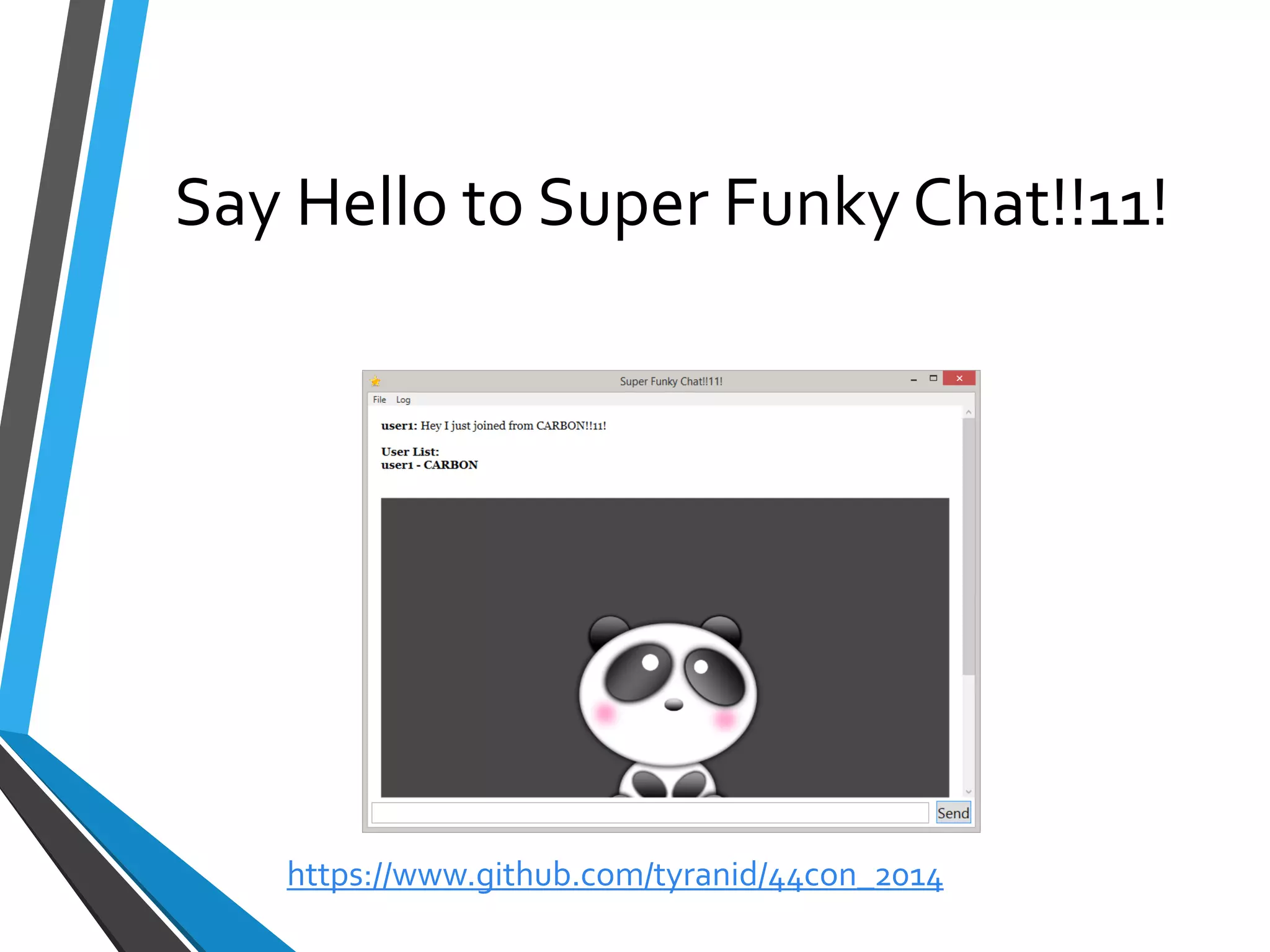
Say Hello to Super Funky Chat!!11! 
https://www.github.com/tyranid/44con_2014
SuperFunkyChat 
•Simple Windows IM Application 
•Written originally as a CTF and CANAPE tutorial 
•Uses a binary protocol 
•Supports SOCKS 
•Has a few “Undocumented” features 
•Sourcecodeavailable at https://www.github.com/tyranid/SuperFunkyChat 
•Don’t use as a real IM system  
https://www.github.com/tyranid/44con_2014
Workshop 1: Quick Tour of SuperFunkyChat 
https://www.github.com/tyranid/44con_2014
Proxying and Capturing Traffic 
•CANAPE Supports Many Ways of Proxying Traffic: 
•TCP/UDP Port Forwarding 
•SOCKS v4/v5 Proxy 
•HTTP Forward and Reverse Proxies 
•Can develop your own extensions to support other types of networks (NamedPipes, COM ports) 
•Also supports Servers and Clients 
https://www.github.com/tyranid/44con_2014
Identifying Suitable Traffic 
•Need to work out what traffic to capture 
•Reverse Engineering 
•Wireshark/PCAP 
https://www.github.com/tyranid/44con_2014
Forcing Traffic Through CANAPE 
•CANAPE works at Application Level (TCP/UDP) not network 
•Traffic from Application needs to go through CANAPE 
•Proxy support 
•DNS redirecting 
•DNAT 
•SOCKSifyingtools (Proxifierfor example) 
https://www.github.com/tyranid/44con_2014
Services 
•CANAPE insolates your project into a set of services. 
•You define a template for your service: 
•Data flow 
•State model 
•Dynamic content 
•When a new connection is made an Instance is instantiated based on the template 
https://www.github.com/tyranid/44con_2014
Workshop 2: Capturing SuperFunkyChat 
https://www.github.com/tyranid/44con_2014
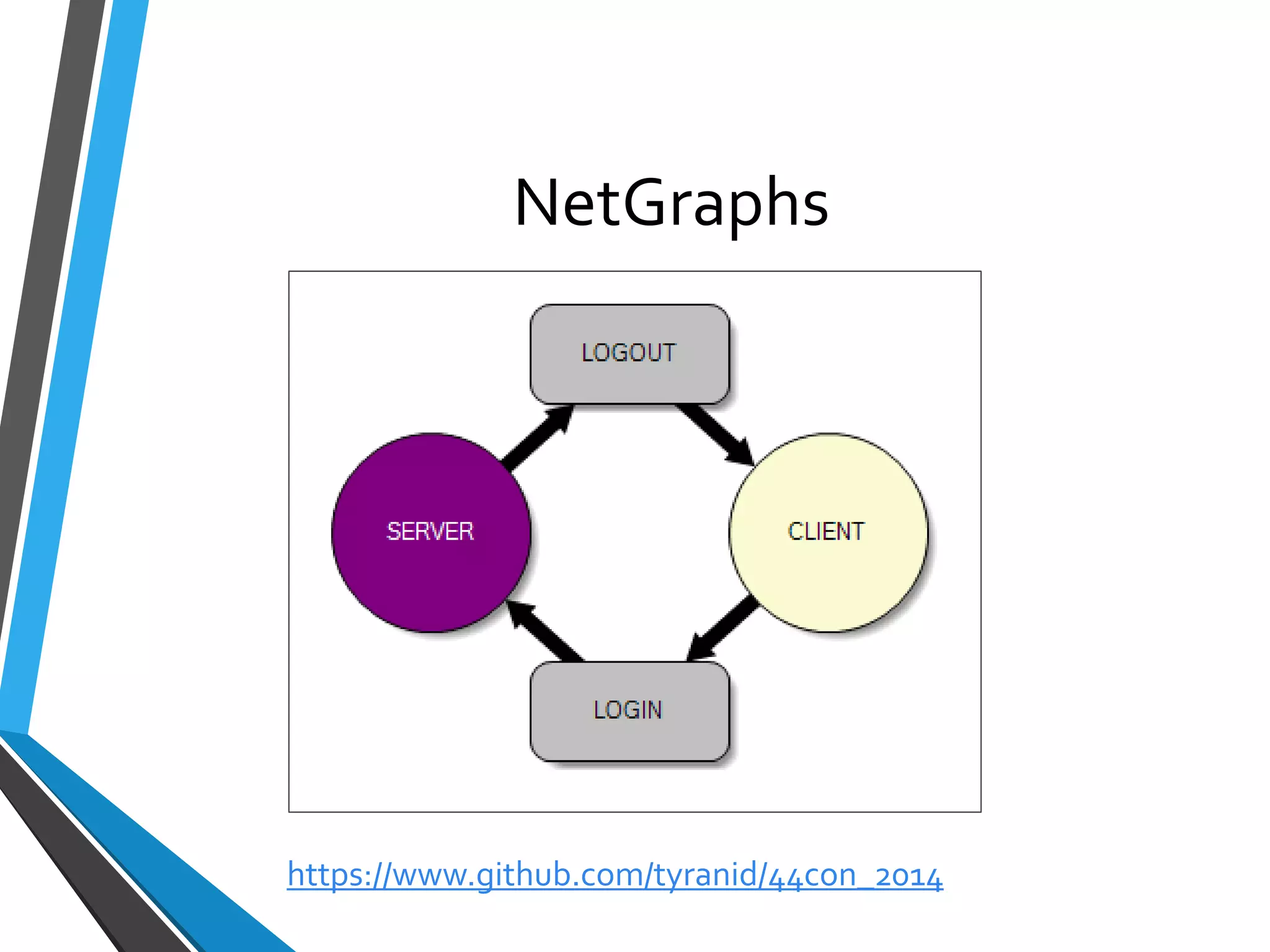
NetGraphs 
https://www.github.com/tyranid/44con_2014
NetGraphs 
•NetGraphsused to mode data flow and state 
•Specified as a directed graph 
•Standard graph nodes available 
•Can implement custom nodes in C#/IronPython 
https://www.github.com/tyranid/44con_2014
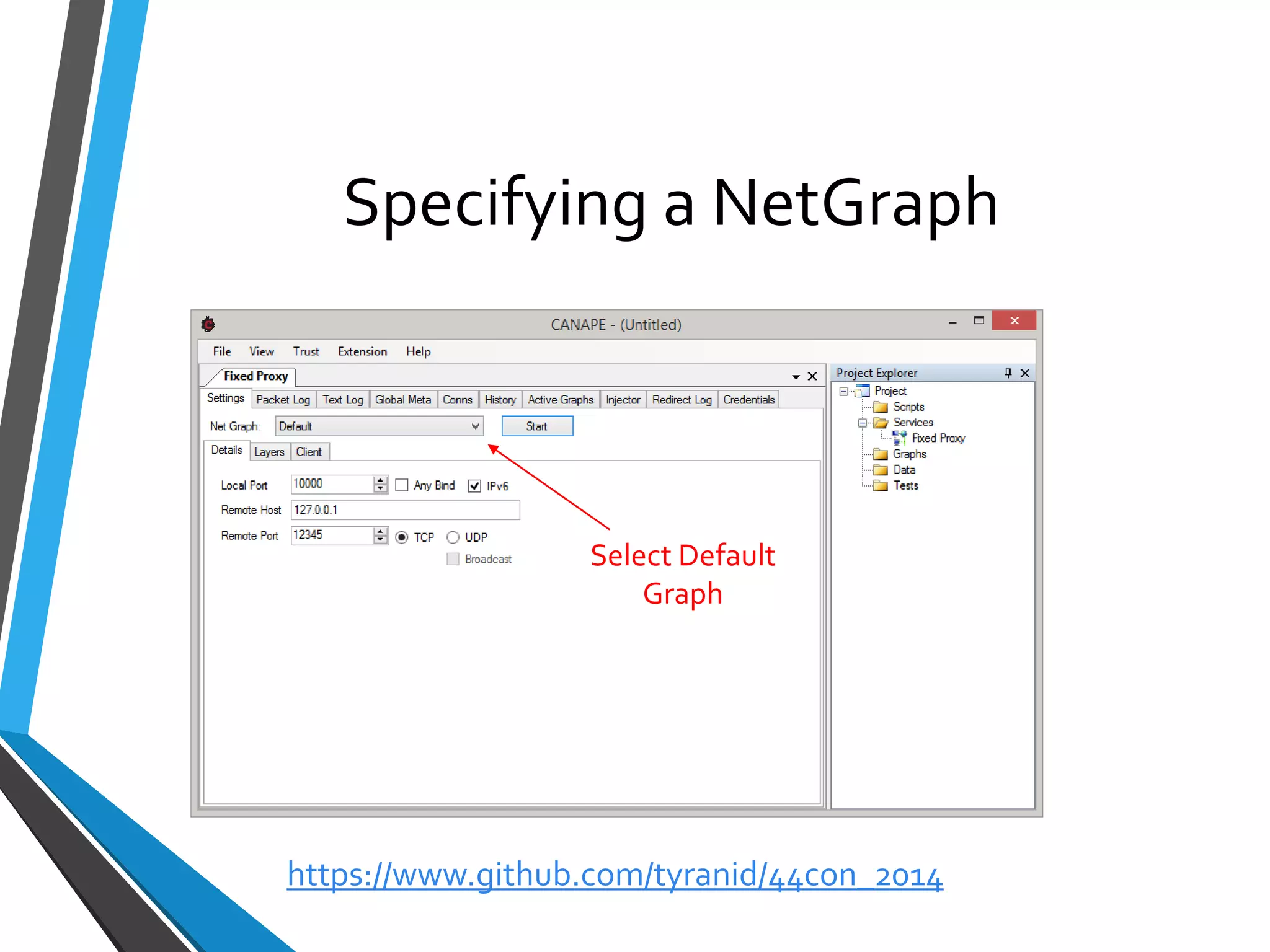
Specifying a NetGraph 
Select Default Graph 
https://www.github.com/tyranid/44con_2014
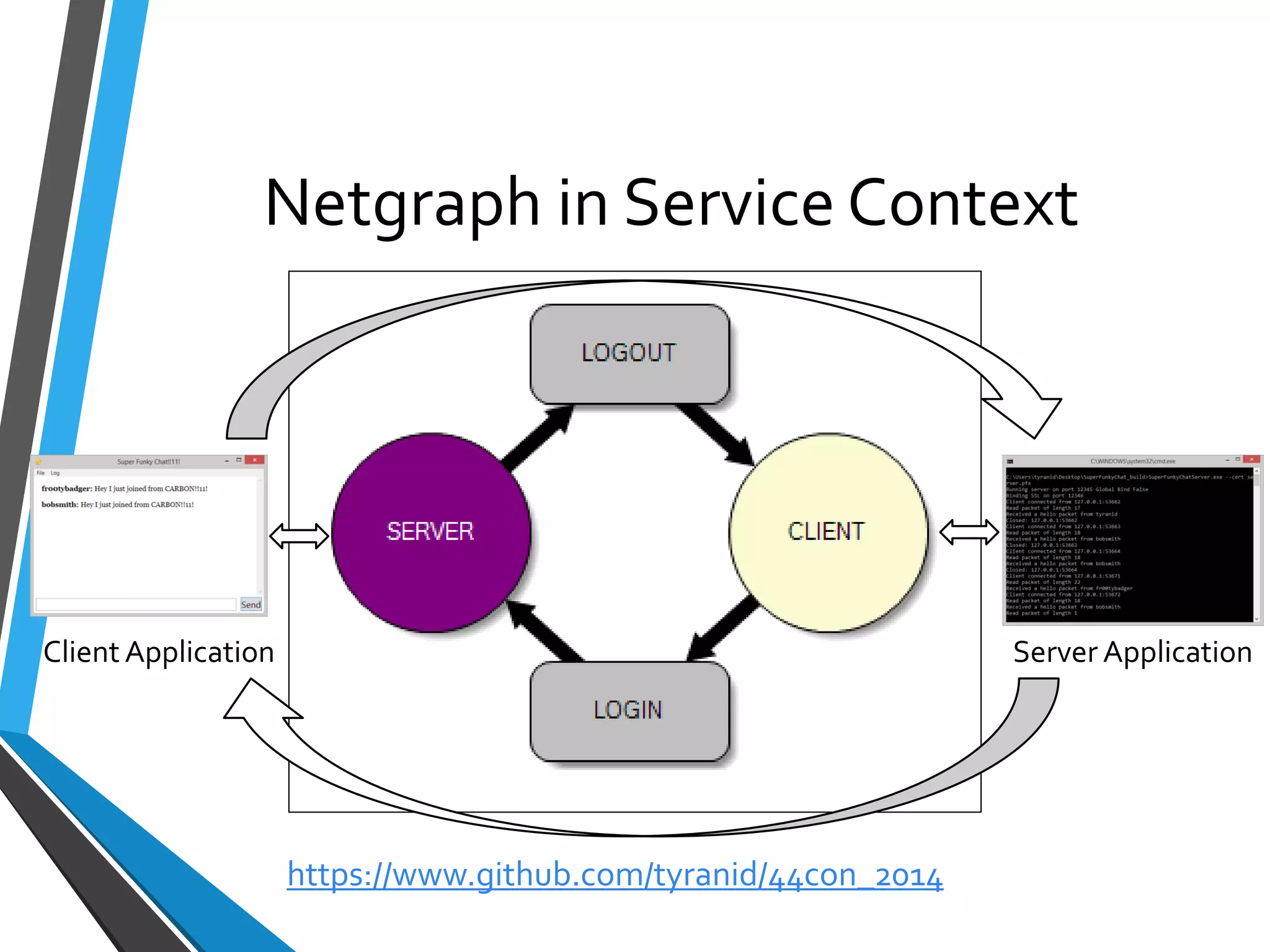
Netgraphin Service Context 
Client Application 
Server Application 
https://www.github.com/tyranid/44con_2014
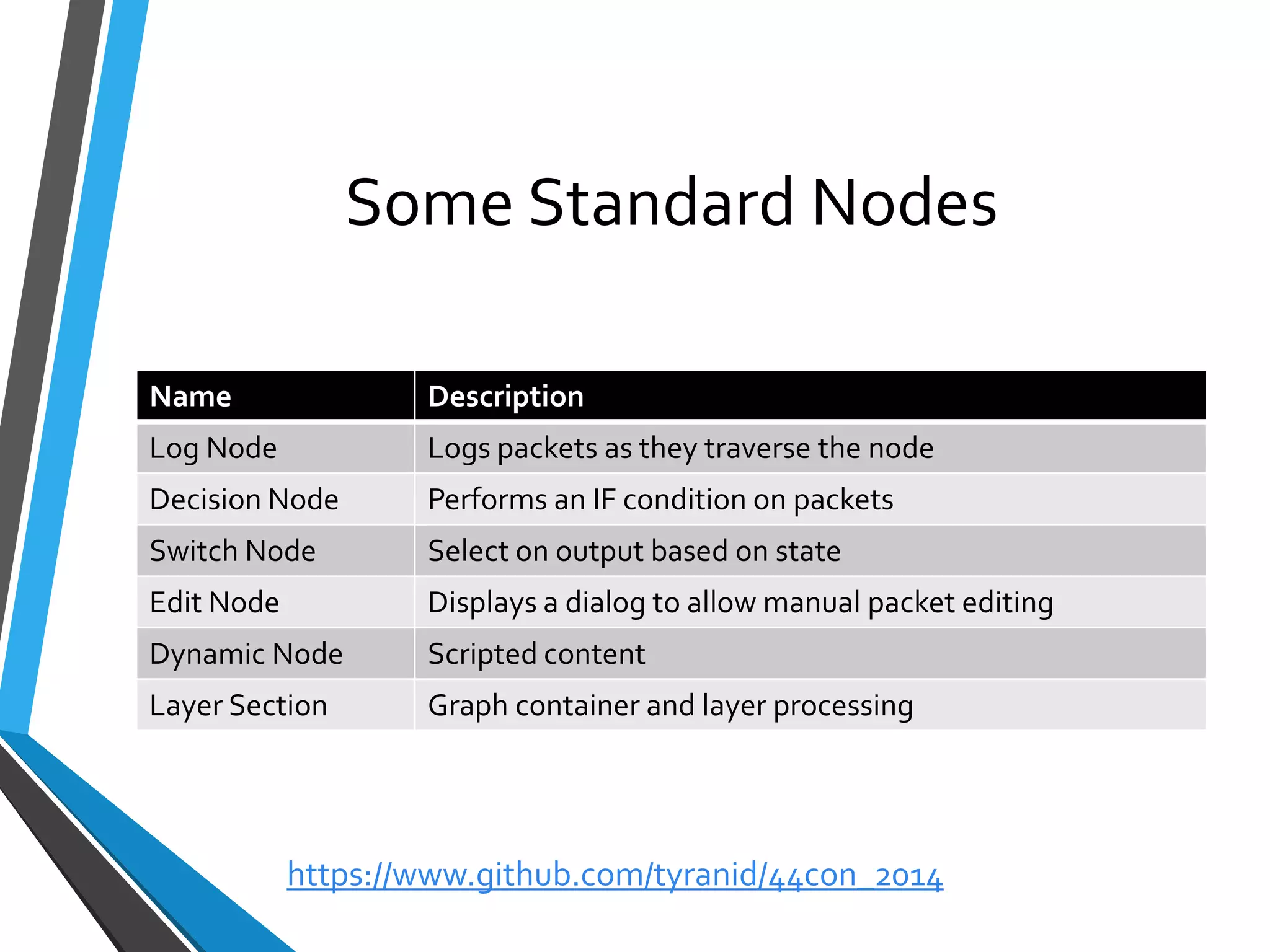
Some Standard Nodes 
Name 
Description 
LogNode 
Logspackets as they traverse the node 
Decision Node 
Performs an IF condition on packets 
Switch Node 
Selecton output based on state 
Edit Node 
Displaysa dialog to allow manual packet editing 
Dynamic Node 
Scripted content 
Layer Section 
Graphcontainer and layer processing 
https://www.github.com/tyranid/44con_2014
Graph User Interface 
•Create a new graph by right clicking project explorer 
•Left Click to Select and Drag Nodes 
•Right Click to Add Nodes 
•Hold and Drag Middle Button to Add Edges 
•Can also hold left Control and use Left button 
•Nodes can be disabled from right click menu 
https://www.github.com/tyranid/44con_2014
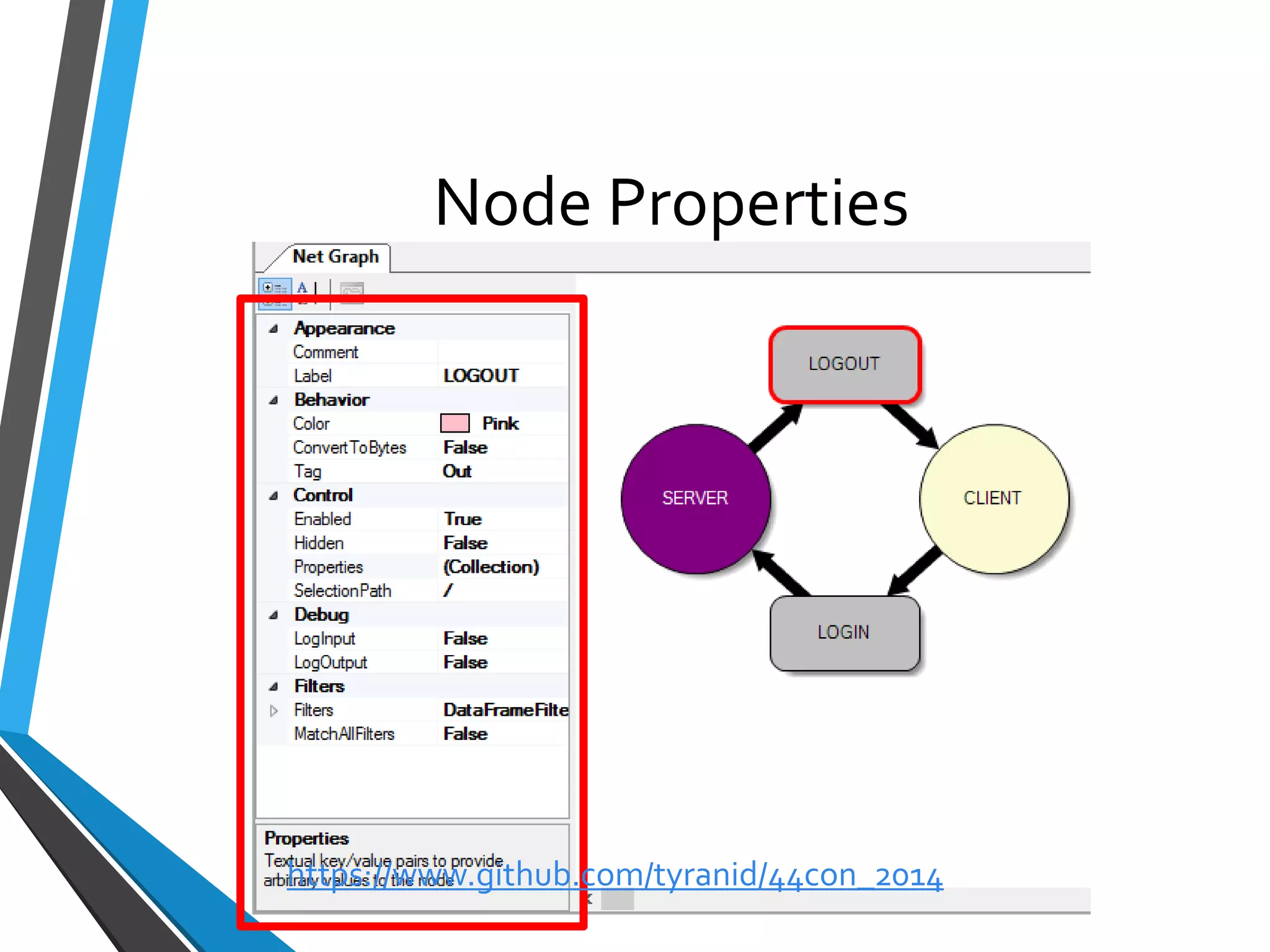
Node Properties 
https://www.github.com/tyranid/44con_2014
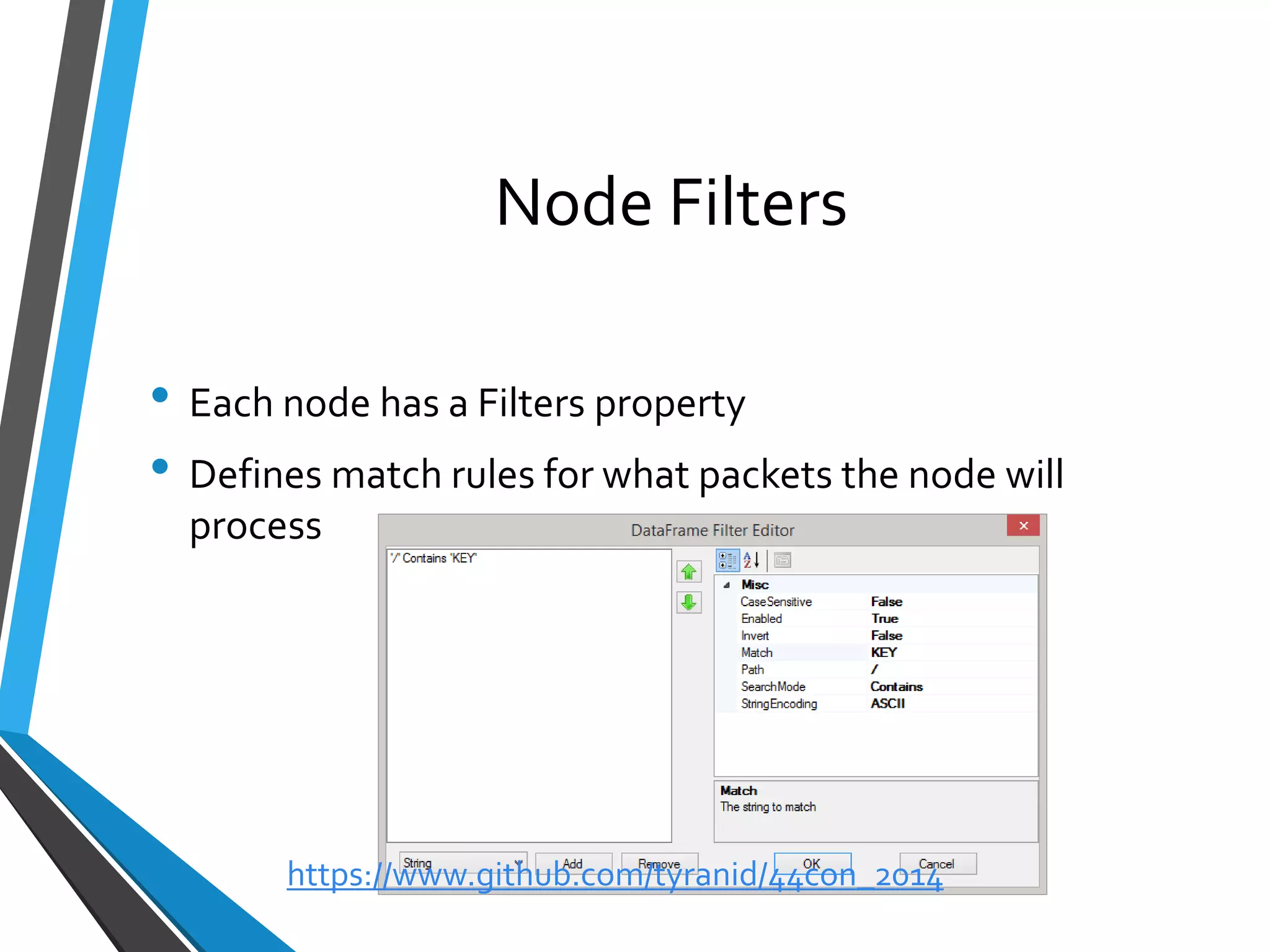
Node Filters 
•Each node has a Filters property 
•Defines match rules for what packets the node will process 
https://www.github.com/tyranid/44con_2014
Workshop 3: Playing with Netgraphs 
https://www.github.com/tyranid/44con_2014
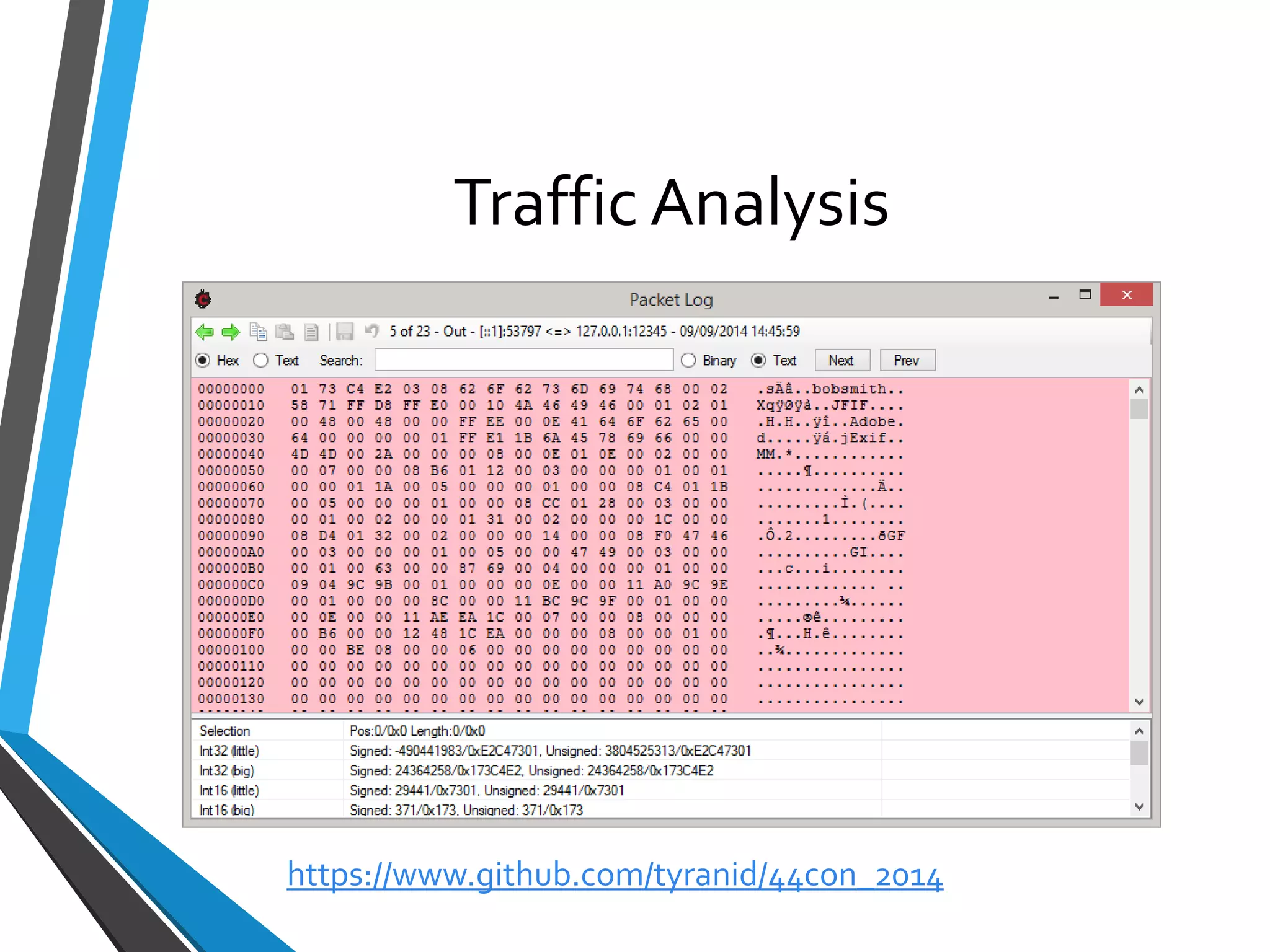
Traffic Analysis 
https://www.github.com/tyranid/44con_2014
Packet Logging 
•Only packets which traverse a log node in a graph end up being logged (well unless you do it manually) 
•Affected by node filters 
•Can specify a number of properties: 
•Colour 
•Logged Name 
https://www.github.com/tyranid/44con_2014
Workshop 4: Packet Logging Interface 
https://www.github.com/tyranid/44con_2014
Packet Tools 
•Analysis of traffic means looking at binary data 
•Many different tasks: 
•Comparing packets and sequences of packets 
•Importing and exporting data 
•Searching 
https://www.github.com/tyranid/44con_2014
Workshop 5: Packet Tools 
https://www.github.com/tyranid/44con_2014
Parsing Traffic 
•CANAPE’s data pipeline can be scripted using C# or Python 
•Not necessarily easy thing to do 
•Parser editor to the rescue 
https://www.github.com/tyranid/44con_2014
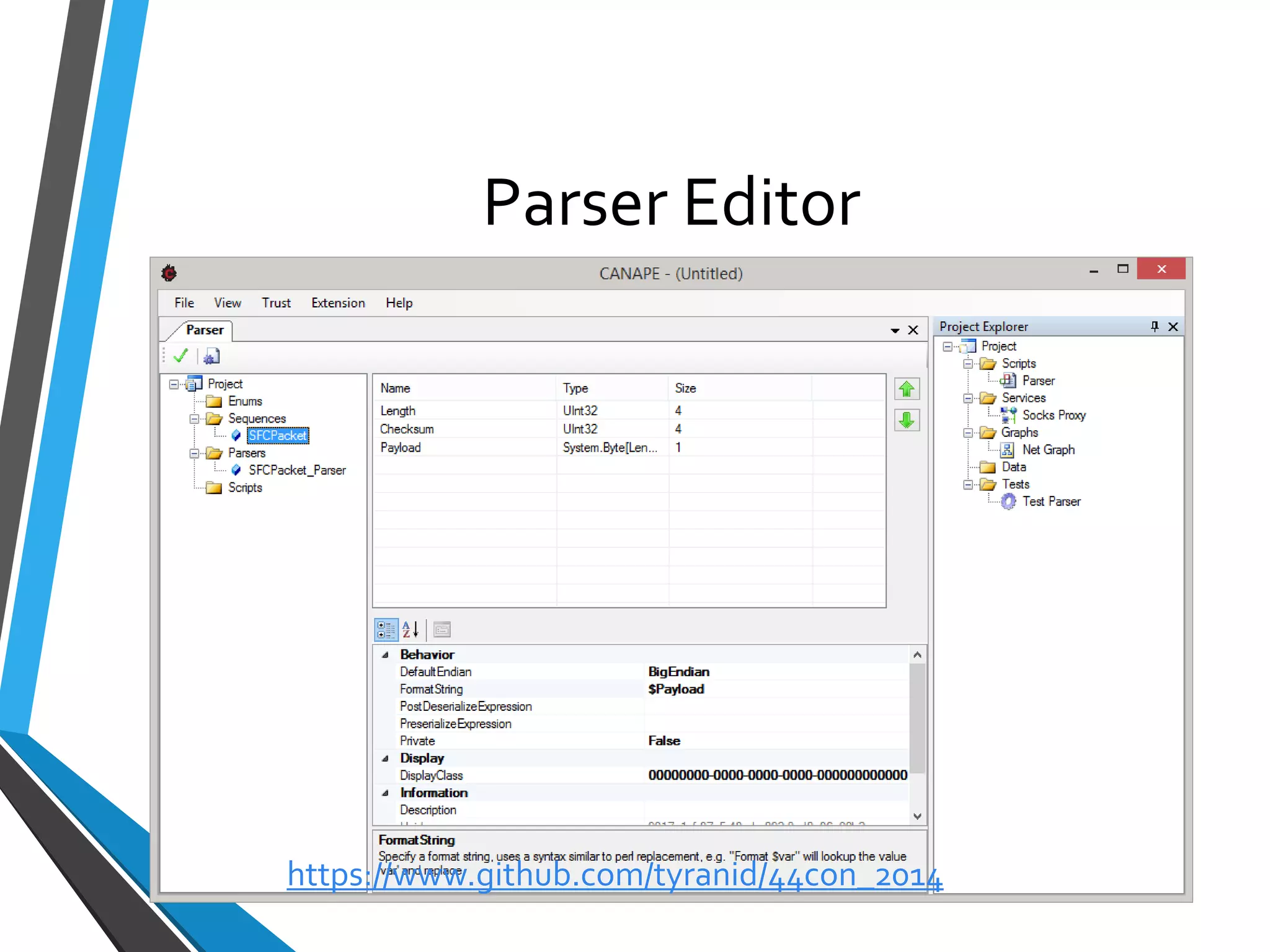
Parser Editor 
https://www.github.com/tyranid/44con_2014
Parser Editor 
•Build protocol structure in GUI 
•Defines 3 types: 
•Sequences 
•Enumerations 
•Parsers 
•Supports complex expressions, TLV, sub-sequences etc. 
•Compiles to C# parser script, can be exported and tweaked 
https://www.github.com/tyranid/44con_2014
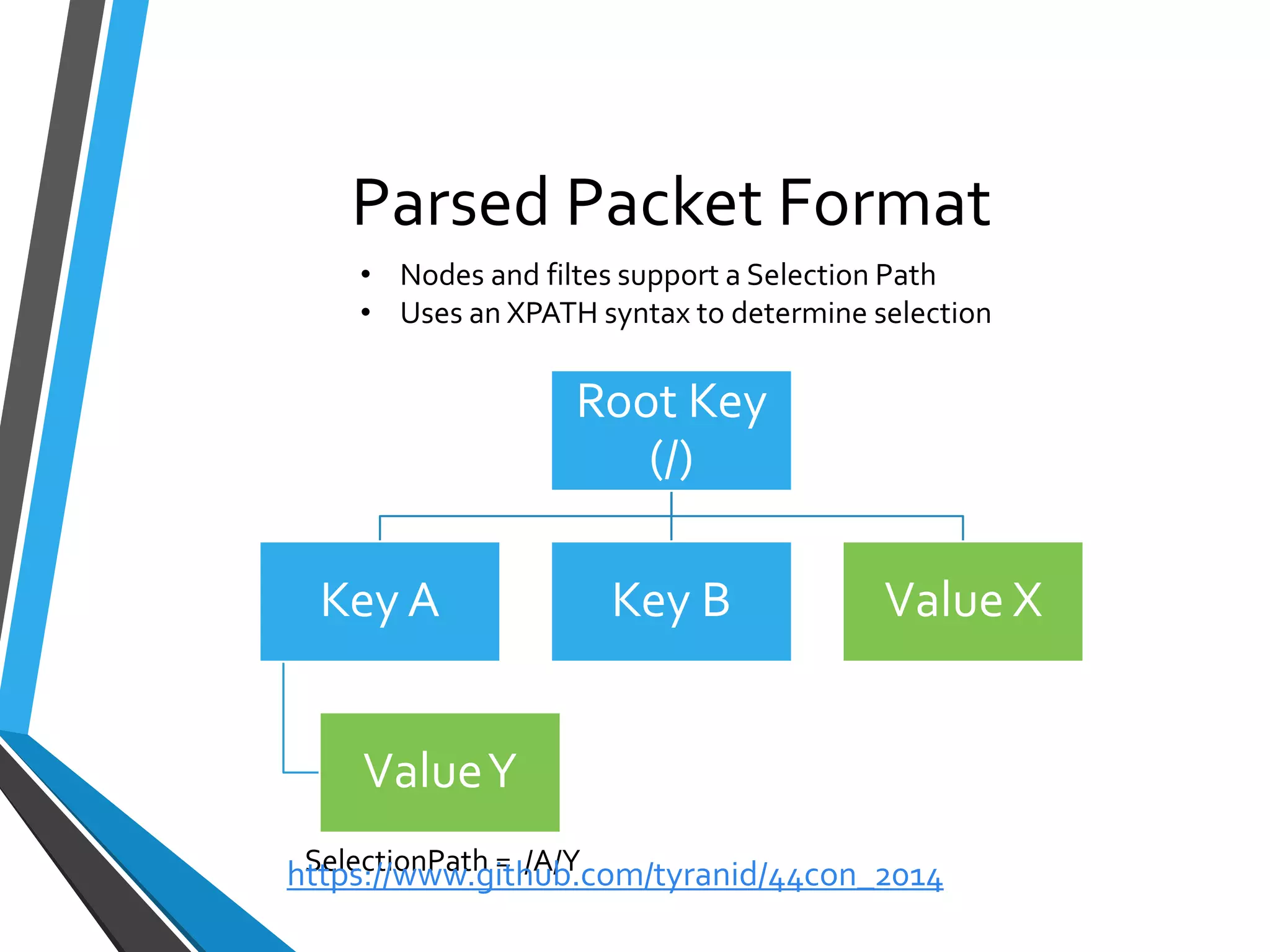
Parsed Packet Format 
Root Key (/) 
Key A 
Value Y 
Key B 
Value X 
SelectionPath= /A/Y 
•Nodes and filtessupport a Selection Path 
•Uses an XPATH syntax to determine selection 
https://www.github.com/tyranid/44con_2014
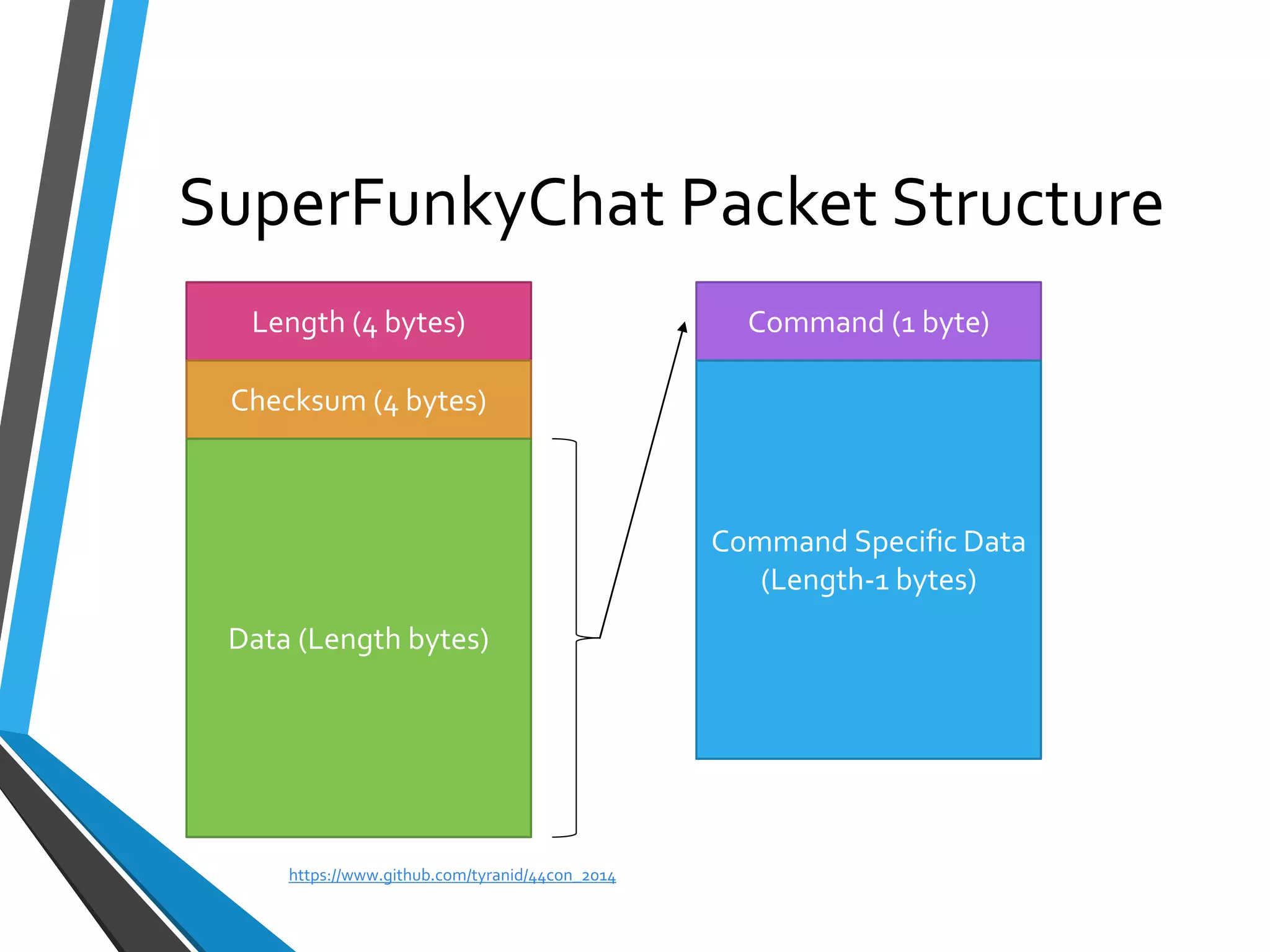
SuperFunkyChatPacket Structure 
Length (4 bytes) 
Checksum (4 bytes) 
Data (Length bytes) 
Command (1 byte) 
Command Specific Data 
(Length-1 bytes) 
https://www.github.com/tyranid/44con_2014
Workshop 6: Parser Development 
https://www.github.com/tyranid/44con_2014
Removing TLS/Layers 
•One of the most common security protocols is TLS/SSL 
•CANAPE doesn’t assume it knows better than you whether a connection is TLS or not 
•Can wrap and decrypt entire connection 
https://www.github.com/tyranid/44con_2014
Workshop 7: Remove TLS Encryption 
https://www.github.com/tyranid/44con_2014
State Modelling 
https://www.github.com/tyranid/44con_2014
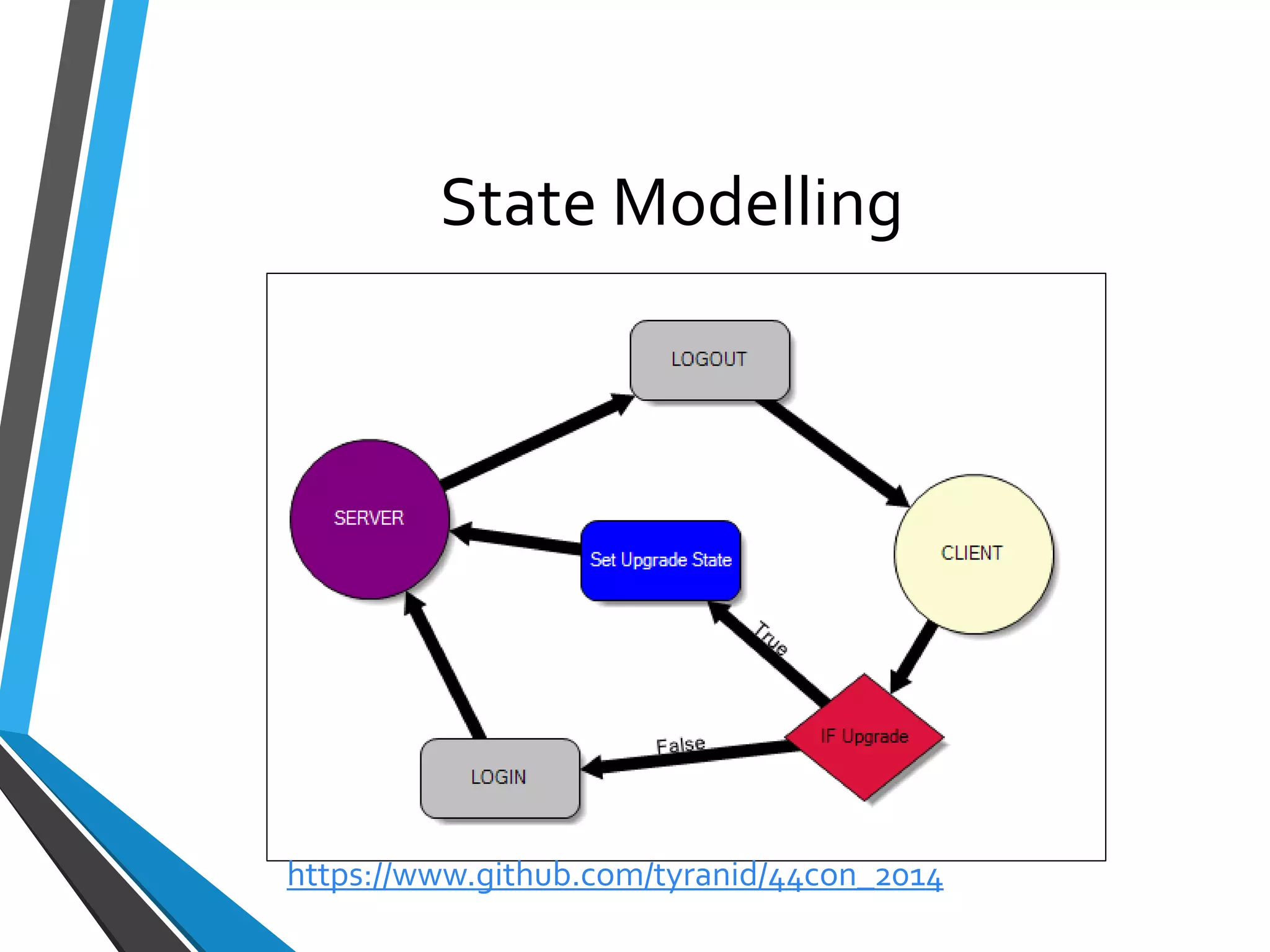
State Modelling 
•Most protocols aren’t simple streams of data 
•Need to deal with State 
•Main way of handling this in CANAPE is through the netgraphs 
•Also simpler interface using state graphs 
https://www.github.com/tyranid/44con_2014
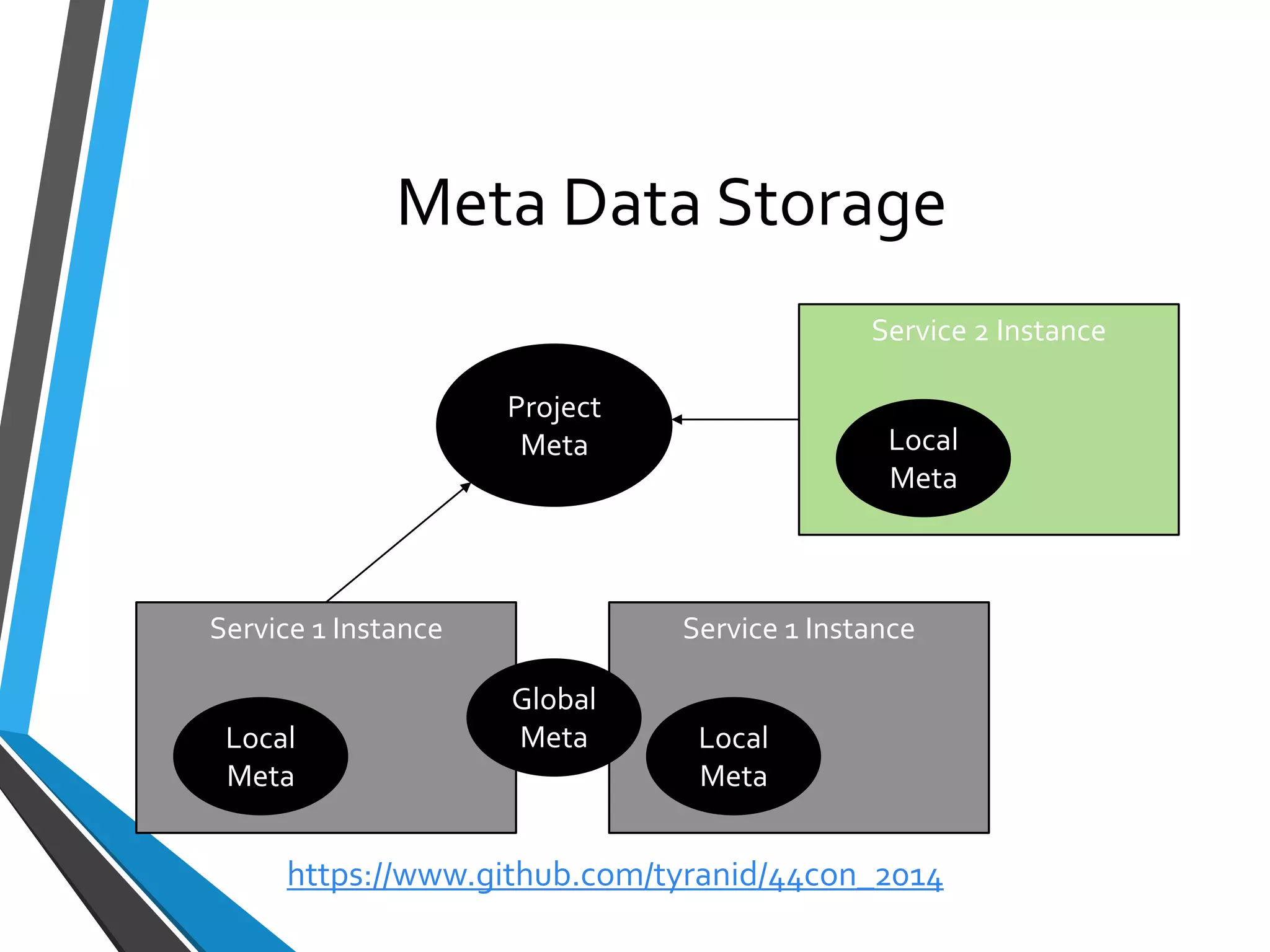
Meta Data Storage 
Service 1 Instance 
Local Meta 
Service 1 Instance 
Global Meta 
Local Meta 
Service 2 Instance 
Local Meta 
Project 
Meta 
https://www.github.com/tyranid/44con_2014
Accessing Meta Data Storage 
•Local (Graph.Meta) 
•Global (Graph.GlobalMeta) 
•Project (CANAPEProject.CurrentProject.GlobalMeta) 
•Layers (this.Meta/this.GlobalMeta) 
https://www.github.com/tyranid/44con_2014
MetaSelection 
•Already seen XPATH SelectionPath 
•Filters can also select on MetaData 
•Examples: 
•#MetaName–Select the local meta value 
•$MetaName–Select the global meta value 
https://www.github.com/tyranid/44con_2014
Workshop 8: Developing XOR Decryption 
https://www.github.com/tyranid/44con_2014
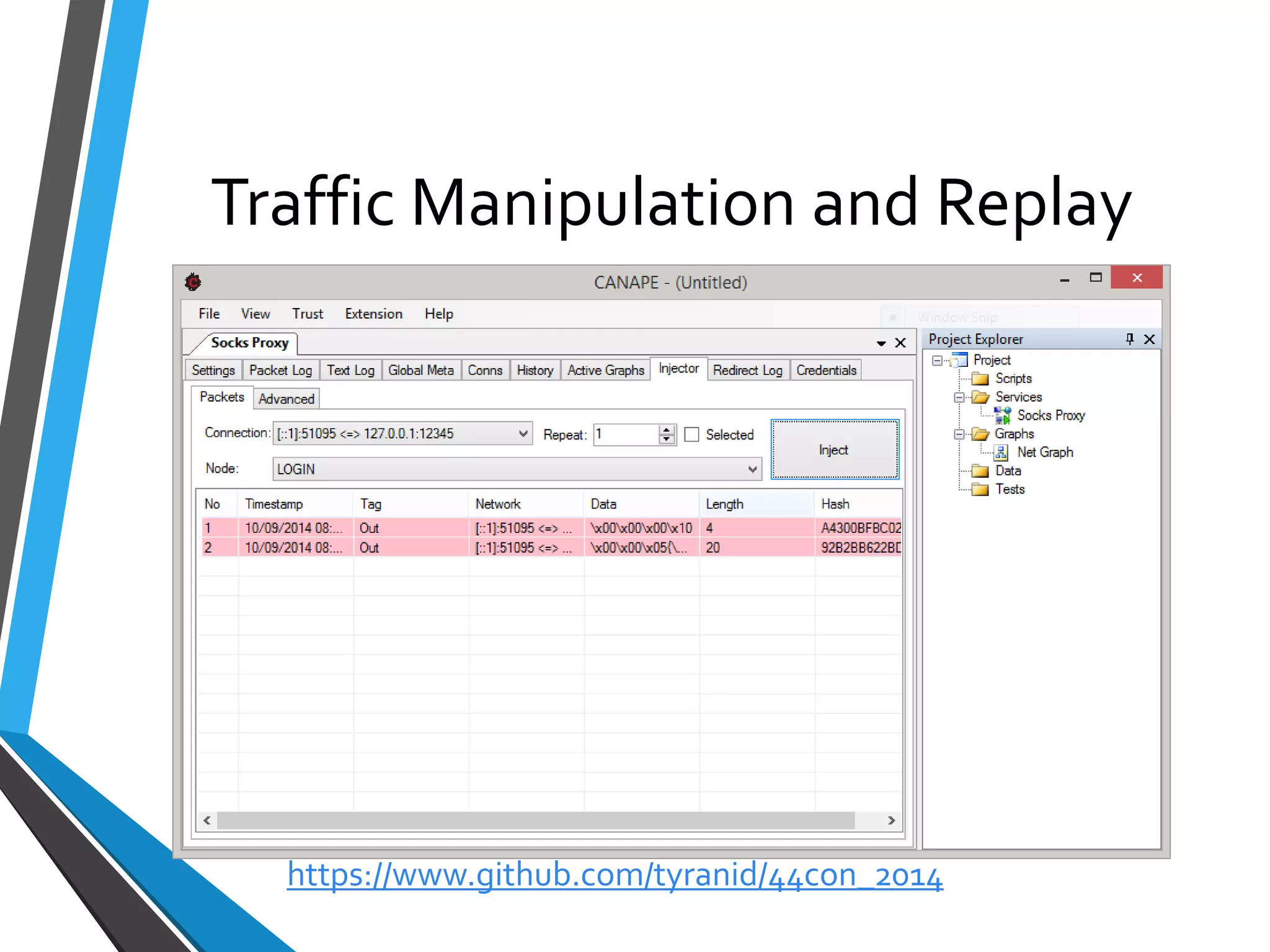
Traffic Manipulation and Replay 
https://www.github.com/tyranid/44con_2014
Dealing with Checksums 
•Up to now we’ve only looked at packets, never changed and replayed them 
•Something prevents us doing this, the checksum 
•Could write a script to fix up checksum after modification 
•Parser editor also gives some basic functions to do this for us 
https://www.github.com/tyranid/44con_2014
Expressions 
•Parser editor supports a python-like syntax expression evaluator 
•Combine with calculated values to recalculate checksum 
•Can even use python snippets: 
DoChecksum.RunMe(Command, bytes(Payload)) 
https://www.github.com/tyranid/44con_2014
Workshop 9: Packet Replay and Injection 
https://www.github.com/tyranid/44con_2014
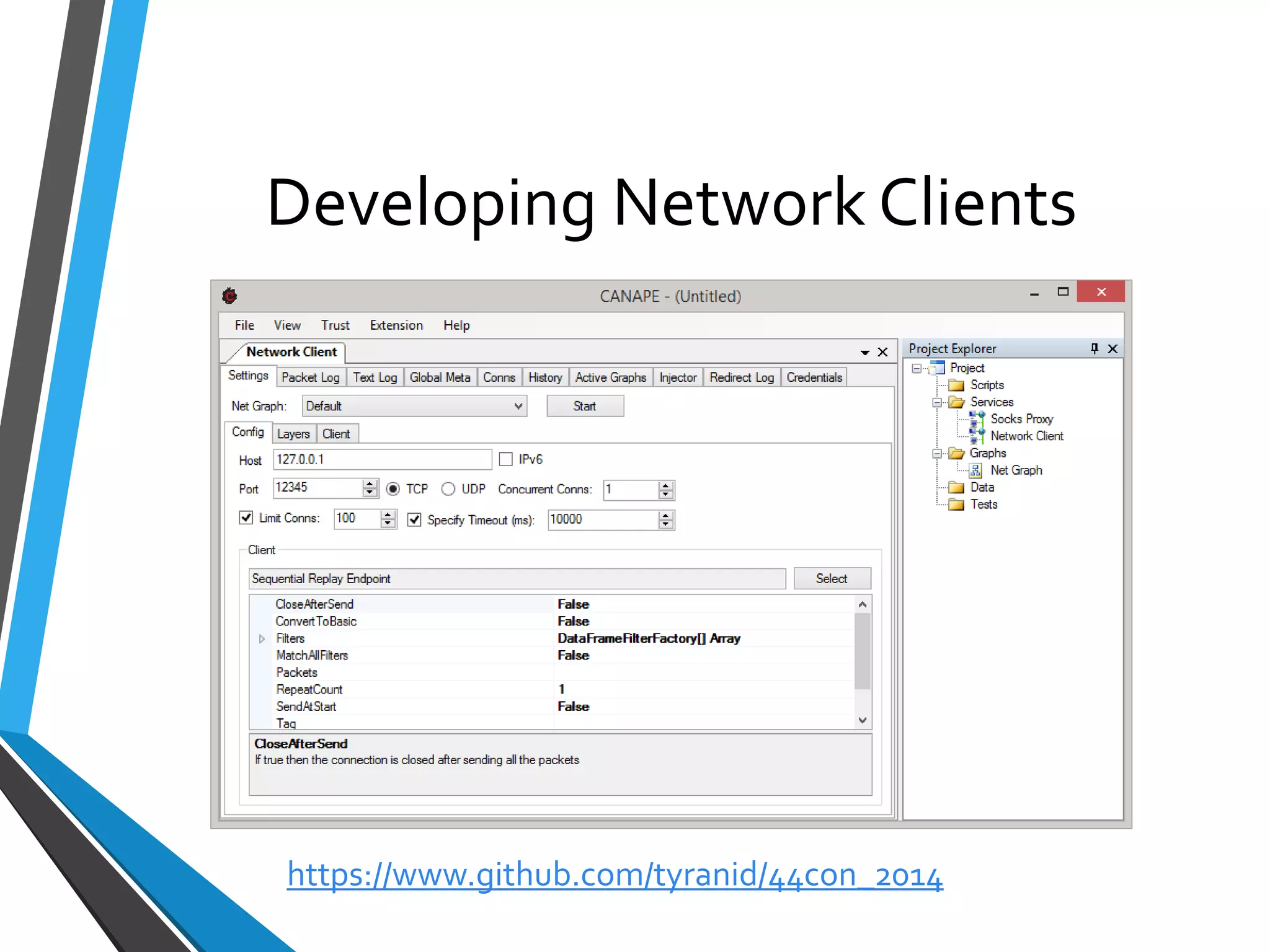
Developing Network Clients 
https://www.github.com/tyranid/44con_2014
Network Clients 
•CANAPE supports developing network clients 
•Designed to allow reuse of work developed through MitM(graphs/scripts) to be reused with the minimal of effort 
•Can be used for fuzzing or other automated tasks. 
https://www.github.com/tyranid/44con_2014
Workshop 10: Command Fuzzer 
https://www.github.com/tyranid/44con_2014
Wrap Up 
https://www.github.com/tyranid/44con_2014

44CON 2014 - Binary Protocol Analysis with CANAPE, James Forshaw

  • 1.
    Binary Protocol Analysiswith CANAPE James Forshaw
  • 2.
    Schedule 1.What isCANAPE? 2.Say Hello to SuperFunkyChat 3.Proxying and Capturing Traffic 4.NetGraphs 5.Modelling State Transitions 6.Removing SSL/Layers 7.Traffic Manipulation and Replay 8.Developing Network Clients 9.Wrap Up https://www.github.com/tyranid/44con_2014
  • 3.
    Playing Along atHome •Pre-built binaries available at: •https://www.github.com/tyranid/44con_2014 •Example projects and slides will come later ASK QUESTIONS https://www.github.com/tyranid/44con_2014
  • 4.
    What is CANAPE? •Arbitrary Network Protocol Capture Tool •Specifically designed for Binary Protocols •Windows focused (some Mono support) •Open source, GPLv3, written in C# •https://www.github.com/ctxis/canape https://www.github.com/tyranid/44con_2014
  • 5.
    What Makes CANAPEDifferent? •Number of tools to generate or fuzz network traffic •Scapy, Peach, Sulleyetc. •Takes Web Application Testing Paradigm and applies to arbitrary protocols •GUI •Easy packet manipulation •Quick feedback https://www.github.com/tyranid/44con_2014
  • 6.
    Workshop 0: QuickTour of CANAPE https://www.github.com/tyranid/44con_2014
  • 7.
    Say Hello toSuper Funky Chat!!11! https://www.github.com/tyranid/44con_2014
  • 8.
    SuperFunkyChat •Simple WindowsIM Application •Written originally as a CTF and CANAPE tutorial •Uses a binary protocol •Supports SOCKS •Has a few “Undocumented” features •Sourcecodeavailable at https://www.github.com/tyranid/SuperFunkyChat •Don’t use as a real IM system  https://www.github.com/tyranid/44con_2014
  • 9.
    Workshop 1: QuickTour of SuperFunkyChat https://www.github.com/tyranid/44con_2014
  • 10.
    Proxying and CapturingTraffic •CANAPE Supports Many Ways of Proxying Traffic: •TCP/UDP Port Forwarding •SOCKS v4/v5 Proxy •HTTP Forward and Reverse Proxies •Can develop your own extensions to support other types of networks (NamedPipes, COM ports) •Also supports Servers and Clients https://www.github.com/tyranid/44con_2014
  • 11.
    Identifying Suitable Traffic •Need to work out what traffic to capture •Reverse Engineering •Wireshark/PCAP https://www.github.com/tyranid/44con_2014
  • 12.
    Forcing Traffic ThroughCANAPE •CANAPE works at Application Level (TCP/UDP) not network •Traffic from Application needs to go through CANAPE •Proxy support •DNS redirecting •DNAT •SOCKSifyingtools (Proxifierfor example) https://www.github.com/tyranid/44con_2014
  • 13.
    Services •CANAPE insolatesyour project into a set of services. •You define a template for your service: •Data flow •State model •Dynamic content •When a new connection is made an Instance is instantiated based on the template https://www.github.com/tyranid/44con_2014
  • 14.
    Workshop 2: CapturingSuperFunkyChat https://www.github.com/tyranid/44con_2014
  • 15.
  • 16.
    NetGraphs •NetGraphsused tomode data flow and state •Specified as a directed graph •Standard graph nodes available •Can implement custom nodes in C#/IronPython https://www.github.com/tyranid/44con_2014
  • 17.
    Specifying a NetGraph Select Default Graph https://www.github.com/tyranid/44con_2014
  • 18.
    Netgraphin Service Context Client Application Server Application https://www.github.com/tyranid/44con_2014
  • 19.
    Some Standard Nodes Name Description LogNode Logspackets as they traverse the node Decision Node Performs an IF condition on packets Switch Node Selecton output based on state Edit Node Displaysa dialog to allow manual packet editing Dynamic Node Scripted content Layer Section Graphcontainer and layer processing https://www.github.com/tyranid/44con_2014
  • 20.
    Graph User Interface •Create a new graph by right clicking project explorer •Left Click to Select and Drag Nodes •Right Click to Add Nodes •Hold and Drag Middle Button to Add Edges •Can also hold left Control and use Left button •Nodes can be disabled from right click menu https://www.github.com/tyranid/44con_2014
  • 21.
  • 22.
    Node Filters •Eachnode has a Filters property •Defines match rules for what packets the node will process https://www.github.com/tyranid/44con_2014
  • 23.
    Workshop 3: Playingwith Netgraphs https://www.github.com/tyranid/44con_2014
  • 24.
  • 25.
    Packet Logging •Onlypackets which traverse a log node in a graph end up being logged (well unless you do it manually) •Affected by node filters •Can specify a number of properties: •Colour •Logged Name https://www.github.com/tyranid/44con_2014
  • 26.
    Workshop 4: PacketLogging Interface https://www.github.com/tyranid/44con_2014
  • 27.
    Packet Tools •Analysisof traffic means looking at binary data •Many different tasks: •Comparing packets and sequences of packets •Importing and exporting data •Searching https://www.github.com/tyranid/44con_2014
  • 28.
    Workshop 5: PacketTools https://www.github.com/tyranid/44con_2014
  • 29.
    Parsing Traffic •CANAPE’sdata pipeline can be scripted using C# or Python •Not necessarily easy thing to do •Parser editor to the rescue https://www.github.com/tyranid/44con_2014
  • 30.
  • 31.
    Parser Editor •Buildprotocol structure in GUI •Defines 3 types: •Sequences •Enumerations •Parsers •Supports complex expressions, TLV, sub-sequences etc. •Compiles to C# parser script, can be exported and tweaked https://www.github.com/tyranid/44con_2014
  • 32.
    Parsed Packet Format Root Key (/) Key A Value Y Key B Value X SelectionPath= /A/Y •Nodes and filtessupport a Selection Path •Uses an XPATH syntax to determine selection https://www.github.com/tyranid/44con_2014
  • 33.
    SuperFunkyChatPacket Structure Length(4 bytes) Checksum (4 bytes) Data (Length bytes) Command (1 byte) Command Specific Data (Length-1 bytes) https://www.github.com/tyranid/44con_2014
  • 34.
    Workshop 6: ParserDevelopment https://www.github.com/tyranid/44con_2014
  • 35.
    Removing TLS/Layers •Oneof the most common security protocols is TLS/SSL •CANAPE doesn’t assume it knows better than you whether a connection is TLS or not •Can wrap and decrypt entire connection https://www.github.com/tyranid/44con_2014
  • 36.
    Workshop 7: RemoveTLS Encryption https://www.github.com/tyranid/44con_2014
  • 37.
  • 38.
    State Modelling •Mostprotocols aren’t simple streams of data •Need to deal with State •Main way of handling this in CANAPE is through the netgraphs •Also simpler interface using state graphs https://www.github.com/tyranid/44con_2014
  • 39.
    Meta Data Storage Service 1 Instance Local Meta Service 1 Instance Global Meta Local Meta Service 2 Instance Local Meta Project Meta https://www.github.com/tyranid/44con_2014
  • 40.
    Accessing Meta DataStorage •Local (Graph.Meta) •Global (Graph.GlobalMeta) •Project (CANAPEProject.CurrentProject.GlobalMeta) •Layers (this.Meta/this.GlobalMeta) https://www.github.com/tyranid/44con_2014
  • 41.
    MetaSelection •Already seenXPATH SelectionPath •Filters can also select on MetaData •Examples: •#MetaName–Select the local meta value •$MetaName–Select the global meta value https://www.github.com/tyranid/44con_2014
  • 42.
    Workshop 8: DevelopingXOR Decryption https://www.github.com/tyranid/44con_2014
  • 43.
    Traffic Manipulation andReplay https://www.github.com/tyranid/44con_2014
  • 44.
    Dealing with Checksums •Up to now we’ve only looked at packets, never changed and replayed them •Something prevents us doing this, the checksum •Could write a script to fix up checksum after modification •Parser editor also gives some basic functions to do this for us https://www.github.com/tyranid/44con_2014
  • 45.
    Expressions •Parser editorsupports a python-like syntax expression evaluator •Combine with calculated values to recalculate checksum •Can even use python snippets: DoChecksum.RunMe(Command, bytes(Payload)) https://www.github.com/tyranid/44con_2014
  • 46.
    Workshop 9: PacketReplay and Injection https://www.github.com/tyranid/44con_2014
  • 47.
    Developing Network Clients https://www.github.com/tyranid/44con_2014
  • 48.
    Network Clients •CANAPEsupports developing network clients •Designed to allow reuse of work developed through MitM(graphs/scripts) to be reused with the minimal of effort •Can be used for fuzzing or other automated tasks. https://www.github.com/tyranid/44con_2014
  • 49.
    Workshop 10: CommandFuzzer https://www.github.com/tyranid/44con_2014
  • 50.