Algorithm & Flowchart
21CSC2T411: Programming in C
SIMMI S
Assistant Professor
Department Of Computer Science(UG)
Kristu Jayanti College, Autonomous
(Reaccredited A++ Grade by NAAC with CGPA 3.78/4)
Bengaluru -560077,India
Algorithm
An algorithm is a process or a set of rules required to perform calculations or
some other problem-solving operations especially by a computer.
The formal definition of an algorithm is that it contains the finite set of
instructions which are being carried in a specific order to perform the specific
task.
It is not the complete program or code; it is just a solution (logic) of a problem,
which can be represented either as an informal description using a Flowchart
or Pseudocode.
Simmi S,Department Of Computer Science
Characteristics of an Algorithm
Input: An algorithm has some input values. We can pass 0 or some input value
to an algorithm.
Output: We will get 1 or more output at the end of an algorithm.
Unambiguity: An algorithm should be unambiguous which means that the
instructions in an algorithm should be clear and simple.
Finiteness: An algorithm should have finiteness. Here, finiteness means that
the algorithm should contain a limited number of instructions, i.e., the
instructions should be countable.
Simmi S,Department Of Computer Science
Characteristics of an Algorithm
Effectiveness: An algorithm should be effective as each instruction in an
algorithm affects the overall process.
Language independent: An algorithm must be language-independent
so that the instructions in an algorithm can be implemented in any of
the languages with the same output.
Simmi S,Department Of Computer Science
Dataflow of an Algorithm
Problem: A problem can be a real-world problem or any instance from the
real-world problem for which we need to create a program or the set of
instructions. The set of instructions is known as an algorithm.
Algorithm: An algorithm will be designed for a problem which is a step by step
procedure.
Input: After designing an algorithm, the required and the desired inputs are
provided to the algorithm.
Processing unit: The input will be given to the processing unit, and the
processing unit will produce the desired output.
Output: The output is the outcome or the result of the program.
Simmi S,Department Of Computer Science
Why do we need Algorithms?
Scalability: It helps us to understand the scalability. When we have a big real-
world problem, we need to scale it down into small-small steps to easily
analyse the problem.
Performance: The real-world is not easily broken down into smaller steps. If
the problem can be easily broken into smaller steps means that the problem is
feasible.
Simmi S,Department Of Computer Science
How to write an Algorithm?
There are no well-defined standards for writing algorithms. Rather, it is
problem and resource dependent.
 Algorithms are never written to support a particular programming code.
As we know that all programming languages share basic code constructs like
loops (do, for, while), flow-control (if-else), etc. These common constructs can
be used to write an algorithm.
We write algorithms in a step-by-step manner, but it is not always the case.
 Algorithm writing is a process and is executed after the problem domain is
well-defined.
Simmi S,Department Of Computer Science
How to write an Algorithm?
Step 1: Should always start
Step n:[Last step should always stop]
If statements can be used to check conditions/Check can also be used.
To repeat steps to definite times we can use looping keywords such as for
Simmi S,Department Of Computer Science
Algorithm two add two numbers
Method 1:
Step 1: Start
Step 2:read a,b,result
Step 3:result=a+b
Step 4: display
Step 5:Stop
------------------------------------------------------------------------------------------------------------------------
Method2:
Step 1:Start
Step 2:read a=10 b=20
Step 3: result=a+b
Step 4: Display result
Step 5: Stop
Simmi S,Department Of Computer Science
Algorithm two add two numbers
Method 3:
Step 1: Start
Step 2: Declare variables num1, num2 and sum.
Step 3: Read values num1 and num2.
Step 4: sum←num1+num2
Step 5: Display sum
Step 6: Stop
Simmi S,Department Of Computer Science
Flowchart
What is a Flowchart?
Flowchart is a graphical representation of an algorithm.
 Programmers often use it as a program-planning tool to solve a problem.
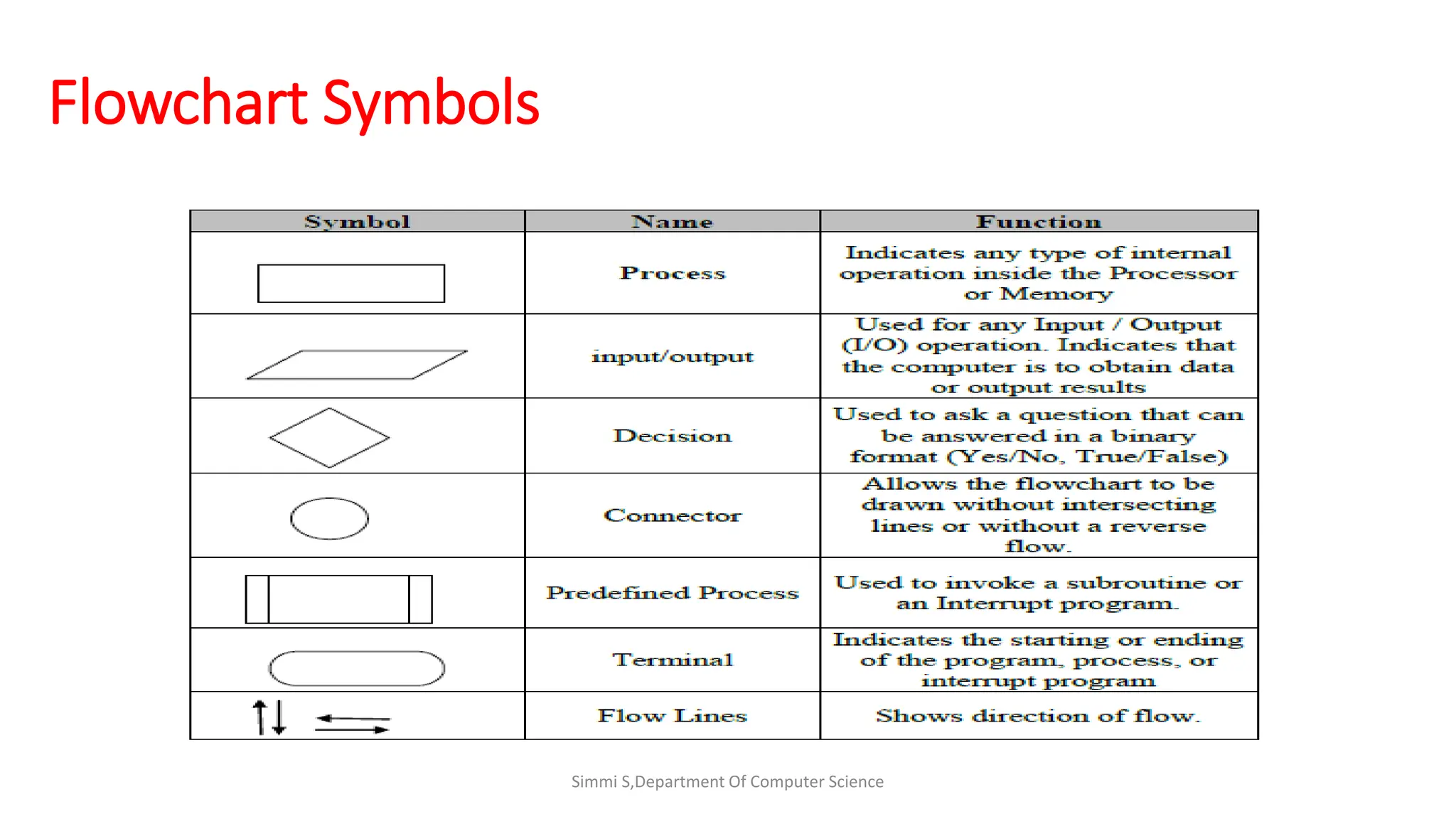
It makes use of symbols which are connected among them to indicate the
flow of information and processing.
The process of drawing a flowchart for an algorithm is known as
“flowcharting”.
Simmi S,Department Of Computer Science
Flowchart Symbols
Guidelines for Developing Flowcharts
These are some points to keep in mind while developing a flowchart −
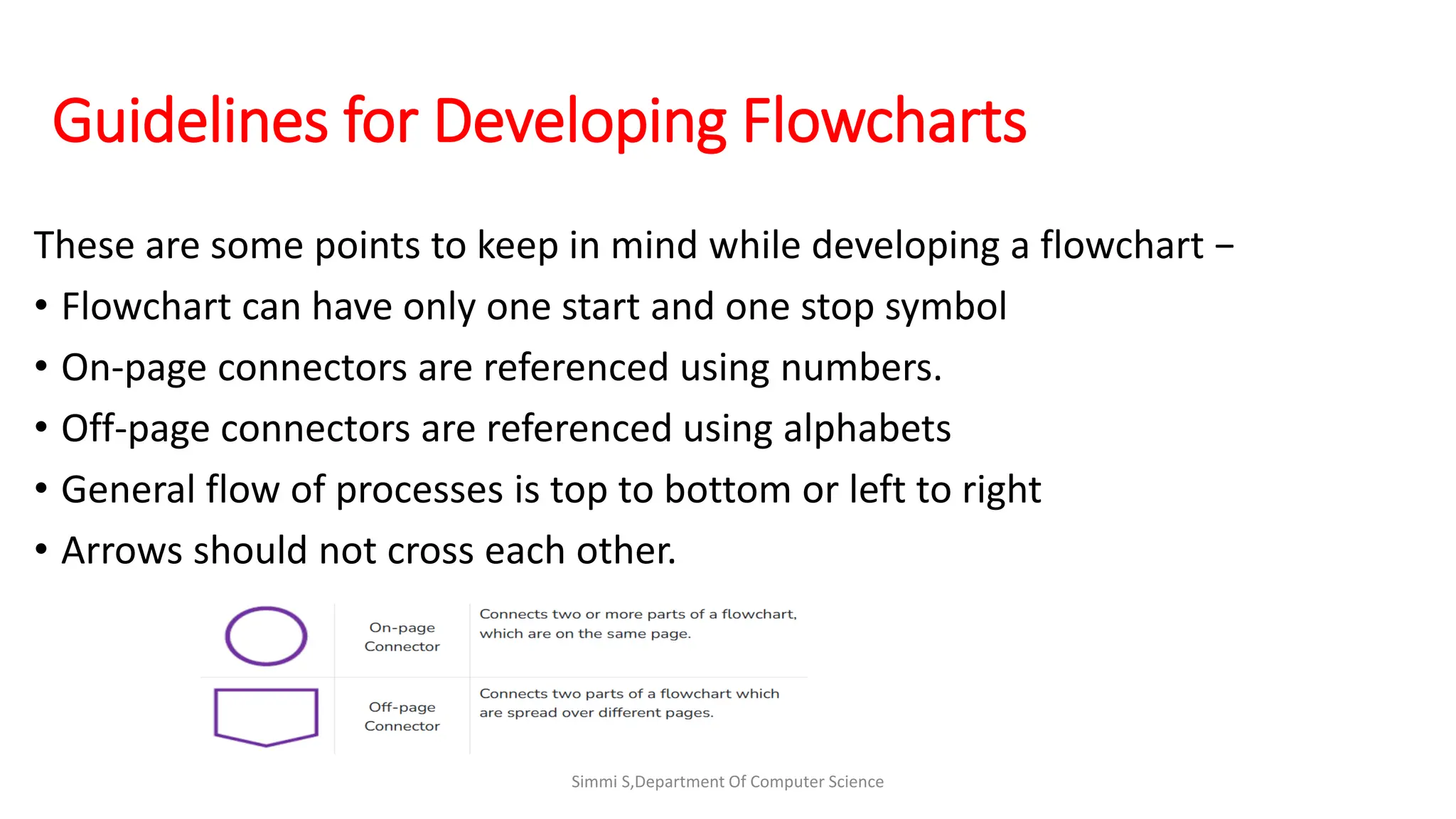
• Flowchart can have only one start and one stop symbol
• On-page connectors are referenced using numbers.
• Off-page connectors are referenced using alphabets
• General flow of processes is top to bottom or left to right
• Arrows should not cross each other.
Simmi S,Department Of Computer Science
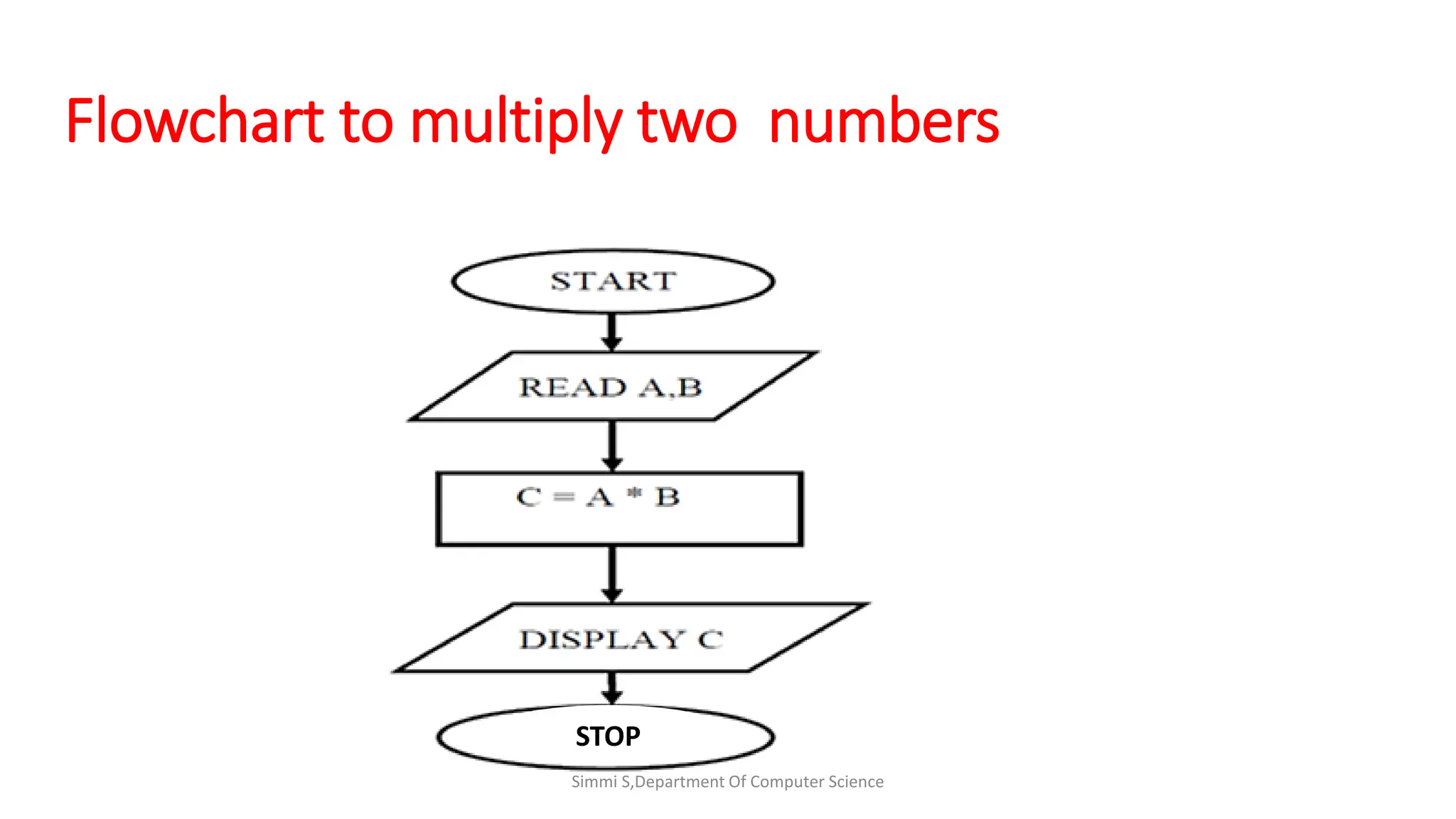
Flowchart to multiply two numbers
Simmi S,Department Of Computer Science
STOP
Simmi S,Department Of Computer Science

c_algo_flowchart.pdf

  • 1.
    Algorithm & Flowchart 21CSC2T411:Programming in C SIMMI S Assistant Professor Department Of Computer Science(UG) Kristu Jayanti College, Autonomous (Reaccredited A++ Grade by NAAC with CGPA 3.78/4) Bengaluru -560077,India
  • 2.
    Algorithm An algorithm isa process or a set of rules required to perform calculations or some other problem-solving operations especially by a computer. The formal definition of an algorithm is that it contains the finite set of instructions which are being carried in a specific order to perform the specific task. It is not the complete program or code; it is just a solution (logic) of a problem, which can be represented either as an informal description using a Flowchart or Pseudocode. Simmi S,Department Of Computer Science
  • 3.
    Characteristics of anAlgorithm Input: An algorithm has some input values. We can pass 0 or some input value to an algorithm. Output: We will get 1 or more output at the end of an algorithm. Unambiguity: An algorithm should be unambiguous which means that the instructions in an algorithm should be clear and simple. Finiteness: An algorithm should have finiteness. Here, finiteness means that the algorithm should contain a limited number of instructions, i.e., the instructions should be countable. Simmi S,Department Of Computer Science
  • 4.
    Characteristics of anAlgorithm Effectiveness: An algorithm should be effective as each instruction in an algorithm affects the overall process. Language independent: An algorithm must be language-independent so that the instructions in an algorithm can be implemented in any of the languages with the same output. Simmi S,Department Of Computer Science
  • 5.
    Dataflow of anAlgorithm Problem: A problem can be a real-world problem or any instance from the real-world problem for which we need to create a program or the set of instructions. The set of instructions is known as an algorithm. Algorithm: An algorithm will be designed for a problem which is a step by step procedure. Input: After designing an algorithm, the required and the desired inputs are provided to the algorithm. Processing unit: The input will be given to the processing unit, and the processing unit will produce the desired output. Output: The output is the outcome or the result of the program. Simmi S,Department Of Computer Science
  • 6.
    Why do weneed Algorithms? Scalability: It helps us to understand the scalability. When we have a big real- world problem, we need to scale it down into small-small steps to easily analyse the problem. Performance: The real-world is not easily broken down into smaller steps. If the problem can be easily broken into smaller steps means that the problem is feasible. Simmi S,Department Of Computer Science
  • 7.
    How to writean Algorithm? There are no well-defined standards for writing algorithms. Rather, it is problem and resource dependent.  Algorithms are never written to support a particular programming code. As we know that all programming languages share basic code constructs like loops (do, for, while), flow-control (if-else), etc. These common constructs can be used to write an algorithm. We write algorithms in a step-by-step manner, but it is not always the case.  Algorithm writing is a process and is executed after the problem domain is well-defined. Simmi S,Department Of Computer Science
  • 8.
    How to writean Algorithm? Step 1: Should always start Step n:[Last step should always stop] If statements can be used to check conditions/Check can also be used. To repeat steps to definite times we can use looping keywords such as for Simmi S,Department Of Computer Science
  • 9.
    Algorithm two addtwo numbers Method 1: Step 1: Start Step 2:read a,b,result Step 3:result=a+b Step 4: display Step 5:Stop ------------------------------------------------------------------------------------------------------------------------ Method2: Step 1:Start Step 2:read a=10 b=20 Step 3: result=a+b Step 4: Display result Step 5: Stop Simmi S,Department Of Computer Science
  • 10.
    Algorithm two addtwo numbers Method 3: Step 1: Start Step 2: Declare variables num1, num2 and sum. Step 3: Read values num1 and num2. Step 4: sum←num1+num2 Step 5: Display sum Step 6: Stop Simmi S,Department Of Computer Science
  • 11.
  • 12.
    What is aFlowchart? Flowchart is a graphical representation of an algorithm.  Programmers often use it as a program-planning tool to solve a problem. It makes use of symbols which are connected among them to indicate the flow of information and processing. The process of drawing a flowchart for an algorithm is known as “flowcharting”. Simmi S,Department Of Computer Science
  • 13.
    Simmi S,Department OfComputer Science Flowchart Symbols
  • 14.
    Guidelines for DevelopingFlowcharts These are some points to keep in mind while developing a flowchart − • Flowchart can have only one start and one stop symbol • On-page connectors are referenced using numbers. • Off-page connectors are referenced using alphabets • General flow of processes is top to bottom or left to right • Arrows should not cross each other. Simmi S,Department Of Computer Science
  • 15.
    Flowchart to multiplytwo numbers Simmi S,Department Of Computer Science STOP
  • 16.
    Simmi S,Department OfComputer Science