A Calculator Project
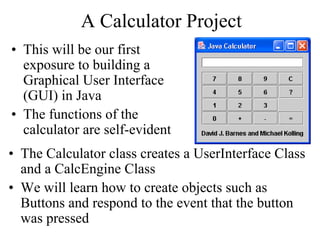
• This will be our first
exposure to building a
Graphical User Interface
(GUI) in Java
• The functions of the
calculator are self-evident
• The Calculator class creates a UserInterface Class
and a CalcEngine Class
• We will learn how to create objects such as
Buttons and respond to the event that the button
was pressed
Calculator
Class
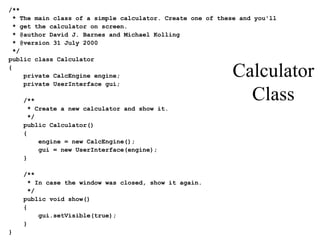
/**
* The main class of a simple calculator. Create one of these and you'll
* get the calculator on screen.
* @author David J. Barnes and Michael Kolling
* @version 31 July 2000
*/
public class Calculator
{
private CalcEngine engine;
private UserInterface gui;
/**
* Create a new calculator and show it.
*/
public Calculator()
{
engine = new CalcEngine();
gui = new UserInterface(engine);
}
/**
* In case the window was closed, show it again.
*/
public void show()
{
gui.setVisible(true);
}
}
Highlights of Building a GUI - 1
• The Layout Components
– The outer component is a Jframe
– A Jpanel has a border layout has five areas: NORTH,
EAST, SOUTH, WEST, and CENTER
– The buttons on the calculator are arranged in a 4x4
grid layout
• Objects placed in the layout
– The display of the numeric value is a JTextField
– The buttons are, not surprisingly, JButton objects
– The message at the bottom is a JLabel
Highlights of Building a GUI - 2
• Each Button has an actionListener attached to it; the
events listen for button presses
• actionPerformed uses the button label to separate out
button presses and handles each button press accordingly
• Think ahead and try to predict how each of these button
presses will be handled
– Buttons 0..9
– Buttons + and –
– The = Button
– The C (clear) button
– The ? Button
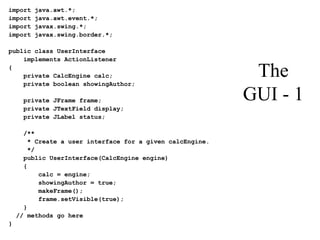
The
GUI - 1
import java.awt.*;
import java.awt.event.*;
import javax.swing.*;
import javax.swing.border.*;
public class UserInterface
implements ActionListener
{
private CalcEngine calc;
private boolean showingAuthor;
private JFrame frame;
private JTextField display;
private JLabel status;
/**
* Create a user interface for a given calcEngine.
*/
public UserInterface(CalcEngine engine)
{
calc = engine;
showingAuthor = true;
makeFrame();
frame.setVisible(true);
}
// methods go here
}
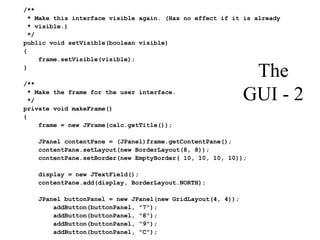
The
GUI - 2
/**
* Make this interface visible again. (Has no effect if it is already
* visible.)
*/
public void setVisible(boolean visible)
{
frame.setVisible(visible);
}
/**
* Make the frame for the user interface.
*/
private void makeFrame()
{
frame = new JFrame(calc.getTitle());
JPanel contentPane = (JPanel)frame.getContentPane();
contentPane.setLayout(new BorderLayout(8, 8));
contentPane.setBorder(new EmptyBorder( 10, 10, 10, 10));
display = new JTextField();
contentPane.add(display, BorderLayout.NORTH);
JPanel buttonPanel = new JPanel(new GridLayout(4, 4));
addButton(buttonPanel, "7");
addButton(buttonPanel, "8");
addButton(buttonPanel, "9");
addButton(buttonPanel, "C");
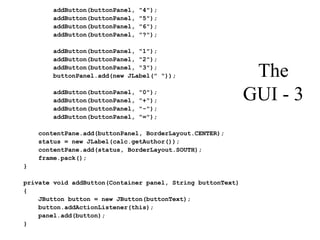
The
GUI - 3
addButton(buttonPanel, "4");
addButton(buttonPanel, "5");
addButton(buttonPanel, "6");
addButton(buttonPanel, "?");
addButton(buttonPanel, "1");
addButton(buttonPanel, "2");
addButton(buttonPanel, "3");
buttonPanel.add(new JLabel(" "));
addButton(buttonPanel, "0");
addButton(buttonPanel, "+");
addButton(buttonPanel, "-");
addButton(buttonPanel, "=");
contentPane.add(buttonPanel, BorderLayout.CENTER);
status = new JLabel(calc.getAuthor());
contentPane.add(status, BorderLayout.SOUTH);
frame.pack();
}
private void addButton(Container panel, String buttonText)
{
JButton button = new JButton(buttonText);
button.addActionListener(this);
panel.add(button);
}
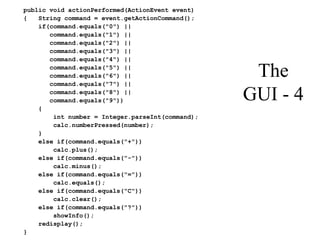
The
GUI - 4
public void actionPerformed(ActionEvent event)
{ String command = event.getActionCommand();
if(command.equals("0") ||
command.equals("1") ||
command.equals("2") ||
command.equals("3") ||
command.equals("4") ||
command.equals("5") ||
command.equals("6") ||
command.equals("7") ||
command.equals("8") ||
command.equals("9"))
{
int number = Integer.parseInt(command);
calc.numberPressed(number);
}
else if(command.equals("+"))
calc.plus();
else if(command.equals("-"))
calc.minus();
else if(command.equals("="))
calc.equals();
else if(command.equals("C"))
calc.clear();
else if(command.equals("?"))
showInfo();
redisplay();
}
The
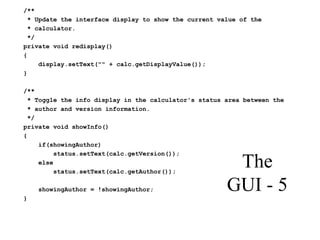
GUI - 5
/**
* Update the interface display to show the current value of the
* calculator.
*/
private void redisplay()
{
display.setText("" + calc.getDisplayValue());
}
/**
* Toggle the info display in the calculator's status area between the
* author and version information.
*/
private void showInfo()
{
if(showingAuthor)
status.setText(calc.getVersion());
else
status.setText(calc.getAuthor());
showingAuthor = !showingAuthor;
}
The Event Handlers - 1
• The model of a calculation
– Numeric operations have the form
<leftOperand> <operation> <lastOperand>
– We have to remember the leftOperand and the
operation while the lastOperand is fetched
– The value that is displayed is held in displayValue
• Now be very specific
• What happens when a digit key is pressed?
The Event Handlers – 2
• Buttons + and –
• The = button (this takes some thought)
• The C (clear) button
• A question: how is a chain calculation, such as
2 + 3 + 4 + 5 =, handled?
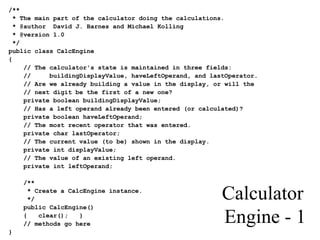
Calculator
Engine - 1
/**
* The main part of the calculator doing the calculations.
* @author David J. Barnes and Michael Kolling
* @version 1.0
*/
public class CalcEngine
{
// The calculator's state is maintained in three fields:
// buildingDisplayValue, haveLeftOperand, and lastOperator.
// Are we already building a value in the display, or will the
// next digit be the first of a new one?
private boolean buildingDisplayValue;
// Has a left operand already been entered (or calculated)?
private boolean haveLeftOperand;
// The most recent operator that was entered.
private char lastOperator;
// The current value (to be) shown in the display.
private int displayValue;
// The value of an existing left operand.
private int leftOperand;
/**
* Create a CalcEngine instance.
*/
public CalcEngine()
{ clear(); }
// methods go here
}
Calculator
Engine - 2
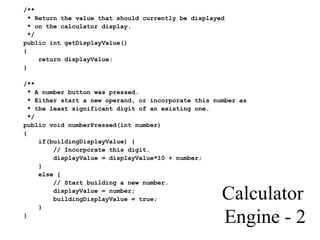
/**
* Return the value that should currently be displayed
* on the calculator display.
*/
public int getDisplayValue()
{
return displayValue;
}
/**
* A number button was pressed.
* Either start a new operand, or incorporate this number as
* the least significant digit of an existing one.
*/
public void numberPressed(int number)
{
if(buildingDisplayValue) {
// Incorporate this digit.
displayValue = displayValue*10 + number;
}
else {
// Start building a new number.
displayValue = number;
buildingDisplayValue = true;
}
}
Calculator
Engine - 3
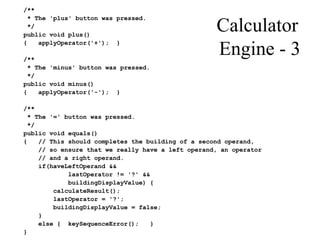
/**
* The 'plus' button was pressed.
*/
public void plus()
{ applyOperator('+'); }
/**
* The 'minus' button was pressed.
*/
public void minus()
{ applyOperator('-'); }
/**
* The '=' button was pressed.
*/
public void equals()
{ // This should completes the building of a second operand,
// so ensure that we really have a left operand, an operator
// and a right operand.
if(haveLeftOperand &&
lastOperator != '?' &&
buildingDisplayValue) {
calculateResult();
lastOperator = '?';
buildingDisplayValue = false;
}
else { keySequenceError(); }
}
Calculator
Engine - 4
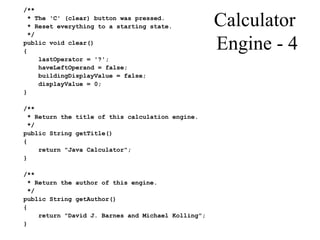
/**
* The 'C' (clear) button was pressed.
* Reset everything to a starting state.
*/
public void clear()
{
lastOperator = '?';
haveLeftOperand = false;
buildingDisplayValue = false;
displayValue = 0;
}
/**
* Return the title of this calculation engine.
*/
public String getTitle()
{
return "Java Calculator";
}
/**
* Return the author of this engine.
*/
public String getAuthor()
{
return "David J. Barnes and Michael Kolling";
}
Calculator
Engine - 5
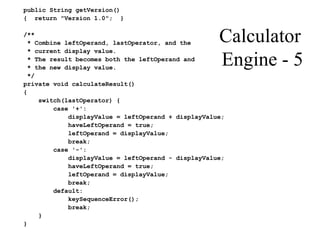
public String getVersion()
{ return "Version 1.0"; }
/**
* Combine leftOperand, lastOperator, and the
* current display value.
* The result becomes both the leftOperand and
* the new display value.
*/
private void calculateResult()
{
switch(lastOperator) {
case '+':
displayValue = leftOperand + displayValue;
haveLeftOperand = true;
leftOperand = displayValue;
break;
case '-':
displayValue = leftOperand - displayValue;
haveLeftOperand = true;
leftOperand = displayValue;
break;
default:
keySequenceError();
break;
}
}
Calculator
Engine - 6
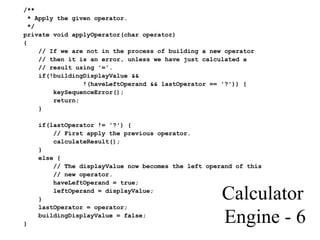
/**
* Apply the given operator.
*/
private void applyOperator(char operator)
{
// If we are not in the process of building a new operator
// then it is an error, unless we have just calculated a
// result using '='.
if(!buildingDisplayValue &&
!(haveLeftOperand && lastOperator == '?')) {
keySequenceError();
return;
}
if(lastOperator != '?') {
// First apply the previous operator.
calculateResult();
}
else {
// The displayValue now becomes the left operand of this
// new operator.
haveLeftOperand = true;
leftOperand = displayValue;
}
lastOperator = operator;
buildingDisplayValue = false;
}
Calculator
Engine –
7
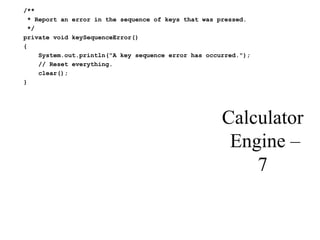
/**
* Report an error in the sequence of keys that was pressed.
*/
private void keySequenceError()
{
System.out.println("A key sequence error has occurred.");
// Reset everything.
clear();
}
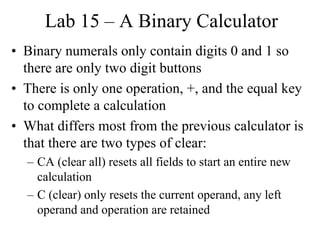
Lab 15 – A Binary Calculator
• Binary numerals only contain digits 0 and 1 so
there are only two digit buttons
• There is only one operation, +, and the equal key
to complete a calculation
• What differs most from the previous calculator is
that there are two types of clear:
– CA (clear all) resets all fields to start an entire new
calculation
– C (clear) only resets the current operand, any left
operand and operation are retained
Binary Addition
• The basic operations
0 + 0 = 0, 0 + 1 = 1, 1 + 0 = 1,
1 + 1 = 10 this mean 0 and carry 1 to the left
• Examples, with the decimal values at the right
1 0 1 1 0 1 (45)
+ 1 0 1 1 0 (22)
1 0 0 0 0 1 1 (67)
1 1 1 1 1 1 (63)
+ 1 1 1 1 1 (31)
1 0 1 1 1 1 0 (94)

CalculatorProject.pdf

  • 1.
    A Calculator Project •This will be our first exposure to building a Graphical User Interface (GUI) in Java • The functions of the calculator are self-evident • The Calculator class creates a UserInterface Class and a CalcEngine Class • We will learn how to create objects such as Buttons and respond to the event that the button was pressed
  • 2.
    Calculator Class /** * The mainclass of a simple calculator. Create one of these and you'll * get the calculator on screen. * @author David J. Barnes and Michael Kolling * @version 31 July 2000 */ public class Calculator { private CalcEngine engine; private UserInterface gui; /** * Create a new calculator and show it. */ public Calculator() { engine = new CalcEngine(); gui = new UserInterface(engine); } /** * In case the window was closed, show it again. */ public void show() { gui.setVisible(true); } }
  • 3.
    Highlights of Buildinga GUI - 1 • The Layout Components – The outer component is a Jframe – A Jpanel has a border layout has five areas: NORTH, EAST, SOUTH, WEST, and CENTER – The buttons on the calculator are arranged in a 4x4 grid layout • Objects placed in the layout – The display of the numeric value is a JTextField – The buttons are, not surprisingly, JButton objects – The message at the bottom is a JLabel
  • 4.
    Highlights of Buildinga GUI - 2 • Each Button has an actionListener attached to it; the events listen for button presses • actionPerformed uses the button label to separate out button presses and handles each button press accordingly • Think ahead and try to predict how each of these button presses will be handled – Buttons 0..9 – Buttons + and – – The = Button – The C (clear) button – The ? Button
  • 5.
    The GUI - 1 importjava.awt.*; import java.awt.event.*; import javax.swing.*; import javax.swing.border.*; public class UserInterface implements ActionListener { private CalcEngine calc; private boolean showingAuthor; private JFrame frame; private JTextField display; private JLabel status; /** * Create a user interface for a given calcEngine. */ public UserInterface(CalcEngine engine) { calc = engine; showingAuthor = true; makeFrame(); frame.setVisible(true); } // methods go here }
  • 6.
    The GUI - 2 /** *Make this interface visible again. (Has no effect if it is already * visible.) */ public void setVisible(boolean visible) { frame.setVisible(visible); } /** * Make the frame for the user interface. */ private void makeFrame() { frame = new JFrame(calc.getTitle()); JPanel contentPane = (JPanel)frame.getContentPane(); contentPane.setLayout(new BorderLayout(8, 8)); contentPane.setBorder(new EmptyBorder( 10, 10, 10, 10)); display = new JTextField(); contentPane.add(display, BorderLayout.NORTH); JPanel buttonPanel = new JPanel(new GridLayout(4, 4)); addButton(buttonPanel, "7"); addButton(buttonPanel, "8"); addButton(buttonPanel, "9"); addButton(buttonPanel, "C");
  • 7.
    The GUI - 3 addButton(buttonPanel,"4"); addButton(buttonPanel, "5"); addButton(buttonPanel, "6"); addButton(buttonPanel, "?"); addButton(buttonPanel, "1"); addButton(buttonPanel, "2"); addButton(buttonPanel, "3"); buttonPanel.add(new JLabel(" ")); addButton(buttonPanel, "0"); addButton(buttonPanel, "+"); addButton(buttonPanel, "-"); addButton(buttonPanel, "="); contentPane.add(buttonPanel, BorderLayout.CENTER); status = new JLabel(calc.getAuthor()); contentPane.add(status, BorderLayout.SOUTH); frame.pack(); } private void addButton(Container panel, String buttonText) { JButton button = new JButton(buttonText); button.addActionListener(this); panel.add(button); }
  • 8.
    The GUI - 4 publicvoid actionPerformed(ActionEvent event) { String command = event.getActionCommand(); if(command.equals("0") || command.equals("1") || command.equals("2") || command.equals("3") || command.equals("4") || command.equals("5") || command.equals("6") || command.equals("7") || command.equals("8") || command.equals("9")) { int number = Integer.parseInt(command); calc.numberPressed(number); } else if(command.equals("+")) calc.plus(); else if(command.equals("-")) calc.minus(); else if(command.equals("=")) calc.equals(); else if(command.equals("C")) calc.clear(); else if(command.equals("?")) showInfo(); redisplay(); }
  • 9.
    The GUI - 5 /** *Update the interface display to show the current value of the * calculator. */ private void redisplay() { display.setText("" + calc.getDisplayValue()); } /** * Toggle the info display in the calculator's status area between the * author and version information. */ private void showInfo() { if(showingAuthor) status.setText(calc.getVersion()); else status.setText(calc.getAuthor()); showingAuthor = !showingAuthor; }
  • 10.
    The Event Handlers- 1 • The model of a calculation – Numeric operations have the form <leftOperand> <operation> <lastOperand> – We have to remember the leftOperand and the operation while the lastOperand is fetched – The value that is displayed is held in displayValue • Now be very specific • What happens when a digit key is pressed?
  • 11.
    The Event Handlers– 2 • Buttons + and – • The = button (this takes some thought) • The C (clear) button • A question: how is a chain calculation, such as 2 + 3 + 4 + 5 =, handled?
  • 12.
    Calculator Engine - 1 /** *The main part of the calculator doing the calculations. * @author David J. Barnes and Michael Kolling * @version 1.0 */ public class CalcEngine { // The calculator's state is maintained in three fields: // buildingDisplayValue, haveLeftOperand, and lastOperator. // Are we already building a value in the display, or will the // next digit be the first of a new one? private boolean buildingDisplayValue; // Has a left operand already been entered (or calculated)? private boolean haveLeftOperand; // The most recent operator that was entered. private char lastOperator; // The current value (to be) shown in the display. private int displayValue; // The value of an existing left operand. private int leftOperand; /** * Create a CalcEngine instance. */ public CalcEngine() { clear(); } // methods go here }
  • 13.
    Calculator Engine - 2 /** *Return the value that should currently be displayed * on the calculator display. */ public int getDisplayValue() { return displayValue; } /** * A number button was pressed. * Either start a new operand, or incorporate this number as * the least significant digit of an existing one. */ public void numberPressed(int number) { if(buildingDisplayValue) { // Incorporate this digit. displayValue = displayValue*10 + number; } else { // Start building a new number. displayValue = number; buildingDisplayValue = true; } }
  • 14.
    Calculator Engine - 3 /** *The 'plus' button was pressed. */ public void plus() { applyOperator('+'); } /** * The 'minus' button was pressed. */ public void minus() { applyOperator('-'); } /** * The '=' button was pressed. */ public void equals() { // This should completes the building of a second operand, // so ensure that we really have a left operand, an operator // and a right operand. if(haveLeftOperand && lastOperator != '?' && buildingDisplayValue) { calculateResult(); lastOperator = '?'; buildingDisplayValue = false; } else { keySequenceError(); } }
  • 15.
    Calculator Engine - 4 /** *The 'C' (clear) button was pressed. * Reset everything to a starting state. */ public void clear() { lastOperator = '?'; haveLeftOperand = false; buildingDisplayValue = false; displayValue = 0; } /** * Return the title of this calculation engine. */ public String getTitle() { return "Java Calculator"; } /** * Return the author of this engine. */ public String getAuthor() { return "David J. Barnes and Michael Kolling"; }
  • 16.
    Calculator Engine - 5 publicString getVersion() { return "Version 1.0"; } /** * Combine leftOperand, lastOperator, and the * current display value. * The result becomes both the leftOperand and * the new display value. */ private void calculateResult() { switch(lastOperator) { case '+': displayValue = leftOperand + displayValue; haveLeftOperand = true; leftOperand = displayValue; break; case '-': displayValue = leftOperand - displayValue; haveLeftOperand = true; leftOperand = displayValue; break; default: keySequenceError(); break; } }
  • 17.
    Calculator Engine - 6 /** *Apply the given operator. */ private void applyOperator(char operator) { // If we are not in the process of building a new operator // then it is an error, unless we have just calculated a // result using '='. if(!buildingDisplayValue && !(haveLeftOperand && lastOperator == '?')) { keySequenceError(); return; } if(lastOperator != '?') { // First apply the previous operator. calculateResult(); } else { // The displayValue now becomes the left operand of this // new operator. haveLeftOperand = true; leftOperand = displayValue; } lastOperator = operator; buildingDisplayValue = false; }
  • 18.
    Calculator Engine – 7 /** * Reportan error in the sequence of keys that was pressed. */ private void keySequenceError() { System.out.println("A key sequence error has occurred."); // Reset everything. clear(); }
  • 19.
    Lab 15 –A Binary Calculator • Binary numerals only contain digits 0 and 1 so there are only two digit buttons • There is only one operation, +, and the equal key to complete a calculation • What differs most from the previous calculator is that there are two types of clear: – CA (clear all) resets all fields to start an entire new calculation – C (clear) only resets the current operand, any left operand and operation are retained
  • 20.
    Binary Addition • Thebasic operations 0 + 0 = 0, 0 + 1 = 1, 1 + 0 = 1, 1 + 1 = 10 this mean 0 and carry 1 to the left • Examples, with the decimal values at the right 1 0 1 1 0 1 (45) + 1 0 1 1 0 (22) 1 0 0 0 0 1 1 (67) 1 1 1 1 1 1 (63) + 1 1 1 1 1 (31) 1 0 1 1 1 1 0 (94)