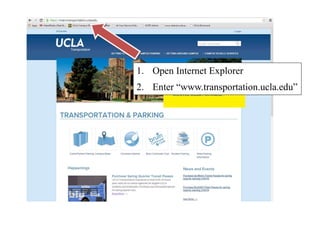
1. Open Internet Explorer
2. Enter “www.transportation.ucla.edu”
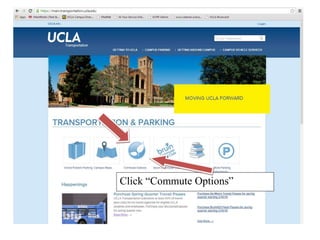
Click “Commute Options”
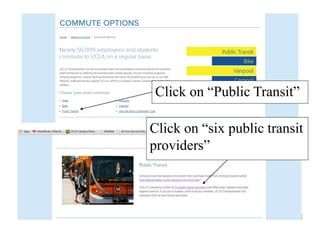
Click on “Public Transit”
Click on “six public transit
providers”
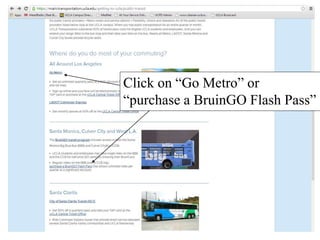
Click on “Go Metro” or
“purchase a BruinGO Flash Pass”
Instructions for BruinGO! Flash
Pass ONLY!
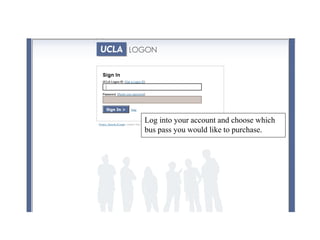
Log into your account and choose which
bus pass you would like to purchase.
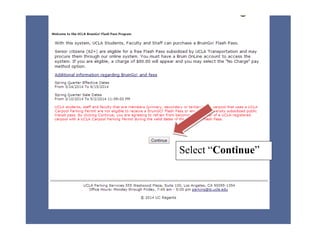
Select “Continue”
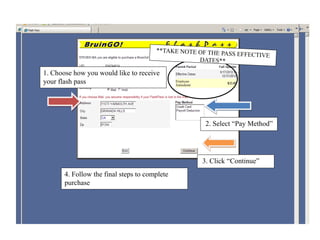
4. Follow the final steps to complete
purchase
1. Choose how you would like to receive
your flash pass
2. Select “Pay Method”
3. Click “Continue”
Instructions for GO METRO TAP
CARDS ONLY!
Log into your account and choose which bus
pass you would like to purchase.
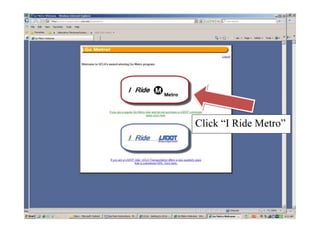
Click “I Ride Metro”
Select “Continue”
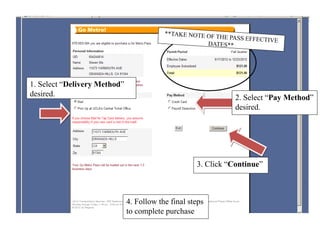
1. Select “Delivery Method”
desired. 2. Select “Pay Method”
desired.
3. Click “Continue”
4. Follow the final steps
to complete purchase
Instructions for getting a UCLA
LogOn ID
If you do not have a BruinID, you may
create one by clicking “Get a Logon ID
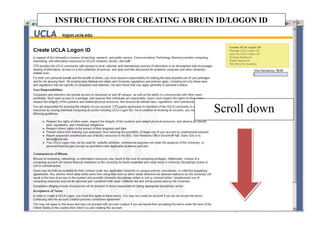
Scroll down
INSTRUCTIONS FOR CREATING A BRUIN ID/LOGON ID
1. Click box to agree to the
“Acceptable Use Policy”
2Click “Next”
1. Select UCLA Faculty
Member or Staff Member
2. Then, click “Next”
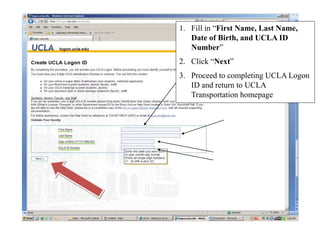
1. Fill in “First Name, Last Name,
Date of Birth, and UCLA ID
Number”
2. Click “Next”
3. Proceed to completing UCLA Logon
ID and return to UCLA
Transportation homepage

Bus pass instructions