Unlimited Powerful Learning
PRESENTED BY : Corporate Trainer
Mallikarjuna G D
gdmallikarjuna@gmail.com
Unlimited Powerful Learning
 FRONTEND TECHNOLOGIES
 BACKEND TECHNOLOGIES
CONTENTS
Unlimited Powerful Learning
FRONTEND
Unlimited Powerful Learning
Every website has two parts:
Front end
This is the part that you see in web browser and interact with all the aspects.
Ex: Looking your favorite product in shopping website and adding, ordering the same.
Back end
This is the part that controls the front end which is behind the scenes.
Storing data's in database and proving to front end
Ex: all the products which you see in shopping cart site are stored in database and accessed to display in front end
Web development jobs comes under three main categories
• Front end development
• Back end development
• Full stack development (both front and back end)
FRONTEND
Unlimited Powerful Learning
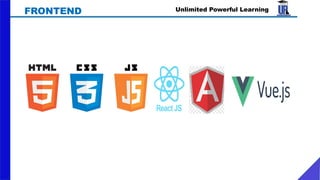
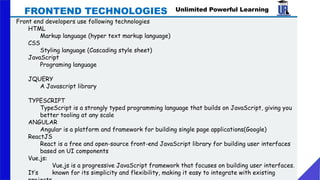
Front end developers use following technologies
HTML
Markup language (hyper text markup language)
CSS
Styling language (Cascading style sheet)
JavaScript
Programing language
JQUERY
A Javascript library
TYPESCRIPT
TypeScript is a strongly typed programming language that builds on JavaScript, giving you
better tooling at any scale
ANGULAR
Angular is a platform and framework for building single page applications(Google)
ReactJS
React is a free and open-source front-end JavaScript library for building user interfaces
based on UI components
Vue.js:
Vue.js is a progressive JavaScript framework that focuses on building user interfaces.
It’s known for its simplicity and flexibility, making it easy to integrate with existing
FRONTEND TECHNOLOGIES
Unlimited Powerful Learning
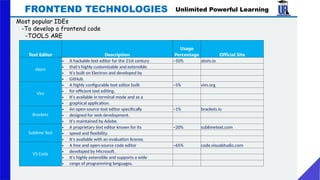
Most popular IDEs
-To develop a frontend code
-TOOLS ARE
FRONTEND TECHNOLOGIES
Text Editor Description
Usage
Percentage Official Site
Atom
• A hackable text editor for the 21st century ~10% atom.io
• that's highly customizable and extensible.
• It's built on Electron and developed by
• GitHub.
Vim
• A highly configurable text editor built ~5% vim.org
• for efficient text editing.
• It's available in terminal mode and as a
• graphical application.
Brackets
• An open-source text editor specifically ~1% brackets.io
• designed for web development.
• It's maintained by Adobe.
Sublime Text
• A proprietary text editor known for its ~20% sublimetext.com
• speed and flexibility.
• It's available with an evaluation license.
VS Code
• A free and open-source code editor ~65% code.visualstudio.com
• developed by Microsoft.
• It's highly extensible and supports a wide
• range of programming languages.
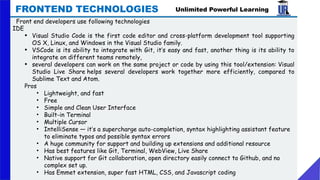
IDE
• Visual Studio Code is the first code editor and cross-platform development tool supporting
OS X, Linux, and Windows in the Visual Studio family.
• VSCode is its ability to integrate with Git, it’s easy and fast, another thing is its ability to
integrate on different teams remotely,
• several developers can work on the same project or code by using this tool/extension: Visual
Studio Live Share helps several developers work together more efficiently, compared to
Sublime Text and Atom.
Pros
• Lightweight, and fast
• Free
• Simple and Clean User Interface
• Built-in Terminal
• Multiple Cursor
• IntelliSense — it’s a supercharge auto-completion, syntax highlighting assistant feature
to eliminate typos and possible syntax errors
• A huge community for support and building up extensions and additional resource
• Has best features like Git, Terminal, WebView, Live Share
• Native support for Git collaboration, open directory easily connect to Github, and no
complex set up.
• Has Emmet extension, super fast HTML, CSS, and Javascript coding
Unlimited Powerful Learning
Front end developers use following technologies
FRONTEND TECHNOLOGIES
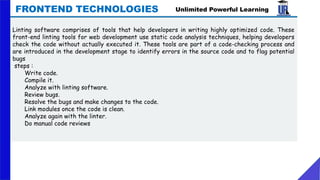
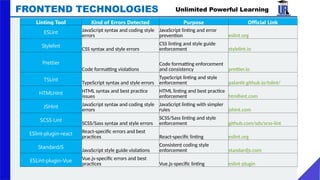
Linting software comprises of tools that help developers in writing highly optimized code. These
front-end linting tools for web development use static code analysis techniques, helping developers
check the code without actually executed it. These tools are part of a code-checking process and
are introduced in the development stage to identify errors in the source code and to flag potential
bugs
steps :
Write code.
Compile it.
Analyze with linting software.
Review bugs.
Resolve the bugs and make changes to the code.
Link modules once the code is clean.
Analyze again with the linter.
Do manual code reviews
Unlimited Powerful Learning
FRONTEND TECHNOLOGIES
Unlimited Powerful Learning
FRONTEND TECHNOLOGIES
Linting Tool Kind of Errors Detected Purpose Official Link
ESLint JavaScript syntax and coding style
errors
JavaScript linting and error
prevention eslint.org
Stylelint
CSS syntax and style errors
CSS linting and style guide
enforcement stylelint.io
Prettier
Code formatting violations
Code formatting enforcement
and consistency prettier.io
TSLint
TypeScript syntax and style errors
TypeScript linting and style
enforcement palantir.github.io/tslint/
HTMLHint HTML syntax and best practice
issues
HTML linting and best practice
enforcement htmlhint.com
JSHint JavaScript syntax and coding style
errors
JavaScript linting with simpler
rules jshint.com
SCSS Lint
SCSS/Sass syntax and style errors
SCSS/Sass linting and style
enforcement github.com/sds/scss-lint
ESlint-plugin-react React-specific errors and best
practices React-specific linting eslint.org
StandardJS
JavaScript style guide violations
Consistent coding style
enforcement standardjs.com
ESLint-plugin-Vue Vue.js-specific errors and best
practices Vue.js-specific linting eslint-plugin
Unlimited Powerful Learning
FRONTEND TECHNOLOGIES
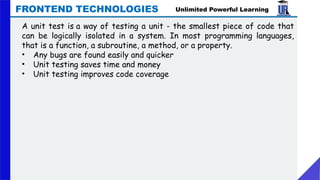
A unit test is a way of testing a unit - the smallest piece of code that
can be logically isolated in a system. In most programming languages,
that is a function, a subroutine, a method, or a property.
• Any bugs are found easily and quicker
• Unit testing saves time and money
• Unit testing improves code coverage
Unlimited Powerful Learning
FRONTEND TECHNOLOGIES
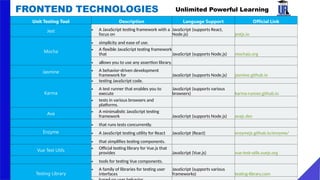
Unit Testing Tool Description Language Support Official Link
Jest • A JavaScript testing framework with a
focus on
JavaScript (supports React,
Node.js) jestjs.io
Mocha
• simplicity and ease of use.
• A flexible JavaScript testing framework
that JavaScript (supports Node.js) mochajs.org
• allows you to use any assertion library.
Jasmine • A behavior-driven development
framework for JavaScript (supports Node.js) jasmine.github.io
Karma
• testing JavaScript code.
• A test runner that enables you to
execute
JavaScript (supports various
browsers) karma-runner.github.io
• tests in various browsers and
platforms.
Ava • A minimalistic JavaScript testing
framework JavaScript (supports Node.js) avajs.dev
• that runs tests concurrently.
Enzyme • A JavaScript testing utility for React JavaScript (React) enzymejs.github.io/enzyme/
• that simplifies testing components.
Vue Test Utils • Official testing library for Vue.js that
provides JavaScript (Vue.js) vue-test-utils.vuejs.org
• tools for testing Vue components.
Testing Library
• A family of libraries for testing user
interfaces
JavaScript (supports various
frameworks) testing-library.com
Unlimited Powerful Learning
FRONTEND TECHNOLOGIES
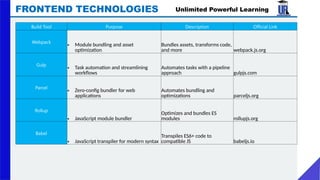
Build Tool Purpose Description Official Link
Webpack
• Module bundling and asset
optimization
Bundles assets, transforms code,
and more webpack.js.org
Gulp
• Task automation and streamlining
workflows
Automates tasks with a pipeline
approach gulpjs.com
Parcel
• Zero-config bundler for web
applications
Automates bundling and
optimizations parceljs.org
Rollup
• JavaScript module bundler
Optimizes and bundles ES
modules rollupjs.org
Babel
• JavaScript transpiler for modern syntax
Transpiles ES6+ code to
compatible JS babeljs.io
Unlimited Powerful Learning
FRONTEND TECHNOLOGIES
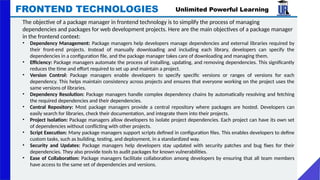
The objective of a package manager in frontend technology is to simplify the process of managing
dependencies and packages for web development projects. Here are the main objectives of a package manager
in the frontend context:
• Dependency Management: Package managers help developers manage dependencies and external libraries required by
their front-end projects. Instead of manually downloading and including each library, developers can specify the
dependencies in a configuration file, and the package manager takes care of downloading and managing them.
• Efficiency: Package managers automate the process of installing, updating, and removing dependencies. This significantly
reduces the time and effort required to set up and maintain a project.
• Version Control: Package managers enable developers to specify specific versions or ranges of versions for each
dependency. This helps maintain consistency across projects and ensures that everyone working on the project uses the
same versions of libraries.
• Dependency Resolution: Package managers handle complex dependency chains by automatically resolving and fetching
the required dependencies and their dependencies.
• Central Repository: Most package managers provide a central repository where packages are hosted. Developers can
easily search for libraries, check their documentation, and integrate them into their projects.
• Project Isolation: Package managers allow developers to isolate project dependencies. Each project can have its own set
of dependencies without conflicting with other projects.
• Script Execution: Many package managers support scripts defined in configuration files. This enables developers to define
custom tasks, such as building, testing, and deployment, in a standardized way.
• Security and Updates: Package managers help developers stay updated with security patches and bug fixes for their
dependencies. They also provide tools to audit packages for known vulnerabilities.
• Ease of Collaboration: Package managers facilitate collaboration among developers by ensuring that all team members
have access to the same set of dependencies and versions.
Unlimited Powerful Learning
FRONTEND TECHNOLOGIES
Package
Manager
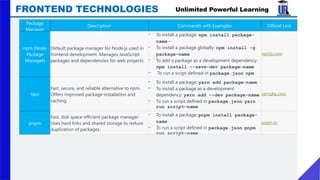
Description Commands with Examples Official Link
npm (Node
Package
Manager)
Default package manager for Node.js used in
frontend development. Manages JavaScript
packages and dependencies for web projects.
- To install a package: npm install package-
name –
- To install a package globally: npm install -g
package-name
- To add a package as a development dependency:
npm install --save-dev package-name
- To run a script defined in package.json: npm
run script-name
npmjs.com
Yarn
Fast, secure, and reliable alternative to npm.
Offers improved package installation and
caching.
- To install a package: yarn add package-name
- To install a package as a development
dependency: yarn add --dev package-name
- To run a script defined in package.json: yarn
run script-name
yarnpkg.com
pnpm
Fast, disk space-efficient package manager.
Uses hard links and shared storage to reduce
duplication of packages.
- To install a package: pnpm install package-
name
- To run a script defined in package.json: pnpm
run script-name
pnpm.io
Unlimited Powerful Learning
BACKEND
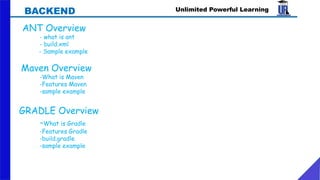
AANT Overview
- what is ant
- build.xml
- Sample example
Maven Overview
-What is Maven
-Features Maven
-sample example
GRADLE Overview
-What is Gradle
-Features Gradle
-build.gradle
-sample example
Unlimited Powerful Learning
Overview
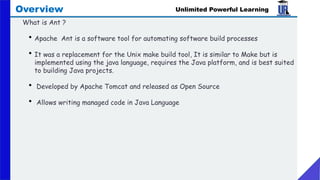
What is Ant ?
• Apache Ant is a software tool for automating software build processes
• It was a replacement for the Unix make build tool, It is similar to Make but is
implemented using the java language, requires the Java platform, and is best suited
to building Java projects.
• Developed by Apache Tomcat and released as Open Source
• Allows writing managed code in Java Language
Unlimited Powerful Learning
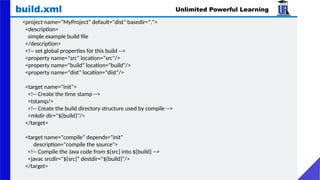
build.xml
<project name="MyProject" default="dist" basedir=".">
<description>
simple example build file
</description>
<!-- set global properties for this build -->
<property name="src" location="src"/>
<property name="build" location="build"/>
<property name="dist" location="dist"/>
<target name="init">
<!-- Create the time stamp -->
<tstamp/>
<!-- Create the build directory structure used by compile -->
<mkdir dir="${build}"/>
</target>
<target name="compile" depends="init"
description="compile the source">
<!-- Compile the Java code from ${src} into ${build} -->
<javac srcdir="${src}" destdir="${build}"/>
</target>
Unlimited Powerful Learning
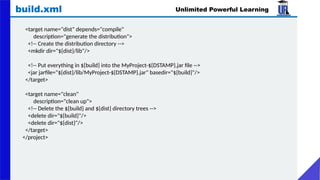
build.xml
<target name="dist" depends="compile"
description="generate the distribution">
<!-- Create the distribution directory -->
<mkdir dir="${dist}/lib"/>
<!-- Put everything in ${build} into the MyProject-${DSTAMP}.jar file -->
<jar jarfile="${dist}/lib/MyProject-${DSTAMP}.jar" basedir="${build}"/>
</target>
<target name="clean"
description="clean up">
<!-- Delete the ${build} and ${dist} directory trees -->
<delete dir="${build}"/>
<delete dir="${dist}"/>
</target>
</project>
Unlimited Powerful Learning
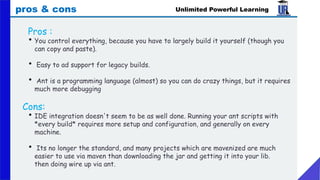
pros & cons
Pros :
• You control everything, because you have to largely build it yourself (though you
can copy and paste).
• Easy to ad support for legacy builds.
• Ant is a programming language (almost) so you can do crazy things, but it requires
much more debugging
Cons:
• IDE integration doesn't seem to be as well done. Running your ant scripts with
*every build* requires more setup and configuration, and generally on every
machine.
• Its no longer the standard, and many projects which are mavenized are much
easier to use via maven than downloading the jar and getting it into your lib.
then doing wire up via ant.
Unlimited Powerful Learning
Overview
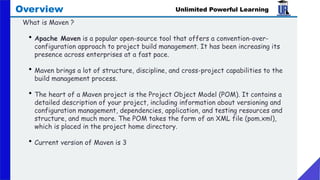
What is Maven ?
• Apache Maven is a popular open-source tool that offers a convention-over-
configuration approach to project build management. It has been increasing its
presence across enterprises at a fast pace.
• Maven brings a lot of structure, discipline, and cross-project capabilities to the
build management process.
• The heart of a Maven project is the Project Object Model (POM). It contains a
detailed description of your project, including information about versioning and
configuration management, dependencies, application, and testing resources and
structure, and much more. The POM takes the form of an XML file (pom.xml),
which is placed in the project home directory.
• Current version of Maven is 3
Unlimited Powerful Learning
Overview
Understanding the problem without Maven
There are many problems that we face during the project development. They are
discussed below:
• Adding a set of Jars in each project: In the case of struts, spring, and hibernate frameworks, we
need to add a set of jar files in each project. It must include all the dependencies of jars also.
• Creating the right project structure: We must create the right project structure in servlet, struts,
etc, otherwise it will not be executed.
• Building and Deploying the project: We must have to build and deploy the project so that it may work.
• Extensible, with the ability to easily write plugins in Java or scripting languages
• One of the highlights of Maven is Transitive Dependency Management. You do not have to declare
each and every JAR that will be needed, directly or indirectly, by your application. You just tell Maven
which libraries you need, and Maven will take care of the libraries that your libraries need.
• Model-based builds: Maven is able to build any number of projects into predefined output types such as
a JAR, WAR, or distribution based on metadata about the project, without the need to do any scripting
in most cases.
Unlimited Powerful Learning
Overview
Features of Maven
• Simple project setup that follows best practices - get a new project or module
started in seconds
• Consistent usage across all projects means no ramp up time for new developers
coming onto a project
• Able to easily work with multiple projects at the same time
• A large and growing repository of libraries and metadata to use out of the box, and
arrangements in place with the largest Open Source projects for real-time
availability of their latest releases
• Extensible, with the ability to easily write plugins in Java or scripting languages
Unlimited Powerful Learning
Overview
Standard Maven lifecycle phases:
• Validate
• Runs a sanity check on the project itself.
• Compile
• Compiles the project source code.
• Test
• Runs the unit tests (typically using JUnit) .
• Package
• Packages the compiled code in its distributable format (JAR, WAR, etc.).
• Verify
• Run checks to confirm that the package is valid.
• Install
• Installs the package into the local repository for use as a dependency in other projects on your local
machine.
• Deploy
• Done in an integration or release environment, copies the final package to the remote repository for
sharing with other developers and projects.
• All dependencies are downloaded automatically;
• All compile/build/dependency info is bundled with your maven spec, and therefore
forced to be in source control with your code. (this is a huge plus)
• Drastically simplifies the way your build will work, because every build follows a
generally standard procedure.
• Every member of your team will be building/deploying in the same way with every
compile.
• Turning on new features (such as junit) across the board for things like CI/CD can be
as easy as one line in your maven config file.
Unlimited Powerful Learning
Overview
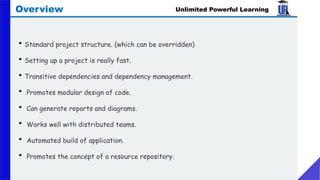
PROS
• Standard project structure. (which can be overridden)
• Setting up a project is really fast.
• Transitive dependencies and dependency management.
• Promotes modular design of code.
• Can generate reports and diagrams.
• Works well with distributed teams.
• Automated build of application.
• Promotes the concept of a resource repository.
Unlimited Powerful Learning
Overview
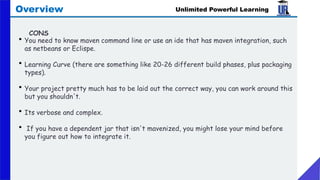
• You need to know maven command line or use an ide that has maven integration, such
as netbeans or Eclispe.
• Learning Curve (there are something like 20-26 different build phases, plus packaging
types).
• Your project pretty much has to be laid out the correct way, you can work around this
but you shouldn't.
• Its verbose and complex.
• If you have a dependent jar that isn't mavenized, you might lose your mind before
you figure out how to integrate it.
Unlimited Powerful Learning
Overview
CONS
• .
Unlimited Powerful Learning
Overview
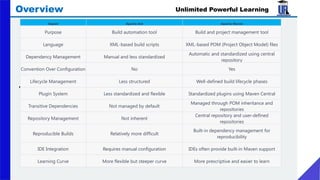
Aspect Apache Ant Apache Maven
Purpose Build automation tool Build and project management tool
Language XML-based build scripts XML-based POM (Project Object Model) files
Dependency Management Manual and less standardized
Automatic and standardized using central
repository
Convention Over Configuration No Yes
Lifecycle Management Less structured Well-defined build lifecycle phases
Plugin System Less standardized and flexible Standardized plugins using Maven Central
Transitive Dependencies Not managed by default
Managed through POM inheritance and
repositories
Repository Management Not inherent
Central repository and user-defined
repositories
Reproducible Builds Relatively more difficult
Built-in dependency management for
reproducibility
IDE Integration Requires manual configuration IDEs often provide built-in Maven support
Learning Curve More flexible but steeper curve More prescriptive and easier to learn
Unlimited Powerful Learning
Overview
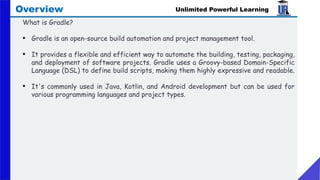
What is Gradle?
• Gradle is an open-source build automation and project management tool.
• It provides a flexible and efficient way to automate the building, testing, packaging,
and deployment of software projects. Gradle uses a Groovy-based Domain-Specific
Language (DSL) to define build scripts, making them highly expressive and readable.
• It's commonly used in Java, Kotlin, and Android development but can be used for
various programming languages and project types.
Unlimited Powerful Learning
Overview
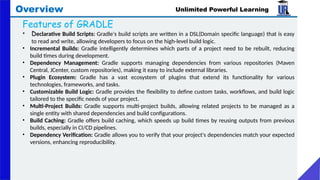
Features of GRADLE
• Declarative Build Scripts: Gradle's build scripts are written in a DSL(Domain specific language) that is easy
to read and write, allowing developers to focus on the high-level build logic.
• Incremental Builds: Gradle intelligently determines which parts of a project need to be rebuilt, reducing
build times during development.
• Dependency Management: Gradle supports managing dependencies from various repositories (Maven
Central, JCenter, custom repositories), making it easy to include external libraries.
• Plugin Ecosystem: Gradle has a vast ecosystem of plugins that extend its functionality for various
technologies, frameworks, and tasks.
• Customizable Build Logic: Gradle provides the flexibility to define custom tasks, workflows, and build logic
tailored to the specific needs of your project.
• Multi-Project Builds: Gradle supports multi-project builds, allowing related projects to be managed as a
single entity with shared dependencies and build configurations.
• Build Caching: Gradle offers build caching, which speeds up build times by reusing outputs from previous
builds, especially in CI/CD pipelines.
• Dependency Verification: Gradle allows you to verify that your project's dependencies match your expected
versions, enhancing reproducibility.
Unlimited Powerful Learning
Overview
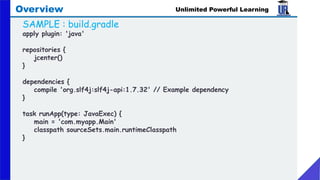
SAMPLE : build.gradle
apply plugin: 'java'
repositories {
jcenter()
}
dependencies {
compile 'org.slf4j:slf4j-api:1.7.32' // Example dependency
}
task runApp(type: JavaExec) {
main = 'com.myapp.Main'
classpath sourceSets.main.runtimeClasspath
}
• .
Unlimited Powerful Learning
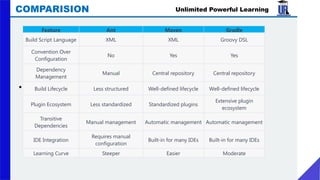
COMPARISION
Feature Ant Maven Gradle
Build Script Language XML XML Groovy DSL
Convention Over
Configuration
No Yes Yes
Dependency
Management
Manual Central repository Central repository
Build Lifecycle Less structured Well-defined lifecycle Well-defined lifecycle
Plugin Ecosystem Less standardized Standardized plugins
Extensive plugin
ecosystem
Transitive
Dependencies
Manual management Automatic management Automatic management
IDE Integration
Requires manual
configuration
Built-in for many IDEs Built-in for many IDEs
Learning Curve Steeper Easier Moderate
Buildmanagment tools mavenandgradle.pptx

Buildmanagment tools mavenandgradle.pptx

  • 1.
    Unlimited Powerful Learning PRESENTEDBY : Corporate Trainer Mallikarjuna G D gdmallikarjuna@gmail.com
  • 2.
    Unlimited Powerful Learning FRONTEND TECHNOLOGIES  BACKEND TECHNOLOGIES CONTENTS
  • 3.
  • 4.
    Unlimited Powerful Learning Everywebsite has two parts: Front end This is the part that you see in web browser and interact with all the aspects. Ex: Looking your favorite product in shopping website and adding, ordering the same. Back end This is the part that controls the front end which is behind the scenes. Storing data's in database and proving to front end Ex: all the products which you see in shopping cart site are stored in database and accessed to display in front end Web development jobs comes under three main categories • Front end development • Back end development • Full stack development (both front and back end) FRONTEND
  • 5.
    Unlimited Powerful Learning Frontend developers use following technologies HTML Markup language (hyper text markup language) CSS Styling language (Cascading style sheet) JavaScript Programing language JQUERY A Javascript library TYPESCRIPT TypeScript is a strongly typed programming language that builds on JavaScript, giving you better tooling at any scale ANGULAR Angular is a platform and framework for building single page applications(Google) ReactJS React is a free and open-source front-end JavaScript library for building user interfaces based on UI components Vue.js: Vue.js is a progressive JavaScript framework that focuses on building user interfaces. It’s known for its simplicity and flexibility, making it easy to integrate with existing FRONTEND TECHNOLOGIES
  • 6.
    Unlimited Powerful Learning Mostpopular IDEs -To develop a frontend code -TOOLS ARE FRONTEND TECHNOLOGIES Text Editor Description Usage Percentage Official Site Atom • A hackable text editor for the 21st century ~10% atom.io • that's highly customizable and extensible. • It's built on Electron and developed by • GitHub. Vim • A highly configurable text editor built ~5% vim.org • for efficient text editing. • It's available in terminal mode and as a • graphical application. Brackets • An open-source text editor specifically ~1% brackets.io • designed for web development. • It's maintained by Adobe. Sublime Text • A proprietary text editor known for its ~20% sublimetext.com • speed and flexibility. • It's available with an evaluation license. VS Code • A free and open-source code editor ~65% code.visualstudio.com • developed by Microsoft. • It's highly extensible and supports a wide • range of programming languages.
  • 7.
    IDE • Visual StudioCode is the first code editor and cross-platform development tool supporting OS X, Linux, and Windows in the Visual Studio family. • VSCode is its ability to integrate with Git, it’s easy and fast, another thing is its ability to integrate on different teams remotely, • several developers can work on the same project or code by using this tool/extension: Visual Studio Live Share helps several developers work together more efficiently, compared to Sublime Text and Atom. Pros • Lightweight, and fast • Free • Simple and Clean User Interface • Built-in Terminal • Multiple Cursor • IntelliSense — it’s a supercharge auto-completion, syntax highlighting assistant feature to eliminate typos and possible syntax errors • A huge community for support and building up extensions and additional resource • Has best features like Git, Terminal, WebView, Live Share • Native support for Git collaboration, open directory easily connect to Github, and no complex set up. • Has Emmet extension, super fast HTML, CSS, and Javascript coding Unlimited Powerful Learning Front end developers use following technologies FRONTEND TECHNOLOGIES
  • 8.
    Linting software comprisesof tools that help developers in writing highly optimized code. These front-end linting tools for web development use static code analysis techniques, helping developers check the code without actually executed it. These tools are part of a code-checking process and are introduced in the development stage to identify errors in the source code and to flag potential bugs steps : Write code. Compile it. Analyze with linting software. Review bugs. Resolve the bugs and make changes to the code. Link modules once the code is clean. Analyze again with the linter. Do manual code reviews Unlimited Powerful Learning FRONTEND TECHNOLOGIES
  • 9.
    Unlimited Powerful Learning FRONTENDTECHNOLOGIES Linting Tool Kind of Errors Detected Purpose Official Link ESLint JavaScript syntax and coding style errors JavaScript linting and error prevention eslint.org Stylelint CSS syntax and style errors CSS linting and style guide enforcement stylelint.io Prettier Code formatting violations Code formatting enforcement and consistency prettier.io TSLint TypeScript syntax and style errors TypeScript linting and style enforcement palantir.github.io/tslint/ HTMLHint HTML syntax and best practice issues HTML linting and best practice enforcement htmlhint.com JSHint JavaScript syntax and coding style errors JavaScript linting with simpler rules jshint.com SCSS Lint SCSS/Sass syntax and style errors SCSS/Sass linting and style enforcement github.com/sds/scss-lint ESlint-plugin-react React-specific errors and best practices React-specific linting eslint.org StandardJS JavaScript style guide violations Consistent coding style enforcement standardjs.com ESLint-plugin-Vue Vue.js-specific errors and best practices Vue.js-specific linting eslint-plugin
  • 10.
    Unlimited Powerful Learning FRONTENDTECHNOLOGIES A unit test is a way of testing a unit - the smallest piece of code that can be logically isolated in a system. In most programming languages, that is a function, a subroutine, a method, or a property. • Any bugs are found easily and quicker • Unit testing saves time and money • Unit testing improves code coverage
  • 11.
    Unlimited Powerful Learning FRONTENDTECHNOLOGIES Unit Testing Tool Description Language Support Official Link Jest • A JavaScript testing framework with a focus on JavaScript (supports React, Node.js) jestjs.io Mocha • simplicity and ease of use. • A flexible JavaScript testing framework that JavaScript (supports Node.js) mochajs.org • allows you to use any assertion library. Jasmine • A behavior-driven development framework for JavaScript (supports Node.js) jasmine.github.io Karma • testing JavaScript code. • A test runner that enables you to execute JavaScript (supports various browsers) karma-runner.github.io • tests in various browsers and platforms. Ava • A minimalistic JavaScript testing framework JavaScript (supports Node.js) avajs.dev • that runs tests concurrently. Enzyme • A JavaScript testing utility for React JavaScript (React) enzymejs.github.io/enzyme/ • that simplifies testing components. Vue Test Utils • Official testing library for Vue.js that provides JavaScript (Vue.js) vue-test-utils.vuejs.org • tools for testing Vue components. Testing Library • A family of libraries for testing user interfaces JavaScript (supports various frameworks) testing-library.com
  • 12.
    Unlimited Powerful Learning FRONTENDTECHNOLOGIES Build Tool Purpose Description Official Link Webpack • Module bundling and asset optimization Bundles assets, transforms code, and more webpack.js.org Gulp • Task automation and streamlining workflows Automates tasks with a pipeline approach gulpjs.com Parcel • Zero-config bundler for web applications Automates bundling and optimizations parceljs.org Rollup • JavaScript module bundler Optimizes and bundles ES modules rollupjs.org Babel • JavaScript transpiler for modern syntax Transpiles ES6+ code to compatible JS babeljs.io
  • 13.
    Unlimited Powerful Learning FRONTENDTECHNOLOGIES The objective of a package manager in frontend technology is to simplify the process of managing dependencies and packages for web development projects. Here are the main objectives of a package manager in the frontend context: • Dependency Management: Package managers help developers manage dependencies and external libraries required by their front-end projects. Instead of manually downloading and including each library, developers can specify the dependencies in a configuration file, and the package manager takes care of downloading and managing them. • Efficiency: Package managers automate the process of installing, updating, and removing dependencies. This significantly reduces the time and effort required to set up and maintain a project. • Version Control: Package managers enable developers to specify specific versions or ranges of versions for each dependency. This helps maintain consistency across projects and ensures that everyone working on the project uses the same versions of libraries. • Dependency Resolution: Package managers handle complex dependency chains by automatically resolving and fetching the required dependencies and their dependencies. • Central Repository: Most package managers provide a central repository where packages are hosted. Developers can easily search for libraries, check their documentation, and integrate them into their projects. • Project Isolation: Package managers allow developers to isolate project dependencies. Each project can have its own set of dependencies without conflicting with other projects. • Script Execution: Many package managers support scripts defined in configuration files. This enables developers to define custom tasks, such as building, testing, and deployment, in a standardized way. • Security and Updates: Package managers help developers stay updated with security patches and bug fixes for their dependencies. They also provide tools to audit packages for known vulnerabilities. • Ease of Collaboration: Package managers facilitate collaboration among developers by ensuring that all team members have access to the same set of dependencies and versions.
  • 14.
    Unlimited Powerful Learning FRONTENDTECHNOLOGIES Package Manager Description Commands with Examples Official Link npm (Node Package Manager) Default package manager for Node.js used in frontend development. Manages JavaScript packages and dependencies for web projects. - To install a package: npm install package- name – - To install a package globally: npm install -g package-name - To add a package as a development dependency: npm install --save-dev package-name - To run a script defined in package.json: npm run script-name npmjs.com Yarn Fast, secure, and reliable alternative to npm. Offers improved package installation and caching. - To install a package: yarn add package-name - To install a package as a development dependency: yarn add --dev package-name - To run a script defined in package.json: yarn run script-name yarnpkg.com pnpm Fast, disk space-efficient package manager. Uses hard links and shared storage to reduce duplication of packages. - To install a package: pnpm install package- name - To run a script defined in package.json: pnpm run script-name pnpm.io
  • 15.
    Unlimited Powerful Learning BACKEND AANTOverview - what is ant - build.xml - Sample example Maven Overview -What is Maven -Features Maven -sample example GRADLE Overview -What is Gradle -Features Gradle -build.gradle -sample example
  • 16.
    Unlimited Powerful Learning Overview Whatis Ant ? • Apache Ant is a software tool for automating software build processes • It was a replacement for the Unix make build tool, It is similar to Make but is implemented using the java language, requires the Java platform, and is best suited to building Java projects. • Developed by Apache Tomcat and released as Open Source • Allows writing managed code in Java Language
  • 17.
    Unlimited Powerful Learning build.xml <projectname="MyProject" default="dist" basedir="."> <description> simple example build file </description> <!-- set global properties for this build --> <property name="src" location="src"/> <property name="build" location="build"/> <property name="dist" location="dist"/> <target name="init"> <!-- Create the time stamp --> <tstamp/> <!-- Create the build directory structure used by compile --> <mkdir dir="${build}"/> </target> <target name="compile" depends="init" description="compile the source"> <!-- Compile the Java code from ${src} into ${build} --> <javac srcdir="${src}" destdir="${build}"/> </target>
  • 18.
    Unlimited Powerful Learning build.xml <targetname="dist" depends="compile" description="generate the distribution"> <!-- Create the distribution directory --> <mkdir dir="${dist}/lib"/> <!-- Put everything in ${build} into the MyProject-${DSTAMP}.jar file --> <jar jarfile="${dist}/lib/MyProject-${DSTAMP}.jar" basedir="${build}"/> </target> <target name="clean" description="clean up"> <!-- Delete the ${build} and ${dist} directory trees --> <delete dir="${build}"/> <delete dir="${dist}"/> </target> </project>
  • 19.
    Unlimited Powerful Learning pros& cons Pros : • You control everything, because you have to largely build it yourself (though you can copy and paste). • Easy to ad support for legacy builds. • Ant is a programming language (almost) so you can do crazy things, but it requires much more debugging Cons: • IDE integration doesn't seem to be as well done. Running your ant scripts with *every build* requires more setup and configuration, and generally on every machine. • Its no longer the standard, and many projects which are mavenized are much easier to use via maven than downloading the jar and getting it into your lib. then doing wire up via ant.
  • 20.
    Unlimited Powerful Learning Overview Whatis Maven ? • Apache Maven is a popular open-source tool that offers a convention-over- configuration approach to project build management. It has been increasing its presence across enterprises at a fast pace. • Maven brings a lot of structure, discipline, and cross-project capabilities to the build management process. • The heart of a Maven project is the Project Object Model (POM). It contains a detailed description of your project, including information about versioning and configuration management, dependencies, application, and testing resources and structure, and much more. The POM takes the form of an XML file (pom.xml), which is placed in the project home directory. • Current version of Maven is 3
  • 21.
    Unlimited Powerful Learning Overview Understandingthe problem without Maven There are many problems that we face during the project development. They are discussed below: • Adding a set of Jars in each project: In the case of struts, spring, and hibernate frameworks, we need to add a set of jar files in each project. It must include all the dependencies of jars also. • Creating the right project structure: We must create the right project structure in servlet, struts, etc, otherwise it will not be executed. • Building and Deploying the project: We must have to build and deploy the project so that it may work. • Extensible, with the ability to easily write plugins in Java or scripting languages • One of the highlights of Maven is Transitive Dependency Management. You do not have to declare each and every JAR that will be needed, directly or indirectly, by your application. You just tell Maven which libraries you need, and Maven will take care of the libraries that your libraries need. • Model-based builds: Maven is able to build any number of projects into predefined output types such as a JAR, WAR, or distribution based on metadata about the project, without the need to do any scripting in most cases.
  • 22.
    Unlimited Powerful Learning Overview Featuresof Maven • Simple project setup that follows best practices - get a new project or module started in seconds • Consistent usage across all projects means no ramp up time for new developers coming onto a project • Able to easily work with multiple projects at the same time • A large and growing repository of libraries and metadata to use out of the box, and arrangements in place with the largest Open Source projects for real-time availability of their latest releases • Extensible, with the ability to easily write plugins in Java or scripting languages
  • 23.
    Unlimited Powerful Learning Overview StandardMaven lifecycle phases: • Validate • Runs a sanity check on the project itself. • Compile • Compiles the project source code. • Test • Runs the unit tests (typically using JUnit) . • Package • Packages the compiled code in its distributable format (JAR, WAR, etc.). • Verify • Run checks to confirm that the package is valid. • Install • Installs the package into the local repository for use as a dependency in other projects on your local machine. • Deploy • Done in an integration or release environment, copies the final package to the remote repository for sharing with other developers and projects.
  • 24.
    • All dependenciesare downloaded automatically; • All compile/build/dependency info is bundled with your maven spec, and therefore forced to be in source control with your code. (this is a huge plus) • Drastically simplifies the way your build will work, because every build follows a generally standard procedure. • Every member of your team will be building/deploying in the same way with every compile. • Turning on new features (such as junit) across the board for things like CI/CD can be as easy as one line in your maven config file. Unlimited Powerful Learning Overview PROS
  • 25.
    • Standard projectstructure. (which can be overridden) • Setting up a project is really fast. • Transitive dependencies and dependency management. • Promotes modular design of code. • Can generate reports and diagrams. • Works well with distributed teams. • Automated build of application. • Promotes the concept of a resource repository. Unlimited Powerful Learning Overview
  • 26.
    • You needto know maven command line or use an ide that has maven integration, such as netbeans or Eclispe. • Learning Curve (there are something like 20-26 different build phases, plus packaging types). • Your project pretty much has to be laid out the correct way, you can work around this but you shouldn't. • Its verbose and complex. • If you have a dependent jar that isn't mavenized, you might lose your mind before you figure out how to integrate it. Unlimited Powerful Learning Overview CONS
  • 27.
    • . Unlimited PowerfulLearning Overview Aspect Apache Ant Apache Maven Purpose Build automation tool Build and project management tool Language XML-based build scripts XML-based POM (Project Object Model) files Dependency Management Manual and less standardized Automatic and standardized using central repository Convention Over Configuration No Yes Lifecycle Management Less structured Well-defined build lifecycle phases Plugin System Less standardized and flexible Standardized plugins using Maven Central Transitive Dependencies Not managed by default Managed through POM inheritance and repositories Repository Management Not inherent Central repository and user-defined repositories Reproducible Builds Relatively more difficult Built-in dependency management for reproducibility IDE Integration Requires manual configuration IDEs often provide built-in Maven support Learning Curve More flexible but steeper curve More prescriptive and easier to learn
  • 28.
    Unlimited Powerful Learning Overview Whatis Gradle? • Gradle is an open-source build automation and project management tool. • It provides a flexible and efficient way to automate the building, testing, packaging, and deployment of software projects. Gradle uses a Groovy-based Domain-Specific Language (DSL) to define build scripts, making them highly expressive and readable. • It's commonly used in Java, Kotlin, and Android development but can be used for various programming languages and project types.
  • 29.
    Unlimited Powerful Learning Overview Featuresof GRADLE • Declarative Build Scripts: Gradle's build scripts are written in a DSL(Domain specific language) that is easy to read and write, allowing developers to focus on the high-level build logic. • Incremental Builds: Gradle intelligently determines which parts of a project need to be rebuilt, reducing build times during development. • Dependency Management: Gradle supports managing dependencies from various repositories (Maven Central, JCenter, custom repositories), making it easy to include external libraries. • Plugin Ecosystem: Gradle has a vast ecosystem of plugins that extend its functionality for various technologies, frameworks, and tasks. • Customizable Build Logic: Gradle provides the flexibility to define custom tasks, workflows, and build logic tailored to the specific needs of your project. • Multi-Project Builds: Gradle supports multi-project builds, allowing related projects to be managed as a single entity with shared dependencies and build configurations. • Build Caching: Gradle offers build caching, which speeds up build times by reusing outputs from previous builds, especially in CI/CD pipelines. • Dependency Verification: Gradle allows you to verify that your project's dependencies match your expected versions, enhancing reproducibility.
  • 30.
    Unlimited Powerful Learning Overview SAMPLE: build.gradle apply plugin: 'java' repositories { jcenter() } dependencies { compile 'org.slf4j:slf4j-api:1.7.32' // Example dependency } task runApp(type: JavaExec) { main = 'com.myapp.Main' classpath sourceSets.main.runtimeClasspath }
  • 31.
    • . Unlimited PowerfulLearning COMPARISION Feature Ant Maven Gradle Build Script Language XML XML Groovy DSL Convention Over Configuration No Yes Yes Dependency Management Manual Central repository Central repository Build Lifecycle Less structured Well-defined lifecycle Well-defined lifecycle Plugin Ecosystem Less standardized Standardized plugins Extensive plugin ecosystem Transitive Dependencies Manual management Automatic management Automatic management IDE Integration Requires manual configuration Built-in for many IDEs Built-in for many IDEs Learning Curve Steeper Easier Moderate