BP205 Custom Controls:
                     Powerful, But Not Rocket Science
                     Martin Meijer | Developer


© 2013 IBM Corporation
Legal disclaimer
     © IBM Corporation 2013. All Rights Reserved.
       The information contained in this publication is provided for informational purposes only. While efforts were made to verify the completeness and accuracy of the information contained in this publication,
       it is provided AS IS without warranty of any kind, express or implied. In addition, this information is based on IBM’s current product plans and strategy, which are subject to change by IBM without notice.
       IBM shall not be responsible for any damages arising out of the use of, or otherwise related to, this publication or any other materials. Nothing contained in this publication is intended to, nor shall have
       the effect of, creating any warranties or representations from IBM or its suppliers or licensors, or altering the terms and conditions of the applicable license agreement governing the use of IBM software.
       References in this presentation to IBM products, programs, or services do not imply that they will be available in all countries in which IBM operates. Product release dates and/or capabilities referenced
       in this presentation may change at any time at IBM’s sole discretion based on market opportunities or other factors, and are not intended to be a commitment to future product or feature availability in any
       way. Nothing contained in these materials is intended to, nor shall have the effect of, stating or implying that any activities undertaken by you will result in any specific sales, revenue growth or other
       results.
       Performance is based on measurements and projections using standard IBM benchmarks in a controlled environment. The actual throughput or performance that any user will experience will vary
       depending upon many factors, including considerations such as the amount of multiprogramming in the user's job stream, the I/O configuration, the storage configuration, and the workload processed.
       Therefore, no assurance can be given that an individual user will achieve results similar to those stated here.
       All customer examples described are presented as illustrations of how those customers have used IBM products and the results they may have achieved. Actual environmental costs and performance
       characteristics may vary by customer.
       Adobe, the Adobe logo, PostScript, and the PostScript logo are either registered trademarks or trademarks of Adobe Systems Incorporated in the United States, and/or other countries.
       Java and all Java-based trademarks are trademarks of Sun Microsystems, Inc. in the United States, other countries, or both.
       Microsoft and Windows are trademarks of Microsoft Corporation in the United States, other countries, or both.
       Intel, Intel Centrino, Celeron, Intel Xeon, Intel SpeedStep, Itanium, and Pentium are trademarks or registered trademarks of Intel Corporation or its subsidiaries in the United States and other countries.
       UNIX is a registered trademark of The Open Group in the United States and other countries.
       Linux is a registered trademark of Linus Torvalds in the United States, other countries, or both. Other company, product, or service names may be trademarks or service marks of others.
       All references to [insert fictitious company name] refer to a fictitious company and are used for illustration purposes only.


 2         © 2013 IBM Corporation
About me
   Martin Meijer
   Developer for Saxion (University in the Netherlands)
   Developer for Yellow 2010
   Speaker (NLLUG, DNUG, Lotusphere Idol 2010)
   Big Fan of XPages
   Big Fan of OpenNTF



3    © 2013 IBM Corporation
Agenda

   XPages and Custom Controls
   Example 1: YouTube
   Example 2: Google Maps
   Example 3: Bootstrap
   OpenNTF
   Q&A
     ─


4   © 2013 IBM Corporation
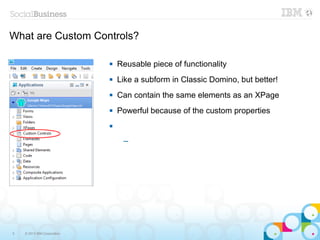
What are Custom Controls?

                                Reusable piece of functionality
                                Like a subform in Classic Domino, but better!
                                Can contain the same elements as an XPage
                                Powerful because of the custom properties
                             


                                  ─


5   © 2013 IBM Corporation
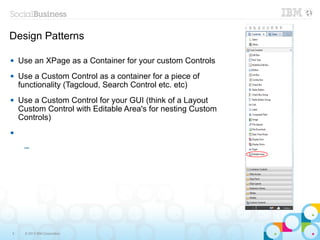
Design Patterns

   Use an XPage as a Container for your custom Controls
   Use a Custom Control as a container for a piece of
    functionality (Tagcloud, Search Control etc. etc)
   Use a Custom Control for your GUI (think of a Layout
    Custom Control with Editable Area's for nesting Custom
    Controls)



     ─


6    © 2013 IBM Corporation
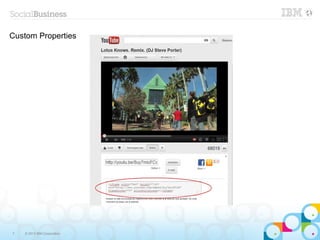
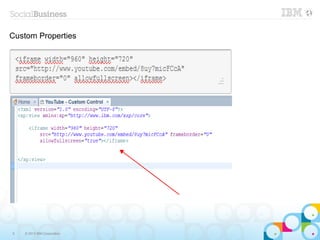
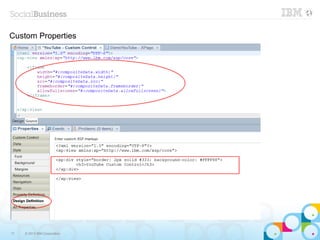
Custom Properties


7   © 2013 IBM Corporation
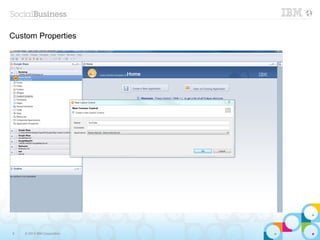
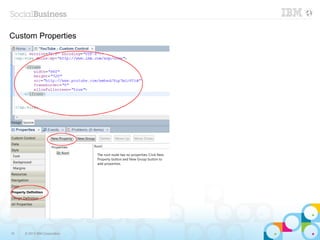
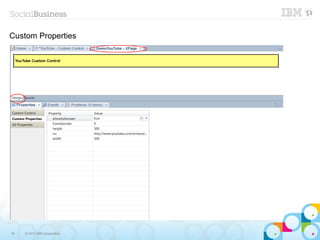
Custom Properties


8   © 2013 IBM Corporation
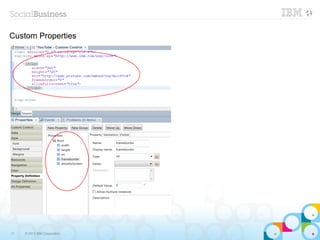
Custom Properties


9   © 2013 IBM Corporation
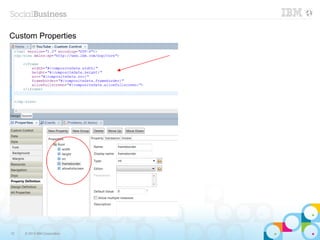
Custom Properties


10   © 2013 IBM Corporation
Custom Properties


11   © 2013 IBM Corporation
Custom Properties


12   © 2013 IBM Corporation
Custom Properties


13   © 2013 IBM Corporation
Custom Properties


14   © 2013 IBM Corporation
Custom Properties


15   © 2013 IBM Corporation
Custom Properties


16   © 2013 IBM Corporation
Custom Properties


17   © 2013 IBM Corporation
Custom Properties


18   © 2013 IBM Corporation
Example 2: Google Maps


19   © 2013 IBM Corporation
Example 2: Google Maps


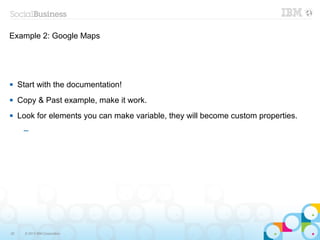
    Start with the documentation!
    Copy & Past example, make it work.
    Look for elements you can make variable, they will become custom properties.
      ─


20     © 2013 IBM Corporation
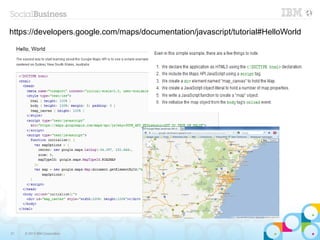
https://developers.google.com/maps/documentation/javascript/tutorial#HelloWorld


21   © 2013 IBM Corporation
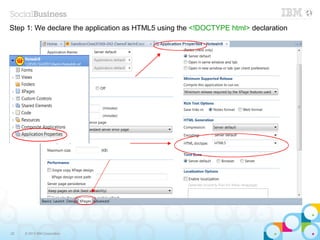
Step 1: We declare the application as HTML5 using the <!DOCTYPE html> declaration


22   © 2013 IBM Corporation
Example 2: Google Maps
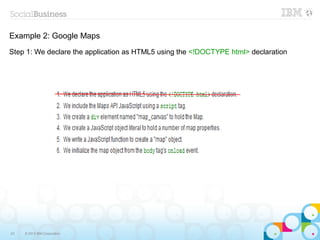
Step 1: We declare the application as HTML5 using the <!DOCTYPE html> declaration


23   © 2013 IBM Corporation
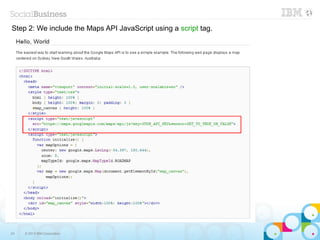
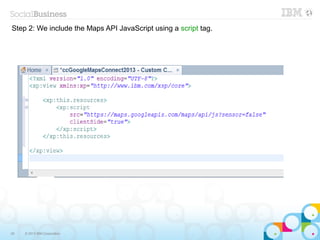
Step 2: We include the Maps API JavaScript using a script tag.


24   © 2013 IBM Corporation
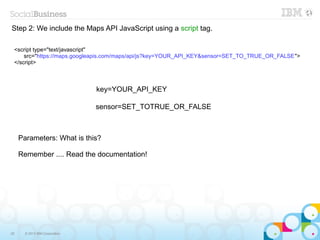
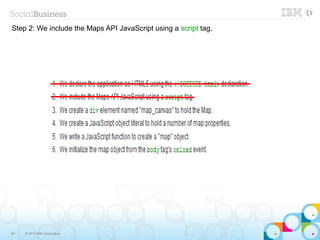
Step 2: We include the Maps API JavaScript using a script tag.

 <script type="text/javascript"
     src="https://maps.googleapis.com/maps/api/js?key=YOUR_API_KEY&sensor=SET_TO_TRUE_OR_FALSE">
 </script>


                                key=YOUR_API_KEY

                                sensor=SET_TOTRUE_OR_FALSE


     Parameters: What is this?

     Remember .... Read the documentation!


25     © 2013 IBM Corporation
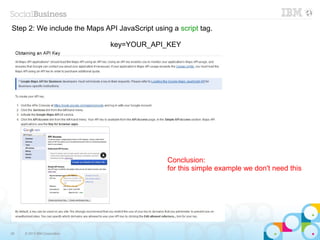
Step 2: We include the Maps API JavaScript using a script tag.

                              key=YOUR_API_KEY


                                                Conclusion:
                                                for this simple example we don't need this


26   © 2013 IBM Corporation
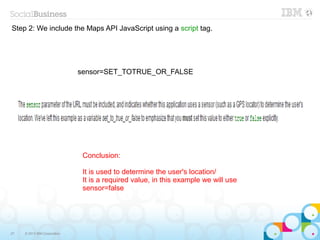
Step 2: We include the Maps API JavaScript using a script tag.


                              sensor=SET_TOTRUE_OR_FALSE


                               Conclusion:

                               It is used to determine the user's location/
                               It is a required value, in this example we will use
                               sensor=false


27   © 2013 IBM Corporation
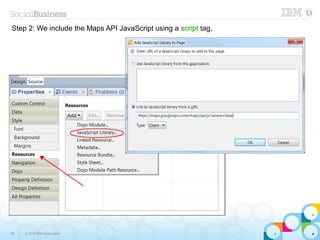
Step 2: We include the Maps API JavaScript using a script tag.


28   © 2013 IBM Corporation
Step 2: We include the Maps API JavaScript using a script tag.


29   © 2013 IBM Corporation
Step 2: We include the Maps API JavaScript using a script tag.


30   © 2013 IBM Corporation
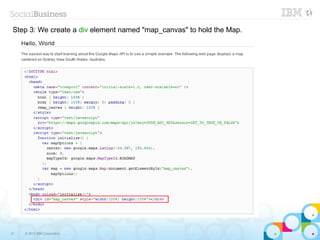
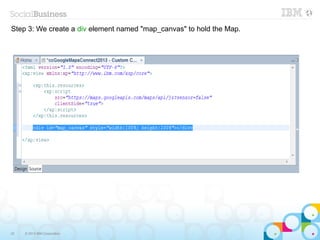
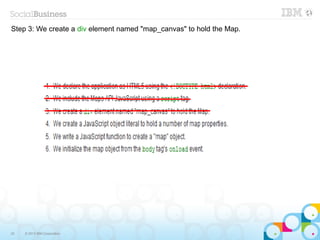
Step 3: We create a div element named "map_canvas" to hold the Map.


31   © 2013 IBM Corporation
Step 3: We create a div element named "map_canvas" to hold the Map.


32   © 2013 IBM Corporation
Step 3: We create a div element named "map_canvas" to hold the Map.


33   © 2013 IBM Corporation
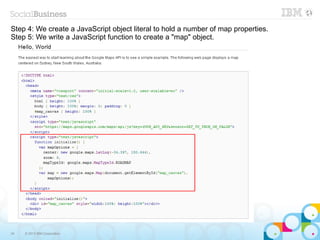
Step 4: We create a JavaScript object literal to hold a number of map properties.
Step 5: We write a JavaScript function to create a "map" object.


34   © 2013 IBM Corporation
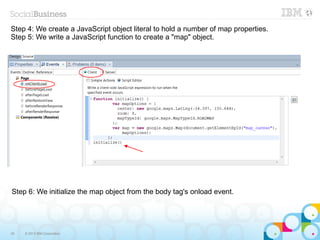
Step 4: We create a JavaScript object literal to hold a number of map properties.
Step 5: We write a JavaScript function to create a "map" object.


Step 6: We initialize the map object from the body tag's onload event.


35   © 2013 IBM Corporation
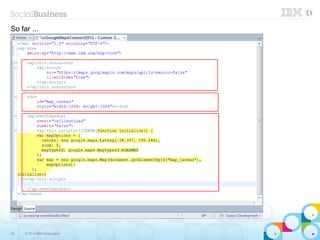
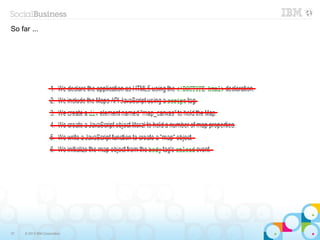
So far ...


36   © 2013 IBM Corporation
So far ...


37   © 2013 IBM Corporation
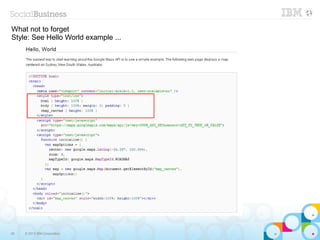
What not to forget
Style: See Hello World example ...


38   © 2013 IBM Corporation
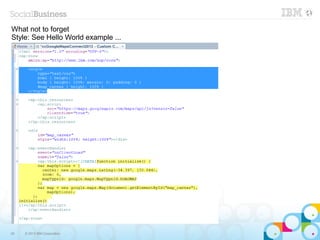
What not to forget
Style: See Hello World example ...


39   © 2013 IBM Corporation
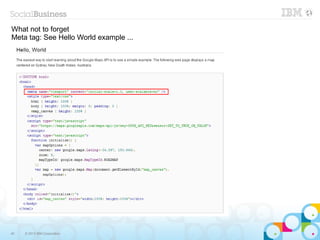
What not to forget
Meta tag: See Hello World example ...


40   © 2013 IBM Corporation
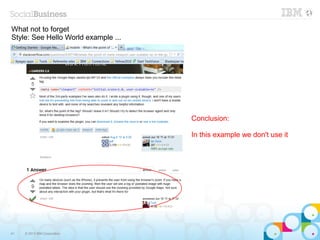
What not to forget
Style: See Hello World example ...


                                     Conclusion:

                                     In this example we don't use it


41   © 2013 IBM Corporation
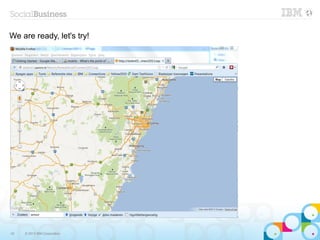
We are ready, let's try!


42   © 2013 IBM Corporation
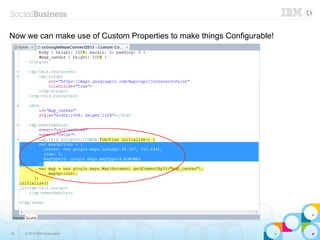
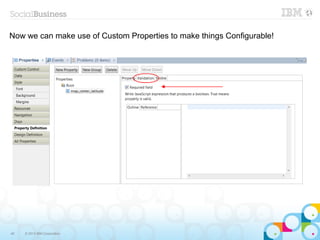
Now we can make use of Custom Properties to make things Configurable!


43   © 2013 IBM Corporation
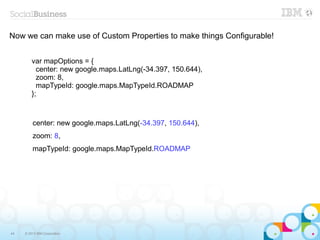
Now we can make use of Custom Properties to make things Configurable!


         var mapOptions = {
           center: new google.maps.LatLng(-34.397, 150.644),
           zoom: 8,
           mapTypeId: google.maps.MapTypeId.ROADMAP
         };


         center: new google.maps.LatLng(-34.397, 150.644),
         zoom: 8,
         mapTypeId: google.maps.MapTypeId.ROADMAP


44   © 2013 IBM Corporation
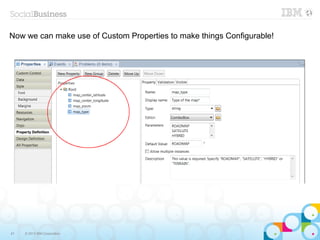
Now we can make use of Custom Properties to make things Configurable!


45   © 2013 IBM Corporation
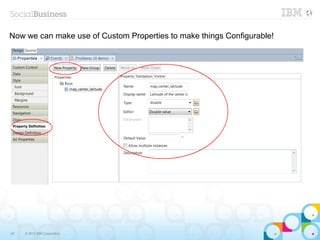
Now we can make use of Custom Properties to make things Configurable!


46   © 2013 IBM Corporation
Now we can make use of Custom Properties to make things Configurable!


47   © 2013 IBM Corporation
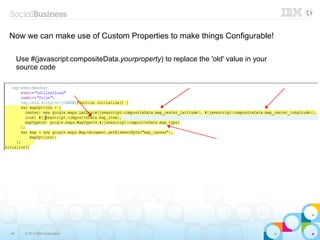
Now we can make use of Custom Properties to make things Configurable!

     Use #(javascript:compositeData.yourproperty) to replace the 'old' value in your
     source code


48     © 2013 IBM Corporation
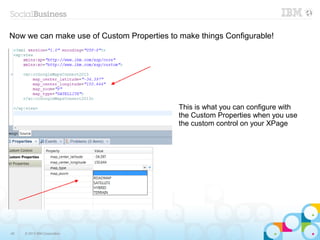
Now we can make use of Custom Properties to make things Configurable!


                                            This is what you can configure with
                                            the Custom Properties when you use
                                            the custom control on your XPage


49   © 2013 IBM Corporation
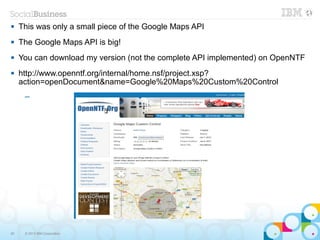
    This was only a small piece of the Google Maps API
    The Google Maps API is big!
    You can download my version (not the complete API implemented) on OpenNTF
    http://www.openntf.org/internal/home.nsf/project.xsp?
     action=openDocument&name=Google%20Maps%20Custom%20Control
      ─


50    © 2013 IBM Corporation
Example 3: Bootstrap


51   © 2013 IBM Corporation
Example 3: Bootstrap


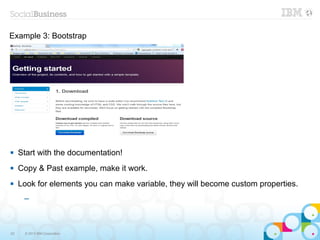
    Start with the documentation!
    Copy & Past example, make it work.
    Look for elements you can make variable, they will become custom properties.
      ─


52    © 2013 IBM Corporation
Example 3: Bootstrap

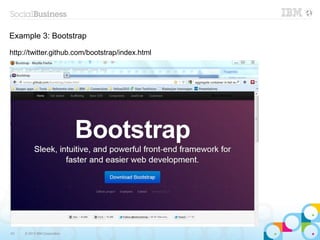
http://twitter.github.com/bootstrap/index.html


53   © 2013 IBM Corporation
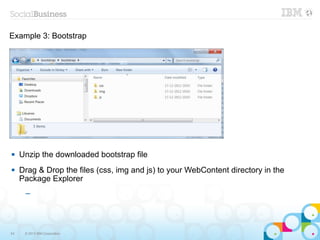
Example 3: Bootstrap


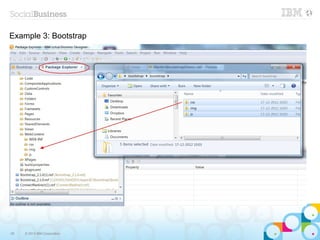
    Unzip the downloaded bootstrap file
    Drag & Drop the files (css, img and js) to your WebContent directory in the
     Package Explorer
      ─


54    © 2013 IBM Corporation
Example 3: Bootstrap


55   © 2013 IBM Corporation
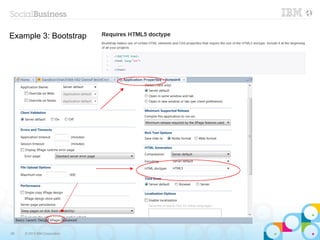
Example 3: Bootstrap


56   © 2013 IBM Corporation
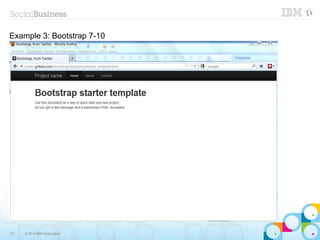
Example 3: Bootstrap 7-10


57   © 2013 IBM Corporation
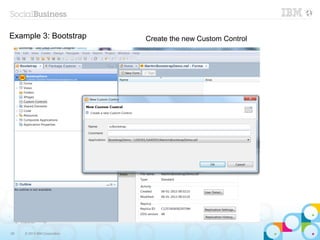
Example 3: Bootstrap          Create the new Custom Control


58   © 2013 IBM Corporation
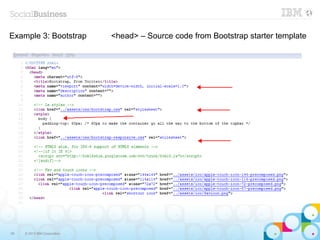
Example 3: Bootstrap          <head> – Source code from Bootstrap starter template


59   © 2013 IBM Corporation
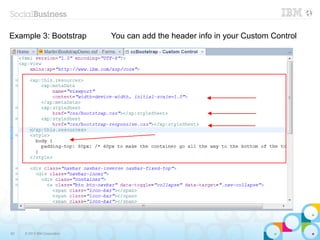
Example 3: Bootstrap          You can add the header info in your Custom Control


60   © 2013 IBM Corporation
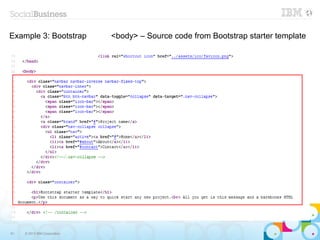
Example 3: Bootstrap          <body> – Source code from Bootstrap starter template


61   © 2013 IBM Corporation
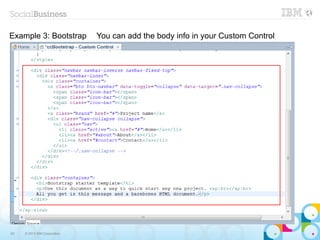
Example 3: Bootstrap          You can add the body info in your Custom Control


62   © 2013 IBM Corporation
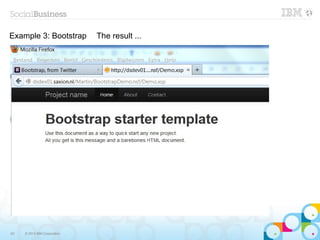
Example 3: Bootstrap          The result ...


63   © 2013 IBM Corporation
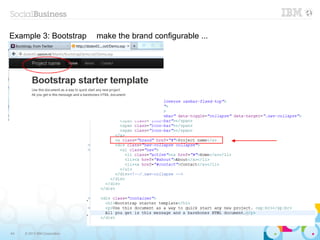
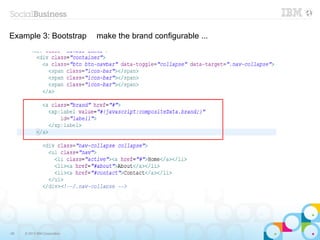
Example 3: Bootstrap          make the brand configurable ...


64   © 2013 IBM Corporation
Example 3: Bootstrap          make the brand configurable ...


65   © 2013 IBM Corporation
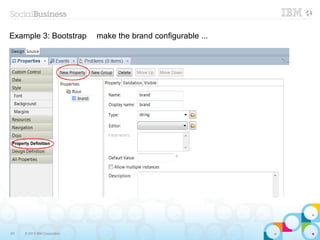
Example 3: Bootstrap          make the brand configurable ...


66   © 2013 IBM Corporation
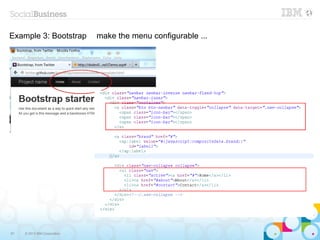
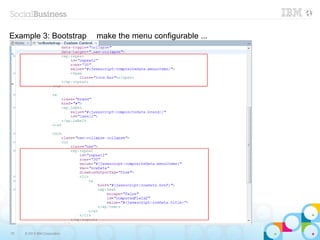
Example 3: Bootstrap          make the menu configurable ...


67   © 2013 IBM Corporation
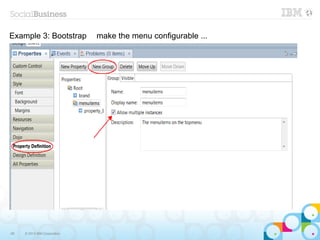
Example 3: Bootstrap          make the menu configurable ...


68   © 2013 IBM Corporation
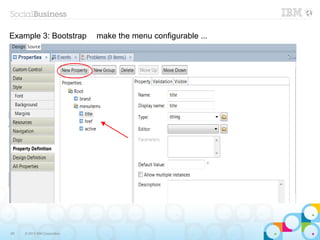
Example 3: Bootstrap          make the menu configurable ...


69   © 2013 IBM Corporation
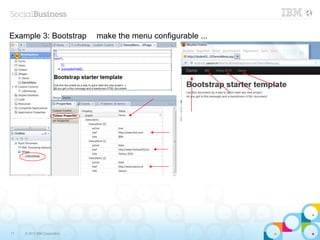
Example 3: Bootstrap          make the menu configurable ...


70   © 2013 IBM Corporation
Example 3: Bootstrap          make the menu configurable ...


71   © 2013 IBM Corporation
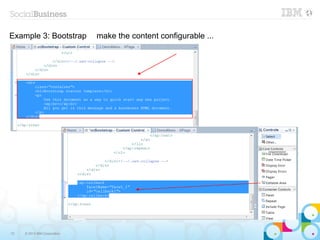
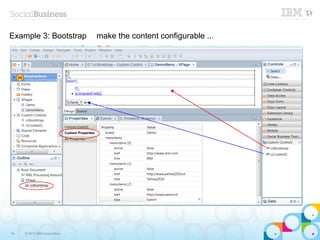
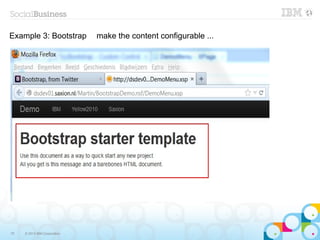
Example 3: Bootstrap          make the content configurable ...


72   © 2013 IBM Corporation
Example 3: Bootstrap          make the content configurable ...


73   © 2013 IBM Corporation
Example 3: Bootstrap          make the content configurable ...


74   © 2013 IBM Corporation
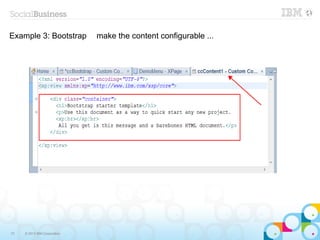
Example 3: Bootstrap          make the content configurable ...


75   © 2013 IBM Corporation
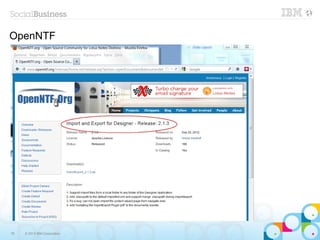
OpenNTF


76   © 2013 IBM Corporation
OpenNTF Import and Export for Designer


77   © 2013 IBM Corporation
Q&A


78   © 2013 IBM Corporation

Presentation BP205 "Custom Controls: Powerful, But Not Rocket Science!" Connect 2013

  • 1.
    BP205 Custom Controls: Powerful, But Not Rocket Science Martin Meijer | Developer © 2013 IBM Corporation
  • 2.
    Legal disclaimer © IBM Corporation 2013. All Rights Reserved. The information contained in this publication is provided for informational purposes only. While efforts were made to verify the completeness and accuracy of the information contained in this publication, it is provided AS IS without warranty of any kind, express or implied. In addition, this information is based on IBM’s current product plans and strategy, which are subject to change by IBM without notice. IBM shall not be responsible for any damages arising out of the use of, or otherwise related to, this publication or any other materials. Nothing contained in this publication is intended to, nor shall have the effect of, creating any warranties or representations from IBM or its suppliers or licensors, or altering the terms and conditions of the applicable license agreement governing the use of IBM software. References in this presentation to IBM products, programs, or services do not imply that they will be available in all countries in which IBM operates. Product release dates and/or capabilities referenced in this presentation may change at any time at IBM’s sole discretion based on market opportunities or other factors, and are not intended to be a commitment to future product or feature availability in any way. Nothing contained in these materials is intended to, nor shall have the effect of, stating or implying that any activities undertaken by you will result in any specific sales, revenue growth or other results. Performance is based on measurements and projections using standard IBM benchmarks in a controlled environment. The actual throughput or performance that any user will experience will vary depending upon many factors, including considerations such as the amount of multiprogramming in the user's job stream, the I/O configuration, the storage configuration, and the workload processed. Therefore, no assurance can be given that an individual user will achieve results similar to those stated here. All customer examples described are presented as illustrations of how those customers have used IBM products and the results they may have achieved. Actual environmental costs and performance characteristics may vary by customer. Adobe, the Adobe logo, PostScript, and the PostScript logo are either registered trademarks or trademarks of Adobe Systems Incorporated in the United States, and/or other countries. Java and all Java-based trademarks are trademarks of Sun Microsystems, Inc. in the United States, other countries, or both. Microsoft and Windows are trademarks of Microsoft Corporation in the United States, other countries, or both. Intel, Intel Centrino, Celeron, Intel Xeon, Intel SpeedStep, Itanium, and Pentium are trademarks or registered trademarks of Intel Corporation or its subsidiaries in the United States and other countries. UNIX is a registered trademark of The Open Group in the United States and other countries. Linux is a registered trademark of Linus Torvalds in the United States, other countries, or both. Other company, product, or service names may be trademarks or service marks of others. All references to [insert fictitious company name] refer to a fictitious company and are used for illustration purposes only. 2 © 2013 IBM Corporation
  • 3.
    About me  Martin Meijer  Developer for Saxion (University in the Netherlands)  Developer for Yellow 2010  Speaker (NLLUG, DNUG, Lotusphere Idol 2010)  Big Fan of XPages  Big Fan of OpenNTF  3 © 2013 IBM Corporation
  • 4.
    Agenda  XPages and Custom Controls  Example 1: YouTube  Example 2: Google Maps  Example 3: Bootstrap  OpenNTF  Q&A ─ 4 © 2013 IBM Corporation
  • 5.
    What are CustomControls?  Reusable piece of functionality  Like a subform in Classic Domino, but better!  Can contain the same elements as an XPage  Powerful because of the custom properties  ─ 5 © 2013 IBM Corporation
  • 6.
    Design Patterns  Use an XPage as a Container for your custom Controls  Use a Custom Control as a container for a piece of functionality (Tagcloud, Search Control etc. etc)  Use a Custom Control for your GUI (think of a Layout Custom Control with Editable Area's for nesting Custom Controls)  ─ 6 © 2013 IBM Corporation
  • 7.
    Custom Properties 7 © 2013 IBM Corporation
  • 8.
    Custom Properties 8 © 2013 IBM Corporation
  • 9.
    Custom Properties 9 © 2013 IBM Corporation
  • 10.
    Custom Properties 10 © 2013 IBM Corporation
  • 11.
    Custom Properties 11 © 2013 IBM Corporation
  • 12.
    Custom Properties 12 © 2013 IBM Corporation
  • 13.
    Custom Properties 13 © 2013 IBM Corporation
  • 14.
    Custom Properties 14 © 2013 IBM Corporation
  • 15.
    Custom Properties 15 © 2013 IBM Corporation
  • 16.
    Custom Properties 16 © 2013 IBM Corporation
  • 17.
    Custom Properties 17 © 2013 IBM Corporation
  • 18.
    Custom Properties 18 © 2013 IBM Corporation
  • 19.
    Example 2: GoogleMaps 19 © 2013 IBM Corporation
  • 20.
    Example 2: GoogleMaps  Start with the documentation!  Copy & Past example, make it work.  Look for elements you can make variable, they will become custom properties. ─ 20 © 2013 IBM Corporation
  • 21.
  • 22.
    Step 1: Wedeclare the application as HTML5 using the <!DOCTYPE html> declaration 22 © 2013 IBM Corporation
  • 23.
    Example 2: GoogleMaps Step 1: We declare the application as HTML5 using the <!DOCTYPE html> declaration 23 © 2013 IBM Corporation
  • 24.
    Step 2: Weinclude the Maps API JavaScript using a script tag. 24 © 2013 IBM Corporation
  • 25.
    Step 2: Weinclude the Maps API JavaScript using a script tag. <script type="text/javascript" src="https://maps.googleapis.com/maps/api/js?key=YOUR_API_KEY&sensor=SET_TO_TRUE_OR_FALSE"> </script> key=YOUR_API_KEY sensor=SET_TOTRUE_OR_FALSE Parameters: What is this? Remember .... Read the documentation! 25 © 2013 IBM Corporation
  • 26.
    Step 2: Weinclude the Maps API JavaScript using a script tag. key=YOUR_API_KEY Conclusion: for this simple example we don't need this 26 © 2013 IBM Corporation
  • 27.
    Step 2: Weinclude the Maps API JavaScript using a script tag. sensor=SET_TOTRUE_OR_FALSE Conclusion: It is used to determine the user's location/ It is a required value, in this example we will use sensor=false 27 © 2013 IBM Corporation
  • 28.
    Step 2: Weinclude the Maps API JavaScript using a script tag. 28 © 2013 IBM Corporation
  • 29.
    Step 2: Weinclude the Maps API JavaScript using a script tag. 29 © 2013 IBM Corporation
  • 30.
    Step 2: Weinclude the Maps API JavaScript using a script tag. 30 © 2013 IBM Corporation
  • 31.
    Step 3: Wecreate a div element named "map_canvas" to hold the Map. 31 © 2013 IBM Corporation
  • 32.
    Step 3: Wecreate a div element named "map_canvas" to hold the Map. 32 © 2013 IBM Corporation
  • 33.
    Step 3: Wecreate a div element named "map_canvas" to hold the Map. 33 © 2013 IBM Corporation
  • 34.
    Step 4: Wecreate a JavaScript object literal to hold a number of map properties. Step 5: We write a JavaScript function to create a "map" object. 34 © 2013 IBM Corporation
  • 35.
    Step 4: Wecreate a JavaScript object literal to hold a number of map properties. Step 5: We write a JavaScript function to create a "map" object. Step 6: We initialize the map object from the body tag's onload event. 35 © 2013 IBM Corporation
  • 36.
    So far ... 36 © 2013 IBM Corporation
  • 37.
    So far ... 37 © 2013 IBM Corporation
  • 38.
    What not toforget Style: See Hello World example ... 38 © 2013 IBM Corporation
  • 39.
    What not toforget Style: See Hello World example ... 39 © 2013 IBM Corporation
  • 40.
    What not toforget Meta tag: See Hello World example ... 40 © 2013 IBM Corporation
  • 41.
    What not toforget Style: See Hello World example ... Conclusion: In this example we don't use it 41 © 2013 IBM Corporation
  • 42.
    We are ready,let's try! 42 © 2013 IBM Corporation
  • 43.
    Now we canmake use of Custom Properties to make things Configurable! 43 © 2013 IBM Corporation
  • 44.
    Now we canmake use of Custom Properties to make things Configurable! var mapOptions = { center: new google.maps.LatLng(-34.397, 150.644), zoom: 8, mapTypeId: google.maps.MapTypeId.ROADMAP }; center: new google.maps.LatLng(-34.397, 150.644), zoom: 8, mapTypeId: google.maps.MapTypeId.ROADMAP 44 © 2013 IBM Corporation
  • 45.
    Now we canmake use of Custom Properties to make things Configurable! 45 © 2013 IBM Corporation
  • 46.
    Now we canmake use of Custom Properties to make things Configurable! 46 © 2013 IBM Corporation
  • 47.
    Now we canmake use of Custom Properties to make things Configurable! 47 © 2013 IBM Corporation
  • 48.
    Now we canmake use of Custom Properties to make things Configurable! Use #(javascript:compositeData.yourproperty) to replace the 'old' value in your source code 48 © 2013 IBM Corporation
  • 49.
    Now we canmake use of Custom Properties to make things Configurable! This is what you can configure with the Custom Properties when you use the custom control on your XPage 49 © 2013 IBM Corporation
  • 50.
    This was only a small piece of the Google Maps API  The Google Maps API is big!  You can download my version (not the complete API implemented) on OpenNTF  http://www.openntf.org/internal/home.nsf/project.xsp? action=openDocument&name=Google%20Maps%20Custom%20Control ─ 50 © 2013 IBM Corporation
  • 51.
    Example 3: Bootstrap 51 © 2013 IBM Corporation
  • 52.
    Example 3: Bootstrap  Start with the documentation!  Copy & Past example, make it work.  Look for elements you can make variable, they will become custom properties. ─ 52 © 2013 IBM Corporation
  • 53.
  • 54.
    Example 3: Bootstrap  Unzip the downloaded bootstrap file  Drag & Drop the files (css, img and js) to your WebContent directory in the Package Explorer ─ 54 © 2013 IBM Corporation
  • 55.
    Example 3: Bootstrap 55 © 2013 IBM Corporation
  • 56.
    Example 3: Bootstrap 56 © 2013 IBM Corporation
  • 57.
    Example 3: Bootstrap7-10 57 © 2013 IBM Corporation
  • 58.
    Example 3: Bootstrap Create the new Custom Control 58 © 2013 IBM Corporation
  • 59.
    Example 3: Bootstrap <head> – Source code from Bootstrap starter template 59 © 2013 IBM Corporation
  • 60.
    Example 3: Bootstrap You can add the header info in your Custom Control 60 © 2013 IBM Corporation
  • 61.
    Example 3: Bootstrap <body> – Source code from Bootstrap starter template 61 © 2013 IBM Corporation
  • 62.
    Example 3: Bootstrap You can add the body info in your Custom Control 62 © 2013 IBM Corporation
  • 63.
    Example 3: Bootstrap The result ... 63 © 2013 IBM Corporation
  • 64.
    Example 3: Bootstrap make the brand configurable ... 64 © 2013 IBM Corporation
  • 65.
    Example 3: Bootstrap make the brand configurable ... 65 © 2013 IBM Corporation
  • 66.
    Example 3: Bootstrap make the brand configurable ... 66 © 2013 IBM Corporation
  • 67.
    Example 3: Bootstrap make the menu configurable ... 67 © 2013 IBM Corporation
  • 68.
    Example 3: Bootstrap make the menu configurable ... 68 © 2013 IBM Corporation
  • 69.
    Example 3: Bootstrap make the menu configurable ... 69 © 2013 IBM Corporation
  • 70.
    Example 3: Bootstrap make the menu configurable ... 70 © 2013 IBM Corporation
  • 71.
    Example 3: Bootstrap make the menu configurable ... 71 © 2013 IBM Corporation
  • 72.
    Example 3: Bootstrap make the content configurable ... 72 © 2013 IBM Corporation
  • 73.
    Example 3: Bootstrap make the content configurable ... 73 © 2013 IBM Corporation
  • 74.
    Example 3: Bootstrap make the content configurable ... 74 © 2013 IBM Corporation
  • 75.
    Example 3: Bootstrap make the content configurable ... 75 © 2013 IBM Corporation
  • 76.
    OpenNTF 76 © 2013 IBM Corporation
  • 77.
    OpenNTF Import andExport for Designer 77 © 2013 IBM Corporation
  • 78.
    Q&A 78 © 2013 IBM Corporation