by Max Shirshin
Frontend Team Lead, Deltamethod
Consultant, Yandex
BEM it!
BEM Methodology for small companies
with high expectations
Why bother?
Web development needs:
● Methodologies, not frameworks
● Same entities across different
technologies
● Scalability
BEM to the rescue
What is BEM?
“BEM claims that three basic entities
(Blocks, Elements, and Modifiers)
are enough to define the way you author
HTML / CSS / JavaScript, structure code
and components, set up interaction
and scale your project to build
an industry-leading service.”
What is BEM?
● A methodology
“Theoretical underpinning” for methods and best
practices
What is BEM?
● A methodology
“Theoretical underpinning” for methods and best
practices
● Originally introduced by Yandex
— www.yandex.ru (English: www.yandex.com)
— 200+ Yandex services using full BEM stack
(methodology + tools)
— 19 million users daily audience
What is BEM?
● A methodology
“Theoretical underpinning” for methods and best
practices
● Originally introduced by Yandex
— www.yandex.ru (English: www.yandex.com)
— 200+ Yandex services using full BEM stack
(methodology + tools)
— 19 million users daily audience
● Used by external projects
— other services
— tools / libraries
Some theory :-)
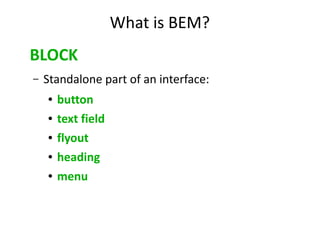
What is BEM?
BLOCK
– Standalone part of an interface:
● button
● text field
● flyout
● heading
● menu
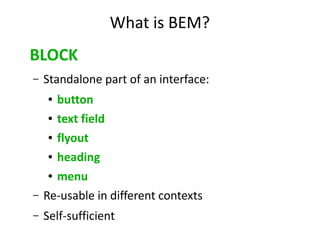
What is BEM?
BLOCK
– Standalone part of an interface:
● button
● text field
● flyout
● heading
● menu
– Re-usable in different contexts
– Self-sufficient
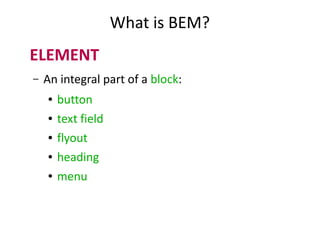
What is BEM?
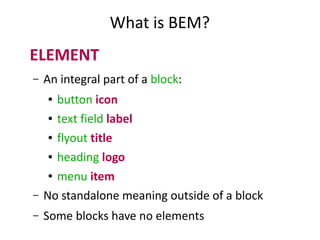
ELEMENT
– An integral part of a block:
● button
● text field
● flyout
● heading
● menu
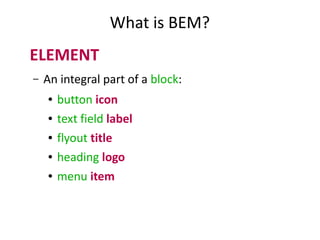
What is BEM?
ELEMENT
– An integral part of a block:
● button icon
● text field label
● flyout title
● heading logo
● menu item
What is BEM?
ELEMENT
– An integral part of a block:
● button icon
● text field label
● flyout title
● heading logo
● menu item
– No standalone meaning outside of a block
– Some blocks have no elements
What is BEM?
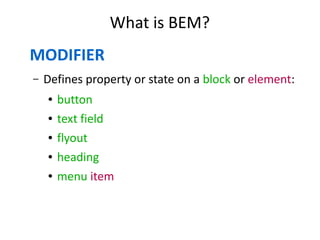
MODIFIER
– Defines property or state on a block or element:
● button
● text field
● flyout
● heading
● menu item
What is BEM?
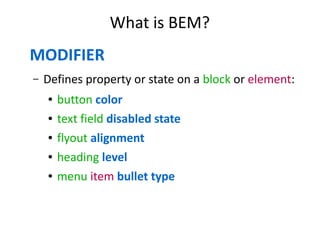
MODIFIER
– Defines property or state on a block or element:
● button color
● text field disabled state
● flyout alignment
● heading level
● menu item bullet type
What is BEM?
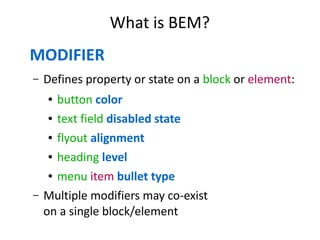
MODIFIER
– Defines property or state on a block or element:
● button color
● text field disabled state
● flyout alignment
● heading level
● menu item bullet type
– Multiple modifiers may co-exist
on a single block/element
BEM + DOM
● Blocks are mapped to DOM
BEM + DOM
● Blocks are mapped to DOM
● Blocks/elems/mods are denoted
with CSS classes
BEM + DOM
● Blocks are mapped to DOM
● Blocks/elems/mods are denoted
with CSS classes
● DOM nodes can be “shared”: you can mix
(block1 + block2) or (element1 + block2)
on a same node
BEM markup forms a semantic overlay
over the existing DOM structure.
This overlay is called a BEM tree.
BEM HOWTO
for your beloved project
with benefits explained
HOWTO: HTML / CSS
CSS naming conventions
“BEM uses CSS class names to denote
blocks, elements and modifiers.”
CSS naming conventions
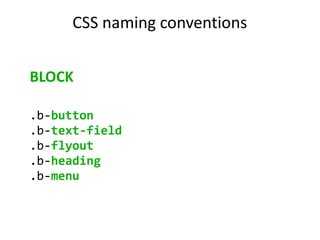
BLOCK
.b-button
.b-text-field
.b-flyout
.b-heading
.b-menu
CSS naming conventions
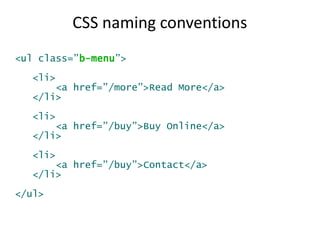
<ul class=”b-menu”>
<li>
<a href=”/more”>Read More</a>
</li>
<li>
<a href=”/buy”>Buy Online</a>
</li>
<li>
<a href=”/buy”>Contact</a>
</li>
</ul>
CSS naming conventions
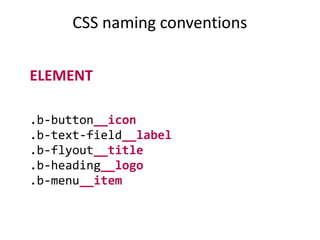
ELEMENT
.b-button__icon
.b-text-field__label
.b-flyout__title
.b-heading__logo
.b-menu__item
CSS naming conventions
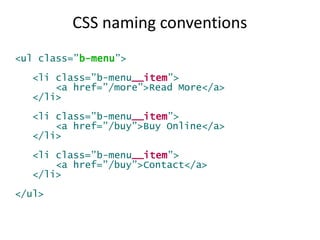
<ul class=”b-menu”>
<li class=”b-menu__item”>
<a href=”/more”>Read More</a>
</li>
<li class=”b-menu__item”>
<a href=”/buy”>Buy Online</a>
</li>
<li class=”b-menu__item”>
<a href=”/buy”>Contact</a>
</li>
</ul>
CSS naming conventions
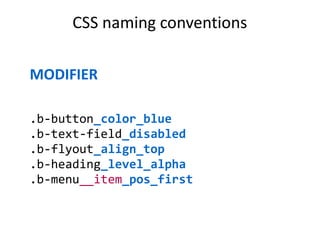
MODIFIER
.b-button_color_blue
.b-text-field_disabled
.b-flyout_align_top
.b-heading_level_alpha
.b-menu__item_pos_first
CSS naming conventions
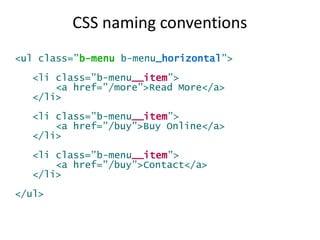
<ul class=”b-menu b-menu_horizontal”>
<li class=”b-menu__item”>
<a href=”/more”>Read More</a>
</li>
<li class=”b-menu__item”>
<a href=”/buy”>Buy Online</a>
</li>
<li class=”b-menu__item”>
<a href=”/buy”>Contact</a>
</li>
</ul>
CSS naming conventions
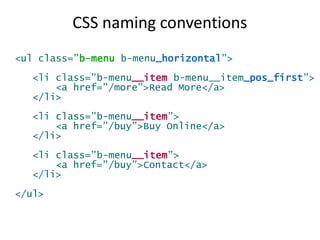
<ul class=”b-menu b-menu_horizontal”>
<li class=”b-menu__item b-menu__item_pos_first”>
<a href=”/more”>Read More</a>
</li>
<li class=”b-menu__item”>
<a href=”/buy”>Buy Online</a>
</li>
<li class=”b-menu__item”>
<a href=”/buy”>Contact</a>
</li>
</ul>
Additional notes on CSS
● Page (Document) is also a block
Additional notes on CSS
● Page (Document) is also a block
● Layouts are blocks (same rules apply)
Additional notes on CSS
● Page (Document) is also a block
● Layouts are blocks (same rules apply)
● No CSS outside of blocks
Additional notes on CSS
● Page (Document) is also a block
● Layouts are blocks (same rules apply)
● No CSS outside of blocks
● No common CSS resets (block independency!)
Additional notes on CSS
● Page (Document) is also a block
● Layouts are blocks (same rules apply)
● No CSS outside of blocks
● No common CSS resets (block independency!)
● No “shared” styles (no need)
Additional notes on CSS
● Page (Document) is also a block
● Layouts are blocks (same rules apply)
● No CSS outside of blocks
● No common CSS resets (block independency!)
● No “shared” styles (no need)
● DOM tree → BEM tree
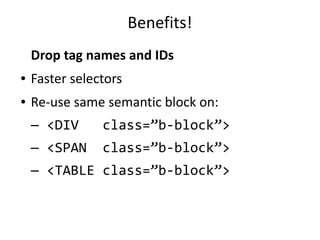
Benefits!
Drop tag names and IDs
Benefits!
Drop tag names and IDs
● Faster selectors
● Re-use same semantic block on:
— <DIV class=”b-block”>
— <SPAN class=”b-block”>
— <TABLE class=”b-block”>
Benefits!
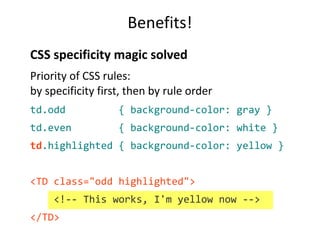
CSS specificity magic solved
Benefits!
CSS specificity magic solved
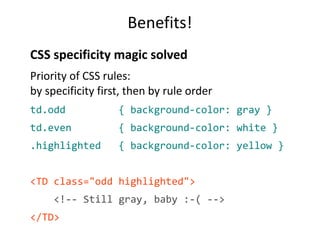
Priority of CSS rules:
by specificity first, then by rule order
Benefits!
CSS specificity magic solved
Priority of CSS rules:
by specificity first, then by rule order
td.odd { background-color: gray }
td.even { background-color: white }
.highlighted { background-color: yellow }
<TD class="odd highlighted">
<!-- Still gray, baby :-( -->
</TD>
Benefits!
CSS specificity magic solved
Priority of CSS rules:
by specificity first, then by rule order
td.odd { background-color: gray }
td.even { background-color: white }
td.highlighted { background-color: yellow }
<TD class="odd highlighted">
<!-- This works, I'm yellow now -->
</TD>
Benefits!
Bye-bye CSS cascade?!
Benefits!
Bye-bye CSS cascade?!
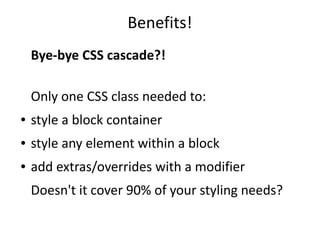
Only one CSS class needed to:
● style a block container
● style any element within a block
● add extras/overrides with a modifier
Doesn't it cover 90% of your styling needs?
Benefits!
Bye-bye CSS cascade?!
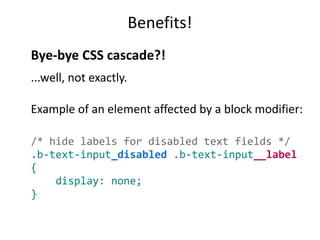
...well, not exactly.
Example of an element affected by a block modifier:
/* hide labels for disabled text fields */
.b-text-input_disabled .b-text-input__label
{
display: none;
}
HOWTO: JavaScript
JavaScript
Components → Blocks
Work with BEM tree, not DOM tree
JavaScript
jQuery BEM plugin
http://xslc.org/jquery-bem/
● Extends jQuery Sizzle with selectors for BEM
entities (mix them with “normal” selectors)
● Add callbacks on modifiers set/change
● Supports methods tied to blocks/elements
JavaScript
i-bem.js framework by Yandex + tutorial
https://github.com/toivonen/bem-js-tutorial
● First English draft docs (expect more!)
● 100% BEM-based declarative API
● Part of a larger bem-core library
JavaScript
Twitter Flight (used by Deltamethod)
http://flightjs.github.io
● Self-contained components, 100% event-driven
● Based on jQuery; AMD-friendly; BEM-friendly
● Built-in syntax sugar for predefined selectors
(good for BEM tree)
● [Shameless self-promo] Try Flight with Reggirt:
http://github.com/ingdir/reggirt
jQuery plugin that emulates event capturing
(opposite of event bubbling)
JavaScript
Twitter Flight (used by Deltamethod)
http://flightjs.github.io
● Self-contained components, 100% event-driven
● Based on jQuery; AMD-friendly; BEM-friendly
● Built-in syntax sugar for predefined selectors
(good for BEM tree)
● [Shameless self-promo] Try Flight with Reggirt:
http://github.com/ingdir/reggirt
jQuery plugin that emulates event capturing
(opposite of event bubbling)
Benefits!
HTML is no longer semantic.
JavaScript is.
HOWTO: Design / UX
BEM is the universal language
for developers and designers,
the bridge across technology gaps.
UX + Frontend
● Design a style guide
UX + Frontend
● Design a style guide
● Keep it up-to-date
UX + Frontend
● Design a style guide
● Keep it up-to-date, always!
UX + Frontend
● Design a style guide
● Keep it up-to-date, always!
● Build new screens quickly
UX + Frontend
Build your block library.
The code itself is the styleguide.
Benefits!
● Prototyping mapped to code from day 1
Benefits!
● Prototyping mapped to code from day 1
● Code mapped to prototypes from day 1
HOWTO: File structure
File and folder structure
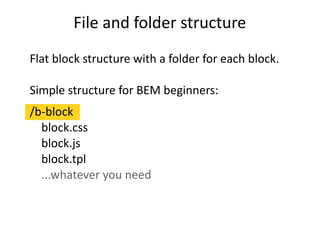
Flat block structure with a folder for each block.
Simple structure for BEM beginners:
/b-block
block.css
block.js
block.tpl
...whatever you need
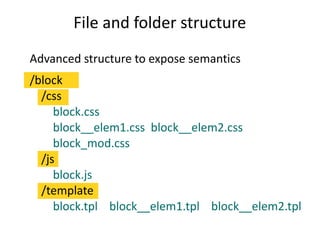
File and folder structure
Advanced structure to expose semantics
/block
/css
block.css
block__elem1.css block__elem2.css
block_mod.css
/js
block.js
/template
block.tpl block__elem1.tpl block__elem2.tpl
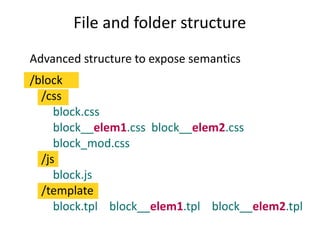
File and folder structure
Advanced structure to expose semantics
/block
/css
block.css
block__elem1.css block__elem2.css
block_mod.css
/js
block.js
/template
block.tpl block__elem1.tpl block__elem2.tpl
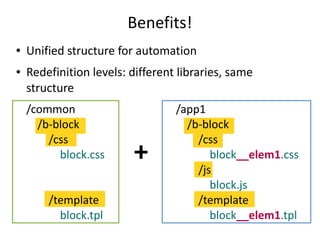
Benefits!
● Unified structure for automation
● Redefinition levels: different libraries, same
structure
/common
/b-block
/css
block.css
/template
block.tpl
/app1
/b-block
/css
block__elem1.css
/js
block.js
/template
block__elem1.tpl
+
Build process and deployment
Use a build tool!
Borschik:
an open-source build tool by Yandex
Code:
https://github.com/bem/borschik
English docs:
http://bem.info/articles/borschik
max.shirshin@gmail.com http://gplus.to/ingdir
@ingdir maxshirshin
Thank you!

BEM it!

  • 1.
    by Max Shirshin FrontendTeam Lead, Deltamethod Consultant, Yandex BEM it! BEM Methodology for small companies with high expectations
  • 2.
  • 3.
    Web development needs: ●Methodologies, not frameworks ● Same entities across different technologies ● Scalability
  • 4.
    BEM to therescue
  • 5.
    What is BEM? “BEMclaims that three basic entities (Blocks, Elements, and Modifiers) are enough to define the way you author HTML / CSS / JavaScript, structure code and components, set up interaction and scale your project to build an industry-leading service.”
  • 6.
    What is BEM? ●A methodology “Theoretical underpinning” for methods and best practices
  • 7.
    What is BEM? ●A methodology “Theoretical underpinning” for methods and best practices ● Originally introduced by Yandex — www.yandex.ru (English: www.yandex.com) — 200+ Yandex services using full BEM stack (methodology + tools) — 19 million users daily audience
  • 8.
    What is BEM? ●A methodology “Theoretical underpinning” for methods and best practices ● Originally introduced by Yandex — www.yandex.ru (English: www.yandex.com) — 200+ Yandex services using full BEM stack (methodology + tools) — 19 million users daily audience ● Used by external projects — other services — tools / libraries
  • 9.
  • 10.
    What is BEM? BLOCK –Standalone part of an interface: ● button ● text field ● flyout ● heading ● menu
  • 11.
    What is BEM? BLOCK –Standalone part of an interface: ● button ● text field ● flyout ● heading ● menu – Re-usable in different contexts – Self-sufficient
  • 12.
    What is BEM? ELEMENT –An integral part of a block: ● button ● text field ● flyout ● heading ● menu
  • 13.
    What is BEM? ELEMENT –An integral part of a block: ● button icon ● text field label ● flyout title ● heading logo ● menu item
  • 14.
    What is BEM? ELEMENT –An integral part of a block: ● button icon ● text field label ● flyout title ● heading logo ● menu item – No standalone meaning outside of a block – Some blocks have no elements
  • 15.
    What is BEM? MODIFIER –Defines property or state on a block or element: ● button ● text field ● flyout ● heading ● menu item
  • 16.
    What is BEM? MODIFIER –Defines property or state on a block or element: ● button color ● text field disabled state ● flyout alignment ● heading level ● menu item bullet type
  • 17.
    What is BEM? MODIFIER –Defines property or state on a block or element: ● button color ● text field disabled state ● flyout alignment ● heading level ● menu item bullet type – Multiple modifiers may co-exist on a single block/element
  • 18.
    BEM + DOM ●Blocks are mapped to DOM
  • 19.
    BEM + DOM ●Blocks are mapped to DOM ● Blocks/elems/mods are denoted with CSS classes
  • 20.
    BEM + DOM ●Blocks are mapped to DOM ● Blocks/elems/mods are denoted with CSS classes ● DOM nodes can be “shared”: you can mix (block1 + block2) or (element1 + block2) on a same node
  • 21.
    BEM markup formsa semantic overlay over the existing DOM structure. This overlay is called a BEM tree.
  • 22.
    BEM HOWTO for yourbeloved project with benefits explained
  • 23.
  • 24.
    CSS naming conventions “BEMuses CSS class names to denote blocks, elements and modifiers.”
  • 25.
  • 26.
    CSS naming conventions <ulclass=”b-menu”> <li> <a href=”/more”>Read More</a> </li> <li> <a href=”/buy”>Buy Online</a> </li> <li> <a href=”/buy”>Contact</a> </li> </ul>
  • 27.
  • 28.
    CSS naming conventions <ulclass=”b-menu”> <li class=”b-menu__item”> <a href=”/more”>Read More</a> </li> <li class=”b-menu__item”> <a href=”/buy”>Buy Online</a> </li> <li class=”b-menu__item”> <a href=”/buy”>Contact</a> </li> </ul>
  • 29.
  • 30.
    CSS naming conventions <ulclass=”b-menu b-menu_horizontal”> <li class=”b-menu__item”> <a href=”/more”>Read More</a> </li> <li class=”b-menu__item”> <a href=”/buy”>Buy Online</a> </li> <li class=”b-menu__item”> <a href=”/buy”>Contact</a> </li> </ul>
  • 31.
    CSS naming conventions <ulclass=”b-menu b-menu_horizontal”> <li class=”b-menu__item b-menu__item_pos_first”> <a href=”/more”>Read More</a> </li> <li class=”b-menu__item”> <a href=”/buy”>Buy Online</a> </li> <li class=”b-menu__item”> <a href=”/buy”>Contact</a> </li> </ul>
  • 32.
    Additional notes onCSS ● Page (Document) is also a block
  • 33.
    Additional notes onCSS ● Page (Document) is also a block ● Layouts are blocks (same rules apply)
  • 34.
    Additional notes onCSS ● Page (Document) is also a block ● Layouts are blocks (same rules apply) ● No CSS outside of blocks
  • 35.
    Additional notes onCSS ● Page (Document) is also a block ● Layouts are blocks (same rules apply) ● No CSS outside of blocks ● No common CSS resets (block independency!)
  • 36.
    Additional notes onCSS ● Page (Document) is also a block ● Layouts are blocks (same rules apply) ● No CSS outside of blocks ● No common CSS resets (block independency!) ● No “shared” styles (no need)
  • 37.
    Additional notes onCSS ● Page (Document) is also a block ● Layouts are blocks (same rules apply) ● No CSS outside of blocks ● No common CSS resets (block independency!) ● No “shared” styles (no need) ● DOM tree → BEM tree
  • 38.
  • 39.
    Benefits! Drop tag namesand IDs ● Faster selectors ● Re-use same semantic block on: — <DIV class=”b-block”> — <SPAN class=”b-block”> — <TABLE class=”b-block”>
  • 40.
  • 41.
    Benefits! CSS specificity magicsolved Priority of CSS rules: by specificity first, then by rule order
  • 42.
    Benefits! CSS specificity magicsolved Priority of CSS rules: by specificity first, then by rule order td.odd { background-color: gray } td.even { background-color: white } .highlighted { background-color: yellow } <TD class="odd highlighted"> <!-- Still gray, baby :-( --> </TD>
  • 43.
    Benefits! CSS specificity magicsolved Priority of CSS rules: by specificity first, then by rule order td.odd { background-color: gray } td.even { background-color: white } td.highlighted { background-color: yellow } <TD class="odd highlighted"> <!-- This works, I'm yellow now --> </TD>
  • 44.
  • 45.
    Benefits! Bye-bye CSS cascade?! Onlyone CSS class needed to: ● style a block container ● style any element within a block ● add extras/overrides with a modifier Doesn't it cover 90% of your styling needs?
  • 46.
    Benefits! Bye-bye CSS cascade?! ...well,not exactly. Example of an element affected by a block modifier: /* hide labels for disabled text fields */ .b-text-input_disabled .b-text-input__label { display: none; }
  • 47.
  • 48.
    JavaScript Components → Blocks Workwith BEM tree, not DOM tree
  • 49.
    JavaScript jQuery BEM plugin http://xslc.org/jquery-bem/ ●Extends jQuery Sizzle with selectors for BEM entities (mix them with “normal” selectors) ● Add callbacks on modifiers set/change ● Supports methods tied to blocks/elements
  • 50.
    JavaScript i-bem.js framework byYandex + tutorial https://github.com/toivonen/bem-js-tutorial ● First English draft docs (expect more!) ● 100% BEM-based declarative API ● Part of a larger bem-core library
  • 51.
    JavaScript Twitter Flight (usedby Deltamethod) http://flightjs.github.io ● Self-contained components, 100% event-driven ● Based on jQuery; AMD-friendly; BEM-friendly ● Built-in syntax sugar for predefined selectors (good for BEM tree) ● [Shameless self-promo] Try Flight with Reggirt: http://github.com/ingdir/reggirt jQuery plugin that emulates event capturing (opposite of event bubbling)
  • 52.
    JavaScript Twitter Flight (usedby Deltamethod) http://flightjs.github.io ● Self-contained components, 100% event-driven ● Based on jQuery; AMD-friendly; BEM-friendly ● Built-in syntax sugar for predefined selectors (good for BEM tree) ● [Shameless self-promo] Try Flight with Reggirt: http://github.com/ingdir/reggirt jQuery plugin that emulates event capturing (opposite of event bubbling)
  • 53.
    Benefits! HTML is nolonger semantic. JavaScript is.
  • 54.
  • 55.
    BEM is theuniversal language for developers and designers, the bridge across technology gaps.
  • 56.
    UX + Frontend ●Design a style guide
  • 57.
    UX + Frontend ●Design a style guide ● Keep it up-to-date
  • 58.
    UX + Frontend ●Design a style guide ● Keep it up-to-date, always!
  • 59.
    UX + Frontend ●Design a style guide ● Keep it up-to-date, always! ● Build new screens quickly
  • 60.
    UX + Frontend Buildyour block library. The code itself is the styleguide.
  • 61.
  • 62.
    Benefits! ● Prototyping mappedto code from day 1 ● Code mapped to prototypes from day 1
  • 63.
  • 64.
    File and folderstructure Flat block structure with a folder for each block. Simple structure for BEM beginners: /b-block block.css block.js block.tpl ...whatever you need
  • 65.
    File and folderstructure Advanced structure to expose semantics /block /css block.css block__elem1.css block__elem2.css block_mod.css /js block.js /template block.tpl block__elem1.tpl block__elem2.tpl
  • 66.
    File and folderstructure Advanced structure to expose semantics /block /css block.css block__elem1.css block__elem2.css block_mod.css /js block.js /template block.tpl block__elem1.tpl block__elem2.tpl
  • 67.
    Benefits! ● Unified structurefor automation ● Redefinition levels: different libraries, same structure /common /b-block /css block.css /template block.tpl /app1 /b-block /css block__elem1.css /js block.js /template block__elem1.tpl +
  • 68.
    Build process anddeployment Use a build tool! Borschik: an open-source build tool by Yandex Code: https://github.com/bem/borschik English docs: http://bem.info/articles/borschik
  • 69.