Basics of Computer
By
I Tejaswini
Department (CSM&CSD)
CLASS-1
Basic components
of the computer
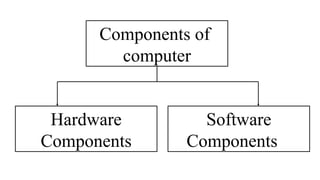
Components of
computer
Hardware
Components
Software
Components
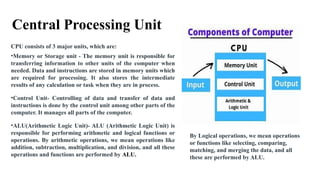
Central Processing Unit
CPU consists of 3 major units, which are:
•Memory or Storage unit - The memory unit is responsible for
transferring information to other units of the computer when
needed. Data and instructions are stored in memory units which
are required for processing. It also stores the intermediate
results of any calculation or task when they are in process.
•Control Unit- Controlling of data and transfer of data and
instructions is done by the control unit among other parts of the
computer. It manages all parts of the computer.
•ALU(Arithmetic Logic Unit)- ALU (Arithmetic Logic Unit) is
responsible for performing arithmetic and logical functions or
operations. By arithmetic operations, we mean operations like
addition, subtraction, multiplication, and division, and all these
operations and functions are performed by ALU.
By Logical operations, we mean operations
or functions like selecting, comparing,
matching, and merging the data, and all
these are performed by ALU.
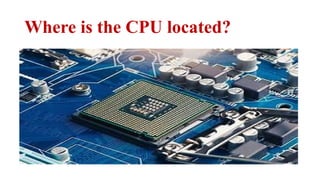
Where is the CPU located?
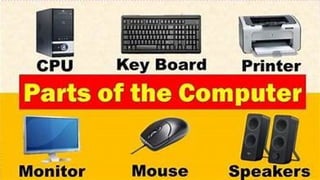
Keyboard
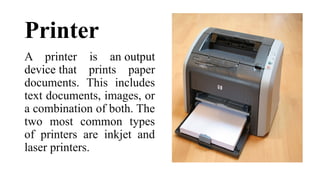
Printer
A printer is an output
device that prints paper
documents. This includes
text documents, images, or
a combination of both. The
two most common types
of printers are inkjet and
laser printers.
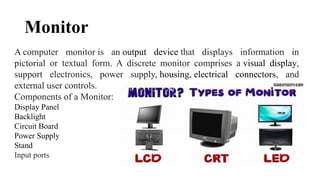
Monitor
A computer monitor is an output device that displays information in
pictorial or textual form. A discrete monitor comprises a visual display,
support electronics, power supply, housing, electrical connectors, and
external user controls.
Components of a Monitor:
Display Panel
Backlight
Circuit Board
Power Supply
Stand
Input ports
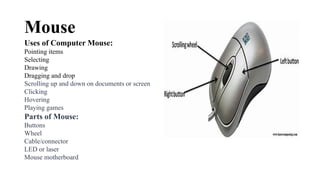
Mouse
Uses of Computer Mouse:
Pointing items
Selecting
Drawing
Dragging and drop
Scrolling up and down on documents or screen
Clicking
Hovering
Playing games
Parts of Mouse:
Buttons
Wheel
Cable/connector
LED or laser
Mouse motherboard
Motherboard:
• The motherboard, or mainboard is the
main circuit board that connects all
the other components of the computer,
including the CPU, RAM, and storage.
• It also contains other essential
components, such as the BIOS (basic
input/output system) and expansion
slots.
• The motherboard processes the actual
exchange of information and data in a
computer system and comprises the
CPU, memory and secondary storage
devices.
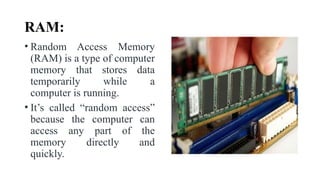
RAM:
• Random Access Memory
(RAM) is a type of computer
memory that stores data
temporarily while a
computer is running.
• It’s called “random access”
because the computer can
access any part of the
memory directly and
quickly.
CLASS-2
Hardware and Various
terms in Computer
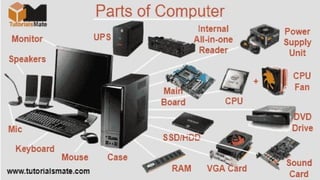
Computer hardware components:
•Motherboard
•Central processing unit (CPU)
•Random access memory (RAM)
•Storage drive (HDD or SSD)
•Graphics processing unit (GPU)
•Keyboard, mouse, & monitor
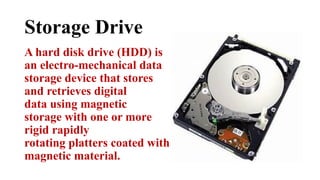
Storage Drive
A hard disk drive (HDD) is
an electro-mechanical data
storage device that stores
and retrieves digital
data using magnetic
storage with one or more
rigid rapidly
rotating platters coated with
magnetic material.
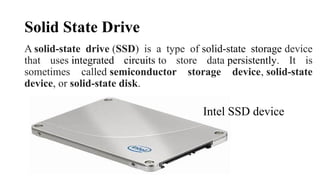
Solid State Drive
A solid-state drive (SSD) is a type of solid-state storage device
that uses integrated circuits to store data persistently. It is
sometimes called semiconductor storage device, solid-state
device, or solid-state disk.
Intel SSD device
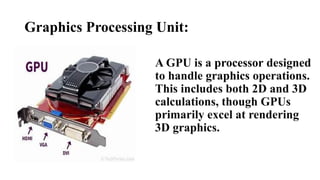
Graphics Processing Unit:
A GPU is a processor designed
to handle graphics operations.
This includes both 2D and 3D
calculations, though GPUs
primarily excel at rendering
3D graphics.
CLASS-3
Software and Operating System
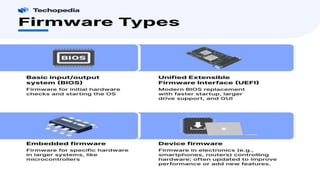
Software Components
Operating System
Device Drivers
Utility Software
Application Software
Firmware
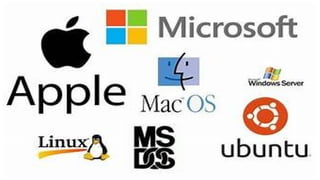
Operating System
An Operating System (OS) is system
software that manages computer hardware,
software resources, and provides various
services for computer programs. It acts as an
intermediary between users and the computer
hardware, enabling the user to interact with
the computer and run applications.
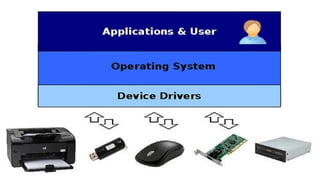
Device Driver:
• A device driver is a small software program that allows the
operating system (OS) to communicate with and control
hardware devices.
• It acts as a translator between the OS and the hardware,
enabling the OS to interact with hardware components like
printers, graphics cards, sound cards, network adapters,
storage devices, and many others.
• Without device drivers, the OS would not be able to use
hardware resources effectively or in some cases at all.
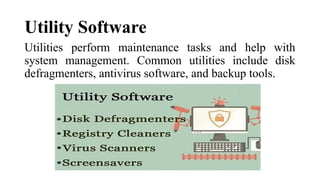
Utility Software
Utilities perform maintenance tasks and help with
system management. Common utilities include disk
defragmenters, antivirus software, and backup tools.
Disk Defragmenters:
Disk fragmenters, also known as disk defragmenters or disk defraggers, are utility programs
that rearrange the data on a computer's hard disk drive (HDD) or solid-state drive (SSD) to
improve performance, reduce fragmentation, and increase storage efficiency. They then
rearrange the files to occupy contiguous blocks on the disk
Registry Cleaners, Virus Scanners and Screen savers
Registry cleaner
Virus scanner Screen saver
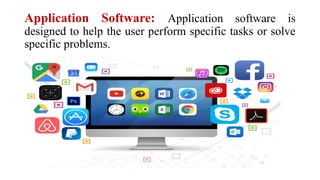
Application Software: Application software is
designed to help the user perform specific tasks or solve
specific problems.
THANK
YOU

Basic Components of Computer(Hardware and Software).pptx

  • 1.
    Basics of Computer By ITejaswini Department (CSM&CSD)
  • 2.
  • 3.
  • 5.
    Central Processing Unit CPUconsists of 3 major units, which are: •Memory or Storage unit - The memory unit is responsible for transferring information to other units of the computer when needed. Data and instructions are stored in memory units which are required for processing. It also stores the intermediate results of any calculation or task when they are in process. •Control Unit- Controlling of data and transfer of data and instructions is done by the control unit among other parts of the computer. It manages all parts of the computer. •ALU(Arithmetic Logic Unit)- ALU (Arithmetic Logic Unit) is responsible for performing arithmetic and logical functions or operations. By arithmetic operations, we mean operations like addition, subtraction, multiplication, and division, and all these operations and functions are performed by ALU. By Logical operations, we mean operations or functions like selecting, comparing, matching, and merging the data, and all these are performed by ALU.
  • 6.
    Where is theCPU located?
  • 7.
  • 8.
    Printer A printer isan output device that prints paper documents. This includes text documents, images, or a combination of both. The two most common types of printers are inkjet and laser printers.
  • 9.
    Monitor A computer monitoris an output device that displays information in pictorial or textual form. A discrete monitor comprises a visual display, support electronics, power supply, housing, electrical connectors, and external user controls. Components of a Monitor: Display Panel Backlight Circuit Board Power Supply Stand Input ports
  • 10.
    Mouse Uses of ComputerMouse: Pointing items Selecting Drawing Dragging and drop Scrolling up and down on documents or screen Clicking Hovering Playing games Parts of Mouse: Buttons Wheel Cable/connector LED or laser Mouse motherboard
  • 11.
    Motherboard: • The motherboard,or mainboard is the main circuit board that connects all the other components of the computer, including the CPU, RAM, and storage. • It also contains other essential components, such as the BIOS (basic input/output system) and expansion slots. • The motherboard processes the actual exchange of information and data in a computer system and comprises the CPU, memory and secondary storage devices.
  • 12.
    RAM: • Random AccessMemory (RAM) is a type of computer memory that stores data temporarily while a computer is running. • It’s called “random access” because the computer can access any part of the memory directly and quickly.
  • 14.
  • 15.
    Computer hardware components: •Motherboard •Centralprocessing unit (CPU) •Random access memory (RAM) •Storage drive (HDD or SSD) •Graphics processing unit (GPU) •Keyboard, mouse, & monitor
  • 16.
    Storage Drive A harddisk drive (HDD) is an electro-mechanical data storage device that stores and retrieves digital data using magnetic storage with one or more rigid rapidly rotating platters coated with magnetic material.
  • 17.
    Solid State Drive Asolid-state drive (SSD) is a type of solid-state storage device that uses integrated circuits to store data persistently. It is sometimes called semiconductor storage device, solid-state device, or solid-state disk. Intel SSD device
  • 18.
    Graphics Processing Unit: AGPU is a processor designed to handle graphics operations. This includes both 2D and 3D calculations, though GPUs primarily excel at rendering 3D graphics.
  • 20.
  • 21.
    Software Components Operating System DeviceDrivers Utility Software Application Software Firmware
  • 22.
    Operating System An OperatingSystem (OS) is system software that manages computer hardware, software resources, and provides various services for computer programs. It acts as an intermediary between users and the computer hardware, enabling the user to interact with the computer and run applications.
  • 24.
    Device Driver: • Adevice driver is a small software program that allows the operating system (OS) to communicate with and control hardware devices. • It acts as a translator between the OS and the hardware, enabling the OS to interact with hardware components like printers, graphics cards, sound cards, network adapters, storage devices, and many others. • Without device drivers, the OS would not be able to use hardware resources effectively or in some cases at all.
  • 26.
    Utility Software Utilities performmaintenance tasks and help with system management. Common utilities include disk defragmenters, antivirus software, and backup tools.
  • 27.
    Disk Defragmenters: Disk fragmenters,also known as disk defragmenters or disk defraggers, are utility programs that rearrange the data on a computer's hard disk drive (HDD) or solid-state drive (SSD) to improve performance, reduce fragmentation, and increase storage efficiency. They then rearrange the files to occupy contiguous blocks on the disk
  • 28.
    Registry Cleaners, VirusScanners and Screen savers Registry cleaner Virus scanner Screen saver
  • 29.
    Application Software: Applicationsoftware is designed to help the user perform specific tasks or solve specific problems.
  • 31.