 A use case diagram help system analyst to discover the
requirements of the target system from the users
perspective.
 Provides functional description of a system & its major
processes.
 Provides graphic description of the users of a system &
what kinds of interactions to exact within that system.
 Displays the details of the processes that occur within
the application area.
 Used to design the test cases for testing the
functionality of the system.
2/15/2017jaya kolekar 2
 Two types of elements
 Business roles
 Business processes
 Actors
 Use Case
 System Boundary
 Association
 Relationships in use cases
2/15/2017jaya kolekar 3
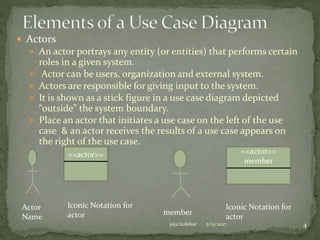
 Actors
 An actor portrays any entity (or entities) that performs certain
roles in a given system.
 Actor can be users, organization and external system.
 Actors are responsible for giving input to the system.
 It is shown as a stick figure in a use case diagram depicted
“outside” the system boundary.
 Place an actor that initiates a use case on the left of the use
case & an actor receives the results of a use case appears on
the right of the use case.
Actor
Name
<<actor>>
Iconic Notation for
actor member
<<actor>>
member
Iconic Notation for
actor
2/15/2017jaya kolekar 4
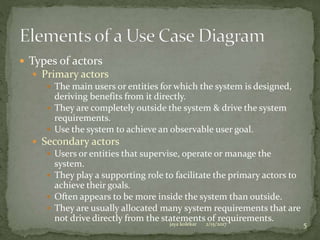
 Types of actors
 Primary actors
 The main users or entities for which the system is designed,
deriving benefits from it directly.
 They are completely outside the system & drive the system
requirements.
 Use the system to achieve an observable user goal.
 Secondary actors
 Users or entities that supervise, operate or manage the
system.
 They play a supporting role to facilitate the primary actors to
achieve their goals.
 Often appears to be more inside the system than outside.
 They are usually allocated many system requirements that are
not drive directly from the statements of requirements.
2/15/2017jaya kolekar 5
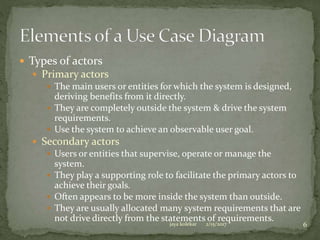
 Types of actors
 Primary actors
 The main users or entities for which the system is designed,
deriving benefits from it directly.
 They are completely outside the system & drive the system
requirements.
 Use the system to achieve an observable user goal.
 Secondary actors
 Users or entities that supervise, operate or manage the
system.
 They play a supporting role to facilitate the primary actors to
achieve their goals.
 Often appears to be more inside the system than outside.
 They are usually allocated many system requirements that are
not drive directly from the statements of requirements.
2/15/2017jaya kolekar 6
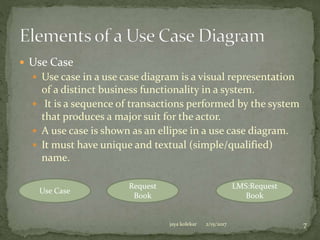
 Use Case
 Use case in a use case diagram is a visual representation
of a distinct business functionality in a system.
 It is a sequence of transactions performed by the system
that produces a major suit for the actor.
 A use case is shown as an ellipse in a use case diagram.
 It must have unique and textual (simple/qualified)
name.
Use Case
Request
Book
LMS:Request
Book
2/15/2017jaya kolekar 7
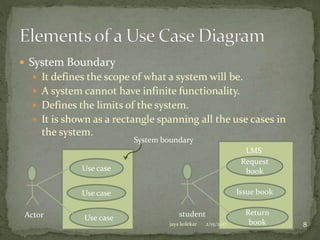
 System Boundary
 It defines the scope of what a system will be.
 A system cannot have infinite functionality.
 Defines the limits of the system.
 It is shown as a rectangle spanning all the use cases in
the system.
Use case
Use case
Use caseActor
Request
book
Issue book
Return
book
student
System boundary
LMS
2/15/2017jaya kolekar 8
 Communication Lines / Relationships
 Use case diagram has communication lines or links to
show communication between its various components.
 Association
 Dependency
 Include
 Extend
 Use case generalization
2/15/2017jaya kolekar 9
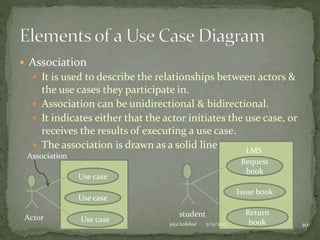
 Association
 It is used to describe the relationships between actors &
the use cases they participate in.
 Association can be unidirectional & bidirectional.
 It indicates either that the actor initiates the use case, or
receives the results of executing a use case.
 The association is drawn as a solid line.
Use case
Use case
Use caseActor
Association
Request
book
Issue book
Return
book
student
LMS
2/15/2017jaya kolekar 10
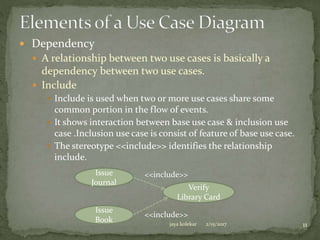
 Dependency
 A relationship between two use cases is basically a
dependency between two use cases.
 Include
 Include is used when two or more use cases share some
common portion in the flow of events.
 It shows interaction between base use case & inclusion use
case .Inclusion use case is consist of feature of base use case.
 The stereotype <<include>> identifies the relationship
include.
Issue
Journal
Issue
Book
Verify
Library Card
<<include>>
<<include>>
2/15/2017jaya kolekar 11
 Dependency
 Extend
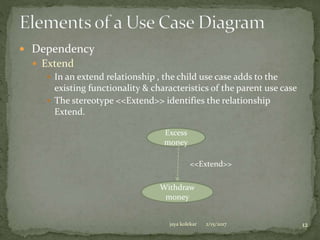
 In an extend relationship , the child use case adds to the
existing functionality & characteristics of the parent use case
 The stereotype <<Extend>> identifies the relationship
Extend.
Excess
money
Withdraw
money
<<Extend>>
2/15/2017jaya kolekar 12
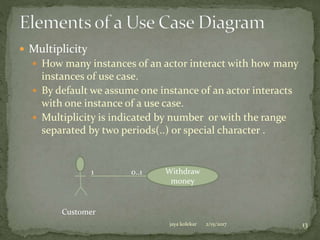
 Multiplicity
 How many instances of an actor interact with how many
instances of use case.
 By default we assume one instance of an actor interacts
with one instance of a use case.
 Multiplicity is indicated by number or with the range
separated by two periods(..) or special character .
Withdraw
money
1 0..1
Customer
2/15/2017jaya kolekar 13
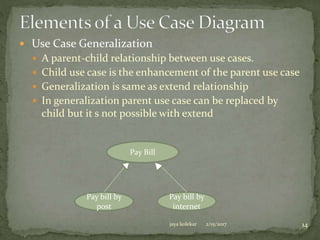
 Use Case Generalization
 A parent-child relationship between use cases.
 Child use case is the enhancement of the parent use case
 Generalization is same as extend relationship
 In generalization parent use case can be replaced by
child but it s not possible with extend
Pay bill by
post
Pay bill by
internet
Pay Bill
2/15/2017jaya kolekar 14
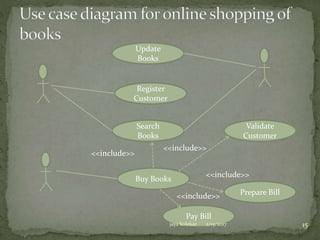
Buy Books
Pay Bill
Prepare Bill
Validate
Customer
Search
Books
Register
Customer
Update
Books
<<include>>
<<include>>
<<include>>
<<include>>
2/15/2017jaya kolekar 15
 Sequence diagrams describe interaction among classes
in terms of an exchange of messages over time.
 Depicts the sequence of actions that occurs in a system.
 The order of invocation of methods in each object is
captured by sequence diagram.
 Shows the dynamic behavior of a system.
 It is two-dimensional in nature.(horizontal axis shows
the life of the object & vertical axis shows the sequence
of the creation or invocation of these objects.
 Used to model usage scenarios, the logic of methods
and the logic of services.
2/15/2017jaya kolekar 16
 Class Roles
 Actor
 Lifelines
 Messages
 Activation
 Creating objects
 Deleting objects
 Simple & Block Iteration
 Branching
2/15/2017jaya kolekar 17
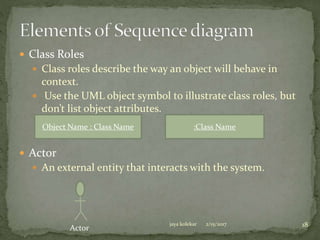
 Class Roles
 Class roles describe the way an object will behave in
context.
 Use the UML object symbol to illustrate class roles, but
don’t list object attributes.
 Actor
 An external entity that interacts with the system.
Object Name : Class Name :Class Name
Actor
2/15/2017jaya kolekar 18
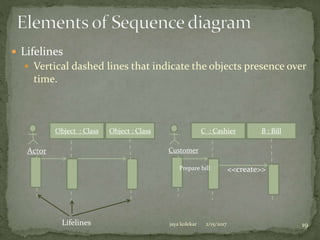
 Lifelines
 Vertical dashed lines that indicate the objects presence over
time.
Object : Class Object : Class
Actor
C : Cashier B : Bill
Customer
Prepare bill <<create>>
Lifelines 2/15/2017jaya kolekar 19
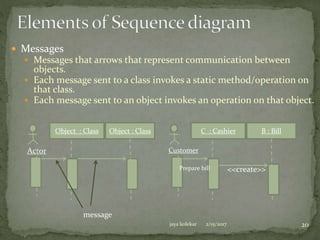
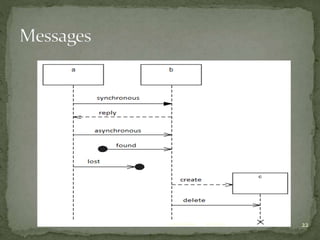
 Messages
 Messages that arrows that represent communication between
objects.
 Each message sent to a class invokes a static method/operation on
that class.
 Each message sent to an object invokes an operation on that object.
Object : Class Object : Class
Actor
C : Cashier B : Bill
Customer
Prepare bill <<create>>
message
2/15/2017jaya kolekar 20
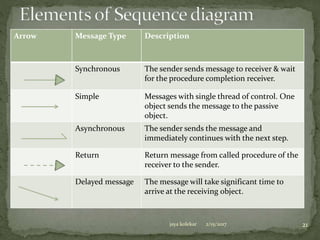
Arrow Message Type Description
Synchronous The sender sends message to receiver & wait
for the procedure completion receiver.
Simple Messages with single thread of control. One
object sends the message to the passive
object.
Asynchronous The sender sends the message and
immediately continues with the next step.
Return Return message from called procedure of the
receiver to the sender.
Delayed message The message will take significant time to
arrive at the receiving object.
2/15/2017jaya kolekar 21
2/15/2017jaya kolekar 22
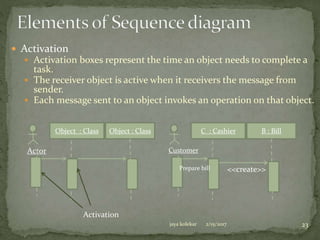
 Activation
 Activation boxes represent the time an object needs to complete a
task.
 The receiver object is active when it receivers the message from
sender.
 Each message sent to an object invokes an operation on that object.
Object : Class Object : Class
Actor
C : Cashier B : Bill
Customer
Prepare bill <<create>>
Activation
2/15/2017jaya kolekar 23
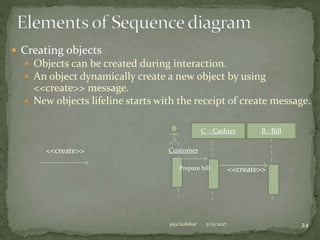
 Creating objects
 Objects can be created during interaction.
 An object dynamically create a new object by using
<<create>> message.
 New objects lifeline starts with the receipt of create message.
C : Cashier B : Bill
Customer
Prepare bill <<create>>
<<create>>
2/15/2017jaya kolekar 24
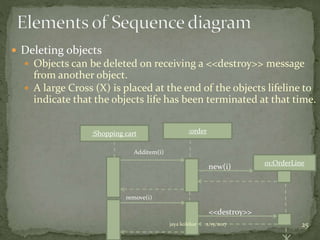
 Deleting objects
 Objects can be deleted on receiving a <<destroy>> message
from another object.
 A large Cross (X) is placed at the end of the objects lifeline to
indicate that the objects life has been terminated at that time.
:order
01:OrderLine
Additem(i)
new(i)
:Shopping cart
<<destroy>>
remove(i)
jaya kolekar 2/15/2017 25
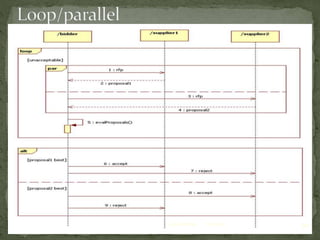
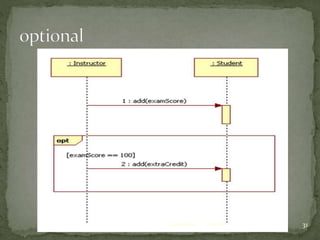
 Structured control
 A sequence of messages is fine for showing a single, linear
sequence, but often need to show conditionals & loops.
 Shows concurrent execution of multiple sequences.
 A control operator is shown as a rectangular region within the
sequence diagram.
 Control operator has a tag a text label inside a small pentagon
in the upper left corner to tell what kind of a control operator
it is.
 Types of control in sequence diagram
 Optional Execution
 Conditional Execution
 Parallel Execution
 Loop(Iterative) Execution
2/15/2017jaya kolekar 26
 Simple & block iteration
 Sometimes a task is to be performed repeatedly, then in
sequence diagram such task is represented by a name
preceded by an asterisk “ * “.
 A repetition or loop within a sequence diagram is depicted as
a rectangle.
C : Cashier B : Bill
Customer
Prepare bill <<create>>
B : Bill
Buy product
[all product added]
Get product details
Add product
Update quantity
Calculate total amountDisplay total
loop
2/15/2017jaya kolekar 27
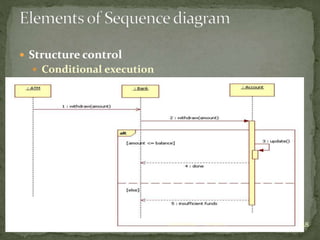
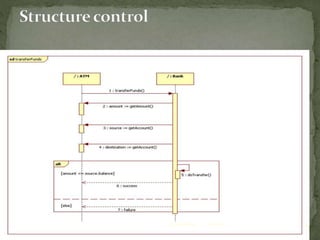
 Structure control
 Conditional execution
2/15/2017jaya kolekar 28
2/15/2017jaya kolekar 29
2/15/2017jaya kolekar 30
2/15/2017jaya kolekar 31
2/15/2017jaya kolekar 32
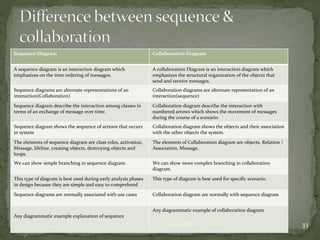
Sequence Diagram Collaboration Diagram
A sequence diagram is an interaction diagram which
emphasizes on the time ordering of messages.
A collaboration Diagram is an interaction diagram which
emphasizes the structural organization of the objects that
send and receive messages.
Sequence diagrams are alternate representations of an
interaction(Collaboration)
Collaboration diagrams are alternate representation of an
interaction(sequence)
Sequence diagram describe the interaction among classes in
terms of an exchange of message over time.
Collaboration diagram describe the interaction with
numbered arrows which shows the movement of messages
during the course of a scenario.
Sequence diagram shows the sequence of actions that occurs
in system
Collaboration diagram shows the objects and their association
with the other objects the system.
The elements of sequence diagram are class roles, activation,
Message, lifeline, creating objects, destroying objects and
loops.
The elements of Collaboration diagram are objects, Relation /
Association, Message.
We can show simple branching in sequence diagram We can show more complex branching in collaboration
diagram.
This type of diagram is best used during early analysis phases
in design because they are simple and easy to comprehend
This type of diagram is best used for specific scenario.
Sequence diagrams are normally associated with use cases Collaboration diagram are normally with sequence diagram
Any diagrammatic example explanation of sequence
Any diagrammatic example of collaboration diagram
2/15/2017jaya kolekar 33

Basic behavioral modeling chapter 3 of OMD

  • 2.
     A usecase diagram help system analyst to discover the requirements of the target system from the users perspective.  Provides functional description of a system & its major processes.  Provides graphic description of the users of a system & what kinds of interactions to exact within that system.  Displays the details of the processes that occur within the application area.  Used to design the test cases for testing the functionality of the system. 2/15/2017jaya kolekar 2
  • 3.
     Two typesof elements  Business roles  Business processes  Actors  Use Case  System Boundary  Association  Relationships in use cases 2/15/2017jaya kolekar 3
  • 4.
     Actors  Anactor portrays any entity (or entities) that performs certain roles in a given system.  Actor can be users, organization and external system.  Actors are responsible for giving input to the system.  It is shown as a stick figure in a use case diagram depicted “outside” the system boundary.  Place an actor that initiates a use case on the left of the use case & an actor receives the results of a use case appears on the right of the use case. Actor Name <<actor>> Iconic Notation for actor member <<actor>> member Iconic Notation for actor 2/15/2017jaya kolekar 4
  • 5.
     Types ofactors  Primary actors  The main users or entities for which the system is designed, deriving benefits from it directly.  They are completely outside the system & drive the system requirements.  Use the system to achieve an observable user goal.  Secondary actors  Users or entities that supervise, operate or manage the system.  They play a supporting role to facilitate the primary actors to achieve their goals.  Often appears to be more inside the system than outside.  They are usually allocated many system requirements that are not drive directly from the statements of requirements. 2/15/2017jaya kolekar 5
  • 6.
     Types ofactors  Primary actors  The main users or entities for which the system is designed, deriving benefits from it directly.  They are completely outside the system & drive the system requirements.  Use the system to achieve an observable user goal.  Secondary actors  Users or entities that supervise, operate or manage the system.  They play a supporting role to facilitate the primary actors to achieve their goals.  Often appears to be more inside the system than outside.  They are usually allocated many system requirements that are not drive directly from the statements of requirements. 2/15/2017jaya kolekar 6
  • 7.
     Use Case Use case in a use case diagram is a visual representation of a distinct business functionality in a system.  It is a sequence of transactions performed by the system that produces a major suit for the actor.  A use case is shown as an ellipse in a use case diagram.  It must have unique and textual (simple/qualified) name. Use Case Request Book LMS:Request Book 2/15/2017jaya kolekar 7
  • 8.
     System Boundary It defines the scope of what a system will be.  A system cannot have infinite functionality.  Defines the limits of the system.  It is shown as a rectangle spanning all the use cases in the system. Use case Use case Use caseActor Request book Issue book Return book student System boundary LMS 2/15/2017jaya kolekar 8
  • 9.
     Communication Lines/ Relationships  Use case diagram has communication lines or links to show communication between its various components.  Association  Dependency  Include  Extend  Use case generalization 2/15/2017jaya kolekar 9
  • 10.
     Association  Itis used to describe the relationships between actors & the use cases they participate in.  Association can be unidirectional & bidirectional.  It indicates either that the actor initiates the use case, or receives the results of executing a use case.  The association is drawn as a solid line. Use case Use case Use caseActor Association Request book Issue book Return book student LMS 2/15/2017jaya kolekar 10
  • 11.
     Dependency  Arelationship between two use cases is basically a dependency between two use cases.  Include  Include is used when two or more use cases share some common portion in the flow of events.  It shows interaction between base use case & inclusion use case .Inclusion use case is consist of feature of base use case.  The stereotype <<include>> identifies the relationship include. Issue Journal Issue Book Verify Library Card <<include>> <<include>> 2/15/2017jaya kolekar 11
  • 12.
     Dependency  Extend In an extend relationship , the child use case adds to the existing functionality & characteristics of the parent use case  The stereotype <<Extend>> identifies the relationship Extend. Excess money Withdraw money <<Extend>> 2/15/2017jaya kolekar 12
  • 13.
     Multiplicity  Howmany instances of an actor interact with how many instances of use case.  By default we assume one instance of an actor interacts with one instance of a use case.  Multiplicity is indicated by number or with the range separated by two periods(..) or special character . Withdraw money 1 0..1 Customer 2/15/2017jaya kolekar 13
  • 14.
     Use CaseGeneralization  A parent-child relationship between use cases.  Child use case is the enhancement of the parent use case  Generalization is same as extend relationship  In generalization parent use case can be replaced by child but it s not possible with extend Pay bill by post Pay bill by internet Pay Bill 2/15/2017jaya kolekar 14
  • 15.
    Buy Books Pay Bill PrepareBill Validate Customer Search Books Register Customer Update Books <<include>> <<include>> <<include>> <<include>> 2/15/2017jaya kolekar 15
  • 16.
     Sequence diagramsdescribe interaction among classes in terms of an exchange of messages over time.  Depicts the sequence of actions that occurs in a system.  The order of invocation of methods in each object is captured by sequence diagram.  Shows the dynamic behavior of a system.  It is two-dimensional in nature.(horizontal axis shows the life of the object & vertical axis shows the sequence of the creation or invocation of these objects.  Used to model usage scenarios, the logic of methods and the logic of services. 2/15/2017jaya kolekar 16
  • 17.
     Class Roles Actor  Lifelines  Messages  Activation  Creating objects  Deleting objects  Simple & Block Iteration  Branching 2/15/2017jaya kolekar 17
  • 18.
     Class Roles Class roles describe the way an object will behave in context.  Use the UML object symbol to illustrate class roles, but don’t list object attributes.  Actor  An external entity that interacts with the system. Object Name : Class Name :Class Name Actor 2/15/2017jaya kolekar 18
  • 19.
     Lifelines  Verticaldashed lines that indicate the objects presence over time. Object : Class Object : Class Actor C : Cashier B : Bill Customer Prepare bill <<create>> Lifelines 2/15/2017jaya kolekar 19
  • 20.
     Messages  Messagesthat arrows that represent communication between objects.  Each message sent to a class invokes a static method/operation on that class.  Each message sent to an object invokes an operation on that object. Object : Class Object : Class Actor C : Cashier B : Bill Customer Prepare bill <<create>> message 2/15/2017jaya kolekar 20
  • 21.
    Arrow Message TypeDescription Synchronous The sender sends message to receiver & wait for the procedure completion receiver. Simple Messages with single thread of control. One object sends the message to the passive object. Asynchronous The sender sends the message and immediately continues with the next step. Return Return message from called procedure of the receiver to the sender. Delayed message The message will take significant time to arrive at the receiving object. 2/15/2017jaya kolekar 21
  • 22.
  • 23.
     Activation  Activationboxes represent the time an object needs to complete a task.  The receiver object is active when it receivers the message from sender.  Each message sent to an object invokes an operation on that object. Object : Class Object : Class Actor C : Cashier B : Bill Customer Prepare bill <<create>> Activation 2/15/2017jaya kolekar 23
  • 24.
     Creating objects Objects can be created during interaction.  An object dynamically create a new object by using <<create>> message.  New objects lifeline starts with the receipt of create message. C : Cashier B : Bill Customer Prepare bill <<create>> <<create>> 2/15/2017jaya kolekar 24
  • 25.
     Deleting objects Objects can be deleted on receiving a <<destroy>> message from another object.  A large Cross (X) is placed at the end of the objects lifeline to indicate that the objects life has been terminated at that time. :order 01:OrderLine Additem(i) new(i) :Shopping cart <<destroy>> remove(i) jaya kolekar 2/15/2017 25
  • 26.
     Structured control A sequence of messages is fine for showing a single, linear sequence, but often need to show conditionals & loops.  Shows concurrent execution of multiple sequences.  A control operator is shown as a rectangular region within the sequence diagram.  Control operator has a tag a text label inside a small pentagon in the upper left corner to tell what kind of a control operator it is.  Types of control in sequence diagram  Optional Execution  Conditional Execution  Parallel Execution  Loop(Iterative) Execution 2/15/2017jaya kolekar 26
  • 27.
     Simple &block iteration  Sometimes a task is to be performed repeatedly, then in sequence diagram such task is represented by a name preceded by an asterisk “ * “.  A repetition or loop within a sequence diagram is depicted as a rectangle. C : Cashier B : Bill Customer Prepare bill <<create>> B : Bill Buy product [all product added] Get product details Add product Update quantity Calculate total amountDisplay total loop 2/15/2017jaya kolekar 27
  • 28.
     Structure control Conditional execution 2/15/2017jaya kolekar 28
  • 29.
  • 30.
  • 31.
  • 32.
  • 33.
    Sequence Diagram CollaborationDiagram A sequence diagram is an interaction diagram which emphasizes on the time ordering of messages. A collaboration Diagram is an interaction diagram which emphasizes the structural organization of the objects that send and receive messages. Sequence diagrams are alternate representations of an interaction(Collaboration) Collaboration diagrams are alternate representation of an interaction(sequence) Sequence diagram describe the interaction among classes in terms of an exchange of message over time. Collaboration diagram describe the interaction with numbered arrows which shows the movement of messages during the course of a scenario. Sequence diagram shows the sequence of actions that occurs in system Collaboration diagram shows the objects and their association with the other objects the system. The elements of sequence diagram are class roles, activation, Message, lifeline, creating objects, destroying objects and loops. The elements of Collaboration diagram are objects, Relation / Association, Message. We can show simple branching in sequence diagram We can show more complex branching in collaboration diagram. This type of diagram is best used during early analysis phases in design because they are simple and easy to comprehend This type of diagram is best used for specific scenario. Sequence diagrams are normally associated with use cases Collaboration diagram are normally with sequence diagram Any diagrammatic example explanation of sequence Any diagrammatic example of collaboration diagram 2/15/2017jaya kolekar 33