I n t e r m a x G r o u p
Automatisch deployen van VMs
• Standaardisatie
• Tijdwinst
• Volledig operationele opleverbare VM
I n t e r m a x G r o u p
Startpunt: handmatig & foutgevoelig!
I n t e r m a x G r o u p
De oplossing
I n t e r m a x G r o u p
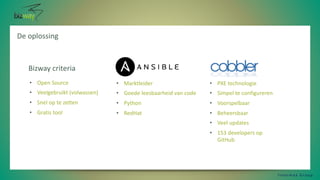
• PXE technologie
• Simpel te configureren
• Voorspelbaar
• Beheersbaar
• Veel updates
• 153 developers op
GitHub
• Marktleider
• Goede leesbaarheid van code
• Python
• RedHat
• Open Source
• Veelgebruikt (volwassen)
• Snel op te zetten
• Gratis tool
Bizway criteria
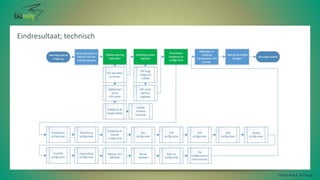
Eindresultaat; technisch
I n t e r m a x G r o u p
Eindresultaat; organisatorisch
• Tijdwinst 80%
• Verplichte standaardisatie
• Minder foutgevoelig
• Begin vandaag, over een jaar is het volledig opgebouwd
I n t e r m a x G r o u p
Cobbler hoe dan?
I n t e r m a x G r o u p
VM aanmaken in Proxmox – Mac adres uitlezen vanuit aangemaakte VM.
Daarna cobbler aanroepen via SSH
$pxe_ip, '22', '/root/create.sh ' . $_POST['server_hostname'] . ' ' . $_POST['server_ip'] . ' ' . $info_wan[1] . ' '
. $info_wan[0] . ' ' . $_POST['server_intern_ip'] . ' ' . $mac_output[1] . ' ' . $subnet_lan
cobbler system remove --name=$1 > /dev/null 2>&1
cobbler system add --name=$1 --profile=CentOS-7-x86_64 --hostname=$1 --interface=eth0 --ip-address=$2
--static=1 --gateway=$3 --subnet=$4 --name-servers="8.8.8.8 8.8.4.4" > /dev/null 2>&1
cobbler system edit --name=$1 --interface=eth1 --ip-address=$5 --name-servers="8.8.8.8 8.8.4.4" --mac-
address=$6 --static=1 --subnet=$7 > /dev/null 2>&1
/etc/init.d/cobblerd restart > /dev/null 2>&1
cobbler sync > /dev/null 2>&1
Ansible hoe dan?
I n t e r m a x G r o u p
….
#Hij wacht 720 seconden tot de host, anders faalt de taak en ook de playbook
- name: wachten op pxe deployment
wait_for: "host={{ new_ip }} port=22 delay=15 state=started timeout=720"
#pingt intern IP van de host vanuit Ansible
- name: check_ping_eth0
shell: >
ping -c 2 {{ new_ip }}
tags: pingtest
ignore_errors: yes
register: check_ping_eth0
#pingt extern IP van de host vanuit Ansible
- name: check_ping_eth1
shell: >
ping -c 2 {{ server_ip }}
tags: pingtest
ignore_errors: yes
register: check_ping_eth1
#stuurt positieve melding naar API als ping geslaagd is
#zegt tegen api dat addhost role klaar is (ook als een taak fout ging)
- name: variables toevoegen aan host_variablefile
lineinfile:
dest:
"/deployment/environments/host_vars/{{ new_ip
}}"
regexp: "{{ item.regexp }}"
line: "{{ item.line }}"
with_items:
- { regexp: "^---", line: "---" }
- { regexp: "^dauser:", line: "dauser:……. ;)" }
- { regexp: "^dalicense:", line: "dalicense: {{
dalicense }}" }
- { regexp: "^server_id:", line: "server_id: {{
server_id }}" }
- { regexp: "^server_hostname:", line:
"server_hostname: {{ server_hostname }}" }
Vragen?
https://nl.linkedin.com/in/bartlageweg
bart@bizway.nl
I n t e r m a x G r o u p

Bart Lageweg - Ansible/Cobbler

  • 1.
    I n te r m a x G r o u p
  • 2.
    Automatisch deployen vanVMs • Standaardisatie • Tijdwinst • Volledig operationele opleverbare VM I n t e r m a x G r o u p
  • 3.
    Startpunt: handmatig &foutgevoelig! I n t e r m a x G r o u p
  • 4.
    De oplossing I nt e r m a x G r o u p • PXE technologie • Simpel te configureren • Voorspelbaar • Beheersbaar • Veel updates • 153 developers op GitHub • Marktleider • Goede leesbaarheid van code • Python • RedHat • Open Source • Veelgebruikt (volwassen) • Snel op te zetten • Gratis tool Bizway criteria
  • 5.
    Eindresultaat; technisch I nt e r m a x G r o u p
  • 6.
    Eindresultaat; organisatorisch • Tijdwinst80% • Verplichte standaardisatie • Minder foutgevoelig • Begin vandaag, over een jaar is het volledig opgebouwd I n t e r m a x G r o u p
  • 7.
    Cobbler hoe dan? In t e r m a x G r o u p VM aanmaken in Proxmox – Mac adres uitlezen vanuit aangemaakte VM. Daarna cobbler aanroepen via SSH $pxe_ip, '22', '/root/create.sh ' . $_POST['server_hostname'] . ' ' . $_POST['server_ip'] . ' ' . $info_wan[1] . ' ' . $info_wan[0] . ' ' . $_POST['server_intern_ip'] . ' ' . $mac_output[1] . ' ' . $subnet_lan cobbler system remove --name=$1 > /dev/null 2>&1 cobbler system add --name=$1 --profile=CentOS-7-x86_64 --hostname=$1 --interface=eth0 --ip-address=$2 --static=1 --gateway=$3 --subnet=$4 --name-servers="8.8.8.8 8.8.4.4" > /dev/null 2>&1 cobbler system edit --name=$1 --interface=eth1 --ip-address=$5 --name-servers="8.8.8.8 8.8.4.4" --mac- address=$6 --static=1 --subnet=$7 > /dev/null 2>&1 /etc/init.d/cobblerd restart > /dev/null 2>&1 cobbler sync > /dev/null 2>&1
  • 8.
    Ansible hoe dan? In t e r m a x G r o u p …. #Hij wacht 720 seconden tot de host, anders faalt de taak en ook de playbook - name: wachten op pxe deployment wait_for: "host={{ new_ip }} port=22 delay=15 state=started timeout=720" #pingt intern IP van de host vanuit Ansible - name: check_ping_eth0 shell: > ping -c 2 {{ new_ip }} tags: pingtest ignore_errors: yes register: check_ping_eth0 #pingt extern IP van de host vanuit Ansible - name: check_ping_eth1 shell: > ping -c 2 {{ server_ip }} tags: pingtest ignore_errors: yes register: check_ping_eth1 #stuurt positieve melding naar API als ping geslaagd is #zegt tegen api dat addhost role klaar is (ook als een taak fout ging) - name: variables toevoegen aan host_variablefile lineinfile: dest: "/deployment/environments/host_vars/{{ new_ip }}" regexp: "{{ item.regexp }}" line: "{{ item.line }}" with_items: - { regexp: "^---", line: "---" } - { regexp: "^dauser:", line: "dauser:……. ;)" } - { regexp: "^dalicense:", line: "dalicense: {{ dalicense }}" } - { regexp: "^server_id:", line: "server_id: {{ server_id }}" } - { regexp: "^server_hostname:", line: "server_hostname: {{ server_hostname }}" }
  • 9.