Backbone Networks:
Types & Uses
Outline
• Introduction
• Types of Backbone technologies
• components of Backbone technologies
• Technologies of Backbone
technologies
• Best Practices of Backbone
technologies
• Improving Backbone technologies
What is a Backbone Network?
Backbone Network is as a Network containing a high capacity connectivity
infrastructure that backbone to the different part of the network.
Network Infrastructure Component: A backbone serves as a crucial element in
computer network infrastructure, facilitating the connection of multiple networks and
enabling the seamless flow of data between them.
Local Area Network Connectivity: It links various local area networks (LANs) within
workplaces, campuses, or buildings, forming the foundation for broader networks like
wide area networks (WANs) or metropolitan area networks (MANs) when spanning entire
cities.
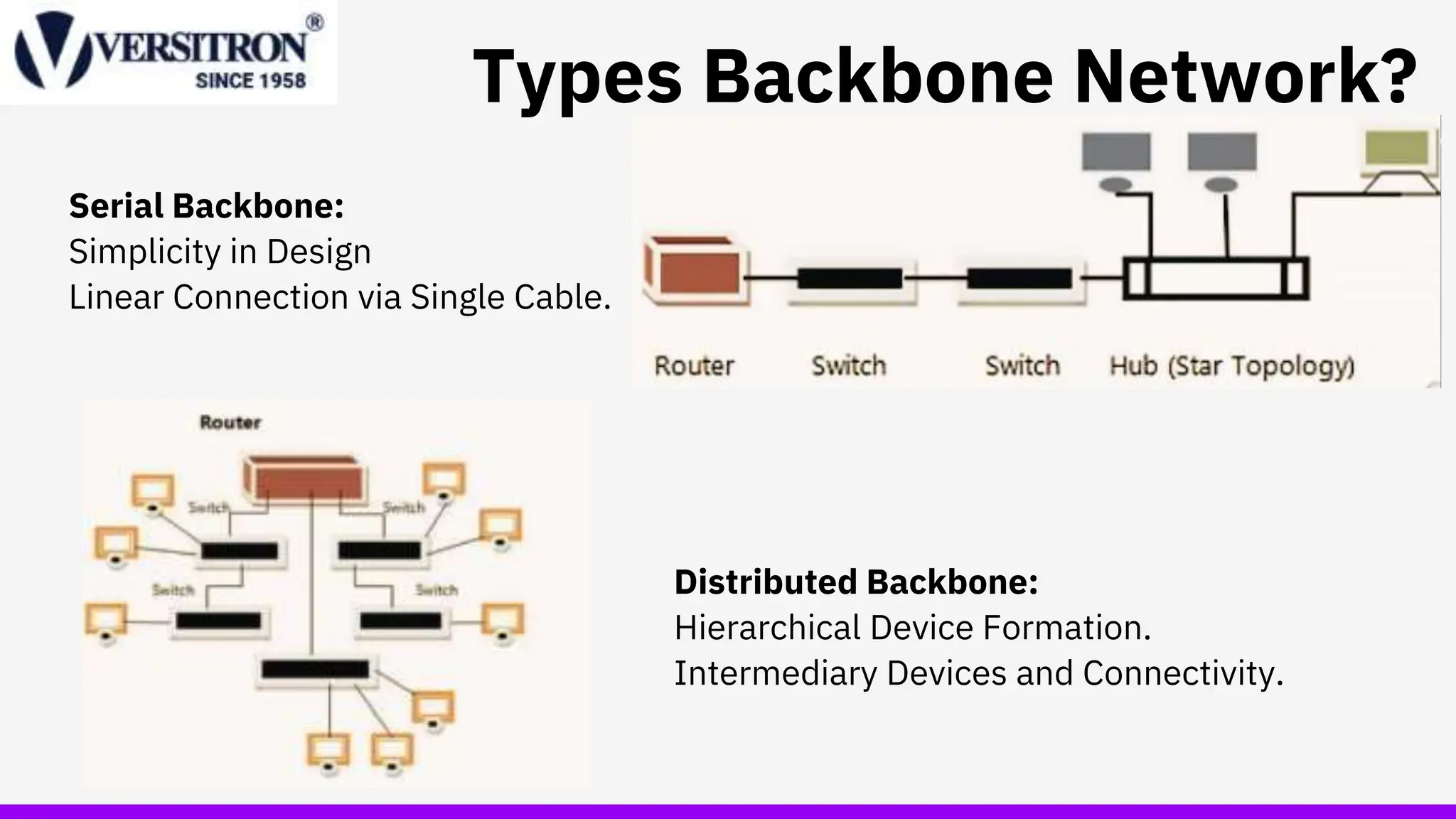
Types Backbone Network?
Serial Backbone:
Simplicity in Design
Linear Connection via Single Cable.
Distributed Backbone:
Hierarchical Device Formation.
Intermediary Devices and Connectivity.
Backbone Network Components
>Network cable
-Function in the same way as in LANs
-Optical fiber - more commonly chosen
(provides higher data rates)
> Hardware devices
- Computers or special-purpose devices that just transfer
messages from one network to another.
• switches
• routers
• gateways
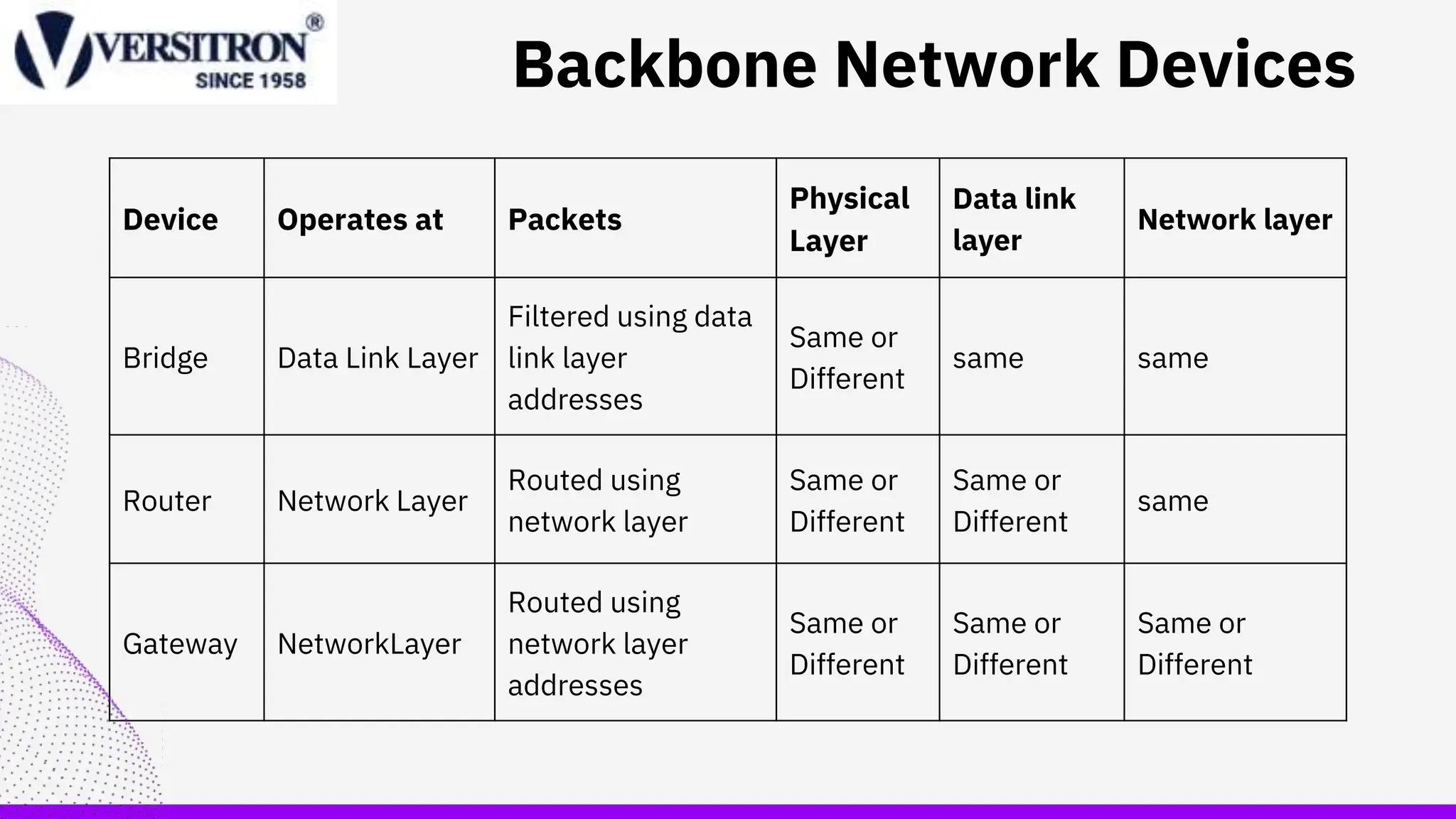
Device Operates at Packets
Physical
Layer
Data link
layer
Network layer
Bridge Data Link Layer
Filtered using data
link layer
addresses
Same or
Different
same same
Router Network Layer
Routed using
network layer
Same or
Different
Same or
Different
same
Gateway NetworkLayer
Routed using
network layer
addresses
Same or
Different
Same or
Different
Same or
Different
Backbone Network Devices
Network Bridge
Definition:
⚬ A network bridge is a network device that creates a single
aggregate from multiple communicating devices, serving
as a communicator between them.
⚬ The primary function of a network bridge is to perform
network bridging, which involves consolidating
communication from various sources into a unified whole.
Advantages and Disadvantages:
⚬ Advantages include connecting similar networks and
accommodating various cable types.
⚬ Disadvantages involve diminishing popularity and market
share loss to more advanced Layer 2 switches.
Router
• Definition
⚬ A router is a device designed to facilitate communication
between two or more distinct networks situated in diverse
geographical locations
⚬ It constructs a new frame around the packet and selects
the optimal route for the packet to travel.
• Types of Routers:
⚬ Broadband Routers: Devices that manage
communication for high-speed internet access.
⚬ Wireless Routers: Routers equipped for wireless network
connectivity.
⚬ Core Router: Manages data traffic within the core of a
network.
⚬ Wired and Wireless Routers
Switches & hub
Hub:
⚬ Hubs serve the purpose of connecting all devices within a
network, enabling communication among them through
broadcasting.
⚬ Also known as network hubs, they act as common connection
points for devices in a network, particularly used to link
segments of a Local Area Network (LAN).
Switch:
⚬ Similar to hubs, switches are utilized to connect devices
within a network, facilitating communication between them.
⚬ During the first instance, switches perform flooding,
broadcasting data to all connected devices. However, from the
second instance onward, they utilize unicast, directing data
specifically to the intended recipient.
Improving performance
• Improve Computer and Device Performance:
⚬ Optimize the performance of computers and devices by
addressing hardware and software efficiency.
• Upgrade to Faster Devices:
⚬ Enhance network speed by upgrading devices to faster
and more advanced models.
• Utilize Faster Routing Protocols:
⚬ Improve data transmission efficiency by implementing
faster routing protocols.
• Opt for Static Routing in Small Networks:
⚬ In smaller networks, choose static routing for quicker
data transfer.
5. Reduce Network Demand:
⚬ Mitigate network congestion by strategically reducing
overall network demand.
BACK TO AGENDA PAGE
Get In Touch
sales@versitron.com
Email
https://www.facebook.com/versit
roninc
https://twitter.com/versitron
https://www.linkedin.com/compa
ny/versitron-inc-/
Social Media
1-800-537-2296
302-894-0699
Call us
www.versitron.com

Backbone Network types.pptx

  • 1.
  • 2.
    Outline • Introduction • Typesof Backbone technologies • components of Backbone technologies • Technologies of Backbone technologies • Best Practices of Backbone technologies • Improving Backbone technologies
  • 3.
    What is aBackbone Network? Backbone Network is as a Network containing a high capacity connectivity infrastructure that backbone to the different part of the network. Network Infrastructure Component: A backbone serves as a crucial element in computer network infrastructure, facilitating the connection of multiple networks and enabling the seamless flow of data between them. Local Area Network Connectivity: It links various local area networks (LANs) within workplaces, campuses, or buildings, forming the foundation for broader networks like wide area networks (WANs) or metropolitan area networks (MANs) when spanning entire cities.
  • 4.
    Types Backbone Network? SerialBackbone: Simplicity in Design Linear Connection via Single Cable. Distributed Backbone: Hierarchical Device Formation. Intermediary Devices and Connectivity.
  • 5.
    Backbone Network Components >Networkcable -Function in the same way as in LANs -Optical fiber - more commonly chosen (provides higher data rates) > Hardware devices - Computers or special-purpose devices that just transfer messages from one network to another. • switches • routers • gateways
  • 6.
    Device Operates atPackets Physical Layer Data link layer Network layer Bridge Data Link Layer Filtered using data link layer addresses Same or Different same same Router Network Layer Routed using network layer Same or Different Same or Different same Gateway NetworkLayer Routed using network layer addresses Same or Different Same or Different Same or Different Backbone Network Devices
  • 7.
    Network Bridge Definition: ⚬ Anetwork bridge is a network device that creates a single aggregate from multiple communicating devices, serving as a communicator between them. ⚬ The primary function of a network bridge is to perform network bridging, which involves consolidating communication from various sources into a unified whole. Advantages and Disadvantages: ⚬ Advantages include connecting similar networks and accommodating various cable types. ⚬ Disadvantages involve diminishing popularity and market share loss to more advanced Layer 2 switches.
  • 8.
    Router • Definition ⚬ Arouter is a device designed to facilitate communication between two or more distinct networks situated in diverse geographical locations ⚬ It constructs a new frame around the packet and selects the optimal route for the packet to travel. • Types of Routers: ⚬ Broadband Routers: Devices that manage communication for high-speed internet access. ⚬ Wireless Routers: Routers equipped for wireless network connectivity. ⚬ Core Router: Manages data traffic within the core of a network. ⚬ Wired and Wireless Routers
  • 9.
    Switches & hub Hub: ⚬Hubs serve the purpose of connecting all devices within a network, enabling communication among them through broadcasting. ⚬ Also known as network hubs, they act as common connection points for devices in a network, particularly used to link segments of a Local Area Network (LAN). Switch: ⚬ Similar to hubs, switches are utilized to connect devices within a network, facilitating communication between them. ⚬ During the first instance, switches perform flooding, broadcasting data to all connected devices. However, from the second instance onward, they utilize unicast, directing data specifically to the intended recipient.
  • 10.
    Improving performance • ImproveComputer and Device Performance: ⚬ Optimize the performance of computers and devices by addressing hardware and software efficiency. • Upgrade to Faster Devices: ⚬ Enhance network speed by upgrading devices to faster and more advanced models. • Utilize Faster Routing Protocols: ⚬ Improve data transmission efficiency by implementing faster routing protocols. • Opt for Static Routing in Small Networks: ⚬ In smaller networks, choose static routing for quicker data transfer. 5. Reduce Network Demand: ⚬ Mitigate network congestion by strategically reducing overall network demand.
  • 11.
    BACK TO AGENDAPAGE Get In Touch sales@versitron.com Email https://www.facebook.com/versit roninc https://twitter.com/versitron https://www.linkedin.com/compa ny/versitron-inc-/ Social Media 1-800-537-2296 302-894-0699 Call us www.versitron.com