BAB III
                          PENGOLAHAN DATA


3.1.   Properties
3.1.1. Properties Form 1
       Pengaturanpropertiesdarimasing-masingobjekpadaform                 1
dapatdilihatpadaTabel 3.1.


                      Gambar 3.1. Tampilan Awal Form 1
                   Tabel 3.1.PengaturanProperties padaForm 1
         Objek                Properties                  Nilai
                               (Name)                     Awal
         Form 1                Caption                   Form 1
                               Picture                  (Bitmap)
                               (Name)                      Image1
        Image 1
                               Picture                    (Bitmap)
                               (Name)                      Label 1
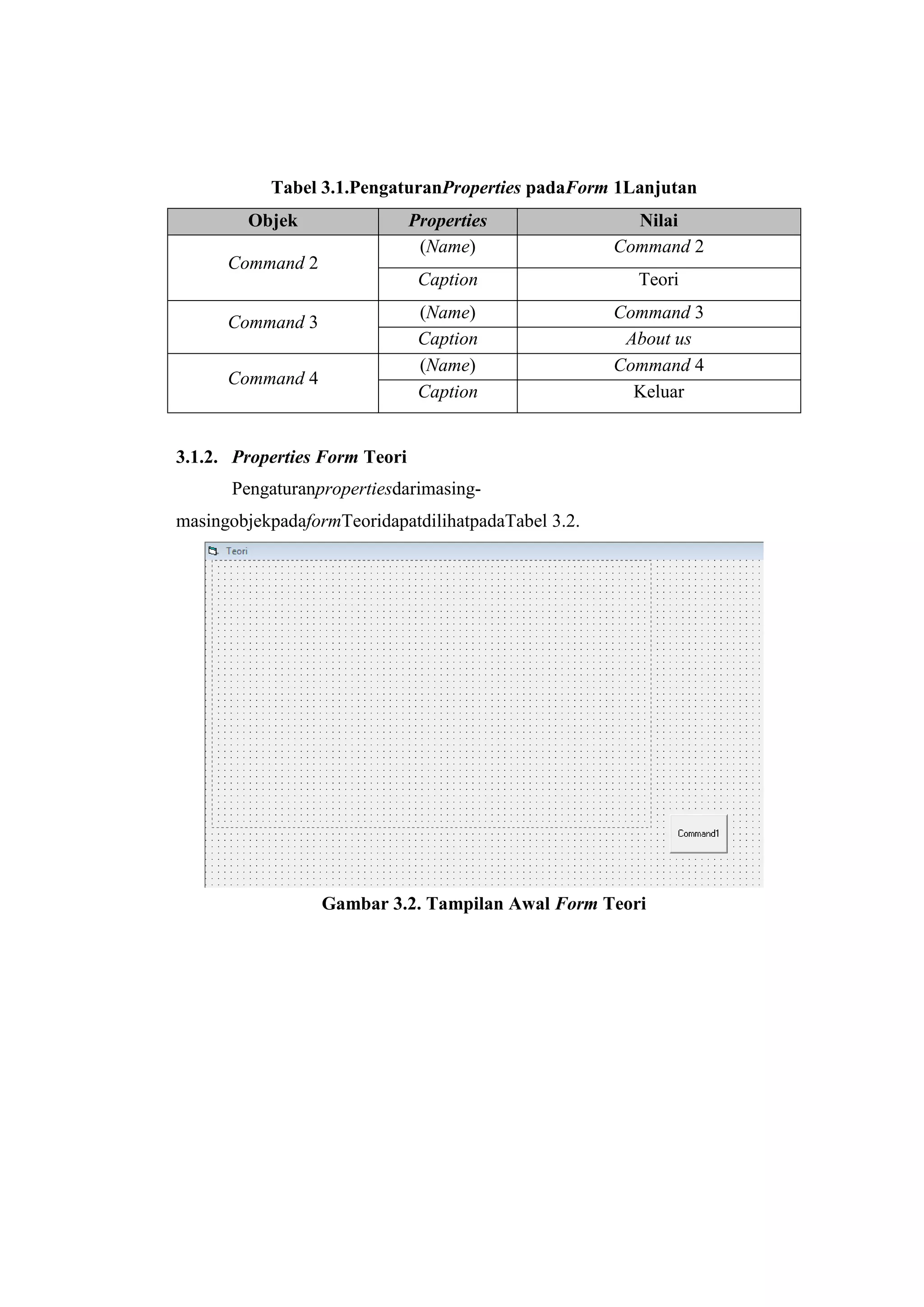
         Label 1               Caption                Perhitungan ERR
                                 Font        Font = Bookman Old Style ; Font
                                             Style = Bold ;Font Size = 20
                               (Name)                   Command 1
       Command 1
                               Caption                Menghitung ERR
Tabel 3.1.PengaturanProperties padaForm 1Lanjutan
        Objek                  Properties              Nilai
                                (Name)               Command 2
      Command 2
                                Caption                Teori
                                (Name)               Command 3
      Command 3
                                Caption               About us
                                (Name)               Command 4
      Command 4
                                Caption                Keluar


3.1.2. Properties Form Teori
      Pengaturanpropertiesdarimasing-
masingobjekpadaformTeoridapatdilihatpadaTabel 3.2.


                  Gambar 3.2. Tampilan Awal Form Teori
Tabel 3.2.PengaturanPropertiespadaFormTeori
         Objek                 Properties                 Nilai
                                (Name)                   Form2
         Form2                  Caption                   Teori
                                Picture                 (Bitmap)
                                (Name)                   Image1
        Image 1
                                Picture                 (Bitmap)
                                (Name)                 Command 1
                                Caption                   Back
      Command 2
                                 Font       Font = MS Sans Serif; Font Style =
                                            Bold ;Font Size = 10


3.1.3. Properties Form About Us
       Pengaturanpropertiesdarimasing-masingobjekpadaformAbout
UsdapatdilihatpadaTabel 3.3.


                  Gambar 3.3. Tampilan Awal Form About Us
Tabel 3.3.PengaturanPropertiespadaFormAbout Us
  Objek             Properties                 Nilai
                     (Name)                   Form3
 Form3               Caption                 About Us
                     Picture                 (Bitmap)
                     (Name)                    Image1
 Image 1
                     Picture                  (Bitmap)
                     (Name)                    Label 6
 Label 6             Caption     KELOMPOK III GELOMBANG 4
                      Font       Font = Bookman Old Style ; Font
                                 Style = Bold ;Font Size = 18
                     (Name)                    Label 1
 Label 1             Caption           Yusuf Randy 110403105
                      Font       Font = Bookman Old Style ; Font
                                 Style = Bold ;Font Size = 12
                     (Name)                    Label 2

  Label 2            Caption        RenidaHikmana 110403016

                      Font       Font = Bookman Old Style ; Font
                                 Style = Bold ;Font Size = 12
                     (Name)                    Label 3
  Label 3            Caption           Sail Huda 110403033

                      Font       Font = Bookman Old Style ; Font
                                 Style = Bold ;Font Size = 12
  Label 4            (Name)                    Label 4
                     Caption         HasrulLimbong 110403105

                      Font        Font = Bookman Old Style ; Font
                                    Style = Bold ;Font Size = 12
                     (Name)                   Label 3

  Label 5            Caption        MarintanAgustina 110403162

                      Font        Font = Bookman Old Style ; Font
                                    Style = Bold ;Font Size = 12
                     (Name)                 Command 1
Command 1
                     Caption                   Back
3.1.4. Properties Form Menghitung ERR
       Pengaturanpropertiesdarimasing-masingobjekpadaform
4dapatdilihatpadaTabel 3.4.


                Gambar 3.4. Tampilan Awal Form Menghitung ERR
Tabel 3.4. PengaturanPropertiespadaFormMenghitung ERR
    Objek                 Properties                Nilai
    Form4                  (Name)                  Form4
                           Caption             Menghitung ERR
                           (Name)                  Label1
    Label 1
                           Caption                  P/F
                           (Name)                  Label2
    Label 2
                           Caption                  F/A
    Label 3                (Name)                  Label 3
                           Caption                   N-t
    Label 4                (Name)                  Label 4
                           Caption                    e
    Label 5                (Name)                   Label5
                           Caption                     t
    Frame 1                (Name)                  Frame 1
                           Caption                 Tahap 1
    Frame 2                (Name)                  Frame 2
                           Caption                 Tahap 2
    Frame 3                (Name)                  Frame 3
                           Caption                 Tahap 3
    Label 6                (Name)                   Label6
                           Caption                    Et
    Label 7                (Name)                   Label7
                           Caption                    Rt
    Label 8                (Name)                   Label8
                           Caption                    N
    Label 9                (Name)                   Label9
                           Caption                    i’
    Label 10                (Name)                 Label10
                           Caption               Kesimpulan
    Label 11                (Name)                 Label11
                           Caption                 MARR
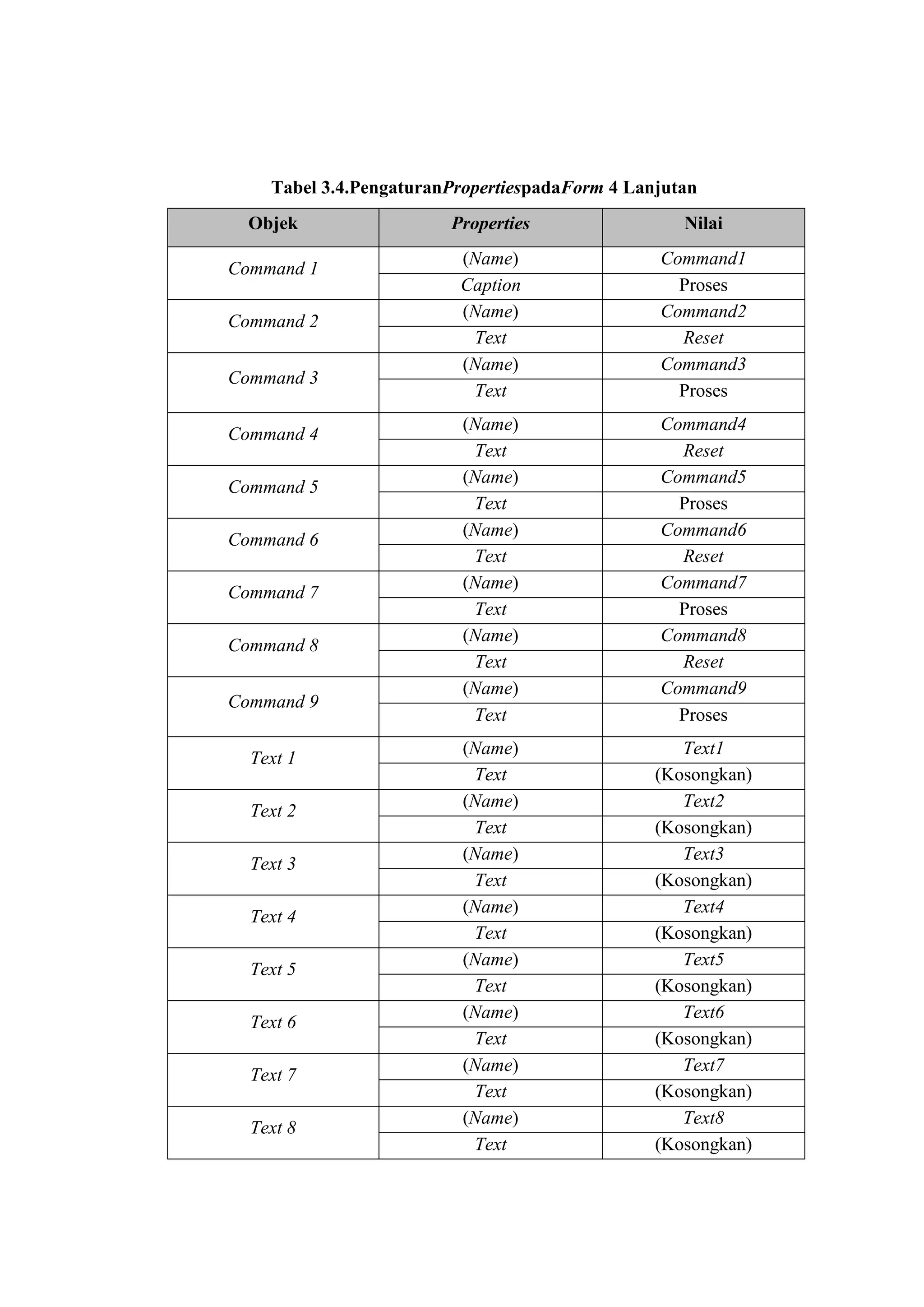
Tabel 3.4.PengaturanPropertiespadaForm 4 Lanjutan
  Objek                 Properties                 Nilai
                         (Name)                 Command1
Command 1
                         Caption                  Proses
                         (Name)                 Command2
Command 2
                          Text                    Reset
                         (Name)                 Command3
Command 3
                          Text                    Proses
                          (Name)                Command4
Command 4
                           Text                   Reset
                          (Name)                Command5
Command 5
                           Text                   Proses
                          (Name)                Command6
Command 6
                           Text                   Reset
                          (Name)                Command7
Command 7
                           Text                   Proses
                          (Name)                Command8
Command 8
                           Text                   Reset
                          (Name)                Command9
Command 9
                           Text                   Proses
                          (Name)                   Text1
  Text 1
                           Text                 (Kosongkan)
                          (Name)                   Text2
  Text 2
                           Text                 (Kosongkan)
                          (Name)                   Text3
  Text 3
                           Text                 (Kosongkan)
                          (Name)                   Text4
  Text 4
                           Text                 (Kosongkan)
                          (Name)                   Text5
  Text 5
                           Text                 (Kosongkan)
                          (Name)                   Text6
  Text 6
                           Text                 (Kosongkan)
                          (Name)                   Text7
  Text 7
                           Text                 (Kosongkan)
                          (Name)                   Text8
  Text 8
                           Text                 (Kosongkan)
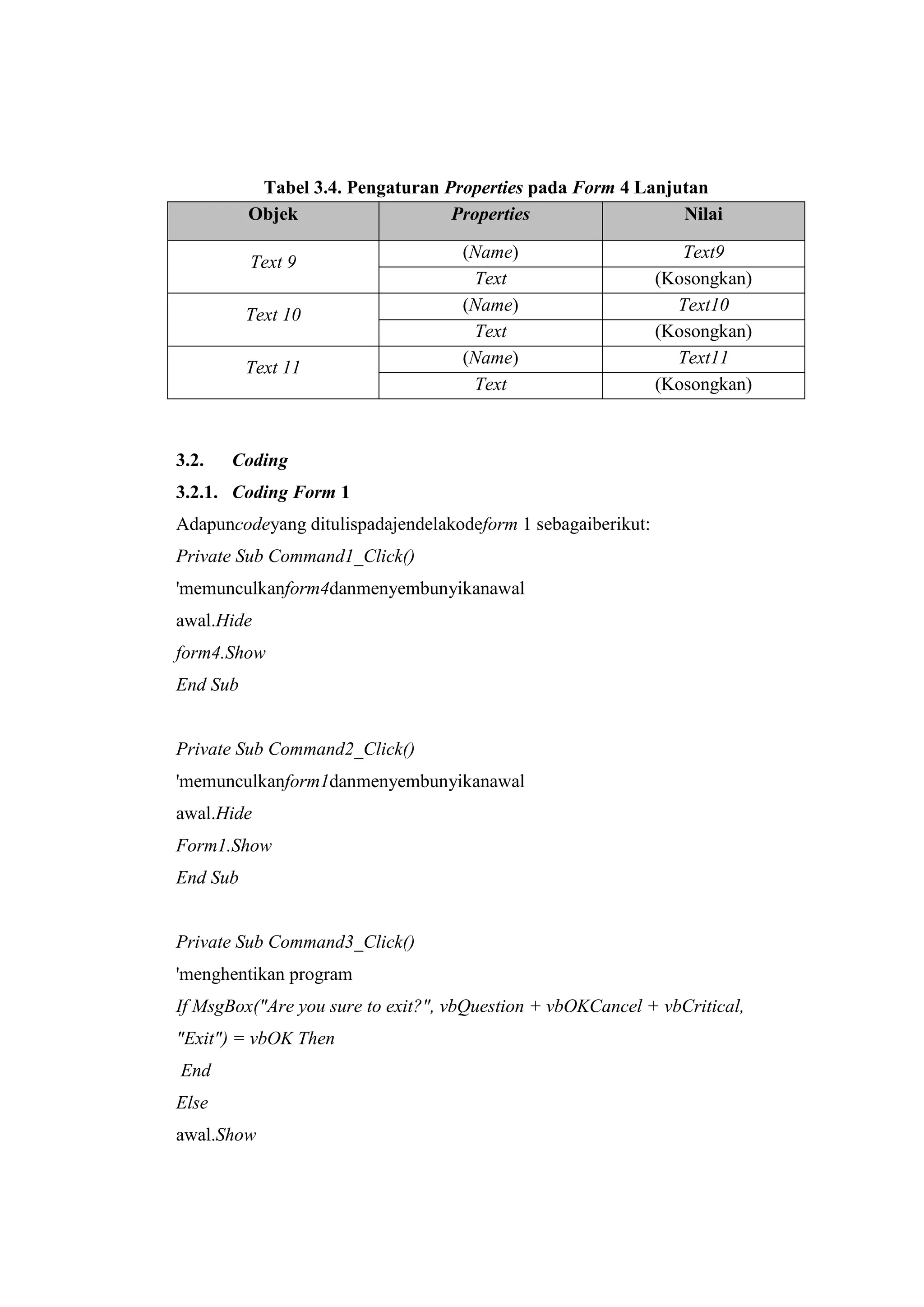
Tabel 3.4. Pengaturan Properties pada Form 4 Lanjutan
          Objek                   Properties                 Nilai

                                    (Name)                       Text9
          Text 9
                                     Text
                                     ass                      (Kosongkan)
                                    (Name)                      Text10
          Text 10
                                     Text                     (Kosongkan)
                                    (Name)                      Text11
          Text 11
                                     Text                     (Kosongkan)


3.2.   Coding
3.2.1. Coding Form 1
Adapuncodeyang ditulispadajendelakodeform 1 sebagaiberikut:
Private Sub Command1_Click()
'memunculkanform4danmenyembunyikanawal
awal.Hide
form4.Show
End Sub


Private Sub Command2_Click()
'memunculkanform1danmenyembunyikanawal
awal.Hide
Form1.Show
End Sub


Private Sub Command3_Click()
'menghentikan program
If MsgBox("Are you sure to exit?", vbQuestion + vbOKCancel + vbCritical,
"Exit") = vbOK Then
End
Else
awal.Show
End If
End Sub


Private Sub Command4_Click()
'memunculkan form2 danmenyembunyikanawal
awal.Hide
Form2.Show
End Sub


3.2.2. Coding Form 2
Adapuncodeyang ditulispadajendelakodeform 2sebagaiberikut:
Private Sub Command1_Click()
'memunculkanawaldanmenyembunyikanform1
Form1.Hide
awal.Show
End Sub


3.2.3. Coding Form 3
Adapuncodeyang ditulispadajendelakodeform 3 sebagaiberikut:
Private Sub Command1_Click()
'memunculkanawaldanmenyembunyikan form2
  Form2.Hide
awal.Show
End Sub


3.2.3. Coding Form 4
Adapuncodeyang ditulispadajendelakodeform 4 sebagaiberikut:
Private Sub Command1_Click()
'menghitungnilaii'
Dim Rt, Et, N, PperF, FperA As Double
PperF = Val(Text5.Text)
FperA = Val(Text4.Text)
Rt = Val(Text10.Text)
Et = Val(Text8.Text)
N = Val(Text2.Text)
Text12.Text = ((Rt * FperA) / (Et * PperF)) ^ (1 / N) - 1
End Sub


Private Sub Command2_Click()
Text8.Text = ""
Text10.Text = ""
Text2.Text = ""
Text12.Text = ""
End Sub


Private Sub Command3_Click()
Dim MARR As Double
MARR = Val(Text13.Text)
If Val(Text13) <= Val(Text12) Then
Text14.Text = "Layak"
Else
Text14.Text = "TidakLayak"
End If
End Sub


Private Sub Command4_Click()
'mengosongkannilai input
Text13.Text = ""
Text14.Text = ""
End Sub
Private Sub Command5_Click()
'memunculkanawaldanmenyembunyikan form3
awal.Show
form3.Hide
End Sub


Private Sub Command6_Click()
'menghitungnilai F/A
Dim e, NkurangtAs Double
e = Val(Text17.Text)
Nkurangt = Val(Text7.Text)
Text4.Text = ((1 + e) ^ Nkurangt - 1) / e
End Sub


Private Sub Command7_Click()
'mengosongkannilai input
Text4.Text = ""
End Sub


Private Sub proses_Click()
'menghitungnilai P/F
Dim e, t As Double
e = Val(Text17.Text)
t = Val(Text18.Text)
Text5.Text = 1 / (1 + e) ^ t
End Sub


Private Sub reset_Click()
'mengosongkannilai input
Text5.Text = ""
End Sub
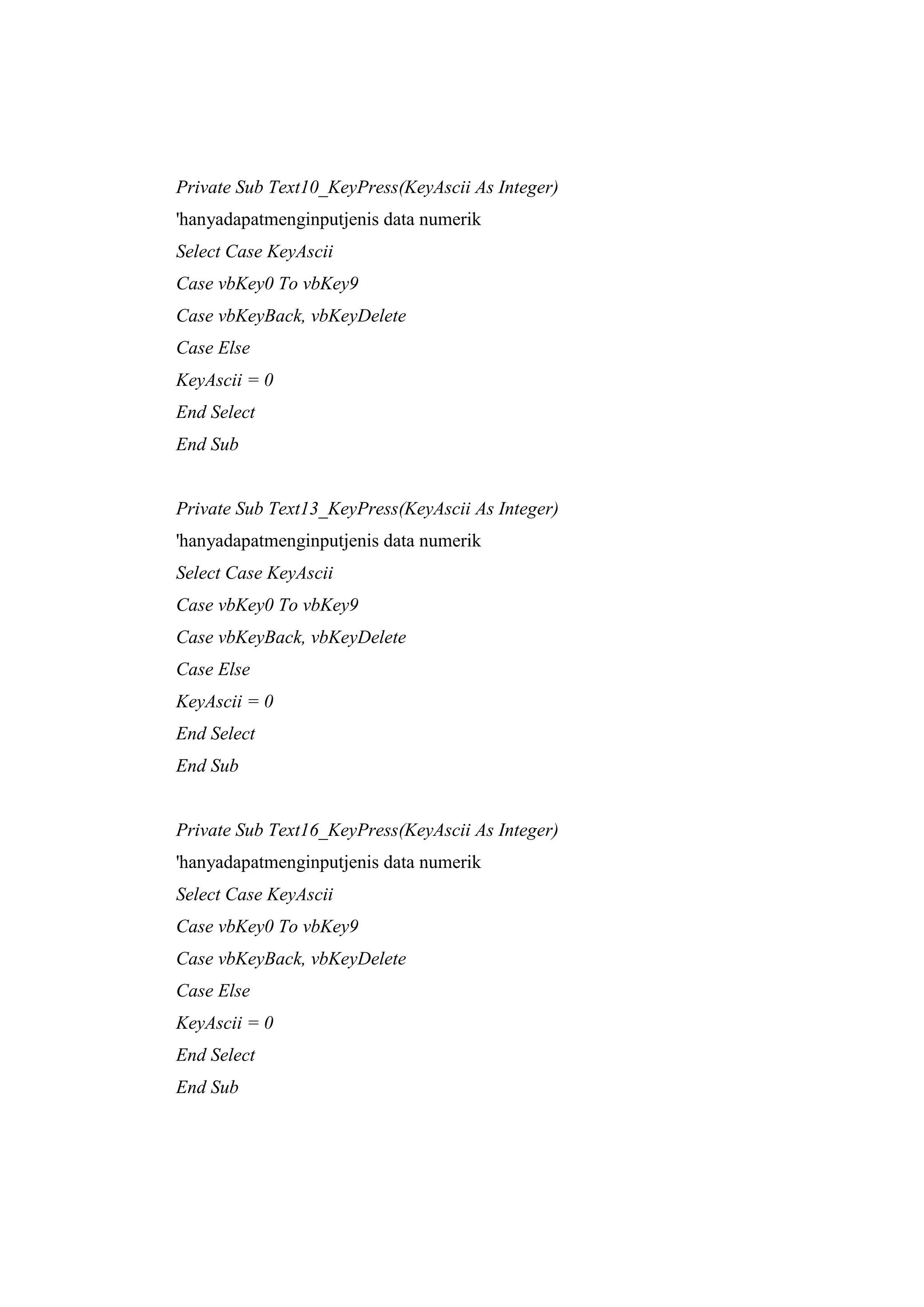
Private Sub Text10_KeyPress(KeyAscii As Integer)
'hanyadapatmenginputjenis data numerik
Select Case KeyAscii
Case vbKey0 To vbKey9
Case vbKeyBack, vbKeyDelete
Case Else
KeyAscii = 0
End Select
End Sub


Private Sub Text13_KeyPress(KeyAscii As Integer)
'hanyadapatmenginputjenis data numerik
Select Case KeyAscii
Case vbKey0 To vbKey9
Case vbKeyBack, vbKeyDelete
Case Else
KeyAscii = 0
End Select
End Sub


Private Sub Text16_KeyPress(KeyAscii As Integer)
'hanyadapatmenginputjenis data numerik
Select Case KeyAscii
Case vbKey0 To vbKey9
Case vbKeyBack, vbKeyDelete
Case Else
KeyAscii = 0
End Select
End Sub
Private Sub Text17_KeyPress(KeyAscii As Integer)
'hanyadapatmenginputjenis data numerik
Select Case KeyAscii
Case vbKey0 To vbKey9
Case vbKeyBack, vbKeyDelete
Case Else
KeyAscii = 0
End Select
End Sub


Private Sub Text2_KeyPress(KeyAscii As Integer)
'hanyadapatmenginputjenis data numerik
Select Case KeyAscii
Case vbKey0 To vbKey9
Case vbKeyBack, vbKeyDelete
Case Else
KeyAscii = 0
End Select
End Sub


Private Sub Text7_KeyPress(KeyAscii As Integer)
'hanyadapatmenginputjenis data numerik
Select Case KeyAscii
Case vbKey0 To vbKey9
Case vbKeyBack, vbKeyDelete
Case Else
KeyAscii = 0
End Select
End Sub
Private Sub Text8_KeyPress(KeyAscii As Integer)
'hanyadapatmenginputjenis data numerik
Select Case KeyAscii
Case vbKey0 To vbKey9
Case vbKeyBack, vbKeyDelete
Case Else
KeyAscii = 0
End Select
End Sub


3.4.   Tampilan Akhir Program
       Adapun tampilan akhir dari Form1 dapat dilihat pada Gambar 3.5.


                       Gambar 3.5. Tampilan Akhir Form1
Adapun tampilan akhir dari FormTeori dapat dilihat pada Gambar 3.6.


              Gambar 3.6. Tampilan Akhir FormTeori


Adapun tampilan akhir dari FormAbout Us dapat dilihat pada Gambar 3.7.


            Gambar 3.7. Tampilan Akhir FormAbout Us
Adapun tampilan akhir dari FormMenghitung ERR dapat dilihat pada
Gambar 3.8.


        Gambar 3.8. Tampilan Akhir FormMenghitung ERR

Bab 3 ampun

  • 1.
    BAB III PENGOLAHAN DATA 3.1. Properties 3.1.1. Properties Form 1 Pengaturanpropertiesdarimasing-masingobjekpadaform 1 dapatdilihatpadaTabel 3.1. Gambar 3.1. Tampilan Awal Form 1 Tabel 3.1.PengaturanProperties padaForm 1 Objek Properties Nilai (Name) Awal Form 1 Caption Form 1 Picture (Bitmap) (Name) Image1 Image 1 Picture (Bitmap) (Name) Label 1 Label 1 Caption Perhitungan ERR Font Font = Bookman Old Style ; Font Style = Bold ;Font Size = 20 (Name) Command 1 Command 1 Caption Menghitung ERR
  • 2.
    Tabel 3.1.PengaturanProperties padaForm1Lanjutan Objek Properties Nilai (Name) Command 2 Command 2 Caption Teori (Name) Command 3 Command 3 Caption About us (Name) Command 4 Command 4 Caption Keluar 3.1.2. Properties Form Teori Pengaturanpropertiesdarimasing- masingobjekpadaformTeoridapatdilihatpadaTabel 3.2. Gambar 3.2. Tampilan Awal Form Teori
  • 3.
    Tabel 3.2.PengaturanPropertiespadaFormTeori Objek Properties Nilai (Name) Form2 Form2 Caption Teori Picture (Bitmap) (Name) Image1 Image 1 Picture (Bitmap) (Name) Command 1 Caption Back Command 2 Font Font = MS Sans Serif; Font Style = Bold ;Font Size = 10 3.1.3. Properties Form About Us Pengaturanpropertiesdarimasing-masingobjekpadaformAbout UsdapatdilihatpadaTabel 3.3. Gambar 3.3. Tampilan Awal Form About Us
  • 4.
    Tabel 3.3.PengaturanPropertiespadaFormAbout Us Objek Properties Nilai (Name) Form3 Form3 Caption About Us Picture (Bitmap) (Name) Image1 Image 1 Picture (Bitmap) (Name) Label 6 Label 6 Caption KELOMPOK III GELOMBANG 4 Font Font = Bookman Old Style ; Font Style = Bold ;Font Size = 18 (Name) Label 1 Label 1 Caption Yusuf Randy 110403105 Font Font = Bookman Old Style ; Font Style = Bold ;Font Size = 12 (Name) Label 2 Label 2 Caption RenidaHikmana 110403016 Font Font = Bookman Old Style ; Font Style = Bold ;Font Size = 12 (Name) Label 3 Label 3 Caption Sail Huda 110403033 Font Font = Bookman Old Style ; Font Style = Bold ;Font Size = 12 Label 4 (Name) Label 4 Caption HasrulLimbong 110403105 Font Font = Bookman Old Style ; Font Style = Bold ;Font Size = 12 (Name) Label 3 Label 5 Caption MarintanAgustina 110403162 Font Font = Bookman Old Style ; Font Style = Bold ;Font Size = 12 (Name) Command 1 Command 1 Caption Back
  • 5.
    3.1.4. Properties FormMenghitung ERR Pengaturanpropertiesdarimasing-masingobjekpadaform 4dapatdilihatpadaTabel 3.4. Gambar 3.4. Tampilan Awal Form Menghitung ERR
  • 6.
    Tabel 3.4. PengaturanPropertiespadaFormMenghitungERR Objek Properties Nilai Form4 (Name) Form4 Caption Menghitung ERR (Name) Label1 Label 1 Caption P/F (Name) Label2 Label 2 Caption F/A Label 3 (Name) Label 3 Caption N-t Label 4 (Name) Label 4 Caption e Label 5 (Name) Label5 Caption t Frame 1 (Name) Frame 1 Caption Tahap 1 Frame 2 (Name) Frame 2 Caption Tahap 2 Frame 3 (Name) Frame 3 Caption Tahap 3 Label 6 (Name) Label6 Caption Et Label 7 (Name) Label7 Caption Rt Label 8 (Name) Label8 Caption N Label 9 (Name) Label9 Caption i’ Label 10 (Name) Label10 Caption Kesimpulan Label 11 (Name) Label11 Caption MARR
  • 7.
    Tabel 3.4.PengaturanPropertiespadaForm 4Lanjutan Objek Properties Nilai (Name) Command1 Command 1 Caption Proses (Name) Command2 Command 2 Text Reset (Name) Command3 Command 3 Text Proses (Name) Command4 Command 4 Text Reset (Name) Command5 Command 5 Text Proses (Name) Command6 Command 6 Text Reset (Name) Command7 Command 7 Text Proses (Name) Command8 Command 8 Text Reset (Name) Command9 Command 9 Text Proses (Name) Text1 Text 1 Text (Kosongkan) (Name) Text2 Text 2 Text (Kosongkan) (Name) Text3 Text 3 Text (Kosongkan) (Name) Text4 Text 4 Text (Kosongkan) (Name) Text5 Text 5 Text (Kosongkan) (Name) Text6 Text 6 Text (Kosongkan) (Name) Text7 Text 7 Text (Kosongkan) (Name) Text8 Text 8 Text (Kosongkan)
  • 8.
    Tabel 3.4. PengaturanProperties pada Form 4 Lanjutan Objek Properties Nilai (Name) Text9 Text 9 Text ass (Kosongkan) (Name) Text10 Text 10 Text (Kosongkan) (Name) Text11 Text 11 Text (Kosongkan) 3.2. Coding 3.2.1. Coding Form 1 Adapuncodeyang ditulispadajendelakodeform 1 sebagaiberikut: Private Sub Command1_Click() 'memunculkanform4danmenyembunyikanawal awal.Hide form4.Show End Sub Private Sub Command2_Click() 'memunculkanform1danmenyembunyikanawal awal.Hide Form1.Show End Sub Private Sub Command3_Click() 'menghentikan program If MsgBox("Are you sure to exit?", vbQuestion + vbOKCancel + vbCritical, "Exit") = vbOK Then End Else awal.Show
  • 9.
    End If End Sub PrivateSub Command4_Click() 'memunculkan form2 danmenyembunyikanawal awal.Hide Form2.Show End Sub 3.2.2. Coding Form 2 Adapuncodeyang ditulispadajendelakodeform 2sebagaiberikut: Private Sub Command1_Click() 'memunculkanawaldanmenyembunyikanform1 Form1.Hide awal.Show End Sub 3.2.3. Coding Form 3 Adapuncodeyang ditulispadajendelakodeform 3 sebagaiberikut: Private Sub Command1_Click() 'memunculkanawaldanmenyembunyikan form2 Form2.Hide awal.Show End Sub 3.2.3. Coding Form 4 Adapuncodeyang ditulispadajendelakodeform 4 sebagaiberikut: Private Sub Command1_Click() 'menghitungnilaii' Dim Rt, Et, N, PperF, FperA As Double PperF = Val(Text5.Text)
  • 10.
    FperA = Val(Text4.Text) Rt= Val(Text10.Text) Et = Val(Text8.Text) N = Val(Text2.Text) Text12.Text = ((Rt * FperA) / (Et * PperF)) ^ (1 / N) - 1 End Sub Private Sub Command2_Click() Text8.Text = "" Text10.Text = "" Text2.Text = "" Text12.Text = "" End Sub Private Sub Command3_Click() Dim MARR As Double MARR = Val(Text13.Text) If Val(Text13) <= Val(Text12) Then Text14.Text = "Layak" Else Text14.Text = "TidakLayak" End If End Sub Private Sub Command4_Click() 'mengosongkannilai input Text13.Text = "" Text14.Text = "" End Sub
  • 11.
    Private Sub Command5_Click() 'memunculkanawaldanmenyembunyikanform3 awal.Show form3.Hide End Sub Private Sub Command6_Click() 'menghitungnilai F/A Dim e, NkurangtAs Double e = Val(Text17.Text) Nkurangt = Val(Text7.Text) Text4.Text = ((1 + e) ^ Nkurangt - 1) / e End Sub Private Sub Command7_Click() 'mengosongkannilai input Text4.Text = "" End Sub Private Sub proses_Click() 'menghitungnilai P/F Dim e, t As Double e = Val(Text17.Text) t = Val(Text18.Text) Text5.Text = 1 / (1 + e) ^ t End Sub Private Sub reset_Click() 'mengosongkannilai input Text5.Text = "" End Sub
  • 12.
    Private Sub Text10_KeyPress(KeyAsciiAs Integer) 'hanyadapatmenginputjenis data numerik Select Case KeyAscii Case vbKey0 To vbKey9 Case vbKeyBack, vbKeyDelete Case Else KeyAscii = 0 End Select End Sub Private Sub Text13_KeyPress(KeyAscii As Integer) 'hanyadapatmenginputjenis data numerik Select Case KeyAscii Case vbKey0 To vbKey9 Case vbKeyBack, vbKeyDelete Case Else KeyAscii = 0 End Select End Sub Private Sub Text16_KeyPress(KeyAscii As Integer) 'hanyadapatmenginputjenis data numerik Select Case KeyAscii Case vbKey0 To vbKey9 Case vbKeyBack, vbKeyDelete Case Else KeyAscii = 0 End Select End Sub
  • 13.
    Private Sub Text17_KeyPress(KeyAsciiAs Integer) 'hanyadapatmenginputjenis data numerik Select Case KeyAscii Case vbKey0 To vbKey9 Case vbKeyBack, vbKeyDelete Case Else KeyAscii = 0 End Select End Sub Private Sub Text2_KeyPress(KeyAscii As Integer) 'hanyadapatmenginputjenis data numerik Select Case KeyAscii Case vbKey0 To vbKey9 Case vbKeyBack, vbKeyDelete Case Else KeyAscii = 0 End Select End Sub Private Sub Text7_KeyPress(KeyAscii As Integer) 'hanyadapatmenginputjenis data numerik Select Case KeyAscii Case vbKey0 To vbKey9 Case vbKeyBack, vbKeyDelete Case Else KeyAscii = 0 End Select End Sub Private Sub Text8_KeyPress(KeyAscii As Integer) 'hanyadapatmenginputjenis data numerik
  • 14.
    Select Case KeyAscii CasevbKey0 To vbKey9 Case vbKeyBack, vbKeyDelete Case Else KeyAscii = 0 End Select End Sub 3.4. Tampilan Akhir Program Adapun tampilan akhir dari Form1 dapat dilihat pada Gambar 3.5. Gambar 3.5. Tampilan Akhir Form1
  • 15.
    Adapun tampilan akhirdari FormTeori dapat dilihat pada Gambar 3.6. Gambar 3.6. Tampilan Akhir FormTeori Adapun tampilan akhir dari FormAbout Us dapat dilihat pada Gambar 3.7. Gambar 3.7. Tampilan Akhir FormAbout Us
  • 16.
    Adapun tampilan akhirdari FormMenghitung ERR dapat dilihat pada Gambar 3.8. Gambar 3.8. Tampilan Akhir FormMenghitung ERR