







@CodingCockatoo
Azure Web
Emma Woods
@CodingCockatoo
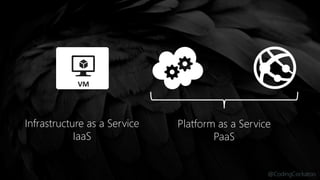
Infrastructure as a Service
IaaS
Platform as a Service
PaaS
@CodingCockatoo
@CodingCockatoo
create
from visual studio
@CodingCockatoo
create a cms
from the marketplace
@CodingCockatoo
webjobs
@CodingCockatoo
assign
custom domains.nz
@CodingCockatoo
manage
content storage
and maintenance
@CodingCockatoo
scale
for user demand
@CodingCockatoo
@CodingCockatoo
@CodingCockatoo
1 6Instance Count Instances
@CodingCockatoo
2 6
60 80
Instance Count
Percent
Instances
[Metric]
@CodingCockatoo
backup
and restore
@CodingCockatoo
monitor
through analytics
and dashboards
@CodingCockatoo
@CodingCockatoo
questions
@CodingCockatoo
resources

Editor's Notes

  • #2 Introduction to websites. 250k of websites in azure (as of Feb) Demo heavy. Not going to show you everything – there is too much Happy for this to be a discussion as I am not an expert Why I like Azure. As an FED I find this all very easy to use. UI is simple Learning a lot about infrastructure from using Azure I am becoming part of a generation that doesn’t know what a server looks like Agenda: Deploy a site from VS Create a CMS in the Marketplace Assign custom domains Manage content Scale for user demand Backup Monitor Azure Portal effectively
  • #3 Virtual Machines is IaaS. Both CloudServices and Web Apps are PaaS. We are going to focus on the PaaS side of Web Apps. Iaas is like buying a house. Paas Cloud Apps is like Renting PaaS Websites is like getting a hotel room. Use the Paas Websites for pure web apps,. The system software is hidden from you and managed for you so you can focus only on your web code.
  • #4 Develop apps with: .Net Python Node.js Java PHP Deploy from: Git Hub VS Online Bit Bucket Dropbox Etc…
  • #5 Easiest and Quickest way. Creating a web application and deploying it to Azure through Visual Studio. Source Control Integration Kudu: https://[website-name].scm.azurewebsites.net Add a note on using the Portal effectively.
  • #6 Creating a CMS site such as Orchard or WordPress through the Azure Marketplace. Add a note on using the Portal effectively.
  • #7 Add a note on using the Portal effectively.
  • #8 Add a note on using the Portal effectively.
  • #10 Add a note on using the Portal effectively. WebJobs aims to make developing, running, and scaling this easier. They are built into Azure Websites and run in the same VM as your Web Sites. Here's some typical scenarios that would be great for the Windows Azure WebJobs SDK: Image processing or other CPU-intensive work. Queue processing. RSS aggregation. File maintenance, such as aggregating or cleaning up log files.  Other long-running tasks that you want to run in a background thread, such as sending emails. WebJobs are invoked in two different ways, either they are triggered or they are continuously running. Triggered jobs happen on a schedule or when some event happens and Continuous jobs basically run a while loop. There is no additional cost to use WebJobs. http://azure.microsoft.com/en-us/documentation/articles/web-sites-create-web-jobs/
  • #11 Assigning custom domains to your sites within the Azure Portal. Add a note on using the Portal effectively.
  • #12 Site content and maintenance through storage and continuous deployment. Kudu and Monaco as site extensions Add a note on using the Portal effectively.
  • #13 Scaling your site for user demand. Traffic manager. Add a note on using the Portal effectively.
  • #14 Develop apps with: .Net Python Node.js Java PHP Deploy from: Git Hub VS Online Bit Bucket Dropbox Etc…
  • #15 Develop apps with: .Net Python Node.js Java PHP Deploy from: Git Hub VS Online Bit Bucket Dropbox Etc…
  • #16 You can manual scale and auto scale. Add a note on using the Portal effectively.
  • #17 You can manual scale and auto scale. Add a note on using the Portal effectively.
  • #18 Backing up and restoring. You an back up: Websites Settings Manifest Websites Files Database (Optional) Add a note on using the Portal effectively.
  • #19 Monitoring and analytics. “Application insights”. Add a note on using the Portal effectively.
  • #20 Users browse using HTML or native apps Deploy to multiple datacentres and use Traffic Manager to route requests to nearest node Azure websites scale up and down Users login to Azure Active Directory, facebook, Google, MS or Twitter Use third party cms like Umbraco, wordpress or Orchard Webjobs can runin the background submitting order confirmations HDInsight on Hadoop could analyse website logs and customer data Azure Cache boosts performance of data services Use Hybrid connectiosn to send messages to on-prem databases Mobile services run in the background providing unified ordering, device authentication and notifications Azure Media Services could be supporting HD quality video, live streaming and on-demand playback Ecommerce confirmations using third party apps such as SendGrid Geo Distributed Content Delivery Network can keep content closer to users.
  • #21 And discussion.
  • #22 Resources For further learnings go to azure.microsoft.com Case studies MVA Dev Camps – one in June