Azure Data Factory Overview for SSIS Developers.pdf
1.
Srinivasa Rao Vinnakota| Azure Data Factory – Educational Content
Azure Data Factory (ADF)
Components & Data Pipeline Orchestration Overview
By Srinivasa Rao Vinnakota
2.
Srinivasa Rao Vinnakota| Azure Data Factory – Educational Content
Content
❑ Introduction to Azure Data Factory (ADF)
❑ Core Components of ADF
❑ Pipelines & Activities
❑ Comparison between SSIS and ADF
o Components and controls
o Transformations
❑ Source & Sink Properties
❑ Dataset
❑ Linked Services
❑ Integration Runtime
❑ Parameters & Activity Sequences
❑ Triggers
❑ CICD In ADF
❑ Environment Setup
❑ Data Flow Orchestration Demo
❑ Best Practices
❑ Questions & Discussion
Azure Data Factory
3.
Srinivasa Rao Vinnakota| Azure Data Factory – Educational Content
Introduction to Azure Data Factory (ADF)
❖ ADF is Cloud-based fully managed data integration and
orchestration service
❖ ADF is a PaaS service used to build ETL (Extract, Transform,
Load) and ELT (Extract, Load, Transform) data integration
solutions.
❖ Orchestrates data movement and transformation
across on-premises and cloud.
Data Sources
Azure Data Factory
Storage
Analytics
Destination
Azure Data Factory Architecture
Self Hosted IR
Azure IR
On-Premises Microsoft Azure
This explainer provides a high-level technical overview of Azure Data Factory components and pipeline orchestration. It does not cover step-by-step pipeline creation. The objective is to help SSIS
developers quickly understand ADF concepts and begin their cloud data integration journey. Microsoft Learn links for hands-on implementation are provided in the ‘Data Flow Orchestration Demo’
session.
4.
Srinivasa Rao Vinnakota| Azure Data Factory – Educational Content
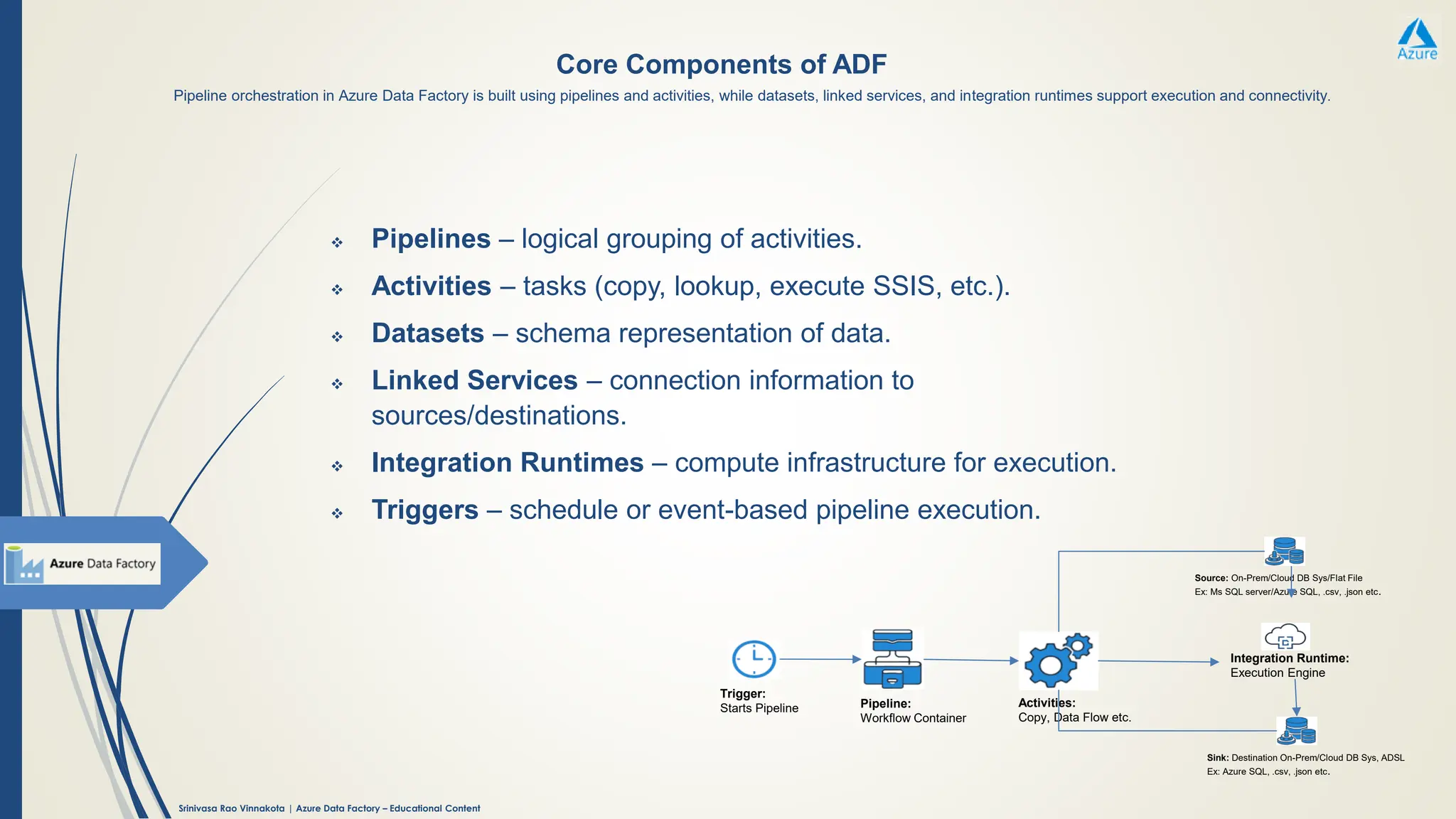
Core Components of ADF
❖ Pipelines – logical grouping of activities.
❖ Activities – tasks (copy, lookup, execute SSIS, etc.).
❖ Datasets – schema representation of data.
❖ Linked Services – connection information to
sources/destinations.
❖ Integration Runtimes – compute infrastructure for execution.
❖ Triggers – schedule or event-based pipeline execution.
Trigger:
Starts Pipeline Pipeline:
Workflow Container
Activities:
Copy, Data Flow etc.
Integration Runtime:
Execution Engine
Source: On-Prem/Cloud DB Sys/Flat File
Ex: Ms SQL server/Azure SQL, .csv, .json etc.
Sink: Destination On-Prem/Cloud DB Sys, ADSL
Ex: Azure SQL, .csv, .json etc.
Pipeline orchestration in Azure Data Factory is built using pipelines and activities, while datasets, linked services, and integration runtimes support execution and connectivity.
5.
Srinivasa Rao Vinnakota| Azure Data Factory – Educational Content
Integration Runtime
Activities
Pipeline
Triggers
Dataset
Linked Service
Data Pipeline Orchestration
6.
Srinivasa Rao Vinnakota| Azure Data Factory – Educational Content
Pipelines & Activities
Pipelines:
Pipeline in ADF is a container holds group of Activities which can be
chained with dependencies or run in parallel
Activities:
❖ Data Movement
❖ Data Transformation
❖ Control Flow
❖ Validation & Utility Activities
❖ Integration & Orchestration Activities
We can mix movement, transformation, and control flow activities to
build complete ETL/ELT workflows
7.
Srinivasa Rao Vinnakota| Azure Data Factory – Educational Content
Types of Activities
❖ Data Movement:
▪ Copy Activity – (source → sink) Copies data from source to sink.
❖ Data Transformation: These activities process and transform data.
Compute-based Transformations:
▪ Data Flow – Visual, code-free data transformations
▪ Mapping: Mapping Data Flows in ADF provide scalable, code-free ETL
transformations using Spark for production pipelines.
▪ Wrangler: Wrangling Data Flows offer an interactive Power Query experience
for shaping and exploring data visually.
▪ Azure Databricks Activity – Runs Databricks notebooks, JARs, or Python scripts
▪ Azure HDInsight Activity – Runs Hive, Pig, Spark, MapReduce jobs
▪ Azure Batch Activity – Executes batch processing jobs
▪ Azure Machine Learning Activity – Runs ML pipelines or batch inference
External Service Transformations:
▪ Stored Procedure Activity – Executes a database stored procedure
▪ U-SQL Activity – Runs U-SQL scripts (Azure Data Lake Analytics)
▪ Custom Activity – Runs custom cod
8.
Srinivasa Rao Vinnakota| Azure Data Factory – Educational Content
Types of Activities
❖ Control Flow: These activities orchestrate workflow logic
▪ If Condition Activity – Branches logic based on condition.
▪ ForEach Activity – Iterates over a collection.
▪ Switch Activity – Multi-branch conditional logic.
▪ Wait Activity – Pauses pipeline execution.
▪ Until Activity – Loops until condition is met.
▪ Fail – Explicitly fail a pipeline
▪ Execute Pipeline Activity – Calls another pipeline.
▪ Set Variable / Append Variable Activity – Manages pipeline variables.
❖ Validation & Utility Activities: Used for checks, monitoring, or external
interaction.
▪ Lookup Activity – Retrieves data from a source.
▪ Get Metadata Activity – Extracts metadata from datasets.
▪ Validation Activity – Validates datasets before execution.
▪ Web Activity – Calls REST endpoints.
▪ Webhook Activity – Call REST APIs and wait for callback
❖ Integration & Orchestration Activities: Used mainly for integration and
hybrid scenarios.
▪ Execute SSIS Package – Run SSIS packages from SSISDB or file system
9.
Srinivasa Rao Vinnakota| Azure Data Factory – Educational Content
Data Flow Activity
❖ Source & Sink:
▪ Source – Reads data from a dataset
▪ Sink – Writes transformed data to a target
Note: In Mapping Data Flows, Source and Sink appear as transformation types in the visual designer. In a Copy Activity,
the Source and Sink are properties of the activity. Source and Sink properties have been explained in upcoming slides.
❖ Schema & Column Transformations
▪ Select – Choose, rename, or reorder columns
▪ Derived Column – Create or modify columns using expressions
▪ Cast – Change data types
▪ Alter Row – Insert, update, delete, or upset logic
▪ Surrogate Key – Generate unique sequential keys
❖ Row-level Transformations
▪ Filter – Filter rows based on conditions
▪ Conditional Split – Split data into multiple streams
▪ Exists – Check row existence in another stream
In Data Flows Activity, transformations are the steps used to clean, shape, join, aggregate, and enrich data without writing code.
10.
Srinivasa Rao Vinnakota| Azure Data Factory – Educational Content
Data Flow Activity
❖ Join & Combine Transformations
▪ Join – Join two data streams (inner, left, right, full)
▪ Lookup – Lookup values from another stream
▪ Union – Combine multiple data streams
▪ Cross Join – Cartesian join
❖ Aggregation & Grouping
▪ Aggregate – Group data and calculate sums, counts, averages, etc.
▪ Window – Perform window-based calculations (rank, lead, lag)
❖ Data Quality & Deduplication
▪ Distinct – Remove duplicate rows
▪ Assert – Validate data quality rules
In Data Flows Activity, transformations are the steps used to clean, shape, join, aggregate, and enrich data without writing code.
11.
Srinivasa Rao Vinnakota| Azure Data Factory – Educational Content
Data Flow Activity
❖ Partitioning & Performance
▪ Sort – Sort data
▪ Repartition – Control data distribution for performance
❖ Advanced & Utility Transformations
▪ Flatten – Unroll array or hierarchical data
▪ Pivot – Convert rows to columns
▪ Unpivot – Convert columns to rows
▪ Parse – Parse complex or semi-structured data
▪ Rank – Assign ranking based on order
▪ Key Generate – Generate hash or unique keys
In Data Flows Activity, transformations are the steps used to clean, shape, join, aggregate, and enrich data without writing code.
12.
Srinivasa Rao Vinnakota| Azure Data Factory – Educational Content
Comparison between SSIS and ADF components and controls
SSIS ADF
Data Flow Task Data Movement (Copy, Data Flow)
Control Flow Control Flow (Activities)
Conditional Split If Condition Activity
Foreach Loop Container ForEach Activity
Package Execution Pipeline Execution
SSISDB Deployment Azure Deployment
Logging Azure Monitor / Pipeline Logs
SSIS Runtime Integration Runtime
This comparison is ideal for onboarding SSIS developers into ADF. It helps them understand how familiar components and controls translate into cloud-native equivalents.
13.
Srinivasa Rao Vinnakota| Azure Data Factory – Educational Content
Comparison between SSIS and ADF Transformations
This comparison is ideal for onboarding SSIS developers into ADF. It helps them understand how familiar transformations translate into cloud-native equivalents.
SSIS Transformation ADF Equivalent
Derived Column
Derived Column in Mapping Data
Flow
Lookup Lookup Transformation
Conditional Split Conditional Split
Aggregate Aggregate
Sort Sort
Join Join (Inner, Left, Right, Full Outer)
Data Conversion Alter Row / Cast Expressions
Script Component
Custom Expressions / Azure Batch /
UDFs
Multicast Multiple Sink Outputs
Union All Union
Merge Join Join
Slowly Changing
Dimension
Surrogate Key + Conditional Split +
Lookup Combo
14.
Srinivasa Rao Vinnakota| Azure Data Factory – Educational Content
Source & Sink Properties
source and sink are properties of Copy activities
Source
❖ Refers to the input dataset or location from which data is read.
❖ It’s a property inside activities like:
❖ Copy Activity
❖ Data Flow Activity
❖ You define the source dataset, linked service, and schema mapping within the activity configuration.
Examples of sources:
▪ Azure Blob Storage (CSV, JSON, Parquet files)
▪ Azure SQL Database
▪ On-premises SQL Server
▪ REST APIs
▪ Cosmos DB
▪ Amazon S3
Sink
❖ Refers to the destination dataset or location where data is written.
❖ It’s also a property inside the same activities.
❖ You configure the sink dataset, format, partitioning, and write behavior.
Examples of sinks:
▪ Azure Data Lake Storage
▪ Azure Synapse Analytics
▪ Azure SQL Database
▪ Snowflake
▪ Oracle DB
▪ File systems
15.
Srinivasa Rao Vinnakota| Azure Data Factory – Educational Content
Dataset
Dataset tells ADF:
❖ Where the data is (via a linked service)
❖ What data to use (file, table, folder, container, etc.)
❖ Structure/format of the data (CSV, JSON, Parquet, SQL table, etc.)
Note: It does not move data by itself. It is used by activities (like Copy Activity, Data Flow).
Example: If you copy data from SQL Server to Blob Storage:
▪ Source Dataset → SQL table
▪ Sink Dataset → Blob file (CSV/Parquet)
Key components of a Dataset
❖ Linked Service – connection to the data store
❖ Data location – table name, file path, container, etc.
❖ Format – CSV, JSON, Avro, Parquet, SQL table
❖ Schema (optional) – column definitions
Types of Datasets
❖ File-based (Blob, ADLS, File Share)
❖ Database-based (SQL Server, Azure SQL, Oracle, MySQL)
❖ NoSQL & SaaS (Cosmos DB, REST, Dataverse)
.
A dataset defines the schema, format, and location of the data used in a pipeline. It serves as metadata for ADF activities by providing a named
reference to data stored in a source or destination, such as a specific file, table, or folder, and represents the input or output data for those activities
16.
Srinivasa Rao Vinnakota| Azure Data Factory – Educational Content
Linked Services
Linked Service
Specifies:
❖ Server / endpoint
❖ Authentication details (username/password, keys, managed identity, etc.)
❖ Connection properties
❖ Integration Runtime to be used for connectivity
What Linked Services are used for
❖ Connecting to source and destination data stores (SQL, Blob, ADLS, Oracle,
Dataverse, etc.)
❖ Connecting to compute services (Azure Databricks, Azure SQL, Synapse, HDInsight)
Relationship with other ADF components
❖ Linked Service → Defines how to connect
❖ Dataset → Defines what data to use
❖ Pipeline/Activity → Defines what to do with the data
Example:
▪ Linked Service: Connection to Azure SQL Database
▪ Dataset: Specific table in that database
▪ Activity: Copy data from Azure SQL to Blob Storage
A Linked Service defines the connection details required to access external resources such as data stores or compute services.
17.
Srinivasa Rao Vinnakota| Azure Data Factory – Educational Content
Integration Runtime
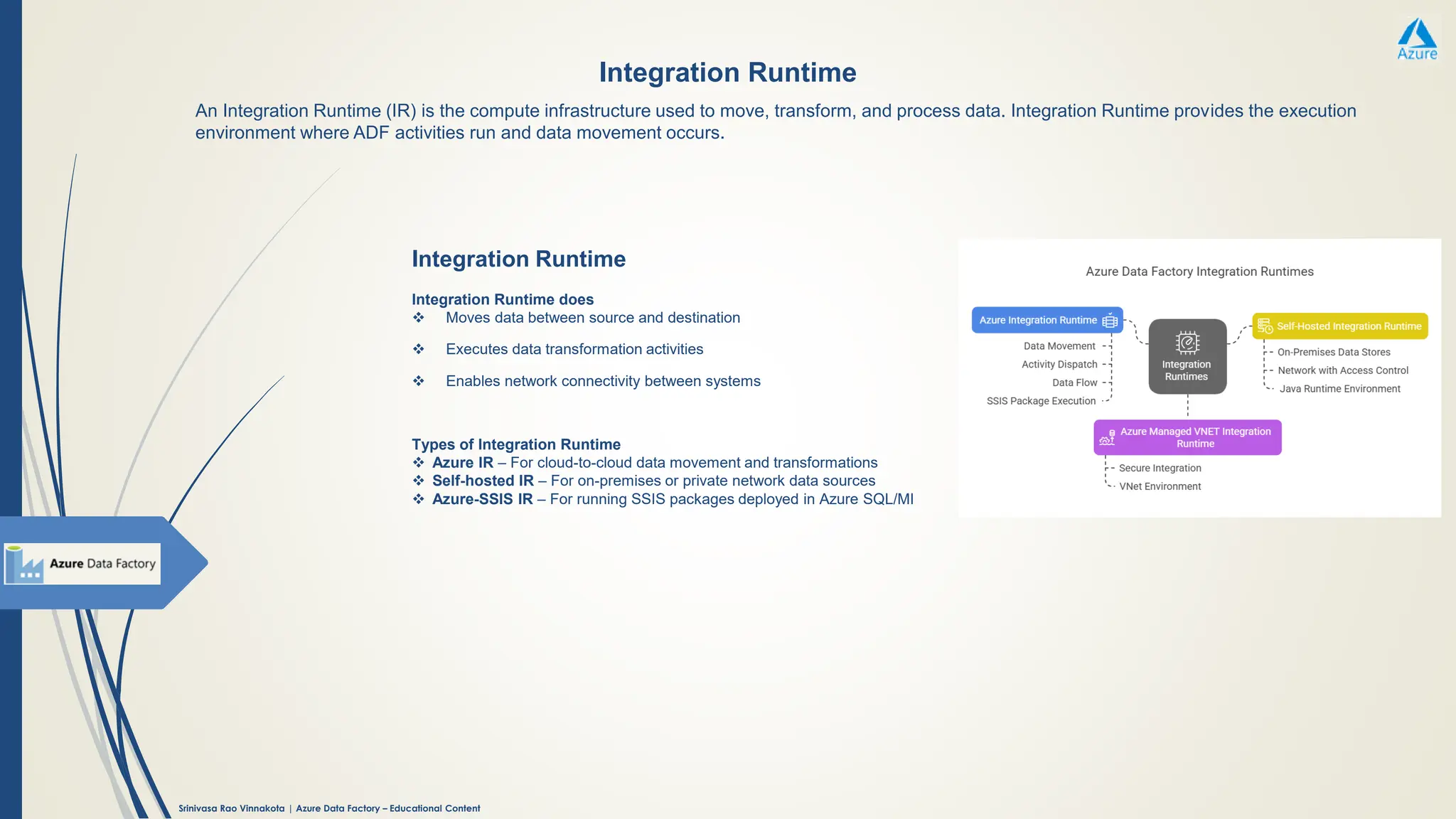
Integration Runtime
Integration Runtime does
❖ Moves data between source and destination
❖ Executes data transformation activities
❖ Enables network connectivity between systems
Types of Integration Runtime
❖ Azure IR – For cloud-to-cloud data movement and transformations
❖ Self-hosted IR – For on-premises or private network data sources
❖ Azure-SSIS IR – For running SSIS packages deployed in Azure SQL/MI
An Integration Runtime (IR) is the compute infrastructure used to move, transform, and process data. Integration Runtime provides the execution
environment where ADF activities run and data movement occurs.
18.
Srinivasa Rao Vinnakota| Azure Data Factory – Educational Content
Parameters & Activity Sequences
Parameters
❖ Parameters are variables that make pipelines, datasets, and activities dynamic and
reusable.
❖ They allow you to pass values at runtime, such as file names, dates, table names, or
environment-specific settings.
Example:
▪ A pipeline parameter that passes a date to load data for a specific day.
Activity Sequences
❖ Activity sequences define the order of execution of activities within a pipeline.
❖ They control how and when activities run based on success, failure, or completion
conditions.
Common dependency types:
▪ Success
▪ Failure
▪ Completion
Parameters add flexibility by making pipelines dynamic, while activity sequences control
the execution flow of activities in ADF pipelines.
19.
Srinivasa Rao Vinnakota| Azure Data Factory – Educational Content
Triggers
Types of Triggers
❖ Schedule Trigger: Runs pipelines at specific times (hourly, daily, weekly, etc.).
❖ Tumbling Window Trigger: Executes pipelines in fixed, non-overlapping time
intervals and supports dependency and backfill scenarios.
❖ Event-based Trigger: Starts pipelines in response to events, such as a file being
created or deleted in Blob Storage or ADLS.
Triggers define when a pipeline should run. Triggers are scheduling mechanisms that automatically start pipeline execution based on time or
events.
Note: Manual execution is not listed as a trigger in ADF because triggers are meant for automated pipeline runs, while manual runs are
initiated on demand without any trigger configuration.
20.
Srinivasa Rao Vinnakota| Azure Data Factory – Educational Content
CI/CD in ADF
How CI/CD works in ADF
❖ Git integration (Azure DevOps or GitHub) is used for source control
❖ Development happens in a feature branch
❖ Changes are merged into the collaboration branch
❖ ADF generates ARM templates for deployment
Note: ADF supports parameterized ARM templates for environment-specific
deployments
❖ Release pipelines deploy these templates to higher environments
Key components
❖ Source control – Versioning and collaboration
❖ Build pipeline – Generates ARM templates
❖ Release pipeline – Deploys artifacts to target environments
❖ Parameters – Used to manage environment-specific values
Benefits
❖ Consistent and repeatable deployments
❖ Version control and rollback
❖ Reduced manual errors
❖ Faster releases
CI/CD in ADF is the process of automatically building, testing, and deploying ADF pipelines and related artifacts (pipelines, datasets, linked
services, triggers) across environments such as Dev → Test → Prod.
21.
Srinivasa Rao Vinnakota| Azure Data Factory – Educational Content
Environment Setup in ADF
How CI/CD works in ADF
❖ Git integration (Azure DevOps or GitHub) is used for source control
❖ Development happens in a feature branch
Typical ADF Environments
❖ Dev – Design and develop pipelines with Git integration
❖ Test/UAT – Validate pipelines with controlled data
❖ Prod – Run pipelines on live data with triggers enabled
Key elements of environment setup
❖ Separate ADF instances per environment
❖ Environment-specific Linked Services (connections, credentials)
❖ Parameterization for datasets, pipelines, and triggers
❖ Integration Runtime setup (Azure / Self-hosted as required)
❖ Access control (RBAC) and Key Vault integration
❖ CI/CD pipelines for automated deployments
Best practices
❖ Disable triggers in non-prod or during deployment
❖ Use Key Vault for secrets
❖ Keep naming conventions consistent
❖ Promote changes via CI/CD, not manual edits
Environment setup in ADF refers to configuring separate Data Factory instances for different stages such as Development, Test, and
Production, along with proper connections, security, and deployment mechanisms.
22.
Srinivasa Rao Vinnakota| Azure Data Factory – Educational Content
Data Flow Orchestration Demo
Demo Walkthrough
❖ Creating ADF Service in Azure Portal and launching ADF studio
❖ Create Integration Runtime
❖ Create Linked Services
❖ Create Datasets
❖ Creating pipeline.
▪ Adding Copy activity
▪ Adding Dat Flow activities
▪ Parameters, expressions and functions
23.
Srinivasa Rao Vinnakota| Azure Data Factory – Educational Content
Best Practices
Make Sure
❖ Modular pipelines.
❖ Parameterize everything.
❖ Use Key Vault for secrets.
❖ Monitor with ADF dashboard.
Summary
• ADF enables scalable data integration.
• Key components: pipelines, datasets, linked services, IR, triggers.
• CI/CD ensures smooth deployment across environments.
• Visual: Recap diagram.








![ict_presentation_final_final_final[1].pptx](https://cdn.slidesharecdn.com/ss_thumbnails/ictpresentationfinalfinalfinal1-251230145259-2b4839bd-thumbnail.jpg?width=640&height=640&fit=bounds)


