4
Azure
Azure
Data Engineer
Data Engineer
Azure
Data Engineer
Azure
Data Engineer
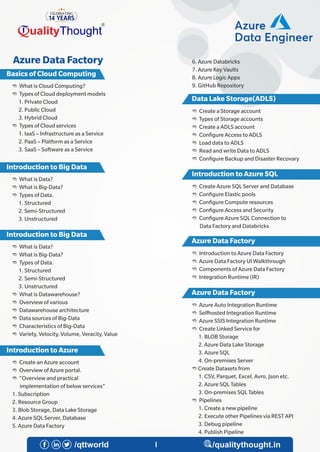
e What is Cloud Computing?
e Types of Cloud deployment models
1. Private Cloud
2. Public Cloud
3. Hybrid Cloud
e Types of Cloud services
1. IaaS – Infrastructure as a Service
2. PaaS – Platform as a Service
3. SaaS – Software as a Service
e What is Data?
e What is Big-Data?
e Types of Data.
1. Structured
2. Semi-Structured
3. Unstructured
e What is Data?
e What is Big-Data?
e Types of Data.
1. Structured
2. Semi-Structured
3. Unstructured
e What is Datawarehouse?
e Overview of various
e Datawarehouse architecture
e Data sources of Big-Data
e Characteristics of Big-Data
e Variety, Velocity, Volume, Veracity, Value
e Create an Azure account
e Overview of Azure portal.
e “Overview and practical
implementation of below services"
1. Subscription
2. Resource Group
3. Blob Storage, Data Lake Storage
4. Azure SQL Server, Database
5. Azure Data Factory
Basics of Cloud Computing
Introduction to Big Data
Introduction to Azure
4
Data Lake Storage(ADLS)
Introduction to Azure SQL
Azure Data Factory
Azure Data Factory
6. Azure Databricks
7. Azure Key Vaults
8. Azure Logic Apps
9. GitHub Repository
e Create a Storage account
e Types of Storage accounts
e Create a ADLS account
e Con gure Access to ADLS
e Load data to ADLS
e Read and write Data to ADLS
e Con gure Backup and Disaster Recovary
e Create Azure SQL Server and Database
e Con gure Elastic pools
e Con gure Compute resources
e Con gure Access and Security
e Con gure Azure SQL Connection to
Data Factory and Databricks
e Introduction to Azure Data Factory
e Azure Data Factory UI Walkthrough
e Components of Azure Data Factory
e Integration Runtime (IR)
e Azure Auto Integration Runtime
e Selfhosted Integration Runtime
e Azure SSIS Integration Runtime
e Create Linked Service for
1. BLOB Storage
2. Azure Data Lake Storage
3. Azure SQL
4. On-premises Server
e Create Datasets from
1. CSV, Parquet, Excel, Avro, Json etc.
2. Azure SQL Tables
3. On-premises SQL Tables
e Pipelines
1. Create a new pipeline
2. Execute other Pipelines via REST API
3. Debug pipeline
4. Publish Pipeline
Azure
Data Engineer
Azure
Data Engineer
Azure Data Factory
4
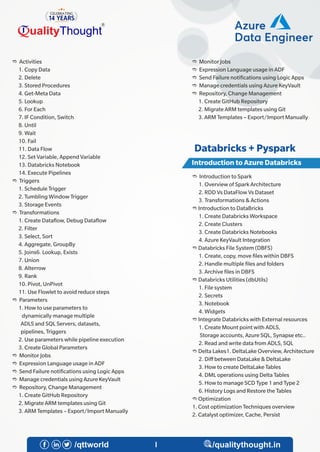
Introduction to Azure Databricks
e Monitor Jobs
e Expression Language usage in ADF
e Send Failure noti cations using Logic Apps
e Manage credentials using Azure KeyVault
e Repository, Change Management
1. Create GitHub Repository
2. Migrate ARM templates using Git
3. ARM Templates – Export/Import Manually
e Introduction to Spark
1. Overview of Spark Architecture
2. RDD Vs DataFlow Vs Dataset
3. Transformations & Actions
e Introduction to DataBricks
1. Create Databricks Workspace
2. Create Clusters
3. Create Databricks Notebooks
4. Azure KeyVault Integration
e Databricks File System (DBFS)
1. Create, copy, move les within DBFS
2. Handle multiple les and folders
3. Archive les in DBFS
e Databricks Utilities (dbUtils)
1. File system
2. Secrets
3. Notebook
4. Widgets
e Integrate Databricks with External resources
1. Create Mount point with ADLS,
Storage accounts, Azure SQL, Synapse etc..
2. Read and write data from ADLS, SQL
e Delta Lakes1. DeltaLake Overview, Architecture
2. Diff between DataLake & DeltaLake
3. How to create DeltaLake Tables
4. DML operations using Delta Tables
5. How to manage SCD Type 1 and Type 2
6. History Logs and Restore the Tables
e Optimization
1. Cost optimization Techniques overview
2. Catalyst optimizer, Cache, Persist
e Activities
1. Copy Data
2. Delete
3. Stored Procedures
4. Get-Meta Data
5. Lookup
6. For Each
7. IF Condition, Switch
8. Until
9. Wait
10. Fail
11. Data Flow
12. Set Variable, Append Variable
13. Databricks Notebook
14. Execute Pipelines
e Triggers
1. Schedule Trigger
2. Tumbling Window Trigger
3. Storage Events
e Transformations
1. Create Data ow, Debug Data ow
2. Filter
3. Select, Sort
4. Aggregate, GroupBy
5. Joins6. Lookup, Exists
7. Union
8. Alterrow
9. Rank
10. Pivot, UnPivot
11. Use Flowlet to avoid reduce steps
e Parameters
1. How to use parameters to
dynamically manage multiple
ADLS and SQL Servers, datasets,
pipelines, Triggers
2. Use parameters while pipeline execution
3. Create Global Parameters
e Monitor Jobs
e Expression Language usage in ADF
e Send Failure noti cations using Logic Apps
e Manage credentials using Azure KeyVault
e Repository, Change Management
1. Create GitHub Repository
2. Migrate ARM templates using Git
3. ARM Templates – Export/Import Manually
Azure
Data Engineer
Azure
Data Engineer
Databricks + Pyspark
4
Connect to External Resources
e Create External File Format
e Create External Data source
e Create External Table
e Create Views
Use multiple languages in Synapse notebook
using magic commandsOverview of Mssparkutils
Introduction to Spark in Synapse
e Create a notebook in Synapse
e Con gure Cluster, Autoscaling
e Create Mount point to connect ADLS,
storage accounts, Azure SQL and
other external databases
e Transformations using Synapse
Integration with Delta Lakes
e Create Tables from Delta Tables
e Create views from Delta Tables
Monitor and Logging
e Monitor the pipelines
e Notify the failure message using Logic Apps
Monitor and Logging
e Monitor the pipelines
e Notify the failure message using Logic Apps
Integrate credentials using Azure Key Vault
Use parameters to integrate multiple Pipelines
datasets, triggers, Linked service, notebooks etc.
Connecting Azure Synapse Views
with BI tools(Power BI)
e Introduction to Python
e Variables, Datatypes, Operators
e Introduction to PySpark
e Read and write data from CSV,
Json, Parquet, Azure SQL,
DBFS, ADLS etc.
e Transformations using PySpark
1. Cast
2. Select
3. Filter
4. Sort
5. Aggregations
6. Join
7. Union
8. Remove Duplicates
9. Calculated Columns, Rename columns
10. Window Functions
11. String Functions
12. Date Functions
13. Conditional Statements
14. Loops
15. User De ned Functions
16. Expression Language
e Run SQL queries in DataBricks using Spark SQL
e Overview of Synapse Architecture
e Create Azure Synapse Account
e Con gure access to Azure Synapse
e Serverless SQL Pool
e Dedicated SQL Pool
e Apache Spark Pool4. Data Explorer Pool
e Load data to ADLS via Synapse UI
e Query data using SQL scripts
e Create a External tables from CSV and parquet le in ADLS
Pyspark
Introduction to Azure Synapse
Overview of Pools in Synapse
Integration with DataLake Storage
Azure
Data Engineer
Azure
Data Engineer
Synapse
Connect to External Resources
e Load data to ADLS via Synapse UI
e Query data using SQL scripts
e Create a External tables from CSV
and parquet le in ADLS
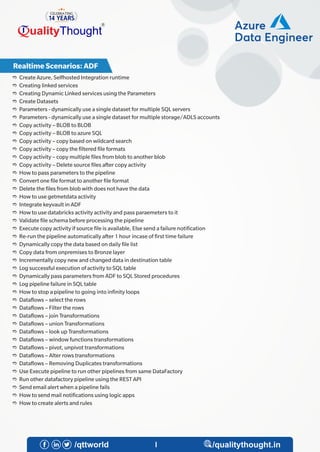
e Create Azure, Selfhosted Integration runtime
e Creating linked services
e Creating Dynamic Linked services using the Parameters
e Create Datasets
e Parameters - dynamically use a single dataset for multiple SQL servers
e Parameters - dynamically use a single dataset for multiple storage/ADLS accounts
e Copy activity – BLOB to BLOB
e Copy activity – BLOB to azure SQL
e Copy activity – copy based on wildcard search
e Copy activity – copy the ltered le formats
e Copy activity – copy multiple les from blob to another blob
e Copy activity – Delete source les after copy activity
e How to pass parameters to the pipeline
e Convert one le format to another le format
e Delete the les from blob with does not have the data
e How to use getmetdata activity
e Integrate keyvault in ADF
e How to use databricks activity activity and pass paraemeters to it
e Validate le schema before processing the pipeline
e Execute copy activity if source le is available, Else send a failure noti cation
e Re-run the pipeline automatically after 1 hour incase of rst time failure
e Dynamically copy the data based on daily le list
e Copy data from onpremises to Bronze layer
e Incrementally copy new and changed data in destination table
e Log successful execution of activity to SQL table
e Dynamically pass parameters from ADF to SQL Stored procedures
e Log pipeline failure in SQL table
e How to stop a pipeline to going into in nity loops
e Data ows – select the rows
e Data ows – Filter the rows
e Data ows – join Transformations
e Data ows – union Transformations
e Data ows – look up Transformations
e Data ows – window functions transformations
e Data ows – pivot, unpivot transformations
e Data ows – Alter rows transformations
e Data ows – Removing Duplicates transformations
e Use Execute pipeline to run other pipelines from same DataFactory
e Run other datafactory pipeline using the REST API
e Send email alert when a pipeline fails
e How to send mail noti cations using logic apps
e How to create alerts and rules
4
Azure
Data Engineer
Azure
Data Engineer
Realtime Scenarios: ADF
e Create a mount point connection to ADLS
e Create a mount point connection to Azure SQL
e Create a Dataframe from a CSV le
e Create a Dataframe from a parquet le
e Create a Dataframe from Json File
e Change the datatype of a column(String to Date, String to Integer)
4
Azure
Data Engineer
Azure
Data Engineer
e How to set global parameters
e Log the pipeline and runid details in log le
e How to import and export ARM templates
e How to integrate ADF with Devops
e How to use GIT repository
e Monitor the pipelines
e Debug the pipelines
e How to create a scheduling trigger
e Create tumbling window trigger to execute the historical dates data
e Execute a pipeline based on Storage account activity
e Create variables using set variable activity
e How to use if condition using if condition activity
e Iterating les using for loop activity
Real Time Scenarios: Databricks
Our Students Got Placement at
Quality Thought Infosystems India (P) Ltd.
4

azure-cloud-data-engineer-training-curriculum (1).pdf

  • 1.
  • 2.
    e What isCloud Computing? e Types of Cloud deployment models 1. Private Cloud 2. Public Cloud 3. Hybrid Cloud e Types of Cloud services 1. IaaS – Infrastructure as a Service 2. PaaS – Platform as a Service 3. SaaS – Software as a Service e What is Data? e What is Big-Data? e Types of Data. 1. Structured 2. Semi-Structured 3. Unstructured e What is Data? e What is Big-Data? e Types of Data. 1. Structured 2. Semi-Structured 3. Unstructured e What is Datawarehouse? e Overview of various e Datawarehouse architecture e Data sources of Big-Data e Characteristics of Big-Data e Variety, Velocity, Volume, Veracity, Value e Create an Azure account e Overview of Azure portal. e “Overview and practical implementation of below services" 1. Subscription 2. Resource Group 3. Blob Storage, Data Lake Storage 4. Azure SQL Server, Database 5. Azure Data Factory Basics of Cloud Computing Introduction to Big Data Introduction to Big Data Introduction to Azure 4 Data Lake Storage(ADLS) Introduction to Azure SQL Azure Data Factory Azure Data Factory 6. Azure Databricks 7. Azure Key Vaults 8. Azure Logic Apps 9. GitHub Repository e Create a Storage account e Types of Storage accounts e Create a ADLS account e Con gure Access to ADLS e Load data to ADLS e Read and write Data to ADLS e Con gure Backup and Disaster Recovary e Create Azure SQL Server and Database e Con gure Elastic pools e Con gure Compute resources e Con gure Access and Security e Con gure Azure SQL Connection to Data Factory and Databricks e Introduction to Azure Data Factory e Azure Data Factory UI Walkthrough e Components of Azure Data Factory e Integration Runtime (IR) e Azure Auto Integration Runtime e Selfhosted Integration Runtime e Azure SSIS Integration Runtime e Create Linked Service for 1. BLOB Storage 2. Azure Data Lake Storage 3. Azure SQL 4. On-premises Server e Create Datasets from 1. CSV, Parquet, Excel, Avro, Json etc. 2. Azure SQL Tables 3. On-premises SQL Tables e Pipelines 1. Create a new pipeline 2. Execute other Pipelines via REST API 3. Debug pipeline 4. Publish Pipeline Azure Data Engineer Azure Data Engineer Azure Data Factory
  • 3.
    4 Introduction to AzureDatabricks e Monitor Jobs e Expression Language usage in ADF e Send Failure noti cations using Logic Apps e Manage credentials using Azure KeyVault e Repository, Change Management 1. Create GitHub Repository 2. Migrate ARM templates using Git 3. ARM Templates – Export/Import Manually e Introduction to Spark 1. Overview of Spark Architecture 2. RDD Vs DataFlow Vs Dataset 3. Transformations & Actions e Introduction to DataBricks 1. Create Databricks Workspace 2. Create Clusters 3. Create Databricks Notebooks 4. Azure KeyVault Integration e Databricks File System (DBFS) 1. Create, copy, move les within DBFS 2. Handle multiple les and folders 3. Archive les in DBFS e Databricks Utilities (dbUtils) 1. File system 2. Secrets 3. Notebook 4. Widgets e Integrate Databricks with External resources 1. Create Mount point with ADLS, Storage accounts, Azure SQL, Synapse etc.. 2. Read and write data from ADLS, SQL e Delta Lakes1. DeltaLake Overview, Architecture 2. Diff between DataLake & DeltaLake 3. How to create DeltaLake Tables 4. DML operations using Delta Tables 5. How to manage SCD Type 1 and Type 2 6. History Logs and Restore the Tables e Optimization 1. Cost optimization Techniques overview 2. Catalyst optimizer, Cache, Persist e Activities 1. Copy Data 2. Delete 3. Stored Procedures 4. Get-Meta Data 5. Lookup 6. For Each 7. IF Condition, Switch 8. Until 9. Wait 10. Fail 11. Data Flow 12. Set Variable, Append Variable 13. Databricks Notebook 14. Execute Pipelines e Triggers 1. Schedule Trigger 2. Tumbling Window Trigger 3. Storage Events e Transformations 1. Create Data ow, Debug Data ow 2. Filter 3. Select, Sort 4. Aggregate, GroupBy 5. Joins6. Lookup, Exists 7. Union 8. Alterrow 9. Rank 10. Pivot, UnPivot 11. Use Flowlet to avoid reduce steps e Parameters 1. How to use parameters to dynamically manage multiple ADLS and SQL Servers, datasets, pipelines, Triggers 2. Use parameters while pipeline execution 3. Create Global Parameters e Monitor Jobs e Expression Language usage in ADF e Send Failure noti cations using Logic Apps e Manage credentials using Azure KeyVault e Repository, Change Management 1. Create GitHub Repository 2. Migrate ARM templates using Git 3. ARM Templates – Export/Import Manually Azure Data Engineer Azure Data Engineer Databricks + Pyspark
  • 4.
    4 Connect to ExternalResources e Create External File Format e Create External Data source e Create External Table e Create Views Use multiple languages in Synapse notebook using magic commandsOverview of Mssparkutils Introduction to Spark in Synapse e Create a notebook in Synapse e Con gure Cluster, Autoscaling e Create Mount point to connect ADLS, storage accounts, Azure SQL and other external databases e Transformations using Synapse Integration with Delta Lakes e Create Tables from Delta Tables e Create views from Delta Tables Monitor and Logging e Monitor the pipelines e Notify the failure message using Logic Apps Monitor and Logging e Monitor the pipelines e Notify the failure message using Logic Apps Integrate credentials using Azure Key Vault Use parameters to integrate multiple Pipelines datasets, triggers, Linked service, notebooks etc. Connecting Azure Synapse Views with BI tools(Power BI) e Introduction to Python e Variables, Datatypes, Operators e Introduction to PySpark e Read and write data from CSV, Json, Parquet, Azure SQL, DBFS, ADLS etc. e Transformations using PySpark 1. Cast 2. Select 3. Filter 4. Sort 5. Aggregations 6. Join 7. Union 8. Remove Duplicates 9. Calculated Columns, Rename columns 10. Window Functions 11. String Functions 12. Date Functions 13. Conditional Statements 14. Loops 15. User De ned Functions 16. Expression Language e Run SQL queries in DataBricks using Spark SQL e Overview of Synapse Architecture e Create Azure Synapse Account e Con gure access to Azure Synapse e Serverless SQL Pool e Dedicated SQL Pool e Apache Spark Pool4. Data Explorer Pool e Load data to ADLS via Synapse UI e Query data using SQL scripts e Create a External tables from CSV and parquet le in ADLS Pyspark Introduction to Azure Synapse Overview of Pools in Synapse Integration with DataLake Storage Azure Data Engineer Azure Data Engineer Synapse Connect to External Resources e Load data to ADLS via Synapse UI e Query data using SQL scripts e Create a External tables from CSV and parquet le in ADLS
  • 5.
    e Create Azure,Selfhosted Integration runtime e Creating linked services e Creating Dynamic Linked services using the Parameters e Create Datasets e Parameters - dynamically use a single dataset for multiple SQL servers e Parameters - dynamically use a single dataset for multiple storage/ADLS accounts e Copy activity – BLOB to BLOB e Copy activity – BLOB to azure SQL e Copy activity – copy based on wildcard search e Copy activity – copy the ltered le formats e Copy activity – copy multiple les from blob to another blob e Copy activity – Delete source les after copy activity e How to pass parameters to the pipeline e Convert one le format to another le format e Delete the les from blob with does not have the data e How to use getmetdata activity e Integrate keyvault in ADF e How to use databricks activity activity and pass paraemeters to it e Validate le schema before processing the pipeline e Execute copy activity if source le is available, Else send a failure noti cation e Re-run the pipeline automatically after 1 hour incase of rst time failure e Dynamically copy the data based on daily le list e Copy data from onpremises to Bronze layer e Incrementally copy new and changed data in destination table e Log successful execution of activity to SQL table e Dynamically pass parameters from ADF to SQL Stored procedures e Log pipeline failure in SQL table e How to stop a pipeline to going into in nity loops e Data ows – select the rows e Data ows – Filter the rows e Data ows – join Transformations e Data ows – union Transformations e Data ows – look up Transformations e Data ows – window functions transformations e Data ows – pivot, unpivot transformations e Data ows – Alter rows transformations e Data ows – Removing Duplicates transformations e Use Execute pipeline to run other pipelines from same DataFactory e Run other datafactory pipeline using the REST API e Send email alert when a pipeline fails e How to send mail noti cations using logic apps e How to create alerts and rules 4 Azure Data Engineer Azure Data Engineer Realtime Scenarios: ADF
  • 6.
    e Create amount point connection to ADLS e Create a mount point connection to Azure SQL e Create a Dataframe from a CSV le e Create a Dataframe from a parquet le e Create a Dataframe from Json File e Change the datatype of a column(String to Date, String to Integer) 4 Azure Data Engineer Azure Data Engineer e How to set global parameters e Log the pipeline and runid details in log le e How to import and export ARM templates e How to integrate ADF with Devops e How to use GIT repository e Monitor the pipelines e Debug the pipelines e How to create a scheduling trigger e Create tumbling window trigger to execute the historical dates data e Execute a pipeline based on Storage account activity e Create variables using set variable activity e How to use if condition using if condition activity e Iterating les using for loop activity Real Time Scenarios: Databricks
  • 7.
    Our Students GotPlacement at Quality Thought Infosystems India (P) Ltd. 4