Introduction to Database


         Presented By :- Avinash Agrawal
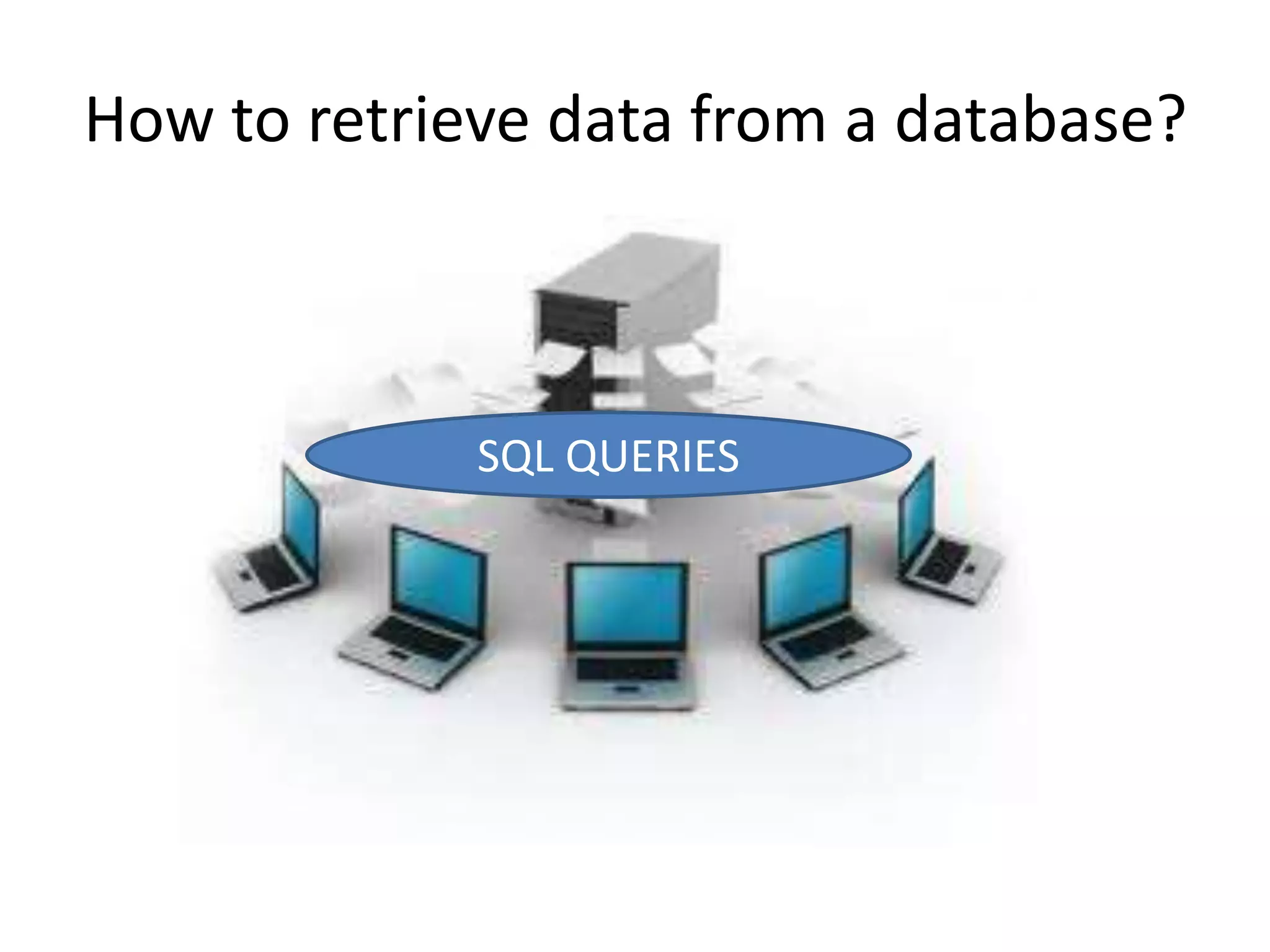
How to retrieve data from a database?


             SQL QUERIES
Introduction to SQL.
• SQL stands for Structured Query Language
• SQL is a special-purpose programming
  language designed for managing data in
  database management systems (DBMS).
• SQL lets you access and manipulate databases
• SQL is an ANSI (American National Standards
  Institute) standard.
What Can SQL do?
•   SQL can execute queries against a database
•   SQL can retrieve data from a database
•   SQL can insert records in a database
•   SQL can update records in a database
•   SQL can delete records from a database
•   SQL can create new databases
•   SQL can create new tables in a database
•   SQL can create stored procedures in a database
•   SQL can create views in a database
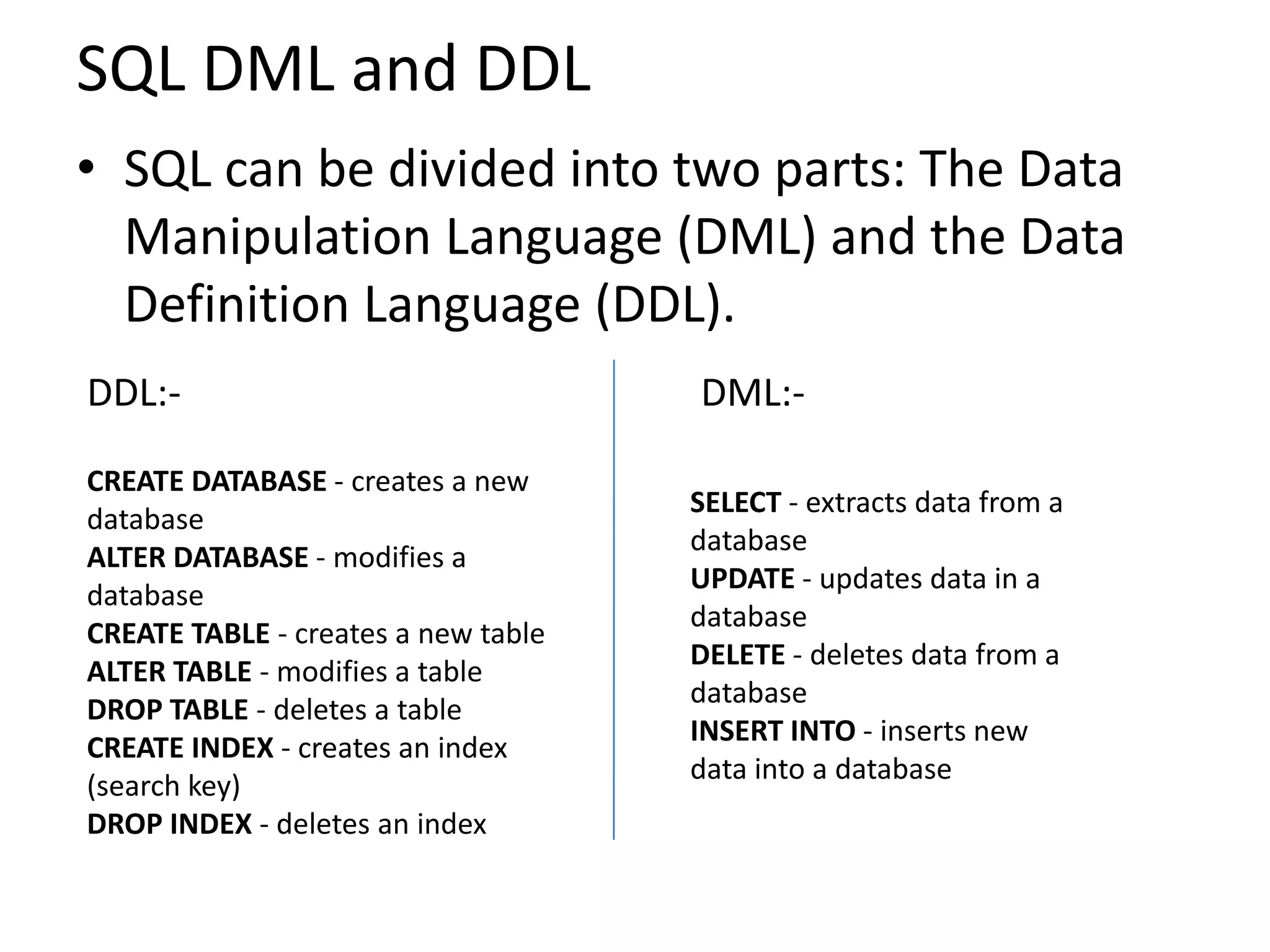
SQL DML and DDL
• SQL can be divided into two parts: The Data
  Manipulation Language (DML) and the Data
  Definition Language (DDL).
DDL:-                                DML:-

CREATE DATABASE - creates a new
                                     SELECT - extracts data from a
database
                                     database
ALTER DATABASE - modifies a
                                     UPDATE - updates data in a
database
                                     database
CREATE TABLE - creates a new table
                                     DELETE - deletes data from a
ALTER TABLE - modifies a table
                                     database
DROP TABLE - deletes a table
                                     INSERT INTO - inserts new
CREATE INDEX - creates an index
                                     data into a database
(search key)
DROP INDEX - deletes an index
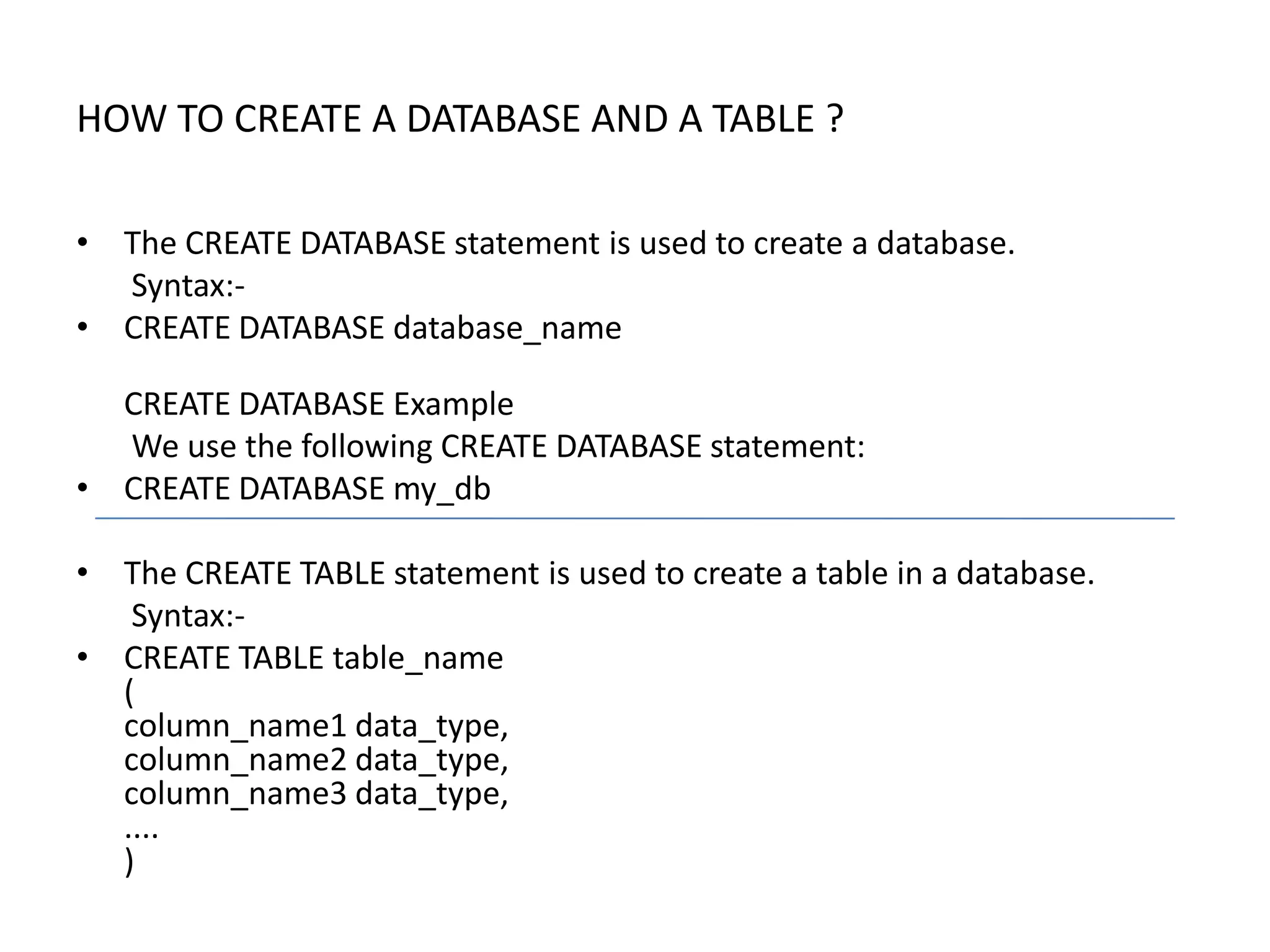
HOW TO CREATE A DATABASE AND A TABLE ?

• The CREATE DATABASE statement is used to create a database.
  Syntax:-
• CREATE DATABASE database_name

  CREATE DATABASE Example
  We use the following CREATE DATABASE statement:
• CREATE DATABASE my_db

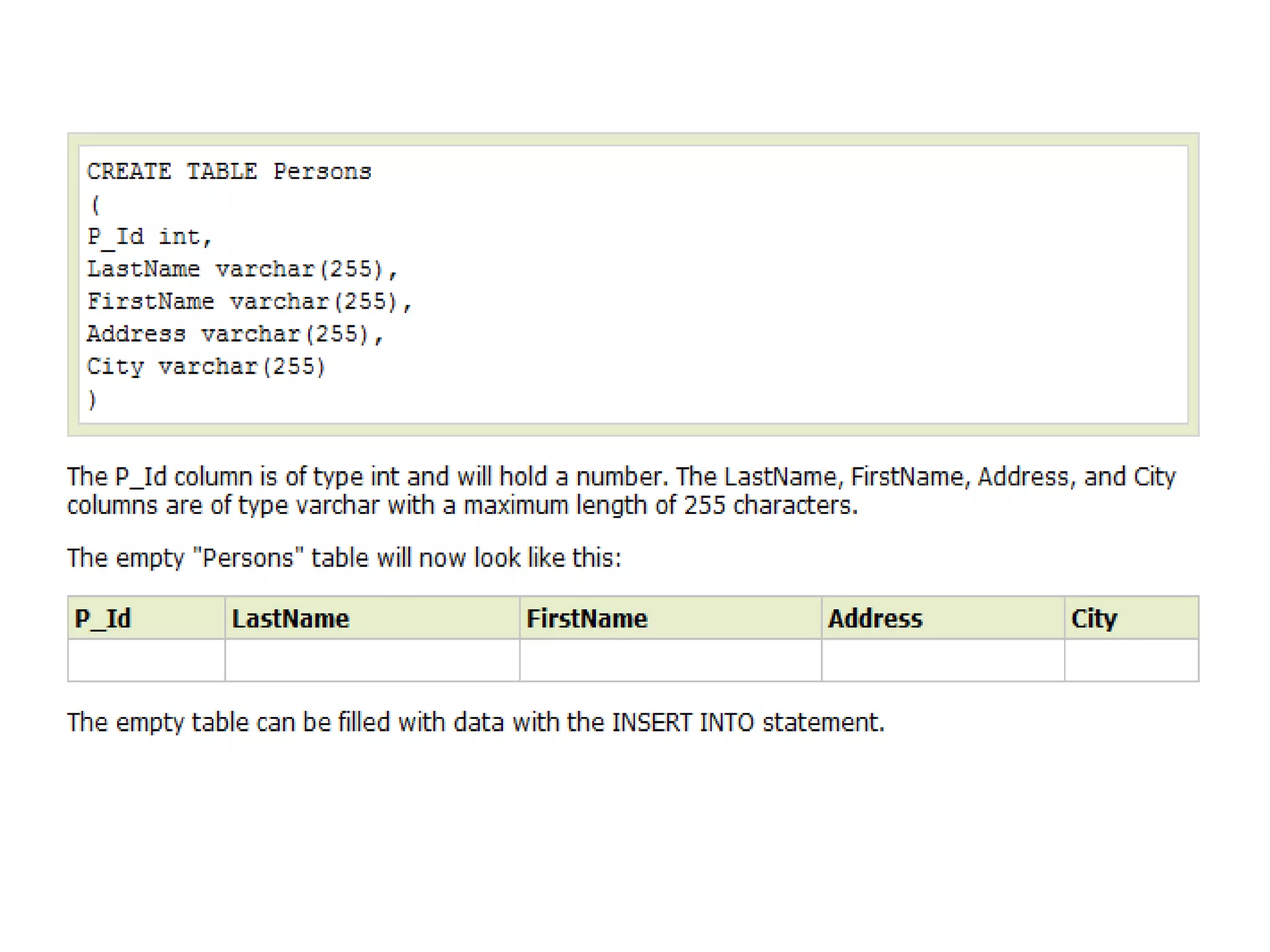
• The CREATE TABLE statement is used to create a table in a database.
   Syntax:-
• CREATE TABLE table_name
  (
  column_name1 data_type,
  column_name2 data_type,
  column_name3 data_type,
  ....
  )
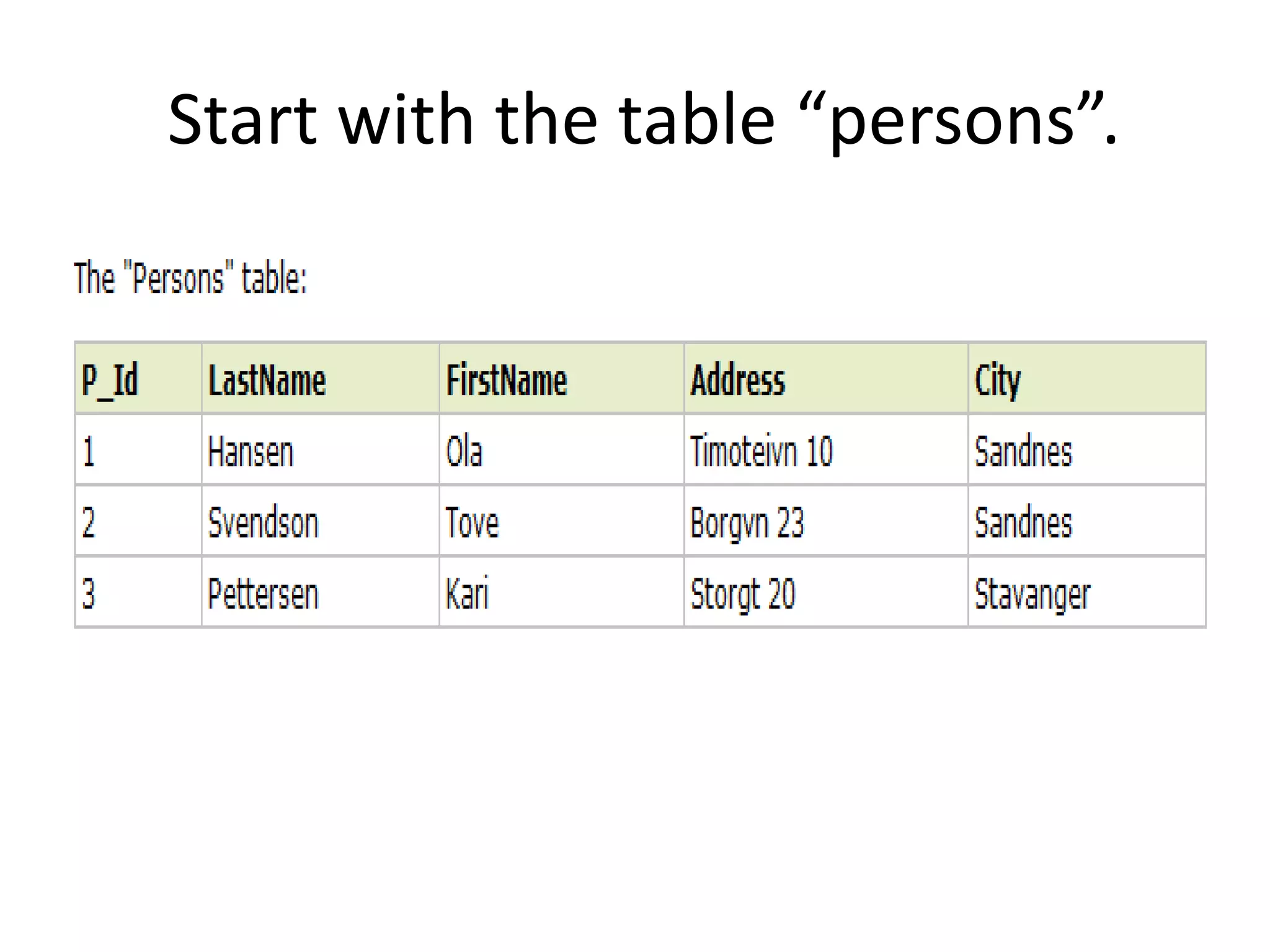
Start with the table “persons”.
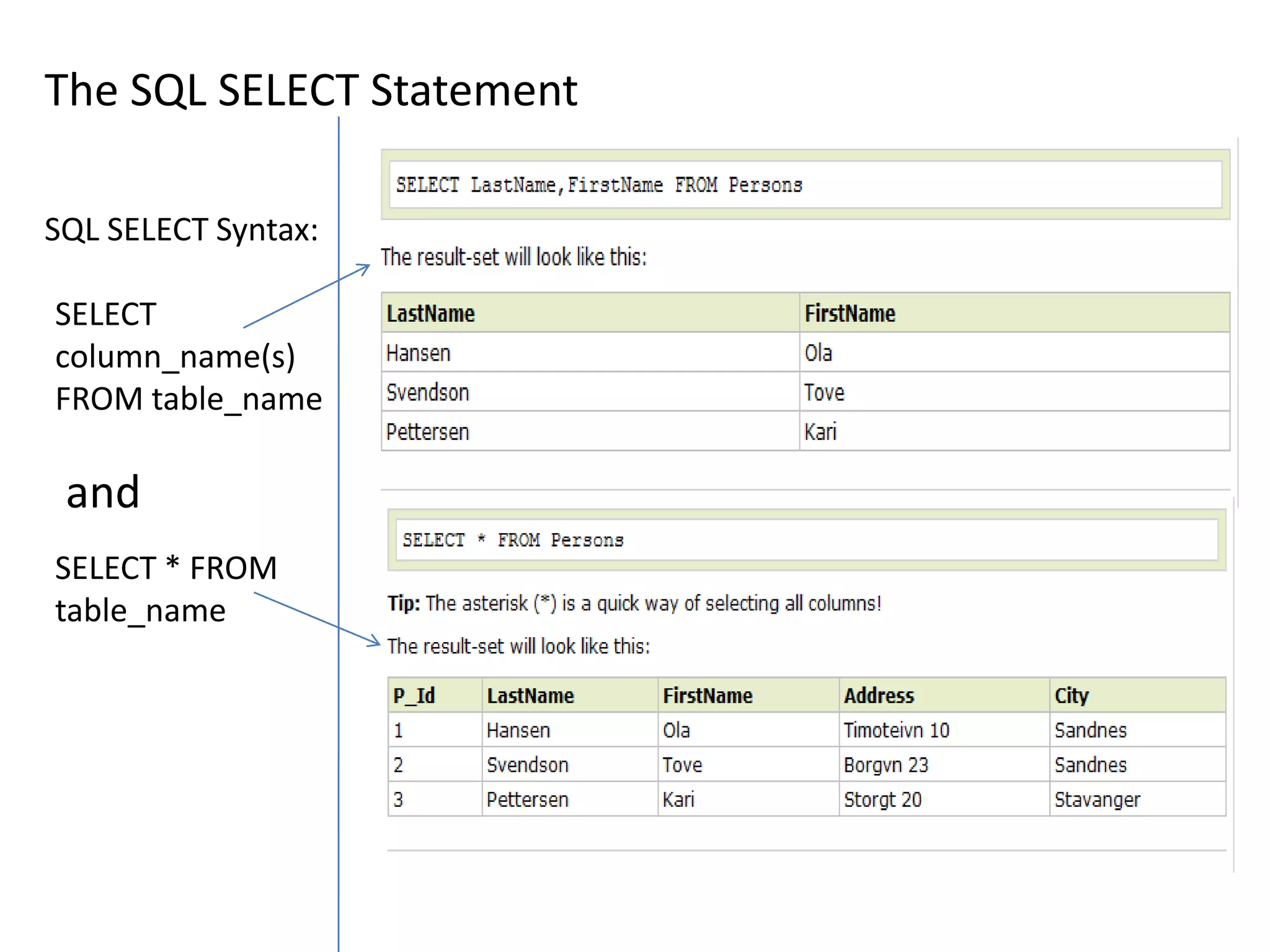
The SQL SELECT Statement

SQL SELECT Syntax:

SELECT
column_name(s)
FROM table_name

 and
SELECT * FROM
table_name
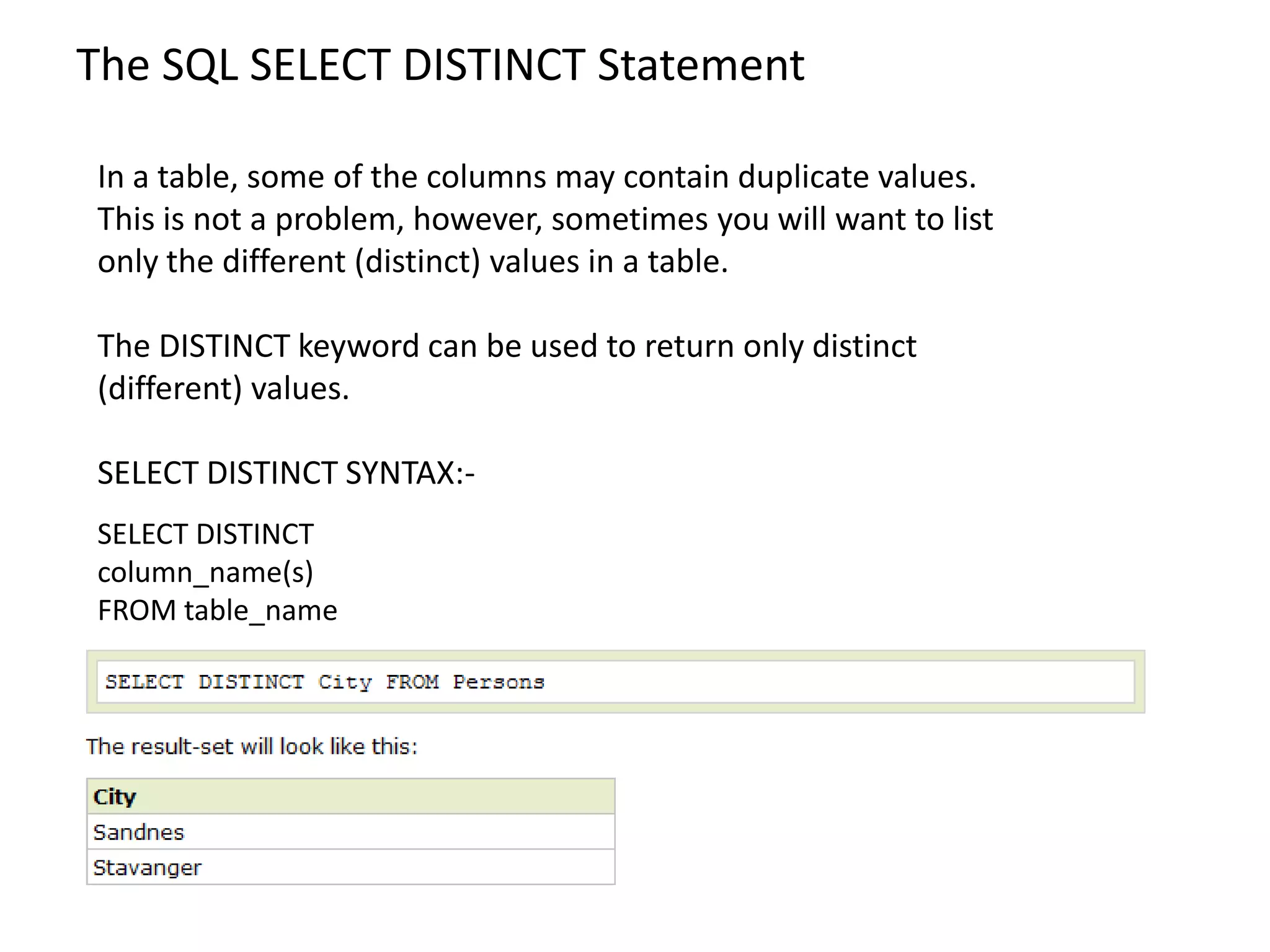
The SQL SELECT DISTINCT Statement

In a table, some of the columns may contain duplicate values.
This is not a problem, however, sometimes you will want to list
only the different (distinct) values in a table.

The DISTINCT keyword can be used to return only distinct
(different) values.

SELECT DISTINCT SYNTAX:-
SELECT DISTINCT
column_name(s)
FROM table_name
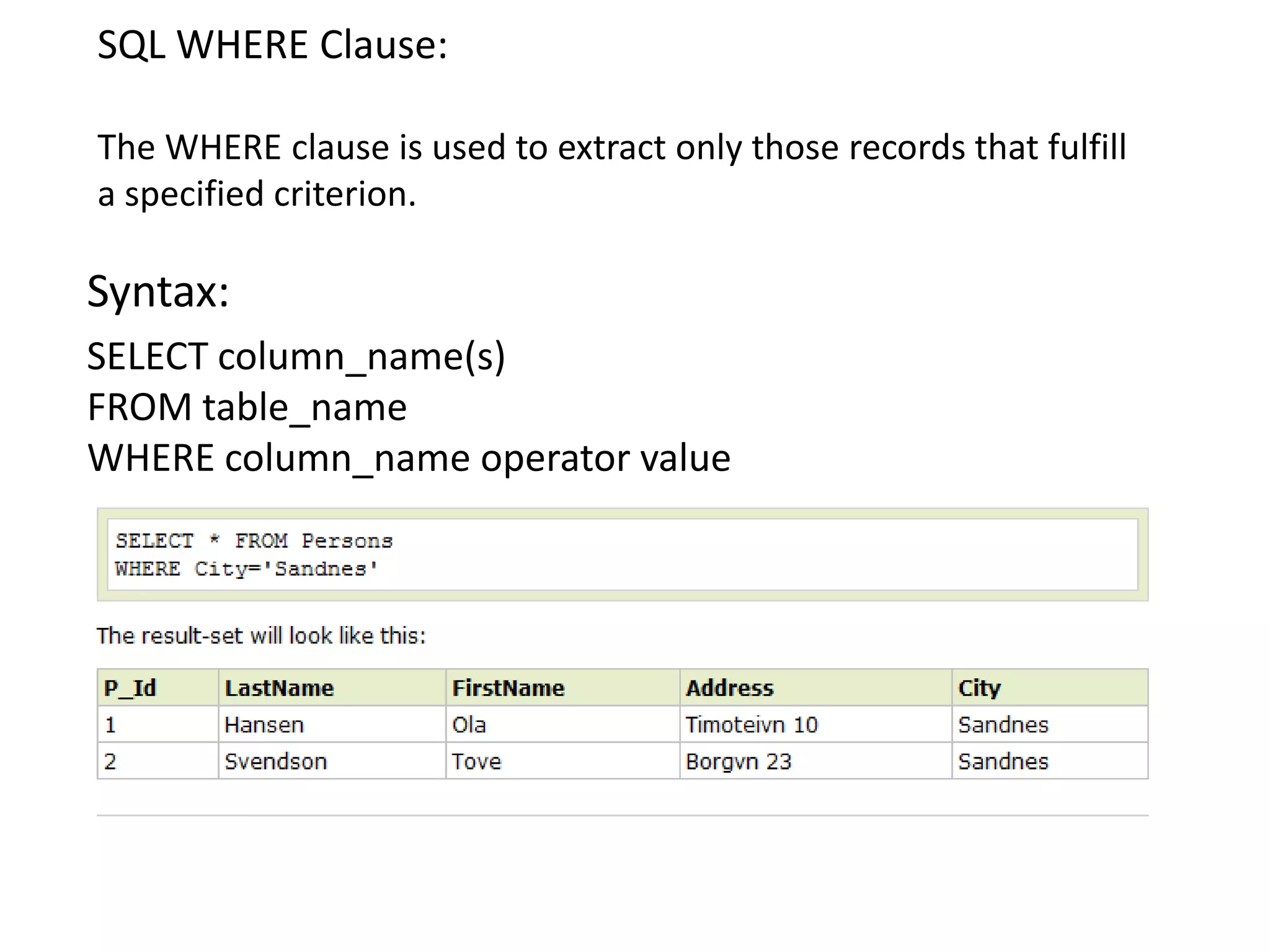
SQL WHERE Clause:

The WHERE clause is used to extract only those records that fulfill
a specified criterion.

Syntax:
SELECT column_name(s)
FROM table_name
WHERE column_name operator value
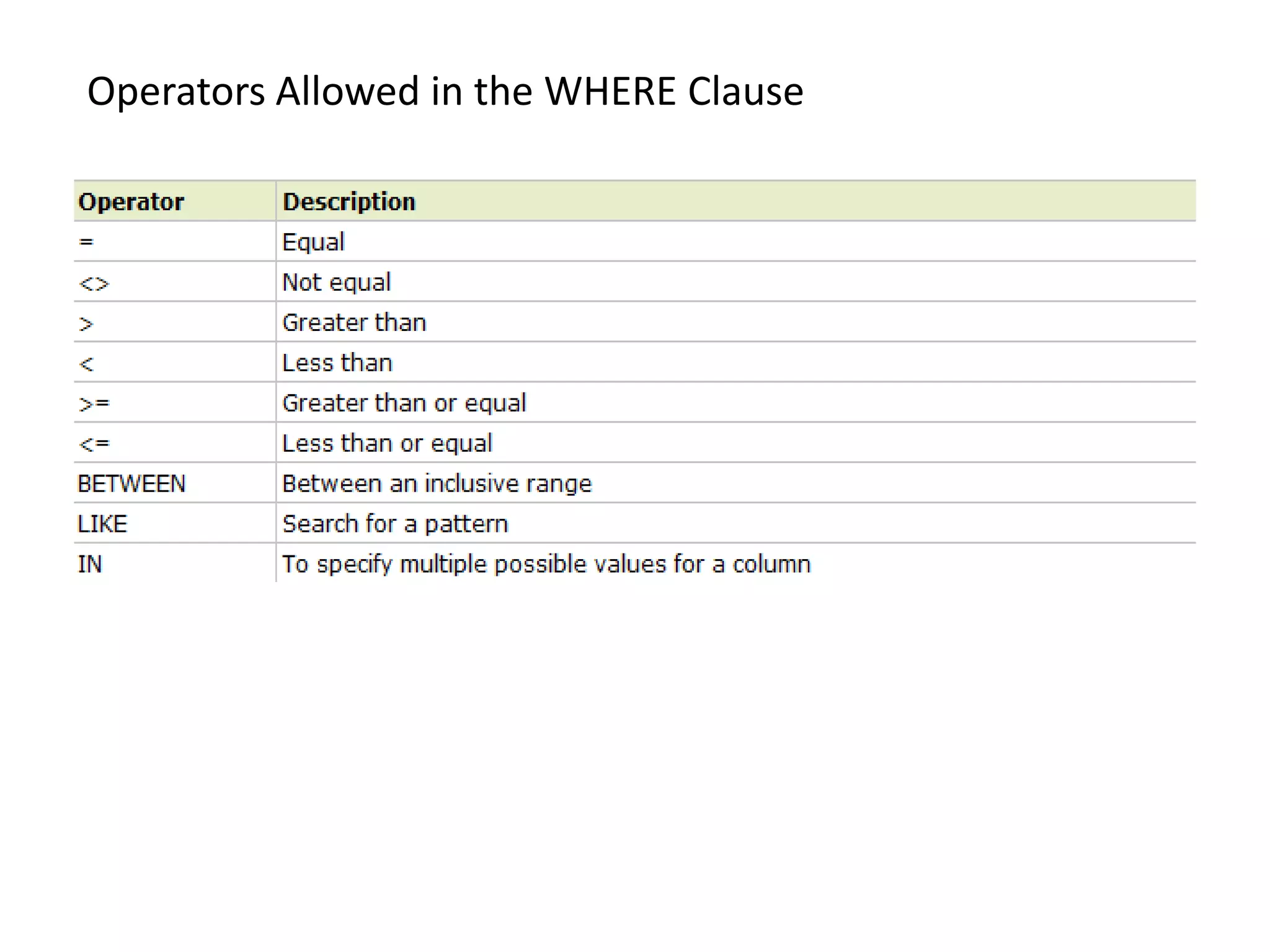
Operators Allowed in the WHERE Clause
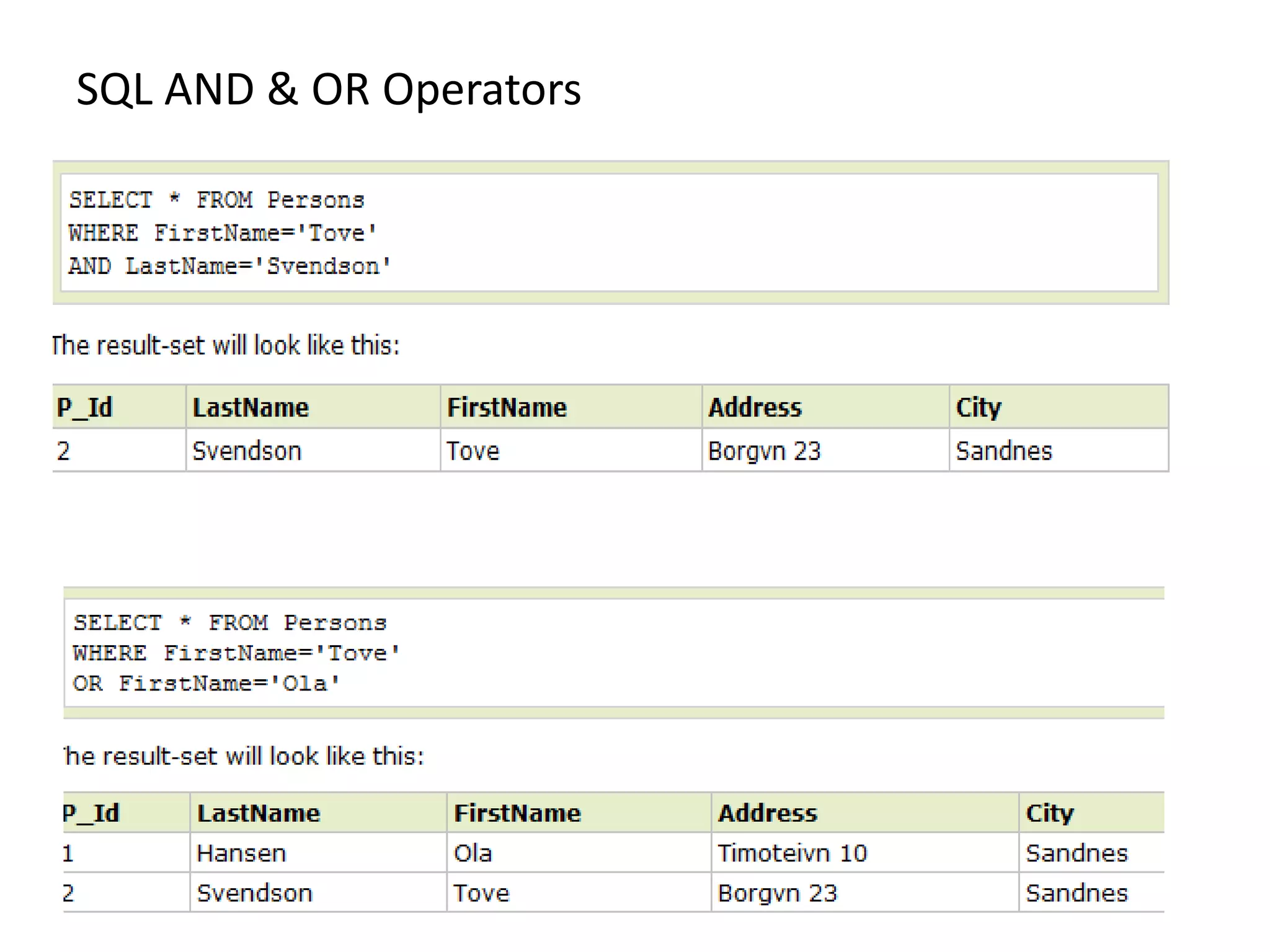
SQL AND & OR Operators
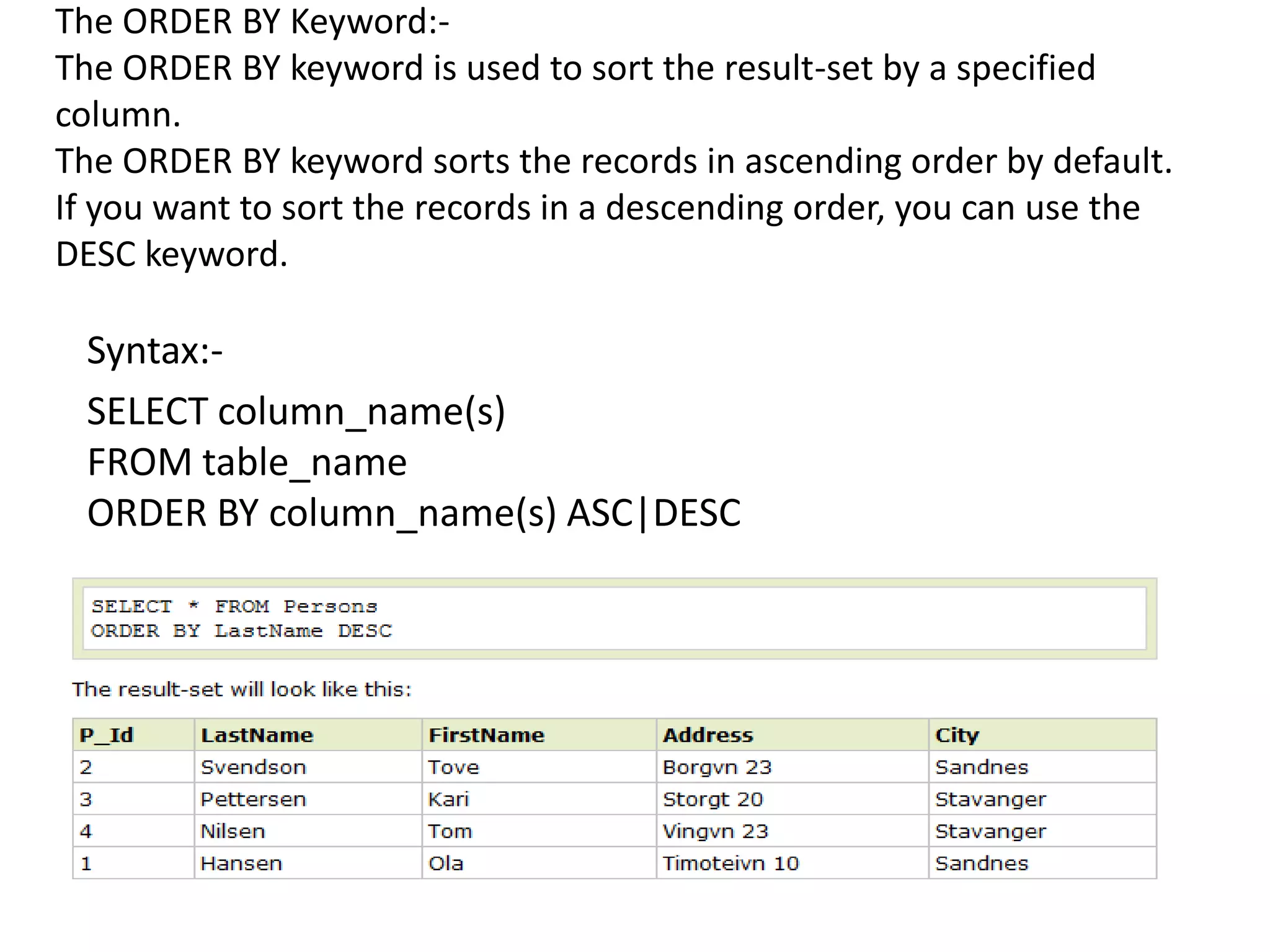
The ORDER BY Keyword:-
The ORDER BY keyword is used to sort the result-set by a specified
column.
The ORDER BY keyword sorts the records in ascending order by default.
If you want to sort the records in a descending order, you can use the
DESC keyword.

 Syntax:-
 SELECT column_name(s)
 FROM table_name
 ORDER BY column_name(s) ASC|DESC
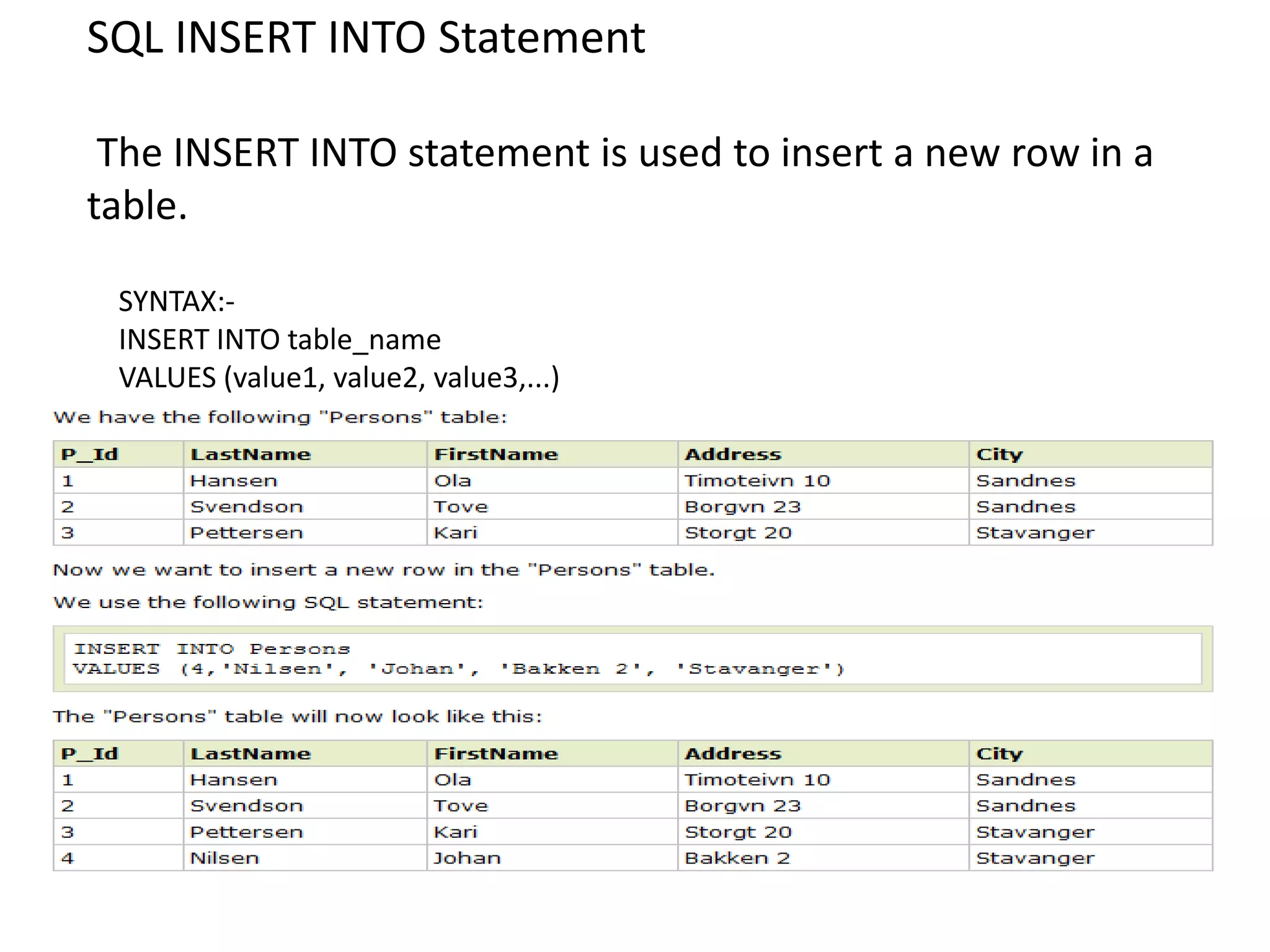
SQL INSERT INTO Statement

 The INSERT INTO statement is used to insert a new row in a
table.

 SYNTAX:-
 INSERT INTO table_name
 VALUES (value1, value2, value3,...)
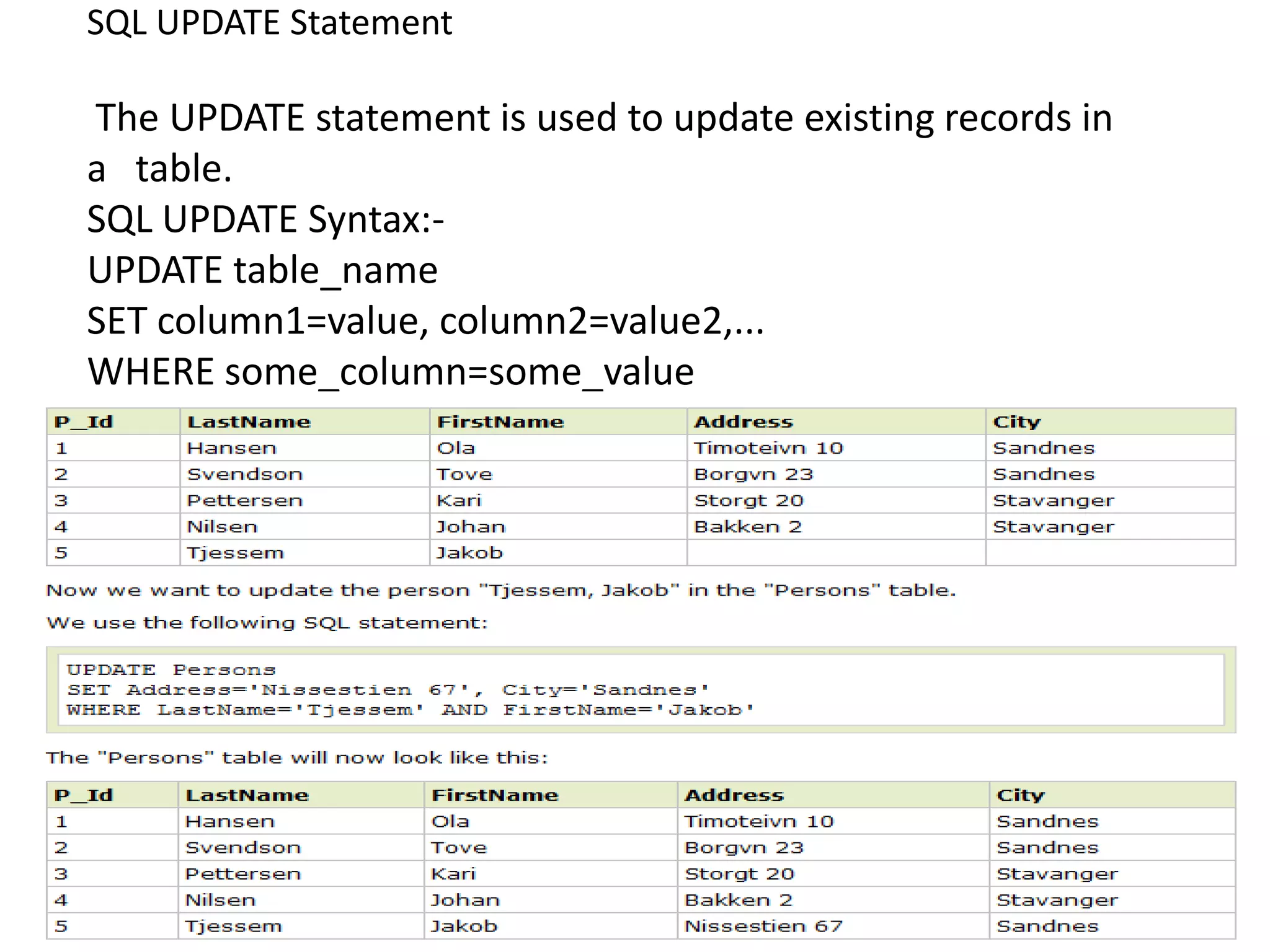
SQL UPDATE Statement

The UPDATE statement is used to update existing records in
a table.
SQL UPDATE Syntax:-
UPDATE table_name
SET column1=value, column2=value2,...
WHERE some_column=some_value
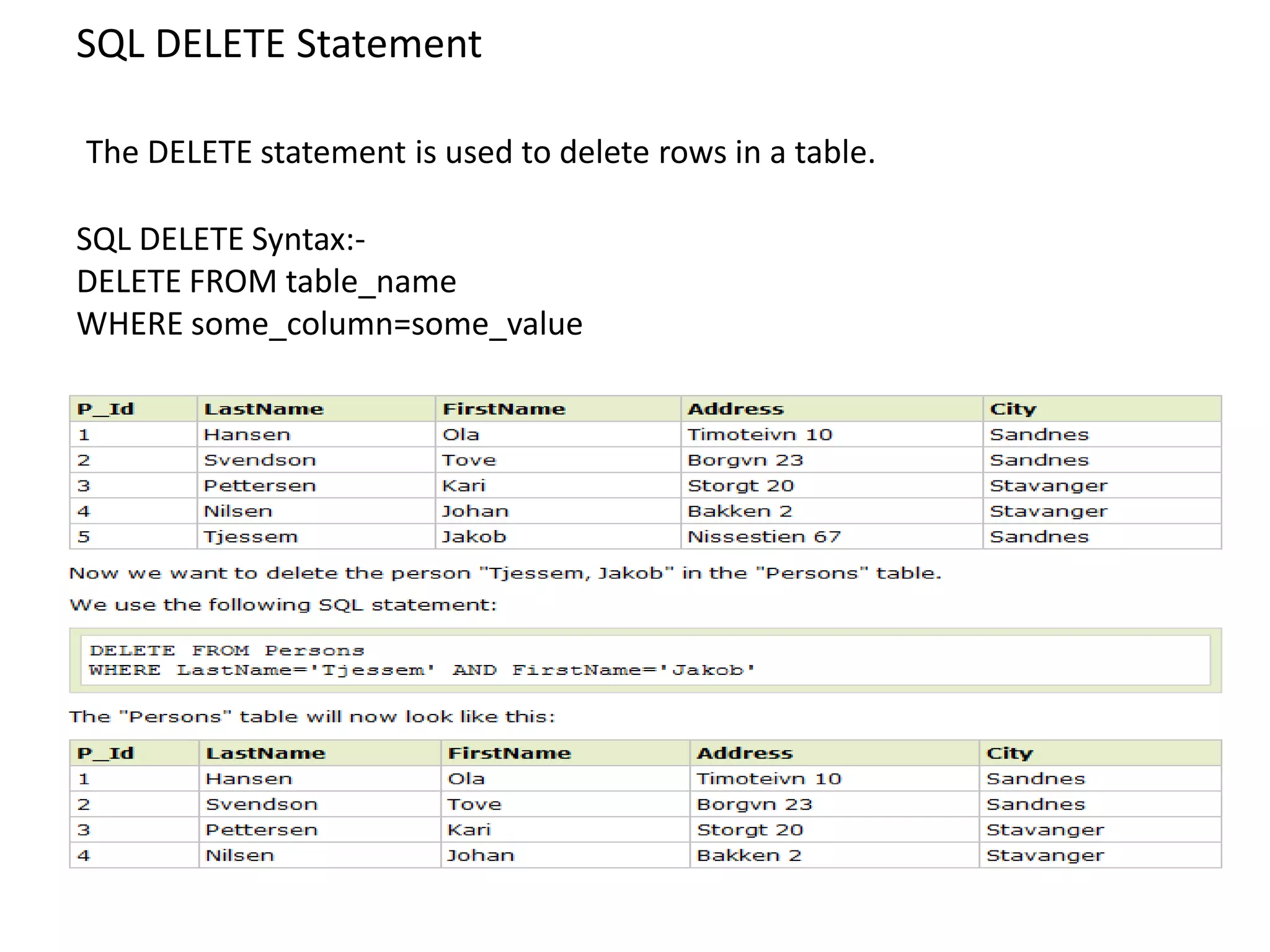
SQL DELETE Statement

The DELETE statement is used to delete rows in a table.

SQL DELETE Syntax:-
DELETE FROM table_name
WHERE some_column=some_value
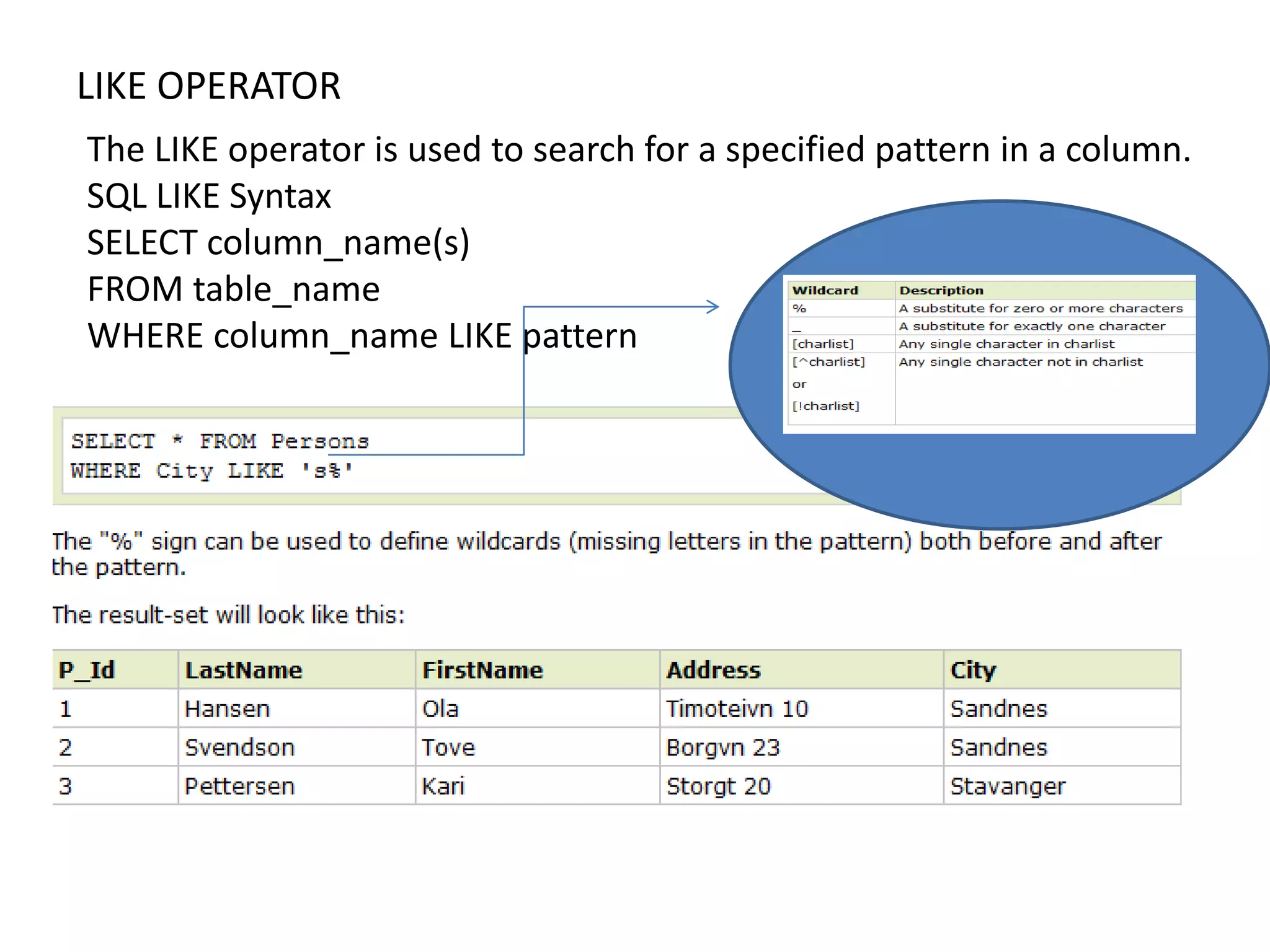
LIKE OPERATOR
The LIKE operator is used to search for a specified pattern in a column.
SQL LIKE Syntax
SELECT column_name(s)
FROM table_name
WHERE column_name LIKE pattern
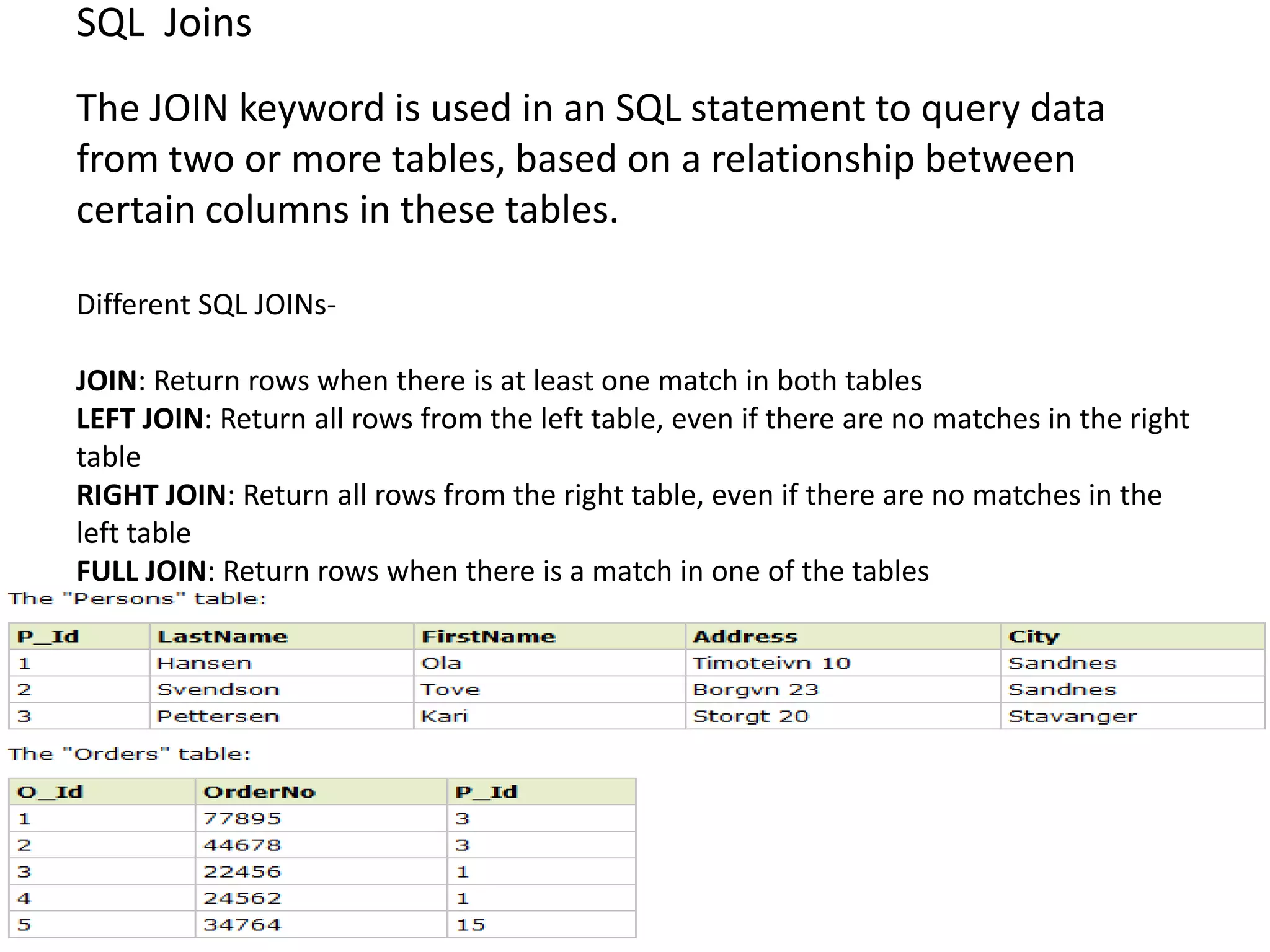
SQL Joins
The JOIN keyword is used in an SQL statement to query data
from two or more tables, based on a relationship between
certain columns in these tables.

Different SQL JOINs-

JOIN: Return rows when there is at least one match in both tables
LEFT JOIN: Return all rows from the left table, even if there are no matches in the right
table
RIGHT JOIN: Return all rows from the right table, even if there are no matches in the
left table
FULL JOIN: Return rows when there is a match in one of the tables
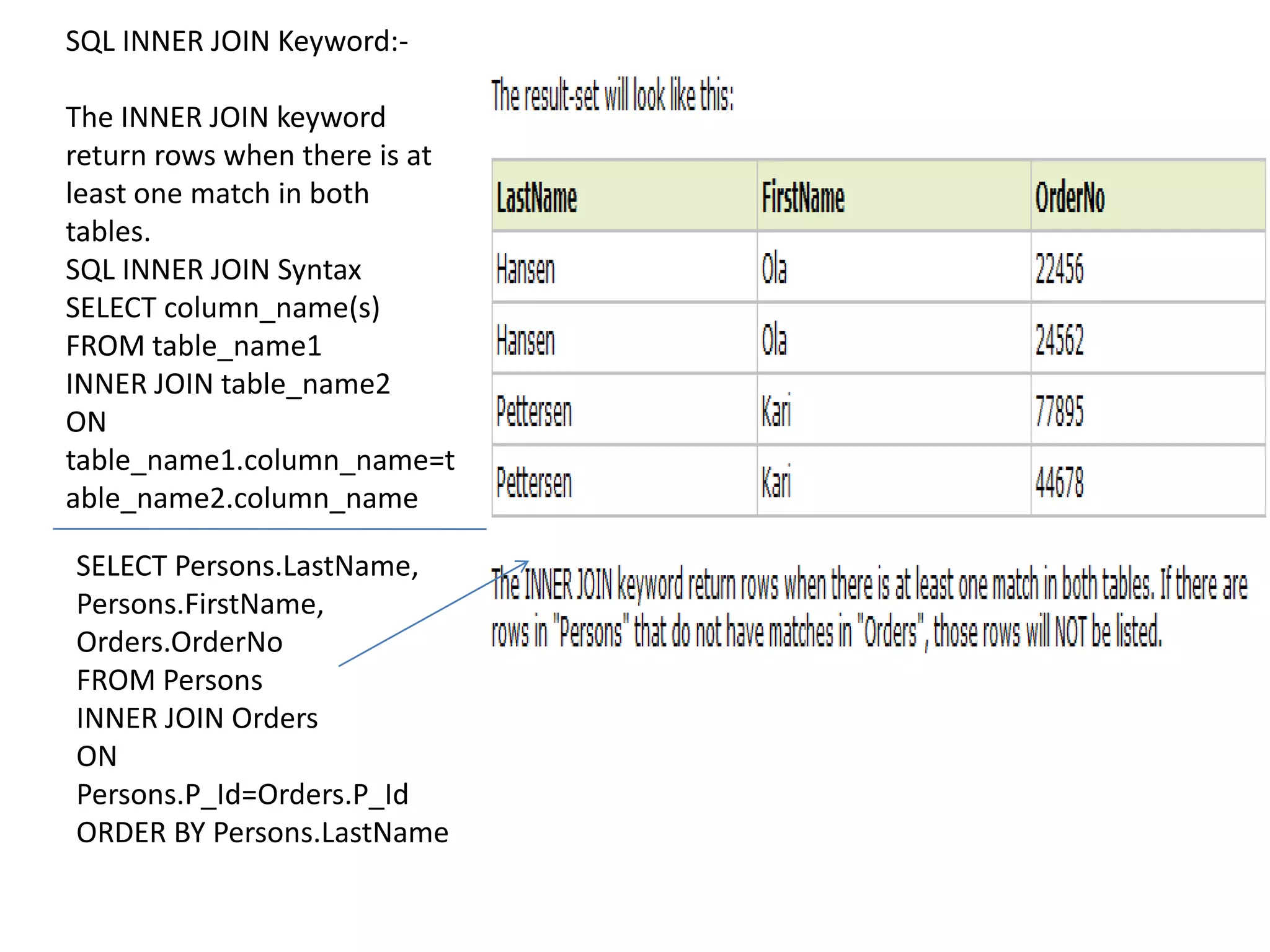
SQL INNER JOIN Keyword:-

The INNER JOIN keyword
return rows when there is at
least one match in both
tables.
SQL INNER JOIN Syntax
SELECT column_name(s)
FROM table_name1
INNER JOIN table_name2
ON
table_name1.column_name=t
able_name2.column_name

SELECT Persons.LastName,
Persons.FirstName,
Orders.OrderNo
FROM Persons
INNER JOIN Orders
ON
Persons.P_Id=Orders.P_Id
ORDER BY Persons.LastName
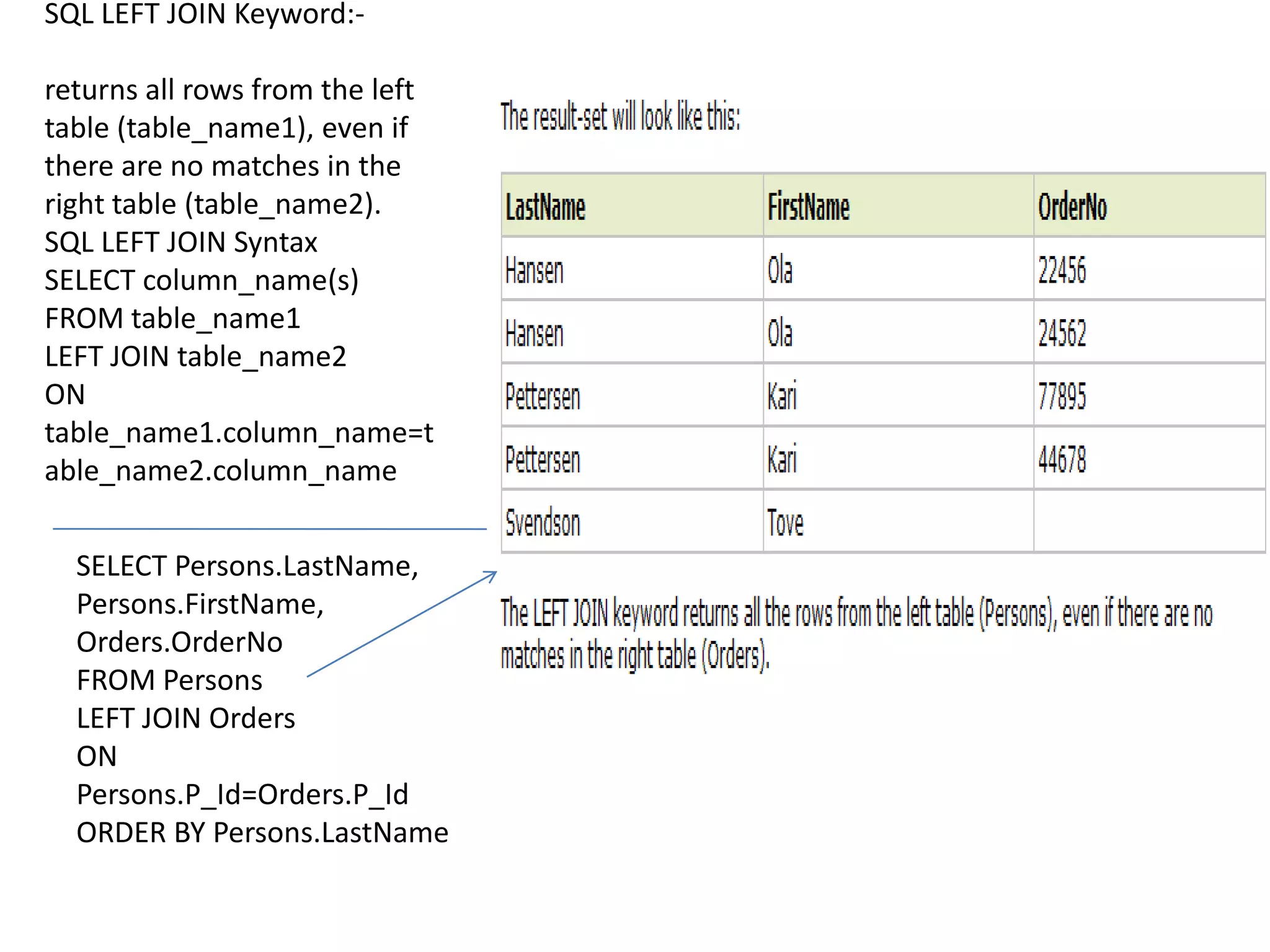
SQL LEFT JOIN Keyword:-

returns all rows from the left
table (table_name1), even if
there are no matches in the
right table (table_name2).
SQL LEFT JOIN Syntax
SELECT column_name(s)
FROM table_name1
LEFT JOIN table_name2
ON
table_name1.column_name=t
able_name2.column_name


  SELECT Persons.LastName,
  Persons.FirstName,
  Orders.OrderNo
  FROM Persons
  LEFT JOIN Orders
  ON
  Persons.P_Id=Orders.P_Id
  ORDER BY Persons.LastName
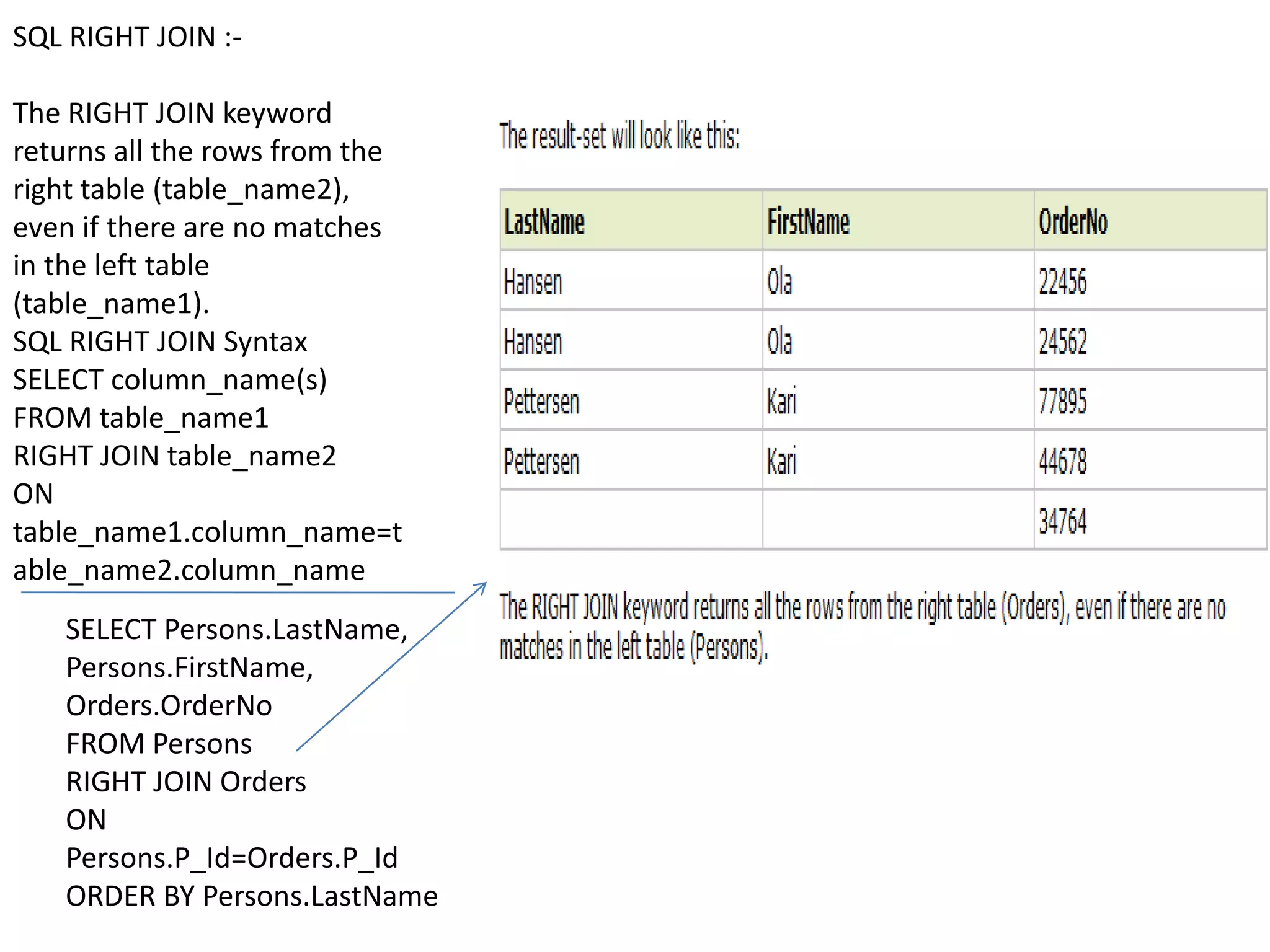
SQL RIGHT JOIN :-

The RIGHT JOIN keyword
returns all the rows from the
right table (table_name2),
even if there are no matches
in the left table
(table_name1).
SQL RIGHT JOIN Syntax
SELECT column_name(s)
FROM table_name1
RIGHT JOIN table_name2
ON
table_name1.column_name=t
able_name2.column_name
   SELECT Persons.LastName,
   Persons.FirstName,
   Orders.OrderNo
   FROM Persons
   RIGHT JOIN Orders
   ON
   Persons.P_Id=Orders.P_Id
   ORDER BY Persons.LastName
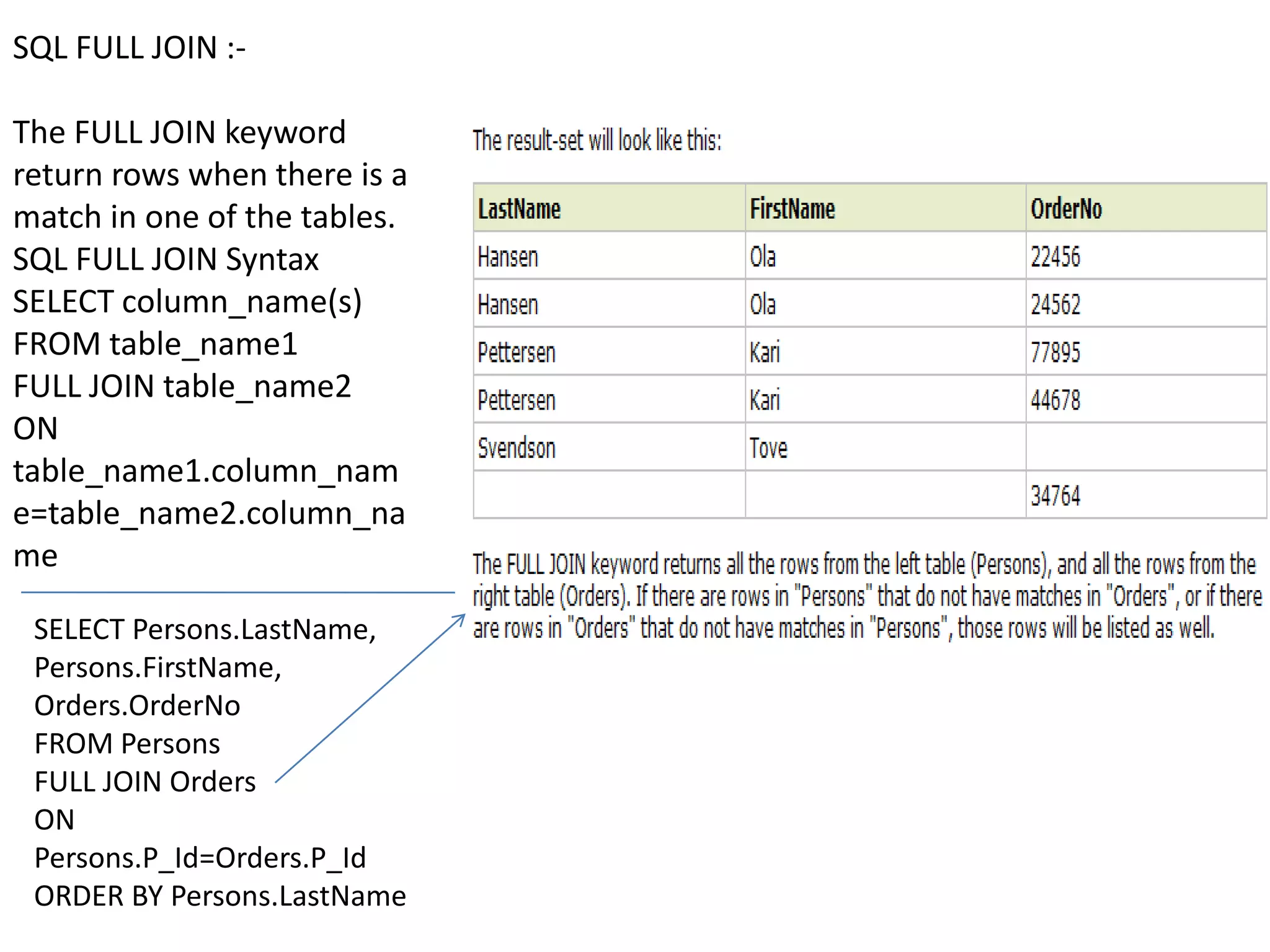
SQL FULL JOIN :-

The FULL JOIN keyword
return rows when there is a
match in one of the tables.
SQL FULL JOIN Syntax
SELECT column_name(s)
FROM table_name1
FULL JOIN table_name2
ON
table_name1.column_nam
e=table_name2.column_na
me

 SELECT Persons.LastName,
 Persons.FirstName,
 Orders.OrderNo
 FROM Persons
 FULL JOIN Orders
 ON
 Persons.P_Id=Orders.P_Id
 ORDER BY Persons.LastName
VIEW:-
A view is a virtual table based on the result-set of an SQL
statement.
A view contains rows and columns, just like a real table. The fields
in a view are fields from one or more real tables in the database.

SQL CREATE VIEW Syntax:-

CREATE VIEW view_name AS
SELECT column_name(s)
FROM table_name
WHERE condition
SQL Creating a View                SQL Updating a View           SQL Dropping a View


In SQL, a view is a virtual table   You can update a view by      You can delete a view with the
based on the result-set of an       using the following syntax:   DROP VIEW command.
SQL statement.
                                    SQL CREATE OR REPLACE VIEW SQL DROP VIEW Syntax:-
SQL CREATE VIEW Syntax:-            Syntax:-
                                                               DROP VIEW view_name
CREATE VIEW view_name AS            CREATE OR REPLACE VIEW
SELECT column_name(s)               view_name AS
FROM table_name                     SELECT column_name(s)
WHERE condition                     FROM table_name
                                    WHERE condition
For example,
                             CREATE VIEW [Current Product
CREATE VIEW [Current Product List] AS
List] AS                     SELECT
SELECT                       ProductID,ProductName,Categ
ProductID,ProductName        ory
FROM Products                FROM Products
WHERE Discontinued=No        WHERE Discontinued=No

Avinash database

  • 1.
    Introduction to Database Presented By :- Avinash Agrawal
  • 2.
    How to retrievedata from a database? SQL QUERIES
  • 3.
    Introduction to SQL. •SQL stands for Structured Query Language • SQL is a special-purpose programming language designed for managing data in database management systems (DBMS). • SQL lets you access and manipulate databases • SQL is an ANSI (American National Standards Institute) standard.
  • 4.
    What Can SQLdo? • SQL can execute queries against a database • SQL can retrieve data from a database • SQL can insert records in a database • SQL can update records in a database • SQL can delete records from a database • SQL can create new databases • SQL can create new tables in a database • SQL can create stored procedures in a database • SQL can create views in a database
  • 5.
    SQL DML andDDL • SQL can be divided into two parts: The Data Manipulation Language (DML) and the Data Definition Language (DDL). DDL:- DML:- CREATE DATABASE - creates a new SELECT - extracts data from a database database ALTER DATABASE - modifies a UPDATE - updates data in a database database CREATE TABLE - creates a new table DELETE - deletes data from a ALTER TABLE - modifies a table database DROP TABLE - deletes a table INSERT INTO - inserts new CREATE INDEX - creates an index data into a database (search key) DROP INDEX - deletes an index
  • 6.
    HOW TO CREATEA DATABASE AND A TABLE ? • The CREATE DATABASE statement is used to create a database. Syntax:- • CREATE DATABASE database_name CREATE DATABASE Example We use the following CREATE DATABASE statement: • CREATE DATABASE my_db • The CREATE TABLE statement is used to create a table in a database. Syntax:- • CREATE TABLE table_name ( column_name1 data_type, column_name2 data_type, column_name3 data_type, .... )
  • 8.
    Start with thetable “persons”.
  • 9.
    The SQL SELECTStatement SQL SELECT Syntax: SELECT column_name(s) FROM table_name and SELECT * FROM table_name
  • 10.
    The SQL SELECTDISTINCT Statement In a table, some of the columns may contain duplicate values. This is not a problem, however, sometimes you will want to list only the different (distinct) values in a table. The DISTINCT keyword can be used to return only distinct (different) values. SELECT DISTINCT SYNTAX:- SELECT DISTINCT column_name(s) FROM table_name
  • 11.
    SQL WHERE Clause: TheWHERE clause is used to extract only those records that fulfill a specified criterion. Syntax: SELECT column_name(s) FROM table_name WHERE column_name operator value
  • 12.
    Operators Allowed inthe WHERE Clause
  • 13.
    SQL AND &OR Operators
  • 14.
    The ORDER BYKeyword:- The ORDER BY keyword is used to sort the result-set by a specified column. The ORDER BY keyword sorts the records in ascending order by default. If you want to sort the records in a descending order, you can use the DESC keyword. Syntax:- SELECT column_name(s) FROM table_name ORDER BY column_name(s) ASC|DESC
  • 15.
    SQL INSERT INTOStatement The INSERT INTO statement is used to insert a new row in a table. SYNTAX:- INSERT INTO table_name VALUES (value1, value2, value3,...)
  • 16.
    SQL UPDATE Statement TheUPDATE statement is used to update existing records in a table. SQL UPDATE Syntax:- UPDATE table_name SET column1=value, column2=value2,... WHERE some_column=some_value
  • 17.
    SQL DELETE Statement TheDELETE statement is used to delete rows in a table. SQL DELETE Syntax:- DELETE FROM table_name WHERE some_column=some_value
  • 18.
    LIKE OPERATOR The LIKEoperator is used to search for a specified pattern in a column. SQL LIKE Syntax SELECT column_name(s) FROM table_name WHERE column_name LIKE pattern
  • 19.
    SQL Joins The JOINkeyword is used in an SQL statement to query data from two or more tables, based on a relationship between certain columns in these tables. Different SQL JOINs- JOIN: Return rows when there is at least one match in both tables LEFT JOIN: Return all rows from the left table, even if there are no matches in the right table RIGHT JOIN: Return all rows from the right table, even if there are no matches in the left table FULL JOIN: Return rows when there is a match in one of the tables
  • 20.
    SQL INNER JOINKeyword:- The INNER JOIN keyword return rows when there is at least one match in both tables. SQL INNER JOIN Syntax SELECT column_name(s) FROM table_name1 INNER JOIN table_name2 ON table_name1.column_name=t able_name2.column_name SELECT Persons.LastName, Persons.FirstName, Orders.OrderNo FROM Persons INNER JOIN Orders ON Persons.P_Id=Orders.P_Id ORDER BY Persons.LastName
  • 21.
    SQL LEFT JOINKeyword:- returns all rows from the left table (table_name1), even if there are no matches in the right table (table_name2). SQL LEFT JOIN Syntax SELECT column_name(s) FROM table_name1 LEFT JOIN table_name2 ON table_name1.column_name=t able_name2.column_name SELECT Persons.LastName, Persons.FirstName, Orders.OrderNo FROM Persons LEFT JOIN Orders ON Persons.P_Id=Orders.P_Id ORDER BY Persons.LastName
  • 22.
    SQL RIGHT JOIN:- The RIGHT JOIN keyword returns all the rows from the right table (table_name2), even if there are no matches in the left table (table_name1). SQL RIGHT JOIN Syntax SELECT column_name(s) FROM table_name1 RIGHT JOIN table_name2 ON table_name1.column_name=t able_name2.column_name SELECT Persons.LastName, Persons.FirstName, Orders.OrderNo FROM Persons RIGHT JOIN Orders ON Persons.P_Id=Orders.P_Id ORDER BY Persons.LastName
  • 23.
    SQL FULL JOIN:- The FULL JOIN keyword return rows when there is a match in one of the tables. SQL FULL JOIN Syntax SELECT column_name(s) FROM table_name1 FULL JOIN table_name2 ON table_name1.column_nam e=table_name2.column_na me SELECT Persons.LastName, Persons.FirstName, Orders.OrderNo FROM Persons FULL JOIN Orders ON Persons.P_Id=Orders.P_Id ORDER BY Persons.LastName
  • 24.
    VIEW:- A view isa virtual table based on the result-set of an SQL statement. A view contains rows and columns, just like a real table. The fields in a view are fields from one or more real tables in the database. SQL CREATE VIEW Syntax:- CREATE VIEW view_name AS SELECT column_name(s) FROM table_name WHERE condition
  • 25.
    SQL Creating aView SQL Updating a View SQL Dropping a View In SQL, a view is a virtual table You can update a view by You can delete a view with the based on the result-set of an using the following syntax: DROP VIEW command. SQL statement. SQL CREATE OR REPLACE VIEW SQL DROP VIEW Syntax:- SQL CREATE VIEW Syntax:- Syntax:- DROP VIEW view_name CREATE VIEW view_name AS CREATE OR REPLACE VIEW SELECT column_name(s) view_name AS FROM table_name SELECT column_name(s) WHERE condition FROM table_name WHERE condition For example, CREATE VIEW [Current Product CREATE VIEW [Current Product List] AS List] AS SELECT SELECT ProductID,ProductName,Categ ProductID,ProductName ory FROM Products FROM Products WHERE Discontinued=No WHERE Discontinued=No