Tutorial
How to automate end-user training
guide with Salesforce
TUTORIAL
Author: Mathieu Emanuelli
Tutorial
CONTENTS
INTRODUCTION .................................................................................................................................3
What is the link with Salesforce?............................................................................................................3
Benefits/Value Delivered........................................................................................................................3
INSTALL THE SOFTWARE.....................................................................................................................3
Pre requisites..........................................................................................................................................3
LAUNCH & CONFIGURE STEPSHOT SETTINGS ......................................................................................3
RUN STEPSHOT ..................................................................................................................................5
REFERENCE ......................................................................................................................................11
CONTACTS .......................................................................................................................................12
2
Tutorial
Executive Summary
User adoption for a project is crucial and can make a project a success or a failure. In order to maximize user
adoption many projects are working on change management.
The change management stream is usually working on many aspects of the project such as stakeholder mapping,
communication plan or training material.
All aspects are extremely important and often underestimated and it is usual to see a cost reduction on change
management, where it should exist actually more investment.
In this context, how change management can demonstrate re value?
I was always surprised to see on project how cumbersome it might be to create some test scripts or user-training
guide: Change management stream has to understand what has been designed, developed by technical team, has
to understand business processes designed by business design team. Result of this tough handover is often the
creation of training material, which relies on screenshot and few sentences in a PowerPoint document.
Then, the question is: how can we be more efficient to create user material, training guide, test scripts in less time
to make sure change management can manage other tasks?
The purpose of this tutorial is to explain how it is possible to make that dream come true: automating end-user
training material creation.
3
Tutorial
INTRODUCTION
WHAT IS THE LINK WITH SALESFORCE?
As I use to work a lot in the last past years in IT projects that deployed Salesforce as many of consultants, I have
managed to make this tutorial around this technology.
BENEFITS/VALUE DELIVERED
Following benefits can be experienced by using this tutorial:
 Reduction of simple task to create end-user training
 Perfect reflection of a step by step process on end user guide
 Easy repository of end user training material
 Innovative design of end user trainings
.
INSTALL THE SOFTWARE
PRE REQUISITES
We are proposing in this tutorial to use the software “StepShot” to make your publication.
In order to use it, you have to :
1. Create an account. This might be a trial account that will be effective during 14 days (here)
2. Validate your account by clicking on the link send at the end of the registration
3. Download the client software and install it on your machine
Note: for this tutorial we used the PC version.
LAUNCH & CONFIGURE STEPSHOT SETTINGS
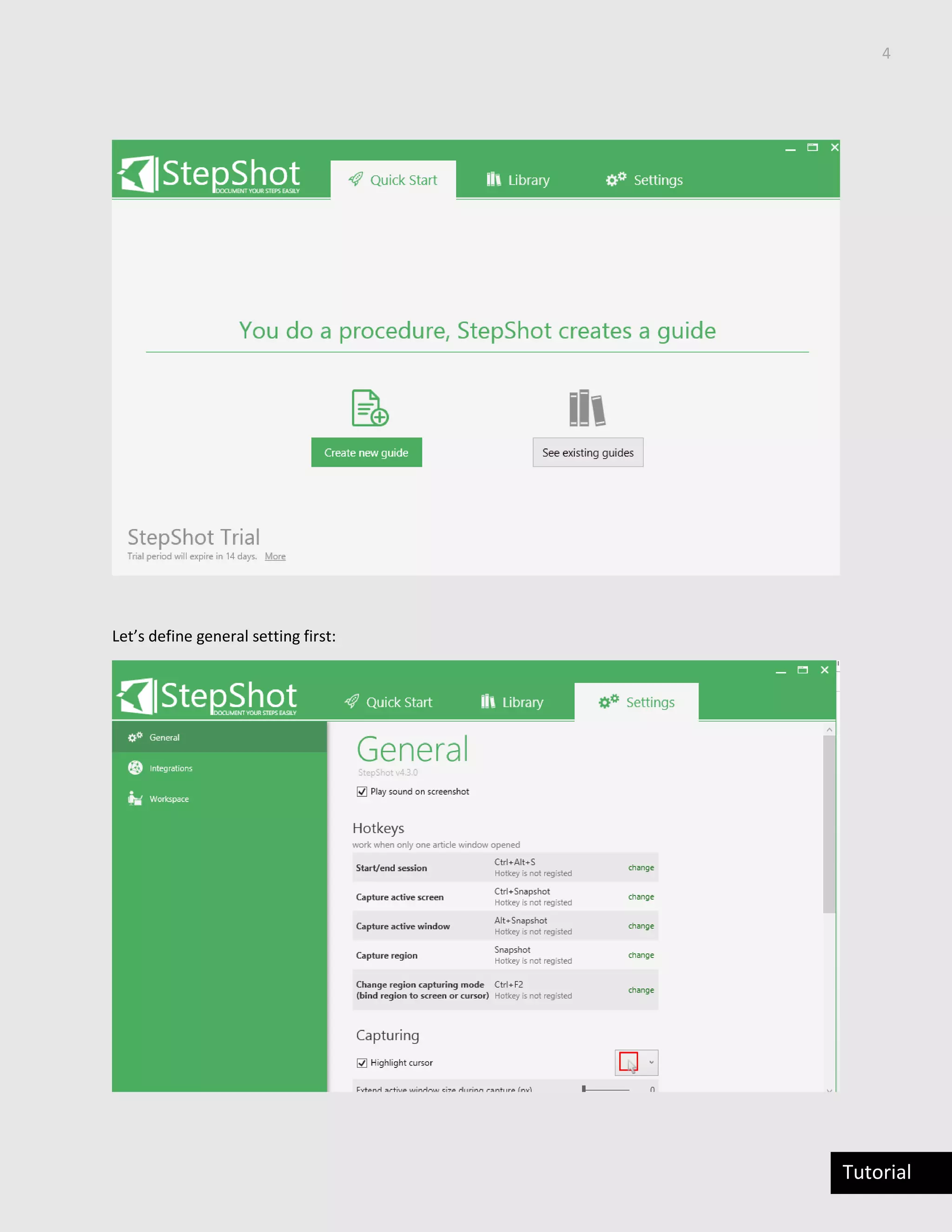
This is the window you will see:
4
Tutorial
Let’s define general setting first:
5
Tutorial
These settings are very important and you have to be careful by setting them because it will defined the
generation of your generated document:
In the tab setting user can defined:
 General settings: how to make the capture
 Define integration: how to integrate the content generated by stepShot
 Define your workspace: Where will be stored the content
RUN STEPSHOT
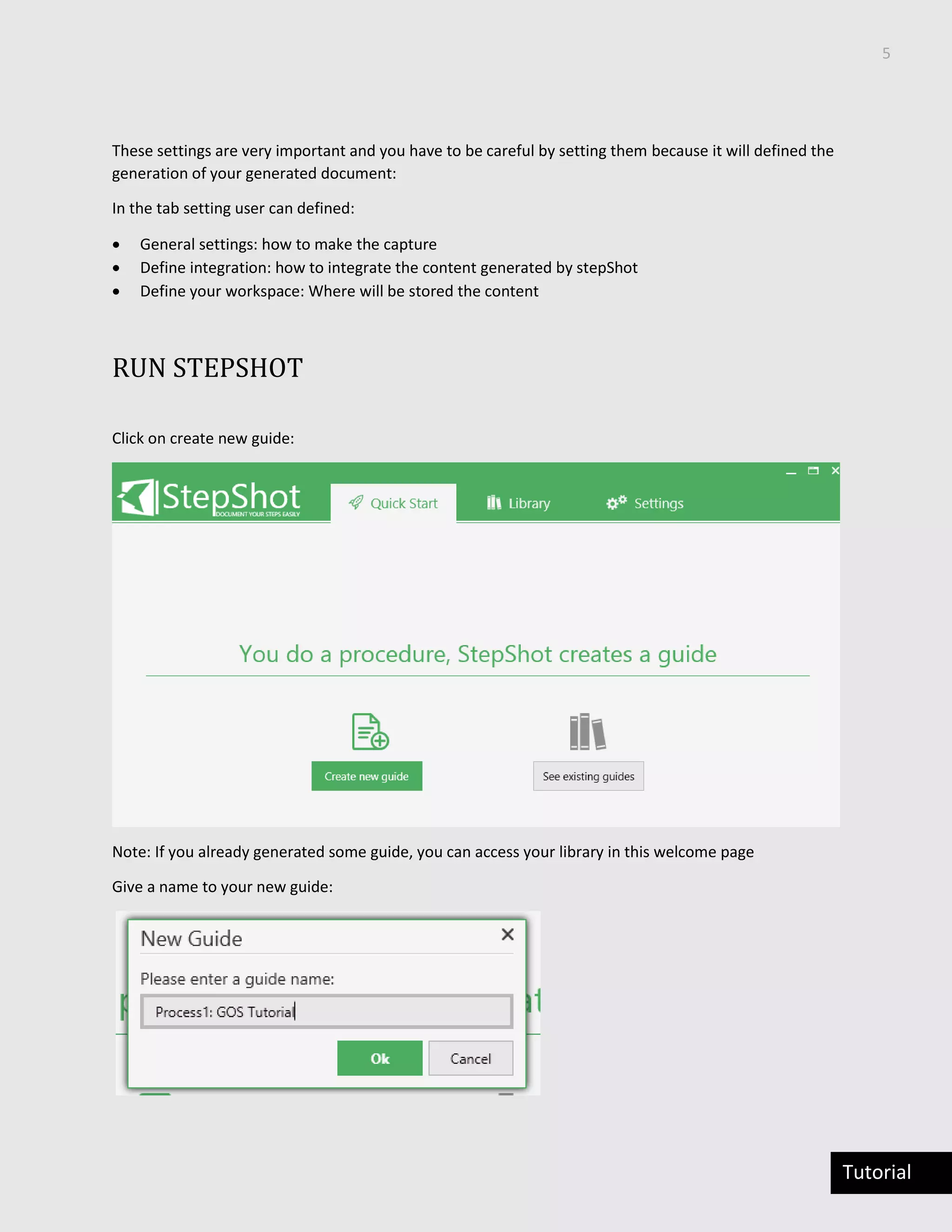
Click on create new guide:
Note: If you already generated some guide, you can access your library in this welcome page
Give a name to your new guide:
6
Tutorial
Note: II recommend giving the name of the process you want to demonstrate
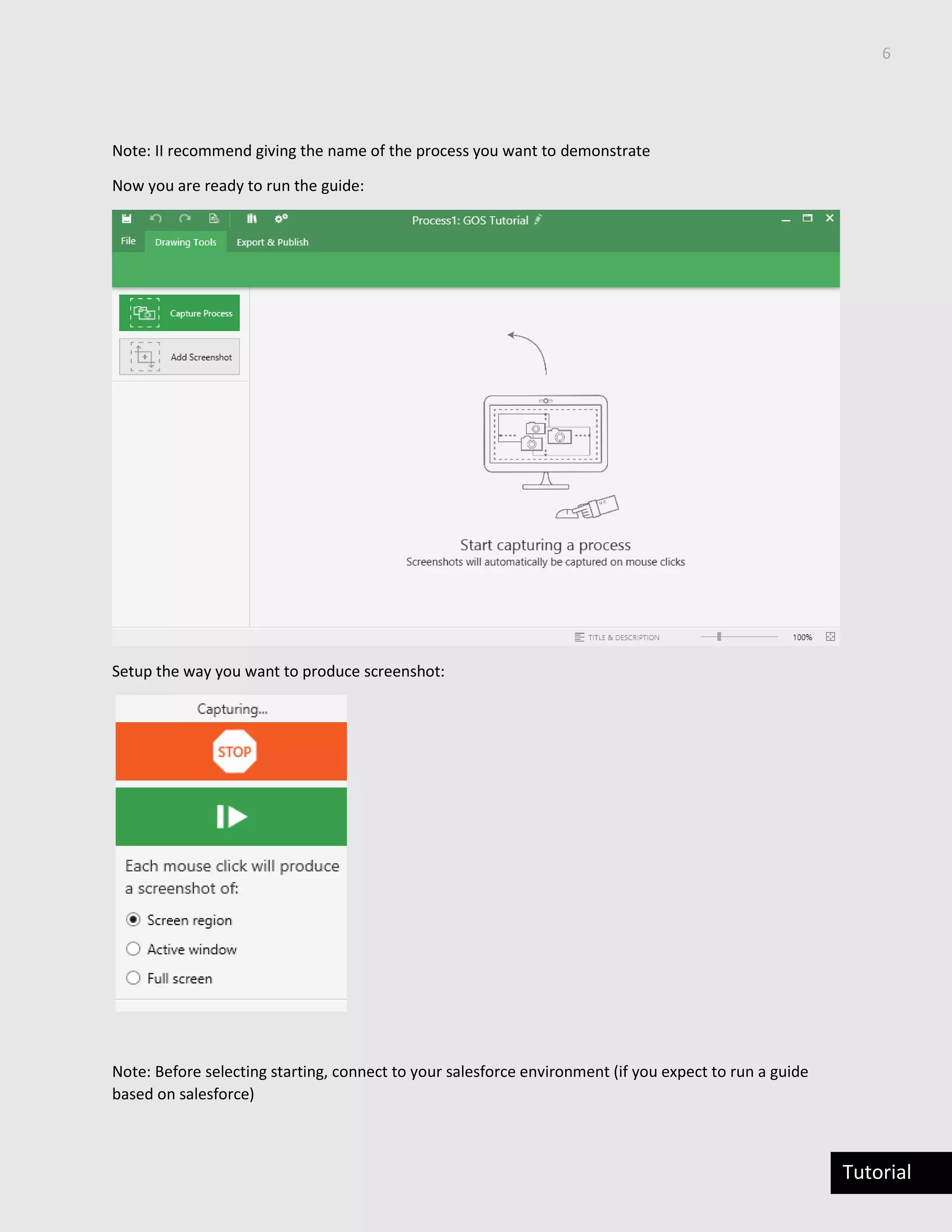
Now you are ready to run the guide:
Setup the way you want to produce screenshot:
Note: Before selecting starting, connect to your salesforce environment (if you expect to run a guide
based on salesforce)
7
Tutorial
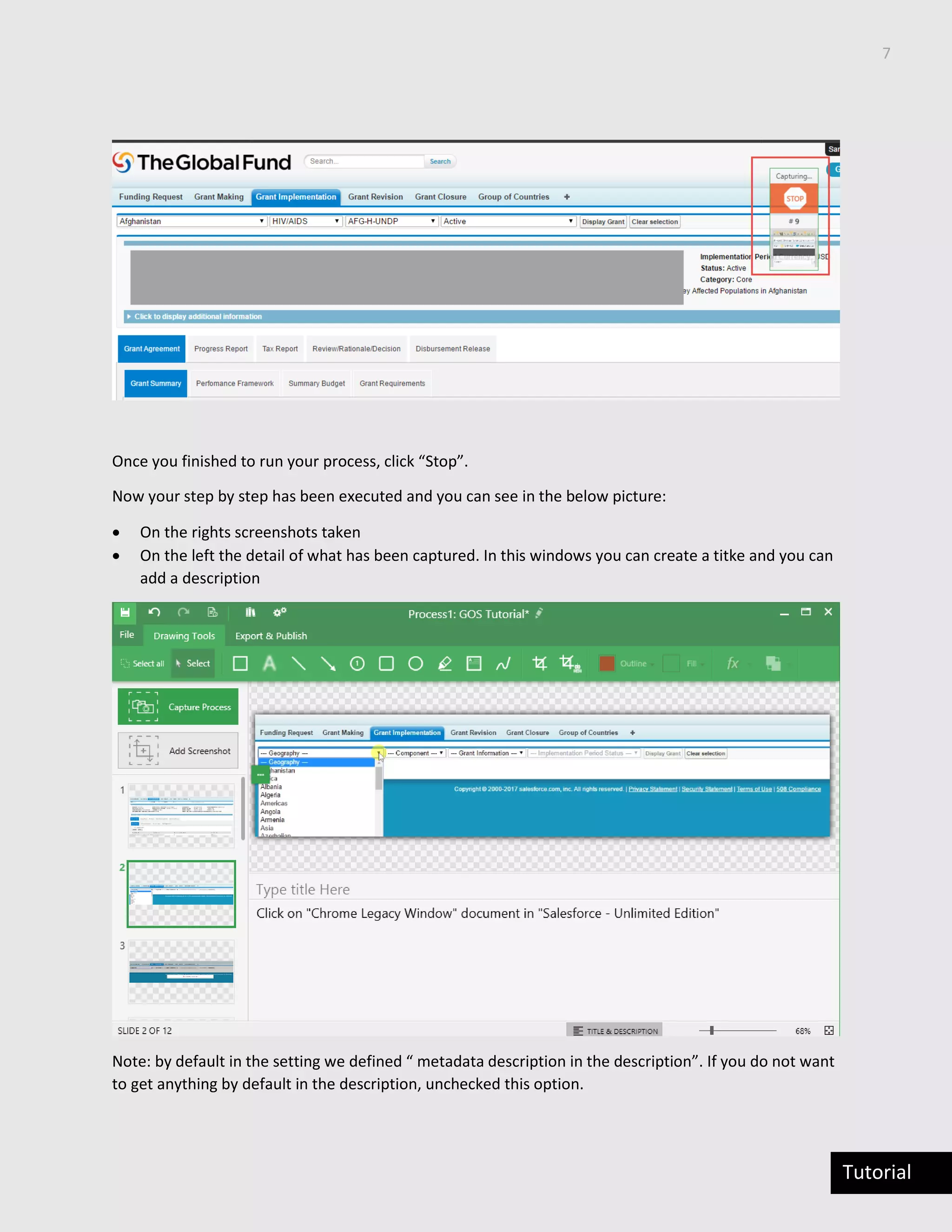
Once you finished to run your process, click “Stop”.
Now your step by step has been executed and you can see in the below picture:
 On the rights screenshots taken
 On the left the detail of what has been captured. In this windows you can create a titke and you can
add a description
Note: by default in the setting we defined “ metadata description in the description”. If you do not want
to get anything by default in the description, unchecked this option.
8
Tutorial
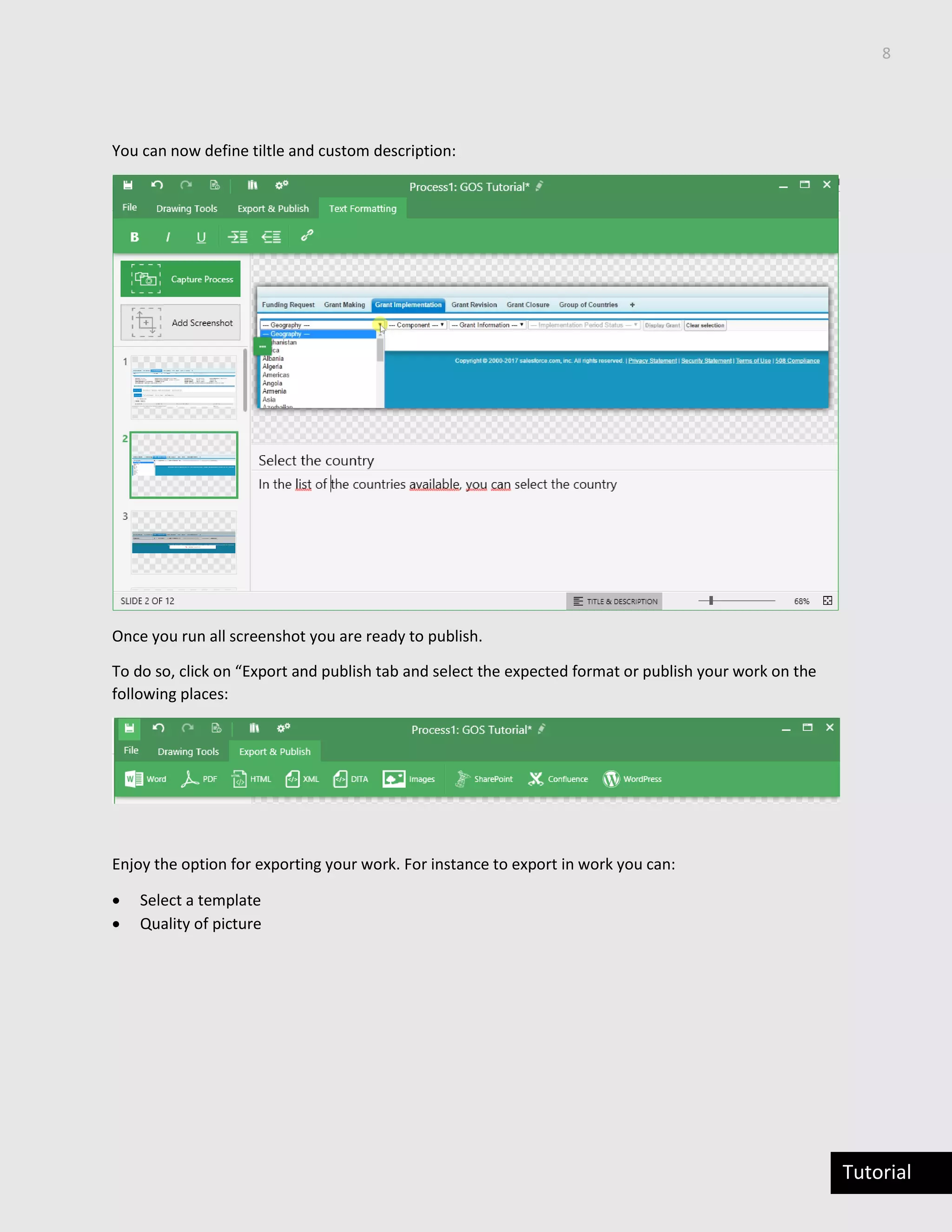
You can now define tiltle and custom description:
Once you run all screenshot you are ready to publish.
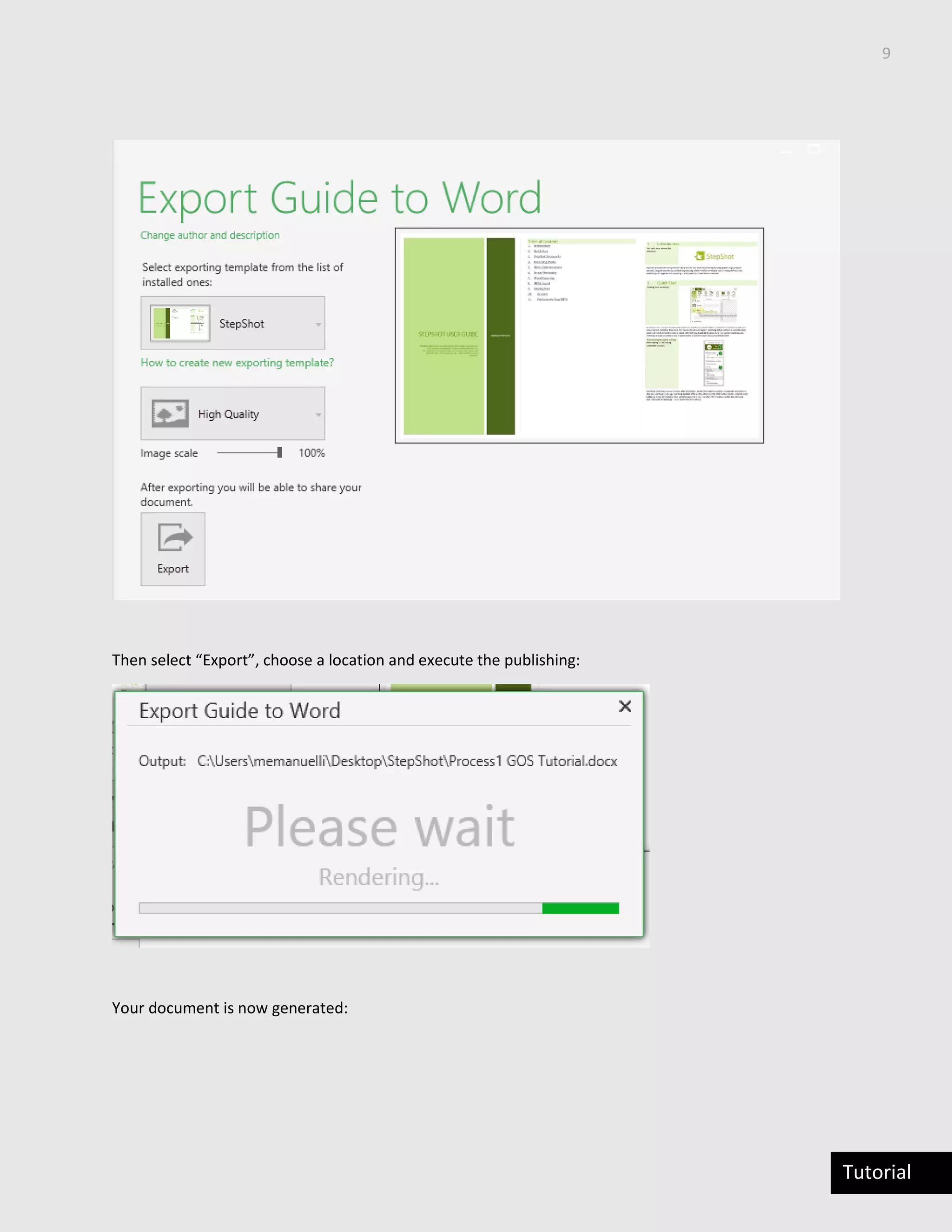
To do so, click on “Export and publish tab and select the expected format or publish your work on the
following places:
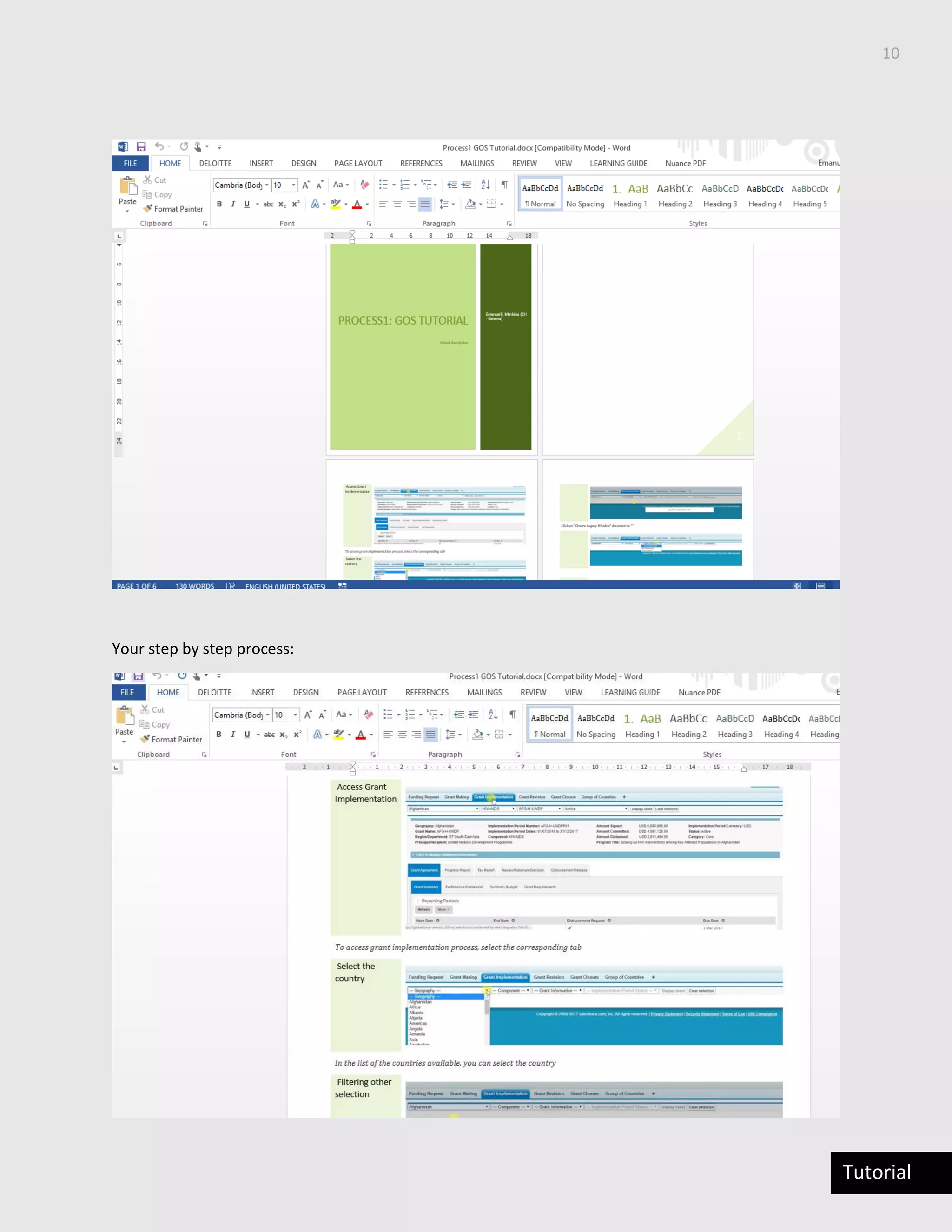
Enjoy the option for exporting your work. For instance to export in work you can:
 Select a template
 Quality of picture
9
Tutorial
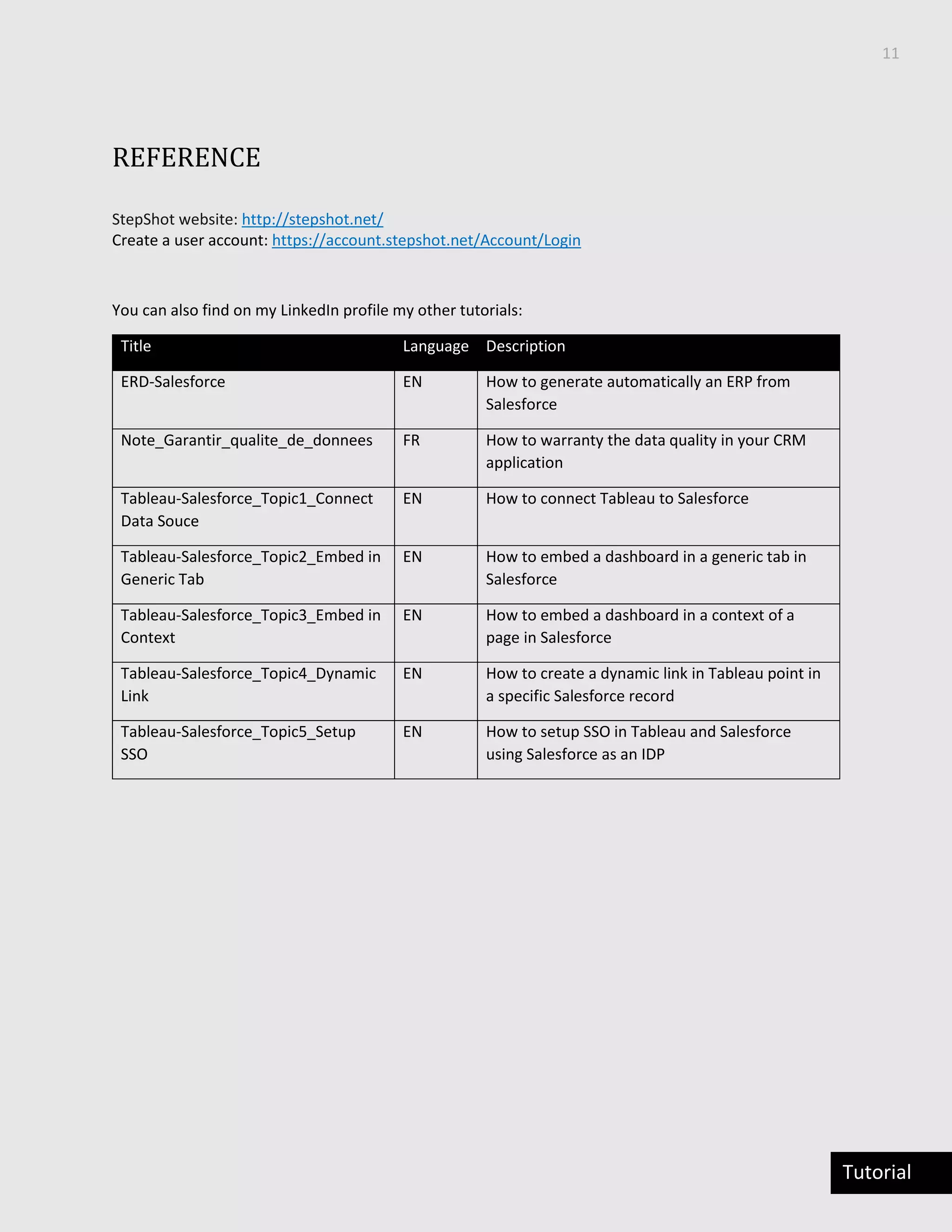
Then select “Export”, choose a location and execute the publishing:
Your document is now generated:
10
Tutorial
Your step by step process:
11
Tutorial
REFERENCE
StepShot website: http://stepshot.net/
Create a user account: https://account.stepshot.net/Account/Login
You can also find on my LinkedIn profile my other tutorials:
Title Language Description
ERD-Salesforce EN How to generate automatically an ERP from
Salesforce
Note_Garantir_qualite_de_donnees FR How to warranty the data quality in your CRM
application
Tableau-Salesforce_Topic1_Connect
Data Souce
EN How to connect Tableau to Salesforce
Tableau-Salesforce_Topic2_Embed in
Generic Tab
EN How to embed a dashboard in a generic tab in
Salesforce
Tableau-Salesforce_Topic3_Embed in
Context
EN How to embed a dashboard in a context of a
page in Salesforce
Tableau-Salesforce_Topic4_Dynamic
Link
EN How to create a dynamic link in Tableau point in
a specific Salesforce record
Tableau-Salesforce_Topic5_Setup
SSO
EN How to setup SSO in Tableau and Salesforce
using Salesforce as an IDP
12
Tutorial
CONTACTS
Mathieu Emanuelli
memanuelli@deloitte.ch
Mobile +41 (0)79 948 69 96
Linkedin
Author: Mathieu Emanuelli

Automate end user guide with Salesforce

  • 1.
    Tutorial How to automateend-user training guide with Salesforce TUTORIAL Author: Mathieu Emanuelli
  • 2.
    Tutorial CONTENTS INTRODUCTION .................................................................................................................................3 What isthe link with Salesforce?............................................................................................................3 Benefits/Value Delivered........................................................................................................................3 INSTALL THE SOFTWARE.....................................................................................................................3 Pre requisites..........................................................................................................................................3 LAUNCH & CONFIGURE STEPSHOT SETTINGS ......................................................................................3 RUN STEPSHOT ..................................................................................................................................5 REFERENCE ......................................................................................................................................11 CONTACTS .......................................................................................................................................12
  • 3.
    2 Tutorial Executive Summary User adoptionfor a project is crucial and can make a project a success or a failure. In order to maximize user adoption many projects are working on change management. The change management stream is usually working on many aspects of the project such as stakeholder mapping, communication plan or training material. All aspects are extremely important and often underestimated and it is usual to see a cost reduction on change management, where it should exist actually more investment. In this context, how change management can demonstrate re value? I was always surprised to see on project how cumbersome it might be to create some test scripts or user-training guide: Change management stream has to understand what has been designed, developed by technical team, has to understand business processes designed by business design team. Result of this tough handover is often the creation of training material, which relies on screenshot and few sentences in a PowerPoint document. Then, the question is: how can we be more efficient to create user material, training guide, test scripts in less time to make sure change management can manage other tasks? The purpose of this tutorial is to explain how it is possible to make that dream come true: automating end-user training material creation.
  • 4.
    3 Tutorial INTRODUCTION WHAT IS THELINK WITH SALESFORCE? As I use to work a lot in the last past years in IT projects that deployed Salesforce as many of consultants, I have managed to make this tutorial around this technology. BENEFITS/VALUE DELIVERED Following benefits can be experienced by using this tutorial:  Reduction of simple task to create end-user training  Perfect reflection of a step by step process on end user guide  Easy repository of end user training material  Innovative design of end user trainings . INSTALL THE SOFTWARE PRE REQUISITES We are proposing in this tutorial to use the software “StepShot” to make your publication. In order to use it, you have to : 1. Create an account. This might be a trial account that will be effective during 14 days (here) 2. Validate your account by clicking on the link send at the end of the registration 3. Download the client software and install it on your machine Note: for this tutorial we used the PC version. LAUNCH & CONFIGURE STEPSHOT SETTINGS This is the window you will see:
  • 5.
  • 6.
    5 Tutorial These settings arevery important and you have to be careful by setting them because it will defined the generation of your generated document: In the tab setting user can defined:  General settings: how to make the capture  Define integration: how to integrate the content generated by stepShot  Define your workspace: Where will be stored the content RUN STEPSHOT Click on create new guide: Note: If you already generated some guide, you can access your library in this welcome page Give a name to your new guide:
  • 7.
    6 Tutorial Note: II recommendgiving the name of the process you want to demonstrate Now you are ready to run the guide: Setup the way you want to produce screenshot: Note: Before selecting starting, connect to your salesforce environment (if you expect to run a guide based on salesforce)
  • 8.
    7 Tutorial Once you finishedto run your process, click “Stop”. Now your step by step has been executed and you can see in the below picture:  On the rights screenshots taken  On the left the detail of what has been captured. In this windows you can create a titke and you can add a description Note: by default in the setting we defined “ metadata description in the description”. If you do not want to get anything by default in the description, unchecked this option.
  • 9.
    8 Tutorial You can nowdefine tiltle and custom description: Once you run all screenshot you are ready to publish. To do so, click on “Export and publish tab and select the expected format or publish your work on the following places: Enjoy the option for exporting your work. For instance to export in work you can:  Select a template  Quality of picture
  • 10.
    9 Tutorial Then select “Export”,choose a location and execute the publishing: Your document is now generated:
  • 11.
  • 12.
    11 Tutorial REFERENCE StepShot website: http://stepshot.net/ Createa user account: https://account.stepshot.net/Account/Login You can also find on my LinkedIn profile my other tutorials: Title Language Description ERD-Salesforce EN How to generate automatically an ERP from Salesforce Note_Garantir_qualite_de_donnees FR How to warranty the data quality in your CRM application Tableau-Salesforce_Topic1_Connect Data Souce EN How to connect Tableau to Salesforce Tableau-Salesforce_Topic2_Embed in Generic Tab EN How to embed a dashboard in a generic tab in Salesforce Tableau-Salesforce_Topic3_Embed in Context EN How to embed a dashboard in a context of a page in Salesforce Tableau-Salesforce_Topic4_Dynamic Link EN How to create a dynamic link in Tableau point in a specific Salesforce record Tableau-Salesforce_Topic5_Setup SSO EN How to setup SSO in Tableau and Salesforce using Salesforce as an IDP
  • 13.
    12 Tutorial CONTACTS Mathieu Emanuelli memanuelli@deloitte.ch Mobile +41(0)79 948 69 96 Linkedin Author: Mathieu Emanuelli