Shubhra Kar | Products & Education
twitter:@shubhrakar
{“Node.js”: “APIs @hyperscale”}
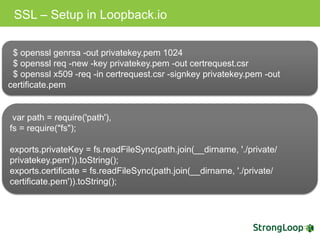
SSL – Setup in Loopback.io
$ openssl genrsa -out privatekey.pem 1024
$ openssl req -new -key privatekey.pem -out certrequest.csr
$ openssl x509 -req -in certrequest.csr -signkey privatekey.pem -out
certificate.pem
var path = require('path'),
fs = require("fs");
exports.privateKey = fs.readFileSync(path.join(__dirname,
'./private/privatekey.pem')).toString();
exports.certificate = fs.readFileSync(path.join(__dirname,
'./private/certificate.pem')).toString();
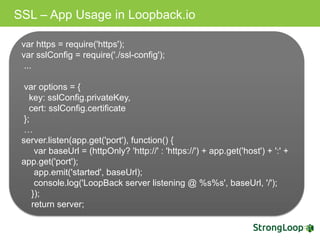
SSL – App Usage in Loopback.io
var https = require('https');
var sslConfig = require('./ssl-config');
...
var options = {
key: sslConfig.privateKey,
cert: sslConfig.certificate
};
…
server.listen(app.get('port'), function() {
var baseUrl = (httpOnly? 'http://' : 'https://') + app.get('host') + ':' +
app.get('port');
app.emit('started', baseUrl);
console.log('LoopBack server listening @ %s%s', baseUrl, '/');
});
return server;
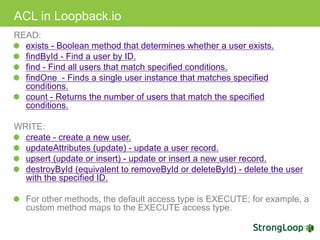
ACL in Loopback.io
READ:
exists - Boolean method that determines whether a user exists.
findById - Find a user by ID.
find - Find all users that match specified conditions.
findOne - Finds a single user instance that matches specified
conditions.
count - Returns the number of users that match the specified
conditions.
WRITE:
create - create a new user.
updateAttributes (update) - update a user record.
upsert (update or insert) - update or insert a new user record.
destroyById (equivalent to removeById or deleteById) - delete the user
with the specified ID.
For other methods, the default access type is EXECUTE; for example, a
custom method maps to the EXECUTE access type.
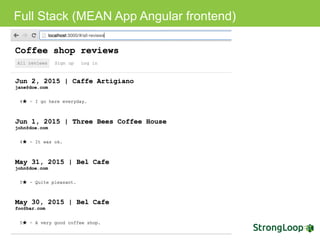
Full Stack (MEAN App Angular frontend)
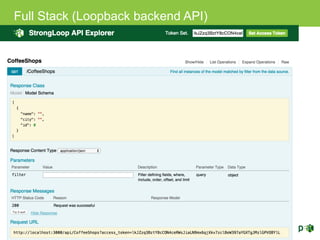
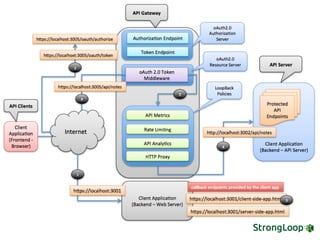
Full Stack (Loopback backend API)
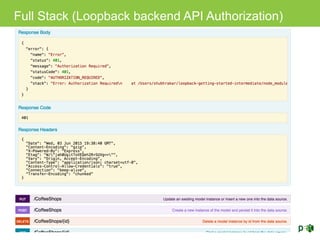
Full Stack (Loopback backend API Authorization)
Static Roles in Loopback.io
User.create([
{username: 'John', email: 'john@doe.com', password: 'opensesame'},
{username: 'Jane', email: 'jane@doe.com', password: 'opensesame'},
{username: 'Bob', email: 'bob@projects.com', password: 'opensesame'}
], function(err, users) {
if (err) return cb(err);
//create the admin role
Role.create({
name: 'admin'
}, function(err, role) {
if (err) cb(err);
//make bob an admin
role.principals.create({
principalType: RoleMapping.USER,
principalId: users[2].id
}, function(err, principal) {
cb(err);
});
});
});
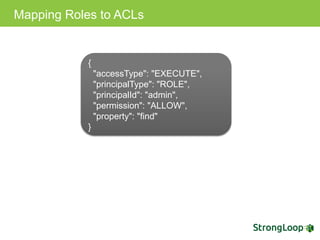
Mapping Roles to ACLs
{
"accessType": "EXECUTE",
"principalType": "ROLE",
"principalId": "admin",
"permission": "ALLOW",
"property": "find"
}
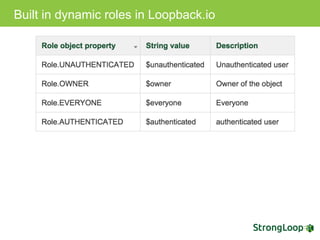
Built in dynamic roles in Loopback.io
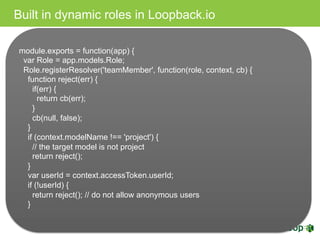
module.exports = function(app) {
var Role = app.models.Role;
Role.registerResolver('teamMember', function(role, context, cb) {
function reject(err) {
if(err) {
return cb(err);
}
cb(null, false);
}
if (context.modelName !== 'project') {
// the target model is not project
return reject();
}
var userId = context.accessToken.userId;
if (!userId) {
return reject(); // do not allow anonymous users
}
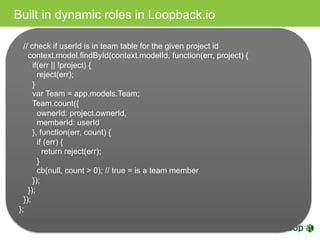
Built in dynamic roles in Loopback.io
// check if userId is in team table for the given project id
context.model.findById(context.modelId, function(err, project) {
if(err || !project) {
reject(err);
}
var Team = app.models.Team;
Team.count({
ownerId: project.ownerId,
memberId: userId
}, function(err, count) {
if (err) {
return reject(err);
}
cb(null, count > 0); // true = is a team member
});
});
});
};
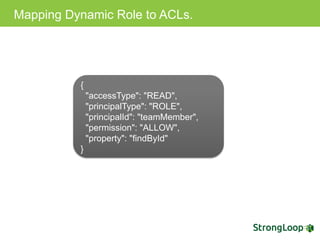
Mapping Dynamic Role to ACLs.
{
"accessType": "READ",
"principalType": "ROLE",
"principalId": "teamMember",
"permission": "ALLOW",
"property": "findById"
}
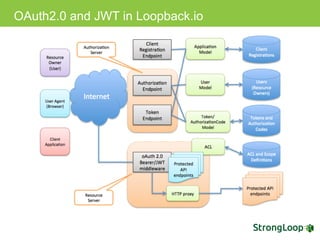
OAuth2.0 and JWT in Loopback.io
Setup – OAuth 2.0 in Loopback.io
npm install loopback-component-oauth2
Configuration – OAuth2.0 in Loopback.io
var oauth2 = require('loopback-component-oauth2');
var options = {
dataSource: app.dataSources.db, // Data source for oAuth2 metadata
persistence
loginPage: '/login', // The login page URL
loginPath: '/login' // The login form processing URL
};
oauth2.oAuth2Provider(
app, // The app instance
options // The options
);
oauth2.authenticate(['/protected', '/api', '/me'],
{session: false, scope: 'email'})
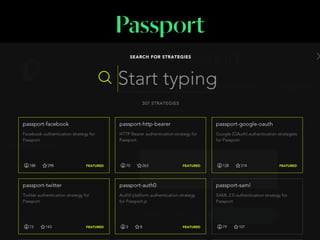
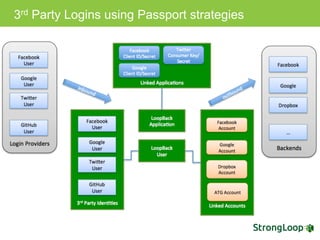
3rd Party Logins using Passport strategies
Setup of passport component in Loopback.io
npm install loopback-component-passport
Config – Facebook Authentication in Loopback.io
{
"facebook-login": {
"provider": "facebook",
"module": "passport-facebook",
"clientID": "{facebook-client-id-1}",
"clientSecret": "{facebook-client-secret-1}",
"callbackURL": "http://localhost:3000/auth/facebook
/callback",
"authPath": "/auth/facebook",
"callbackPath": "/auth/facebook/callback",
"successRedirect": "/auth/account",
"scope": ["email"]
}
Config – Google Authentication in Loopback.io
{
"google-link": {
"provider": "google",
"module": "passport-google-oauth",
"strategy": "OAuth2Strategy",
"clientID": "{google-client-id-2}",
"clientSecret": "{google-client-secret-2}",
"callbackURL": "http://localhost:3000/link/google/
callback",
"authPath": "/link/google",
"callbackPath": "/link/google/callback",
"successRedirect": "/link/account",
"scope": ["email", "profile"],
"link": true
}
Config – MS AD Authentication in Loopback.io
{
"ms-ad": {
"provider": "ms-ad",
"authScheme":"ldap",
"module": "passport-ldapauth",
"authPath": "/auth/msad",
"successRedirect": "/auth/account",
"failureRedirect": "/msad",
"failureFlash": true,
"session": true,
"LdapAttributeForLogin": "mail",
"LdapAttributeForUsername": "mail",
"LdapAttributeForMail": "mail",
"server":{
"url": "ldap://ldap.example.org:389/dc=example,dc=org",
"bindDn": "bindUsername",
"bindCredentials": "bindPassword",
"searchBase": "ou=people,dc=example,dc=org",
"searchAttributes": ["cn", "mail", "uid", "givenname"],
"searchFilter": "(&(objectcategory=person)(objectclass=user)(|(s
amaccountname={{username}})(mail={{username}})))"
}
}
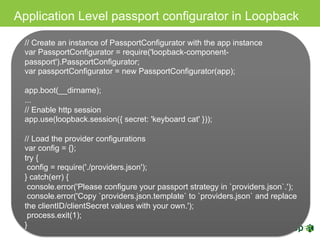
Application Level passport configurator in Loopback
// Create an instance of PassportConfigurator with the app instance
var PassportConfigurator = require('loopback-component-
passport').PassportConfigurator;
var passportConfigurator = new PassportConfigurator(app);
app.boot(__dirname);
...
// Enable http session
app.use(loopback.session({ secret: 'keyboard cat' }));
// Load the provider configurations
var config = {};
try {
config = require('./providers.json');
} catch(err) {
console.error('Please configure your passport strategy in `providers.json`.');
console.error('Copy `providers.json.template` to `providers.json` and
replace the clientID/clientSecret values with your own.');
process.exit(1);
}
Application Level using Passport configurator
// Initialize passport
passportConfigurator.init();
// Set up related models
passportConfigurator.setupModels({
userModel: app.models.user,
userIdentityModel: app.models.userIdentity,
userCredentialModel: app.models.userCredential
});
// Configure passport strategies for third party auth providers
for(var s in config) {
var c = config[s];
c.session = c.session !== false;
passportConfigurator.configureProvider(s, c);
}
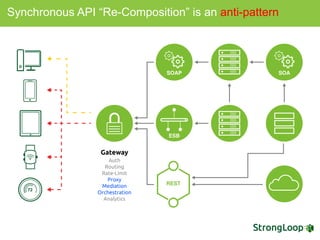
Synchronous API “Re-Composition” is an anti-pattern
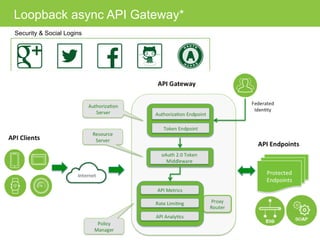
Security & Social Logins
Loopback async API Gateway*
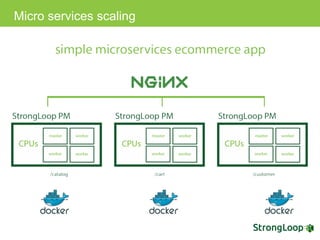
Micro services scaling
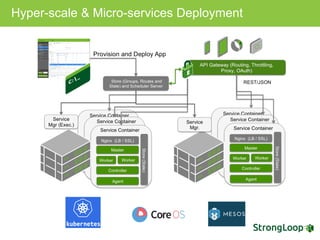
Hyper-scale & Micro-services Deployment

Authenticating and Securing Node.js APIs

  • 1.
    Shubhra Kar |Products & Education twitter:@shubhrakar {“Node.js”: “APIs @hyperscale”}
  • 2.
    SSL – Setupin Loopback.io $ openssl genrsa -out privatekey.pem 1024 $ openssl req -new -key privatekey.pem -out certrequest.csr $ openssl x509 -req -in certrequest.csr -signkey privatekey.pem -out certificate.pem var path = require('path'), fs = require("fs"); exports.privateKey = fs.readFileSync(path.join(__dirname, './private/privatekey.pem')).toString(); exports.certificate = fs.readFileSync(path.join(__dirname, './private/certificate.pem')).toString();
  • 3.
    SSL – AppUsage in Loopback.io var https = require('https'); var sslConfig = require('./ssl-config'); ... var options = { key: sslConfig.privateKey, cert: sslConfig.certificate }; … server.listen(app.get('port'), function() { var baseUrl = (httpOnly? 'http://' : 'https://') + app.get('host') + ':' + app.get('port'); app.emit('started', baseUrl); console.log('LoopBack server listening @ %s%s', baseUrl, '/'); }); return server;
  • 4.
    ACL in Loopback.io READ: exists- Boolean method that determines whether a user exists. findById - Find a user by ID. find - Find all users that match specified conditions. findOne - Finds a single user instance that matches specified conditions. count - Returns the number of users that match the specified conditions. WRITE: create - create a new user. updateAttributes (update) - update a user record. upsert (update or insert) - update or insert a new user record. destroyById (equivalent to removeById or deleteById) - delete the user with the specified ID. For other methods, the default access type is EXECUTE; for example, a custom method maps to the EXECUTE access type.
  • 5.
    Full Stack (MEANApp Angular frontend)
  • 6.
  • 7.
    Full Stack (Loopbackbackend API Authorization)
  • 8.
    Static Roles inLoopback.io User.create([ {username: 'John', email: 'john@doe.com', password: 'opensesame'}, {username: 'Jane', email: 'jane@doe.com', password: 'opensesame'}, {username: 'Bob', email: 'bob@projects.com', password: 'opensesame'} ], function(err, users) { if (err) return cb(err); //create the admin role Role.create({ name: 'admin' }, function(err, role) { if (err) cb(err); //make bob an admin role.principals.create({ principalType: RoleMapping.USER, principalId: users[2].id }, function(err, principal) { cb(err); }); }); });
  • 9.
    Mapping Roles toACLs { "accessType": "EXECUTE", "principalType": "ROLE", "principalId": "admin", "permission": "ALLOW", "property": "find" }
  • 10.
    Built in dynamicroles in Loopback.io
  • 11.
    Built in dynamicroles in Loopback.io module.exports = function(app) { var Role = app.models.Role; Role.registerResolver('teamMember', function(role, context, cb) { function reject(err) { if(err) { return cb(err); } cb(null, false); } if (context.modelName !== 'project') { // the target model is not project return reject(); } var userId = context.accessToken.userId; if (!userId) { return reject(); // do not allow anonymous users }
  • 12.
    Built in dynamicroles in Loopback.io // check if userId is in team table for the given project id context.model.findById(context.modelId, function(err, project) { if(err || !project) { reject(err); } var Team = app.models.Team; Team.count({ ownerId: project.ownerId, memberId: userId }, function(err, count) { if (err) { return reject(err); } cb(null, count > 0); // true = is a team member }); }); }); };
  • 13.
    Mapping Dynamic Roleto ACLs. { "accessType": "READ", "principalType": "ROLE", "principalId": "teamMember", "permission": "ALLOW", "property": "findById" }
  • 14.
    OAuth2.0 and JWTin Loopback.io
  • 15.
    Setup – OAuth2.0 in Loopback.io npm install loopback-component-oauth2
  • 16.
    Configuration – OAuth2.0in Loopback.io var oauth2 = require('loopback-component-oauth2'); var options = { dataSource: app.dataSources.db, // Data source for oAuth2 metadata persistence loginPage: '/login', // The login page URL loginPath: '/login' // The login form processing URL }; oauth2.oAuth2Provider( app, // The app instance options // The options ); oauth2.authenticate(['/protected', '/api', '/me'], {session: false, scope: 'email'})
  • 18.
    3rd Party Loginsusing Passport strategies
  • 19.
    Setup of passportcomponent in Loopback.io npm install loopback-component-passport
  • 20.
    Config – FacebookAuthentication in Loopback.io { "facebook-login": { "provider": "facebook", "module": "passport-facebook", "clientID": "{facebook-client-id-1}", "clientSecret": "{facebook-client-secret-1}", "callbackURL": "http://localhost:3000/auth/facebook /callback", "authPath": "/auth/facebook", "callbackPath": "/auth/facebook/callback", "successRedirect": "/auth/account", "scope": ["email"] }
  • 21.
    Config – GoogleAuthentication in Loopback.io { "google-link": { "provider": "google", "module": "passport-google-oauth", "strategy": "OAuth2Strategy", "clientID": "{google-client-id-2}", "clientSecret": "{google-client-secret-2}", "callbackURL": "http://localhost:3000/link/google/ callback", "authPath": "/link/google", "callbackPath": "/link/google/callback", "successRedirect": "/link/account", "scope": ["email", "profile"], "link": true }
  • 22.
    Config – MSAD Authentication in Loopback.io { "ms-ad": { "provider": "ms-ad", "authScheme":"ldap", "module": "passport-ldapauth", "authPath": "/auth/msad", "successRedirect": "/auth/account", "failureRedirect": "/msad", "failureFlash": true, "session": true, "LdapAttributeForLogin": "mail", "LdapAttributeForUsername": "mail", "LdapAttributeForMail": "mail", "server":{ "url": "ldap://ldap.example.org:389/dc=example,dc=org", "bindDn": "bindUsername", "bindCredentials": "bindPassword", "searchBase": "ou=people,dc=example,dc=org", "searchAttributes": ["cn", "mail", "uid", "givenname"], "searchFilter": "(&(objectcategory=person)(objectclass=user)(|(s amaccountname={{username}})(mail={{username}})))" } }
  • 23.
    Application Level passportconfigurator in Loopback // Create an instance of PassportConfigurator with the app instance var PassportConfigurator = require('loopback-component- passport').PassportConfigurator; var passportConfigurator = new PassportConfigurator(app); app.boot(__dirname); ... // Enable http session app.use(loopback.session({ secret: 'keyboard cat' })); // Load the provider configurations var config = {}; try { config = require('./providers.json'); } catch(err) { console.error('Please configure your passport strategy in `providers.json`.'); console.error('Copy `providers.json.template` to `providers.json` and replace the clientID/clientSecret values with your own.'); process.exit(1); }
  • 24.
    Application Level usingPassport configurator // Initialize passport passportConfigurator.init(); // Set up related models passportConfigurator.setupModels({ userModel: app.models.user, userIdentityModel: app.models.userIdentity, userCredentialModel: app.models.userCredential }); // Configure passport strategies for third party auth providers for(var s in config) { var c = config[s]; c.session = c.session !== false; passportConfigurator.configureProvider(s, c); }
  • 25.
  • 26.
    Security & SocialLogins Loopback async API Gateway*
  • 28.
  • 29.