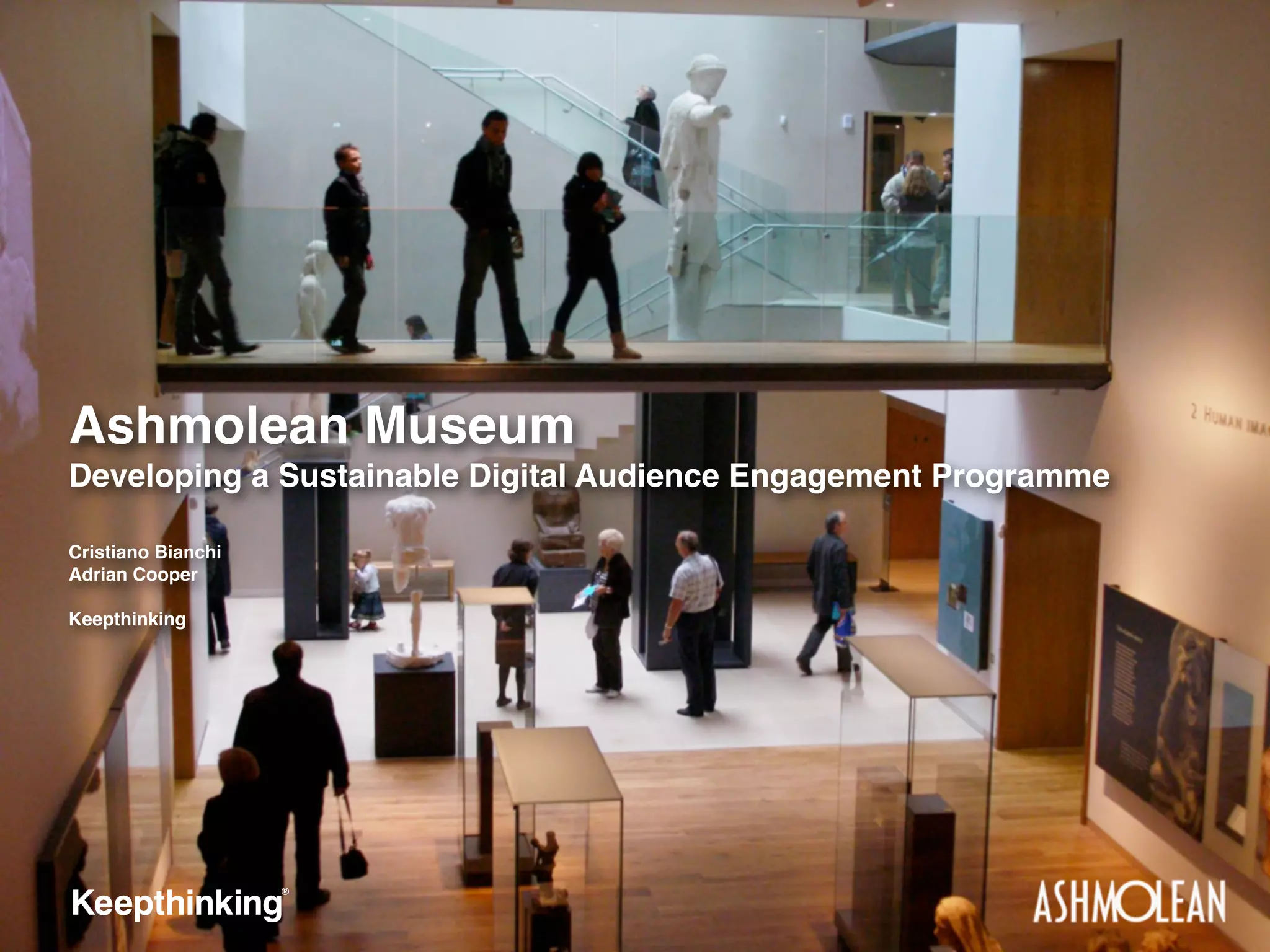
Ashmolean Museum
Developing a Sustainable Digital Audience Engagement Programme
Cristiano Bianchi
Adrian Cooper
Keepthinking
Agenda

Collections Engagement Project
‣
‣
‣

project background
key objectives

‣
‣
‣

audience segmentation

‣

developing the operational plan

approach

concept development
user evaluation results
who we are

combines strategy, consulting,
software development and digital design in a
single agency.
who we are
the project

The project
‣

Development of collection engagement strategy and
operational plan

‣
‣
‣

Keepthinking (project lead)
Morris Hargreaves McIntrye (audience research)
The Ashmolean Museum (content and strategy)
the project

Background
‣
‣
‣
‣

The world’s first public museum (1683)
Major redevelopment in 2009

‣
‣

Now shift focus to digital transformation
Expand Crossing Cultures, Crossing Time digitally

Audience numbers quadrupled since re-opening
Redisplaying objects - Crossing Cultures, Crossing Time
the project

Project rationale
‣
‣
‣
‣
‣

Over 1,000,000 objects
30% digitised
5% online
No common standards for content or technology
Audience demanded more online material
the project

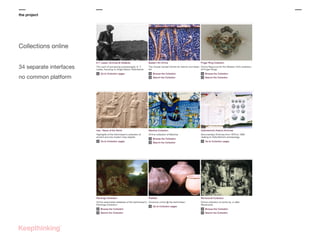
Collections online
34 separate interfaces
no common platform
the project

Project rationale
‣
‣
‣

Meet audience needs
Combine funding, staffing and other resources to deliver
Success dependent on firm foundations
the project

Objectives & outcomes
‣
‣
‣

Who are the museum’s audiences?
What do they want?
How do we deliver it?
the project

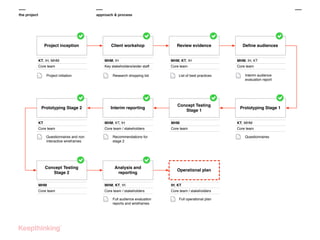
approach & process

Project inception

Client workshop

Review evidence

Define audiences

KT, IH, MHM

MHM, IH

MHM, KT, IH

MHM, IH, KT

Core team

Key stakeholders/wider staff

Core team

Core team

Project initiation

Prototyping Stage 2

Research shopping list

Interim reporting

List of best practices

Concept Testing
Stage 1

Interim audience
evaluation report

Prototyping Stage 1

KT

MHM, KT, IH

MHM

KT, MHM

Core team

Core team / stakeholders

Core team

Core team

Questionnaires and non
interactive wireframes

Concept Testing
Stage 2

Questionnaires

Recommendations for
stage 2

Analysis and
reporting

Operational plan

MHM

MHM, KT, IH

IH, KT

Core team

Core team / stakeholders

Core team / stakeholders

Full audience evaluation
reports and wireframes

Full operational plan
audience segmentation

Audience segmentation
‣
‣
‣
‣

Best practice research
User modes and persona
Meeting the needs and engage specific users
Compare to a physical museum visit
audience segmentation

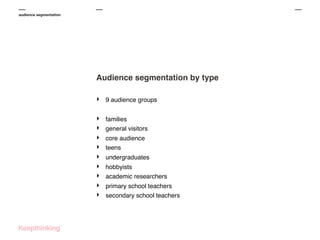
Audience segmentation by type
‣

9 audience groups

‣
‣
‣
‣
‣
‣
‣
‣
‣

families
general visitors
core audience
teens
undergraduates
hobbyists
academic researchers
primary school teachers
secondary school teachers
audience segmentation

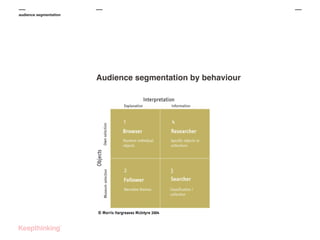
Audience segmentation by behaviour
concept development

Concept development
‣
‣
‣
‣

Analysed current best practice
Developed ideas
Concept testing
Prototype testing
concept development

Developing ideas
‣

Looked at what each user mode might need to engage

‣
‣
‣
‣
‣
‣
‣
‣
‣
‣

learn
search
be surprised
create inspiration
stimulation
compare/contrast
download
plan visits
curate
...
concept development

Stages of discovery
‣

4 stages of discovery

‣
‣
‣
‣

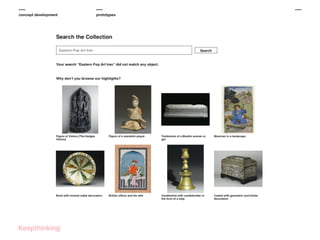
get to the object
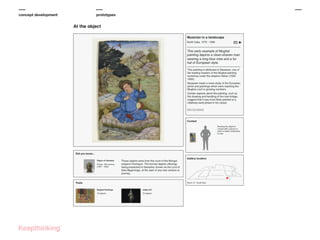
at the object
interaction with the object
in-gallery/mobile interaction
concept development

prototypes
concept development

prototypes
concept development

prototypes
concept development

prototypes
user evaluation

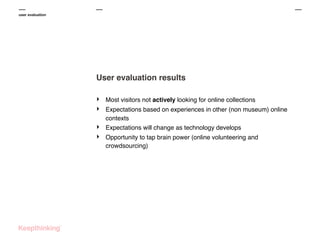
User evaluation results
‣
‣
‣
‣

Most visitors not actively looking for online collections
Expectations based on experiences in other (non museum) online
contexts
Expectations will change as technology develops
Opportunity to tap brain power (online volunteering and
crowdsourcing)
user evaluation

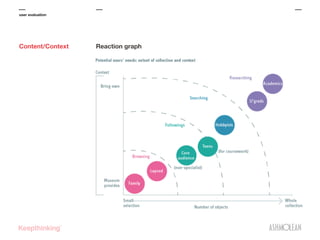
Content/Context

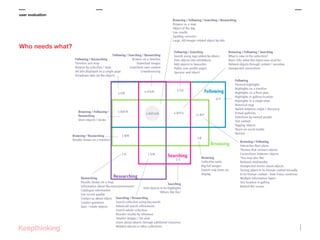
Reaction graph
user evaluation

Who needs what?

reaction graph
Stage 1
Get to the object

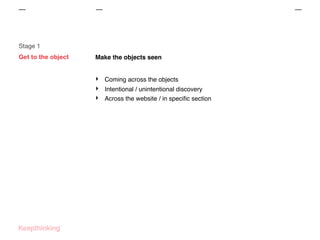
Make the objects seen

‣
‣
‣

Coming across the objects
Intentional / unintentional discovery
Across the website / in specific section
user evaluation

Stage 1
Get to the object:
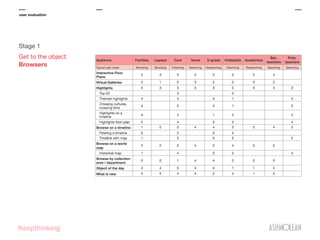
Browsers
user evaluation

Stage 1
Get to the object:
Browsers

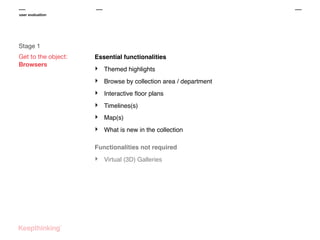
Essential functionalities

‣

Themed highlights

‣

Browse by collection area / department

‣

Interactive floor plans

‣

Timelines(s)

‣

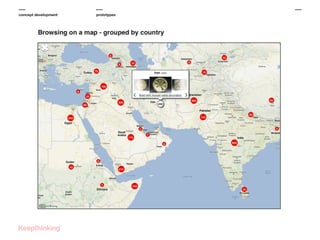
Map(s)

‣

What is new in the collection

Functionalities not required

‣

Virtual (3D) Galleries
user evaluation

Stage 1
Get to the object:
Browsers

Themed highlights

‣

See between 30 and 50 objects

‣

Have a selection, but not just any selection

‣

Why are highlights... highlighted?

‣

Have several groups of highlights

‣

Crossing Cultures, Crossing Time
user evaluation

Stage 1
Get to the object:
Browsers

Browse by collection, area or department

‣

Audiences are familiar with the collection

‣

Promote the overall museum theme online
user evaluation

Stage 1
Get to the object:
Browsers

Interactive floor plans

‣

Relate the experience on site / online

‣

Before and after visit
user evaluation

Stage 1
Get to the object:
Browsers

Timeline(s)

‣

Help visitors contextualise objects

‣

Object cross relationships

‣

Relationships to other events

‣

Scored very highly across all audience segments
user evaluation

Stage 1
Get to the object:
Browsers

Map(s)

‣

Another contextualising opportunity

‣

Could be combined with timelines.
user evaluation

Stage 1
Get to the object:
Browsers

What is new in the collection?

‣

What is new and relevant in the collection

‣

New object on display

‣

Event featuring collection objects
user evaluation

Stage 1
Get to the object:
Followers

Essential functionalities

‣

Learn activities

‣

Selections by named people

‣

Themes that connect objects differently from the gallery

‣

You might also like

Secondary functionalities

‣

Seek connections between objects

Functionalities not required

-

Exhibitions replicated online

-

Collections trails
user evaluation

Stage 1
Get to the object:
Searchers and
Researchers

Essential functionalities

‣

Search using keywords

‣

Advanced search

‣

Search whole collection

‣

Search for items on display only

‣

Multiple sorting options

Secondary functionalities

‣

Search using tags

‣

Sense of how many others like this
user evaluation

Stage 2
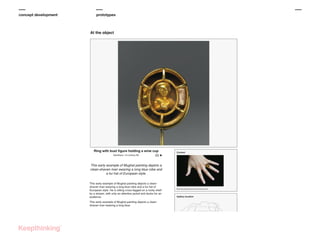
At the object

People have reached the object: what’s next?

‣

What can visitors do with the objects?

‣

Where can they go from there?
user evaluation

Stage 2
At the object

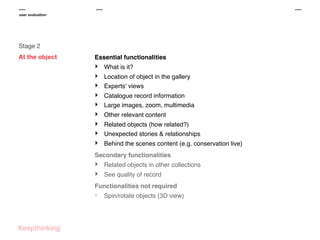
Essential functionalities

‣
‣
‣
‣
‣
‣
‣
‣
‣

What is it?
Location of object in the gallery
Experts' views
Catalogue record information
Large images, zoom, multimedia
Other relevant content
Related objects (how related?)
Unexpected stories & relationships
Behind the scenes content (e.g. conservation live)

Secondary functionalities

‣
‣

Related objects in other collections
See quality of record

Functionalities not required

-

Spin/rotate objects (3D view)
user evaluation

Stage 3
Interacting

Ashmolean audiences want to be involved

‣

Surprising outcomes
‣ Audiences know about your museum and its collection

‣
‣

They would love to be able to interact and contribute
Shame to miss their contribution
user evaluation

Stage 3
Interacting

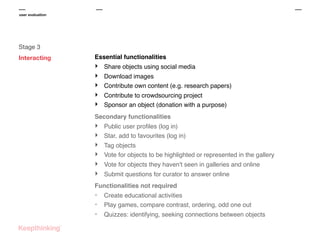
Essential functionalities

‣
‣
‣
‣
‣

Share objects using social media
Download images
Contribute own content (e.g. research papers)
Contribute to crowdsourcing project
Sponsor an object (donation with a purpose)

Secondary functionalities

‣
‣
‣
‣
‣
‣

Public user profiles (log in)
Star, add to favourites (log in)
Tag objects
Vote for objects to be highlighted or represented in the gallery
Vote for objects they haven't seen in galleries and online
Submit questions for curator to answer online

Functionalities not required

-

Create educational activities
Play games, compare contrast, ordering, odd one out
Quizzes: identifying, seeking connections between objects
user evaluation

Stage 4
Mobile and in-gallery
interactives

Make the content more accessible

‣

Even more surprising outcomes

‣
‣

No to using (own) mobile phone at the museum
Yes to multimedia and interactive applications
user evaluation

Stage 4
Mobile and in-gallery
interactives

Essential functionalities

‣

Collect objects for later use

Secondary functionalities

‣

Track their visit at the Museum

Functionalities not required

‣

Use mobile at the Museum
operational plan

Developing the operational plan
‣
‣
‣
‣
‣
‣

Build on insight from the user testing
Consult with museum staff
Technical / organisation / staffing challenges
Improve staff digital skills
Manage and monitor
Budget and time plan
operational plan

Developing the operational plan
‣
‣
‣
‣
‣
‣
‣

What is an overall digital strategy?
How does the collection engagement fit in?
Technological challenges
Documentation challenges
Curatorial challenges
Staffing and management challenges
Sustainability
operational plan

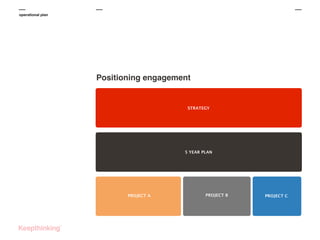
Positioning engagement

STRATEGY

5 YEAR PLAN

PROJECT A

PROJECT B

PROJECT C
operational plan

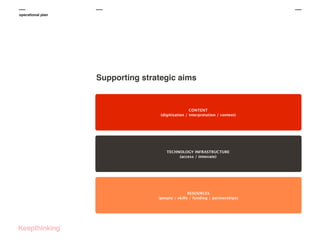
Supporting strategic aims

CONTENT
(digitisation / interpretation / context)

TECHNOLOGY INFRASTRUCTURE
(access / innovate)

RESOURCES
(people / skills / funding / partnerships)
operational plan

Developing the operational plan
‣

5-year plan

‣
‣
‣

Digital culture at the core of museum activities
‣ Integrated, museum-wide programme of change

‣
‣

Strategic goals: content, technology, resources
Long-term changes

Divided into manageable projects

Plan as a delivery framework

‣

...with priorities
operational plan

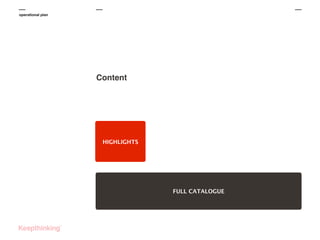
Content
‣

Content creation

‣
‣
‣
‣
‣

‣

‣

objects / archives
digitisation (photography / scanning / audio / video)

Shared content creation guidelines

interpretation / narrative / curation
Guidelines
Strategy for collaboration
Sharing

‣
‣

Sort out digital access rights
Objectives

‣
‣

High level topics and narrative...
... not departmental agendas!
operational plan

Content

HIGHLIGHTS

FULL CATALOGUE
operational plan

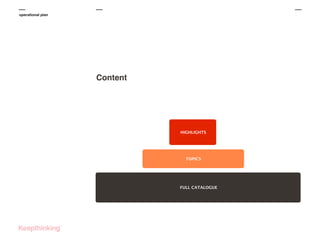
Content

HIGHLIGHTS

HIGHLIGHTS

TOPICS

FULL CATALOGUE
OBJECT RECORDS
operational plan

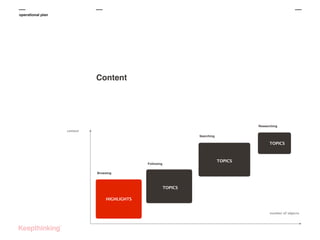
Content

Researching
context
Searching

TOPICS

TOPICS

Following
Browsing

TOPICS

OBJECT RECORDS

HIGHLIGHTS
number of objects
operational plan

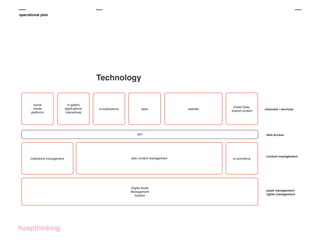
Technology
‣

Technology selection based on agreed principles

‣
‣
‣
‣
‣
‣

Focussed on management and delivery
Separate content and delivery
Short planning cycles / agile
Regular releases
Build in prototyping/experimentation
Think mobile/tabled firs
operational plan

Technology

social
media
platforms

in-gallery
applications/
interactives

e-publications

apps

website

linked Data,
shared content

API

collections management

web content management

Digital Asset
Management
System

channels / services

data access

e-commerce

content management

asset management
rights management
operational plan

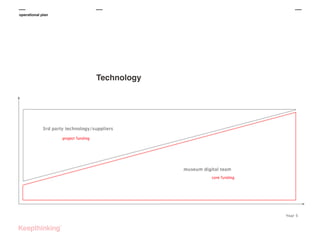
Technology
operational plan

Resources
‣

Staff and skills

‣
‣
‣
‣

Develop staff digital expertise
Fund more digital roles
Digital as core and not add-on

Funding

‣
‣
‣

Funding sources
Project specific vs. longer term
Content and technical partnerships
operational plan

Strategic goals
‣

Content

‣
‣
‣

Technology

‣
‣
‣

Deliver compelling experiences to different visitors
Ongoing digitisation programme

Museum-wide platform
Manage, publish and distribute content

Resources
‣ Secure funding

‣
‣

Build team (internal/external)
Find external technology and content partners
operational plan

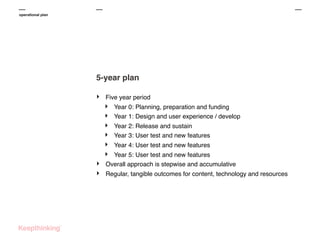
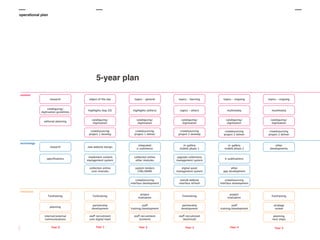
5-year plan
‣

Five year period

‣
‣
‣
‣
‣
‣
‣
‣

Year 0: Planning, preparation and funding
Year 1: Design and user experience / develop
Year 2: Release and sustain
Year 3: User test and new features
Year 4: User test and new features

Year 5: User test and new features
Overall approach is stepwise and accumulative
Regular, tangible outcomes for content, technology and resources
operational plan

5-year plan
operational plan

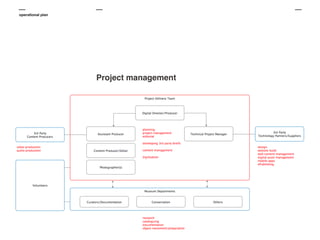
Project management
Thank You.

http://www.keepthinking.it

Keepthinking London

Keepthinking New York

Keepthinking Hong Kong

43 Clerkenwell Road
London EC1M 5RS

244 Fifth Ave
New York NY 10001

78 Bonham Strand
Sheung Wan, Hong Kong

+44 20 74905337

+1 212 372 7351

+852 9014 5721

info@keepthinking.it

newyork@keepthinking.it

hongkong@keepthinking.it

MCN2013 - Ashmolean collections engagement

  • 1.
    Ashmolean Museum Developing aSustainable Digital Audience Engagement Programme Cristiano Bianchi Adrian Cooper Keepthinking
  • 2.
    Agenda Collections Engagement Project ‣ ‣ ‣ projectbackground key objectives ‣ ‣ ‣ audience segmentation ‣ developing the operational plan approach concept development user evaluation results
  • 3.
    who we are combinesstrategy, consulting, software development and digital design in a single agency.
  • 4.
  • 5.
    the project The project ‣ Developmentof collection engagement strategy and operational plan ‣ ‣ ‣ Keepthinking (project lead) Morris Hargreaves McIntrye (audience research) The Ashmolean Museum (content and strategy)
  • 6.
    the project Background ‣ ‣ ‣ ‣ The world’sfirst public museum (1683) Major redevelopment in 2009 ‣ ‣ Now shift focus to digital transformation Expand Crossing Cultures, Crossing Time digitally Audience numbers quadrupled since re-opening Redisplaying objects - Crossing Cultures, Crossing Time
  • 7.
    the project Project rationale ‣ ‣ ‣ ‣ ‣ Over1,000,000 objects 30% digitised 5% online No common standards for content or technology Audience demanded more online material
  • 8.
    the project Collections online 34separate interfaces no common platform
  • 9.
    the project Project rationale ‣ ‣ ‣ Meetaudience needs Combine funding, staffing and other resources to deliver Success dependent on firm foundations
  • 10.
    the project Objectives &outcomes ‣ ‣ ‣ Who are the museum’s audiences? What do they want? How do we deliver it?
  • 11.
    the project approach &process Project inception Client workshop Review evidence Define audiences KT, IH, MHM MHM, IH MHM, KT, IH MHM, IH, KT Core team Key stakeholders/wider staff Core team Core team Project initiation Prototyping Stage 2 Research shopping list Interim reporting List of best practices Concept Testing Stage 1 Interim audience evaluation report Prototyping Stage 1 KT MHM, KT, IH MHM KT, MHM Core team Core team / stakeholders Core team Core team Questionnaires and non interactive wireframes Concept Testing Stage 2 Questionnaires Recommendations for stage 2 Analysis and reporting Operational plan MHM MHM, KT, IH IH, KT Core team Core team / stakeholders Core team / stakeholders Full audience evaluation reports and wireframes Full operational plan
  • 12.
    audience segmentation Audience segmentation ‣ ‣ ‣ ‣ Bestpractice research User modes and persona Meeting the needs and engage specific users Compare to a physical museum visit
  • 13.
    audience segmentation Audience segmentationby type ‣ 9 audience groups ‣ ‣ ‣ ‣ ‣ ‣ ‣ ‣ ‣ families general visitors core audience teens undergraduates hobbyists academic researchers primary school teachers secondary school teachers
  • 14.
  • 15.
    concept development Concept development ‣ ‣ ‣ ‣ Analysedcurrent best practice Developed ideas Concept testing Prototype testing
  • 16.
    concept development Developing ideas ‣ Lookedat what each user mode might need to engage ‣ ‣ ‣ ‣ ‣ ‣ ‣ ‣ ‣ ‣ learn search be surprised create inspiration stimulation compare/contrast download plan visits curate ...
  • 17.
    concept development Stages ofdiscovery ‣ 4 stages of discovery ‣ ‣ ‣ ‣ get to the object at the object interaction with the object in-gallery/mobile interaction
  • 18.
  • 19.
  • 20.
  • 21.
  • 22.
    user evaluation User evaluationresults ‣ ‣ ‣ ‣ Most visitors not actively looking for online collections Expectations based on experiences in other (non museum) online contexts Expectations will change as technology develops Opportunity to tap brain power (online volunteering and crowdsourcing)
  • 23.
  • 24.
    user evaluation Who needswhat? reaction graph
  • 25.
    Stage 1 Get tothe object Make the objects seen ‣ ‣ ‣ Coming across the objects Intentional / unintentional discovery Across the website / in specific section
  • 26.
    user evaluation Stage 1 Getto the object: Browsers
  • 27.
    user evaluation Stage 1 Getto the object: Browsers Essential functionalities ‣ Themed highlights ‣ Browse by collection area / department ‣ Interactive floor plans ‣ Timelines(s) ‣ Map(s) ‣ What is new in the collection Functionalities not required ‣ Virtual (3D) Galleries
  • 28.
    user evaluation Stage 1 Getto the object: Browsers Themed highlights ‣ See between 30 and 50 objects ‣ Have a selection, but not just any selection ‣ Why are highlights... highlighted? ‣ Have several groups of highlights ‣ Crossing Cultures, Crossing Time
  • 29.
    user evaluation Stage 1 Getto the object: Browsers Browse by collection, area or department ‣ Audiences are familiar with the collection ‣ Promote the overall museum theme online
  • 30.
    user evaluation Stage 1 Getto the object: Browsers Interactive floor plans ‣ Relate the experience on site / online ‣ Before and after visit
  • 31.
    user evaluation Stage 1 Getto the object: Browsers Timeline(s) ‣ Help visitors contextualise objects ‣ Object cross relationships ‣ Relationships to other events ‣ Scored very highly across all audience segments
  • 32.
    user evaluation Stage 1 Getto the object: Browsers Map(s) ‣ Another contextualising opportunity ‣ Could be combined with timelines.
  • 33.
    user evaluation Stage 1 Getto the object: Browsers What is new in the collection? ‣ What is new and relevant in the collection ‣ New object on display ‣ Event featuring collection objects
  • 34.
    user evaluation Stage 1 Getto the object: Followers Essential functionalities ‣ Learn activities ‣ Selections by named people ‣ Themes that connect objects differently from the gallery ‣ You might also like Secondary functionalities ‣ Seek connections between objects Functionalities not required - Exhibitions replicated online - Collections trails
  • 35.
    user evaluation Stage 1 Getto the object: Searchers and Researchers Essential functionalities ‣ Search using keywords ‣ Advanced search ‣ Search whole collection ‣ Search for items on display only ‣ Multiple sorting options Secondary functionalities ‣ Search using tags ‣ Sense of how many others like this
  • 36.
    user evaluation Stage 2 Atthe object People have reached the object: what’s next? ‣ What can visitors do with the objects? ‣ Where can they go from there?
  • 37.
    user evaluation Stage 2 Atthe object Essential functionalities ‣ ‣ ‣ ‣ ‣ ‣ ‣ ‣ ‣ What is it? Location of object in the gallery Experts' views Catalogue record information Large images, zoom, multimedia Other relevant content Related objects (how related?) Unexpected stories & relationships Behind the scenes content (e.g. conservation live) Secondary functionalities ‣ ‣ Related objects in other collections See quality of record Functionalities not required - Spin/rotate objects (3D view)
  • 38.
    user evaluation Stage 3 Interacting Ashmoleanaudiences want to be involved ‣ Surprising outcomes ‣ Audiences know about your museum and its collection ‣ ‣ They would love to be able to interact and contribute Shame to miss their contribution
  • 39.
    user evaluation Stage 3 Interacting Essentialfunctionalities ‣ ‣ ‣ ‣ ‣ Share objects using social media Download images Contribute own content (e.g. research papers) Contribute to crowdsourcing project Sponsor an object (donation with a purpose) Secondary functionalities ‣ ‣ ‣ ‣ ‣ ‣ Public user profiles (log in) Star, add to favourites (log in) Tag objects Vote for objects to be highlighted or represented in the gallery Vote for objects they haven't seen in galleries and online Submit questions for curator to answer online Functionalities not required - Create educational activities Play games, compare contrast, ordering, odd one out Quizzes: identifying, seeking connections between objects
  • 40.
    user evaluation Stage 4 Mobileand in-gallery interactives Make the content more accessible ‣ Even more surprising outcomes ‣ ‣ No to using (own) mobile phone at the museum Yes to multimedia and interactive applications
  • 41.
    user evaluation Stage 4 Mobileand in-gallery interactives Essential functionalities ‣ Collect objects for later use Secondary functionalities ‣ Track their visit at the Museum Functionalities not required ‣ Use mobile at the Museum
  • 42.
    operational plan Developing theoperational plan ‣ ‣ ‣ ‣ ‣ ‣ Build on insight from the user testing Consult with museum staff Technical / organisation / staffing challenges Improve staff digital skills Manage and monitor Budget and time plan
  • 43.
    operational plan Developing theoperational plan ‣ ‣ ‣ ‣ ‣ ‣ ‣ What is an overall digital strategy? How does the collection engagement fit in? Technological challenges Documentation challenges Curatorial challenges Staffing and management challenges Sustainability
  • 44.
    operational plan Positioning engagement STRATEGY 5YEAR PLAN PROJECT A PROJECT B PROJECT C
  • 45.
    operational plan Supporting strategicaims CONTENT (digitisation / interpretation / context) TECHNOLOGY INFRASTRUCTURE (access / innovate) RESOURCES (people / skills / funding / partnerships)
  • 46.
    operational plan Developing theoperational plan ‣ 5-year plan ‣ ‣ ‣ Digital culture at the core of museum activities ‣ Integrated, museum-wide programme of change ‣ ‣ Strategic goals: content, technology, resources Long-term changes Divided into manageable projects Plan as a delivery framework ‣ ...with priorities
  • 47.
    operational plan Content ‣ Content creation ‣ ‣ ‣ ‣ ‣ ‣ ‣ objects/ archives digitisation (photography / scanning / audio / video) Shared content creation guidelines interpretation / narrative / curation Guidelines Strategy for collaboration Sharing ‣ ‣ Sort out digital access rights Objectives ‣ ‣ High level topics and narrative... ... not departmental agendas!
  • 48.
  • 49.
  • 50.
  • 51.
    operational plan Technology ‣ Technology selectionbased on agreed principles ‣ ‣ ‣ ‣ ‣ ‣ Focussed on management and delivery Separate content and delivery Short planning cycles / agile Regular releases Build in prototyping/experimentation Think mobile/tabled firs
  • 52.
    operational plan Technology social media platforms in-gallery applications/ interactives e-publications apps website linked Data, sharedcontent API collections management web content management Digital Asset Management System channels / services data access e-commerce content management asset management rights management
  • 53.
  • 54.
    operational plan Resources ‣ Staff andskills ‣ ‣ ‣ ‣ Develop staff digital expertise Fund more digital roles Digital as core and not add-on Funding ‣ ‣ ‣ Funding sources Project specific vs. longer term Content and technical partnerships
  • 55.
    operational plan Strategic goals ‣ Content ‣ ‣ ‣ Technology ‣ ‣ ‣ Delivercompelling experiences to different visitors Ongoing digitisation programme Museum-wide platform Manage, publish and distribute content Resources ‣ Secure funding ‣ ‣ Build team (internal/external) Find external technology and content partners
  • 56.
    operational plan 5-year plan ‣ Fiveyear period ‣ ‣ ‣ ‣ ‣ ‣ ‣ ‣ Year 0: Planning, preparation and funding Year 1: Design and user experience / develop Year 2: Release and sustain Year 3: User test and new features Year 4: User test and new features Year 5: User test and new features Overall approach is stepwise and accumulative Regular, tangible outcomes for content, technology and resources
  • 57.
  • 58.
  • 59.
    Thank You. http://www.keepthinking.it Keepthinking London KeepthinkingNew York Keepthinking Hong Kong 43 Clerkenwell Road London EC1M 5RS 244 Fifth Ave New York NY 10001 78 Bonham Strand Sheung Wan, Hong Kong +44 20 74905337 +1 212 372 7351 +852 9014 5721 info@keepthinking.it newyork@keepthinking.it hongkong@keepthinking.it