IT2304 – Full Stack Web Development Unit II - AngularJS
Prepared by Dr. R. Arthy 1
Department of Information Technology
2023 – 2024 (ODD SEMESTER)
Year : III IT Course Code : IT2304
Faculty
Name
: Dr. R. Arthy, AP/IT Course Name : Full Stack Web Development
Course code
(as per
NBA)
: 21ITC304 Regulation : R2021
UNIT II – ANGULARJS
CHEAT SHEAT
Topic 1: Modules and Dependency Injection
Modules
 An AngularJS module defines an application.
 The module is a container for the different parts of an application.
 The module is a container for the application controllers.
 Controllers always belong to a module.
Create a module named myModule1.
var appName = angular.module(“myModule1”,[])
Defining a Controller and using it:
var appName = angular.module(“myModule1”,[]);
appName.controller(“SampleController”,
function($scope,){
//Members to be used in view for binding
$scope.city=”Hyderabad”;
});
In the view:
<div ng-controller=”SampleController”>
<!-- Template of the view with binding expressions using members of $scope -->
<div>{{city}}</div>
IT2304 – Full Stack Web Development Unit II - AngularJS
Prepared by Dr. R. Arthy 2
</div>
Dependency Injection:
 AngularJS has a built-in dependency injector that keeps track of all components
(services, values, etc.) and returns instances of needed components using dependency
injection. Angular‟s dependency injector works based on names of the components.
 AngularJS provides following core components which can be injected into each other
as dependencies.
o Value
o Factory
o Service
o Provider
o Constant

A simple case of dependency injection:
myModule.controller(“MyController”, function($scope,
$window, myService){
});
 Here, $scope, $window and myService are passed into the controller through
dependency injection.
Defining a Service:
var appName = angular.module(“myModule1”,[]);
appName.service(“sampleService”, function(){
var svc = this;
var cities=[“New Delhi”, “Mumbai”, “Kolkata”, “Chennai”];
svc.addCity = function(city){
cities.push(city);
};
svc.getCities = function(){
return cities;
}
});
Factory:
 A factory is a function that returns an object
IT2304 – Full Stack Web Development Unit II - AngularJS
Prepared by Dr. R. Arthy 3
var appName = angular.module(“myModule1”,[]);
appName.factory(“sampleFactory”, function(){
var cities = [“New Delhi”, “Mumbai”, “Kolkata”, “Chennai”];
function addCity(city){
cities.push(city);
}
function getCities(){
return cities;
}
return{
getCities: getCities,
addCity:addCity
};
});
Value:
angular.module(“myModule”).value(“sampleValue”, {
cities : [“New Delhi”, “Mumbai”, “Kolkata”, “Chennai”],
addCity: function(city){
cities.push(city);
},
getCities: function(){
return cities;
}
});
 A value is a simple JavaScript object.
 It is created just once, so value is also a singleton.
 All members of a value are public.
Constant:
angular.module(“myModule”).
constant(“sampleConstant”,{pi: Math.PI});
 A constant is also like a value.
IT2304 – Full Stack Web Development Unit II - AngularJS
Prepared by Dr. R. Arthy 4
Topic 2: Scope as a Data Model
 The scope is the binding part between the HTML (view) and the JavaScript
(controller).
 The scope is an object with the available properties and methods.
 The scope is available for both the view and the controller.
<script>
var app = angular.module('myApp', []);
app.controller('myCtrl', function($scope) {
$scope.carname = "Volvo";
});
Root Scope
 All applications have a $rootScope which is the scope created on the HTML element
that contains the ng-app directive.
 The rootScope is available in the entire application.
 If a variable has the same name in both the current scope and in the rootScope, the
application uses the one in the current scope.
Script
var app = angular.module("m1", []);
app.controller("c1", function($scope, $rootScope){
$scope.name = "Arthy";
$rootScope.msg1 = "Hello ";
});
app.controller("c2", function($scope, $rootScope){
$scope.name1 = "R.Arthy";
});
View
<body ng-app = "m1">
<div ng-controller = "c1">
<h3> Message {{msg1}} is a root scope </h3>
Name in C1 = {{name}}
{{msg1}} {{name}}
<br/>
</div><hr>
IT2304 – Full Stack Web Development Unit II - AngularJS
Prepared by Dr. R. Arthy 5
<div ng-controller = "c2">
<h3> Name in c1 is a scope of c1 </h3>
Name in C2 = {{name1}}
{{msg1}} {{name}}
<br/>
</div>
</body>
Output:
Hello is displayed in root scope and scope
Topic 3: Directives
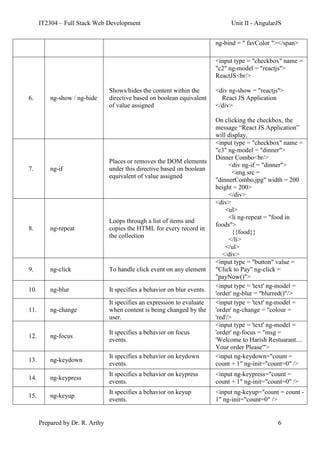
S. No. Directives Description Example
1. ng-app To bootstrap the application
<body ng-app = "myDirectives">
</body>
2. ng-controller To set a controller on a view
<div ng-controller = "c1">
</div>
3. ng-model
Enables two-way data binding on any
input controls and sends validity of
data in the input control to the
enclosing form
<input type = 'text' ng-model =
'order'/>
4. ng-init
Used to evaluate an expression in the
current scope
<body ng-app = "myDirectives"
ng-init = "foods = ['Idly',
'Dosa', 'Chappathi', 'Poori',
'Parota']”>
</body>
5. ng-bind
It binds the content of an html
element to application data.
<input type = 'text' ng-model =
'order' ng-change = "colour =
'red'">
<span style = "color: {{colour}}"
IT2304 – Full Stack Web Development Unit II - AngularJS
Prepared by Dr. R. Arthy 6
ng-bind = " favColor "></span>
6. ng-show / ng-hide
Shows/hides the content within the
directive based on boolean equivalent
of value assigned
<input type = "checkbox" name =
"c2" ng-model = "reactjs">
ReactJS<br/>
<div ng-show = "reactjs">
React JS Application
</div>
On clicking the checkbox, the
message “React JS Application”
will display.
7. ng-if
Places or removes the DOM elements
under this directive based on boolean
equivalent of value assigned
<input type = "checkbox" name =
"c3" ng-model = "dinner">
Dinner Combo<br/>
<div ng-if = "dinner">
<img src =
"dinnerCombo.jpg" width = 200
height = 200>
</div>
8. ng-repeat
Loops through a list of items and
copies the HTML for every record in
the collection
<div>
<ul>
<li ng-repeat = "food in
foods">
{{food}}
</li>
</ul>
</div>
9. ng-click To handle click event on any element
<input type = "button" value =
"Click to Pay" ng-click =
"payNow()">
10. ng-blur It specifies a behavior on blur events.
<input type = 'text' ng-model =
'order' ng-blur = "blurred()"/>
11. ng-change
It specifies an expression to evaluate
when content is being changed by the
user.
<input type = 'text' ng-model =
'order' ng-change = "colour =
'red'/>
12. ng-focus
It specifies a behavior on focus
events.
<input type = 'text' ng-model =
'order' ng-focus = "msg =
'Welcome to Harish Restuarant....
Your order Please'">
13. ng-keydown
It specifies a behavior on keydown
events.
<input ng-keydown="count =
count + 1" ng-init="count=0" />
14. ng-keypress
It specifies a behavior on keypress
events.
<input ng-keypress="count =
count + 1" ng-init="count=0" />
15. ng-keyup
It specifies a behavior on keyup
events.
<input ng-keyup="count = count -
1" ng-init="count=0" />
IT2304 – Full Stack Web Development Unit II - AngularJS
Prepared by Dr. R. Arthy 7
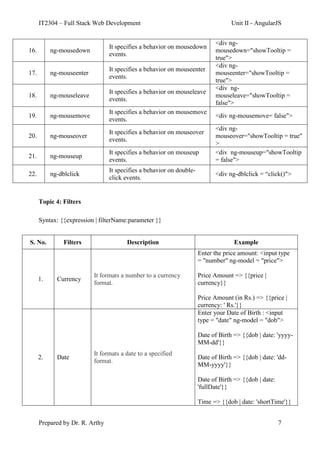
16. ng-mousedown
It specifies a behavior on mousedown
events.
<div ng-
mousedown="showTooltip =
true">
17. ng-mouseenter
It specifies a behavior on mouseenter
events.
<div ng-
mouseenter="showTooltip =
true">
18. ng-mouseleave
It specifies a behavior on mouseleave
events.
<div ng-
mouseleave="showTooltip =
false">
19. ng-mousemove
It specifies a behavior on mousemove
events.
<div ng-mousemove= false">
20. ng-mouseover
It specifies a behavior on mouseover
events.
<div ng-
mouseover="showTooltip = true"
>
21. ng-mouseup
It specifies a behavior on mouseup
events.
<div ng-mouseup="showTooltip
= false">
22. ng-dblclick
It specifies a behavior on double-
click events.
<div ng-dblclick = “click()">
Topic 4: Filters
Syntax: {{expression | filterName:parameter }}
S. No. Filters Description Example
1. Currency
It formats a number to a currency
format.
Enter the price amount: <input type
= "number" ng-model = "price">
Price Amount => {{price |
currency}}
Price Amount (in Rs.) => {{price |
currency: ' Rs.'}}
2. Date
It formats a date to a specified
format.
Enter your Date of Birth : <input
type = "date" ng-model = "dob">
Date of Birth => {{dob | date: 'yyyy-
MM-dd'}}
Date of Birth => {{dob | date: 'dd-
MM-yyyy'}}
Date of Birth => {{dob | date:
'fullDate'}}
Time => {{dob | date: 'shortTime'}}
IT2304 – Full Stack Web Development Unit II - AngularJS
Prepared by Dr. R. Arthy 8
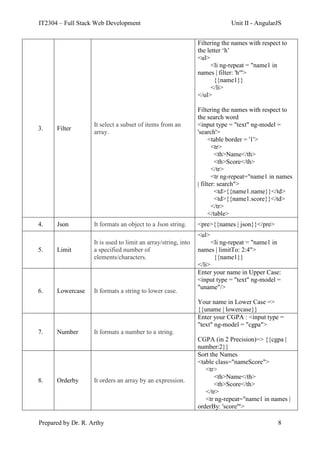
3. Filter
It select a subset of items from an
array.
Filtering the names with respect to
the letter „h‟
<ul>
<li ng-repeat = "name1 in
names | filter: 'h'">
{{name1}}
</li>
</ul>
Filtering the names with respect to
the search word
<input type = "text" ng-model =
'search'>
<table border = '1'>
<tr>
<th>Name</th>
<th>Score</th>
</tr>
<tr ng-repeat="name1 in names
| filter: search">
<td>{{name1.name}}</td>
<td>{{name1.score}}</td>
</tr>
</table>
4. Json It formats an object to a Json string. <pre>{{names | json}}</pre>
5. Limit
It is used to limit an array/string, into
a specified number of
elements/characters.
<ul>
<li ng-repeat = "name1 in
names | limitTo: 2:4">
{{name1}}
</li>
6. Lowercase It formats a string to lower case.
Enter your name in Upper Case:
<input type = "text" ng-model =
"uname"/>
Your name in Lower Case =>
{{uname | lowercase}}
7. Number It formats a number to a string.
Enter your CGPA : <input type =
"text" ng-model = "cgpa">
CGPA (in 2 Precision)=> {{cgpa |
number:2}}
8. Orderby It orders an array by an expression.
Sort the Names
<table class="nameScore">
<tr>
<th>Name</th>
<th>Score</th>
</tr>
<tr ng-repeat="name1 in names |
orderBy: 'score'">
IT2304 – Full Stack Web Development Unit II - AngularJS
Prepared by Dr. R. Arthy 9
<td>{{name1.name}}</td>
<td>{{name1.score}}</td>
</tr>
</table>
To sort in descending order =>
orderBy: „-score‟
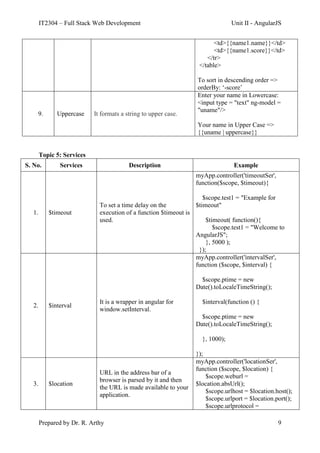
9. Uppercase It formats a string to upper case.
Enter your name in Lowercase:
<input type = "text" ng-model =
"uname"/>
Your name in Upper Case =>
{{uname | uppercase}}
Topic 5: Services
S. No. Services Description Example
1. $timeout
To set a time delay on the
execution of a function $timeout is
used.
myApp.controller('timeoutSer',
function($scope, $timeout){
$scope.test1 = "Example for
$timeout"
$timeout( function(){
$scope.test1 = "Welcome to
AngularJS";
}, 5000 );
});
2. $interval
It is a wrapper in angular for
window.setInterval.
myApp.controller('intervalSer',
function ($scope, $interval) {
$scope.ptime = new
Date().toLocaleTimeString();
$interval(function () {
$scope.ptime = new
Date().toLocaleTimeString();
}, 1000);
});
3. $location
URL in the address bar of a
browser is parsed by it and then
the URL is made available to your
application.
myApp.controller('locationSer',
function ($scope, $location) {
$scope.weburl =
$location.absUrl();
$scope.urlhost = $location.host();
$scope.urlport = $location.port();
$scope.urlprotocol =
IT2304 – Full Stack Web Development Unit II - AngularJS
Prepared by Dr. R. Arthy 10
$location.protocol();
});
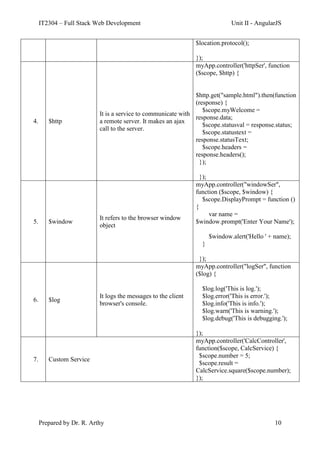
4. $http
It is a service to communicate with
a remote server. It makes an ajax
call to the server.
myApp.controller('httpSer', function
($scope, $http) {
$http.get("sample.html").then(function
(response) {
$scope.myWelcome =
response.data;
$scope.statusval = response.status;
$scope.statustext =
response.statusText;
$scope.headers =
response.headers();
});
});
5. $window
It refers to the browser window
object
myApp.controller("windowSer",
function ($scope, $window) {
$scope.DisplayPrompt = function ()
{
var name =
$window.prompt('Enter Your Name');
$window.alert('Hello ' + name);
}
});
6. $log
It logs the messages to the client
browser's console.
myApp.controller("logSer", function
($log) {
$log.log('This is log.');
$log.error('This is error.');
$log.info('This is info.');
$log.warn('This is warning.');
$log.debug('This is debugging.');
});
7. Custom Service
myApp.controller('CalcController',
function($scope, CalcService) {
$scope.number = 5;
$scope.result =
CalcService.square($scope.number);
});

ANGULARJS.pdf

  • 1.
    IT2304 – FullStack Web Development Unit II - AngularJS Prepared by Dr. R. Arthy 1 Department of Information Technology 2023 – 2024 (ODD SEMESTER) Year : III IT Course Code : IT2304 Faculty Name : Dr. R. Arthy, AP/IT Course Name : Full Stack Web Development Course code (as per NBA) : 21ITC304 Regulation : R2021 UNIT II – ANGULARJS CHEAT SHEAT Topic 1: Modules and Dependency Injection Modules  An AngularJS module defines an application.  The module is a container for the different parts of an application.  The module is a container for the application controllers.  Controllers always belong to a module. Create a module named myModule1. var appName = angular.module(“myModule1”,[]) Defining a Controller and using it: var appName = angular.module(“myModule1”,[]); appName.controller(“SampleController”, function($scope,){ //Members to be used in view for binding $scope.city=”Hyderabad”; }); In the view: <div ng-controller=”SampleController”> <!-- Template of the view with binding expressions using members of $scope --> <div>{{city}}</div>
  • 2.
    IT2304 – FullStack Web Development Unit II - AngularJS Prepared by Dr. R. Arthy 2 </div> Dependency Injection:  AngularJS has a built-in dependency injector that keeps track of all components (services, values, etc.) and returns instances of needed components using dependency injection. Angular‟s dependency injector works based on names of the components.  AngularJS provides following core components which can be injected into each other as dependencies. o Value o Factory o Service o Provider o Constant  A simple case of dependency injection: myModule.controller(“MyController”, function($scope, $window, myService){ });  Here, $scope, $window and myService are passed into the controller through dependency injection. Defining a Service: var appName = angular.module(“myModule1”,[]); appName.service(“sampleService”, function(){ var svc = this; var cities=[“New Delhi”, “Mumbai”, “Kolkata”, “Chennai”]; svc.addCity = function(city){ cities.push(city); }; svc.getCities = function(){ return cities; } }); Factory:  A factory is a function that returns an object
  • 3.
    IT2304 – FullStack Web Development Unit II - AngularJS Prepared by Dr. R. Arthy 3 var appName = angular.module(“myModule1”,[]); appName.factory(“sampleFactory”, function(){ var cities = [“New Delhi”, “Mumbai”, “Kolkata”, “Chennai”]; function addCity(city){ cities.push(city); } function getCities(){ return cities; } return{ getCities: getCities, addCity:addCity }; }); Value: angular.module(“myModule”).value(“sampleValue”, { cities : [“New Delhi”, “Mumbai”, “Kolkata”, “Chennai”], addCity: function(city){ cities.push(city); }, getCities: function(){ return cities; } });  A value is a simple JavaScript object.  It is created just once, so value is also a singleton.  All members of a value are public. Constant: angular.module(“myModule”). constant(“sampleConstant”,{pi: Math.PI});  A constant is also like a value.
  • 4.
    IT2304 – FullStack Web Development Unit II - AngularJS Prepared by Dr. R. Arthy 4 Topic 2: Scope as a Data Model  The scope is the binding part between the HTML (view) and the JavaScript (controller).  The scope is an object with the available properties and methods.  The scope is available for both the view and the controller. <script> var app = angular.module('myApp', []); app.controller('myCtrl', function($scope) { $scope.carname = "Volvo"; }); Root Scope  All applications have a $rootScope which is the scope created on the HTML element that contains the ng-app directive.  The rootScope is available in the entire application.  If a variable has the same name in both the current scope and in the rootScope, the application uses the one in the current scope. Script var app = angular.module("m1", []); app.controller("c1", function($scope, $rootScope){ $scope.name = "Arthy"; $rootScope.msg1 = "Hello "; }); app.controller("c2", function($scope, $rootScope){ $scope.name1 = "R.Arthy"; }); View <body ng-app = "m1"> <div ng-controller = "c1"> <h3> Message {{msg1}} is a root scope </h3> Name in C1 = {{name}} {{msg1}} {{name}} <br/> </div><hr>
  • 5.
    IT2304 – FullStack Web Development Unit II - AngularJS Prepared by Dr. R. Arthy 5 <div ng-controller = "c2"> <h3> Name in c1 is a scope of c1 </h3> Name in C2 = {{name1}} {{msg1}} {{name}} <br/> </div> </body> Output: Hello is displayed in root scope and scope Topic 3: Directives S. No. Directives Description Example 1. ng-app To bootstrap the application <body ng-app = "myDirectives"> </body> 2. ng-controller To set a controller on a view <div ng-controller = "c1"> </div> 3. ng-model Enables two-way data binding on any input controls and sends validity of data in the input control to the enclosing form <input type = 'text' ng-model = 'order'/> 4. ng-init Used to evaluate an expression in the current scope <body ng-app = "myDirectives" ng-init = "foods = ['Idly', 'Dosa', 'Chappathi', 'Poori', 'Parota']”> </body> 5. ng-bind It binds the content of an html element to application data. <input type = 'text' ng-model = 'order' ng-change = "colour = 'red'"> <span style = "color: {{colour}}"
  • 6.
    IT2304 – FullStack Web Development Unit II - AngularJS Prepared by Dr. R. Arthy 6 ng-bind = " favColor "></span> 6. ng-show / ng-hide Shows/hides the content within the directive based on boolean equivalent of value assigned <input type = "checkbox" name = "c2" ng-model = "reactjs"> ReactJS<br/> <div ng-show = "reactjs"> React JS Application </div> On clicking the checkbox, the message “React JS Application” will display. 7. ng-if Places or removes the DOM elements under this directive based on boolean equivalent of value assigned <input type = "checkbox" name = "c3" ng-model = "dinner"> Dinner Combo<br/> <div ng-if = "dinner"> <img src = "dinnerCombo.jpg" width = 200 height = 200> </div> 8. ng-repeat Loops through a list of items and copies the HTML for every record in the collection <div> <ul> <li ng-repeat = "food in foods"> {{food}} </li> </ul> </div> 9. ng-click To handle click event on any element <input type = "button" value = "Click to Pay" ng-click = "payNow()"> 10. ng-blur It specifies a behavior on blur events. <input type = 'text' ng-model = 'order' ng-blur = "blurred()"/> 11. ng-change It specifies an expression to evaluate when content is being changed by the user. <input type = 'text' ng-model = 'order' ng-change = "colour = 'red'/> 12. ng-focus It specifies a behavior on focus events. <input type = 'text' ng-model = 'order' ng-focus = "msg = 'Welcome to Harish Restuarant.... Your order Please'"> 13. ng-keydown It specifies a behavior on keydown events. <input ng-keydown="count = count + 1" ng-init="count=0" /> 14. ng-keypress It specifies a behavior on keypress events. <input ng-keypress="count = count + 1" ng-init="count=0" /> 15. ng-keyup It specifies a behavior on keyup events. <input ng-keyup="count = count - 1" ng-init="count=0" />
  • 7.
    IT2304 – FullStack Web Development Unit II - AngularJS Prepared by Dr. R. Arthy 7 16. ng-mousedown It specifies a behavior on mousedown events. <div ng- mousedown="showTooltip = true"> 17. ng-mouseenter It specifies a behavior on mouseenter events. <div ng- mouseenter="showTooltip = true"> 18. ng-mouseleave It specifies a behavior on mouseleave events. <div ng- mouseleave="showTooltip = false"> 19. ng-mousemove It specifies a behavior on mousemove events. <div ng-mousemove= false"> 20. ng-mouseover It specifies a behavior on mouseover events. <div ng- mouseover="showTooltip = true" > 21. ng-mouseup It specifies a behavior on mouseup events. <div ng-mouseup="showTooltip = false"> 22. ng-dblclick It specifies a behavior on double- click events. <div ng-dblclick = “click()"> Topic 4: Filters Syntax: {{expression | filterName:parameter }} S. No. Filters Description Example 1. Currency It formats a number to a currency format. Enter the price amount: <input type = "number" ng-model = "price"> Price Amount => {{price | currency}} Price Amount (in Rs.) => {{price | currency: ' Rs.'}} 2. Date It formats a date to a specified format. Enter your Date of Birth : <input type = "date" ng-model = "dob"> Date of Birth => {{dob | date: 'yyyy- MM-dd'}} Date of Birth => {{dob | date: 'dd- MM-yyyy'}} Date of Birth => {{dob | date: 'fullDate'}} Time => {{dob | date: 'shortTime'}}
  • 8.
    IT2304 – FullStack Web Development Unit II - AngularJS Prepared by Dr. R. Arthy 8 3. Filter It select a subset of items from an array. Filtering the names with respect to the letter „h‟ <ul> <li ng-repeat = "name1 in names | filter: 'h'"> {{name1}} </li> </ul> Filtering the names with respect to the search word <input type = "text" ng-model = 'search'> <table border = '1'> <tr> <th>Name</th> <th>Score</th> </tr> <tr ng-repeat="name1 in names | filter: search"> <td>{{name1.name}}</td> <td>{{name1.score}}</td> </tr> </table> 4. Json It formats an object to a Json string. <pre>{{names | json}}</pre> 5. Limit It is used to limit an array/string, into a specified number of elements/characters. <ul> <li ng-repeat = "name1 in names | limitTo: 2:4"> {{name1}} </li> 6. Lowercase It formats a string to lower case. Enter your name in Upper Case: <input type = "text" ng-model = "uname"/> Your name in Lower Case => {{uname | lowercase}} 7. Number It formats a number to a string. Enter your CGPA : <input type = "text" ng-model = "cgpa"> CGPA (in 2 Precision)=> {{cgpa | number:2}} 8. Orderby It orders an array by an expression. Sort the Names <table class="nameScore"> <tr> <th>Name</th> <th>Score</th> </tr> <tr ng-repeat="name1 in names | orderBy: 'score'">
  • 9.
    IT2304 – FullStack Web Development Unit II - AngularJS Prepared by Dr. R. Arthy 9 <td>{{name1.name}}</td> <td>{{name1.score}}</td> </tr> </table> To sort in descending order => orderBy: „-score‟ 9. Uppercase It formats a string to upper case. Enter your name in Lowercase: <input type = "text" ng-model = "uname"/> Your name in Upper Case => {{uname | uppercase}} Topic 5: Services S. No. Services Description Example 1. $timeout To set a time delay on the execution of a function $timeout is used. myApp.controller('timeoutSer', function($scope, $timeout){ $scope.test1 = "Example for $timeout" $timeout( function(){ $scope.test1 = "Welcome to AngularJS"; }, 5000 ); }); 2. $interval It is a wrapper in angular for window.setInterval. myApp.controller('intervalSer', function ($scope, $interval) { $scope.ptime = new Date().toLocaleTimeString(); $interval(function () { $scope.ptime = new Date().toLocaleTimeString(); }, 1000); }); 3. $location URL in the address bar of a browser is parsed by it and then the URL is made available to your application. myApp.controller('locationSer', function ($scope, $location) { $scope.weburl = $location.absUrl(); $scope.urlhost = $location.host(); $scope.urlport = $location.port(); $scope.urlprotocol =
  • 10.
    IT2304 – FullStack Web Development Unit II - AngularJS Prepared by Dr. R. Arthy 10 $location.protocol(); }); 4. $http It is a service to communicate with a remote server. It makes an ajax call to the server. myApp.controller('httpSer', function ($scope, $http) { $http.get("sample.html").then(function (response) { $scope.myWelcome = response.data; $scope.statusval = response.status; $scope.statustext = response.statusText; $scope.headers = response.headers(); }); }); 5. $window It refers to the browser window object myApp.controller("windowSer", function ($scope, $window) { $scope.DisplayPrompt = function () { var name = $window.prompt('Enter Your Name'); $window.alert('Hello ' + name); } }); 6. $log It logs the messages to the client browser's console. myApp.controller("logSer", function ($log) { $log.log('This is log.'); $log.error('This is error.'); $log.info('This is info.'); $log.warn('This is warning.'); $log.debug('This is debugging.'); }); 7. Custom Service myApp.controller('CalcController', function($scope, CalcService) { $scope.number = 5; $scope.result = CalcService.square($scope.number); });