AngularJS
AngularJSoverview
• AngularJS is a JavaScript MVW
framework made by Google for
building complex client-side
applications.
• It provides everything for development
of SPA out of the box
AngularJScorefeatures
• Modules
• Controllers
• Directives
• Scope
• Templates
• Filters
• Services
• Dependency injection and container
• Testability
AngularJSmodules
• Allows to separate application in logical domains
• Allows to minify dependencies and knowledge
sharing between modules
• Allows to introduce architecture limitations aka :
– main module knows about controllers
– main module knows about routing
– controllers know about repositories (services)
– main module knows nothing about repositories
– controllers know nothing about routing
AngularJSmodules
//declare module and its dependencies
angular.module('myApp', ['ngAnimate','ngCookies'])
//declaring controller in a module
.controller("MainController",mainController)
//running module configuration if needed
.config(moduleConfiguration);
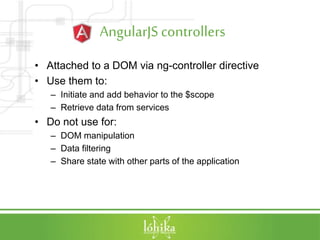
AngularJScontrollers
• Attached to a DOM via ng-controller directive
• Use them to:
– Initiate and add behavior to the $scope
– Retrieve data from services
• Do not use for:
– DOM manipulation
– Data filtering
– Share state with other parts of the application
AngularJScontrollers
angular.module('app')
.controller('Customers', [function() {
var vm = this;
vm.title = 'Customers';
vm.customers = [
{name: 'Customer 1'}, {name: 'Customer 2'},
{name: 'Customer 3'}, {name: 'Customer 4'}
];
}]);
//VS
angular.module('app')
.controller('Customers', ['$scope', function($scope) {
$scope.title = 'Customers';
$scope.customers = [
{name: 'Customer 1'}, {name: 'Customer 2'},
{name: 'Customer 3'}, {name: 'Customer 4'}
];
}]);
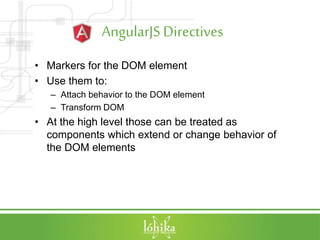
AngularJSDirectives
• Markers for the DOM element
• Use them to:
– Attach behavior to the DOM element
– Transform DOM
• At the high level those can be treated as
components which extend or change behavior of
the DOM elements
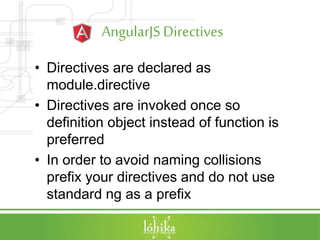
AngularJSDirectives
• Directives are declared as
module.directive
• Directives are invoked once so
definition object instead of function is
preferred
• In order to avoid naming collisions
prefix your directives and do not use
standard ng as a prefix
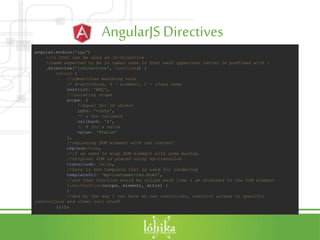
AngularJSDirectives
angular.module('app')
//in html can be used as lo-directive
//name expected to be in camel case in html each uppercase letter is prefixed with -
.directive('loDirective', function() {
return {
//identifies matching rule
// A-attribute, E – element, C - class name
restrict: 'AEC',
//isolating scope
scope: {
//equal for JS object
info: '=info',
// & for callback
callback: '&',
// @ for a value
value: '@value'
},
//replacing DOM element with own content
replace:true,
//if we need to wrap DOM element with some markup.
//Original DOM is placed using ng-transclud
transclude: false,
//here is the template that is used for rendering
templateUrl: 'my-customer-iso.html',
//and that function would be called each time I am attached to the DOM element
link:function(scope, element, attrs) {
}
//And by the way I can have my own controller, restrict access to specific
controllers and other cool stuff
};});
AngularJSScope
• object that refers to the application
model
• arranged in hierarchical structure
which mimic the DOM structure
(scopes inheritance is done though
prototype)
• Provides API to:
– Watch model mutations
– Propagate model changes
AngularJSScope
angular.module('app')
.controller("TestController", ['$scope', function($scope){
//I can set values and use them in the view
$scope.name = "Test";
$scope.count = 0;
//I can subscribe to events which can be $emit(notify parents)
//and $broadcast(notify children)
$scope.$on('CustomEvent', function(name) {
$scope.name = name;
});
//I can $watch the changes
//even in the collection through $watchCollection
$scope.$watch('name',function(newValue, oldValue){
$scope.count++;
});
//or I can apply changes if async operation is performed
setTimeout(function(){
$scope.$apply(function(){
$scope.name = "Hey ya!!!";
})},200);
}]);
AngularJS Templates
• Written in HTML
– Can contain directives
– Can contain filters
– Can contain form
– Can contain specific markup {{expression}}
• Can be loaded dynamically
• Can be injected into other templates
• Are loaded once per app
• Are compiled on 1st load
AngularJS Workingwith forms
• ng-model – bind element value to form
control (ng-model=“user.name”)
• Give form a name and mark it as
novalidate
• standard validation with
formName.fieldname.$error
• or use 3rd party libraries
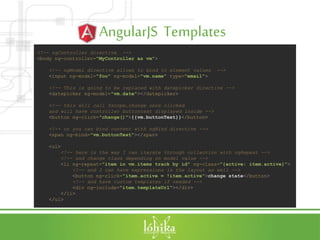
AngularJS Templates
<!-- ngController directive -->
<body ng-controller="MyController as vm">
<!-- ngModel directive allows to bind to element values -->
<input ng-model="foo" ng-model="vm.name" type="email">
<!-- This is going to be replaced with datepicker directive -->
<datepicker ng-model="vm.date"></datepicker>
<!-- this will call $scope.change once clicked
and will have controller buttontext displayed inside -->
<button ng-click="change()">{{vm.buttonText}}</button>
<!-- or you can bind content with ngBind directive -->
<span ng-bind="vm.buttonText"></span>
<ul>
<!-- here is the way I can iterate through collection with ngRepeat -->
<!-- and change class depending on model value -->
<li ng-repeat="item in vm.items track by id" ng-class="{active: item.active}">
<!-- and I can have expressions in the layout as well -->
<button ng-click="item.active = !item.active">change state</button>
<!-- and have custom templates if needed -->
<div ng-include="item.templateUrl"></div>
</li>
</ul>
AngularJS Filters
• Used to filter output
• Used to format output
• Filter is applied by using | in markup
• Or can be injected in other object
• Should return a function that will be
evaluated
AngularJS Filters
<script type="text/javascript">
//here is the way we register filder
angular.module('myFilters', []).filter('checkmark', function() {
//in the return function let's change the output
return function(input) {
return input ? 'True' : 'False';
};
});
</script>
Search: <input ng-model="searchText">
<table>
<tr><th>Name</th><th>Visited date</th><th>Active</th></tr>
<!-- I can filter elements in array -->
<tr ng-repeat="customer in customers | filter:searchText">
<td>{{customer.name}}</td>
<!-- I can format output with standard filter -->
<td>{{customer.lastVisitedDate | date:'yyyy-MM-dd'}}</td>
<!-- or with custom -->
<td>{{customer.active | checkmark }}</td>
</tr>
</table>
AngularJS Services
• Used to share across application:
– Data
– Behavior
• Services are lazy instantiated
• Services are singletons
• Remove code duplication
• Can work with DOM if needed
AngularJS Services
angular.module('app').factory('SampleRESTService', function ($resource) {
//there we go let's use another service which provides full REST support
return $resource('/api/sample/:id', { id: '@id' });
})
//let's inject the service
.controller("TestController", ['$scope', 'SampleRESTService',
function($scope, SampleRESTService){
$scope.tasks = SampleRESTService.query();
}]);
AngularJSDependencyinjection
• Using the inline array annotation
(prefered) is doing the constructor
injection
• Using $inject
• Using naming convention (is not min
safe)
• Add ng-strict-di directive to avoid
usage of naming convention
Dependencyinjection
var MyController = function($scope, greeter) {};
//$inject annotation
MyController.$inject = ['$scope'];
myModule.controller('MyController', MyController);
//array annotation
myModule.controller('MyController',[ '$scope', MyController]);
//naming annotation
myModule.controller('MyController',MyController);
AngularJS Testability
• Unit testing
• End 2 end testing == Automated
testing
• Middleware testing == white box
testing provides access to internal
angular objects (directives)
• Useful library angular-mocks
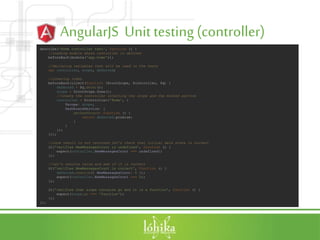
AngularJS Unit testing (controller)
describe('Home controller test', function () {
//loading module where controller is defined
beforeEach(module('app.home'));
//declaring variables that will be used in the tests
var controller, scope, deferred;
//creating items
beforeEach(inject(function ($rootScope, $controller, $q) {
deferred = $q.defer();
scope = $rootScope.$new();
//create the controller injecting the scope and the mocked service
controller = $controller('Home', {
$scope: scope,
DashboardService: {
getDashboard: function () {
return deferred.promise;
}
}
});
}));
//once result is not returned let's check that initial data state is correct
it('verifies NewMessagesCount is undefined', function () {
expect(controller.NewMessagesCount === undefined);
});
//Let's resolve value and see if it is correct
it('verifies NewMessagesCount is correct', function () {
deferred.resolve({ NewMessagesCount: 5 });
expect(controller.NewMessagesCount === 5);
});
it('verifies that scope contains go and it is a function', function () {
expect(scope.go === 'function');
});
});
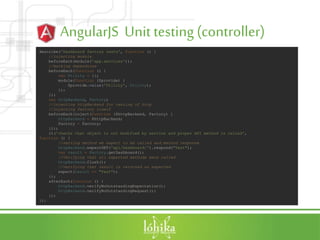
AngularJS Unit testing (controller)
describe('Dashboard factory tests', function () {
//injecting module
beforeEach(module('app.services'));
//mocking dependcies
beforeEach(function () {
var Utility = {};
module(function ($provide) {
$provide.value('Utility', Utility);
});
});
var httpBackend, Factory;
//injecting httpBackend for testing of http
//injecting factory itself
beforeEach(inject(function ($httpBackend, Factory) {
httpBackend = $httpBackend;
Factory = Factory;
}));
it('checks that object is not modified by service and proper API method is called',
function () {
//setting method we expect to be called and method response
httpBackend.expectGET('api/Dashboard/').respond("Test");
var result = Factory.getDashboard();
//Verifying that all expected methods were called
httpBackend.flush();
//verifying that result is returned as expected
expect(result == "Test");
});
afterEach(function () {
httpBackend.verifyNoOutstandingExpectation();
httpBackend.verifyNoOutstandingRequest();
});
});
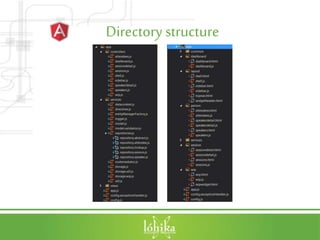
Directory structure
First application
• Specify ng-app directive to say that
this is angular application
Sum Up
• Provides big amount of features
• Has everything for SPA development
• Limits usage of other frameworks
• Learning curve is being quite high
Useful componentsand links
• https://angularjs.org/
• http://angular-ui.github.io/ - bootstrap
components for angular
AngularJS.part1

AngularJS.part1

  • 1.
  • 2.
    AngularJSoverview • AngularJS isa JavaScript MVW framework made by Google for building complex client-side applications. • It provides everything for development of SPA out of the box
  • 3.
    AngularJScorefeatures • Modules • Controllers •Directives • Scope • Templates • Filters • Services • Dependency injection and container • Testability
  • 4.
    AngularJSmodules • Allows toseparate application in logical domains • Allows to minify dependencies and knowledge sharing between modules • Allows to introduce architecture limitations aka : – main module knows about controllers – main module knows about routing – controllers know about repositories (services) – main module knows nothing about repositories – controllers know nothing about routing
  • 5.
    AngularJSmodules //declare module andits dependencies angular.module('myApp', ['ngAnimate','ngCookies']) //declaring controller in a module .controller("MainController",mainController) //running module configuration if needed .config(moduleConfiguration);
  • 6.
    AngularJScontrollers • Attached toa DOM via ng-controller directive • Use them to: – Initiate and add behavior to the $scope – Retrieve data from services • Do not use for: – DOM manipulation – Data filtering – Share state with other parts of the application
  • 7.
    AngularJScontrollers angular.module('app') .controller('Customers', [function() { varvm = this; vm.title = 'Customers'; vm.customers = [ {name: 'Customer 1'}, {name: 'Customer 2'}, {name: 'Customer 3'}, {name: 'Customer 4'} ]; }]); //VS angular.module('app') .controller('Customers', ['$scope', function($scope) { $scope.title = 'Customers'; $scope.customers = [ {name: 'Customer 1'}, {name: 'Customer 2'}, {name: 'Customer 3'}, {name: 'Customer 4'} ]; }]);
  • 8.
    AngularJSDirectives • Markers forthe DOM element • Use them to: – Attach behavior to the DOM element – Transform DOM • At the high level those can be treated as components which extend or change behavior of the DOM elements
  • 9.
    AngularJSDirectives • Directives aredeclared as module.directive • Directives are invoked once so definition object instead of function is preferred • In order to avoid naming collisions prefix your directives and do not use standard ng as a prefix
  • 10.
    AngularJSDirectives angular.module('app') //in html canbe used as lo-directive //name expected to be in camel case in html each uppercase letter is prefixed with - .directive('loDirective', function() { return { //identifies matching rule // A-attribute, E – element, C - class name restrict: 'AEC', //isolating scope scope: { //equal for JS object info: '=info', // & for callback callback: '&', // @ for a value value: '@value' }, //replacing DOM element with own content replace:true, //if we need to wrap DOM element with some markup. //Original DOM is placed using ng-transclud transclude: false, //here is the template that is used for rendering templateUrl: 'my-customer-iso.html', //and that function would be called each time I am attached to the DOM element link:function(scope, element, attrs) { } //And by the way I can have my own controller, restrict access to specific controllers and other cool stuff };});
  • 11.
    AngularJSScope • object thatrefers to the application model • arranged in hierarchical structure which mimic the DOM structure (scopes inheritance is done though prototype) • Provides API to: – Watch model mutations – Propagate model changes
  • 12.
    AngularJSScope angular.module('app') .controller("TestController", ['$scope', function($scope){ //Ican set values and use them in the view $scope.name = "Test"; $scope.count = 0; //I can subscribe to events which can be $emit(notify parents) //and $broadcast(notify children) $scope.$on('CustomEvent', function(name) { $scope.name = name; }); //I can $watch the changes //even in the collection through $watchCollection $scope.$watch('name',function(newValue, oldValue){ $scope.count++; }); //or I can apply changes if async operation is performed setTimeout(function(){ $scope.$apply(function(){ $scope.name = "Hey ya!!!"; })},200); }]);
  • 13.
    AngularJS Templates • Writtenin HTML – Can contain directives – Can contain filters – Can contain form – Can contain specific markup {{expression}} • Can be loaded dynamically • Can be injected into other templates • Are loaded once per app • Are compiled on 1st load
  • 14.
    AngularJS Workingwith forms •ng-model – bind element value to form control (ng-model=“user.name”) • Give form a name and mark it as novalidate • standard validation with formName.fieldname.$error • or use 3rd party libraries
  • 15.
    AngularJS Templates <!-- ngControllerdirective --> <body ng-controller="MyController as vm"> <!-- ngModel directive allows to bind to element values --> <input ng-model="foo" ng-model="vm.name" type="email"> <!-- This is going to be replaced with datepicker directive --> <datepicker ng-model="vm.date"></datepicker> <!-- this will call $scope.change once clicked and will have controller buttontext displayed inside --> <button ng-click="change()">{{vm.buttonText}}</button> <!-- or you can bind content with ngBind directive --> <span ng-bind="vm.buttonText"></span> <ul> <!-- here is the way I can iterate through collection with ngRepeat --> <!-- and change class depending on model value --> <li ng-repeat="item in vm.items track by id" ng-class="{active: item.active}"> <!-- and I can have expressions in the layout as well --> <button ng-click="item.active = !item.active">change state</button> <!-- and have custom templates if needed --> <div ng-include="item.templateUrl"></div> </li> </ul>
  • 16.
    AngularJS Filters • Usedto filter output • Used to format output • Filter is applied by using | in markup • Or can be injected in other object • Should return a function that will be evaluated
  • 17.
    AngularJS Filters <script type="text/javascript"> //hereis the way we register filder angular.module('myFilters', []).filter('checkmark', function() { //in the return function let's change the output return function(input) { return input ? 'True' : 'False'; }; }); </script> Search: <input ng-model="searchText"> <table> <tr><th>Name</th><th>Visited date</th><th>Active</th></tr> <!-- I can filter elements in array --> <tr ng-repeat="customer in customers | filter:searchText"> <td>{{customer.name}}</td> <!-- I can format output with standard filter --> <td>{{customer.lastVisitedDate | date:'yyyy-MM-dd'}}</td> <!-- or with custom --> <td>{{customer.active | checkmark }}</td> </tr> </table>
  • 18.
    AngularJS Services • Usedto share across application: – Data – Behavior • Services are lazy instantiated • Services are singletons • Remove code duplication • Can work with DOM if needed
  • 19.
    AngularJS Services angular.module('app').factory('SampleRESTService', function($resource) { //there we go let's use another service which provides full REST support return $resource('/api/sample/:id', { id: '@id' }); }) //let's inject the service .controller("TestController", ['$scope', 'SampleRESTService', function($scope, SampleRESTService){ $scope.tasks = SampleRESTService.query(); }]);
  • 20.
    AngularJSDependencyinjection • Using theinline array annotation (prefered) is doing the constructor injection • Using $inject • Using naming convention (is not min safe) • Add ng-strict-di directive to avoid usage of naming convention
  • 21.
    Dependencyinjection var MyController =function($scope, greeter) {}; //$inject annotation MyController.$inject = ['$scope']; myModule.controller('MyController', MyController); //array annotation myModule.controller('MyController',[ '$scope', MyController]); //naming annotation myModule.controller('MyController',MyController);
  • 22.
    AngularJS Testability • Unittesting • End 2 end testing == Automated testing • Middleware testing == white box testing provides access to internal angular objects (directives) • Useful library angular-mocks
  • 23.
    AngularJS Unit testing(controller) describe('Home controller test', function () { //loading module where controller is defined beforeEach(module('app.home')); //declaring variables that will be used in the tests var controller, scope, deferred; //creating items beforeEach(inject(function ($rootScope, $controller, $q) { deferred = $q.defer(); scope = $rootScope.$new(); //create the controller injecting the scope and the mocked service controller = $controller('Home', { $scope: scope, DashboardService: { getDashboard: function () { return deferred.promise; } } }); })); //once result is not returned let's check that initial data state is correct it('verifies NewMessagesCount is undefined', function () { expect(controller.NewMessagesCount === undefined); }); //Let's resolve value and see if it is correct it('verifies NewMessagesCount is correct', function () { deferred.resolve({ NewMessagesCount: 5 }); expect(controller.NewMessagesCount === 5); }); it('verifies that scope contains go and it is a function', function () { expect(scope.go === 'function'); }); });
  • 24.
    AngularJS Unit testing(controller) describe('Dashboard factory tests', function () { //injecting module beforeEach(module('app.services')); //mocking dependcies beforeEach(function () { var Utility = {}; module(function ($provide) { $provide.value('Utility', Utility); }); }); var httpBackend, Factory; //injecting httpBackend for testing of http //injecting factory itself beforeEach(inject(function ($httpBackend, Factory) { httpBackend = $httpBackend; Factory = Factory; })); it('checks that object is not modified by service and proper API method is called', function () { //setting method we expect to be called and method response httpBackend.expectGET('api/Dashboard/').respond("Test"); var result = Factory.getDashboard(); //Verifying that all expected methods were called httpBackend.flush(); //verifying that result is returned as expected expect(result == "Test"); }); afterEach(function () { httpBackend.verifyNoOutstandingExpectation(); httpBackend.verifyNoOutstandingRequest(); }); });
  • 25.
  • 26.
    First application • Specifyng-app directive to say that this is angular application
  • 27.
    Sum Up • Providesbig amount of features • Has everything for SPA development • Limits usage of other frameworks • Learning curve is being quite high
  • 28.
    Useful componentsand links •https://angularjs.org/ • http://angular-ui.github.io/ - bootstrap components for angular