ANDROID
基礎開發課程 (3)
Presented by
Duran Hsieh
http://dog0416.blogspot.tw/
OUTLINE
• 課程目標與進度
• 實作範例:Google Map 與GPS
感測器互動
• Android App上架流程
• AdMob
• 複習與練習時間
• (補充) Facebook login
• Q&A
3Presented By: Duran Hsieh
課程目標與進度
• 課程目標
• Android 基礎知識
• 名詞解釋
• 運作原理、生命週期
• Android Studio 介紹與操作
• Android App 開發實作
• Android 專案架構說明、Java 學習
• Layout、Components 介紹、操作與程式實作
• 地圖互動程式製作
• Material design
• 上架教學
• 如何將你的 App 上架
• 廣告
• FB android login
4Presented By: Duran Hsieh
課程目標與進度
•課程進度
日期 說明
04月06日 Android 基礎知識與安裝環境
Android上使用GPS感測器
作業:GPS 範例程式
04月13日 期中考放假
04月20日 Android Google map API
作業:建立地圖範例程式
04月27日 Material Design、地圖互動程式製作、產生APK與APP上架
作業:準備小專題
05月18日 小專題成果驗收 - DEMO
實作範例:GOOGLE
MAP 與GPS 感測器互動
6Presented By: Duran Hsieh
實作範例:GOOGLE MAP 與GPS 感測器互動
• 建立一個手機應用程式,追蹤目前自己位置
• 當位置改變時,地圖畫面要追蹤使用者位置(使用者
置中)
• 依據自己移動位置,在地圖上劃出軌跡
• 點擊自己的位置,需要顯示出目前經緯度座標
• 地圖類型為衛星圖
7Presented By: Duran Hsieh
實作範例:GOOGLE MAP 與GPS 感測器互動
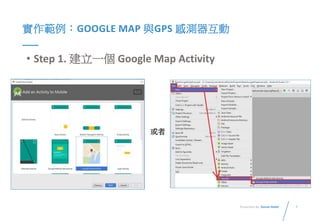
• Step 1. 建立一個 Google Map Activity
或者
8Presented By: Duran Hsieh
實作範例:GOOGLE MAP 與GPS 感測器互動
• Step 2. 申請與加入Google map Key
• 請參考上一堂課投影片
9Presented By: Duran Hsieh
實作範例:GOOGLE MAP 與GPS 感測器互動
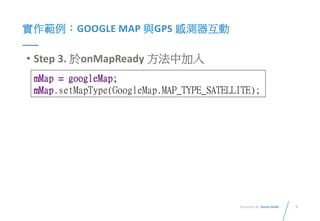
• Step 3. 於onMapReady 方法中加入
mMap = googleMap;
mMap.setMapType(GoogleMap.MAP_TYPE_SATELLITE);
10Presented By: Duran Hsieh
實作範例:GOOGLE MAP 與GPS 感測器互動
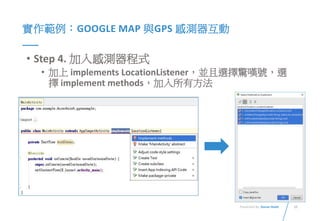
• Step 4. 加入感測器程式
• 加上 implements LocationListener,並且選擇驚嘆號,選
擇 implement methods,加入所有方法
11Presented By: Duran Hsieh
實作範例:GOOGLE MAP 與GPS 感測器互動
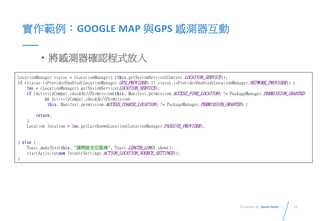
• 將感測器確認程式放入
LocationManager status = (LocationManager) (this.getSystemService(Context.LOCATION_SERVICE));
if (status.isProviderEnabled(LocationManager.GPS_PROVIDER) || status.isProviderEnabled(LocationManager.NETWORK_PROVIDER)) {
lms = (LocationManager) getSystemService(LOCATION_SERVICE);
if (ActivityCompat.checkSelfPermission(this, Manifest.permission.ACCESS_FINE_LOCATION) != PackageManager.PERMISSION_GRANTED
&& ActivityCompat.checkSelfPermission(
this, Manifest.permission.ACCESS_COARSE_LOCATION) != PackageManager.PERMISSION_GRANTED) {
return;
}
Location location = lms.getLastKnownLocation(LocationManager.PASSIVE_PROVIDER);
} else {
Toast.makeText(this, "請開啟定位服務", Toast.LENGTH_LONG).show();
startActivity(new Intent(Settings.ACTION_LOCATION_SOURCE_SETTINGS));
}
12Presented By: Duran Hsieh
實作範例:GOOGLE MAP 與GPS 感測器互動
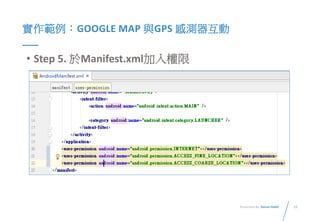
• Step 5. 於Manifest.xml加入權限
13Presented By: Duran Hsieh
實作範例:GOOGLE MAP 與GPS 感測器互動
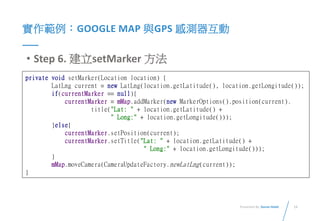
• Step 6. 建立setMarker 方法
private void setMarker(Location location) {
LatLng current = new LatLng(location.getLatitude(), location.getLongitude());
if(currentMarker == null){
currentMarker = mMap.addMarker(new MarkerOptions().position(current).
title("Lat: " + location.getLatitude() +
" Long:" + location.getLongitude()));
}else{
currentMarker.setPosition(current);
currentMarker.setTitle("Lat: " + location.getLatitude() +
" Long:" + location.getLongitude()));
}
mMap.moveCamera(CameraUpdateFactory.newLatLng(current));
}
14Presented By: Duran Hsieh
實作範例:GOOGLE MAP 與GPS 感測器互動
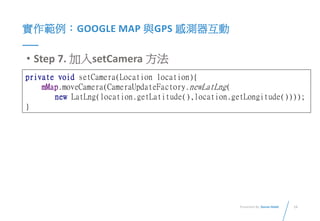
• Step 7. 加入setCamera 方法
private void setCamera(Location location){
mMap.moveCamera(CameraUpdateFactory.newLatLng(
new LatLng(location.getLatitude(),location.getLongitude())));
}
15Presented By: Duran Hsieh
實作範例:GOOGLE MAP 與GPS 感測器互動
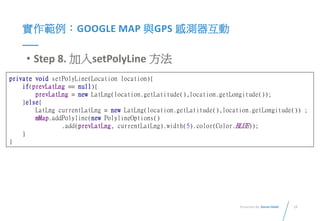
• Step 8. 加入setPolyLine 方法
private void setPolyLine(Location location){
if(prevLatLng == null){
prevLatLng = new LatLng(location.getLatitude(),location.getLongitude());
}else{
LatLng currentLatLng = new LatLng(location.getLatitude(),location.getLongitude()) ;
mMap.addPolyline(new PolylineOptions()
.add(prevLatLng, currentLatLng).width(5).color(Color.BLUE));
}
}
16Presented By: Duran Hsieh
實作範例:GOOGLE MAP 與GPS 感測器互動
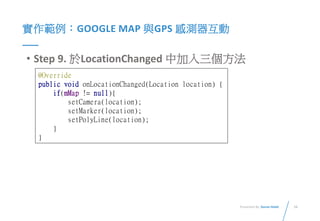
• Step 9. 於LocationChanged 中加入三個方法
@Override
public void onLocationChanged(Location location) {
if(mMap != null){
setCamera(location);
setMarker(location);
setPolyLine(location);
}
}
17Presented By: Duran Hsieh
實作範例:GOOGLE MAP 與GPS 感測器互動
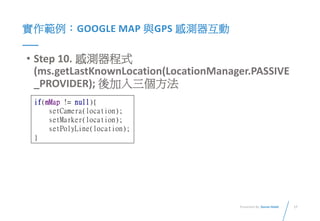
• Step 10. 感測器程式
(ms.getLastKnownLocation(LocationManager.PASSIVE
_PROVIDER); 後加入三個方法
if(mMap != null){
setCamera(location);
setMarker(location);
setPolyLine(location);
}
ANDROID APP上架流程
19Presented By: Duran Hsieh
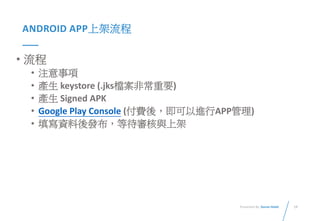
ANDROID APP上架流程
• 流程
• 注意事項
• 產生 keystore (.jks檔案非常重要)
• 產生 Signed APK
• Google Play Console (付費後,即可以進行APP管理)
• 填寫資料後發布,等待審核與上架
20Presented By: Duran Hsieh
ANDROID APP上架流程
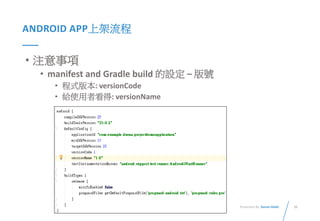
• 注意事項
• manifest and Gradle build 的設定 – 版號
• 程式版本: versionCode
• 給使用者看得: versionName
21Presented By: Duran Hsieh
ANDROID APP上架流程
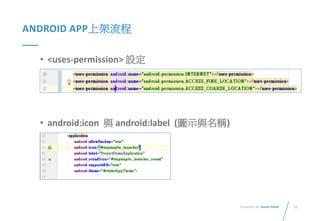
• <uses-permission> 設定
• android:icon 與 android:label (圖示與名稱)
22Presented By: Duran Hsieh
ANDROID APP上架流程
• 確認你的應用程式支援多種銀幕規格
https://developer.android.com/guide/practices/screens_su
pport.html#screen-independence
• 選一個好的package name
• 不能使用com.example
23Presented By: Duran Hsieh
ANDROID APP上架流程
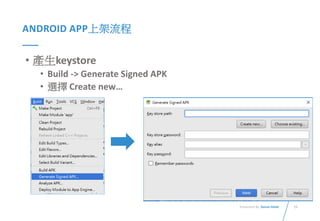
• 產生keystore
• Build -> Generate Signed APK
• 選擇 Create new…
24Presented By: Duran Hsieh
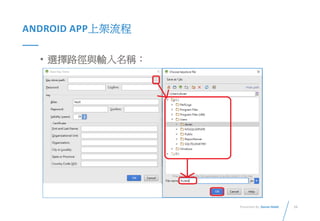
ANDROID APP上架流程
• 選擇路徑與輸入名稱:
25Presented By: Duran Hsieh
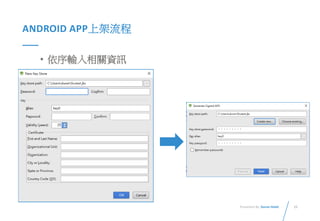
ANDROID APP上架流程
• 依序輸入相關資訊
26Presented By: Duran Hsieh
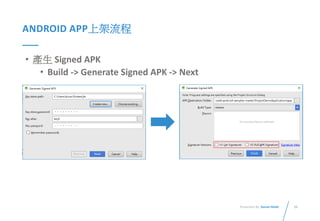
ANDROID APP上架流程
• 產生 Signed APK
• Build -> Generate Signed APK -> Next
27Presented By: Duran Hsieh
ANDROID APP上架流程
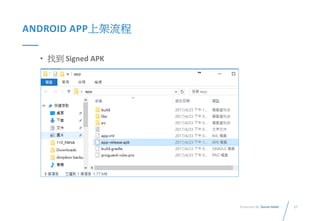
• 找到 Signed APK
28Presented By: Duran Hsieh
ANDROID APP上架流程
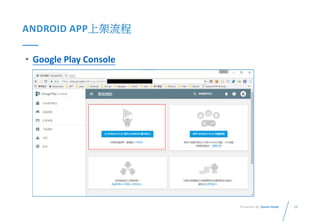
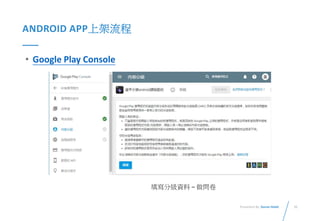
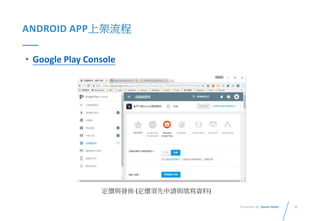
• Google Play Console
29Presented By: Duran Hsieh
ANDROID APP上架流程
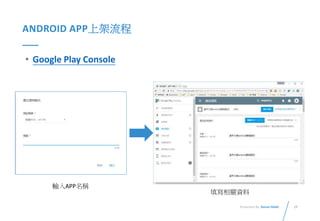
• Google Play Console
輸入APP名稱
填寫相關資料
30Presented By: Duran Hsieh
ANDROID APP上架流程
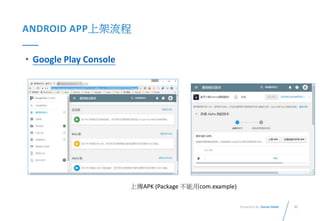
• Google Play Console
上傳APK (Package 不能用com.example)
31Presented By: Duran Hsieh
ANDROID APP上架流程
• Google Play Console
填寫分級資料 – 做問卷
32Presented By: Duran Hsieh
ANDROID APP上架流程
• Google Play Console
定價與發佈 (定價須先申請與填寫資料)
33Presented By: Duran Hsieh
ANDROID APP上架流程
• Google Play Console
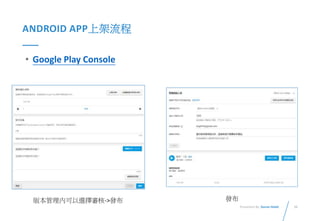
版本管理內可以選擇審核->發布 發布
AdMob
35Presented By: Duran Hsieh
ADMOB
• 廣告收益:
• Android 使用者屬性
• 多數 APP 為免費
• 消費族群不容易購買APP
• 靠廣告賺大錢非常困難
• 萬中選一APP才有可能
• WHY?
• 增加開發動力
• 不要造成使用者煩躁
• 你做的是廣告APP ?
36Presented By: Duran Hsieh
ADMOB
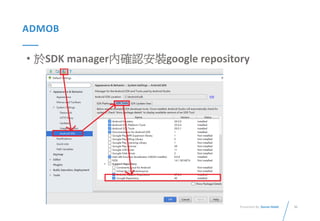
• 於SDK manager內確認安裝google repository
37Presented By: Duran Hsieh
ADMOB
• 設定 gradle
dependencies {
compile fileTree(dir: 'libs', include: ['*.jar'])
androidTestCompile('com.android.support.test.espresso:espresso-core:2.2.2', {
exclude group: 'com.android.support', module: 'support-annotations'
})
compile 'com.google.android.gms:play-services:6.5+'
compile 'com.android.support:appcompat-v7:25.3.1'
testCompile 'junit:junit:4.12'
}
38Presented By: Duran Hsieh
ADMOB
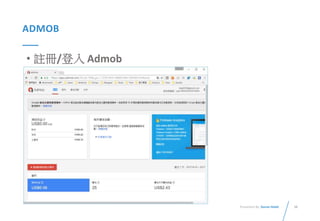
• 註冊/登入 Admob
39Presented By: Duran Hsieh
ADMOB
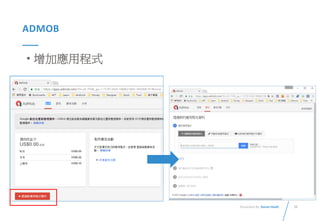
• 增加應用程式
40Presented By: Duran Hsieh
ADMOB
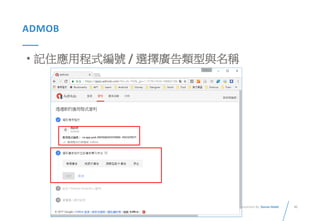
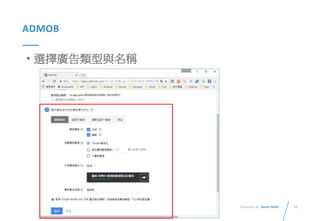
• 記住應用程式編號 / 選擇廣告類型與名稱
41Presented By: Duran Hsieh
ADMOB
• 選擇廣告類型與名稱
42Presented By: Duran Hsieh
ADMOB
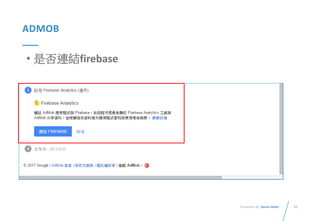
• 是否連結firebase
43Presented By: Duran Hsieh
ADMOB
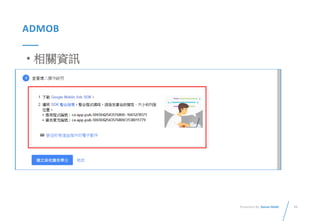
• 相關資訊
44Presented By: Duran Hsieh
ADMOB
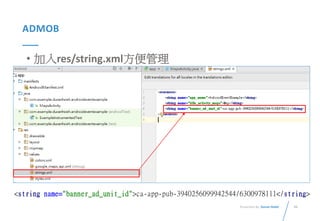
• 加入res/string.xml方便管理
<string name="banner_ad_unit_id">ca-app-pub-3940256099942544/6300978111</string>
45Presented By: Duran Hsieh
ADMOB
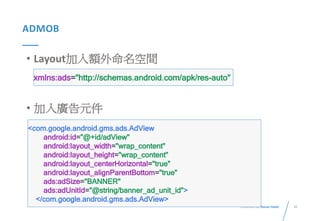
• Layout加入額外命名空間
• 加入廣告元件
<com.google.android.gms.ads.AdView
android:id="@+id/adView"
android:layout_width="wrap_content"
android:layout_height="wrap_content"
android:layout_centerHorizontal="true"
android:layout_alignParentBottom="true"
ads:adSize="BANNER"
ads:adUnitId="@string/banner_ad_unit_id">
</com.google.android.gms.ads.AdView>
xmlns:ads="http://schemas.android.com/apk/res-auto"
46Presented By: Duran Hsieh
ADMOB
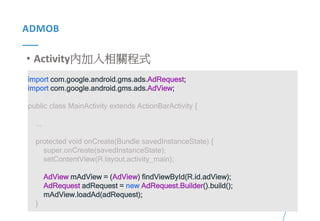
• Activity內加入相關程式
import com.google.android.gms.ads.AdRequest;
import com.google.android.gms.ads.AdView;
public class MainActivity extends ActionBarActivity {
...
protected void onCreate(Bundle savedInstanceState) {
super.onCreate(savedInstanceState);
setContentView(R.layout.activity_main);
AdView mAdView = (AdView) findViewById(R.id.adView);
AdRequest adRequest = new AdRequest.Builder().build();
mAdView.loadAd(adRequest);
}
47Presented By: Duran Hsieh
ADMOB
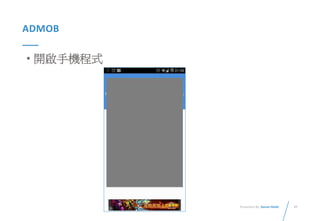
• 開啟手機程式
複習與練習時間
49Presented By: Duran Hsieh
複習與練習時間
• 練習上次課程內容
• 製作GPS與google map互動程式
Facebook login
51Presented By: Duran Hsieh
FACEBOOK LOGIN
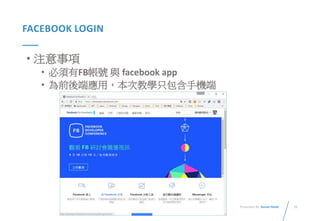
• 注意事項
• 必須有FB帳號 與 facebook app
• 為前後端應用,本次教學只包含手機端
52Presented By: Duran Hsieh
FACEBOOK LOGIN
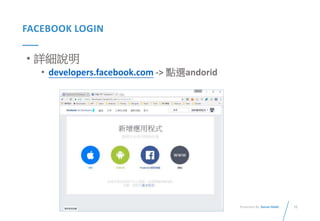
• 詳細說明
• developers.facebook.com -> 點選andorid
53Presented By: Duran Hsieh
FACEBOOK LOGIN
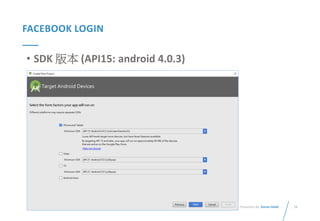
• SDK 版本 (API15: android 4.0.3)
54Presented By: Duran Hsieh
FACEBOOK LOGIN
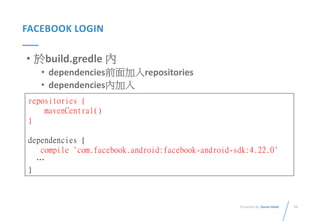
• 於build.gredle 內
• dependencies前面加入repositories
• dependencies內加入
repositories {
mavenCentral()
}
dependencies {
compile 'com.facebook.android:facebook-android-sdk:4.22.0'
…
}
55Presented By: Duran Hsieh
FACEBOOK LOGIN
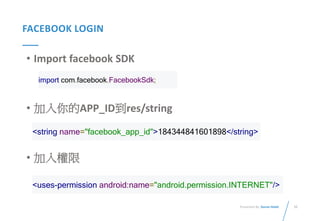
• Import facebook SDK
• 加入你的APP_ID到res/string
• 加入權限
import com.facebook.FacebookSdk;
<string name="facebook_app_id">184344841601898</string>
<uses-permission android:name="android.permission.INTERNET"/>
56Presented By: Duran Hsieh
FACEBOOK LOGIN
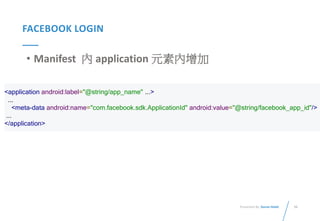
• Manifest 內 application 元素內增加
<application android:label="@string/app_name" ...>
...
<meta-data android:name="com.facebook.sdk.ApplicationId" android:value="@string/facebook_app_id"/>
...
</application>
57Presented By: Duran Hsieh
FACEBOOK LOGIN
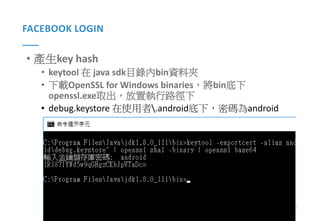
• 產生key hash
• keytool 在 java sdk目錄內bin資料夾
• 下載OpenSSL for Windows binaries,將bin底下
openssl.exe取出,放置執行路徑下
• debug.keystore 在使用者.android底下,密碼為android
58Presented By: Duran Hsieh
FACEBOOK LOGIN
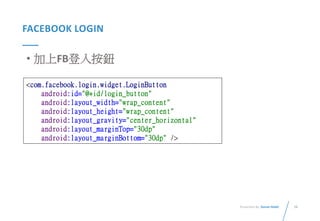
• 加上FB登入按鈕
<com.facebook.login.widget.LoginButton
android:id="@+id/login_button"
android:layout_width="wrap_content"
android:layout_height="wrap_content"
android:layout_gravity="center_horizontal"
android:layout_marginTop="30dp"
android:layout_marginBottom="30dp" />
59Presented By: Duran Hsieh
FACEBOOK LOGIN
• 程式說明 與Demo
• https://github.com/matsurigoto/FBLloginExample
QUESTION & ANSWERS
THANK YOU FOR
WATCHING

Android基礎課程3 - APP上架、廣告與 Facebook 登入

  • 1.
    ANDROID 基礎開發課程 (3) Presented by DuranHsieh http://dog0416.blogspot.tw/
  • 2.
    OUTLINE • 課程目標與進度 • 實作範例:GoogleMap 與GPS 感測器互動 • Android App上架流程 • AdMob • 複習與練習時間 • (補充) Facebook login • Q&A
  • 3.
    3Presented By: DuranHsieh 課程目標與進度 • 課程目標 • Android 基礎知識 • 名詞解釋 • 運作原理、生命週期 • Android Studio 介紹與操作 • Android App 開發實作 • Android 專案架構說明、Java 學習 • Layout、Components 介紹、操作與程式實作 • 地圖互動程式製作 • Material design • 上架教學 • 如何將你的 App 上架 • 廣告 • FB android login
  • 4.
    4Presented By: DuranHsieh 課程目標與進度 •課程進度 日期 說明 04月06日 Android 基礎知識與安裝環境 Android上使用GPS感測器 作業:GPS 範例程式 04月13日 期中考放假 04月20日 Android Google map API 作業:建立地圖範例程式 04月27日 Material Design、地圖互動程式製作、產生APK與APP上架 作業:準備小專題 05月18日 小專題成果驗收 - DEMO
  • 5.
  • 6.
    6Presented By: DuranHsieh 實作範例:GOOGLE MAP 與GPS 感測器互動 • 建立一個手機應用程式,追蹤目前自己位置 • 當位置改變時,地圖畫面要追蹤使用者位置(使用者 置中) • 依據自己移動位置,在地圖上劃出軌跡 • 點擊自己的位置,需要顯示出目前經緯度座標 • 地圖類型為衛星圖
  • 7.
    7Presented By: DuranHsieh 實作範例:GOOGLE MAP 與GPS 感測器互動 • Step 1. 建立一個 Google Map Activity 或者
  • 8.
    8Presented By: DuranHsieh 實作範例:GOOGLE MAP 與GPS 感測器互動 • Step 2. 申請與加入Google map Key • 請參考上一堂課投影片
  • 9.
    9Presented By: DuranHsieh 實作範例:GOOGLE MAP 與GPS 感測器互動 • Step 3. 於onMapReady 方法中加入 mMap = googleMap; mMap.setMapType(GoogleMap.MAP_TYPE_SATELLITE);
  • 10.
    10Presented By: DuranHsieh 實作範例:GOOGLE MAP 與GPS 感測器互動 • Step 4. 加入感測器程式 • 加上 implements LocationListener,並且選擇驚嘆號,選 擇 implement methods,加入所有方法
  • 11.
    11Presented By: DuranHsieh 實作範例:GOOGLE MAP 與GPS 感測器互動 • 將感測器確認程式放入 LocationManager status = (LocationManager) (this.getSystemService(Context.LOCATION_SERVICE)); if (status.isProviderEnabled(LocationManager.GPS_PROVIDER) || status.isProviderEnabled(LocationManager.NETWORK_PROVIDER)) { lms = (LocationManager) getSystemService(LOCATION_SERVICE); if (ActivityCompat.checkSelfPermission(this, Manifest.permission.ACCESS_FINE_LOCATION) != PackageManager.PERMISSION_GRANTED && ActivityCompat.checkSelfPermission( this, Manifest.permission.ACCESS_COARSE_LOCATION) != PackageManager.PERMISSION_GRANTED) { return; } Location location = lms.getLastKnownLocation(LocationManager.PASSIVE_PROVIDER); } else { Toast.makeText(this, "請開啟定位服務", Toast.LENGTH_LONG).show(); startActivity(new Intent(Settings.ACTION_LOCATION_SOURCE_SETTINGS)); }
  • 12.
    12Presented By: DuranHsieh 實作範例:GOOGLE MAP 與GPS 感測器互動 • Step 5. 於Manifest.xml加入權限
  • 13.
    13Presented By: DuranHsieh 實作範例:GOOGLE MAP 與GPS 感測器互動 • Step 6. 建立setMarker 方法 private void setMarker(Location location) { LatLng current = new LatLng(location.getLatitude(), location.getLongitude()); if(currentMarker == null){ currentMarker = mMap.addMarker(new MarkerOptions().position(current). title("Lat: " + location.getLatitude() + " Long:" + location.getLongitude())); }else{ currentMarker.setPosition(current); currentMarker.setTitle("Lat: " + location.getLatitude() + " Long:" + location.getLongitude())); } mMap.moveCamera(CameraUpdateFactory.newLatLng(current)); }
  • 14.
    14Presented By: DuranHsieh 實作範例:GOOGLE MAP 與GPS 感測器互動 • Step 7. 加入setCamera 方法 private void setCamera(Location location){ mMap.moveCamera(CameraUpdateFactory.newLatLng( new LatLng(location.getLatitude(),location.getLongitude()))); }
  • 15.
    15Presented By: DuranHsieh 實作範例:GOOGLE MAP 與GPS 感測器互動 • Step 8. 加入setPolyLine 方法 private void setPolyLine(Location location){ if(prevLatLng == null){ prevLatLng = new LatLng(location.getLatitude(),location.getLongitude()); }else{ LatLng currentLatLng = new LatLng(location.getLatitude(),location.getLongitude()) ; mMap.addPolyline(new PolylineOptions() .add(prevLatLng, currentLatLng).width(5).color(Color.BLUE)); } }
  • 16.
    16Presented By: DuranHsieh 實作範例:GOOGLE MAP 與GPS 感測器互動 • Step 9. 於LocationChanged 中加入三個方法 @Override public void onLocationChanged(Location location) { if(mMap != null){ setCamera(location); setMarker(location); setPolyLine(location); } }
  • 17.
    17Presented By: DuranHsieh 實作範例:GOOGLE MAP 與GPS 感測器互動 • Step 10. 感測器程式 (ms.getLastKnownLocation(LocationManager.PASSIVE _PROVIDER); 後加入三個方法 if(mMap != null){ setCamera(location); setMarker(location); setPolyLine(location); }
  • 18.
  • 19.
    19Presented By: DuranHsieh ANDROID APP上架流程 • 流程 • 注意事項 • 產生 keystore (.jks檔案非常重要) • 產生 Signed APK • Google Play Console (付費後,即可以進行APP管理) • 填寫資料後發布,等待審核與上架
  • 20.
    20Presented By: DuranHsieh ANDROID APP上架流程 • 注意事項 • manifest and Gradle build 的設定 – 版號 • 程式版本: versionCode • 給使用者看得: versionName
  • 21.
    21Presented By: DuranHsieh ANDROID APP上架流程 • <uses-permission> 設定 • android:icon 與 android:label (圖示與名稱)
  • 22.
    22Presented By: DuranHsieh ANDROID APP上架流程 • 確認你的應用程式支援多種銀幕規格 https://developer.android.com/guide/practices/screens_su pport.html#screen-independence • 選一個好的package name • 不能使用com.example
  • 23.
    23Presented By: DuranHsieh ANDROID APP上架流程 • 產生keystore • Build -> Generate Signed APK • 選擇 Create new…
  • 24.
    24Presented By: DuranHsieh ANDROID APP上架流程 • 選擇路徑與輸入名稱:
  • 25.
    25Presented By: DuranHsieh ANDROID APP上架流程 • 依序輸入相關資訊
  • 26.
    26Presented By: DuranHsieh ANDROID APP上架流程 • 產生 Signed APK • Build -> Generate Signed APK -> Next
  • 27.
    27Presented By: DuranHsieh ANDROID APP上架流程 • 找到 Signed APK
  • 28.
    28Presented By: DuranHsieh ANDROID APP上架流程 • Google Play Console
  • 29.
    29Presented By: DuranHsieh ANDROID APP上架流程 • Google Play Console 輸入APP名稱 填寫相關資料
  • 30.
    30Presented By: DuranHsieh ANDROID APP上架流程 • Google Play Console 上傳APK (Package 不能用com.example)
  • 31.
    31Presented By: DuranHsieh ANDROID APP上架流程 • Google Play Console 填寫分級資料 – 做問卷
  • 32.
    32Presented By: DuranHsieh ANDROID APP上架流程 • Google Play Console 定價與發佈 (定價須先申請與填寫資料)
  • 33.
    33Presented By: DuranHsieh ANDROID APP上架流程 • Google Play Console 版本管理內可以選擇審核->發布 發布
  • 34.
  • 35.
    35Presented By: DuranHsieh ADMOB • 廣告收益: • Android 使用者屬性 • 多數 APP 為免費 • 消費族群不容易購買APP • 靠廣告賺大錢非常困難 • 萬中選一APP才有可能 • WHY? • 增加開發動力 • 不要造成使用者煩躁 • 你做的是廣告APP ?
  • 36.
    36Presented By: DuranHsieh ADMOB • 於SDK manager內確認安裝google repository
  • 37.
    37Presented By: DuranHsieh ADMOB • 設定 gradle dependencies { compile fileTree(dir: 'libs', include: ['*.jar']) androidTestCompile('com.android.support.test.espresso:espresso-core:2.2.2', { exclude group: 'com.android.support', module: 'support-annotations' }) compile 'com.google.android.gms:play-services:6.5+' compile 'com.android.support:appcompat-v7:25.3.1' testCompile 'junit:junit:4.12' }
  • 38.
    38Presented By: DuranHsieh ADMOB • 註冊/登入 Admob
  • 39.
    39Presented By: DuranHsieh ADMOB • 增加應用程式
  • 40.
    40Presented By: DuranHsieh ADMOB • 記住應用程式編號 / 選擇廣告類型與名稱
  • 41.
    41Presented By: DuranHsieh ADMOB • 選擇廣告類型與名稱
  • 42.
    42Presented By: DuranHsieh ADMOB • 是否連結firebase
  • 43.
    43Presented By: DuranHsieh ADMOB • 相關資訊
  • 44.
    44Presented By: DuranHsieh ADMOB • 加入res/string.xml方便管理 <string name="banner_ad_unit_id">ca-app-pub-3940256099942544/6300978111</string>
  • 45.
    45Presented By: DuranHsieh ADMOB • Layout加入額外命名空間 • 加入廣告元件 <com.google.android.gms.ads.AdView android:id="@+id/adView" android:layout_width="wrap_content" android:layout_height="wrap_content" android:layout_centerHorizontal="true" android:layout_alignParentBottom="true" ads:adSize="BANNER" ads:adUnitId="@string/banner_ad_unit_id"> </com.google.android.gms.ads.AdView> xmlns:ads="http://schemas.android.com/apk/res-auto"
  • 46.
    46Presented By: DuranHsieh ADMOB • Activity內加入相關程式 import com.google.android.gms.ads.AdRequest; import com.google.android.gms.ads.AdView; public class MainActivity extends ActionBarActivity { ... protected void onCreate(Bundle savedInstanceState) { super.onCreate(savedInstanceState); setContentView(R.layout.activity_main); AdView mAdView = (AdView) findViewById(R.id.adView); AdRequest adRequest = new AdRequest.Builder().build(); mAdView.loadAd(adRequest); }
  • 47.
    47Presented By: DuranHsieh ADMOB • 開啟手機程式
  • 48.
  • 49.
    49Presented By: DuranHsieh 複習與練習時間 • 練習上次課程內容 • 製作GPS與google map互動程式
  • 50.
  • 51.
    51Presented By: DuranHsieh FACEBOOK LOGIN • 注意事項 • 必須有FB帳號 與 facebook app • 為前後端應用,本次教學只包含手機端
  • 52.
    52Presented By: DuranHsieh FACEBOOK LOGIN • 詳細說明 • developers.facebook.com -> 點選andorid
  • 53.
    53Presented By: DuranHsieh FACEBOOK LOGIN • SDK 版本 (API15: android 4.0.3)
  • 54.
    54Presented By: DuranHsieh FACEBOOK LOGIN • 於build.gredle 內 • dependencies前面加入repositories • dependencies內加入 repositories { mavenCentral() } dependencies { compile 'com.facebook.android:facebook-android-sdk:4.22.0' … }
  • 55.
    55Presented By: DuranHsieh FACEBOOK LOGIN • Import facebook SDK • 加入你的APP_ID到res/string • 加入權限 import com.facebook.FacebookSdk; <string name="facebook_app_id">184344841601898</string> <uses-permission android:name="android.permission.INTERNET"/>
  • 56.
    56Presented By: DuranHsieh FACEBOOK LOGIN • Manifest 內 application 元素內增加 <application android:label="@string/app_name" ...> ... <meta-data android:name="com.facebook.sdk.ApplicationId" android:value="@string/facebook_app_id"/> ... </application>
  • 57.
    57Presented By: DuranHsieh FACEBOOK LOGIN • 產生key hash • keytool 在 java sdk目錄內bin資料夾 • 下載OpenSSL for Windows binaries,將bin底下 openssl.exe取出,放置執行路徑下 • debug.keystore 在使用者.android底下,密碼為android
  • 58.
    58Presented By: DuranHsieh FACEBOOK LOGIN • 加上FB登入按鈕 <com.facebook.login.widget.LoginButton android:id="@+id/login_button" android:layout_width="wrap_content" android:layout_height="wrap_content" android:layout_gravity="center_horizontal" android:layout_marginTop="30dp" android:layout_marginBottom="30dp" />
  • 59.
    59Presented By: DuranHsieh FACEBOOK LOGIN • 程式說明 與Demo • https://github.com/matsurigoto/FBLloginExample
  • 60.
  • 61.

Editor's Notes

  • #4 1. Net core rc4 版本,dotnet new 指令有重大變更。
  • #5 1. Net core rc4 版本,dotnet new 指令有重大變更。
  • #7 參考資料:https://zh.wikipedia.org/wiki/Android
  • #8 參考資料:https://zh.wikipedia.org/wiki/Android
  • #9 參考資料:https://zh.wikipedia.org/wiki/Android
  • #10 參考資料:https://zh.wikipedia.org/wiki/Android
  • #11 參考資料:https://zh.wikipedia.org/wiki/Android
  • #12 參考資料:https://zh.wikipedia.org/wiki/Android
  • #13 <uses-permission android:name="android.permission.INTERNET"></uses-permission> <uses-permission android:name="android.permission.ACCESS_FINE_LOCATION"></uses-permission> <uses-permission android:name="android.permission.ACCESS_COARSE_LOCATION"></uses-permission>
  • #15 參考資料:https://zh.wikipedia.org/wiki/Android
  • #16 參考資料:https://zh.wikipedia.org/wiki/Android
  • #17 參考資料:https://zh.wikipedia.org/wiki/Android
  • #18 參考資料:https://zh.wikipedia.org/wiki/Android
  • #51 Note: Insert your picture by clicking on the Picture Place Holder Icon, then send it back!
  • #58 keytool -exportcert -alias androiddebugkey -keystore %HOMEPATH%\.android\debug.keystore | openssl sha1 -binary | openssl base64