

Android Programming


       Lesson 9
Multiple Background
      Threads
     NGUYEN The Linh
Android Programming


Contents


      1    Overview

      2    Using Handlers

      3    Using AsyncTask


                            2
Android Programming


Multiple Background Threads


                Overview


                    3
Android Programming


Overview

 When an application is launched, the system creates a
  thread of execution for the application, called "main."

 The main thread is also sometimes called the UI
  thread.

 The system does not create a separate thread for each
  instance of a component. All components that run in
  the same process are instantiated in the UI thread,
  and system calls to each component are dispatched
  from that thread.
                           4
Android Programming


Overview

 If everything is happening in the UI thread,
  performing long operations such as network access or
  database queries will block the whole UI.


 When the thread is blocked, no events can be
  dispatched, including drawing events.


                          5
Android Programming


Overview

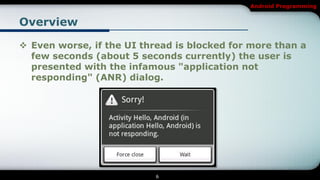
 Even worse, if the UI thread is blocked for more than a
  few seconds (about 5 seconds currently) the user is
  presented with the infamous "application not
  responding" (ANR) dialog.


                           6
Android Programming


Overview

 The user might then decide to quit your application
  and uninstall it if they are unhappy.


                          7
Android Programming


Overview

 There are simply two rules to Android's single thread
  model:
    Do not block the UI thread
    Do not access the Android UI toolkit from outside the UI thread


                                 8
Android Programming


Multiple Background Threads


              Using Handlers


                    9
Android Programming


Using Handlers

 Do not block the UI thread
    Because of the single thread model described above, it's vital to
     the responsiveness of your application's UI that you do not block
     the UI thread. If you have operations to perform that are not
     instantaneous, you should make sure to do them in separate
     threads ("background" or "worker" threads).


                                 10
Android Programming


Using Handlers

 Do not block the UI thread


                          11
Android Programming


Using Handlers

 Do not block the UI thread
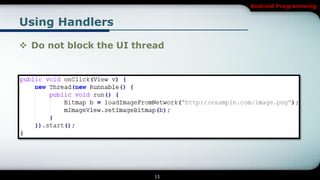
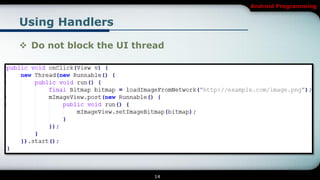
    At first, this seems to work fine, because it creates a new thread to
     handle the network operation. However, it violates the second rule
     of the single-threaded model: do not access the Android UI toolkit
     from outside the UI thread—this sample modifies
     the ImageView from the worker thread instead of the UI thread.

     This can result in undefined and unexpected behavior, which can
      be difficult and time-consuming to track down.


                                  12
Android Programming


Using Handlers

 Do not block the UI thread
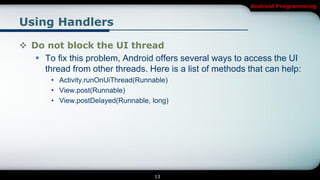
    To fix this problem, Android offers several ways to access the UI
     thread from other threads. Here is a list of methods that can help:
        • Activity.runOnUiThread(Runnable)
        • View.post(Runnable)
        • View.postDelayed(Runnable, long)


                                     13
Android Programming


Using Handlers

 Do not block the UI thread


                          14
Android Programming


Using Handlers

 Do not block the UI thread
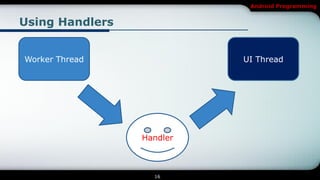
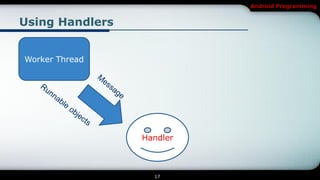
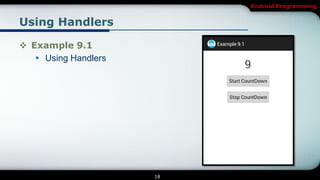
    To handle more complex interactions with a worker thread, you
     might consider using a Handler in your worker thread, to process
     messages delivered from the UI thread.


                                 15
Android Programming


Using Handlers


Worker Thread              UI Thread


                 Handler


                   16
Android Programming


Using Handlers


Worker Thread


                 Handler


                   17
Android Programming


Using Handlers

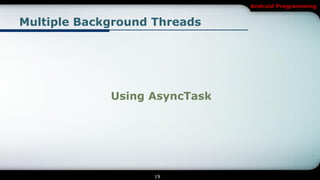
 Example 9.1
    Using Handlers


                      18
Android Programming


Multiple Background Threads


             Using AsyncTask


                    19
Android Programming


Using AsyncTask

 AsyncTask is an abstract class that provides several
  methods managing the interaction between the UI
  thread and the background thread.

 It’s implementation is by creating a sub class that
  extends AsyncTask and implementing the different
  protected methods it provides.


                          20
Android Programming


Using AsyncTask

 Step 1 is creating the AsyncTask sub class:
    class ProgressTask extends AsyncTask<Params, Progress,
     Result>{ }
    Params: parameter info passed to be used by the AsyncTask.
    Progress: the type of progress that the task accomplishes.
    The result returned after the AsyncTask finishes.


                              21
Android Programming


Using AsyncTask

 Step 1 is creating the AsyncTask sub class:
    class ProgressTask extends AsyncTask<Integer, Integer,
     Void>{ }
    The parameter and the progress are of type Integer and the result
     is Void as our tasks does not return anything (return null).


                                 22
Android Programming


Using AsyncTask

 Step 2 is overriding the protected methods defined by
  the AsyncTask class that handle the execution life
  cycle of the AsyncTask.
    We have five methods to implement which are:
      • onPreExecute: the first method called in the AsyncTask, called on the UI
        thread.

      • doInBackground: the method that executes the time consuming tasks and
        publish the task progress, executed in background thread.


                                      23
Android Programming


Using AsyncTask

 Step 2
    We have five methods to implement which are:

       • onProgressUpdate: method that updates the progress of the AsyncTask, run
         on the UI thread.

       • onPostExecute: the final method that gets called
         after doInBackground finishes, here we can update the UI with the results of
         the AsyncTask.

       • onCancelled: gets called if the AsyncTask.cancel() methods is called,
         terminating the execution of the AsyncTask.

                                       24
Android Programming


Using AsyncTask

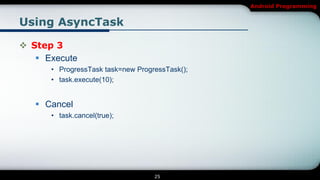
 Step 3
    Execute
      • ProgressTask task=new ProgressTask();
      • task.execute(10);


    Cancel
      • task.cancel(true);


                                   25
Android Programming


Using AsyncTask

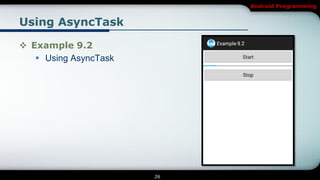
 Example 9.2
    Using AsyncTask


                       26
Android Programming

[Android] Multiple Background Threads

  • 1.
    Android Programming Lesson 9 Multiple Background Threads NGUYEN The Linh
  • 2.
    Android Programming Contents 1 Overview 2 Using Handlers 3 Using AsyncTask 2
  • 3.
  • 4.
    Android Programming Overview  Whenan application is launched, the system creates a thread of execution for the application, called "main."  The main thread is also sometimes called the UI thread.  The system does not create a separate thread for each instance of a component. All components that run in the same process are instantiated in the UI thread, and system calls to each component are dispatched from that thread. 4
  • 5.
    Android Programming Overview  Ifeverything is happening in the UI thread, performing long operations such as network access or database queries will block the whole UI.  When the thread is blocked, no events can be dispatched, including drawing events. 5
  • 6.
    Android Programming Overview  Evenworse, if the UI thread is blocked for more than a few seconds (about 5 seconds currently) the user is presented with the infamous "application not responding" (ANR) dialog. 6
  • 7.
    Android Programming Overview  Theuser might then decide to quit your application and uninstall it if they are unhappy. 7
  • 8.
    Android Programming Overview  Thereare simply two rules to Android's single thread model:  Do not block the UI thread  Do not access the Android UI toolkit from outside the UI thread 8
  • 9.
  • 10.
    Android Programming Using Handlers Do not block the UI thread  Because of the single thread model described above, it's vital to the responsiveness of your application's UI that you do not block the UI thread. If you have operations to perform that are not instantaneous, you should make sure to do them in separate threads ("background" or "worker" threads). 10
  • 11.
    Android Programming Using Handlers Do not block the UI thread 11
  • 12.
    Android Programming Using Handlers Do not block the UI thread  At first, this seems to work fine, because it creates a new thread to handle the network operation. However, it violates the second rule of the single-threaded model: do not access the Android UI toolkit from outside the UI thread—this sample modifies the ImageView from the worker thread instead of the UI thread.  This can result in undefined and unexpected behavior, which can be difficult and time-consuming to track down. 12
  • 13.
    Android Programming Using Handlers Do not block the UI thread  To fix this problem, Android offers several ways to access the UI thread from other threads. Here is a list of methods that can help: • Activity.runOnUiThread(Runnable) • View.post(Runnable) • View.postDelayed(Runnable, long) 13
  • 14.
    Android Programming Using Handlers Do not block the UI thread 14
  • 15.
    Android Programming Using Handlers Do not block the UI thread  To handle more complex interactions with a worker thread, you might consider using a Handler in your worker thread, to process messages delivered from the UI thread. 15
  • 16.
    Android Programming Using Handlers WorkerThread UI Thread Handler 16
  • 17.
  • 18.
    Android Programming Using Handlers Example 9.1  Using Handlers 18
  • 19.
    Android Programming Multiple BackgroundThreads Using AsyncTask 19
  • 20.
    Android Programming Using AsyncTask AsyncTask is an abstract class that provides several methods managing the interaction between the UI thread and the background thread.  It’s implementation is by creating a sub class that extends AsyncTask and implementing the different protected methods it provides. 20
  • 21.
    Android Programming Using AsyncTask Step 1 is creating the AsyncTask sub class:  class ProgressTask extends AsyncTask<Params, Progress, Result>{ }  Params: parameter info passed to be used by the AsyncTask.  Progress: the type of progress that the task accomplishes.  The result returned after the AsyncTask finishes. 21
  • 22.
    Android Programming Using AsyncTask Step 1 is creating the AsyncTask sub class:  class ProgressTask extends AsyncTask<Integer, Integer, Void>{ }  The parameter and the progress are of type Integer and the result is Void as our tasks does not return anything (return null). 22
  • 23.
    Android Programming Using AsyncTask Step 2 is overriding the protected methods defined by the AsyncTask class that handle the execution life cycle of the AsyncTask.  We have five methods to implement which are: • onPreExecute: the first method called in the AsyncTask, called on the UI thread. • doInBackground: the method that executes the time consuming tasks and publish the task progress, executed in background thread. 23
  • 24.
    Android Programming Using AsyncTask Step 2  We have five methods to implement which are: • onProgressUpdate: method that updates the progress of the AsyncTask, run on the UI thread. • onPostExecute: the final method that gets called after doInBackground finishes, here we can update the UI with the results of the AsyncTask. • onCancelled: gets called if the AsyncTask.cancel() methods is called, terminating the execution of the AsyncTask. 24
  • 25.
    Android Programming Using AsyncTask Step 3  Execute • ProgressTask task=new ProgressTask(); • task.execute(10);  Cancel • task.cancel(true); 25
  • 26.
    Android Programming Using AsyncTask Example 9.2  Using AsyncTask 26
  • 27.