
Android Programming


         Lesson 8
 Maps, Geocoding and
Location-Based Services
       NGUYEN The Linh
Android Programming


Contents


      1    Location-Based Services

      2    Gecoding

      3    Maps


      4    Exercise 8


                         2
Android Programming


Maps, Geocoding and LBS


         Location-Based Services


                   3
Android Programming


Using Location-Based Services

 Location-based services (LBS) is an umbrella term
  used to describe the different technologies used to
  find the device’s current location. The two main LBS
  elements are:
    LocationManager: Provides hooks to the location-based services.
    LocationProviders: Each of which represents a different location
     finding technology used to determine the device’s current location.


                                  4
Android Programming


Setting up the Emulator with Test Providers

 Location-based services are dependant on device
  hardware for finding the current location. When
  developing and testing with the emulator, your
  hardware is virtualized, and you’re likely to stay in
  pretty much the same location.

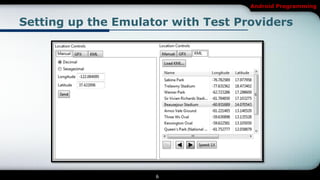
 Use the Location Controls available from the DDMS
  perspective in Eclipse to push location changes
  directly into the test GPS_PROVIDER.


                            5
Android Programming


Setting up the Emulator with Test Providers


                     6
Android Programming


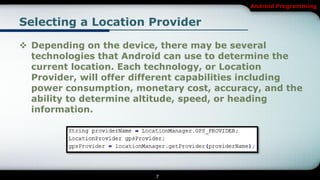
Selecting a Location Provider

 Depending on the device, there may be several
  technologies that Android can use to determine the
  current location. Each technology, or Location
  Provider, will offer different capabilities including
  power consumption, monetary cost, accuracy, and the
  ability to determine altitude, speed, or heading
  information.


                          7
Android Programming


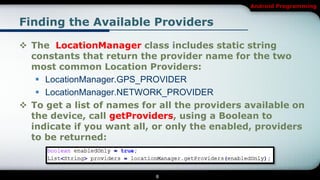
Finding the Available Providers

 The LocationManager class includes static string
  constants that return the provider name for the two
  most common Location Providers:
    LocationManager.GPS_PROVIDER
    LocationManager.NETWORK_PROVIDER
 To get a list of names for all the providers available on
  the device, call getProviders, using a Boolean to
  indicate if you want all, or only the enabled, providers
  to be returned:


                            8
Android Programming


Finding Providers Based on Criteria

 In most scenarios, it’s unlikely that you will want to
  explicitly choose the Location Provider to use. More
  commonly, you’ll specify the requirements that a
  provider must meet and let Android determine the
  best technology to use.

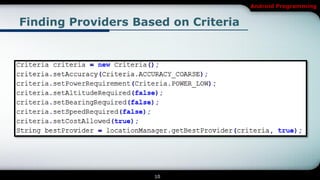
 Use the Criteria class to dictate the requirements of a
  provider in terms of accuracy (fine or coarse), power
  use (low, medium, high), cost, and the ability to
  return values for altitude, speed.


                            9
Android Programming


Finding Providers Based on Criteria


                     10
Android Programming


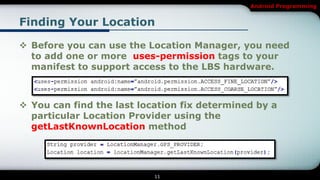
Finding Your Location

 Before you can use the Location Manager, you need
  to add one or more uses-permission tags to your
  manifest to support access to the LBS hardware.


 You can find the last location fix determined by a
  particular Location Provider using the
  getLastKnownLocation method


                           11
Android Programming


Maps, Geocoding and LBS


               Geocoding


                   12
Android Programming


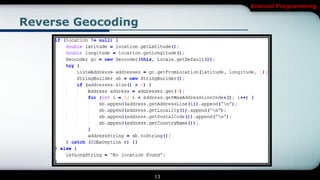
Reverse Geocoding


                    13
Android Programming


Forward Geocoding

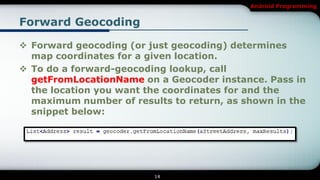
 Forward geocoding (or just geocoding) determines
  map coordinates for a given location.
 To do a forward-geocoding lookup, call
  getFromLocationName on a Geocoder instance. Pass in
  the location you want the coordinates for and the
  maximum number of results to return, as shown in the
  snippet below:


                         14
Android Programming


Maps, Geocoding and LBS


                  Maps


                   15
Android Programming


Introducing MapView and MapActivity

 MapView is the actual Map View (control).
 MapActivity is the base class you extend to create a
  new Activity that can include a Map View. The
  MapActivity class handles the application life cycle
  and background service management required for
  displaying maps. As a result, you can only use a
  MapView within MapActivity-derived Activities.
 Overlay is the class used to annotate your maps. Using
  Overlays, you can use a Canvas to draw onto any
  number of layers that are displayed on top of a Map
  View.

                          16
Android Programming


Introducing MapView and MapActivity

 MapController is used to control the map, allowing you
  to set the center location and zoom levels.

 MyLocationOverlay is a special overlay that can be
  used to display the current position and orientation of
  the device.

 ItemizedOverlays and OverlayItems are used together
  to let you create a layer of map markers, displayed
  using drawable with associated text.

                           17
Android Programming


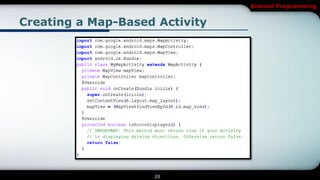
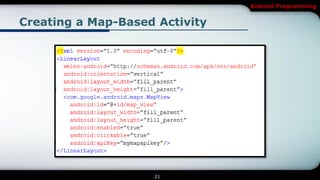
Creating a Map-Based Activity

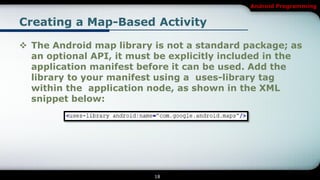
 The Android map library is not a standard package; as
  an optional API, it must be explicitly included in the
  application manifest before it can be used. Add the
  library to your manifest using a uses-library tag
  within the application node, as shown in the XML
  snippet below:


                          18
Android Programming


Creating a Map-Based Activity

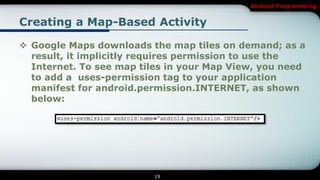
 Google Maps downloads the map tiles on demand; as a
  result, it implicitly requires permission to use the
  Internet. To see map tiles in your Map View, you need
  to add a uses-permission tag to your application
  manifest for android.permission.INTERNET, as shown
  below:


                         19
Android Programming


Creating a Map-Based Activity


                    20
Android Programming


Creating a Map-Based Activity


                    21
Android Programming


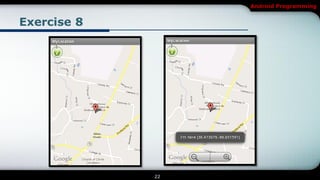
Exercise 8


             22
Android Programming

[Android] Maps, Geocoding and Location-Based Services

  • 1.
    Android Programming Lesson 8 Maps, Geocoding and Location-Based Services NGUYEN The Linh
  • 2.
    Android Programming Contents 1 Location-Based Services 2 Gecoding 3 Maps 4 Exercise 8 2
  • 3.
    Android Programming Maps, Geocodingand LBS Location-Based Services 3
  • 4.
    Android Programming Using Location-BasedServices  Location-based services (LBS) is an umbrella term used to describe the different technologies used to find the device’s current location. The two main LBS elements are:  LocationManager: Provides hooks to the location-based services.  LocationProviders: Each of which represents a different location finding technology used to determine the device’s current location. 4
  • 5.
    Android Programming Setting upthe Emulator with Test Providers  Location-based services are dependant on device hardware for finding the current location. When developing and testing with the emulator, your hardware is virtualized, and you’re likely to stay in pretty much the same location.  Use the Location Controls available from the DDMS perspective in Eclipse to push location changes directly into the test GPS_PROVIDER. 5
  • 6.
    Android Programming Setting upthe Emulator with Test Providers 6
  • 7.
    Android Programming Selecting aLocation Provider  Depending on the device, there may be several technologies that Android can use to determine the current location. Each technology, or Location Provider, will offer different capabilities including power consumption, monetary cost, accuracy, and the ability to determine altitude, speed, or heading information. 7
  • 8.
    Android Programming Finding theAvailable Providers  The LocationManager class includes static string constants that return the provider name for the two most common Location Providers:  LocationManager.GPS_PROVIDER  LocationManager.NETWORK_PROVIDER  To get a list of names for all the providers available on the device, call getProviders, using a Boolean to indicate if you want all, or only the enabled, providers to be returned: 8
  • 9.
    Android Programming Finding ProvidersBased on Criteria  In most scenarios, it’s unlikely that you will want to explicitly choose the Location Provider to use. More commonly, you’ll specify the requirements that a provider must meet and let Android determine the best technology to use.  Use the Criteria class to dictate the requirements of a provider in terms of accuracy (fine or coarse), power use (low, medium, high), cost, and the ability to return values for altitude, speed. 9
  • 10.
  • 11.
    Android Programming Finding YourLocation  Before you can use the Location Manager, you need to add one or more uses-permission tags to your manifest to support access to the LBS hardware.  You can find the last location fix determined by a particular Location Provider using the getLastKnownLocation method 11
  • 12.
  • 13.
  • 14.
    Android Programming Forward Geocoding Forward geocoding (or just geocoding) determines map coordinates for a given location.  To do a forward-geocoding lookup, call getFromLocationName on a Geocoder instance. Pass in the location you want the coordinates for and the maximum number of results to return, as shown in the snippet below: 14
  • 15.
  • 16.
    Android Programming Introducing MapViewand MapActivity  MapView is the actual Map View (control).  MapActivity is the base class you extend to create a new Activity that can include a Map View. The MapActivity class handles the application life cycle and background service management required for displaying maps. As a result, you can only use a MapView within MapActivity-derived Activities.  Overlay is the class used to annotate your maps. Using Overlays, you can use a Canvas to draw onto any number of layers that are displayed on top of a Map View. 16
  • 17.
    Android Programming Introducing MapViewand MapActivity  MapController is used to control the map, allowing you to set the center location and zoom levels.  MyLocationOverlay is a special overlay that can be used to display the current position and orientation of the device.  ItemizedOverlays and OverlayItems are used together to let you create a layer of map markers, displayed using drawable with associated text. 17
  • 18.
    Android Programming Creating aMap-Based Activity  The Android map library is not a standard package; as an optional API, it must be explicitly included in the application manifest before it can be used. Add the library to your manifest using a uses-library tag within the application node, as shown in the XML snippet below: 18
  • 19.
    Android Programming Creating aMap-Based Activity  Google Maps downloads the map tiles on demand; as a result, it implicitly requires permission to use the Internet. To see map tiles in your Map View, you need to add a uses-permission tag to your application manifest for android.permission.INTERNET, as shown below: 19
  • 20.
    Android Programming Creating aMap-Based Activity 20
  • 21.
    Android Programming Creating aMap-Based Activity 21
  • 22.
  • 23.