Day 3 – Android Hacking
Agenda for today’s session
NETWORK ANALYSIS WITH
BURP SUITE
DYNAMIC ANALYSIS
Capturing Network
traffic as MITM
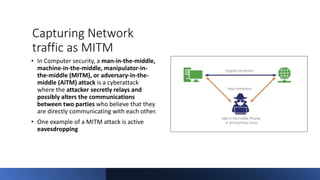
• In Computer security, a man-in-the-middle,
machine-in-the-middle, manipulator-in-
the-middle (MITM), or adversary-in-the-
middle (AiTM) attack is a cyberattack
where the attacker secretly relays and
possibly alters the communications
between two parties who believe that they
are directly communicating with each other.
• One example of a MITM attack is active
eavesdropping
Configuring an Android device to work with
Burp Suite
• It's possible to test web applications and mobile apps using a rooted
Android device. To do this, you need to do the following:
• Configure your Burp Proxy listener to accept connections on all
network interfaces.
• Connect both your device and your computer to the same wireless
network.
• To interact with HTTPS traffic, you need to install a CA certificate on
your android device at the system level.
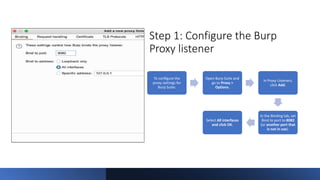
Step 1: Configure the Burp
Proxy listener
To configure the
proxy settings for
Burp Suite:
Open Burp Suite and
go to Proxy >
Options.
In Proxy Listeners,
click Add.
In the Binding tab, set
Bind to port to 8082
(or another port that
is not in use).
Select All interfaces
and click OK.
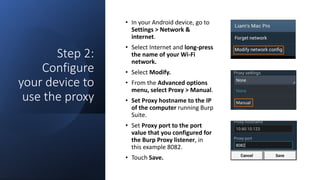
Step 2:
Configure
your device to
use the proxy
• In your Android device, go to
Settings > Network &
internet.
• Select Internet and long-press
the name of your Wi-Fi
network.
• Select Modify.
• From the Advanced options
menu, select Proxy > Manual.
• Set Proxy hostname to the IP
of the computer running Burp
Suite.
• Set Proxy port to the port
value that you configured for
the Burp Proxy listener, in
this example 8082.
• Touch Save.
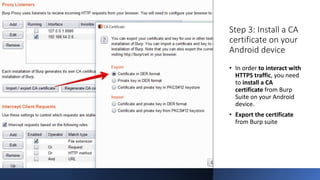
Step 3: Install a CA
certificate on your
Android device
• In order to interact with
HTTPS traffic, you need
to install a CA
certificate from Burp
Suite on your Android
device.
• Export the certificate
from Burp suite
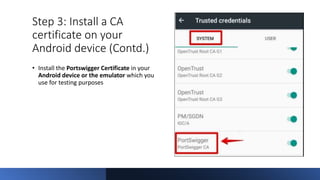
Step 3: Install a CA
certificate on your
Android device (Contd.)
• Install the Portswigger Certificate in your
Android device or the emulator which you
use for testing purposes
Step 4: Test
the
configuration
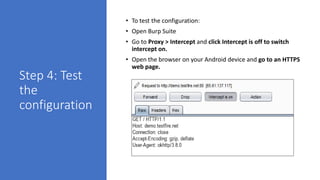
• To test the configuration:
• Open Burp Suite
• Go to Proxy > Intercept and click Intercept is off to switch
intercept on.
• Open the browser on your Android device and go to an HTTPS
web page.
Network Troubleshooting
• Are you able to reach your proxy from mobile.
• Is Burp listening on all interfaces?
• Is your proxy configured on the device?
• Can you proxy HTTP traffic?
• Is your Burp certificate installed on the device as a root certificate?
• Does your Burp certificate have an appropriate lifetime?
• Is the application proxy aware?
• Is the application using SSL pinning?
• Is the application using custom protocol?
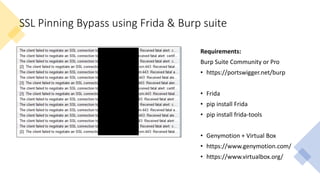
SSL Pinning Bypass using Frida & Burp suite
Requirements:
Burp Suite Community or Pro
• https://portswigger.net/burp
• Frida
• pip install Frida
• pip install frida-tools
• Genymotion + Virtual Box
• https://www.genymotion.com/
• https://www.virtualbox.org/
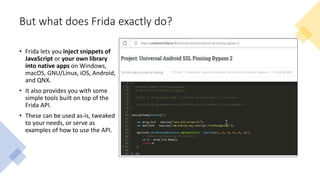
But what does Frida exactly do?
• Frida lets you inject snippets of
JavaScript or your own library
into native apps on Windows,
macOS, GNU/Linux, iOS, Android,
and QNX.
• It also provides you with some
simple tools built on top of the
Frida API.
• These can be used as-is, tweaked
to your needs, or serve as
examples of how to use the API.
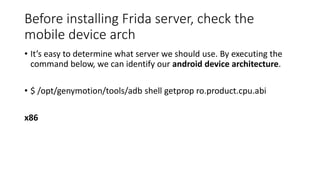
Before installing Frida server, check the
mobile device arch
• It’s easy to determine what server we should use. By executing the
command below, we can identify our android device architecture.
• $ /opt/genymotion/tools/adb shell getprop ro.product.cpu.abi
x86
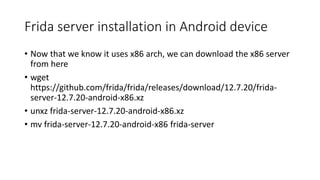
Frida server installation in Android device
• Now that we know it uses x86 arch, we can download the x86 server
from here
• wget
https://github.com/frida/frida/releases/download/12.7.20/frida-
server-12.7.20-android-x86.xz
• unxz frida-server-12.7.20-android-x86.xz
• mv frida-server-12.7.20-android-x86 frida-server
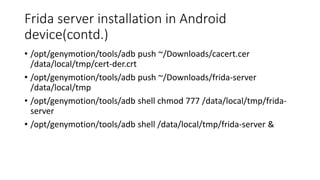
Frida server installation in Android
device(contd.)
• /opt/genymotion/tools/adb push ~/Downloads/cacert.cer
/data/local/tmp/cert-der.crt
• /opt/genymotion/tools/adb push ~/Downloads/frida-server
/data/local/tmp
• /opt/genymotion/tools/adb shell chmod 777 /data/local/tmp/frida-
server
• /opt/genymotion/tools/adb shell /data/local/tmp/frida-server &
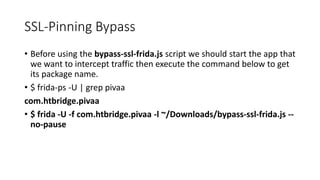
SSL-Pinning Bypass
• Before using the bypass-ssl-frida.js script we should start the app that
we want to intercept traffic then execute the command below to get
its package name.
• $ frida-ps -U | grep pivaa
com.htbridge.pivaa
• $ frida -U -f com.htbridge.pivaa -l ~/Downloads/bypass-ssl-frida.js --
no-pause
DYNAMIC ANALYSIS IN ANDROID
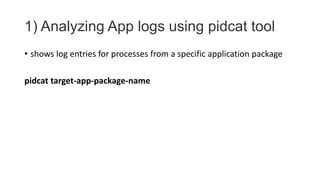
1) Analyzing App logs using pidcat tool
• shows log entries for processes from a specific application package
pidcat target-app-package-name
Recommendation
Enforce secure communication
• When you safeguard the data that you exchange between your app
and other apps, or between your app and a website, you improve
your app's stability and protect the data that you send and receive.
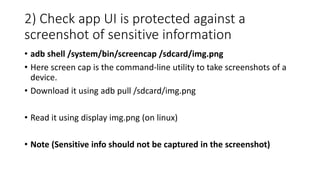
2) Check app UI is protected against a
screenshot of sensitive information
• adb shell /system/bin/screencap /sdcard/img.png
• Here screen cap is the command-line utility to take screenshots of a
device.
• Download it using adb pull /sdcard/img.png
• Read it using display img.png (on linux)
• Note (Sensitive info should not be captured in the screenshot)
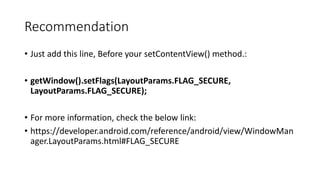
Recommendation
• Just add this line, Before your setContentView() method.:
• getWindow().setFlags(LayoutParams.FLAG_SECURE,
LayoutParams.FLAG_SECURE);
• For more information, check the below link:
• https://developer.android.com/reference/android/view/WindowMan
ager.LayoutParams.html#FLAG_SECURE
3) Check root detection mechanism is
implemented
• Install the app on the rooted device if it is not showing any alert
regarding the rooted device or not blocking the app to run.
• Then it is not protected with root detection.
Recommendation
• Implement emulator detection
• Implement root detection checks
• Implement Frida detection
• Implement Magisk detection
• Code obfuscation
4) Check shared preferences for persistent
login
• For the first time for the login, the app asks for the user name and
password and later it does not ask for the username and password.
• It stores the login key in login_account.xml at the shared preferences.
• It can be stolen by other app and attacker can use it
Recommendation
• To create SharedPreferences you will need Context object (can be an
application Context)
• getSharedPreferences method parses Preference file and creates
Map object for it
• You can create it in few modes provided by Context, it's strongly
recommended to use MODE_PRIVATE because creating world-
readable/writable files is very dangerous, and likely to cause security
holes in applications
5) Checking for Keyboard cache
• Location
/data/data/com.android.providers.userdictionary/databases/user_
dict.db
• Use SQLite to read it(user_dict.db)
Recommendation
• Disable the auto-correct feature for any sensitive information, not
just for password fields.
• Since the keyboard caches sensitive information, it may be
recoverable.
• For UITextField, look into setting the autocorrectionType property to
UITextAutocorrectionTypeNo to disable caching.
• These settings may change over time as the SDK updates so ensure it
is fully researched.
6) Test for Deep Linking Vulnerabilities
• Deep link are URLs which navigate users directly to the specific
content in an applications
• To define deep links, intent filters are defined in
AndroidManifest.xml file
• Intent filter must also include a category with the DEFAULT or
BROWSABLE value
• Check for if scheme, host and parameters are validated properly
Recommendation
• Since deep links are configured within the app, a developer could
have a secret value communicated to the app by a remote back end
server over a secure transmission protocol.
• Verification of Deep Links as App Links can be done by setting
android:autoVerify=”true” in the manifest file
• One can include a JSON file with the name assetlinks.json in your web
server that is described by the web URL intent filter
7) Test for WebView Vulnerabilities
• It allows to show web pages as an activity
• In smali code look for these strings
• @JavascriptInterface ,setJavaScriptEnabled ,setWebViewClient
• Check for dangerous WebView settings like setAllowFileAccess(true)
Recommendation
• Disable JavaScript and Plugin support if they are not needed. While both are
disabled by default, best practices call for explicitly setting them as disabled.
• Disable local file access. This restricts access to the app’s resource and asset
directory and mitigates against an attack from a web page which seeks to gain
access to other locally accessible files.
• Disallow the loading of content from third-party hosts. This can be difficult to
achieve from within the app.
• However, a developer can override shouldOverrideUrlLoading and
shouldInterceptRequest to intercept, inspect, and validate most
requests initiated from within a WebView.
• A developer may also consider implementing a whitelist scheme by using
the URI class to inspect components of a URI to ensure it matches an
entry within a list of approved resources.
8) Check location for the secrets
• res/values/strings.xml
• build configs like - local.properties, gradle.properties
• /data/misc/keystore/
9) Check for Input Validation issues
• Input validation check for URI schemes :
• Reading app files stored in sdcard or internal storage using
"file:///path_of_file" schema to read the files
• file:///sdcard/.file_name.txt or
file:///data/data/com.app.name/shared_prefs/
app_preferences.xml
Recommendation
• As with proper web application security, all input from the client
should be must be treated as untrusted.
• Services must thoroughly filter and validate input from the app and
user.
• Proper sanitization includes all user input before transmitting and
during receipt.
10) Check for Access Control issues
• Some of the componentes can be accessed by other apps if the are not
properly protected. Components like activities,services,content providers
• e.g. In a app one activity shows the API key and password (activity might
handle some other sensitive info) inside the app. Try to get the same info
from the outside of the app.
• Note: Check if the Activity/Component is exported and app is allowing
access of info outside the application. then it is an issue
• check using adb shell am start com.app_name/.Activity_name (activity
which is exported and have sensitive information) this will launch the
activity
• adb shell am start -n com.app_name/.Activity_name -a
com.app_name.action.VIEW_Action_name-a it specifies the intent action
and above will launch the activity
Recommendation
• Setting Permission for an activity
• In order to restrict the access only to components within the app, the
permission tag can be defined with the android:protectionLevel=signature
attribute.
• Setting flags on the redirected intent
• In order to prevent unintended flags being set, the removeFlags or setFlags
methods can be used on the inner intent object.
• Avoiding use of URI_ALLOW_UNSAFE flag
11) Information disclosure
• Certain settings on a web server can increase security.
• One commonly overlooked vulnerability on a web server is
information disclosure.
• Information disclosure can lead to serious problems, because every
piece of information attackers can gain from a server makes staging
an attack easier.
Recommendation
• A simple way to reduce information disclosure is to disable verbose errors.
Verbose errors can be useful in a development environment, but in a production
environment can leak critical information such as web framework information
and versions.
• Return the minimum amount of information in server responses.
• One configuration change in servers that can greatly improve security is to
change any default directories. Attackers frequently search the Internet for sites
with “low-hanging fruit,” such as default logins, easily guessable admin
interfaces, and simple naming schemes for “hidden” directories.
• Administration or other restricted areas should not be publicly web-accessible
unless absolutely necessary, and must be resistant to brute force attacks.
• HTTP authentication or forms authentication without lockout protection can
(and will) be attacked by brute force.
12) Properly Configure Server-side SSL
• Many web servers allow lower encryption settings, such as the very weak,
export-grade 40-bit encryption.
Recommendation:
• Ensure SSL certificates are properly installed and configured for the highest
encryption possible. If possible, enable only strong ciphers (128-bit and
up).
• Enable TLS 1.2 and TLS 1.3
• Implement a strong cipher suite to protect information used in creating
shared keys, encrypting messages between clients and servers, and
generating message hashes and signatures that ensure the integrity of
those messages. Also be sure to disable weak protocols.
13) Use Proper Session Management
• Sessions for users are maintained on most apps via a cookie, which can be
vulnerable.
Recommendation:
• Web languages (e.g. Java, .NET) offer session management, which is well-
developed and security tested.
• Keep server software up-to-date with security patches.
• Rolling your own session management is more risky and undertaken only
with proper expertise.
• Ensure the size of the session cookie is sufficient. Short or predictable
session cookies make it possible for an attacker to predict, highjack or
perform other attacks against the session. Use high-security settings in
session configuration.
14) Protect Internal Resources
• Resources for internal use such as administrator login forms
frequently leverage authentication that is not resistant to brute force.
• For example HTTP or forms authentication without lockout.
• Compromise of administration or other internal resources can lead
to extensive data loss and other damage.
Recommendation
• Such resources should be blocked from external access.
• Any resource that does not require public Internet access should be
restricted using firewall rules and network segmentation.
• If a login page, admin area or other resource is accessible externally,
assume it will be discovered by malicious users and attacked by brute
force.
15) Treat Geolocation Data Carefully
• Android and iOS can use GPS to accurately determine location.
• Mishandling this GPS data is a privacy concern and may make the
user vulnerable to other attacks if the attacker knows their current
or past locations.
• Information about local bluetooth and/or NFC/RFID tags may also
leak geolocation information.
• Also, applications with access to gallery pictures can also be grabbing
the GPS position stored in them (if any), by checking timestamps and
assuming the user took the picture can be a privacy issue for the
user.
Recommendation
• Do not log or store GPS information.
• Make sure to strip the EXIF data from the image.
16) Institute Local Session Timeout
• Mobile devices are frequently lost or stolen, and an attacker can
take advantage of an active session to access sensitive data, execute
transactions, or perform reconnaissance on a device owner’s
accounts.
• In addition, without a proper session timeout, an app may be
susceptible to data interception via a man-in-the-middle attack.
Recommendation
• Any time the app is not used for more than 5 minutes, terminate the
active session, redirect the user to the log-in screen, ensure that no
app data is visible, and require the user to re-enter log-in credentials
to access the app.
• After timeout, also discard and clear all memory associated with
user data including any master keys use to decrypt that data
• Also, make sure the session timeout occurs on both the client side
and the server side to mitigate against an attacker modifying the local
timeout mechanism.
17) Implement Enhanced / Two-Factor
Authentication
• Weak or non-existent authentication can grant an attacker unauthorized
access to an app.
Recommendation:
• Additional code provided by SMS or email -- but beware that an attacker
will likely have access to both on a stolen device
• Password plus additional user-known value, for example user-selected
personal factor
• Security questions and answers, selected by the user in advance (e.g.
during registration)
• For the highest level of security, use one-time passwords that require the
user to not only possess the correct credentials, but also a physical token
including the one time password.
18) Prevent Framing and Clickjacking
• Framing involves delivery of a Web/WAP site within an iFrame. This
attack can enable the “wrapper” site to execute a clickjacking attack.
• Clickjacking is a very real threat that has been exploited on high-
profile services (e.g., Facebook) to steal information or redirect users
to attacker controlled sites.
Recommendation:
• Implement X-frame-options
• X-Frame-Options: DENY
• X-Frame-Options: SAMEORIGIN
19) Protect Against CSRF with Form Tokens
• CSRF (Cross-site Request Forgery) relies on known or predictable form
values and a logged-in browser session.
Recommendation:
• Each form submission should contain a token which was loaded with
the form or at the beginning of a user session.
• Check this token on the server when receiving POST requests to
ensure the user originated it.
• This capability is provided with major web platforms and can be
implemented on forms with minimal custom development.
20) Sign Android APKs
• APKs should be signed correctly with a non-expired certificate.
Recommendation:
• Sign a production app with a production certificate, not a debug certificate
• Make sure the certificate includes a sufficient validity period (i.e., won't expire
during the expected lifespan of the app)
• Google recommends that your certificate use at least 2048-bit encryption
• Make sure the keystore containing the signing key is properly protected
• Also, restrict access to the keystore to only those people that absolutely require
it
• Here's an example of a Keytool command that generates a private key:
$ keytool -genkey -v -keystore my-release-key.keystore -alias alias_name -keyalg
RSA -keysize 2048 -validity 10000
THANK YOU !

Android Penetration Testing - Day 3

  • 1.
    Day 3 –Android Hacking
  • 2.
    Agenda for today’ssession NETWORK ANALYSIS WITH BURP SUITE DYNAMIC ANALYSIS
  • 3.
    Capturing Network traffic asMITM • In Computer security, a man-in-the-middle, machine-in-the-middle, manipulator-in- the-middle (MITM), or adversary-in-the- middle (AiTM) attack is a cyberattack where the attacker secretly relays and possibly alters the communications between two parties who believe that they are directly communicating with each other. • One example of a MITM attack is active eavesdropping
  • 4.
    Configuring an Androiddevice to work with Burp Suite • It's possible to test web applications and mobile apps using a rooted Android device. To do this, you need to do the following: • Configure your Burp Proxy listener to accept connections on all network interfaces. • Connect both your device and your computer to the same wireless network. • To interact with HTTPS traffic, you need to install a CA certificate on your android device at the system level.
  • 5.
    Step 1: Configurethe Burp Proxy listener To configure the proxy settings for Burp Suite: Open Burp Suite and go to Proxy > Options. In Proxy Listeners, click Add. In the Binding tab, set Bind to port to 8082 (or another port that is not in use). Select All interfaces and click OK.
  • 6.
    Step 2: Configure your deviceto use the proxy • In your Android device, go to Settings > Network & internet. • Select Internet and long-press the name of your Wi-Fi network. • Select Modify. • From the Advanced options menu, select Proxy > Manual. • Set Proxy hostname to the IP of the computer running Burp Suite. • Set Proxy port to the port value that you configured for the Burp Proxy listener, in this example 8082. • Touch Save.
  • 7.
    Step 3: Installa CA certificate on your Android device • In order to interact with HTTPS traffic, you need to install a CA certificate from Burp Suite on your Android device. • Export the certificate from Burp suite
  • 8.
    Step 3: Installa CA certificate on your Android device (Contd.) • Install the Portswigger Certificate in your Android device or the emulator which you use for testing purposes
  • 9.
    Step 4: Test the configuration •To test the configuration: • Open Burp Suite • Go to Proxy > Intercept and click Intercept is off to switch intercept on. • Open the browser on your Android device and go to an HTTPS web page.
  • 10.
    Network Troubleshooting • Areyou able to reach your proxy from mobile. • Is Burp listening on all interfaces? • Is your proxy configured on the device? • Can you proxy HTTP traffic? • Is your Burp certificate installed on the device as a root certificate? • Does your Burp certificate have an appropriate lifetime? • Is the application proxy aware? • Is the application using SSL pinning? • Is the application using custom protocol?
  • 11.
    SSL Pinning Bypassusing Frida & Burp suite Requirements: Burp Suite Community or Pro • https://portswigger.net/burp • Frida • pip install Frida • pip install frida-tools • Genymotion + Virtual Box • https://www.genymotion.com/ • https://www.virtualbox.org/
  • 12.
    But what doesFrida exactly do? • Frida lets you inject snippets of JavaScript or your own library into native apps on Windows, macOS, GNU/Linux, iOS, Android, and QNX. • It also provides you with some simple tools built on top of the Frida API. • These can be used as-is, tweaked to your needs, or serve as examples of how to use the API.
  • 13.
    Before installing Fridaserver, check the mobile device arch • It’s easy to determine what server we should use. By executing the command below, we can identify our android device architecture. • $ /opt/genymotion/tools/adb shell getprop ro.product.cpu.abi x86
  • 14.
    Frida server installationin Android device • Now that we know it uses x86 arch, we can download the x86 server from here • wget https://github.com/frida/frida/releases/download/12.7.20/frida- server-12.7.20-android-x86.xz • unxz frida-server-12.7.20-android-x86.xz • mv frida-server-12.7.20-android-x86 frida-server
  • 15.
    Frida server installationin Android device(contd.) • /opt/genymotion/tools/adb push ~/Downloads/cacert.cer /data/local/tmp/cert-der.crt • /opt/genymotion/tools/adb push ~/Downloads/frida-server /data/local/tmp • /opt/genymotion/tools/adb shell chmod 777 /data/local/tmp/frida- server • /opt/genymotion/tools/adb shell /data/local/tmp/frida-server &
  • 16.
    SSL-Pinning Bypass • Beforeusing the bypass-ssl-frida.js script we should start the app that we want to intercept traffic then execute the command below to get its package name. • $ frida-ps -U | grep pivaa com.htbridge.pivaa • $ frida -U -f com.htbridge.pivaa -l ~/Downloads/bypass-ssl-frida.js -- no-pause
  • 17.
  • 18.
    1) Analyzing Applogs using pidcat tool • shows log entries for processes from a specific application package pidcat target-app-package-name
  • 19.
    Recommendation Enforce secure communication •When you safeguard the data that you exchange between your app and other apps, or between your app and a website, you improve your app's stability and protect the data that you send and receive.
  • 20.
    2) Check appUI is protected against a screenshot of sensitive information • adb shell /system/bin/screencap /sdcard/img.png • Here screen cap is the command-line utility to take screenshots of a device. • Download it using adb pull /sdcard/img.png • Read it using display img.png (on linux) • Note (Sensitive info should not be captured in the screenshot)
  • 21.
    Recommendation • Just addthis line, Before your setContentView() method.: • getWindow().setFlags(LayoutParams.FLAG_SECURE, LayoutParams.FLAG_SECURE); • For more information, check the below link: • https://developer.android.com/reference/android/view/WindowMan ager.LayoutParams.html#FLAG_SECURE
  • 22.
    3) Check rootdetection mechanism is implemented • Install the app on the rooted device if it is not showing any alert regarding the rooted device or not blocking the app to run. • Then it is not protected with root detection.
  • 23.
    Recommendation • Implement emulatordetection • Implement root detection checks • Implement Frida detection • Implement Magisk detection • Code obfuscation
  • 24.
    4) Check sharedpreferences for persistent login • For the first time for the login, the app asks for the user name and password and later it does not ask for the username and password. • It stores the login key in login_account.xml at the shared preferences. • It can be stolen by other app and attacker can use it
  • 25.
    Recommendation • To createSharedPreferences you will need Context object (can be an application Context) • getSharedPreferences method parses Preference file and creates Map object for it • You can create it in few modes provided by Context, it's strongly recommended to use MODE_PRIVATE because creating world- readable/writable files is very dangerous, and likely to cause security holes in applications
  • 26.
    5) Checking forKeyboard cache • Location /data/data/com.android.providers.userdictionary/databases/user_ dict.db • Use SQLite to read it(user_dict.db)
  • 27.
    Recommendation • Disable theauto-correct feature for any sensitive information, not just for password fields. • Since the keyboard caches sensitive information, it may be recoverable. • For UITextField, look into setting the autocorrectionType property to UITextAutocorrectionTypeNo to disable caching. • These settings may change over time as the SDK updates so ensure it is fully researched.
  • 28.
    6) Test forDeep Linking Vulnerabilities • Deep link are URLs which navigate users directly to the specific content in an applications • To define deep links, intent filters are defined in AndroidManifest.xml file • Intent filter must also include a category with the DEFAULT or BROWSABLE value • Check for if scheme, host and parameters are validated properly
  • 29.
    Recommendation • Since deeplinks are configured within the app, a developer could have a secret value communicated to the app by a remote back end server over a secure transmission protocol. • Verification of Deep Links as App Links can be done by setting android:autoVerify=”true” in the manifest file • One can include a JSON file with the name assetlinks.json in your web server that is described by the web URL intent filter
  • 30.
    7) Test forWebView Vulnerabilities • It allows to show web pages as an activity • In smali code look for these strings • @JavascriptInterface ,setJavaScriptEnabled ,setWebViewClient • Check for dangerous WebView settings like setAllowFileAccess(true)
  • 31.
    Recommendation • Disable JavaScriptand Plugin support if they are not needed. While both are disabled by default, best practices call for explicitly setting them as disabled. • Disable local file access. This restricts access to the app’s resource and asset directory and mitigates against an attack from a web page which seeks to gain access to other locally accessible files. • Disallow the loading of content from third-party hosts. This can be difficult to achieve from within the app. • However, a developer can override shouldOverrideUrlLoading and shouldInterceptRequest to intercept, inspect, and validate most requests initiated from within a WebView. • A developer may also consider implementing a whitelist scheme by using the URI class to inspect components of a URI to ensure it matches an entry within a list of approved resources.
  • 32.
    8) Check locationfor the secrets • res/values/strings.xml • build configs like - local.properties, gradle.properties • /data/misc/keystore/
  • 33.
    9) Check forInput Validation issues • Input validation check for URI schemes : • Reading app files stored in sdcard or internal storage using "file:///path_of_file" schema to read the files • file:///sdcard/.file_name.txt or file:///data/data/com.app.name/shared_prefs/ app_preferences.xml
  • 34.
    Recommendation • As withproper web application security, all input from the client should be must be treated as untrusted. • Services must thoroughly filter and validate input from the app and user. • Proper sanitization includes all user input before transmitting and during receipt.
  • 35.
    10) Check forAccess Control issues • Some of the componentes can be accessed by other apps if the are not properly protected. Components like activities,services,content providers • e.g. In a app one activity shows the API key and password (activity might handle some other sensitive info) inside the app. Try to get the same info from the outside of the app. • Note: Check if the Activity/Component is exported and app is allowing access of info outside the application. then it is an issue • check using adb shell am start com.app_name/.Activity_name (activity which is exported and have sensitive information) this will launch the activity • adb shell am start -n com.app_name/.Activity_name -a com.app_name.action.VIEW_Action_name-a it specifies the intent action and above will launch the activity
  • 36.
    Recommendation • Setting Permissionfor an activity • In order to restrict the access only to components within the app, the permission tag can be defined with the android:protectionLevel=signature attribute. • Setting flags on the redirected intent • In order to prevent unintended flags being set, the removeFlags or setFlags methods can be used on the inner intent object. • Avoiding use of URI_ALLOW_UNSAFE flag
  • 37.
    11) Information disclosure •Certain settings on a web server can increase security. • One commonly overlooked vulnerability on a web server is information disclosure. • Information disclosure can lead to serious problems, because every piece of information attackers can gain from a server makes staging an attack easier.
  • 38.
    Recommendation • A simpleway to reduce information disclosure is to disable verbose errors. Verbose errors can be useful in a development environment, but in a production environment can leak critical information such as web framework information and versions. • Return the minimum amount of information in server responses. • One configuration change in servers that can greatly improve security is to change any default directories. Attackers frequently search the Internet for sites with “low-hanging fruit,” such as default logins, easily guessable admin interfaces, and simple naming schemes for “hidden” directories. • Administration or other restricted areas should not be publicly web-accessible unless absolutely necessary, and must be resistant to brute force attacks. • HTTP authentication or forms authentication without lockout protection can (and will) be attacked by brute force.
  • 39.
    12) Properly ConfigureServer-side SSL • Many web servers allow lower encryption settings, such as the very weak, export-grade 40-bit encryption. Recommendation: • Ensure SSL certificates are properly installed and configured for the highest encryption possible. If possible, enable only strong ciphers (128-bit and up). • Enable TLS 1.2 and TLS 1.3 • Implement a strong cipher suite to protect information used in creating shared keys, encrypting messages between clients and servers, and generating message hashes and signatures that ensure the integrity of those messages. Also be sure to disable weak protocols.
  • 40.
    13) Use ProperSession Management • Sessions for users are maintained on most apps via a cookie, which can be vulnerable. Recommendation: • Web languages (e.g. Java, .NET) offer session management, which is well- developed and security tested. • Keep server software up-to-date with security patches. • Rolling your own session management is more risky and undertaken only with proper expertise. • Ensure the size of the session cookie is sufficient. Short or predictable session cookies make it possible for an attacker to predict, highjack or perform other attacks against the session. Use high-security settings in session configuration.
  • 41.
    14) Protect InternalResources • Resources for internal use such as administrator login forms frequently leverage authentication that is not resistant to brute force. • For example HTTP or forms authentication without lockout. • Compromise of administration or other internal resources can lead to extensive data loss and other damage.
  • 42.
    Recommendation • Such resourcesshould be blocked from external access. • Any resource that does not require public Internet access should be restricted using firewall rules and network segmentation. • If a login page, admin area or other resource is accessible externally, assume it will be discovered by malicious users and attacked by brute force.
  • 43.
    15) Treat GeolocationData Carefully • Android and iOS can use GPS to accurately determine location. • Mishandling this GPS data is a privacy concern and may make the user vulnerable to other attacks if the attacker knows their current or past locations. • Information about local bluetooth and/or NFC/RFID tags may also leak geolocation information. • Also, applications with access to gallery pictures can also be grabbing the GPS position stored in them (if any), by checking timestamps and assuming the user took the picture can be a privacy issue for the user.
  • 44.
    Recommendation • Do notlog or store GPS information. • Make sure to strip the EXIF data from the image.
  • 45.
    16) Institute LocalSession Timeout • Mobile devices are frequently lost or stolen, and an attacker can take advantage of an active session to access sensitive data, execute transactions, or perform reconnaissance on a device owner’s accounts. • In addition, without a proper session timeout, an app may be susceptible to data interception via a man-in-the-middle attack.
  • 46.
    Recommendation • Any timethe app is not used for more than 5 minutes, terminate the active session, redirect the user to the log-in screen, ensure that no app data is visible, and require the user to re-enter log-in credentials to access the app. • After timeout, also discard and clear all memory associated with user data including any master keys use to decrypt that data • Also, make sure the session timeout occurs on both the client side and the server side to mitigate against an attacker modifying the local timeout mechanism.
  • 47.
    17) Implement Enhanced/ Two-Factor Authentication • Weak or non-existent authentication can grant an attacker unauthorized access to an app. Recommendation: • Additional code provided by SMS or email -- but beware that an attacker will likely have access to both on a stolen device • Password plus additional user-known value, for example user-selected personal factor • Security questions and answers, selected by the user in advance (e.g. during registration) • For the highest level of security, use one-time passwords that require the user to not only possess the correct credentials, but also a physical token including the one time password.
  • 48.
    18) Prevent Framingand Clickjacking • Framing involves delivery of a Web/WAP site within an iFrame. This attack can enable the “wrapper” site to execute a clickjacking attack. • Clickjacking is a very real threat that has been exploited on high- profile services (e.g., Facebook) to steal information or redirect users to attacker controlled sites. Recommendation: • Implement X-frame-options • X-Frame-Options: DENY • X-Frame-Options: SAMEORIGIN
  • 49.
    19) Protect AgainstCSRF with Form Tokens • CSRF (Cross-site Request Forgery) relies on known or predictable form values and a logged-in browser session. Recommendation: • Each form submission should contain a token which was loaded with the form or at the beginning of a user session. • Check this token on the server when receiving POST requests to ensure the user originated it. • This capability is provided with major web platforms and can be implemented on forms with minimal custom development.
  • 50.
    20) Sign AndroidAPKs • APKs should be signed correctly with a non-expired certificate. Recommendation: • Sign a production app with a production certificate, not a debug certificate • Make sure the certificate includes a sufficient validity period (i.e., won't expire during the expected lifespan of the app) • Google recommends that your certificate use at least 2048-bit encryption • Make sure the keystore containing the signing key is properly protected • Also, restrict access to the keystore to only those people that absolutely require it • Here's an example of a Keytool command that generates a private key: $ keytool -genkey -v -keystore my-release-key.keystore -alias alias_name -keyalg RSA -keysize 2048 -validity 10000
  • 51.