1
COMPLEX
ENGINEERING PROBLEM (CEP)
Course Title:
Introduction to Embedded Systems
Title:
ANDROID CONTROLLED ROBOT USING MICROCONTROLLER
8051
Submitted to:
Engineer: Atif Mahmood Khaki
Submitted by:
Sadam Hussain
GCPKI-00857
Department:
BEEE (4th)
2
ABSTARACT
Many of the wireless robot using RF modules. But this project make use of android mobile
phone for robotic control. The control commands are available more than modules. For this the
Android mobile user has to install the application on his/her mobile phone. The user need to
turn on the Bluetooth in the mobile. The wireless communication technique used to control the
robot is Bluetooth technology. User can use various command like move forward, reverse,
move left and move right using these commands which are sent from the android mobiles,
Bluetooth has a Bluetooth receiver unit which receive the command and gave it to
microcontroller circuit to control the motors. The microcontroller then transmitting the signal
to the motor driver ICs to operate the motors.
3
OVERVIEW
CONTENTS
1) INTRODUCTION-------------------------------------------------------------- 4
1.1) Problem Statement………………………………………………………….4
1.2) Objectives…………………………………………...………………………4
2) HARDWARE REQUIRED-----------------------------------------------------4
3) SOFTWRE REQUIRED--------------------------------------------------------4
4) EXPLANTION--------------------------------------------------------------------5
5) SOFTWRE CODE AND SCHEMATIC DIAGRAM---------------------5
5.1) Kiel u Vision C language code………………………………………………….5-11
5.2) Proteus schematic Diagram………………………………………………………11
6) SOFTWARE OUTPUT----------------------------------------------------------12
6.1) Kiel u Vision…………………………………………………………………….12
6.2) Proteus professional…………………………………………………………13-14
7) CONCLUSION-------------------------------------------------------------------15
8) REFRENCES---------------------------------------------------------------------15
9) FUTURE SCOPE----------------------------------------------------------------15
10) GLOSSORY----------------------------------------------------------------15-16
4
1) INTRODCTION.
1.1) Problem Statement:
Design and Implement Android Controlled Robot Using 8051 Microcontroller.?
1.2) Objectives.
Android is software stack for mobile devices that include an operating system middleware and key
application. Android boast a healthy array of connectivity options, including Wi-Fi Bluetooth and
wireless data over a cellular connection (for example, GPRS, EDGE (Enhanced Data rate for GSM
revolution) and 3G. Android provide access to wide range of useful libraries and tools that can be
used to build rich applications. In addition, Android includes a full set of tools that have been built
from the ground up alongside. The plate form providing developers high productivity and deep
insight their applications.
The controlling device of the whole system is microcontroller, Bluetooth module, Dc motors
are interfaced to microcontroller. The data received by the Bluetooth module Android smart
phone as feed as input to the controller. The controller acts according on the dc motor of the
Robot. The robot in the project can be made to move in all four directions using the Android
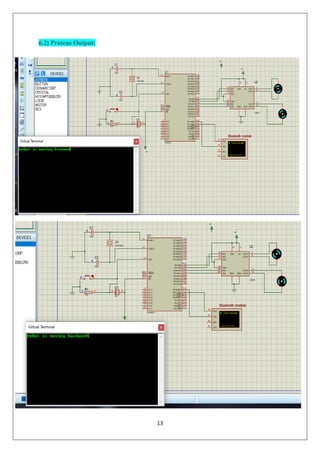
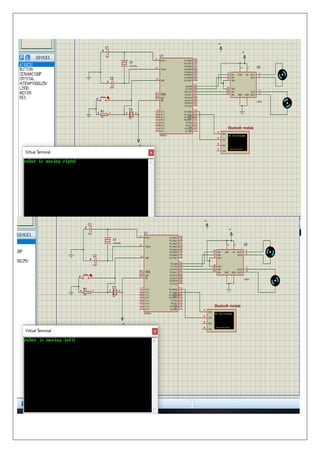
phone the direction of the robot is indicated using Virtual Terminal and Motors. In achieving
the task the controller is loaded with program written using embedded C language using Kiel
u Vision.
2) HARDWARE REQUIRED.
The following Components are required to complete the CEP.
▪ 8051 microcontroller (AT89S52)
▪ HC-05 Bluetooth module
▪ L293D Motor Driver
▪ Robot chassis
▪ DC Motors (2)
▪ Wheels (2)
5
▪ Castor Wheel
▪ Jumper wires
▪ Bluetooth terminal android app
3) SOFTWARE REQUIRED
▪ Kiel u Vision
▪ Proteus professional
▪ Android App (Bluetooth App)
4) EXPLANTION
The project aims in designing a robot that can be operated using Android mobile phone.
The controlling of the robot is done wirelessly through Android smart phone using the
Bluetooth feature present in it. Here in the project the Android smart phone is used as remote
controlling for operating the robot.
Here in this robot I have used a Bluetooth module to control via two motor at 100RPM
approximately the robot is controlled by an Android application microcontroller used as
AT89C51 from 8051 family to work in serial communication UART mode the communication
is configured on 9800bps to communicate it with the Bluetooth module.
The Bluetooth module used is a HC-05 in smd package which works on 3.3v and have a serial
communication with any devices connected to it the communication speed can be configured
on various speed via AT command.
The BT module is a SPP supported profile so it can be connected easily to any Bluetooth
module or phone. In this profile the data can be sent and receive to module. The BT module is
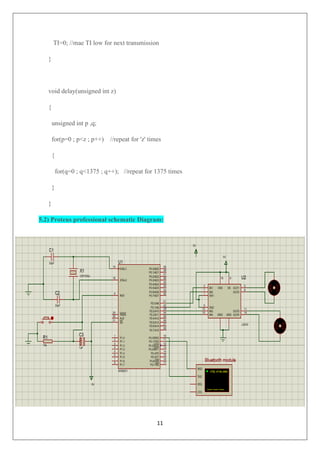
connected to the RX pin of microcontroller.
The L293D is a motor driver IC to operate the motor in any direction required dependent on
the logic applied to the logic pin.
A readymade compact size chassis I have used to avoid the chassis Assembly the chassis
contain two decks the lower is used for Motors fitting the upper is used as a battery stack.
6
On top the plate the board is mounted by screw fitting.
5) SOFTWRE CODE AND SCHEMATIC DIAGRAM
5.1) Kiel u Vision C language code
#include<reg51.h>
unsigned char ch1;
unsigned char s;
sbit m1f=P2^0; // in1 pin of motor1
sbit m1b=P2^1; // in2 pin of motor1
sbit m2f=P2^2; // in1 pin of motor2
sbit m2b=P2^3; // in2 pin of motor2
void delay(unsigned int) ; //function for creating delay
char rxdata(void); //function for receiving a character through serial port of 8051
void txdata(unsigned char); //function for sending a character through serial port of 8051
void main(void)
{
unsigned char i;
unsigned char msg1[]={"robot is moving forward"};
unsigned char msg2[]={"robot is moving backward"};
unsigned char msg3[]={"robot is moving right"};
unsigned char msg4[]={"robot is moving left"};
unsigned char msg5[]={"robot is stopped"};
TMOD=0x20; //timer 1 , mode 2 , auto reload
SCON=0x50; //8bit data , 1 stop bit , REN enabled
7
TH1=0xfd; //timer value for 9600 bits per second(bps)
TR1=1;
while(1) //repeat forever
{
s=rxdata(); //receive serial data from hc-05 bluetooth module
if(s=='f') //move both the motors in forward direction
{
m1f=1;
delay(1);
m1b=0;
delay(1);
m2f=1;
delay(1);
m2b=0;
delay(1);
for(i=0;msg1[i]!='0';i++)
{
txdata(msg1[i]);
} }
else if(s=='b')
{
m1f=0;
delay(1);
8
m1b=1;
delay(10);
m2f=0;
delay(10);
m2b=1;
delay(10);
for(i=0;msg2[i]!='0';i++)
{
txdata(msg2[i]);
}
}
else if(s=='r')
{ m1f=1;
delay(1);
m1b=0;
delay(10);
m2f=0;
delay(10);
m2b=1;
delay(10);
for(i=0;msg3[i]!='0';i++)
{ txdata(msg3[i]);
}
9
}
else if(s=='l')
{
m1f=0;
delay(1);
m1b=1;
delay(1);
m2f=1;
delay(1);
m2b=0;
delay(1);
for(i=0;msg4[i]!='0';i++)
{
txdata(msg4[i]);
}
}
else if(s=='s')
{
m1f=0;
delay(1);
m1b=0;
delay(1);
m2f=0;
10
delay(1);
m2b=0;
delay(1);
for(i=0;msg5[i]!='0';i++)
{
txdata(msg5[i]);
}
}
txdata('n');
}
}
char rxdata()
{
while(RI==0); //wait till RI becomes HIGH
RI=0; //make RI low
ch1=SBUF; //copy received data
return ch1; //return the received data to main function.
}
void txdata(unsigned char x)
{
SBUF=x; //copy data to be transmitted to SBUF
while(TI==0); //wait till TI becomes high
11
TI=0; //mae TI low for next transmission
}
void delay(unsigned int z)
{
unsigned int p ,q;
for(p=0 ; p<z ; p++) //repeat for 'z' times
{
for(q=0 ; q<1375 ; q++); //repeat for 1375 times
}
}
5.2) Proteus professional schematic Diagram:
12
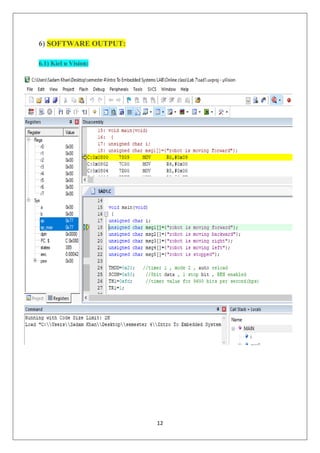
6) SOFTWARE OUTPUT:
6.1) Kiel u Vision:
13
6.2) Proteus Output:
14
15
7) CONCLUSION
Wireless control is one of the most important basic need of all living beings. But unfortunately
due to huge amount of data and communication overheads the technology is not fully utilized.
Many of the wireless-controlled robot use RF modules. But this project make use of Android
mobile phone for Robotic which is very cheap and easily available. The control command
available are more than RF module. For this the Android mobile user has to install the
application on his/her mobile phone then the user need to turn on the Bluetooth in the mobile,
the wireless communication technique used to control the robot is Bluetooth technology. User
can use various command like move forward, reverse, move left and move right using these
commands which are sent from the android mobiles, Bluetooth has a Bluetooth receiver unit
which receive the command and gave it to microcontroller circuit to control the motors. The
microcontroller then transmitting the signal to the motor driver ICs to operate the motors.
8)REFRENCES:
Following are all the references used to compile this project report:
▪ https://circuitdigest.com/microcontroller-projects/bluetooth-controlled-robot-using-8051.
▪ https://youtu.be/PNm-9I9KAR8.
▪ Google Search Engine for Basic definition.
9)FUTURE SCOPE:
This project will be implemented further on AVR, ARM and Microcontroller etc.
More can be done in the process of UART communication control and many challenges will
be carry out to increase reliability and efficiency.
This system can also be developed using GSM technology.
10)GLOSOORY:
Kiel u Vision: Kiel u Vision is microcontroller software used to create hex file of Assembly
and C language.
Proteus: proteus is electrical software used to draw and tests the completion of various
electrical circuits.
16
Robot Chassis: Aluminium Chassis comprise the body of a robot. Roll cages, bumpers and
other body accessories can also be found in this category.
HC-05 Bluetooth module: HC-05 module is an easy to use Bluetooth SPP (Serial Port
Protocol) module, designed for transparent wireless serial connection setup.
UART. Universal Asynchronous Receiver transmitter is a physical circuit not communication
protocol like SPI and I2C.

Android Control robot using 8051 microcontroler

  • 1.
    1 COMPLEX ENGINEERING PROBLEM (CEP) CourseTitle: Introduction to Embedded Systems Title: ANDROID CONTROLLED ROBOT USING MICROCONTROLLER 8051 Submitted to: Engineer: Atif Mahmood Khaki Submitted by: Sadam Hussain GCPKI-00857 Department: BEEE (4th)
  • 2.
    2 ABSTARACT Many of thewireless robot using RF modules. But this project make use of android mobile phone for robotic control. The control commands are available more than modules. For this the Android mobile user has to install the application on his/her mobile phone. The user need to turn on the Bluetooth in the mobile. The wireless communication technique used to control the robot is Bluetooth technology. User can use various command like move forward, reverse, move left and move right using these commands which are sent from the android mobiles, Bluetooth has a Bluetooth receiver unit which receive the command and gave it to microcontroller circuit to control the motors. The microcontroller then transmitting the signal to the motor driver ICs to operate the motors.
  • 3.
    3 OVERVIEW CONTENTS 1) INTRODUCTION-------------------------------------------------------------- 4 1.1)Problem Statement………………………………………………………….4 1.2) Objectives…………………………………………...………………………4 2) HARDWARE REQUIRED-----------------------------------------------------4 3) SOFTWRE REQUIRED--------------------------------------------------------4 4) EXPLANTION--------------------------------------------------------------------5 5) SOFTWRE CODE AND SCHEMATIC DIAGRAM---------------------5 5.1) Kiel u Vision C language code………………………………………………….5-11 5.2) Proteus schematic Diagram………………………………………………………11 6) SOFTWARE OUTPUT----------------------------------------------------------12 6.1) Kiel u Vision…………………………………………………………………….12 6.2) Proteus professional…………………………………………………………13-14 7) CONCLUSION-------------------------------------------------------------------15 8) REFRENCES---------------------------------------------------------------------15 9) FUTURE SCOPE----------------------------------------------------------------15 10) GLOSSORY----------------------------------------------------------------15-16
  • 4.
    4 1) INTRODCTION. 1.1) ProblemStatement: Design and Implement Android Controlled Robot Using 8051 Microcontroller.? 1.2) Objectives. Android is software stack for mobile devices that include an operating system middleware and key application. Android boast a healthy array of connectivity options, including Wi-Fi Bluetooth and wireless data over a cellular connection (for example, GPRS, EDGE (Enhanced Data rate for GSM revolution) and 3G. Android provide access to wide range of useful libraries and tools that can be used to build rich applications. In addition, Android includes a full set of tools that have been built from the ground up alongside. The plate form providing developers high productivity and deep insight their applications. The controlling device of the whole system is microcontroller, Bluetooth module, Dc motors are interfaced to microcontroller. The data received by the Bluetooth module Android smart phone as feed as input to the controller. The controller acts according on the dc motor of the Robot. The robot in the project can be made to move in all four directions using the Android phone the direction of the robot is indicated using Virtual Terminal and Motors. In achieving the task the controller is loaded with program written using embedded C language using Kiel u Vision. 2) HARDWARE REQUIRED. The following Components are required to complete the CEP. ▪ 8051 microcontroller (AT89S52) ▪ HC-05 Bluetooth module ▪ L293D Motor Driver ▪ Robot chassis ▪ DC Motors (2) ▪ Wheels (2)
  • 5.
    5 ▪ Castor Wheel ▪Jumper wires ▪ Bluetooth terminal android app 3) SOFTWARE REQUIRED ▪ Kiel u Vision ▪ Proteus professional ▪ Android App (Bluetooth App) 4) EXPLANTION The project aims in designing a robot that can be operated using Android mobile phone. The controlling of the robot is done wirelessly through Android smart phone using the Bluetooth feature present in it. Here in the project the Android smart phone is used as remote controlling for operating the robot. Here in this robot I have used a Bluetooth module to control via two motor at 100RPM approximately the robot is controlled by an Android application microcontroller used as AT89C51 from 8051 family to work in serial communication UART mode the communication is configured on 9800bps to communicate it with the Bluetooth module. The Bluetooth module used is a HC-05 in smd package which works on 3.3v and have a serial communication with any devices connected to it the communication speed can be configured on various speed via AT command. The BT module is a SPP supported profile so it can be connected easily to any Bluetooth module or phone. In this profile the data can be sent and receive to module. The BT module is connected to the RX pin of microcontroller. The L293D is a motor driver IC to operate the motor in any direction required dependent on the logic applied to the logic pin. A readymade compact size chassis I have used to avoid the chassis Assembly the chassis contain two decks the lower is used for Motors fitting the upper is used as a battery stack.
  • 6.
    6 On top theplate the board is mounted by screw fitting. 5) SOFTWRE CODE AND SCHEMATIC DIAGRAM 5.1) Kiel u Vision C language code #include<reg51.h> unsigned char ch1; unsigned char s; sbit m1f=P2^0; // in1 pin of motor1 sbit m1b=P2^1; // in2 pin of motor1 sbit m2f=P2^2; // in1 pin of motor2 sbit m2b=P2^3; // in2 pin of motor2 void delay(unsigned int) ; //function for creating delay char rxdata(void); //function for receiving a character through serial port of 8051 void txdata(unsigned char); //function for sending a character through serial port of 8051 void main(void) { unsigned char i; unsigned char msg1[]={"robot is moving forward"}; unsigned char msg2[]={"robot is moving backward"}; unsigned char msg3[]={"robot is moving right"}; unsigned char msg4[]={"robot is moving left"}; unsigned char msg5[]={"robot is stopped"}; TMOD=0x20; //timer 1 , mode 2 , auto reload SCON=0x50; //8bit data , 1 stop bit , REN enabled
  • 7.
    7 TH1=0xfd; //timer valuefor 9600 bits per second(bps) TR1=1; while(1) //repeat forever { s=rxdata(); //receive serial data from hc-05 bluetooth module if(s=='f') //move both the motors in forward direction { m1f=1; delay(1); m1b=0; delay(1); m2f=1; delay(1); m2b=0; delay(1); for(i=0;msg1[i]!='0';i++) { txdata(msg1[i]); } } else if(s=='b') { m1f=0; delay(1);
  • 8.
  • 9.
  • 10.
    10 delay(1); m2b=0; delay(1); for(i=0;msg5[i]!='0';i++) { txdata(msg5[i]); } } txdata('n'); } } char rxdata() { while(RI==0); //waittill RI becomes HIGH RI=0; //make RI low ch1=SBUF; //copy received data return ch1; //return the received data to main function. } void txdata(unsigned char x) { SBUF=x; //copy data to be transmitted to SBUF while(TI==0); //wait till TI becomes high
  • 11.
    11 TI=0; //mae TIlow for next transmission } void delay(unsigned int z) { unsigned int p ,q; for(p=0 ; p<z ; p++) //repeat for 'z' times { for(q=0 ; q<1375 ; q++); //repeat for 1375 times } } 5.2) Proteus professional schematic Diagram:
  • 12.
  • 13.
  • 14.
  • 15.
    15 7) CONCLUSION Wireless controlis one of the most important basic need of all living beings. But unfortunately due to huge amount of data and communication overheads the technology is not fully utilized. Many of the wireless-controlled robot use RF modules. But this project make use of Android mobile phone for Robotic which is very cheap and easily available. The control command available are more than RF module. For this the Android mobile user has to install the application on his/her mobile phone then the user need to turn on the Bluetooth in the mobile, the wireless communication technique used to control the robot is Bluetooth technology. User can use various command like move forward, reverse, move left and move right using these commands which are sent from the android mobiles, Bluetooth has a Bluetooth receiver unit which receive the command and gave it to microcontroller circuit to control the motors. The microcontroller then transmitting the signal to the motor driver ICs to operate the motors. 8)REFRENCES: Following are all the references used to compile this project report: ▪ https://circuitdigest.com/microcontroller-projects/bluetooth-controlled-robot-using-8051. ▪ https://youtu.be/PNm-9I9KAR8. ▪ Google Search Engine for Basic definition. 9)FUTURE SCOPE: This project will be implemented further on AVR, ARM and Microcontroller etc. More can be done in the process of UART communication control and many challenges will be carry out to increase reliability and efficiency. This system can also be developed using GSM technology. 10)GLOSOORY: Kiel u Vision: Kiel u Vision is microcontroller software used to create hex file of Assembly and C language. Proteus: proteus is electrical software used to draw and tests the completion of various electrical circuits.
  • 16.
    16 Robot Chassis: AluminiumChassis comprise the body of a robot. Roll cages, bumpers and other body accessories can also be found in this category. HC-05 Bluetooth module: HC-05 module is an easy to use Bluetooth SPP (Serial Port Protocol) module, designed for transparent wireless serial connection setup. UART. Universal Asynchronous Receiver transmitter is a physical circuit not communication protocol like SPI and I2C.