Ajman University of science and technology
College of Information Technology
Department of Computer Engineering
Graduation project II
BLUETOOTH CONTROLLED ANDRIOD CAR
Maria Jihad 201111093
Doaa Marzouk 201110165
Supervisor : Engineer Rawhi al raai
Outline
• Introduction
• objectives
• General description
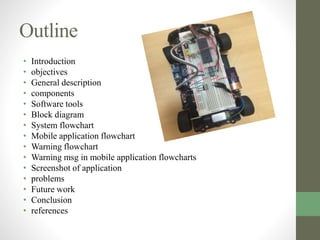
• components
• Software tools
• Block diagram
• System flowchart
• Mobile application flowchart
• Warning flowchart
• Warning msg in mobile application flowcharts
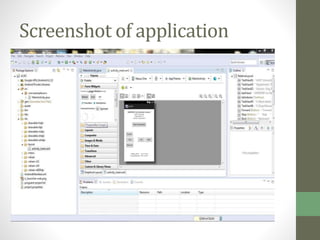
• Screenshot of application
• problems
• Future work
• Conclusion
• references
Introduction
• Bluetooth controlled android car consists of a cooperative
subsystems that rely on and Control another subsystem.
• The subsystems are divided into two main systems, the
car and the remote control.
Objectives
• Controlling robot car using smart phone.
• Design a system performs specific functions.
• Develop android application .
• Dealing with sensor interface with microcontroller
• Dealing with module interface with microcontroller
General description
• The final design will consist of vehicle and remote control,
The PIC will be our central processing unit .
• The vehicle and the remote control rely on communication
from one device to the other to produce a functioning
system.
• The system is expected to allow user to simultaneously
connect to vehicle through Bluetooth pairing between the
android device and the Bluetooth chip on the vehicle and
control the motion of the car.
• PIC 18f4550
• Power source
• Regulator
• led
• 2 DC motor
• L293 motor drive
• Car vehicle
• toothpick 2.1 Bluetooth module
• Android device
• LOGO vibration sensor
Components
Software tools
• c language to program the PIC microcontroller using
MikroC PRO for PIC – C complier for microchip
• java language to develop the mobile application using
ADT (Android Developer Tools) which is a plugin for
Eclipse that provides a suite of tools that are integrated
with the Eclipse IDE.
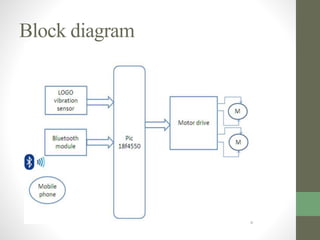
Block diagram
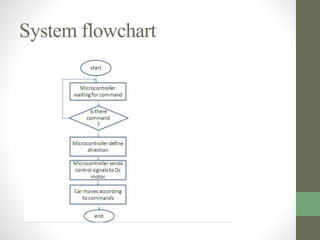
System flowchart
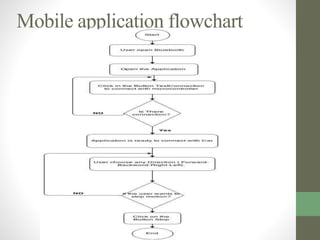
Mobile application flowchart
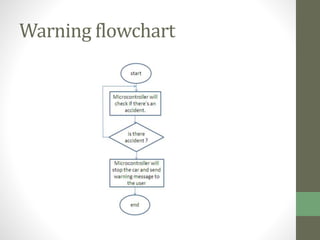
Warning flowchart
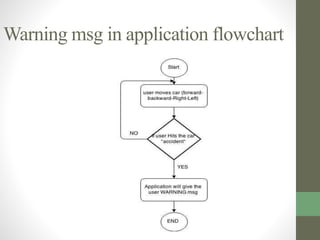
Warning msg in application flowchart
Screenshot of application
Problems
• car front wheels has a balance problem , one of the
wheels is higher than the other.
• Android application is slow and stop working so we need
to restart the application
Future work
• Using Wi-Fi technology instead of Bluetooth
technology.
• Add the accelerometer option to control the car
Conclusion
• We were able to complete our project and produced a
Bluetooth controlled android car that can be controlled
through a smart phone.
• This opens door for wide range of possible similar
applications.
1) Assistant for professor .
2) Assistant for housewife .
3) Electrically powered wheelchair
References
• AllDataSheet.com, 2003-2015. Electronics component datasheet search.
[Online]
Available at: http://www.alldatasheet.com/
[Accessed 14 april 2015].
• Android Developers , n.d. Android Developer Tools. [Online]
Available at: https://developer.android.com/tools/help/adt.html
[Accessed 8 May 2015].
• Android Developers, n.d. Activity. [Online]
Available at:
http://developer.android.com/reference/android/app/Activity.html
[Accessed 15 May 2015].
• Android Developers, n.d. Bluetooth. [Online]
Available at:
http://developer.android.com/guide/topics/connectivity/bluetooth.html
[Accessed 8 May 2015].
References
• Android Developers, n.d. Bluetooth Adapter. [Online]
Available at:
http://developer.android.com/reference/android/bluetooth/Bluetoo
thAdapter.html
[Accessed 8 May 2015].
• Android Developers, n.d. Bluetooth Socket. [Online]
Available at:
http://developer.android.com/reference/android/bluetooth/Bluetoo
thSocket.html
[Accessed 8 May 2015].
• Android Developers, n.d. Handler. [Online]
Available at:
http://developer.android.com/reference/android/os/Handler.html
[Accessed 15 May 2015].
• Android Developers, n.d. Starting an Activity. [Online]
Available at: http://developer.android.com/training/basics/activity-
lifecycle/starting.html
[Accessed 15 May 2015].
Thank you

Bluetooth controlled android car

  • 1.
    Ajman University ofscience and technology College of Information Technology Department of Computer Engineering Graduation project II BLUETOOTH CONTROLLED ANDRIOD CAR Maria Jihad 201111093 Doaa Marzouk 201110165 Supervisor : Engineer Rawhi al raai
  • 2.
    Outline • Introduction • objectives •General description • components • Software tools • Block diagram • System flowchart • Mobile application flowchart • Warning flowchart • Warning msg in mobile application flowcharts • Screenshot of application • problems • Future work • Conclusion • references
  • 3.
    Introduction • Bluetooth controlledandroid car consists of a cooperative subsystems that rely on and Control another subsystem. • The subsystems are divided into two main systems, the car and the remote control.
  • 4.
    Objectives • Controlling robotcar using smart phone. • Design a system performs specific functions. • Develop android application . • Dealing with sensor interface with microcontroller • Dealing with module interface with microcontroller
  • 5.
    General description • Thefinal design will consist of vehicle and remote control, The PIC will be our central processing unit . • The vehicle and the remote control rely on communication from one device to the other to produce a functioning system. • The system is expected to allow user to simultaneously connect to vehicle through Bluetooth pairing between the android device and the Bluetooth chip on the vehicle and control the motion of the car.
  • 6.
    • PIC 18f4550 •Power source • Regulator • led • 2 DC motor • L293 motor drive • Car vehicle • toothpick 2.1 Bluetooth module • Android device • LOGO vibration sensor Components
  • 7.
    Software tools • clanguage to program the PIC microcontroller using MikroC PRO for PIC – C complier for microchip • java language to develop the mobile application using ADT (Android Developer Tools) which is a plugin for Eclipse that provides a suite of tools that are integrated with the Eclipse IDE.
  • 8.
  • 9.
  • 10.
  • 11.
  • 12.
    Warning msg inapplication flowchart
  • 13.
  • 14.
    Problems • car frontwheels has a balance problem , one of the wheels is higher than the other. • Android application is slow and stop working so we need to restart the application
  • 15.
    Future work • UsingWi-Fi technology instead of Bluetooth technology. • Add the accelerometer option to control the car
  • 16.
    Conclusion • We wereable to complete our project and produced a Bluetooth controlled android car that can be controlled through a smart phone. • This opens door for wide range of possible similar applications. 1) Assistant for professor . 2) Assistant for housewife . 3) Electrically powered wheelchair
  • 17.
    References • AllDataSheet.com, 2003-2015.Electronics component datasheet search. [Online] Available at: http://www.alldatasheet.com/ [Accessed 14 april 2015]. • Android Developers , n.d. Android Developer Tools. [Online] Available at: https://developer.android.com/tools/help/adt.html [Accessed 8 May 2015]. • Android Developers, n.d. Activity. [Online] Available at: http://developer.android.com/reference/android/app/Activity.html [Accessed 15 May 2015]. • Android Developers, n.d. Bluetooth. [Online] Available at: http://developer.android.com/guide/topics/connectivity/bluetooth.html [Accessed 8 May 2015].
  • 18.
    References • Android Developers,n.d. Bluetooth Adapter. [Online] Available at: http://developer.android.com/reference/android/bluetooth/Bluetoo thAdapter.html [Accessed 8 May 2015]. • Android Developers, n.d. Bluetooth Socket. [Online] Available at: http://developer.android.com/reference/android/bluetooth/Bluetoo thSocket.html [Accessed 8 May 2015]. • Android Developers, n.d. Handler. [Online] Available at: http://developer.android.com/reference/android/os/Handler.html [Accessed 15 May 2015]. • Android Developers, n.d. Starting an Activity. [Online] Available at: http://developer.android.com/training/basics/activity- lifecycle/starting.html [Accessed 15 May 2015].
  • 19.