Python
INTERMEDIATE
Rapid prototyping using Python libraries and
integration with local and remote services
The Starting Point
• You (should) have the basic knowledge for
creating Python programs from scratch
• In realizing an application, you can stand on the
shoulders of giants
– i.e., reuse things (libraries, packages, etc.) made
available by other developers
• In looking for libraries to integrate with your
application, it could be useful to
– Keep It Simple Stupid (KISS)
3/20/2017 Python intermediate 2
What can I integrate?
• Libraries and packages to provide more
functionality, algorithms, etc. to your own
program
– e.g., complex math operations, statistical packages,
OS interfaces, …
• Libraries and packages to integrate external
(cloud, web) services
– e.g., weather, social networks, …
3/20/2017 Python intermediate 3
Integrate Python Packages
• To use other Python packages in your
applications you should
– install them (typically)
– import them
• Python modules can be installed with the pip
command
pip install <package_name>
3/20/2017 Python intermediate 4
Learn more about pip at https://pip.pypa.io
Learning by Example
• We would like to realize a Telegram bot
(AmIBot) that
– greets us
– acts as a textual parrot, by sending back as text
whatever we write (textual echo)
– acts as a parrot, by sending back as voice whatever
we write (vocal echo)
3/20/2017 Python intermediate 5
A
What is a Telegram bot?
• A third-party application that run inside
Telegram
• Users can interact with bots by sending them
– messages
– commands
– inline requests
• Developers can control their own bots using the
Telegram bot API or dedicated libraries
3/20/2017 Python intermediate 6
Discover more at https://core.telegram.org/bots
How to create a Telegram bot?
• First, ask BotFather
– set up a bot account with @BotFather
– it will ask you for
• a name (I chose AmIBot)
• a username that must end in 'bot' (I chose AmI2017_bot)
– Then, BotFather will give you
• a token to use the Telegram API
• a Telegram link to let users converse with your bot
3/20/2017 Python intermediate 7
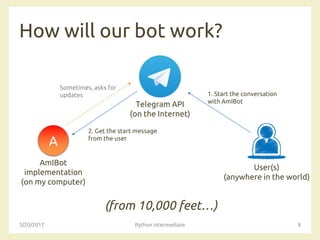
How will our bot work?
(from 10,000 feet…)
3/20/2017 Python intermediate 8
A
Telegram API
(on the Internet)
AmIBot
implementation
(on my computer)
User(s)
(anywhere in the world)
1. Start the conversation
with AmIBot
Sometimes, asks for
updates
2. Get the start message
from the user
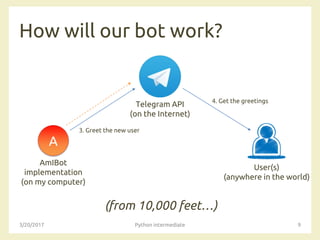
How will our bot work?
(from 10,000 feet…)
3/20/2017 Python intermediate 9
A
Telegram API
(on the Internet)
AmIBot
implementation
(on my computer)
User(s)
(anywhere in the world)
3. Greet the new user
4. Get the greetings
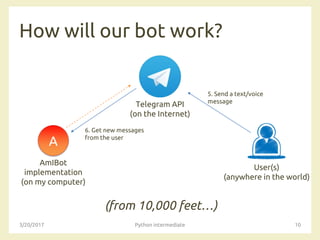
How will our bot work?
(from 10,000 feet…)
3/20/2017 Python intermediate 10
A
Telegram API
(on the Internet)
AmIBot
implementation
(on my computer)
User(s)
(anywhere in the world)
5. Send a text/voice
message
6. Get new messages
from the user
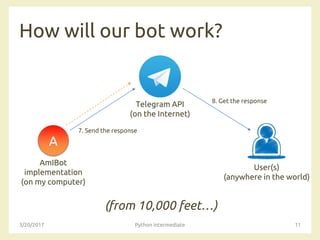
How will our bot work?
(from 10,000 feet…)
3/20/2017 Python intermediate 11
A
Telegram API
(on the Internet)
AmIBot
implementation
(on my computer)
User(s)
(anywhere in the world)
7. Send the response
8. Get the response
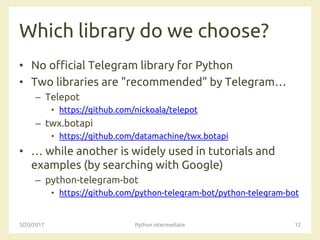
Which library do we choose?
• No official Telegram library for Python
• Two libraries are "recommended" by Telegram…
– Telepot
• https://github.com/nickoala/telepot
– twx.botapi
• https://github.com/datamachine/twx.botapi
• … while another is widely used in tutorials and
examples (by searching with Google)
– python-telegram-bot
• https://github.com/python-telegram-bot/python-telegram-bot
3/20/2017 Python intermediate 12
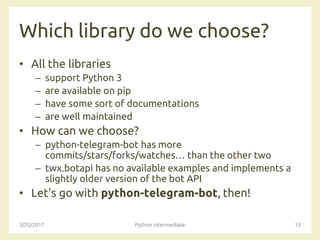
Which library do we choose?
• All the libraries
– support Python 3
– are available on pip
– have some sort of documentations
– are well maintained
• How can we choose?
– python-telegram-bot has more
commits/stars/forks/watches… than the other two
– twx.botapi has no available examples and implements a
slightly older version of the bot API
• Let's go with python-telegram-bot, then!
3/20/2017 Python intermediate 13
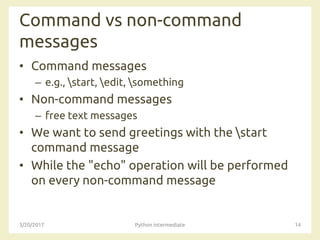
Command vs non-command
messages
• Command messages
– e.g., start, edit, something
• Non-command messages
– free text messages
• We want to send greetings with the start
command message
• While the "echo" operation will be performed
on every non-command message
3/20/2017 Python intermediate 14
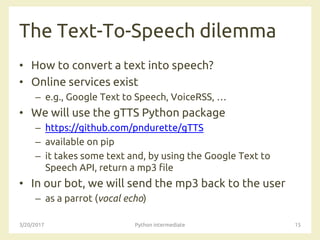
The Text-To-Speech dilemma
• How to convert a text into speech?
• Online services exist
– e.g., Google Text to Speech, VoiceRSS, …
• We will use the gTTS Python package
– https://github.com/pndurette/gTTS
– available on pip
– it takes some text and, by using the Google Text to
Speech API, return a mp3 file
• In our bot, we will send the mp3 back to the user
– as a parrot (vocal echo)
3/20/2017 Python intermediate 15
Playground
• If you want to experiment more, you can…
• … perform an "inverted" echo
– e.g., the user write "hello, bot" and the bot should
reply with "olleh, tob"
• … ask for the weather
– https://pypi.python.org/pypi/yahooweather
3/20/2017 Python intermediate 16
Questions?
01QZP AMBIENT INTELLIGENCE
Luigi De Russis
luigi.derussis@polito.it
License
• This work is licensed under the Creative Commons “Attribution-
NonCommercial-ShareAlike Unported (CC BY-NC-SA 4.0)” License.
• You are free:
– to Share - to copy, distribute and transmit the work
– to Remix - to adapt the work
• Under the following conditions:
– Attribution - You must attribute the work in the manner specified by the
author or licensor (but not in any way that suggests that they endorse you
or your use of the work).
– Noncommercial - You may not use this work for commercial purposes.
– Share Alike - If you alter, transform, or build upon this work, you may
distribute the resulting work only under the same or similar license to this
one.
• To view a copy of this license, visit
https://creativecommons.org/licenses/by-nc-sa/4.0/
3/20/2017 Python intermediate 18

AmI 2017 - Python intermediate

  • 1.
    Python INTERMEDIATE Rapid prototyping usingPython libraries and integration with local and remote services
  • 2.
    The Starting Point •You (should) have the basic knowledge for creating Python programs from scratch • In realizing an application, you can stand on the shoulders of giants – i.e., reuse things (libraries, packages, etc.) made available by other developers • In looking for libraries to integrate with your application, it could be useful to – Keep It Simple Stupid (KISS) 3/20/2017 Python intermediate 2
  • 3.
    What can Iintegrate? • Libraries and packages to provide more functionality, algorithms, etc. to your own program – e.g., complex math operations, statistical packages, OS interfaces, … • Libraries and packages to integrate external (cloud, web) services – e.g., weather, social networks, … 3/20/2017 Python intermediate 3
  • 4.
    Integrate Python Packages •To use other Python packages in your applications you should – install them (typically) – import them • Python modules can be installed with the pip command pip install <package_name> 3/20/2017 Python intermediate 4 Learn more about pip at https://pip.pypa.io
  • 5.
    Learning by Example •We would like to realize a Telegram bot (AmIBot) that – greets us – acts as a textual parrot, by sending back as text whatever we write (textual echo) – acts as a parrot, by sending back as voice whatever we write (vocal echo) 3/20/2017 Python intermediate 5 A
  • 6.
    What is aTelegram bot? • A third-party application that run inside Telegram • Users can interact with bots by sending them – messages – commands – inline requests • Developers can control their own bots using the Telegram bot API or dedicated libraries 3/20/2017 Python intermediate 6 Discover more at https://core.telegram.org/bots
  • 7.
    How to createa Telegram bot? • First, ask BotFather – set up a bot account with @BotFather – it will ask you for • a name (I chose AmIBot) • a username that must end in 'bot' (I chose AmI2017_bot) – Then, BotFather will give you • a token to use the Telegram API • a Telegram link to let users converse with your bot 3/20/2017 Python intermediate 7
  • 8.
    How will ourbot work? (from 10,000 feet…) 3/20/2017 Python intermediate 8 A Telegram API (on the Internet) AmIBot implementation (on my computer) User(s) (anywhere in the world) 1. Start the conversation with AmIBot Sometimes, asks for updates 2. Get the start message from the user
  • 9.
    How will ourbot work? (from 10,000 feet…) 3/20/2017 Python intermediate 9 A Telegram API (on the Internet) AmIBot implementation (on my computer) User(s) (anywhere in the world) 3. Greet the new user 4. Get the greetings
  • 10.
    How will ourbot work? (from 10,000 feet…) 3/20/2017 Python intermediate 10 A Telegram API (on the Internet) AmIBot implementation (on my computer) User(s) (anywhere in the world) 5. Send a text/voice message 6. Get new messages from the user
  • 11.
    How will ourbot work? (from 10,000 feet…) 3/20/2017 Python intermediate 11 A Telegram API (on the Internet) AmIBot implementation (on my computer) User(s) (anywhere in the world) 7. Send the response 8. Get the response
  • 12.
    Which library dowe choose? • No official Telegram library for Python • Two libraries are "recommended" by Telegram… – Telepot • https://github.com/nickoala/telepot – twx.botapi • https://github.com/datamachine/twx.botapi • … while another is widely used in tutorials and examples (by searching with Google) – python-telegram-bot • https://github.com/python-telegram-bot/python-telegram-bot 3/20/2017 Python intermediate 12
  • 13.
    Which library dowe choose? • All the libraries – support Python 3 – are available on pip – have some sort of documentations – are well maintained • How can we choose? – python-telegram-bot has more commits/stars/forks/watches… than the other two – twx.botapi has no available examples and implements a slightly older version of the bot API • Let's go with python-telegram-bot, then! 3/20/2017 Python intermediate 13
  • 14.
    Command vs non-command messages •Command messages – e.g., start, edit, something • Non-command messages – free text messages • We want to send greetings with the start command message • While the "echo" operation will be performed on every non-command message 3/20/2017 Python intermediate 14
  • 15.
    The Text-To-Speech dilemma •How to convert a text into speech? • Online services exist – e.g., Google Text to Speech, VoiceRSS, … • We will use the gTTS Python package – https://github.com/pndurette/gTTS – available on pip – it takes some text and, by using the Google Text to Speech API, return a mp3 file • In our bot, we will send the mp3 back to the user – as a parrot (vocal echo) 3/20/2017 Python intermediate 15
  • 16.
    Playground • If youwant to experiment more, you can… • … perform an "inverted" echo – e.g., the user write "hello, bot" and the bot should reply with "olleh, tob" • … ask for the weather – https://pypi.python.org/pypi/yahooweather 3/20/2017 Python intermediate 16
  • 17.
    Questions? 01QZP AMBIENT INTELLIGENCE LuigiDe Russis luigi.derussis@polito.it
  • 18.
    License • This workis licensed under the Creative Commons “Attribution- NonCommercial-ShareAlike Unported (CC BY-NC-SA 4.0)” License. • You are free: – to Share - to copy, distribute and transmit the work – to Remix - to adapt the work • Under the following conditions: – Attribution - You must attribute the work in the manner specified by the author or licensor (but not in any way that suggests that they endorse you or your use of the work). – Noncommercial - You may not use this work for commercial purposes. – Share Alike - If you alter, transform, or build upon this work, you may distribute the resulting work only under the same or similar license to this one. • To view a copy of this license, visit https://creativecommons.org/licenses/by-nc-sa/4.0/ 3/20/2017 Python intermediate 18