ALIAS ATTRIBUTE –
HOW TO CONFIGURE
Boris Blajevici
Senior Technical Support Engineer
November 20th 2015
2
1. Introduction to Alias Attributes
2. Windchill Data Model
3. Mapping Syntax
4. Examples
5. Limitations
6. Troubleshooting
7. References
AGENDA
3
INTRODUCTION
TO ALIAS
ATTRIBUTES
4
• Purpose:
– Alias Attributes map to an attribute on a related object
– Mapping allows to display information of the related object on Information page or tables
– Mapping property using operators and the internal names
– Target object types need to be accessible either by reference or link
• Examples:
– Display Part Number on a CAD Document
– Display Master attributes on a versioned type
– Display Document Attributes on described Part
INTRODUCTION TO ALIAS ATTRIBUTES
5
INTRODUCTION TO ALIAS ATTRIBUTES
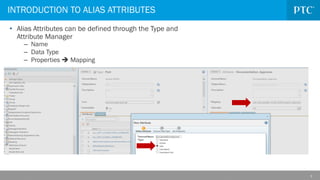
• Alias Attributes can be defined through the Type and
Attribute Manager
– Name
– Data Type
– Properties  Mapping
6
WINDCHILL
DATA MODEL
7
OBJECT RELATIONSHIPS
Type L
Type C
Type B
Type A
Type D
IBA: Approver
MyType
Alias Attribute:
Documentation_Approver
8
• Two ways of creating relations in Windchill Data Model:
– References
– Link objects
WINDCHILL DATA MODEL
9
• References:
– Represented in the database as “Foreign Key” relations
– Can be identified by two columns in the database table:
• Column CLASSNAMEKEYxxx contains information on the database table this reference points to
• Followed by column Idxxx that contains the value of the referenced object’s IDA2A2
– Examples: Master references
REFERENCES
Some table… Table for CLASS_A
This tells which
table to look at.
10
• Windchill uses link objects to explicitly link objects together
• Links are managed by a separate class
• Contains two references, one to parent and one to child (in general this is):
– Parent = Role A: CLASSNAMEKEYROLEAOBJECTREF & IDA3A5
– Child = Role B: CLASSNAMEKEYROLEBOBJECTREF & IDA3B5
LINK OBJECTS
11
• Example:
– Part Usage Link for BOM
• usedBy = CLASSNAMEKEYROLEAOBJECTREF & IDA3A5
• uses= CLASSNAMEKEYROLEBOBJECTREF & IDA3B5
LINK OBJECTS
wt.part.WTPartUsageLink
WTPart WTPartMaster
usedBy uses Simplified view of WTPARTDESCRIBELINK table
WTPART table
WTDOCUMENT table
WTDOCUMENTMASTER table
WTPARTMASTER
12
• Use Logical Attribute Report to identify Alias Attribute mappings provided per default
• The Logical Attributes Report is available from Customization ▶ Tools
– Site preference Client Customization=Yes
– Customization > Tools > Logical Attribute Report
LOGICAL ATTRIBUTE REPORT
13
KDB ARTICLES
• Search Knowledge DB for articles containing relationship information
CS63595 - How to understand
Change Management objects
and their relations in Windchill
PDMLink
14
RELATIONSHIP EXPLORER
Use the Relationship Explorer
15
VISUAL HELP TO IDENTIFY THE DATA MODEL
• Leverage graphical Join Models that will be available in Query Builder of Windchill 11.0
• Easy and simple way identify available References and Links
16
MAPPING SYNTAX
17
• General Guideline:
– Starting point of the mapping is object where the Alias Attribute is defined
– This object is not included in the Mapping property
– Value of attribute at the end of mapping displays value of the alias attribute in the UI
• Operators:
– There are four operators available for navigation: ^, @, ~ and =
MAPPING SYNTAX
18
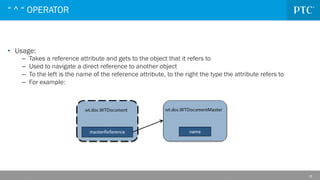
• Usage:
– Takes a reference attribute and gets to the object that it refers to
– Used to navigate a direct reference to another object
– To the left is the name of the reference attribute, to the right the type the attribute refers to
– For example:
“ ^ “ OPERATOR
19
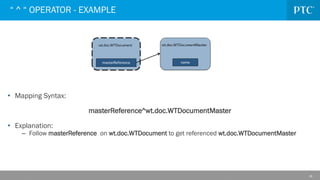
• Mapping Syntax:
masterReference^wt.doc.WTDocumentMaster
• Explanation:
– Follow masterReference on wt.doc.WTDocument to get referenced wt.doc.WTDocumentMaster
“ ^ “ OPERATOR - EXAMPLE
20
• Usage:
– Operator searches for an object that matches a reference parameter
– Similar to the dereference operator, but travels reference in other direction
– Commonly used when navigating link objects
– For example:
“ @ “ OPERATOR
21
• Mapping Syntax:
usedBy@wt.doc.WTDocumentUsageLink
• Explanation:
– Find and return that wt.doc.WTDocumentUsageLink that has a reference called usedBy that links to
the current object (wt.doc.WTDocument)
“ @ “ OPERATOR - EXAMPLE
22
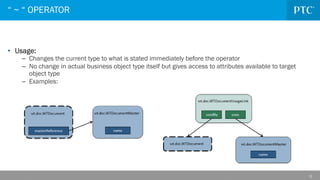
• Usage:
– Changes the current type to what is stated immediately before the operator
– No change in actual business object type itself but gives access to attributes available to target
object type
– Examples:
“ ~ “ OPERATOR
23
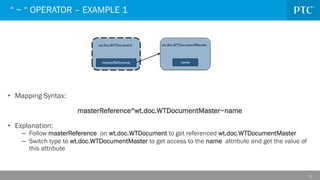
• Mapping Syntax:
masterReference^wt.doc.WTDocumentMaster~name
• Explanation:
– Follow masterReference on wt.doc.WTDocument to get referenced wt.doc.WTDocumentMaster
– Switch type to wt.doc.WTDocumentMaster to get access to the name attribute and get the value of
this attribute
“ ~ “ OPERATOR – EXAMPLE 1
24
• Mapping Syntax:
usedBy@wt.doc.WTDocumentUsageLink~uses^wt.doc.WTDocumentMaster~name
• Explanation:
– Find and return that wt.doc.WTDocumentUsageLink that has a reference called usedBy that links to
the current object (wt.doc.WTDocument)
– Switch type to wt.doc.WTDocumentUsageLink to get access to the uses reference attribute
– Follow the reference to the wt.doc.WTDocumentMaster and switch type
– Return the name attribute value
“ ~ “ OPERATOR – EXAMPLE 2
25
• Usage:
– Navigates to object with an attribute value that equals to the attribute value on current type
– No direct reference or link needs to exist
– Is a trident operator: <attribute1>=<attribute2>@<type>
– Only supported with modeled attributes of type Boolean, Integer, String and Date on left and right
side of the equal symbol
– Examples:
Display number of End Item that is stored in a SubFolder object with same name
“ = “ OPERATOR
26
Display number of End Item that is stored in a SubFolder object with same name
• Mapping Syntax:
name=name@wt.part.WTPart~number
• Explanation:
– Find and return the wt.part.WTPart with same name as wt.folder.SubFolder object
(Note: the WTPart does not necessarily be located in the SubFolder)
– Switch type and return the number attribute
“ = “ OPERATOR - EXAMPLE
27
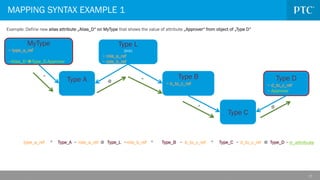
MAPPING SYNTAX EXAMPLE 1
Type L
(link)
~ role_a_ref
~ role_b_ref
Type C
Type B
~ b_to_c_ref
Type A Type D
~ d_to_c_ref
~ Approver
MyType
~ type_a_ref
~Alias_D Type_D.Approver
type_a_ref ^ Type_A Type_L role_b_ref Type_B
@
~ ^
role_a_ref ~ ~ b_to_c_ref Type_C
^ Type_D d_attribute
@ ~
~ d_to_c_ref
^
^
^
@
@
Example: Define new alias attribute „Alias_D“ on MyType that shows the value of attribute „Approver“ from object of „Type D“
28
ONE-TO-MANY RELATIONSHIPS
Mapping: describes@wt.part.WTPartDescribeLink~describedBy^wt.doc.WTDocument~Approver
29
MAPPING SYNTAX EXAMPLE 2
Mapping: name=name@wt.doc.WTDocument~Approver
Example: Define new alias attribute „Documentation Approver“ on WTPart that shows the value of attribute „Approver“ from
WTDocument with same Name
Alias Attribute
30
LIMITATIONS
31
• Alias Attributes not supported in Advanced Search
– CS129256 - How to make alias attributes available for Advanced Search In Windchill PDMLink 10.1
– CS81826 - Alias attributes cannot be used as search criteria in Advanced Search in Windchill PDMLink 10
– Idea: 6402 - WTPart Alias-Attributes in Advanced Search (Criteria)
• Alias Attributes are not supported in Filters
– CS150341 - Is it possible to define a filter for Alias attribute mapping in Windchill PDMLink 10
• Alias Attributes not available in Table Views prior Windchill 10.1 M040
– CS40073 - Alias Attributes and Calculated Attributes are not available for Table View in Windchill PDMLink 10.0 M020
• Alias Attributes not supported in Desktop Integration
– CS70889 -Alias and Calculated attributes are not visible from Office Applications using Desktop Integration in
Windchill
• Alias Attributes are not propagated to CAD Applications
– CS202614 - Does it support to propagate Alias type Attributes value stored on EPMDocument object from Windchill to
CAD Application ?
– Idea: 4087 - Tool Support to create Alias Attributes
– Idea: 4442 - Alias Attribute support for workspace and CAD
• Alias Attributes can’t map to NPA attributes
LIMITATIONS
32
TROUBLESHOOTING
33
• Alias Attribute mapping only used once on a type or its subtypes
– Additional mappings will result in error message
– Logical Attribute Report can be used to check configured mappings (including OOTB mappings)
– Logical Attribute Report available on http://hostname/Windchill/meta/LogicalAttributeReport.jsp
• Alias Attribute results in comma separated list of values
– Attribute mapping does not return unique but multiple results
– Consider if equal operator in mapping syntax can narrow down result set
• Alias Attribute does not show any values even target attribute has value
– Possible issue in the mapping syntax
– Alias Attribute mappings are very often complicated
– Breaking down the mapping and adding one operator after the other helps troubleshooting
• Creating Alias Attribute mapping rises error messages that syntax can’t be resolved or is
incorrect
– Breakdown the mapping in multiple pieces and adding one operator after the other to identify
incorrect mapping
TROUBLESHOOTING
34
REFERENCES
35
• CS131355 - Understanding mapping syntax and operators for alias attributes in Windchill
36
• CS131357 - Overview of link objects in Windchill
37
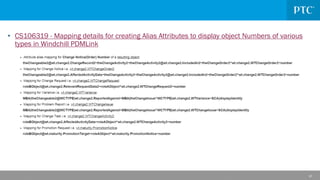
• CS106319 - Mapping details for creating Alias Attributes to display object Numbers of various
types in Windchill PDMLink
38
• CS41966 - How to display soft attributes added to master in Windchill PDMLink 10
• CS40087 - How to show the associated WTPart revision on the Cad Document details page
using the Alias attribute in Windchill PDMLink 10
39
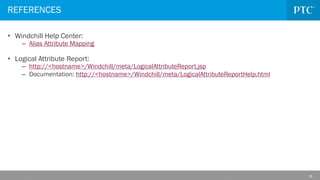
• Windchill Help Center:
– Alias Attribute Mapping
• Logical Attribute Report:
– http://<hostname>/Windchill/meta/LogicalAttributeReport.jsp
– Documentation: http://<hostname>/Windchill/meta/LogicalAttributeReportHelp.html
REFERENCES
40
• Q&A
ptc.com

Alias Attribute using Windchill PDMLink.pdf

  • 1.
    ALIAS ATTRIBUTE – HOWTO CONFIGURE Boris Blajevici Senior Technical Support Engineer November 20th 2015
  • 2.
    2 1. Introduction toAlias Attributes 2. Windchill Data Model 3. Mapping Syntax 4. Examples 5. Limitations 6. Troubleshooting 7. References AGENDA
  • 3.
  • 4.
    4 • Purpose: – AliasAttributes map to an attribute on a related object – Mapping allows to display information of the related object on Information page or tables – Mapping property using operators and the internal names – Target object types need to be accessible either by reference or link • Examples: – Display Part Number on a CAD Document – Display Master attributes on a versioned type – Display Document Attributes on described Part INTRODUCTION TO ALIAS ATTRIBUTES
  • 5.
    5 INTRODUCTION TO ALIASATTRIBUTES • Alias Attributes can be defined through the Type and Attribute Manager – Name – Data Type – Properties  Mapping
  • 6.
  • 7.
    7 OBJECT RELATIONSHIPS Type L TypeC Type B Type A Type D IBA: Approver MyType Alias Attribute: Documentation_Approver
  • 8.
    8 • Two waysof creating relations in Windchill Data Model: – References – Link objects WINDCHILL DATA MODEL
  • 9.
    9 • References: – Representedin the database as “Foreign Key” relations – Can be identified by two columns in the database table: • Column CLASSNAMEKEYxxx contains information on the database table this reference points to • Followed by column Idxxx that contains the value of the referenced object’s IDA2A2 – Examples: Master references REFERENCES Some table… Table for CLASS_A This tells which table to look at.
  • 10.
    10 • Windchill useslink objects to explicitly link objects together • Links are managed by a separate class • Contains two references, one to parent and one to child (in general this is): – Parent = Role A: CLASSNAMEKEYROLEAOBJECTREF & IDA3A5 – Child = Role B: CLASSNAMEKEYROLEBOBJECTREF & IDA3B5 LINK OBJECTS
  • 11.
    11 • Example: – PartUsage Link for BOM • usedBy = CLASSNAMEKEYROLEAOBJECTREF & IDA3A5 • uses= CLASSNAMEKEYROLEBOBJECTREF & IDA3B5 LINK OBJECTS wt.part.WTPartUsageLink WTPart WTPartMaster usedBy uses Simplified view of WTPARTDESCRIBELINK table WTPART table WTDOCUMENT table WTDOCUMENTMASTER table WTPARTMASTER
  • 12.
    12 • Use LogicalAttribute Report to identify Alias Attribute mappings provided per default • The Logical Attributes Report is available from Customization ▶ Tools – Site preference Client Customization=Yes – Customization > Tools > Logical Attribute Report LOGICAL ATTRIBUTE REPORT
  • 13.
    13 KDB ARTICLES • SearchKnowledge DB for articles containing relationship information CS63595 - How to understand Change Management objects and their relations in Windchill PDMLink
  • 14.
    14 RELATIONSHIP EXPLORER Use theRelationship Explorer
  • 15.
    15 VISUAL HELP TOIDENTIFY THE DATA MODEL • Leverage graphical Join Models that will be available in Query Builder of Windchill 11.0 • Easy and simple way identify available References and Links
  • 16.
  • 17.
    17 • General Guideline: –Starting point of the mapping is object where the Alias Attribute is defined – This object is not included in the Mapping property – Value of attribute at the end of mapping displays value of the alias attribute in the UI • Operators: – There are four operators available for navigation: ^, @, ~ and = MAPPING SYNTAX
  • 18.
    18 • Usage: – Takesa reference attribute and gets to the object that it refers to – Used to navigate a direct reference to another object – To the left is the name of the reference attribute, to the right the type the attribute refers to – For example: “ ^ “ OPERATOR
  • 19.
    19 • Mapping Syntax: masterReference^wt.doc.WTDocumentMaster •Explanation: – Follow masterReference on wt.doc.WTDocument to get referenced wt.doc.WTDocumentMaster “ ^ “ OPERATOR - EXAMPLE
  • 20.
    20 • Usage: – Operatorsearches for an object that matches a reference parameter – Similar to the dereference operator, but travels reference in other direction – Commonly used when navigating link objects – For example: “ @ “ OPERATOR
  • 21.
    21 • Mapping Syntax: usedBy@wt.doc.WTDocumentUsageLink •Explanation: – Find and return that wt.doc.WTDocumentUsageLink that has a reference called usedBy that links to the current object (wt.doc.WTDocument) “ @ “ OPERATOR - EXAMPLE
  • 22.
    22 • Usage: – Changesthe current type to what is stated immediately before the operator – No change in actual business object type itself but gives access to attributes available to target object type – Examples: “ ~ “ OPERATOR
  • 23.
    23 • Mapping Syntax: masterReference^wt.doc.WTDocumentMaster~name •Explanation: – Follow masterReference on wt.doc.WTDocument to get referenced wt.doc.WTDocumentMaster – Switch type to wt.doc.WTDocumentMaster to get access to the name attribute and get the value of this attribute “ ~ “ OPERATOR – EXAMPLE 1
  • 24.
    24 • Mapping Syntax: usedBy@wt.doc.WTDocumentUsageLink~uses^wt.doc.WTDocumentMaster~name •Explanation: – Find and return that wt.doc.WTDocumentUsageLink that has a reference called usedBy that links to the current object (wt.doc.WTDocument) – Switch type to wt.doc.WTDocumentUsageLink to get access to the uses reference attribute – Follow the reference to the wt.doc.WTDocumentMaster and switch type – Return the name attribute value “ ~ “ OPERATOR – EXAMPLE 2
  • 25.
    25 • Usage: – Navigatesto object with an attribute value that equals to the attribute value on current type – No direct reference or link needs to exist – Is a trident operator: <attribute1>=<attribute2>@<type> – Only supported with modeled attributes of type Boolean, Integer, String and Date on left and right side of the equal symbol – Examples: Display number of End Item that is stored in a SubFolder object with same name “ = “ OPERATOR
  • 26.
    26 Display number ofEnd Item that is stored in a SubFolder object with same name • Mapping Syntax: name=name@wt.part.WTPart~number • Explanation: – Find and return the wt.part.WTPart with same name as wt.folder.SubFolder object (Note: the WTPart does not necessarily be located in the SubFolder) – Switch type and return the number attribute “ = “ OPERATOR - EXAMPLE
  • 27.
    27 MAPPING SYNTAX EXAMPLE1 Type L (link) ~ role_a_ref ~ role_b_ref Type C Type B ~ b_to_c_ref Type A Type D ~ d_to_c_ref ~ Approver MyType ~ type_a_ref ~Alias_D Type_D.Approver type_a_ref ^ Type_A Type_L role_b_ref Type_B @ ~ ^ role_a_ref ~ ~ b_to_c_ref Type_C ^ Type_D d_attribute @ ~ ~ d_to_c_ref ^ ^ ^ @ @ Example: Define new alias attribute „Alias_D“ on MyType that shows the value of attribute „Approver“ from object of „Type D“
  • 28.
  • 29.
    29 MAPPING SYNTAX EXAMPLE2 Mapping: name=name@wt.doc.WTDocument~Approver Example: Define new alias attribute „Documentation Approver“ on WTPart that shows the value of attribute „Approver“ from WTDocument with same Name Alias Attribute
  • 30.
  • 31.
    31 • Alias Attributesnot supported in Advanced Search – CS129256 - How to make alias attributes available for Advanced Search In Windchill PDMLink 10.1 – CS81826 - Alias attributes cannot be used as search criteria in Advanced Search in Windchill PDMLink 10 – Idea: 6402 - WTPart Alias-Attributes in Advanced Search (Criteria) • Alias Attributes are not supported in Filters – CS150341 - Is it possible to define a filter for Alias attribute mapping in Windchill PDMLink 10 • Alias Attributes not available in Table Views prior Windchill 10.1 M040 – CS40073 - Alias Attributes and Calculated Attributes are not available for Table View in Windchill PDMLink 10.0 M020 • Alias Attributes not supported in Desktop Integration – CS70889 -Alias and Calculated attributes are not visible from Office Applications using Desktop Integration in Windchill • Alias Attributes are not propagated to CAD Applications – CS202614 - Does it support to propagate Alias type Attributes value stored on EPMDocument object from Windchill to CAD Application ? – Idea: 4087 - Tool Support to create Alias Attributes – Idea: 4442 - Alias Attribute support for workspace and CAD • Alias Attributes can’t map to NPA attributes LIMITATIONS
  • 32.
  • 33.
    33 • Alias Attributemapping only used once on a type or its subtypes – Additional mappings will result in error message – Logical Attribute Report can be used to check configured mappings (including OOTB mappings) – Logical Attribute Report available on http://hostname/Windchill/meta/LogicalAttributeReport.jsp • Alias Attribute results in comma separated list of values – Attribute mapping does not return unique but multiple results – Consider if equal operator in mapping syntax can narrow down result set • Alias Attribute does not show any values even target attribute has value – Possible issue in the mapping syntax – Alias Attribute mappings are very often complicated – Breaking down the mapping and adding one operator after the other helps troubleshooting • Creating Alias Attribute mapping rises error messages that syntax can’t be resolved or is incorrect – Breakdown the mapping in multiple pieces and adding one operator after the other to identify incorrect mapping TROUBLESHOOTING
  • 34.
  • 35.
    35 • CS131355 -Understanding mapping syntax and operators for alias attributes in Windchill
  • 36.
    36 • CS131357 -Overview of link objects in Windchill
  • 37.
    37 • CS106319 -Mapping details for creating Alias Attributes to display object Numbers of various types in Windchill PDMLink
  • 38.
    38 • CS41966 -How to display soft attributes added to master in Windchill PDMLink 10 • CS40087 - How to show the associated WTPart revision on the Cad Document details page using the Alias attribute in Windchill PDMLink 10
  • 39.
    39 • Windchill HelpCenter: – Alias Attribute Mapping • Logical Attribute Report: – http://<hostname>/Windchill/meta/LogicalAttributeReport.jsp – Documentation: http://<hostname>/Windchill/meta/LogicalAttributeReportHelp.html REFERENCES
  • 40.
  • 41.