AJAX LOADING Kelompok 8
AJAX AJAX adalah teknik untuk membuat halaman web yang cepat dan dinamis.  AJAX memungkinkan halaman web diperbarui secara asynchronous dengan menukarkan sejumlah kecil data dengan server  Ini berarti bahwa adalah mungkin untuk memperbarui bagian dari suatu halaman web, tanpa reload seluruh halaman
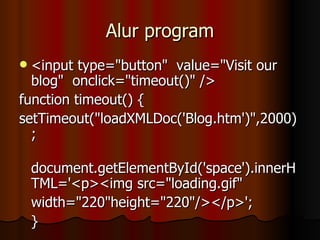
Alur program <input type=&quot;button&quot;  value=&quot;Visit our blog&quot;  onclick=&quot;timeout()&quot; /> function timeout() { setTimeout(&quot;loadXMLDoc('Blog.htm')&quot;,2000); document.getElementById('space').innerHTML='<p><img src=&quot;loading.gif&quot;  width=&quot;220&quot;height=&quot;220&quot;/></p>'; }
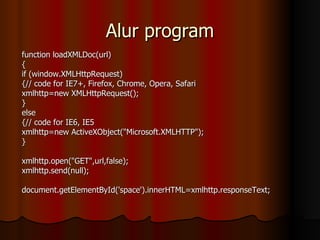
Alur program function loadXMLDoc(url) { if (window.XMLHttpRequest) {// code for IE7+, Firefox, Chrome, Opera, Safari xmlhttp=new XMLHttpRequest(); } else {// code for IE6, IE5 xmlhttp=new ActiveXObject(&quot;Microsoft.XMLHTTP&quot;); } xmlhttp.open(&quot;GET&quot;,url,false); xmlhttp.send(null); document.getElementById('space').innerHTML=xmlhttp.responseText;
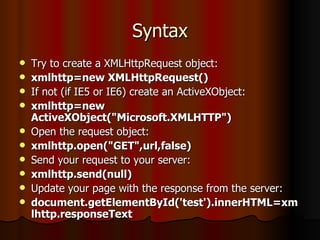
Syntax Try to create a XMLHttpRequest object: xmlhttp=new XMLHttpRequest()  If not (if IE5 or IE6) create an ActiveXObject: xmlhttp=new ActiveXObject(&quot;Microsoft.XMLHTTP&quot;) Open the request object: xmlhttp.open(&quot;GET&quot;,url,false) Send your request to your server: xmlhttp.send(null) Update your page with the response from the server: document.getElementById('test').innerHTML=xmlhttp.responseText

Ajax loading

  • 1.
  • 2.
    AJAX AJAX adalahteknik untuk membuat halaman web yang cepat dan dinamis. AJAX memungkinkan halaman web diperbarui secara asynchronous dengan menukarkan sejumlah kecil data dengan server Ini berarti bahwa adalah mungkin untuk memperbarui bagian dari suatu halaman web, tanpa reload seluruh halaman
  • 3.
    Alur program <inputtype=&quot;button&quot; value=&quot;Visit our blog&quot; onclick=&quot;timeout()&quot; /> function timeout() { setTimeout(&quot;loadXMLDoc('Blog.htm')&quot;,2000); document.getElementById('space').innerHTML='<p><img src=&quot;loading.gif&quot; width=&quot;220&quot;height=&quot;220&quot;/></p>'; }
  • 4.
    Alur program functionloadXMLDoc(url) { if (window.XMLHttpRequest) {// code for IE7+, Firefox, Chrome, Opera, Safari xmlhttp=new XMLHttpRequest(); } else {// code for IE6, IE5 xmlhttp=new ActiveXObject(&quot;Microsoft.XMLHTTP&quot;); } xmlhttp.open(&quot;GET&quot;,url,false); xmlhttp.send(null); document.getElementById('space').innerHTML=xmlhttp.responseText;
  • 5.
    Syntax Try tocreate a XMLHttpRequest object: xmlhttp=new XMLHttpRequest() If not (if IE5 or IE6) create an ActiveXObject: xmlhttp=new ActiveXObject(&quot;Microsoft.XMLHTTP&quot;) Open the request object: xmlhttp.open(&quot;GET&quot;,url,false) Send your request to your server: xmlhttp.send(null) Update your page with the response from the server: document.getElementById('test').innerHTML=xmlhttp.responseText

Editor's Notes

  • #6 An asynchronous request (&amp;quot;true&amp;quot;) will not wait on a server response before continuing on with the execution of the current script. It will instead invoke the onreadystatechange event listener of the XMLHttpRequest object throughout the various stages of the request. A synchronous request (&amp;quot;false&amp;quot;) however will hang execution of the current script until the request has been completed, not invoking the onreadystatechange event listener.