11-2
Lecture Topics
We willcover the following topics in this order:
–11.1.5 The Scanner Class
–11.1.6 Serialized Object I/O
–2.4.1 Basic Output and Formatted Output
–11.2 Files
–3.7 Exceptions and try .. catch
–8.3 Exceptions and try .. catch
3.
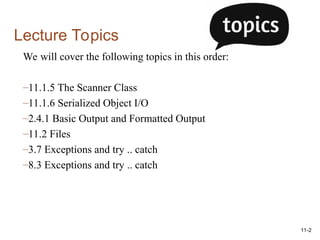
Review Text Files- Reading
To read in from a file using Scanner, we need to tell the Scanner where to read in
from.
1.import java.io.*;
2.Create a File object and provide it the name of the file
3.Pass the File object to the Scanner
4.Use the hasNext() method to determine if there is still data to read.
5.Use the Scanner’s .next methods to read the data.
6.When done, close the file.
File file = new File("animals.txt");
Scanner input = new Scanner(file);
while(input.hasNext())
{
String animal = input.nextLine();
System.out.println(animal);
}
in.close();
4.
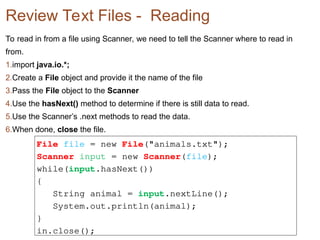
Review Text Files- Writing
To write to a file, use the PrintWriter class.
1.import java.io.*;
2.Create a PrintWriter object that takes the file name as input
3.Use the .print(), .println() and .printf() methods to write.
4.Close the PrintWriter. Failure to close the PrintWriter will not
save the contents written.
Reminder: PrintWriter will create the file if it does not exist and
will overwrite the contents if it had content.
PrintWriter myFile = new PrintWriter(“essay.txt”);
myFile.println(“I love Java.”);
myFile.close();
5.
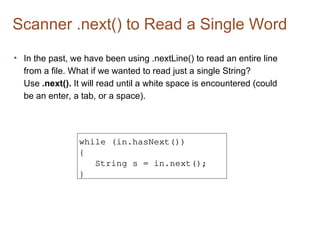
Scanner .next() toRead a Single Word
• In the past, we have been using .nextLine() to read an entire line
from a file. What if we wanted to read just a single String?
Use .next(). It will read until a white space is encountered (could
be an enter, a tab, or a space).
while (in.hasNext())
{
String s = in.next();
}
6.
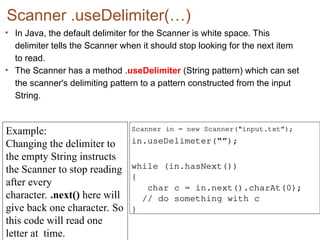
Scanner .useDelimiter(…)
• InJava, the default delimiter for the Scanner is white space. This
delimiter tells the Scanner when it should stop looking for the next item
to read.
• The Scanner has a method .useDelimiter (String pattern) which can set
the scanner's delimiting pattern to a pattern constructed from the input
String.
Scanner in = new Scanner(“input.txt”);
in.useDelimeter(“”);
while (in.hasNext())
{
char c = in.next().charAt(0);
// do something with c
}
Example:
Changing the delimiter to
the empty String instructs
the Scanner to stop reading
after every
character. .next() here will
give back one character. So
this code will read one
letter at time.
7.
Scanner .useDelimiter() andPatterns
• You can use patterns with the .useDelimiter() method.
• For example, if you want to read only letters and skip all other
characters (including numbers and special characters), you
can use .useDelimiter("[^a-zA-Z]+“)
Scanner in = new
Scanner(“input.txt”);
in.useDelimeter("[^a-zA-Z]+”);
[^abc] Any character except a, b, or c (negation)
[a-zA-Z]
a through z or A through Z, inclusive
(range)
X+ X repeated one or more times
This is saying the
delimiter is anything
that is not (^) the
letters a-z or A-Z
repeated (+)
8.
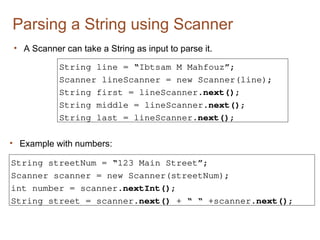
Parsing a Stringusing Scanner
• A Scanner can take a String as input to parse it.
String line = “Ibtsam M Mahfouz”;
Scanner lineScanner = new Scanner(line);
String first = lineScanner.next();
String middle = lineScanner.next();
String last = lineScanner.next();
• Example with numbers:
String streetNum = “123 Main Street”;
Scanner scanner = new Scanner(streetNum);
int number = scanner.nextInt();
String street = scanner.next() + “ “ +scanner.next();
9.
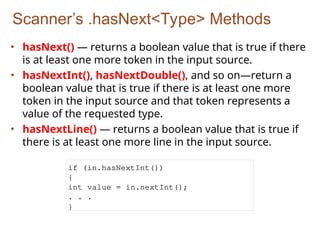
Scanner’s .hasNext<Type> Methods
•hasNext() — returns a boolean value that is true if there
is at least one more token in the input source.
• hasNextInt(), hasNextDouble(), and so on—return a
boolean value that is true if there is at least one more
token in the input source and that token represents a
value of the requested type.
• hasNextLine() — returns a boolean value that is true if
there is at least one more line in the input source.
if (in.hasNextInt())
{
int value = in.nextInt();
. . .
}
10.
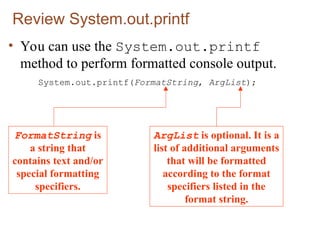
Review System.out.printf
• Youcan use the System.out.printf
method to perform formatted console output.
System.out.printf(FormatString, ArgList);
FormatString is
a string that
contains text and/or
special formatting
specifiers.
ArgList is optional. It is a
list of additional arguments
that will be formatted
according to the format
specifiers listed in the
format string.
11.
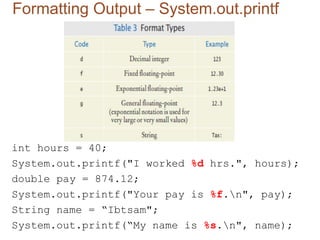
Formatting Output –System.out.printf
int hours = 40;
System.out.printf("I worked %d hrs.", hours);
double pay = 874.12;
System.out.printf("Your pay is %f.n", pay);
String name = “Ibtsam";
System.out.printf(“My name is %s.n", name);
12.
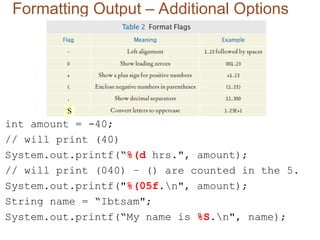
Formatting Output –Additional Options
int amount = -40;
// will print (40)
System.out.printf(“%(d hrs.", amount);
// will print (040) – () are counted in the 5.
System.out.printf("%(05f.n", amount);
String name = “Ibtsam";
System.out.printf(“My name is %S.n", name);
S
13.
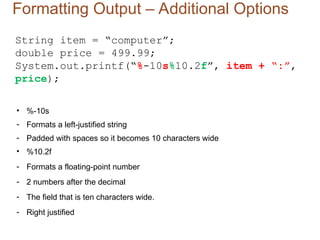
Formatting Output –Additional Options
String item = “computer”;
double price = 499.99;
System.out.printf(“%-10s%10.2f”, item + “:”,
price);
• %-10s
- Formats a left-justified string
- Padded with spaces so it becomes 10 characters wide
• %10.2f
- Formats a floating-point number
- 2 numbers after the decimal
- The field that is ten characters wide.
- Right justified
14.
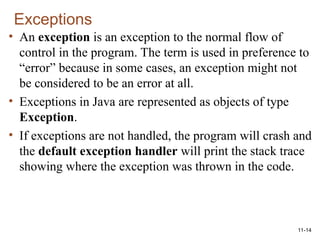
11-14
Exceptions
• An exceptionis an exception to the normal flow of
control in the program. The term is used in preference to
“error” because in some cases, an exception might not
be considered to be an error at all.
• Exceptions in Java are represented as objects of type
Exception.
• If exceptions are not handled, the program will crash and
the default exception handler will print the stack trace
showing where the exception was thrown in the code.
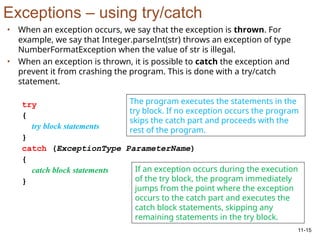
15.
11-15
Exceptions – usingtry/catch
• When an exception occurs, we say that the exception is thrown. For
example, we say that Integer.parseInt(str) throws an exception of type
NumberFormatException when the value of str is illegal.
• When an exception is thrown, it is possible to catch the exception and
prevent it from crashing the program. This is done with a try/catch
statement.
try
{
try block statements
}
catch (ExceptionType ParameterName)
{
catch block statements
}
The program executes the statements in the
try block. If no exception occurs the program
skips the catch part and proceeds with the
rest of the program.
If an exception occurs during the execution
of the try block, the program immediately
jumps from the point where the exception
occurs to the catch part and executes the
catch block statements, skipping any
remaining statements in the try block.
16.
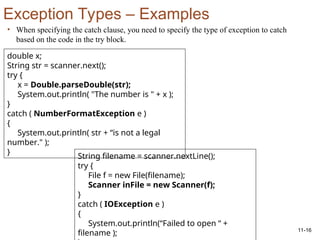
11-16
Exception Types –Examples
• When specifying the catch clause, you need to specify the type of exception to catch
based on the code in the try block.
double x;
String str = scanner.next();
try {
x = Double.parseDouble(str);
System.out.println( "The number is " + x );
}
catch ( NumberFormatException e )
{
System.out.println( str + “is not a legal
number." );
}
String filename = scanner.nextLine();
try {
File f = new File(filename);
Scanner inFile = new Scanner(f);
}
catch ( IOException e )
{
System.out.println(“Failed to open “ +
filename );
17.
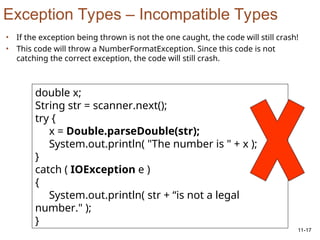
11-17
Exception Types –Incompatible Types
double x;
String str = scanner.next();
try {
x = Double.parseDouble(str);
System.out.println( "The number is " + x );
}
catch ( IOException e )
{
System.out.println( str + “is not a legal
number." );
}
• If the exception being thrown is not the one caught, the code will still crash!
• This code will throw a NumberFormatException. Since this code is not
catching the correct exception, the code will still crash.
18.
11-18
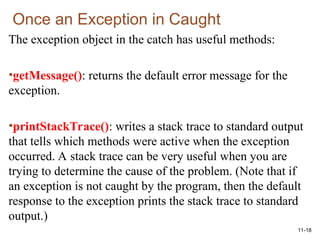
Once an Exceptionin Caught
The exception object in the catch has useful methods:
•getMessage(): returns the default error message for the
exception.
•printStackTrace(): writes a stack trace to standard output
that tells which methods were active when the exception
occurred. A stack trace can be very useful when you are
trying to determine the cause of the problem. (Note that if
an exception is not caught by the program, then the default
response to the exception prints the stack trace to standard
output.)
19.
11-19
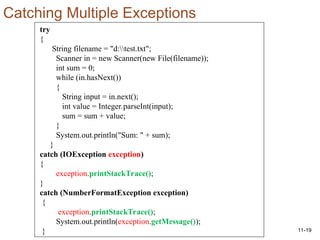
try
{
String filename ="d:test.txt";
Scanner in = new Scanner(new File(filename));
int sum = 0;
while (in.hasNext())
{
String input = in.next();
int value = Integer.parseInt(input);
sum = sum + value;
}
System.out.println("Sum: " + sum);
}
catch (IOException exception)
{
exception.printStackTrace();
}
catch (NumberFormatException exception)
{
exception.printStackTrace();
System.out.println(exception.getMessage());
}
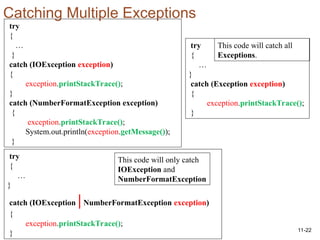
Catching Multiple Exceptions
11-21
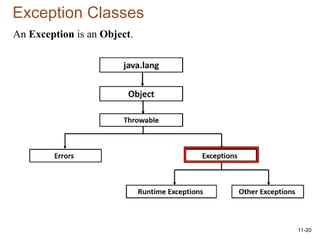
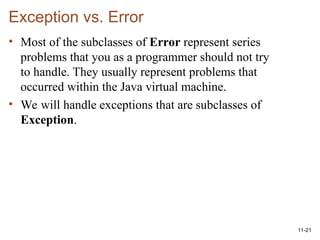
Exception vs. Error
•Most of the subclasses of Error represent series
problems that you as a programmer should not try
to handle. They usually represent problems that
occurred within the Java virtual machine.
• We will handle exceptions that are subclasses of
Exception.
22.
11-22
try
{
…
}
catch (IOException exception)
{
exception.printStackTrace();
}
catch(NumberFormatException exception)
{
exception.printStackTrace();
System.out.println(exception.getMessage());
}
Catching Multiple Exceptions
try
{
…
}
catch (IOException |NumberFormatException exception)
{
exception.printStackTrace();
}
try
{
…
}
catch (Exception exception)
{
exception.printStackTrace();
}
This code will only catch
IOException and
NumberFormatException
This code will catch all
Exceptions.
23.
11-23
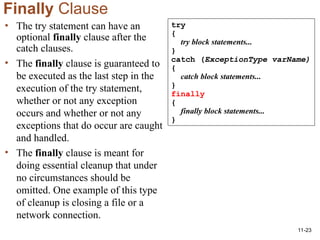
Finally Clause
• Thetry statement can have an
optional finally clause after the
catch clauses.
• The finally clause is guaranteed to
be executed as the last step in the
execution of the try statement,
whether or not any exception
occurs and whether or not any
exceptions that do occur are caught
and handled.
• The finally clause is meant for
doing essential cleanup that under
no circumstances should be
omitted. One example of this type
of cleanup is closing a file or a
network connection.
try
{
try block statements...
}
catch (ExceptionType varName)
{
catch block statements...
}
finally
{
finally block statements...
}
24.
11-24
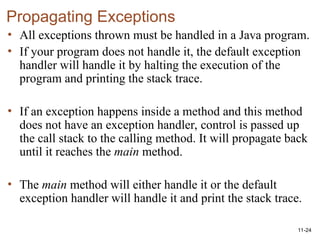
Propagating Exceptions
• Allexceptions thrown must be handled in a Java program.
• If your program does not handle it, the default exception
handler will handle it by halting the execution of the
program and printing the stack trace.
• If an exception happens inside a method and this method
does not have an exception handler, control is passed up
the call stack to the calling method. It will propagate back
until it reaches the main method.
• The main method will either handle it or the default
exception handler will handle it and print the stack trace.
25.
public static voiddoWork() throws IOException
{
String filename = "e:test1.txt“;
Scanner in = new Scanner(new File(filename));
int sum = 0;
while (in.hasNext())
{
String input = in.next();
int value = Integer.parseInt(input);
sum = sum + value;
}
System.out.println("Sum: " + sum);
}
public static void main(String[] args)
{
try
{
doWork();
}
catch(Exception exception)
{
exception.printStackTrace();
System.out.println(exception.getMessage());
}
}
26.
11-26
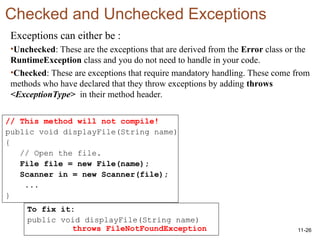
Checked and UncheckedExceptions
Exceptions can either be :
•Unchecked: These are the exceptions that are derived from the Error class or the
RuntimeException class and you do not need to handle in your code.
•Checked: These are exceptions that require mandatory handling. These come from
methods who have declared that they throw exceptions by adding throws
<ExceptionType> in their method header.
// This method will not compile!
public void displayFile(String name)
{
// Open the file.
File file = new File(name);
Scanner in = new Scanner(file);
...
}
To fix it:
public void displayFile(String name)
throws FileNotFoundException
27.
11-27
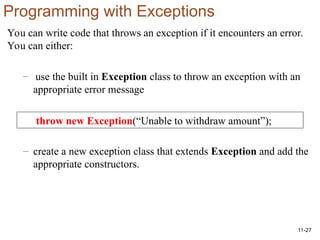
Programming with Exceptions
Youcan write code that throws an exception if it encounters an error.
You can either:
– use the built in Exception class to throw an exception with an
appropriate error message
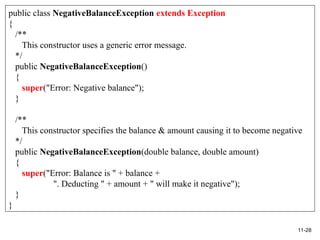
– create a new exception class that extends Exception and add the
appropriate constructors.
throw new Exception(“Unable to withdraw amount”);
28.
11-28
public class NegativeBalanceExceptionextends Exception
{
/**
This constructor uses a generic error message.
*/
public NegativeBalanceException()
{
super("Error: Negative balance");
}
/**
This constructor specifies the balance & amount causing it to become negative
*/
public NegativeBalanceException(double balance, double amount)
{
super("Error: Balance is " + balance +
". Deducting " + amount + " will make it negative");
}
}
29.
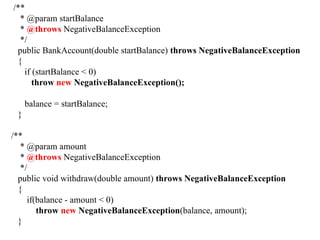
/**
* @param startBalance
*@throws NegativeBalanceException
*/
public BankAccount(double startBalance) throws NegativeBalanceException
{
if (startBalance < 0)
throw new NegativeBalanceException();
balance = startBalance;
}
/**
* @param amount
* @throws NegativeBalanceException
*/
public void withdraw(double amount) throws NegativeBalanceException
{
if(balance - amount < 0)
throw new NegativeBalanceException(balance, amount);
}
30.
Nested Try/Catch
String[] array= { null};
for(String s : array)
{
try
{
System.out.println(Integer.parseInt(s));
}
catch(Exception e)
{
try
{
System.out.println("invalid value " + s);
FileWriter f = new FileWriter("z:errors.txt", true);
PrintWriter pw = new PrintWriter(f);
pw.println("invalid value " + s);
pw.close();
}
catch(Exception ee)
{
System.out.println(ee.getMessage());
}
}
1st
try/catch
responsible
for catching
Strings that
are not
integers.
2nd
try/catch
responsible for
printing an error
message to a
file. But
opening the file
will cause
another
exception if the
path is wrong.
31.
11-31
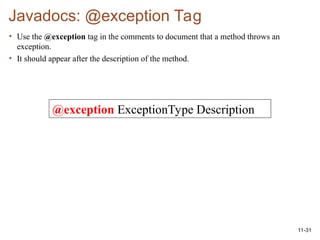
Javadocs: @exception Tag
•Use the @exception tag in the comments to document that a method throws an
exception.
• It should appear after the description of the method.
@exception ExceptionType Description

![Scanner .useDelimiter() and Patterns
• You can use patterns with the .useDelimiter() method.
• For example, if you want to read only letters and skip all other
characters (including numbers and special characters), you
can use .useDelimiter("[^a-zA-Z]+“)
Scanner in = new
Scanner(“input.txt”);
in.useDelimeter("[^a-zA-Z]+”);
[^abc] Any character except a, b, or c (negation)
[a-zA-Z]
a through z or A through Z, inclusive
(range)
X+ X repeated one or more times
This is saying the
delimiter is anything
that is not (^) the
letters a-z or A-Z
repeated (+)](https://image.slidesharecdn.com/advancedooplect4inputoutputandexceptions-260106232248-87083574/85/AdvancedOOP_Lect4_InputOutput_and_Exceptions-ppt-7-320.jpg)
![public static void doWork() throws IOException
{
String filename = "e:test1.txt“;
Scanner in = new Scanner(new File(filename));
int sum = 0;
while (in.hasNext())
{
String input = in.next();
int value = Integer.parseInt(input);
sum = sum + value;
}
System.out.println("Sum: " + sum);
}
public static void main(String[] args)
{
try
{
doWork();
}
catch(Exception exception)
{
exception.printStackTrace();
System.out.println(exception.getMessage());
}
}](https://image.slidesharecdn.com/advancedooplect4inputoutputandexceptions-260106232248-87083574/85/AdvancedOOP_Lect4_InputOutput_and_Exceptions-ppt-25-320.jpg)
![Nested Try/Catch
String[] array = { null};
for(String s : array)
{
try
{
System.out.println(Integer.parseInt(s));
}
catch(Exception e)
{
try
{
System.out.println("invalid value " + s);
FileWriter f = new FileWriter("z:errors.txt", true);
PrintWriter pw = new PrintWriter(f);
pw.println("invalid value " + s);
pw.close();
}
catch(Exception ee)
{
System.out.println(ee.getMessage());
}
}
1st
try/catch
responsible
for catching
Strings that
are not
integers.
2nd
try/catch
responsible for
printing an error
message to a
file. But
opening the file
will cause
another
exception if the
path is wrong.](https://image.slidesharecdn.com/advancedooplect4inputoutputandexceptions-260106232248-87083574/85/AdvancedOOP_Lect4_InputOutput_and_Exceptions-ppt-30-320.jpg)


![Polymer [ बहुलक ] Chemistry Notes PDF - Irfanullah Mehar - JJ Sir Chemistry.pdf](https://cdn.slidesharecdn.com/ss_thumbnails/polymerchemistrynotespdf-irfanullahmehar-jjsirchemistry-260210172118-3f9b37f7-thumbnail.jpg?width=640&height=640&fit=bounds)


