Advanced Docker
Developer Workflows on
MacOS X and Windows
Anil Madhavapeddy, Richard Mortier
Docker Inc.
OSCON Open Containers Day 2016
with thanks to the Docker for Mac and Windows
teams for extensive contributions.
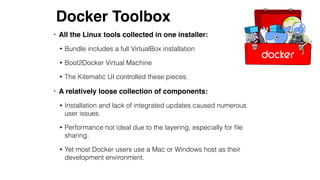
• All the Linux tools collected in one installer:
• Bundle includes a full VirtualBox installation
• Boot2Docker Virtual Machine
• The Kitematic UI controlled these pieces.
• A relatively loose collection of components:
• Installation and lack of integrated updates caused numerous
user issues.
• Performance not ideal due to the layering, especially for file
sharing.
• Yet most Docker users use a Mac or Windows host as their
development environment.
Docker Toolbox
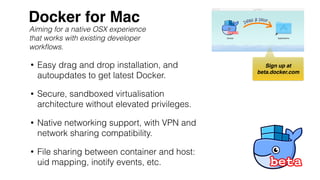
• Easy drag and drop installation, and
autoupdates to get latest Docker.
• Secure, sandboxed virtualisation
architecture without elevated privileges.
• Native networking support, with VPN and
network sharing compatibility.
• File sharing between container and host:
uid mapping, inotify events, etc.
Docker for Mac
Aiming for a native OSX experience
that works with existing developer
workflows.
Sign up at
beta.docker.com
Virtualisation
• Uses the new HyperKit framework, which is in turn
based on xHyve and FreeBSD's bHyve.
• Sandbox friendly: processes largely run as non-
root, with privileges of the local user.
Virtualisation
• Uses the new HyperKit framework, which is in turn
based on xHyve and FreeBSD's bHyve.
• Sandbox friendly: processes largely run as non-
root, with privileges of the local user.
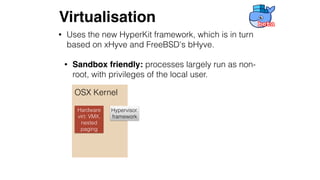
Virtualisation
OSX Kernel
Hypervisor.
framework
Hardware
virt: VMX,
nested
paging
• Uses the new HyperKit framework, which is in turn
based on xHyve and FreeBSD's bHyve.
• Sandbox friendly: processes largely run as non-
root, with privileges of the local user.
Virtualisation
OSX Kernel Userspace
Hypervisor.
framework
User Process
Thread/vCPU
Traps on I/O pages
Manages ACPI, PCI
devices
Hardware
virt: VMX,
nested
paging
• Uses the new HyperKit framework, which is in turn
based on xHyve and FreeBSD's bHyve.
• Sandbox friendly: processes largely run as non-
root, with privileges of the local user.
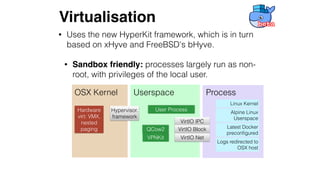
Virtualisation
OSX Kernel Userspace
Hypervisor.
framework
User ProcessHardware
virt: VMX,
nested
paging
Process
Linux Kernel
VirtIO IPC
VirtIO Block
VirtIO Net
Alpine Linux
Userspace
Latest Docker
preconfigured
QCow2
VPNKit
Logs redirected to
OSX host
• Uses the new HyperKit framework, which is in turn
based on xHyve and FreeBSD's bHyve.
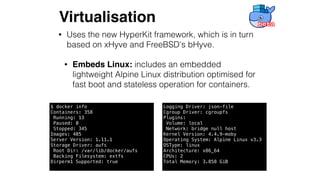
• Embeds Linux: includes an embedded
lightweight Alpine Linux distribution optimised for
fast boot and stateless operation for containers.
Virtualisation
$ docker info
Containers: 358
Running: 13
Paused: 0
Stopped: 345
Images: 485
Server Version: 1.11.1
Storage Driver: aufs
Root Dir: /var/lib/docker/aufs
Backing Filesystem: extfs
Dirperm1 Supported: true
Logging Driver: json-file
Cgroup Driver: cgroupfs
Plugins:
Volume: local
Network: bridge null host
Kernel Version: 4.4.9-moby
Operating System: Alpine Linux v3.3
OSType: linux
Architecture: x86_64
CPUs: 2
Total Memory: 3.858 GiB
• Uses the new HyperKit framework, which is in turn based
on xHyve and FreeBSD's bHyve.
• Sandbox friendly: processes largely run as non-root,
with privileges of the local user.
• Embeds Linux: includes an embedded lightweight
Alpine Linux distribution optimised for fast boot and
stateless operation for containers.
• Drag 'n drop installation: Docker.app is self-contained,
installs symlinks from app bundle into /usr/local,
and autoupdates.
Virtualisation
• Performance: The CPU performance of a Linux container is
largely the same as when running the same compute on the
Mac, since we use the hardware CPU virtualisation extensions.
• Battery life: Some battery life hit due to running containers
instead of MacOS X native processes, but not adverse for
normal use.
• Disk usage: The app manages disk usage via a qcow2 file in
its data directory. This is a sparse file that is allocated on
demand, up to a (current) maximum of 64GB of disk space.
Can be excluded from Time Machine backups.
Virtualisation
Networking
Notworking
• Want to hide the gory details of virtualisation from
the user. The Linux VM should be "invisible".
• Not solving this leads to many user complaints:
• VPN software and corporate installations do not
like bridged virtual machines or custom routing.

Result: container traffic cannot connect to Internet.
• Services cannot be exposed on localhost or
the external interface and are instead on the Linux
VM IP address.

Result: breaks common web oAuth workflows.
Networking
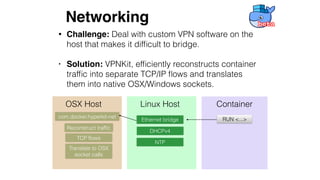
• Challenge: Deal with custom VPN software on the
host that makes it difficult to bridge.
• Solution: VPNKit, efficiently reconstructs container
traffic into separate TCP/IP flows and translates
them into native OSX/Windows sockets.
OSX Host Linux Host Container
RUN <...>com.docker.hyperkit-net
Reconstruct traffic
TCP flows
Translate to OSX
socket calls
Ethernet bridge
DHCPv4
NTP
Networking
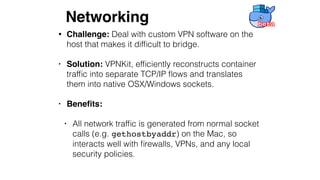
• Challenge: Deal with custom VPN software on the
host that makes it difficult to bridge.
• Solution: VPNKit, efficiently reconstructs container
traffic into separate TCP/IP flows and translates
them into native OSX/Windows sockets.
• Benefits:
• All network traffic is generated from normal socket
calls (e.g. gethostbyaddr) on the Mac, so
interacts well with firewalls, VPNs, and any local
security policies.
Networking
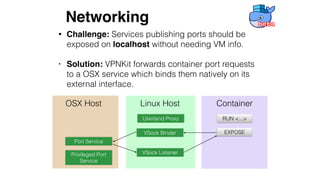
OSX Host Linux Host
Privileged Port
Service
Container
EXPOSE
Port Service
VSock Binder
RUN <...>
VSock Listener
Userland Proxy
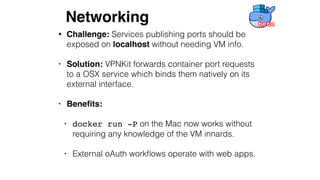
• Challenge: Services publishing ports should be
exposed on localhost without needing VM info.
• Solution: VPNKit forwards container port requests
to a OSX service which binds them natively on its
external interface.
Networking
• Challenge: Services publishing ports should be
exposed on localhost without needing VM info.
• Solution: VPNKit forwards container port requests
to a OSX service which binds them natively on its
external interface.
• Benefits:
• docker run -P on the Mac now works without
requiring any knowledge of the VM innards.
• External oAuth workflows operate with web apps.
Networking
Filesystems
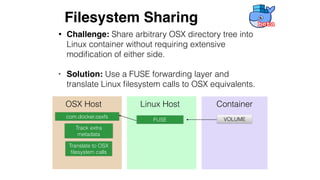
• Challenge: Share arbitrary OSX directory tree into
Linux container without requiring extensive
modification of either side.
• Solution: Use a FUSE forwarding layer and
translate Linux filesystem calls to OSX equivalents.
OSX Host Linux Host Container
VOLUMEcom.docker.osxfs
Track extra
metadata
Translate to OSX
filesystem calls
FUSE
Filesystem Sharing
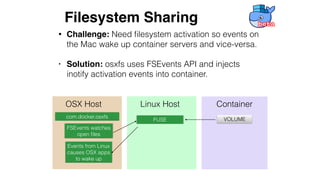
• Challenge: Need filesystem activation so events on
the Mac wake up container servers and vice-versa.
• Solution: osxfs uses FSEvents API and injects
inotify activation events into container.
OSX Host Linux Host Container
VOLUMEcom.docker.osxfs
FSEvents watches
open files
Events from Linux
causes OSX apps
to wake up
FUSE
Filesystem Sharing
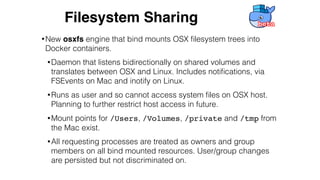
•New osxfs engine that bind mounts OSX filesystem trees into
Docker containers.
•Daemon that listens bidirectionally on shared volumes and
translates between OSX and Linux. Includes notifications, via
FSEvents on Mac and inotify on Linux.
•Runs as user and so cannot access system files on OSX host.
Planning to further restrict host access in future.
•Mount points for /Users, /Volumes, /private and /tmp from
the Mac exist.
•All requesting processes are treated as owners and group
members on all bind mounted resources. User/group changes
are persisted but not discriminated on.
Filesystem Sharing
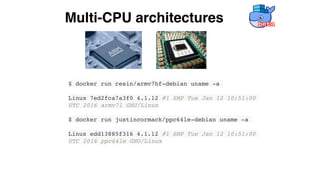
$ docker run resin/armv7hf-debian uname -a
Linux 7ed2fca7a3f0 4.1.12 #1 SMP Tue Jan 12 10:51:00
UTC 2016 armv7l GNU/Linux
$ docker run justincormack/ppc64le-debian uname -a
Linux edd13885f316 4.1.12 #1 SMP Tue Jan 12 10:51:00
UTC 2016 ppc64le GNU/Linux
Multi-CPU architectures
Questions?
Sign up at
beta.docker.com
Twitter: @avsm

Advanced Docker Developer Workflows on MacOS X and Windows

  • 1.
    Advanced Docker Developer Workflowson MacOS X and Windows Anil Madhavapeddy, Richard Mortier Docker Inc. OSCON Open Containers Day 2016 with thanks to the Docker for Mac and Windows teams for extensive contributions.
  • 2.
    • All theLinux tools collected in one installer: • Bundle includes a full VirtualBox installation • Boot2Docker Virtual Machine • The Kitematic UI controlled these pieces. • A relatively loose collection of components: • Installation and lack of integrated updates caused numerous user issues. • Performance not ideal due to the layering, especially for file sharing. • Yet most Docker users use a Mac or Windows host as their development environment. Docker Toolbox
  • 3.
    • Easy dragand drop installation, and autoupdates to get latest Docker. • Secure, sandboxed virtualisation architecture without elevated privileges. • Native networking support, with VPN and network sharing compatibility. • File sharing between container and host: uid mapping, inotify events, etc. Docker for Mac Aiming for a native OSX experience that works with existing developer workflows. Sign up at beta.docker.com
  • 4.
  • 5.
    • Uses thenew HyperKit framework, which is in turn based on xHyve and FreeBSD's bHyve. • Sandbox friendly: processes largely run as non- root, with privileges of the local user. Virtualisation
  • 6.
    • Uses thenew HyperKit framework, which is in turn based on xHyve and FreeBSD's bHyve. • Sandbox friendly: processes largely run as non- root, with privileges of the local user. Virtualisation OSX Kernel Hypervisor. framework Hardware virt: VMX, nested paging
  • 7.
    • Uses thenew HyperKit framework, which is in turn based on xHyve and FreeBSD's bHyve. • Sandbox friendly: processes largely run as non- root, with privileges of the local user. Virtualisation OSX Kernel Userspace Hypervisor. framework User Process Thread/vCPU Traps on I/O pages Manages ACPI, PCI devices Hardware virt: VMX, nested paging
  • 8.
    • Uses thenew HyperKit framework, which is in turn based on xHyve and FreeBSD's bHyve. • Sandbox friendly: processes largely run as non- root, with privileges of the local user. Virtualisation OSX Kernel Userspace Hypervisor. framework User ProcessHardware virt: VMX, nested paging Process Linux Kernel VirtIO IPC VirtIO Block VirtIO Net Alpine Linux Userspace Latest Docker preconfigured QCow2 VPNKit Logs redirected to OSX host
  • 9.
    • Uses thenew HyperKit framework, which is in turn based on xHyve and FreeBSD's bHyve. • Embeds Linux: includes an embedded lightweight Alpine Linux distribution optimised for fast boot and stateless operation for containers. Virtualisation $ docker info Containers: 358 Running: 13 Paused: 0 Stopped: 345 Images: 485 Server Version: 1.11.1 Storage Driver: aufs Root Dir: /var/lib/docker/aufs Backing Filesystem: extfs Dirperm1 Supported: true Logging Driver: json-file Cgroup Driver: cgroupfs Plugins: Volume: local Network: bridge null host Kernel Version: 4.4.9-moby Operating System: Alpine Linux v3.3 OSType: linux Architecture: x86_64 CPUs: 2 Total Memory: 3.858 GiB
  • 10.
    • Uses thenew HyperKit framework, which is in turn based on xHyve and FreeBSD's bHyve. • Sandbox friendly: processes largely run as non-root, with privileges of the local user. • Embeds Linux: includes an embedded lightweight Alpine Linux distribution optimised for fast boot and stateless operation for containers. • Drag 'n drop installation: Docker.app is self-contained, installs symlinks from app bundle into /usr/local, and autoupdates. Virtualisation
  • 11.
    • Performance: TheCPU performance of a Linux container is largely the same as when running the same compute on the Mac, since we use the hardware CPU virtualisation extensions. • Battery life: Some battery life hit due to running containers instead of MacOS X native processes, but not adverse for normal use. • Disk usage: The app manages disk usage via a qcow2 file in its data directory. This is a sparse file that is allocated on demand, up to a (current) maximum of 64GB of disk space. Can be excluded from Time Machine backups. Virtualisation
  • 12.
  • 13.
    • Want tohide the gory details of virtualisation from the user. The Linux VM should be "invisible". • Not solving this leads to many user complaints: • VPN software and corporate installations do not like bridged virtual machines or custom routing.
 Result: container traffic cannot connect to Internet. • Services cannot be exposed on localhost or the external interface and are instead on the Linux VM IP address.
 Result: breaks common web oAuth workflows. Networking
  • 14.
    • Challenge: Dealwith custom VPN software on the host that makes it difficult to bridge. • Solution: VPNKit, efficiently reconstructs container traffic into separate TCP/IP flows and translates them into native OSX/Windows sockets. OSX Host Linux Host Container RUN <...>com.docker.hyperkit-net Reconstruct traffic TCP flows Translate to OSX socket calls Ethernet bridge DHCPv4 NTP Networking
  • 15.
    • Challenge: Dealwith custom VPN software on the host that makes it difficult to bridge. • Solution: VPNKit, efficiently reconstructs container traffic into separate TCP/IP flows and translates them into native OSX/Windows sockets. • Benefits: • All network traffic is generated from normal socket calls (e.g. gethostbyaddr) on the Mac, so interacts well with firewalls, VPNs, and any local security policies. Networking
  • 16.
    OSX Host LinuxHost Privileged Port Service Container EXPOSE Port Service VSock Binder RUN <...> VSock Listener Userland Proxy • Challenge: Services publishing ports should be exposed on localhost without needing VM info. • Solution: VPNKit forwards container port requests to a OSX service which binds them natively on its external interface. Networking
  • 17.
    • Challenge: Servicespublishing ports should be exposed on localhost without needing VM info. • Solution: VPNKit forwards container port requests to a OSX service which binds them natively on its external interface. • Benefits: • docker run -P on the Mac now works without requiring any knowledge of the VM innards. • External oAuth workflows operate with web apps. Networking
  • 18.
  • 19.
    • Challenge: Sharearbitrary OSX directory tree into Linux container without requiring extensive modification of either side. • Solution: Use a FUSE forwarding layer and translate Linux filesystem calls to OSX equivalents. OSX Host Linux Host Container VOLUMEcom.docker.osxfs Track extra metadata Translate to OSX filesystem calls FUSE Filesystem Sharing
  • 20.
    • Challenge: Needfilesystem activation so events on the Mac wake up container servers and vice-versa. • Solution: osxfs uses FSEvents API and injects inotify activation events into container. OSX Host Linux Host Container VOLUMEcom.docker.osxfs FSEvents watches open files Events from Linux causes OSX apps to wake up FUSE Filesystem Sharing
  • 21.
    •New osxfs enginethat bind mounts OSX filesystem trees into Docker containers. •Daemon that listens bidirectionally on shared volumes and translates between OSX and Linux. Includes notifications, via FSEvents on Mac and inotify on Linux. •Runs as user and so cannot access system files on OSX host. Planning to further restrict host access in future. •Mount points for /Users, /Volumes, /private and /tmp from the Mac exist. •All requesting processes are treated as owners and group members on all bind mounted resources. User/group changes are persisted but not discriminated on. Filesystem Sharing
  • 22.
    $ docker runresin/armv7hf-debian uname -a Linux 7ed2fca7a3f0 4.1.12 #1 SMP Tue Jan 12 10:51:00 UTC 2016 armv7l GNU/Linux $ docker run justincormack/ppc64le-debian uname -a Linux edd13885f316 4.1.12 #1 SMP Tue Jan 12 10:51:00 UTC 2016 ppc64le GNU/Linux Multi-CPU architectures
  • 23.