DEVICE
CONTROL
H O M E
I N Y O U R
(AND BEYOND)
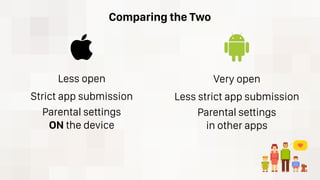
Comparing the Two
Less open
Strict app submission
Parental settings
ON the device
Very open
Less strict app submission
Parental settings
in other apps
Make sure your child hasn’t jailbroken the device.
Make sure your child knows not to sign into
someone else’s account.
Make sure you have parental controls set on
whatever device your child uses.
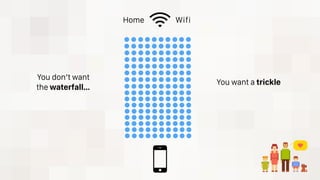
Home Wifi
You don’t want
the waterfall…
You want a trickle
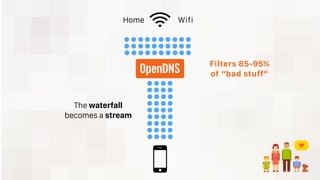
Home Wifi
Filters 85-95%
of “bad stuff”
The waterfall
becomes a stream
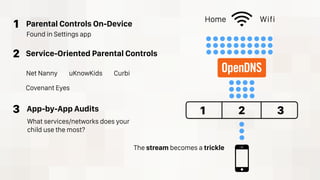
Home Wifi
1 2 3
1
2
3
Parental Controls On-Device
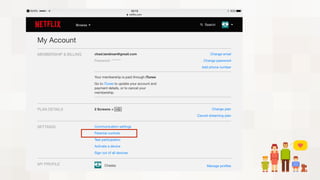
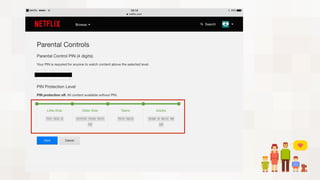
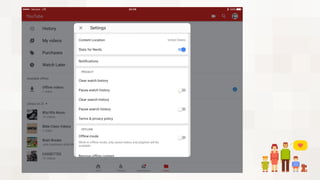
Service-Oriented Parental Controls
App-by-App Audits
What services/networks does your
child use the most?
Found in Settings app
Net Nanny uKnowKids Curbi
Covenant Eyes
The stream becomes a trickle
The
Fingerprint
Trick
1. Go through Settings > General > Restrictions
2. Add your own fingerprint/passcode (under Settings > Touch ID)
3. Audit privacy settings (Settings > Privacy)
4. Audit Game Center (Settings > Game Center)
5. Audit Social Media accounts and their access
(know SM account passwords!)
6. Audit all apps and their access
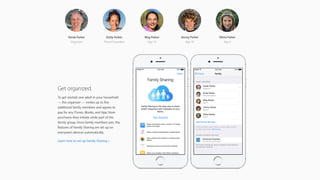
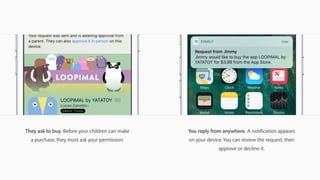
7. Set up Family Sharing [apple.com/icloud/family-sharing]
iOS iPads, iPhones, iPod Touches
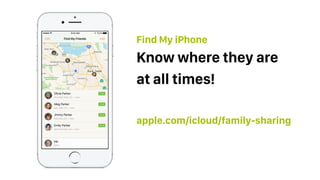
apple.com/icloud/family-sharing
Know where they are
at all times!
Find My iPhone
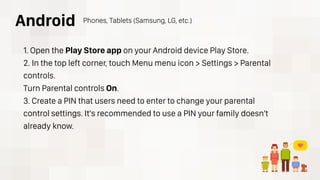
1. Open the Play Store app on your Android device Play Store.
2. In the top left corner, touch Menu menu icon > Settings > Parental
controls.
Turn Parental controls On.
3. Create a PIN that users need to enter to change your parental
control settings. It's recommended to use a PIN your family doesn't
already know.
Android Phones, Tablets (Samsung, LG, etc.)
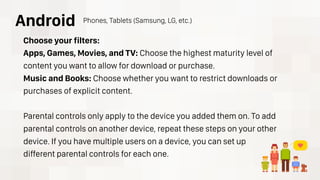
Choose your filters:
Apps, Games, Movies, and TV: Choose the highest maturity level of
content you want to allow for download or purchase.
Music and Books: Choose whether you want to restrict downloads or
purchases of explicit content.
Parental controls only apply to the device you added them on. To add
parental controls on another device, repeat these steps on your other
device. If you have multiple users on a device, you can set up
different parental controls for each one.
Android Phones, Tablets (Samsung, LG, etc.)
https://support.google.com/googleplay/answer/1075738?hl=en
Android Phones, Tablets (Samsung, LG, etc.)
For more info:
Contact the carrier if you need to:
• Block a number from calling
• Block a number from texting
• Shut off texting
• Shut off or limit data
• Shut off/deactivate Personal Hotspot

ADP03 - Home Security

  • 1.
    DEVICE CONTROL H O ME I N Y O U R (AND BEYOND)
  • 2.
    Comparing the Two Lessopen Strict app submission Parental settings ON the device Very open Less strict app submission Parental settings in other apps
  • 3.
    Make sure yourchild hasn’t jailbroken the device. Make sure your child knows not to sign into someone else’s account. Make sure you have parental controls set on whatever device your child uses.
  • 4.
    Home Wifi You don’twant the waterfall… You want a trickle
  • 5.
    Home Wifi Filters 85-95% of“bad stuff” The waterfall becomes a stream
  • 7.
    Home Wifi 1 23 1 2 3 Parental Controls On-Device Service-Oriented Parental Controls App-by-App Audits What services/networks does your child use the most? Found in Settings app Net Nanny uKnowKids Curbi Covenant Eyes The stream becomes a trickle
  • 8.
  • 14.
    1. Go throughSettings > General > Restrictions 2. Add your own fingerprint/passcode (under Settings > Touch ID) 3. Audit privacy settings (Settings > Privacy) 4. Audit Game Center (Settings > Game Center) 5. Audit Social Media accounts and their access (know SM account passwords!) 6. Audit all apps and their access 7. Set up Family Sharing [apple.com/icloud/family-sharing] iOS iPads, iPhones, iPod Touches
  • 17.
    apple.com/icloud/family-sharing Know where theyare at all times! Find My iPhone
  • 18.
    1. Open thePlay Store app on your Android device Play Store. 2. In the top left corner, touch Menu menu icon > Settings > Parental controls. Turn Parental controls On. 3. Create a PIN that users need to enter to change your parental control settings. It's recommended to use a PIN your family doesn't already know. Android Phones, Tablets (Samsung, LG, etc.)
  • 19.
    Choose your filters: Apps,Games, Movies, and TV: Choose the highest maturity level of content you want to allow for download or purchase. Music and Books: Choose whether you want to restrict downloads or purchases of explicit content. Parental controls only apply to the device you added them on. To add parental controls on another device, repeat these steps on your other device. If you have multiple users on a device, you can set up different parental controls for each one. Android Phones, Tablets (Samsung, LG, etc.)
  • 20.
  • 21.
    Contact the carrierif you need to: • Block a number from calling • Block a number from texting • Shut off texting • Shut off or limit data • Shut off/deactivate Personal Hotspot