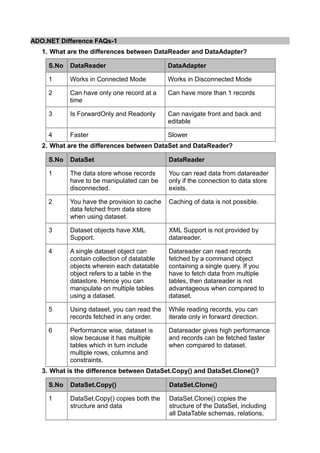
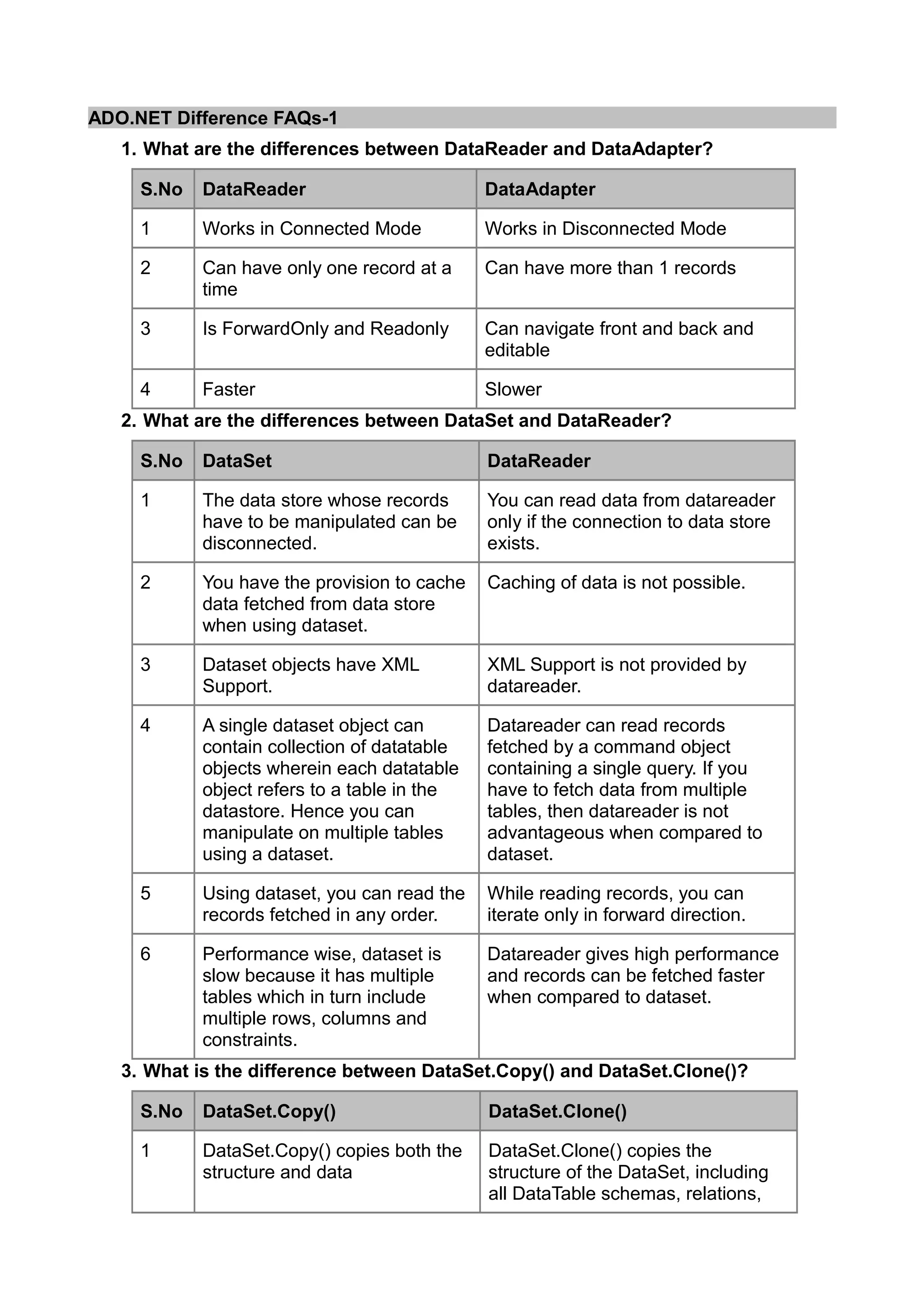
ADO.NET Difference FAQs-1
   1. What are the differences between DataReader and DataAdapter?

     S.No   DataReader                        DataAdapter

     1      Works in Connected Mode           Works in Disconnected Mode

     2      Can have only one record at a     Can have more than 1 records
            time

     3      Is ForwardOnly and Readonly       Can navigate front and back and
                                              editable

     4      Faster                            Slower
   2. What are the differences between DataSet and DataReader?

     S.No   DataSet                           DataReader

     1      The data store whose records      You can read data from datareader
            have to be manipulated can be     only if the connection to data store
            disconnected.                     exists.

     2      You have the provision to cache   Caching of data is not possible.
            data fetched from data store
            when using dataset.

     3      Dataset objects have XML          XML Support is not provided by
            Support.                          datareader.

     4      A single dataset object can       Datareader can read records
            contain collection of datatable   fetched by a command object
            objects wherein each datatable    containing a single query. If you
            object refers to a table in the   have to fetch data from multiple
            datastore. Hence you can          tables, then datareader is not
            manipulate on multiple tables     advantageous when compared to
            using a dataset.                  dataset.

     5      Using dataset, you can read the   While reading records, you can
            records fetched in any order.     iterate only in forward direction.

     6      Performance wise, dataset is      Datareader gives high performance
            slow because it has multiple      and records can be fetched faster
            tables which in turn include      when compared to dataset.
            multiple rows, columns and
            constraints.
   3. What is the difference between DataSet.Copy() and DataSet.Clone()?

     S.No   DataSet.Copy()                    DataSet.Clone()

     1      DataSet.Copy() copies both the    DataSet.Clone() copies the
            structure and data                structure of the DataSet, including
                                              all DataTable schemas, relations,
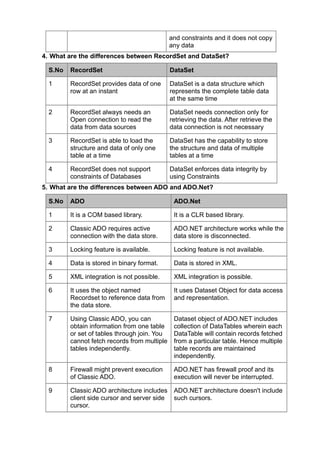
and constraints and it does not copy
                                              any data
4. What are the differences between RecordSet and DataSet?

  S.No   RecordSet                            DataSet

  1      RecordSet provides data of one       DataSet is a data structure which
         row at an instant                    represents the complete table data
                                              at the same time

  2      RecordSet always needs an            DataSet needs connection only for
         Open connection to read the          retrieving the data. After retrieve the
         data from data sources               data connection is not necessary

  3      RecordSet is able to load the        DataSet has the capability to store
         structure and data of only one       the structure and data of multiple
         table at a time                      tables at a time

  4      RecordSet does not support           DataSet enforces data integrity by
         constraints of Databases             using Constraints
5. What are the differences between ADO and ADO.Net?

  S.No   ADO                                   ADO.Net

  1      It is a COM based library.            It is a CLR based library.

  2      Classic ADO requires active           ADO.NET architecture works while the
         connection with the data store.       data store is disconnected.

  3      Locking feature is available.         Locking feature is not available.

  4      Data is stored in binary format.      Data is stored in XML.

  5      XML integration is not possible.      XML integration is possible.

  6      It uses the object named              It uses Dataset Object for data access
         Recordset to reference data from      and representation.
         the data store.

  7      Using Classic ADO, you can            Dataset object of ADO.NET includes
         obtain information from one table     collection of DataTables wherein each
         or set of tables through join. You    DataTable will contain records fetched
         cannot fetch records from multiple    from a particular table. Hence multiple
         tables independently.                 table records are maintained
                                               independently.

  8      Firewall might prevent execution      ADO.NET has firewall proof and its
         of Classic ADO.                       execution will never be interrupted.

  9      Classic ADO architecture includes     ADO.NET architecture doesn't include
         client side cursor and server side    such cursors.
         cursor.
10     You cannot send multiple             You can send multiple transactions
             transactions using a single          using a single connection instance.
             connection instance.


Reference: http://onlydifferencefaqs.blogspot.in/2012/07/adonet-difference-faqs-1.html


ADO.Net Difference FAQs-2
1.Difference between Typed DataSet and Untyped DataSet

      S.No   Typed DataSet                     Untyped DataSet

      1      It provides additional methods,   It is not as easy to use as strongly
             properties and events and thus    typed dataset.
             it makes it easier to use.

      2      They have .xsd file (Xml          They do not do error checking at
             Schema definition) file           the design time as they are filled at
             associated with them and do       run time when the code executes.
             error checking regarding their
             schema at design time using
             the .xsd definitions.

      3      We will get advantage of          We cannot get an advantage of
             intelliSense in VS. NET.          intelliSense.

      4      Performance is slower in case     Performance is faster in case of
             of strongly typed dataset.        Untyped dataset.

      5      In complex environment,           Untyped datasets are easy to
             strongly typed dataset's are      administer.
             difficult to administer.

Typed DataSets use explicit names and DataTypes for their members.
ex:
northwindDataSet.Products.ProductNameColumn.Caption = "pnames";

UnTyped DataSets use table and column collections for their members
ex:
ds.Tables["emp"].Columns["eno"].ReadOnly=true;

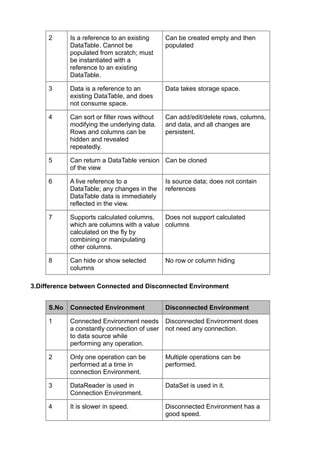
2.Difference between DataView and DataTable


      S.No   DataView                          DataTable

      1      Read-only i.e., DataView can      Read/Write i.e., Datatable can be
             be used to select the data.       used to edit or select or delete or
                                               insert a data.
2      Is a reference to an existing     Can be created empty and then
            DataTable. Cannot be              populated
            populated from scratch; must
            be instantiated with a
            reference to an existing
            DataTable.

     3      Data is a reference to an         Data takes storage space.
            existing DataTable, and does
            not consume space.

     4      Can sort or filter rows without   Can add/edit/delete rows, columns,
            modifying the underlying data.    and data, and all changes are
            Rows and columns can be           persistent.
            hidden and revealed
            repeatedly.

     5      Can return a DataTable version Can be cloned
            of the view

     6      A live reference to a             Is source data; does not contain
            DataTable; any changes in the     references
            DataTable data is immediately
            reflected in the view.

     7      Supports calculated columns,   Does not support calculated
            which are columns with a value columns
            calculated on the fly by
            combining or manipulating
            other columns.

     8      Can hide or show selected         No row or column hiding
            columns

3.Difference between Connected and Disconnected Environment


     S.No   Connected Environment             Disconnected Environment

     1      Connected Environment needs Disconnected Environment does
            a constantly connection of user not need any connection.
            to data source while
            performing any operation.

     2      Only one operation can be         Multiple operations can be
            performed at a time in            performed.
            connection Environment.

     3      DataReader is used in             DataSet is used in it.
            Connection Environment.

     4      It is slower in speed.            Disconnected Environment has a
                                              good speed.
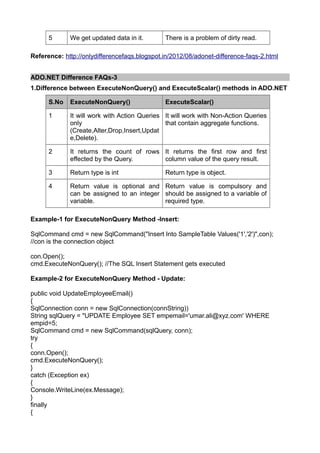
5      We get updated data in it.       There is a problem of dirty read.

Reference: http://onlydifferencefaqs.blogspot.in/2012/08/adonet-difference-faqs-2.html


ADO.NET Difference FAQs-3
1.Difference between ExecuteNonQuery() and ExecuteScalar() methods in ADO.NET

      S.No   ExecuteNonQuery()                ExecuteScalar()

      1      It will work with Action Queries It will work with Non-Action Queries
             only                             that contain aggregate functions.
             (Create,Alter,Drop,Insert,Updat
             e,Delete).

      2      It returns the count of rows It returns the first row and first
             effected by the Query.       column value of the query result.

      3      Return type is int               Return type is object.

      4      Return value is optional and Return value is compulsory and
             can be assigned to an integer should be assigned to a variable of
             variable.                     required type.

Example-1 for ExecuteNonQuery Method -Insert:

SqlCommand cmd = new SqlCommand("Insert Into SampleTable Values('1','2')",con);
//con is the connection object

con.Open();
cmd.ExecuteNonQuery(); //The SQL Insert Statement gets executed

Example-2 for ExecuteNonQuery Method - Update:

public void UpdateEmployeeEmail()
{
SqlConnection conn = new SqlConnection(connString))
String sqlQuery = "UPDATE Employee SET empemail='umar.ali@xyz.com' WHERE
empid=5;
SqlCommand cmd = new SqlCommand(sqlQuery, conn);
try
{
conn.Open();
cmd.ExecuteNonQuery();
}
catch (Exception ex)
{
Console.WriteLine(ex.Message);
}
finally
{
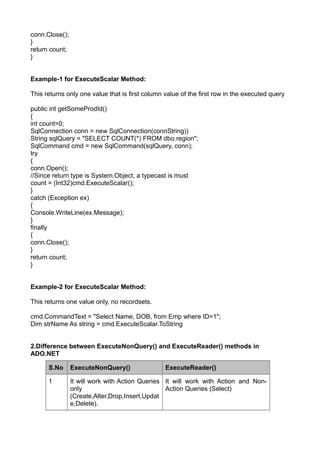
conn.Close();
}
return count;
}


Example-1 for ExecuteScalar Method:

This returns only one value that is first column value of the first row in the executed query

public int getSomeProdId()
{
int count=0;
SqlConnection conn = new SqlConnection(connString))
String sqlQuery = "SELECT COUNT(*) FROM dbo.region";
SqlCommand cmd = new SqlCommand(sqlQuery, conn);
try
{
conn.Open();
//Since return type is System.Object, a typecast is must
count = (Int32)cmd.ExecuteScalar();
}
catch (Exception ex)
{
Console.WriteLine(ex.Message);
}
finally
{
conn.Close();
}
return count;
}


Example-2 for ExecuteScalar Method:

This returns one value only, no recordsets.

cmd.CommandText = "Select Name, DOB, from Emp where ID=1";
Dim strName As string = cmd.ExecuteScalar.ToString


2.Difference between ExecuteNonQuery() and ExecuteReader() methods in
ADO.NET

      S.No      ExecuteNonQuery()                ExecuteReader()

      1         It will work with Action Queries It will work with Action and Non-
                only                             Action Queries (Select)
                (Create,Alter,Drop,Insert,Updat
                e,Delete).
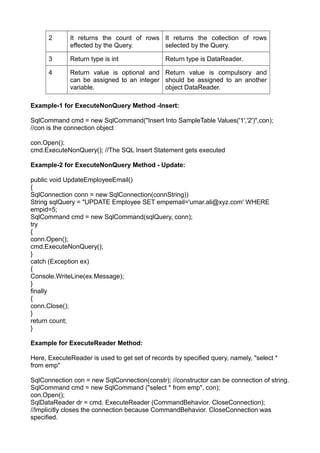
2      It returns the count of rows It returns the collection of rows
             effected by the Query.       selected by the Query.

      3      Return type is int                Return type is DataReader.

      4      Return value is optional and Return value is compulsory and
             can be assigned to an integer should be assigned to an another
             variable.                     object DataReader.

Example-1 for ExecuteNonQuery Method -Insert:

SqlCommand cmd = new SqlCommand("Insert Into SampleTable Values('1','2')",con);
//con is the connection object

con.Open();
cmd.ExecuteNonQuery(); //The SQL Insert Statement gets executed

Example-2 for ExecuteNonQuery Method - Update:

public void UpdateEmployeeEmail()
{
SqlConnection conn = new SqlConnection(connString))
String sqlQuery = "UPDATE Employee SET empemail='umar.ali@xyz.com' WHERE
empid=5;
SqlCommand cmd = new SqlCommand(sqlQuery, conn);
try
{
conn.Open();
cmd.ExecuteNonQuery();
}
catch (Exception ex)
{
Console.WriteLine(ex.Message);
}
finally
{
conn.Close();
}
return count;
}

Example for ExecuteReader Method:

Here, ExecuteReader is used to get set of records by specified query, namely, "select *
from emp"

SqlConnection con = new SqlConnection(constr); //constructor can be connection of string.
SqlCommand cmd = new SqlCommand ("select * from emp", con);
con.Open();
SqlDataReader dr = cmd. ExecuteReader (CommandBehavior. CloseConnection);
//Implicitly closes the connection because CommandBehavior. CloseConnection was
specified.
while(dr.Read())
{
Console.WriteLine (dr.GetString(0));
}
dr.Close();

Reference: http://onlydifferencefaqs.blogspot.in/2012/08/adonet-difference-faqs-3.html

ADO.NET difference faqs compiled- 1

  • 1.
    ADO.NET Difference FAQs-1 1. What are the differences between DataReader and DataAdapter? S.No DataReader DataAdapter 1 Works in Connected Mode Works in Disconnected Mode 2 Can have only one record at a Can have more than 1 records time 3 Is ForwardOnly and Readonly Can navigate front and back and editable 4 Faster Slower 2. What are the differences between DataSet and DataReader? S.No DataSet DataReader 1 The data store whose records You can read data from datareader have to be manipulated can be only if the connection to data store disconnected. exists. 2 You have the provision to cache Caching of data is not possible. data fetched from data store when using dataset. 3 Dataset objects have XML XML Support is not provided by Support. datareader. 4 A single dataset object can Datareader can read records contain collection of datatable fetched by a command object objects wherein each datatable containing a single query. If you object refers to a table in the have to fetch data from multiple datastore. Hence you can tables, then datareader is not manipulate on multiple tables advantageous when compared to using a dataset. dataset. 5 Using dataset, you can read the While reading records, you can records fetched in any order. iterate only in forward direction. 6 Performance wise, dataset is Datareader gives high performance slow because it has multiple and records can be fetched faster tables which in turn include when compared to dataset. multiple rows, columns and constraints. 3. What is the difference between DataSet.Copy() and DataSet.Clone()? S.No DataSet.Copy() DataSet.Clone() 1 DataSet.Copy() copies both the DataSet.Clone() copies the structure and data structure of the DataSet, including all DataTable schemas, relations,
  • 2.
    and constraints andit does not copy any data 4. What are the differences between RecordSet and DataSet? S.No RecordSet DataSet 1 RecordSet provides data of one DataSet is a data structure which row at an instant represents the complete table data at the same time 2 RecordSet always needs an DataSet needs connection only for Open connection to read the retrieving the data. After retrieve the data from data sources data connection is not necessary 3 RecordSet is able to load the DataSet has the capability to store structure and data of only one the structure and data of multiple table at a time tables at a time 4 RecordSet does not support DataSet enforces data integrity by constraints of Databases using Constraints 5. What are the differences between ADO and ADO.Net? S.No ADO ADO.Net 1 It is a COM based library. It is a CLR based library. 2 Classic ADO requires active ADO.NET architecture works while the connection with the data store. data store is disconnected. 3 Locking feature is available. Locking feature is not available. 4 Data is stored in binary format. Data is stored in XML. 5 XML integration is not possible. XML integration is possible. 6 It uses the object named It uses Dataset Object for data access Recordset to reference data from and representation. the data store. 7 Using Classic ADO, you can Dataset object of ADO.NET includes obtain information from one table collection of DataTables wherein each or set of tables through join. You DataTable will contain records fetched cannot fetch records from multiple from a particular table. Hence multiple tables independently. table records are maintained independently. 8 Firewall might prevent execution ADO.NET has firewall proof and its of Classic ADO. execution will never be interrupted. 9 Classic ADO architecture includes ADO.NET architecture doesn't include client side cursor and server side such cursors. cursor.
  • 3.
    10 You cannot send multiple You can send multiple transactions transactions using a single using a single connection instance. connection instance. Reference: http://onlydifferencefaqs.blogspot.in/2012/07/adonet-difference-faqs-1.html ADO.Net Difference FAQs-2 1.Difference between Typed DataSet and Untyped DataSet S.No Typed DataSet Untyped DataSet 1 It provides additional methods, It is not as easy to use as strongly properties and events and thus typed dataset. it makes it easier to use. 2 They have .xsd file (Xml They do not do error checking at Schema definition) file the design time as they are filled at associated with them and do run time when the code executes. error checking regarding their schema at design time using the .xsd definitions. 3 We will get advantage of We cannot get an advantage of intelliSense in VS. NET. intelliSense. 4 Performance is slower in case Performance is faster in case of of strongly typed dataset. Untyped dataset. 5 In complex environment, Untyped datasets are easy to strongly typed dataset's are administer. difficult to administer. Typed DataSets use explicit names and DataTypes for their members. ex: northwindDataSet.Products.ProductNameColumn.Caption = "pnames"; UnTyped DataSets use table and column collections for their members ex: ds.Tables["emp"].Columns["eno"].ReadOnly=true; 2.Difference between DataView and DataTable S.No DataView DataTable 1 Read-only i.e., DataView can Read/Write i.e., Datatable can be be used to select the data. used to edit or select or delete or insert a data.
  • 4.
    2 Is a reference to an existing Can be created empty and then DataTable. Cannot be populated populated from scratch; must be instantiated with a reference to an existing DataTable. 3 Data is a reference to an Data takes storage space. existing DataTable, and does not consume space. 4 Can sort or filter rows without Can add/edit/delete rows, columns, modifying the underlying data. and data, and all changes are Rows and columns can be persistent. hidden and revealed repeatedly. 5 Can return a DataTable version Can be cloned of the view 6 A live reference to a Is source data; does not contain DataTable; any changes in the references DataTable data is immediately reflected in the view. 7 Supports calculated columns, Does not support calculated which are columns with a value columns calculated on the fly by combining or manipulating other columns. 8 Can hide or show selected No row or column hiding columns 3.Difference between Connected and Disconnected Environment S.No Connected Environment Disconnected Environment 1 Connected Environment needs Disconnected Environment does a constantly connection of user not need any connection. to data source while performing any operation. 2 Only one operation can be Multiple operations can be performed at a time in performed. connection Environment. 3 DataReader is used in DataSet is used in it. Connection Environment. 4 It is slower in speed. Disconnected Environment has a good speed.
  • 5.
    5 We get updated data in it. There is a problem of dirty read. Reference: http://onlydifferencefaqs.blogspot.in/2012/08/adonet-difference-faqs-2.html ADO.NET Difference FAQs-3 1.Difference between ExecuteNonQuery() and ExecuteScalar() methods in ADO.NET S.No ExecuteNonQuery() ExecuteScalar() 1 It will work with Action Queries It will work with Non-Action Queries only that contain aggregate functions. (Create,Alter,Drop,Insert,Updat e,Delete). 2 It returns the count of rows It returns the first row and first effected by the Query. column value of the query result. 3 Return type is int Return type is object. 4 Return value is optional and Return value is compulsory and can be assigned to an integer should be assigned to a variable of variable. required type. Example-1 for ExecuteNonQuery Method -Insert: SqlCommand cmd = new SqlCommand("Insert Into SampleTable Values('1','2')",con); //con is the connection object con.Open(); cmd.ExecuteNonQuery(); //The SQL Insert Statement gets executed Example-2 for ExecuteNonQuery Method - Update: public void UpdateEmployeeEmail() { SqlConnection conn = new SqlConnection(connString)) String sqlQuery = "UPDATE Employee SET empemail='umar.ali@xyz.com' WHERE empid=5; SqlCommand cmd = new SqlCommand(sqlQuery, conn); try { conn.Open(); cmd.ExecuteNonQuery(); } catch (Exception ex) { Console.WriteLine(ex.Message); } finally {
  • 6.
    conn.Close(); } return count; } Example-1 forExecuteScalar Method: This returns only one value that is first column value of the first row in the executed query public int getSomeProdId() { int count=0; SqlConnection conn = new SqlConnection(connString)) String sqlQuery = "SELECT COUNT(*) FROM dbo.region"; SqlCommand cmd = new SqlCommand(sqlQuery, conn); try { conn.Open(); //Since return type is System.Object, a typecast is must count = (Int32)cmd.ExecuteScalar(); } catch (Exception ex) { Console.WriteLine(ex.Message); } finally { conn.Close(); } return count; } Example-2 for ExecuteScalar Method: This returns one value only, no recordsets. cmd.CommandText = "Select Name, DOB, from Emp where ID=1"; Dim strName As string = cmd.ExecuteScalar.ToString 2.Difference between ExecuteNonQuery() and ExecuteReader() methods in ADO.NET S.No ExecuteNonQuery() ExecuteReader() 1 It will work with Action Queries It will work with Action and Non- only Action Queries (Select) (Create,Alter,Drop,Insert,Updat e,Delete).
  • 7.
    2 It returns the count of rows It returns the collection of rows effected by the Query. selected by the Query. 3 Return type is int Return type is DataReader. 4 Return value is optional and Return value is compulsory and can be assigned to an integer should be assigned to an another variable. object DataReader. Example-1 for ExecuteNonQuery Method -Insert: SqlCommand cmd = new SqlCommand("Insert Into SampleTable Values('1','2')",con); //con is the connection object con.Open(); cmd.ExecuteNonQuery(); //The SQL Insert Statement gets executed Example-2 for ExecuteNonQuery Method - Update: public void UpdateEmployeeEmail() { SqlConnection conn = new SqlConnection(connString)) String sqlQuery = "UPDATE Employee SET empemail='umar.ali@xyz.com' WHERE empid=5; SqlCommand cmd = new SqlCommand(sqlQuery, conn); try { conn.Open(); cmd.ExecuteNonQuery(); } catch (Exception ex) { Console.WriteLine(ex.Message); } finally { conn.Close(); } return count; } Example for ExecuteReader Method: Here, ExecuteReader is used to get set of records by specified query, namely, "select * from emp" SqlConnection con = new SqlConnection(constr); //constructor can be connection of string. SqlCommand cmd = new SqlCommand ("select * from emp", con); con.Open(); SqlDataReader dr = cmd. ExecuteReader (CommandBehavior. CloseConnection); //Implicitly closes the connection because CommandBehavior. CloseConnection was specified.
  • 8.