Accelerate your growth potential	 March 2017
Accelerate your growth potential
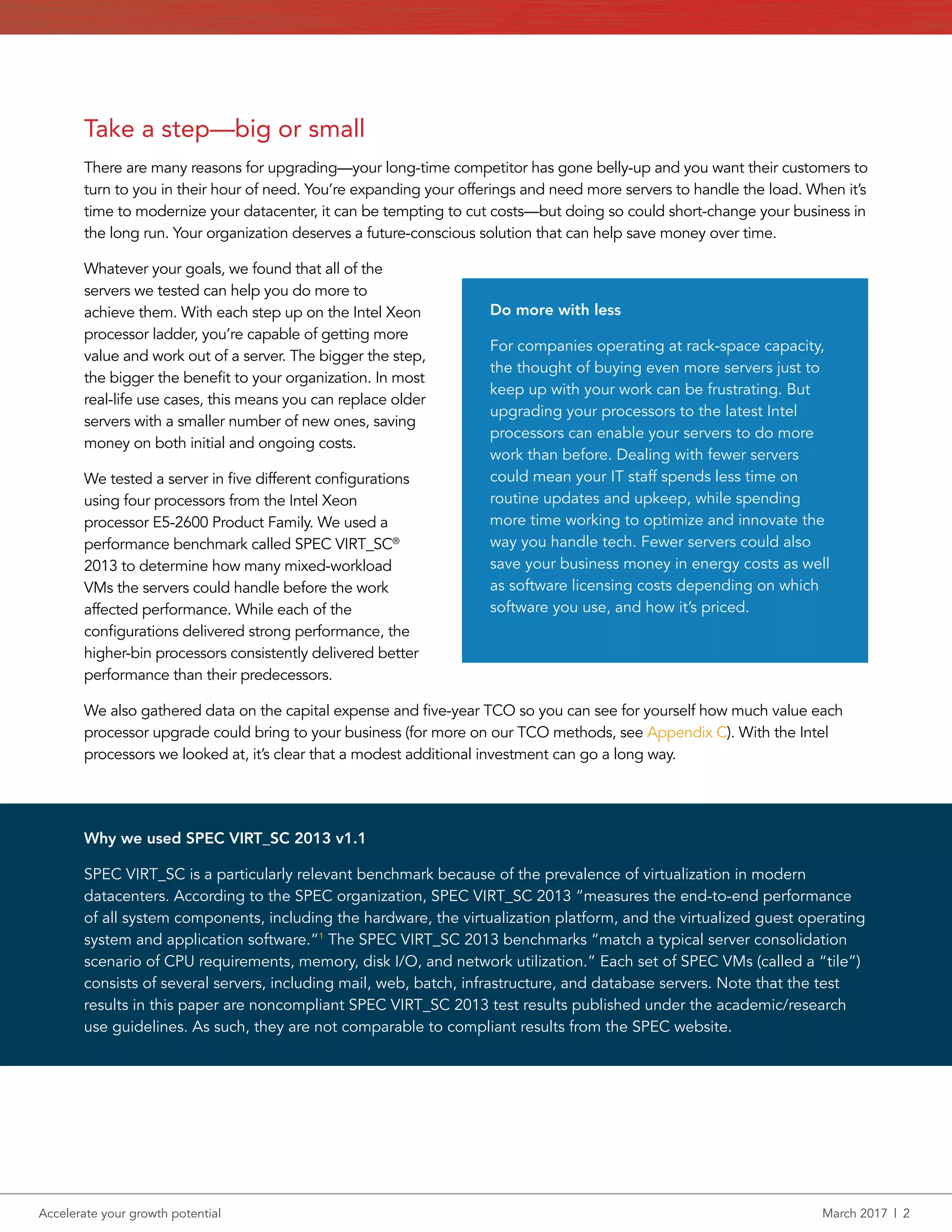
Higher-end Intel Xeon processors can help your organization do more
work, serve more customers, and save money over time
Whether your company is facing the challenge of harnessing the power of Big Data, capitalizing
on faster times to insights, or gaining a more efficient infrastructure, finding the right server
configuration for your needs can be a big step in the right direction.
When it comes to server processors, higher-bin processors from Intel can supply enough
performance to offset the initial investment by allowing you to do more work with fewer servers,
saving your company money over time.
In the Principled Technologies datacenter, we
worked hands-on with servers powered by four
products in the Intel®
Xeon®
Processor E5-2600 v4
Product Family: the E5-2620 v4, E5-2630 v4, E5-
2650 v4, and E5-2660 v4. We tested each server
in the same environment, measuring the number
of virtual machines each could handle before VM
performance decreased. To determine how well
each option fits a variety of budgets, we estimated
the total cost of ownership (TCO) for these
configurations over five years, taking into account
the cost of the hardware, hardware support,
energy, facilities, and server administration.
Faster processors are an investment, and we found
that each new Intel processor we tested offered a
better value for your money than the last.
A Principled Technologies report: Hands-on testing. Real-world results.
E5-2620 v4 processor
E5-2620 v4 processor (x2)
E5-2630 v4 processor (x2)
E5-2660 v4 processor (x2)
& 2400 MHz RAM upgrade
E5-2650 v4 processor (x2)
& 2400 MHz RAM upgrade
48
Support
VMs
up to
42 VMs
48 VMs
16 VMs
27 VMs
37 VMs
Accelerate your growth potential	 March 2017  |  2
Take a step—big or small
There are many reasons for upgrading—your long-time competitor has gone belly-up and you want their customers to
turn to you in their hour of need. You’re expanding your offerings and need more servers to handle the load. When it’s
time to modernize your datacenter, it can be tempting to cut costs—but doing so could short-change your business in
the long run. Your organization deserves a future-conscious solution that can help save money over time.
Whatever your goals, we found that all of the
servers we tested can help you do more to
achieve them. With each step up on the Intel Xeon
processor ladder, you’re capable of getting more
value and work out of a server. The bigger the step,
the bigger the benefit to your organization. In most
real-life use cases, this means you can replace older
servers with a smaller number of new ones, saving
money on both initial and ongoing costs.
We tested a server in five different configurations
using four processors from the Intel Xeon
processor E5-2600 Product Family. We used a
performance benchmark called SPEC VIRT_SC®
2013 to determine how many mixed-workload
VMs the servers could handle before the work
affected performance. While each of the
configurations delivered strong performance, the
higher‑bin processors consistently delivered better
performance than their predecessors.
We also gathered data on the capital expense and five-year TCO so you can see for yourself how much value each
processor upgrade could bring to your business (for more on our TCO methods, see Appendix C). With the Intel
processors we looked at, it’s clear that a modest additional investment can go a long way.
Do more with less
For companies operating at rack-space capacity,
the thought of buying even more servers just to
keep up with your work can be frustrating. But
upgrading your processors to the latest Intel
processors can enable your servers to do more
work than before. Dealing with fewer servers
could mean your IT staff spends less time on
routine updates and upkeep, while spending
more time working to optimize and innovate the
way you handle tech. Fewer servers could also
save your business money in energy costs as well
as software licensing costs depending on which
software you use, and how it’s priced.
Why we used SPEC VIRT_SC 2013 v1.1
SPEC VIRT_SC is a particularly relevant benchmark because of the prevalence of virtualization in modern
datacenters. According to the SPEC organization, SPEC VIRT_SC 2013 “measures the end-to-end performance
of all system components, including the hardware, the virtualization platform, and the virtualized guest operating
system and application software.”1
The SPEC VIRT_SC 2013 benchmarks “match a typical server consolidation
scenario of CPU requirements, memory, disk I/O, and network utilization.” Each set of SPEC VMs (called a “tile”)
consists of several servers, including mail, web, batch, infrastructure, and database servers. Note that the test
results in this paper are noncompliant SPEC VIRT_SC 2013 test results published under the academic/research
use guidelines. As such, they are not comparable to compliant results from the SPEC website.
Accelerate your growth potential	 March 2017  |  3
Our baseline: The Intel Xeon processor E5-2620 v4
A server powered by a single Intel Xeon processor E5-2620 v4 (often used for file/print servers or applications that
don’t require a lot of resources) will cost your organization $34,775.89 over five years. And for all that money, each
of these servers will be able to support only 16 VMs total. In the next few sections, we’ll see how dual-socket servers
equipped with higher-bin Intel Xeon processors can allow your company to do more work while saving money.
One small step up opens up a world of possibilities
Using a dual-socket server can enable your business to run more resource-intensive applications and sort through
larger databases. In our datacenter, a server equipped with two Intel Xeon processors E5-2620 v4 ran 27 virtual
machines comfortably before our test workload negatively affected overall performance. To get the same
amount of work using our single-socket baseline server, you’d need to purchase two servers for every dual-socket
configuration, which would cost your organization $69,551.78 over five years.
A new dual-socket Dell EMC PowerEdge™
R730xd configured with this processor carries a TCO of $35,876.40—
meaning you get 1.6 times the number of VMs our baseline server could support for nearly half the cost.
Virtual machines
SPEC VIRT_SC 2013 score
471.3
27
Intel Xeon processor
E5-2620 v4 (x2)
2133MHz RAM
Virtual machines
SPEC VIRT_SC 2013 score
236.3
16
Intel Xeon processor
E5-2620 v4
2133MHz RAM
2
2
Accelerate your growth potential	 March 2017  |  4
More power with the Intel Xeon processor E5-2630 v4
Customers use your website to pay their bills and view statements, read news stories, or write blog entries. We found
that more users can accomplish these tasks concurrently with a server powered by the Intel Xeon processor E5-2630 v4.
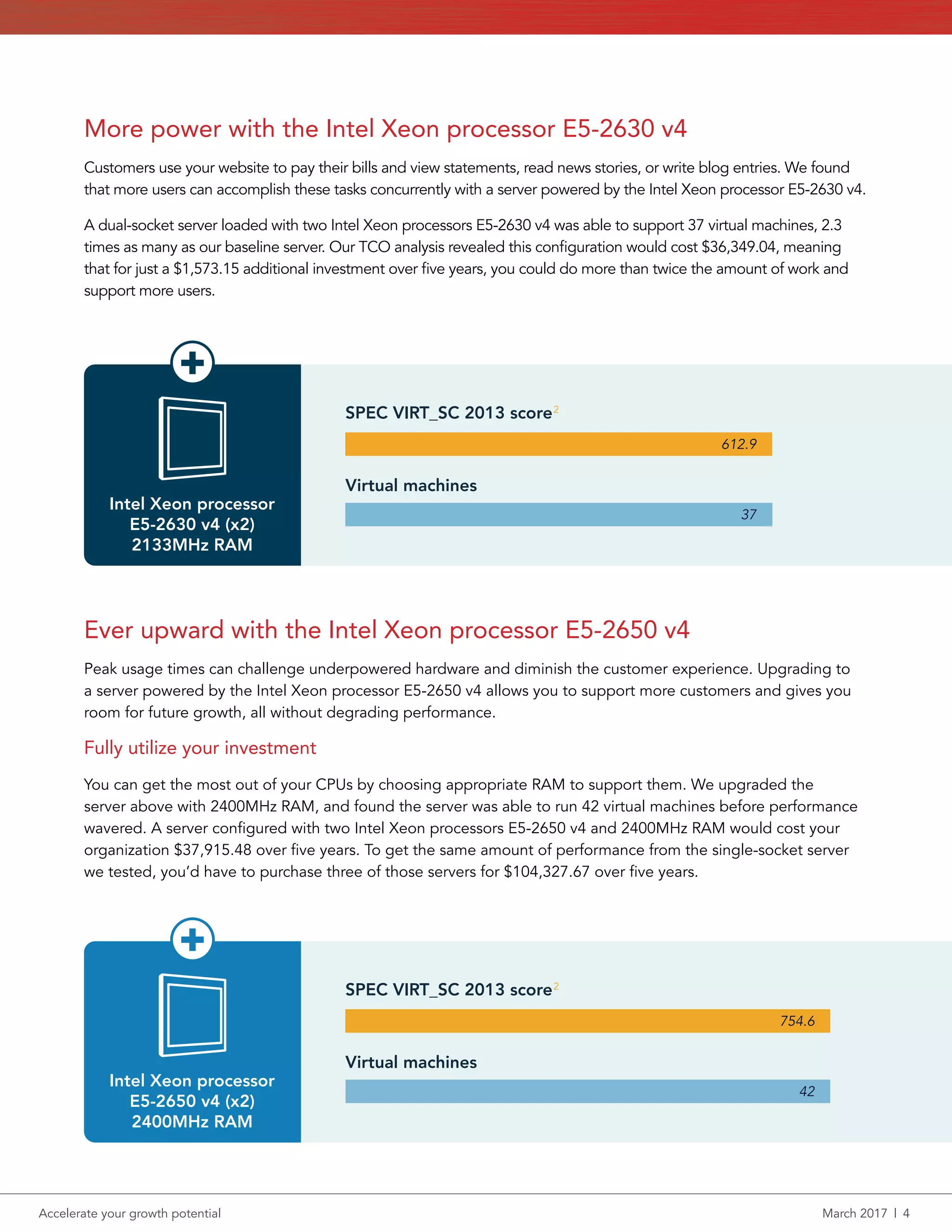
A dual-socket server loaded with two Intel Xeon processors E5-2630 v4 was able to support 37 virtual machines, 2.3
times as many as our baseline server. Our TCO analysis revealed this configuration would cost $36,349.04, meaning
that for just a $1,573.15 additional investment over five years, you could do more than twice the amount of work and
support more users.
Ever upward with the Intel Xeon processor E5-2650 v4
Peak usage times can challenge underpowered hardware and diminish the customer experience. Upgrading to
a server powered by the Intel Xeon processor E5-2650 v4 allows you to support more customers and gives you
room for future growth, all without degrading performance.
Fully utilize your investment
You can get the most out of your CPUs by choosing appropriate RAM to support them. We upgraded the
server above with 2400MHz RAM, and found the server was able to run 42 virtual machines before performance
wavered. A server configured with two Intel Xeon processors E5-2650 v4 and 2400MHz RAM would cost your
organization $37,915.48 over five years. To get the same amount of performance from the single-socket server
we tested, you’d have to purchase three of those servers for $104,327.67 over five years.
Virtual machines
SPEC VIRT_SC 2013 score
612.9
37
Intel Xeon processor
E5-2630 v4 (x2)
2133MHz RAM
Virtual machines
SPEC VIRT_SC 2013 score
754.6
42
Intel Xeon processor
E5-2650 v4 (x2)
2400MHz RAM
2
2
Accelerate your growth potential	 March 2017  |  5
Take everything to the next level with the Intel Xeon processor
E5-2660 v4
Big Data analytics are changing the face of business. Timely insights affect everything from day-to-day operations
to customer-facing initiatives, and everything in between. But working with these powerful analytics is extremely
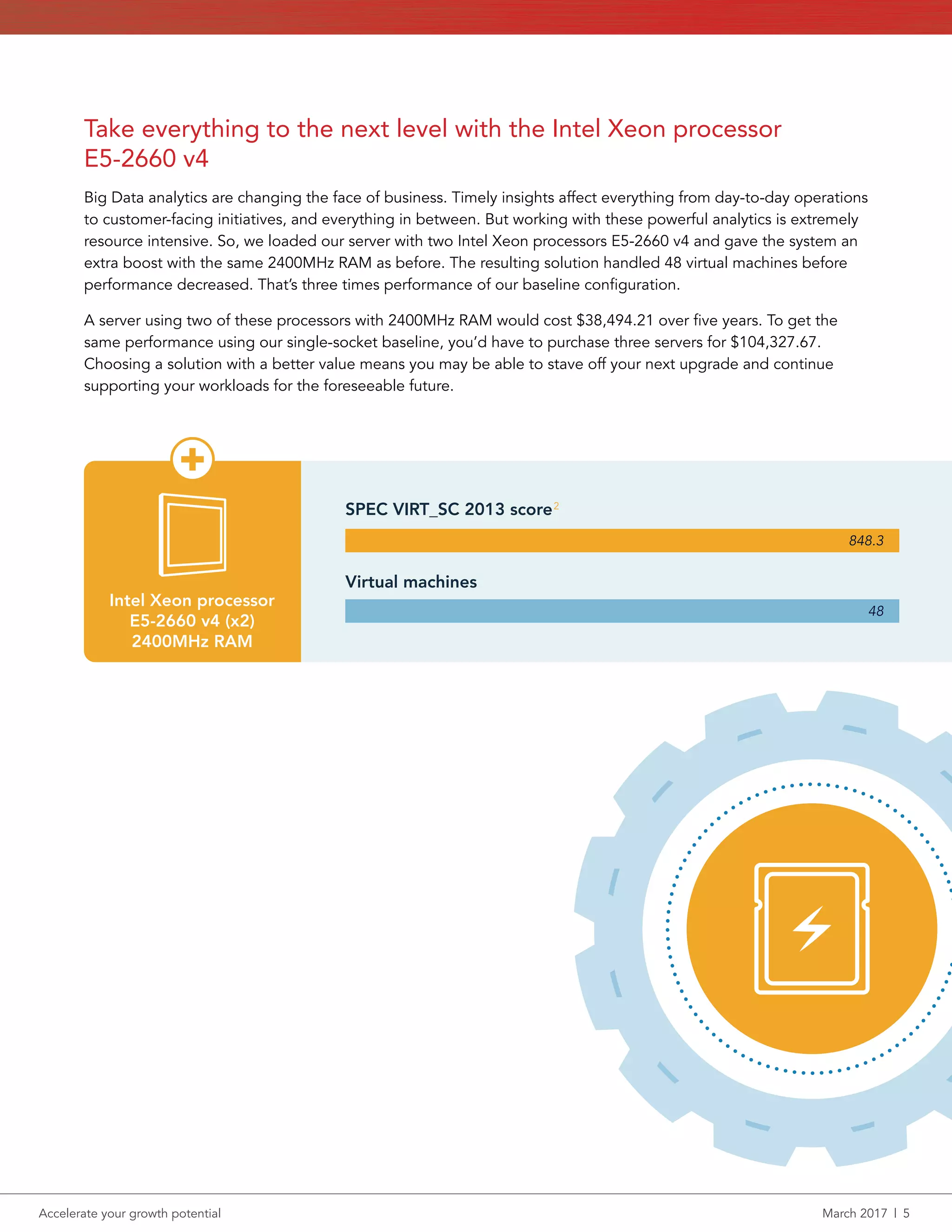
resource intensive. So, we loaded our server with two Intel Xeon processors E5-2660 v4 and gave the system an
extra boost with the same 2400MHz RAM as before. The resulting solution handled 48 virtual machines before
performance decreased. That’s three times performance of our baseline configuration.
A server using two of these processors with 2400MHz RAM would cost $38,494.21 over five years. To get the
same performance using our single-socket baseline, you’d have to purchase three servers for $104,327.67.
Choosing a solution with a better value means you may be able to stave off your next upgrade and continue
supporting your workloads for the foreseeable future.
Virtual machines
SPEC VIRT_SC 2013 score
848.3
48
Intel Xeon processor
E5-2660 v4 (x2)
2400MHz RAM
2
Accelerate your growth potential	 March 2017  |  6
Conclusion: Choose a solution that makes sound business sense
Each server configuration we tested enabled us to do more work than our baseline without risking performance.
Compared to the total cost of a server, the initial cost of a processor upgrade is easily offset by the performance
boost each processor drives. Each upfront investment means you’ll be able to meet rising customer demands
better and, in some cases, gives your business room to grow.
1	 https://www.spec.org/virt_sc2013/
2	 The test results in this paper are noncompliant, though our test environment had only minor differences from SPEC guidelines. As such,
we believe our results are an accurate measurement of server performance. Review our methodology in Appendix B to learn more
about how we tested.
3	 Number of servers required at each configuration level to host at least the same number of VMs as 12x E5-2660 v4 servers
24x E5-2660 v4 processors in 12 servers
$461,931
$790,001
Save
over 5 years
up to
36x E5-2620 v4 processors in 36 servers
$1,251,932
44x E5-2620 v4 processors in 22 servers
$789,281
32x E5-2630 v4 processors in 16 servers
$581,585
28x E5-2650 v4 processors in 14 servers
$530,817
E5-2620 v4 processor with 2133MHz RAM
16 VMs
E5-2620 v4 processor (x2) with 2133MHz RAM
E5-2630 v4 processor (x2) with 2133MHz RAM
E5-2660 v4 processor (x2) with 2400MHz RAM
E5-2650 v4 processor (x2) with 2400MHz RAM
48
Support
VMs
up to
27 VMs
37 VMs
42 VMs
48 VMs
Number of VMs supported
Cost to match 24U of E5-2660 v4 processor-powered servers3
Accelerate your growth potential	 March 2017  |  7
On December 8, 2016, we finalized the hardware and software configurations we tested. Updates for current and
recently released hardware and software appear often, so unavoidably these configurations may not represent
the latest versions available when this report appears. For older systems, we chose configurations representative
of typical purchases of those systems. We concluded hands-on testing on January 11, 2017.
Appendix A – System configuration information
Server configuration information Dell EMC PowerEdge R730xd
BIOS name and version 2.3.4
Non-default BIOS settings Boot Mode = UEFI
Operating system name and version Red Hat Enterprise Linux Server 7.2 (KVM)
Date of last OS updates/patches applied 12/08/2016
Power management policy Performance
Processor #1
Number of processors 1 or 2
Vendor and model Intel Xeon E5-2620 v4
Core count (per processor) 8
Core frequency (GHz) 2.10
Stepping R0
Processor #2
Number of processors 2
Vendor and model Intel Xeon E5-2630 v4
Core count (per processor) 10
Core frequency (GHz) 2.20
Stepping R0
Processor #3
Number of processors 2
Vendor and model Intel Xeon E5-2650 v4
Core count (per processor) 12
Core frequency (GHz) 2.20
Stepping M0
Processor #4
Number of processors 2
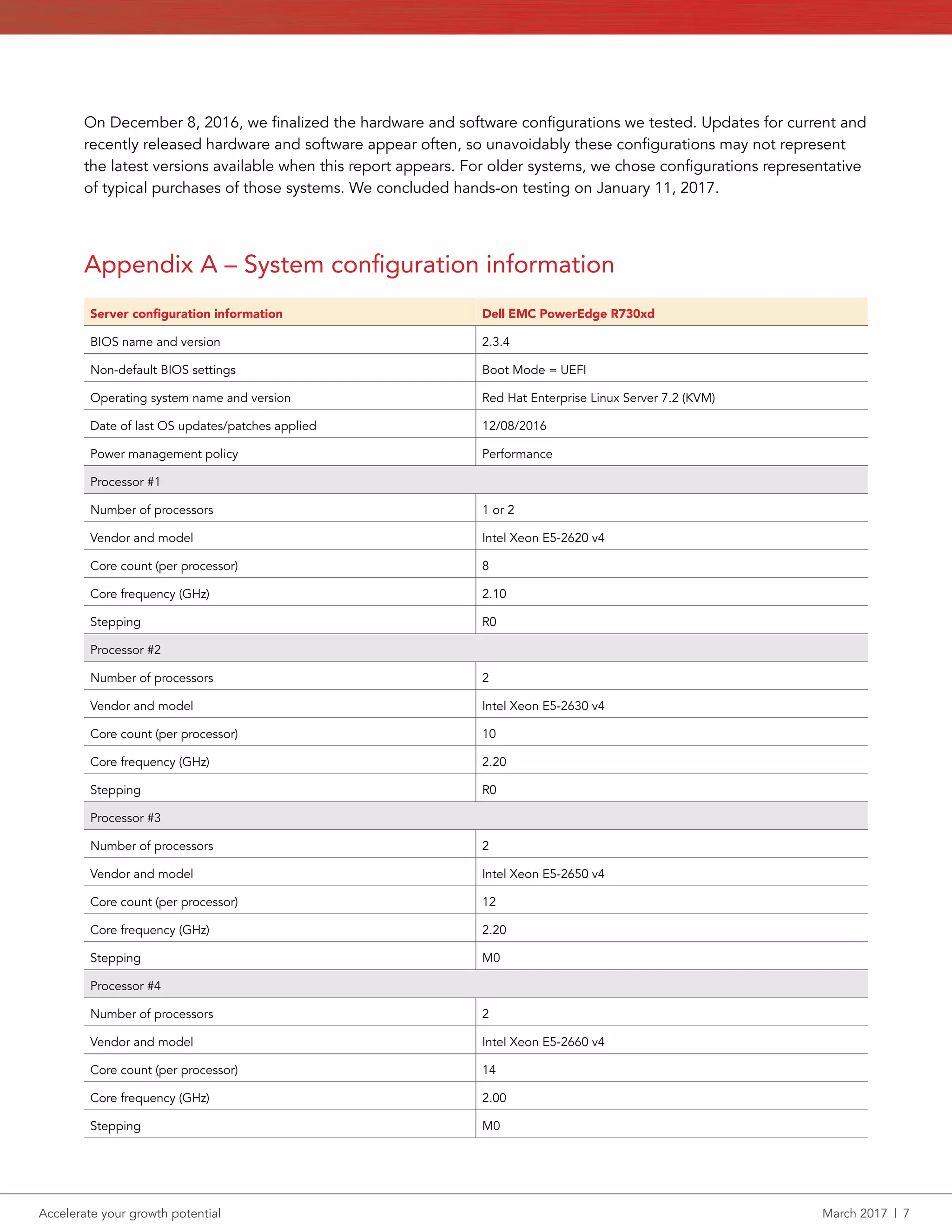
Vendor and model Intel Xeon E5-2660 v4
Core count (per processor) 14
Core frequency (GHz) 2.00
Stepping M0
Accelerate your growth potential	 March 2017  |  8
Server configuration information Dell EMC PowerEdge R730xd
Memory module(s) #1
Total memory in system (GB) 512
Number of memory modules
13
3
Vendor and model
Samsung M393A4K40BB0-CPB0Q
Micron MTA36ASF4G72PZ-2G1B1
Size (GB) 32
Type DDR4
Speed (MHz) 2133
Speed running in the server (MHz) 2133
Memory module(s) #2
Total memory in system (GB) 512
Number of memory modules 16
Vendor and model Hynix HMA84GR7MFR4N-UH
Size (GB) 32
Type DDR4
Speed (MHz) 2400
Speed running in the server (MHz) 2400
Storage controller
Vendor and model Dell PERC H730P Mini
Cache size (GB) 2
Firmware version 25.5.0.0018
Driver version 06.904.07.00_el7.2-1
Local storage front
Number of drives 16
Drive vendor and model Intel SSDSC2BX40
Drive size (GB) 400
Drive information (speed, interface, type) 6G SATA SSD
Local storage rear
Number of drives 2
Drive vendor and model Samsung MZ7LM120HCFD00D3
Drive size (GB) 120
Drive information (speed, interface, type) SATA SSD
Network adapter
Vendor and model 1 x Broadcom 5720 QP
Number and type of ports 4 x 1Gb
Driver version 3.137
Accelerate your growth potential	 March 2017  |  9
Server configuration information Dell EMC PowerEdge R730xd
Network adapter
Vendor and model 2 x Intel 10G Server Adapter X520-DA2
Number and type of ports 2 x 10Gb
Driver version 4.4.6-1
Power supplies
Vendor and model Astec E750E-S1
Number of power supplies 2
Wattage of each (W) 750
Accelerate your growth potential	 March 2017  |  10
Appendix B – How we tested
Setting up the SPEC VIRT_SC 2013 environment
Performing basic setup
1.	 Install Red Hat Enterprise Linux 7.3 on the R730xd per Red Hat Enterprise Linux best practices.
2.	 Make sure all hardware and software is up to date with drivers, firmware, updates, etc.
3.	 Install the E5-2660 v4 CPUs and 2400MHz memory to start.
4.	 Configure the storage per SPEC VIRT_SC 2013 recommendations:
a.	Appserver: 16GB
b.	Batch: 16GB
c.	DB: 40GB
d.	Infra: 50GB
e.	Mail: 36GB
f.	 Web: 16GB
5.	 Configure network SPEC VIRT_SC 2013 recommendations
a.	One network interface connected to an external network for clients and VM communication
Setting up SPEC VIRT_SC 2013
Setting up the Infraserver VM
1.	 Install the OS.
2.	 Install Java 7.
3.	 Configure the OS to start the pollme.jar listener automatically on boot.
4.	 Copy the SPECweb®
2005 directory from the harness kit onto the VM.
5.	 Setup a remote filesystem, create a 32 GB filesystem, and make it accessible by the webserver VM.
6.	 Configure the back end simulator (BeSim) by taking the following actions:
a.	Configure the system with web server software on port 81.
b.	Build the BeSim code.
c.	Install the code to the BeSim web server.
d.	Start the BeSim web server.
e.	Use the test_besim_support scripts to test the setup.
Setting up the webserver VM
1.	 Install the OS.
2.	 Install Java 6 or greater Compatible JRE software.
3.	 Configure the OS to start the pollme.jar listener automatically on boot.
4.	 Copy the SPECweb2005 directory from the harness kit onto the VM.
5.	 Set localization on the system to US.
6.	 Install and configure Nginx 1.8.1 with PHP and SSL or TLS support.
7.	 Set the current working directory to the wafgen directory.
8.	 Make a document root support/downloads directory a fileserver mount from the infraserver VM by taking the following actions:
a.	Go to the SPECweb2005/wafgen directory and edid the support wafgen files to the TILEINDEX value for the tile you are creating.
b.	Edit /opt/SPECweb2005/wafgen/unix/support_downloads_props.rc and set the parameter TILEINDEX equal to the tile number
minus 1.
c.	Edit /opt/SPECweb2005 wafgen/unix/support_image_props.rc and set the parameter TILEINDEX equal to the tile number minus 1.
d.	Build the image files.
e.	Build the support files.
Setting up PHP
1.	 Copy the contents of the /opt/SPECweb2005/Scripts/PHP/* directory to your document root.
2.	 Verify the “support” and “Smarty-2.6.26” subdirectories are under the document root, and ensure the web server has read and write
access to these directories and subdirectories.
Accelerate your growth potential	 March 2017  |  11
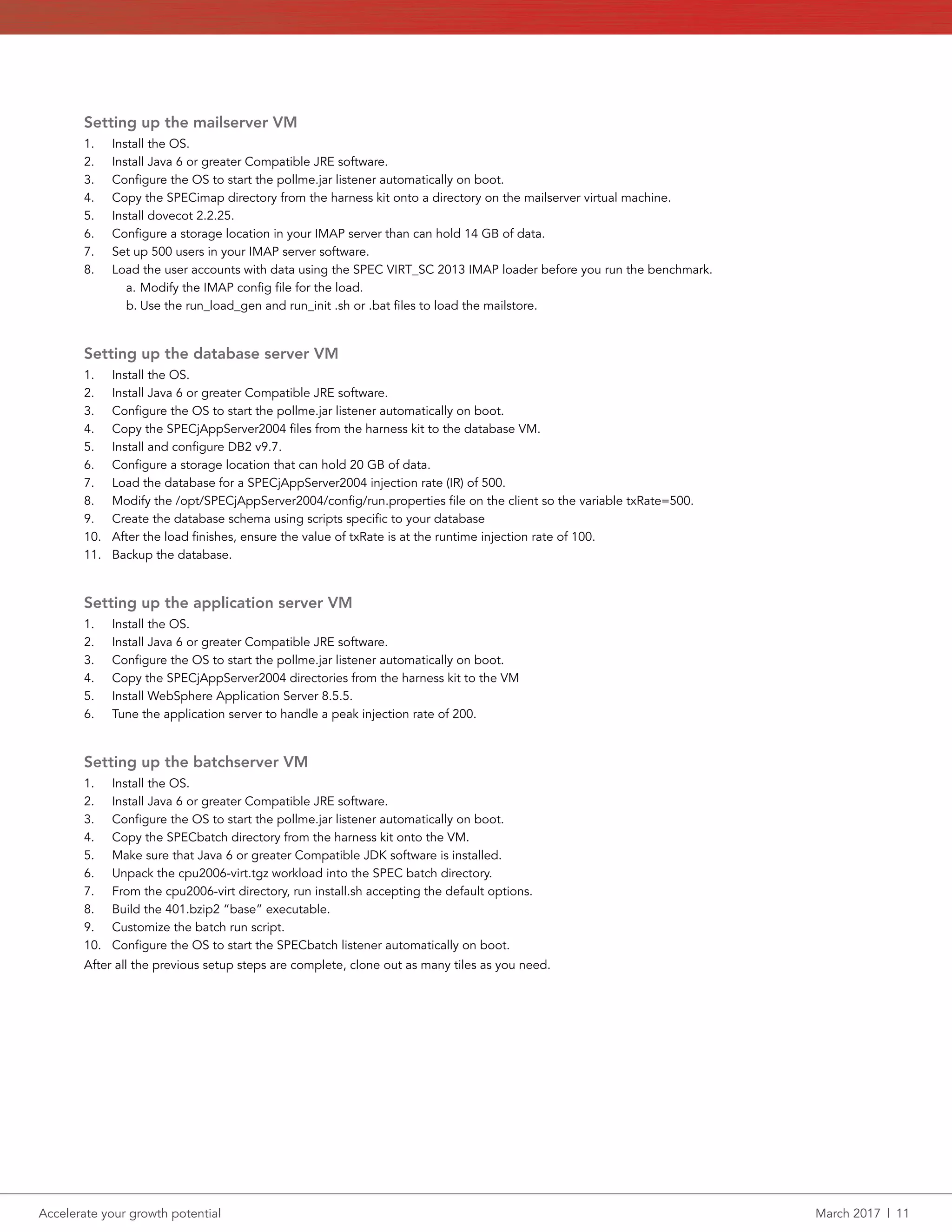
Setting up the mailserver VM
1.	 Install the OS.
2.	 Install Java 6 or greater Compatible JRE software.
3.	 Configure the OS to start the pollme.jar listener automatically on boot.
4.	 Copy the SPECimap directory from the harness kit onto a directory on the mailserver virtual machine.
5.	 Install dovecot 2.2.25.
6.	 Configure a storage location in your IMAP server than can hold 14 GB of data.
7.	 Set up 500 users in your IMAP server software.
8.	 Load the user accounts with data using the SPEC VIRT_SC 2013 IMAP loader before you run the benchmark.
a.	Modify the IMAP config file for the load.
b.	Use the run_load_gen and run_init .sh or .bat files to load the mailstore.
Setting up the database server VM
1.	 Install the OS.
2.	 Install Java 6 or greater Compatible JRE software.
3.	 Configure the OS to start the pollme.jar listener automatically on boot.
4.	 Copy the SPECjAppServer2004 files from the harness kit to the database VM.
5.	 Install and configure DB2 v9.7.
6.	 Configure a storage location that can hold 20 GB of data.
7.	 Load the database for a SPECjAppServer2004 injection rate (IR) of 500.
8.	 Modify the /opt/SPECjAppServer2004/config/run.properties file on the client so the variable txRate=500.
9.	 Create the database schema using scripts specific to your database
10.	 After the load finishes, ensure the value of txRate is at the runtime injection rate of 100.
11.	 Backup the database.
Setting up the application server VM
1.	 Install the OS.
2.	 Install Java 6 or greater Compatible JRE software.
3.	 Configure the OS to start the pollme.jar listener automatically on boot.
4.	 Copy the SPECjAppServer2004 directories from the harness kit to the VM
5.	 Install WebSphere Application Server 8.5.5.
6.	 Tune the application server to handle a peak injection rate of 200.
Setting up the batchserver VM
1.	 Install the OS.
2.	 Install Java 6 or greater Compatible JRE software.
3.	 Configure the OS to start the pollme.jar listener automatically on boot.
4.	 Copy the SPECbatch directory from the harness kit onto the VM.
5.	 Make sure that Java 6 or greater Compatible JDK software is installed.
6.	 Unpack the cpu2006-virt.tgz workload into the SPEC batch directory.
7.	 From the cpu2006-virt directory, run install.sh accepting the default options.
8.	 Build the 401.bzip2 “base” executable.
9.	 Customize the batch run script.
10.	 Configure the OS to start the SPECbatch listener automatically on boot.
After all the previous setup steps are complete, clone out as many tiles as you need.
Accelerate your growth potential	 March 2017  |  12
Configuration details
For complete details about the configurations and test methodology for our SPEC VIRT_SC 2013 v1.1 testing, review the output file for the
E5-2660 v4 test directly at http://facts.pt/qvAbBk. All CPU configurations were tested with these settings with the total number of VMs being
the only difference.
Configuration details
Web server configuration details
Web Server Name/Version Nginx 1.8.1
Script Name/Version PHP 5.3.3
Other Software
Alternative PHP Cache APC 3.1.9
Smarty Template Engine 2.6.26
App Server Configuration Details
App. Server Name/Version GlassFish Server Open Source Edition 3.1.2.2
Emulator Name/Version Apache Tomcat 7.0.73
Mail Server Configuration Details
Mail Server Name/Version Dovecot 2.2.25
Database Configuration Details
Database Name/Version PostgreSQL 9.2.19
Infraserver Configuration Details
Web Server Name/Version Apache 2.2.15
Script Name/Version FastCGI 2.4.6-2
Batch Server Configuration Details
C Compiler Version gcc 4.4.7-17
Optimization Flags -O2
Common VM Configuration Details
JVM Version OpenJDK Runtime Environment (1.7.0.99-2.6.5.1.el6-x86_64)
Other Software ixgbevf v3.2.2
Common Configuration Details:
• JVM Version: OpenJDK Runtime Environment (1.7.0.99-2.6.5.1.el6-x86_64)
• Other Software: ixgbevf v3.2.2
Web Server Configuration Details:
• Web Server Name/Version: Nginx 1.8.1
• Script Name/Version: PHP 5.3.3
• Other Software:
yy Alternative PHP Cache APC 3.1.9
yy Smarty Template Engine 2.6.26
Accelerate your growth potential	 March 2017  |  13
App Server Configuration Details:
• App. Server Name/Version: GlassFish Server Open Source Edition 3.1.2.2
• Emulator Name/Version: Apache Tomcat 7.0.73
Mail Server Configuration Details:
• Mail Server Name/Version: Dovecot 2.2.25
Database Configuration Details:
• Database Name/Version: PostgreSQL 9.2.19
Infraserver Configuration Details:
• Web Server Name/Version: Apache 2.2.15
• Script Name/Version: FastCGI 2.4.6-2
Batch Server Configuration Details:
• C Compiler Version: gcc 4.4.7-17
• Optimization Flags: -O2
Accelerate your growth potential	 March 2017  |  14
Appendix C: TCO
About our total cost of ownership (TCO) analysis
We estimated the cost of each server to include hardware purchase, hardware support, energy costs, datacenter space costs, and server
administration. We estimated these costs for a server life of five years.
Hardware purchase costs
We priced the Dell PowerEdge R730xd servers on the Dell site. The prices for the five servers we tested vary because of their different
processors and memory modules and range from $13,093.66 for the single Intel Xeon processor E5-2620 model to $15,579.55 for the
dual‑socket server with the Intel Xeon processor E5-2660.1
Hardware support costs
We used the price on the Dell EMC website for ProSupport Plus: 5 Year Mission Critical 4-hour Onsite Service of $4,107.36 per server.2
Energy costs
We measured power usage on the servers while both actively running the SPEC benchmark and while idle. We estimated energy costs based
on the servers being active 50 percent of the time, averaging the active and idle energy usage. We estimated a 10.4-cent cost per Kilowatt
hour based on a U.S. Energy Information Administration report of average price per electricity to ultimate commercial customers for year to
date ending in October, 2016.3
We used that information to calculate energy costs to power the server. We estimated the energy overhead
of the server at double that to account for cooling, heating, and other data center infrastructure power usage. Datacenters differ in their
power usage effectiveness; our 2.0 multiplier is conservative.
Datacenter Space
Servers also have additional overhead costs related to the datacenter space they occupy. We estimated these costs at $1,000 per month per
rack. Assuming a 42U rack, the five-year cost for each 2U server is $2,858.
Server administration
We estimate that each server administrator can support an average of 40 servers for hardware and OS management. That number could vary
based on automation and other efficiencies. We calculated costs based on salary and benefits of a Systems Administrator II at $106,958.4
That works out to a five-year administration cost per server of $13,369.75.
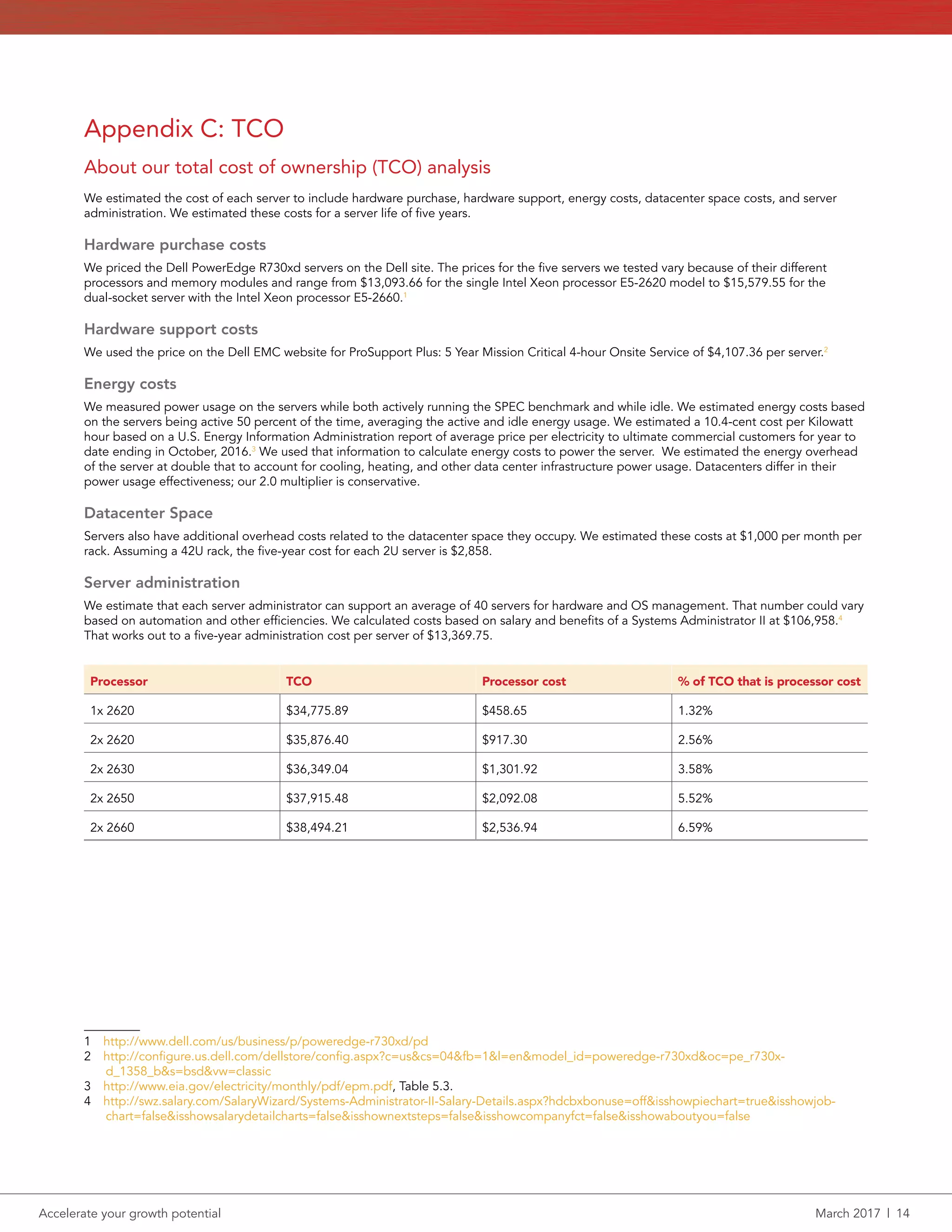
Processor TCO Processor cost % of TCO that is processor cost
1x 2620 $34,775.89 $458.65 1.32%
2x 2620 $35,876.40 $917.30 2.56%
2x 2630 $36,349.04 $1,301.92 3.58%
2x 2650 $37,915.48 $2,092.08 5.52%
2x 2660 $38,494.21 $2,536.94 6.59%
1  http://www.dell.com/us/business/p/poweredge-r730xd/pd
2  http://configure.us.dell.com/dellstore/config.aspx?c=us&cs=04&fb=1&l=en&model_id=poweredge-r730xd&oc=pe_r730x-
d_1358_b&s=bsd&vw=classic
3  http://www.eia.gov/electricity/monthly/pdf/epm.pdf, Table 5.3.
4  http://swz.salary.com/SalaryWizard/Systems-Administrator-II-Salary-Details.aspx?hdcbxbonuse=off&isshowpiechart=true&isshowjob-
chart=false&isshowsalarydetailcharts=false&isshownextsteps=false&isshowcompanyfct=false&isshowaboutyou=false
Accelerate your growth potential	 March 2017  |  15
Principled Technologies is a registered trademark of Principled Technologies, Inc.
All other product names are the trademarks of their respective owners.
DISCLAIMER OF WARRANTIES; LIMITATION OF LIABILITY:
Principled Technologies, Inc. has made reasonable efforts to ensure the accuracy and validity of its testing, however, Principled Technologies, Inc. specifically disclaims
any warranty, expressed or implied, relating to the test results and analysis, their accuracy, completeness or quality, including any implied warranty of fitness for any
particular purpose. All persons or entities relying on the results of any testing do so at their own risk, and agree that Principled Technologies, Inc., its employees and its
subcontractors shall have no liability whatsoever from any claim of loss or damage on account of any alleged error or defect in any testing procedure or result.
In no event shall Principled Technologies, Inc. be liable for indirect, special, incidental, or consequential damages in connection with its testing, even if advised of the
possibility of such damages. In no event shall Principled Technologies, Inc.’s liability, including for direct damages, exceed the amounts paid in connection with Principled
Technologies, Inc.’s testing. Customer’s sole and exclusive remedies are as set forth herein.
This project was commissioned by Intel Corp.
Principled
Technologies®
Facts matter.®Principled
Technologies®
Facts matter.®

Accelerate your growth potential

  • 1.
    Accelerate your growthpotential March 2017 Accelerate your growth potential Higher-end Intel Xeon processors can help your organization do more work, serve more customers, and save money over time Whether your company is facing the challenge of harnessing the power of Big Data, capitalizing on faster times to insights, or gaining a more efficient infrastructure, finding the right server configuration for your needs can be a big step in the right direction. When it comes to server processors, higher-bin processors from Intel can supply enough performance to offset the initial investment by allowing you to do more work with fewer servers, saving your company money over time. In the Principled Technologies datacenter, we worked hands-on with servers powered by four products in the Intel® Xeon® Processor E5-2600 v4 Product Family: the E5-2620 v4, E5-2630 v4, E5- 2650 v4, and E5-2660 v4. We tested each server in the same environment, measuring the number of virtual machines each could handle before VM performance decreased. To determine how well each option fits a variety of budgets, we estimated the total cost of ownership (TCO) for these configurations over five years, taking into account the cost of the hardware, hardware support, energy, facilities, and server administration. Faster processors are an investment, and we found that each new Intel processor we tested offered a better value for your money than the last. A Principled Technologies report: Hands-on testing. Real-world results. E5-2620 v4 processor E5-2620 v4 processor (x2) E5-2630 v4 processor (x2) E5-2660 v4 processor (x2) & 2400 MHz RAM upgrade E5-2650 v4 processor (x2) & 2400 MHz RAM upgrade 48 Support VMs up to 42 VMs 48 VMs 16 VMs 27 VMs 37 VMs
  • 2.
    Accelerate your growthpotential March 2017  |  2 Take a step—big or small There are many reasons for upgrading—your long-time competitor has gone belly-up and you want their customers to turn to you in their hour of need. You’re expanding your offerings and need more servers to handle the load. When it’s time to modernize your datacenter, it can be tempting to cut costs—but doing so could short-change your business in the long run. Your organization deserves a future-conscious solution that can help save money over time. Whatever your goals, we found that all of the servers we tested can help you do more to achieve them. With each step up on the Intel Xeon processor ladder, you’re capable of getting more value and work out of a server. The bigger the step, the bigger the benefit to your organization. In most real-life use cases, this means you can replace older servers with a smaller number of new ones, saving money on both initial and ongoing costs. We tested a server in five different configurations using four processors from the Intel Xeon processor E5-2600 Product Family. We used a performance benchmark called SPEC VIRT_SC® 2013 to determine how many mixed-workload VMs the servers could handle before the work affected performance. While each of the configurations delivered strong performance, the higher‑bin processors consistently delivered better performance than their predecessors. We also gathered data on the capital expense and five-year TCO so you can see for yourself how much value each processor upgrade could bring to your business (for more on our TCO methods, see Appendix C). With the Intel processors we looked at, it’s clear that a modest additional investment can go a long way. Do more with less For companies operating at rack-space capacity, the thought of buying even more servers just to keep up with your work can be frustrating. But upgrading your processors to the latest Intel processors can enable your servers to do more work than before. Dealing with fewer servers could mean your IT staff spends less time on routine updates and upkeep, while spending more time working to optimize and innovate the way you handle tech. Fewer servers could also save your business money in energy costs as well as software licensing costs depending on which software you use, and how it’s priced. Why we used SPEC VIRT_SC 2013 v1.1 SPEC VIRT_SC is a particularly relevant benchmark because of the prevalence of virtualization in modern datacenters. According to the SPEC organization, SPEC VIRT_SC 2013 “measures the end-to-end performance of all system components, including the hardware, the virtualization platform, and the virtualized guest operating system and application software.”1 The SPEC VIRT_SC 2013 benchmarks “match a typical server consolidation scenario of CPU requirements, memory, disk I/O, and network utilization.” Each set of SPEC VMs (called a “tile”) consists of several servers, including mail, web, batch, infrastructure, and database servers. Note that the test results in this paper are noncompliant SPEC VIRT_SC 2013 test results published under the academic/research use guidelines. As such, they are not comparable to compliant results from the SPEC website.
  • 3.
    Accelerate your growthpotential March 2017  |  3 Our baseline: The Intel Xeon processor E5-2620 v4 A server powered by a single Intel Xeon processor E5-2620 v4 (often used for file/print servers or applications that don’t require a lot of resources) will cost your organization $34,775.89 over five years. And for all that money, each of these servers will be able to support only 16 VMs total. In the next few sections, we’ll see how dual-socket servers equipped with higher-bin Intel Xeon processors can allow your company to do more work while saving money. One small step up opens up a world of possibilities Using a dual-socket server can enable your business to run more resource-intensive applications and sort through larger databases. In our datacenter, a server equipped with two Intel Xeon processors E5-2620 v4 ran 27 virtual machines comfortably before our test workload negatively affected overall performance. To get the same amount of work using our single-socket baseline server, you’d need to purchase two servers for every dual-socket configuration, which would cost your organization $69,551.78 over five years. A new dual-socket Dell EMC PowerEdge™ R730xd configured with this processor carries a TCO of $35,876.40— meaning you get 1.6 times the number of VMs our baseline server could support for nearly half the cost. Virtual machines SPEC VIRT_SC 2013 score 471.3 27 Intel Xeon processor E5-2620 v4 (x2) 2133MHz RAM Virtual machines SPEC VIRT_SC 2013 score 236.3 16 Intel Xeon processor E5-2620 v4 2133MHz RAM 2 2
  • 4.
    Accelerate your growthpotential March 2017  |  4 More power with the Intel Xeon processor E5-2630 v4 Customers use your website to pay their bills and view statements, read news stories, or write blog entries. We found that more users can accomplish these tasks concurrently with a server powered by the Intel Xeon processor E5-2630 v4. A dual-socket server loaded with two Intel Xeon processors E5-2630 v4 was able to support 37 virtual machines, 2.3 times as many as our baseline server. Our TCO analysis revealed this configuration would cost $36,349.04, meaning that for just a $1,573.15 additional investment over five years, you could do more than twice the amount of work and support more users. Ever upward with the Intel Xeon processor E5-2650 v4 Peak usage times can challenge underpowered hardware and diminish the customer experience. Upgrading to a server powered by the Intel Xeon processor E5-2650 v4 allows you to support more customers and gives you room for future growth, all without degrading performance. Fully utilize your investment You can get the most out of your CPUs by choosing appropriate RAM to support them. We upgraded the server above with 2400MHz RAM, and found the server was able to run 42 virtual machines before performance wavered. A server configured with two Intel Xeon processors E5-2650 v4 and 2400MHz RAM would cost your organization $37,915.48 over five years. To get the same amount of performance from the single-socket server we tested, you’d have to purchase three of those servers for $104,327.67 over five years. Virtual machines SPEC VIRT_SC 2013 score 612.9 37 Intel Xeon processor E5-2630 v4 (x2) 2133MHz RAM Virtual machines SPEC VIRT_SC 2013 score 754.6 42 Intel Xeon processor E5-2650 v4 (x2) 2400MHz RAM 2 2
  • 5.
    Accelerate your growthpotential March 2017  |  5 Take everything to the next level with the Intel Xeon processor E5-2660 v4 Big Data analytics are changing the face of business. Timely insights affect everything from day-to-day operations to customer-facing initiatives, and everything in between. But working with these powerful analytics is extremely resource intensive. So, we loaded our server with two Intel Xeon processors E5-2660 v4 and gave the system an extra boost with the same 2400MHz RAM as before. The resulting solution handled 48 virtual machines before performance decreased. That’s three times performance of our baseline configuration. A server using two of these processors with 2400MHz RAM would cost $38,494.21 over five years. To get the same performance using our single-socket baseline, you’d have to purchase three servers for $104,327.67. Choosing a solution with a better value means you may be able to stave off your next upgrade and continue supporting your workloads for the foreseeable future. Virtual machines SPEC VIRT_SC 2013 score 848.3 48 Intel Xeon processor E5-2660 v4 (x2) 2400MHz RAM 2
  • 6.
    Accelerate your growthpotential March 2017  |  6 Conclusion: Choose a solution that makes sound business sense Each server configuration we tested enabled us to do more work than our baseline without risking performance. Compared to the total cost of a server, the initial cost of a processor upgrade is easily offset by the performance boost each processor drives. Each upfront investment means you’ll be able to meet rising customer demands better and, in some cases, gives your business room to grow. 1 https://www.spec.org/virt_sc2013/ 2 The test results in this paper are noncompliant, though our test environment had only minor differences from SPEC guidelines. As such, we believe our results are an accurate measurement of server performance. Review our methodology in Appendix B to learn more about how we tested. 3 Number of servers required at each configuration level to host at least the same number of VMs as 12x E5-2660 v4 servers 24x E5-2660 v4 processors in 12 servers $461,931 $790,001 Save over 5 years up to 36x E5-2620 v4 processors in 36 servers $1,251,932 44x E5-2620 v4 processors in 22 servers $789,281 32x E5-2630 v4 processors in 16 servers $581,585 28x E5-2650 v4 processors in 14 servers $530,817 E5-2620 v4 processor with 2133MHz RAM 16 VMs E5-2620 v4 processor (x2) with 2133MHz RAM E5-2630 v4 processor (x2) with 2133MHz RAM E5-2660 v4 processor (x2) with 2400MHz RAM E5-2650 v4 processor (x2) with 2400MHz RAM 48 Support VMs up to 27 VMs 37 VMs 42 VMs 48 VMs Number of VMs supported Cost to match 24U of E5-2660 v4 processor-powered servers3
  • 7.
    Accelerate your growthpotential March 2017  |  7 On December 8, 2016, we finalized the hardware and software configurations we tested. Updates for current and recently released hardware and software appear often, so unavoidably these configurations may not represent the latest versions available when this report appears. For older systems, we chose configurations representative of typical purchases of those systems. We concluded hands-on testing on January 11, 2017. Appendix A – System configuration information Server configuration information Dell EMC PowerEdge R730xd BIOS name and version 2.3.4 Non-default BIOS settings Boot Mode = UEFI Operating system name and version Red Hat Enterprise Linux Server 7.2 (KVM) Date of last OS updates/patches applied 12/08/2016 Power management policy Performance Processor #1 Number of processors 1 or 2 Vendor and model Intel Xeon E5-2620 v4 Core count (per processor) 8 Core frequency (GHz) 2.10 Stepping R0 Processor #2 Number of processors 2 Vendor and model Intel Xeon E5-2630 v4 Core count (per processor) 10 Core frequency (GHz) 2.20 Stepping R0 Processor #3 Number of processors 2 Vendor and model Intel Xeon E5-2650 v4 Core count (per processor) 12 Core frequency (GHz) 2.20 Stepping M0 Processor #4 Number of processors 2 Vendor and model Intel Xeon E5-2660 v4 Core count (per processor) 14 Core frequency (GHz) 2.00 Stepping M0
  • 8.
    Accelerate your growthpotential March 2017  |  8 Server configuration information Dell EMC PowerEdge R730xd Memory module(s) #1 Total memory in system (GB) 512 Number of memory modules 13 3 Vendor and model Samsung M393A4K40BB0-CPB0Q Micron MTA36ASF4G72PZ-2G1B1 Size (GB) 32 Type DDR4 Speed (MHz) 2133 Speed running in the server (MHz) 2133 Memory module(s) #2 Total memory in system (GB) 512 Number of memory modules 16 Vendor and model Hynix HMA84GR7MFR4N-UH Size (GB) 32 Type DDR4 Speed (MHz) 2400 Speed running in the server (MHz) 2400 Storage controller Vendor and model Dell PERC H730P Mini Cache size (GB) 2 Firmware version 25.5.0.0018 Driver version 06.904.07.00_el7.2-1 Local storage front Number of drives 16 Drive vendor and model Intel SSDSC2BX40 Drive size (GB) 400 Drive information (speed, interface, type) 6G SATA SSD Local storage rear Number of drives 2 Drive vendor and model Samsung MZ7LM120HCFD00D3 Drive size (GB) 120 Drive information (speed, interface, type) SATA SSD Network adapter Vendor and model 1 x Broadcom 5720 QP Number and type of ports 4 x 1Gb Driver version 3.137
  • 9.
    Accelerate your growthpotential March 2017  |  9 Server configuration information Dell EMC PowerEdge R730xd Network adapter Vendor and model 2 x Intel 10G Server Adapter X520-DA2 Number and type of ports 2 x 10Gb Driver version 4.4.6-1 Power supplies Vendor and model Astec E750E-S1 Number of power supplies 2 Wattage of each (W) 750
  • 10.
    Accelerate your growthpotential March 2017  |  10 Appendix B – How we tested Setting up the SPEC VIRT_SC 2013 environment Performing basic setup 1. Install Red Hat Enterprise Linux 7.3 on the R730xd per Red Hat Enterprise Linux best practices. 2. Make sure all hardware and software is up to date with drivers, firmware, updates, etc. 3. Install the E5-2660 v4 CPUs and 2400MHz memory to start. 4. Configure the storage per SPEC VIRT_SC 2013 recommendations: a. Appserver: 16GB b. Batch: 16GB c. DB: 40GB d. Infra: 50GB e. Mail: 36GB f. Web: 16GB 5. Configure network SPEC VIRT_SC 2013 recommendations a. One network interface connected to an external network for clients and VM communication Setting up SPEC VIRT_SC 2013 Setting up the Infraserver VM 1. Install the OS. 2. Install Java 7. 3. Configure the OS to start the pollme.jar listener automatically on boot. 4. Copy the SPECweb® 2005 directory from the harness kit onto the VM. 5. Setup a remote filesystem, create a 32 GB filesystem, and make it accessible by the webserver VM. 6. Configure the back end simulator (BeSim) by taking the following actions: a. Configure the system with web server software on port 81. b. Build the BeSim code. c. Install the code to the BeSim web server. d. Start the BeSim web server. e. Use the test_besim_support scripts to test the setup. Setting up the webserver VM 1. Install the OS. 2. Install Java 6 or greater Compatible JRE software. 3. Configure the OS to start the pollme.jar listener automatically on boot. 4. Copy the SPECweb2005 directory from the harness kit onto the VM. 5. Set localization on the system to US. 6. Install and configure Nginx 1.8.1 with PHP and SSL or TLS support. 7. Set the current working directory to the wafgen directory. 8. Make a document root support/downloads directory a fileserver mount from the infraserver VM by taking the following actions: a. Go to the SPECweb2005/wafgen directory and edid the support wafgen files to the TILEINDEX value for the tile you are creating. b. Edit /opt/SPECweb2005/wafgen/unix/support_downloads_props.rc and set the parameter TILEINDEX equal to the tile number minus 1. c. Edit /opt/SPECweb2005 wafgen/unix/support_image_props.rc and set the parameter TILEINDEX equal to the tile number minus 1. d. Build the image files. e. Build the support files. Setting up PHP 1. Copy the contents of the /opt/SPECweb2005/Scripts/PHP/* directory to your document root. 2. Verify the “support” and “Smarty-2.6.26” subdirectories are under the document root, and ensure the web server has read and write access to these directories and subdirectories.
  • 11.
    Accelerate your growthpotential March 2017  |  11 Setting up the mailserver VM 1. Install the OS. 2. Install Java 6 or greater Compatible JRE software. 3. Configure the OS to start the pollme.jar listener automatically on boot. 4. Copy the SPECimap directory from the harness kit onto a directory on the mailserver virtual machine. 5. Install dovecot 2.2.25. 6. Configure a storage location in your IMAP server than can hold 14 GB of data. 7. Set up 500 users in your IMAP server software. 8. Load the user accounts with data using the SPEC VIRT_SC 2013 IMAP loader before you run the benchmark. a. Modify the IMAP config file for the load. b. Use the run_load_gen and run_init .sh or .bat files to load the mailstore. Setting up the database server VM 1. Install the OS. 2. Install Java 6 or greater Compatible JRE software. 3. Configure the OS to start the pollme.jar listener automatically on boot. 4. Copy the SPECjAppServer2004 files from the harness kit to the database VM. 5. Install and configure DB2 v9.7. 6. Configure a storage location that can hold 20 GB of data. 7. Load the database for a SPECjAppServer2004 injection rate (IR) of 500. 8. Modify the /opt/SPECjAppServer2004/config/run.properties file on the client so the variable txRate=500. 9. Create the database schema using scripts specific to your database 10. After the load finishes, ensure the value of txRate is at the runtime injection rate of 100. 11. Backup the database. Setting up the application server VM 1. Install the OS. 2. Install Java 6 or greater Compatible JRE software. 3. Configure the OS to start the pollme.jar listener automatically on boot. 4. Copy the SPECjAppServer2004 directories from the harness kit to the VM 5. Install WebSphere Application Server 8.5.5. 6. Tune the application server to handle a peak injection rate of 200. Setting up the batchserver VM 1. Install the OS. 2. Install Java 6 or greater Compatible JRE software. 3. Configure the OS to start the pollme.jar listener automatically on boot. 4. Copy the SPECbatch directory from the harness kit onto the VM. 5. Make sure that Java 6 or greater Compatible JDK software is installed. 6. Unpack the cpu2006-virt.tgz workload into the SPEC batch directory. 7. From the cpu2006-virt directory, run install.sh accepting the default options. 8. Build the 401.bzip2 “base” executable. 9. Customize the batch run script. 10. Configure the OS to start the SPECbatch listener automatically on boot. After all the previous setup steps are complete, clone out as many tiles as you need.
  • 12.
    Accelerate your growthpotential March 2017  |  12 Configuration details For complete details about the configurations and test methodology for our SPEC VIRT_SC 2013 v1.1 testing, review the output file for the E5-2660 v4 test directly at http://facts.pt/qvAbBk. All CPU configurations were tested with these settings with the total number of VMs being the only difference. Configuration details Web server configuration details Web Server Name/Version Nginx 1.8.1 Script Name/Version PHP 5.3.3 Other Software Alternative PHP Cache APC 3.1.9 Smarty Template Engine 2.6.26 App Server Configuration Details App. Server Name/Version GlassFish Server Open Source Edition 3.1.2.2 Emulator Name/Version Apache Tomcat 7.0.73 Mail Server Configuration Details Mail Server Name/Version Dovecot 2.2.25 Database Configuration Details Database Name/Version PostgreSQL 9.2.19 Infraserver Configuration Details Web Server Name/Version Apache 2.2.15 Script Name/Version FastCGI 2.4.6-2 Batch Server Configuration Details C Compiler Version gcc 4.4.7-17 Optimization Flags -O2 Common VM Configuration Details JVM Version OpenJDK Runtime Environment (1.7.0.99-2.6.5.1.el6-x86_64) Other Software ixgbevf v3.2.2 Common Configuration Details: • JVM Version: OpenJDK Runtime Environment (1.7.0.99-2.6.5.1.el6-x86_64) • Other Software: ixgbevf v3.2.2 Web Server Configuration Details: • Web Server Name/Version: Nginx 1.8.1 • Script Name/Version: PHP 5.3.3 • Other Software: yy Alternative PHP Cache APC 3.1.9 yy Smarty Template Engine 2.6.26
  • 13.
    Accelerate your growthpotential March 2017  |  13 App Server Configuration Details: • App. Server Name/Version: GlassFish Server Open Source Edition 3.1.2.2 • Emulator Name/Version: Apache Tomcat 7.0.73 Mail Server Configuration Details: • Mail Server Name/Version: Dovecot 2.2.25 Database Configuration Details: • Database Name/Version: PostgreSQL 9.2.19 Infraserver Configuration Details: • Web Server Name/Version: Apache 2.2.15 • Script Name/Version: FastCGI 2.4.6-2 Batch Server Configuration Details: • C Compiler Version: gcc 4.4.7-17 • Optimization Flags: -O2
  • 14.
    Accelerate your growthpotential March 2017  |  14 Appendix C: TCO About our total cost of ownership (TCO) analysis We estimated the cost of each server to include hardware purchase, hardware support, energy costs, datacenter space costs, and server administration. We estimated these costs for a server life of five years. Hardware purchase costs We priced the Dell PowerEdge R730xd servers on the Dell site. The prices for the five servers we tested vary because of their different processors and memory modules and range from $13,093.66 for the single Intel Xeon processor E5-2620 model to $15,579.55 for the dual‑socket server with the Intel Xeon processor E5-2660.1 Hardware support costs We used the price on the Dell EMC website for ProSupport Plus: 5 Year Mission Critical 4-hour Onsite Service of $4,107.36 per server.2 Energy costs We measured power usage on the servers while both actively running the SPEC benchmark and while idle. We estimated energy costs based on the servers being active 50 percent of the time, averaging the active and idle energy usage. We estimated a 10.4-cent cost per Kilowatt hour based on a U.S. Energy Information Administration report of average price per electricity to ultimate commercial customers for year to date ending in October, 2016.3 We used that information to calculate energy costs to power the server. We estimated the energy overhead of the server at double that to account for cooling, heating, and other data center infrastructure power usage. Datacenters differ in their power usage effectiveness; our 2.0 multiplier is conservative. Datacenter Space Servers also have additional overhead costs related to the datacenter space they occupy. We estimated these costs at $1,000 per month per rack. Assuming a 42U rack, the five-year cost for each 2U server is $2,858. Server administration We estimate that each server administrator can support an average of 40 servers for hardware and OS management. That number could vary based on automation and other efficiencies. We calculated costs based on salary and benefits of a Systems Administrator II at $106,958.4 That works out to a five-year administration cost per server of $13,369.75. Processor TCO Processor cost % of TCO that is processor cost 1x 2620 $34,775.89 $458.65 1.32% 2x 2620 $35,876.40 $917.30 2.56% 2x 2630 $36,349.04 $1,301.92 3.58% 2x 2650 $37,915.48 $2,092.08 5.52% 2x 2660 $38,494.21 $2,536.94 6.59% 1  http://www.dell.com/us/business/p/poweredge-r730xd/pd 2  http://configure.us.dell.com/dellstore/config.aspx?c=us&cs=04&fb=1&l=en&model_id=poweredge-r730xd&oc=pe_r730x- d_1358_b&s=bsd&vw=classic 3  http://www.eia.gov/electricity/monthly/pdf/epm.pdf, Table 5.3. 4  http://swz.salary.com/SalaryWizard/Systems-Administrator-II-Salary-Details.aspx?hdcbxbonuse=off&isshowpiechart=true&isshowjob- chart=false&isshowsalarydetailcharts=false&isshownextsteps=false&isshowcompanyfct=false&isshowaboutyou=false
  • 15.
    Accelerate your growthpotential March 2017  |  15 Principled Technologies is a registered trademark of Principled Technologies, Inc. All other product names are the trademarks of their respective owners. DISCLAIMER OF WARRANTIES; LIMITATION OF LIABILITY: Principled Technologies, Inc. has made reasonable efforts to ensure the accuracy and validity of its testing, however, Principled Technologies, Inc. specifically disclaims any warranty, expressed or implied, relating to the test results and analysis, their accuracy, completeness or quality, including any implied warranty of fitness for any particular purpose. All persons or entities relying on the results of any testing do so at their own risk, and agree that Principled Technologies, Inc., its employees and its subcontractors shall have no liability whatsoever from any claim of loss or damage on account of any alleged error or defect in any testing procedure or result. In no event shall Principled Technologies, Inc. be liable for indirect, special, incidental, or consequential damages in connection with its testing, even if advised of the possibility of such damages. In no event shall Principled Technologies, Inc.’s liability, including for direct damages, exceed the amounts paid in connection with Principled Technologies, Inc.’s testing. Customer’s sole and exclusive remedies are as set forth herein. This project was commissioned by Intel Corp. Principled Technologies® Facts matter.®Principled Technologies® Facts matter.®