Simplify admin tasks
while maintaining steady
performance with VMware
Cloud Foundation (VCF) 9.0
On three common cluster administration
tasks, VCF saved time and effort,
streamlining operations compared to Red
Hat OpenShift Platform Plus
Leading cloud platforms differ in both feature sets and how
well they streamline administrative tasks when it comes to
managing cloud infrastructure resources. To offer a glimpse
into how two such platforms compare, we explored their
administrative efficiency for completing three common
cluster administration tasks. We compared VMware Cloud
Foundation (VCF) 9.0 to Red Hat OpenShift Platform Plus
(OPP), with all Red Hat testing performed on OpenShift
Container Platform (OCP) 4.19, which includes OpenShift
Virtualization and is a core component of OPP. We also
wanted to know how application performance might change
while these cluster-level tasks occurred, so we ran a database
workload on the cluster and monitored its performance.
Cluster admins could use these results to help plan cluster
updates. Overall, we found that performing admin duties
with VCF went off without a hitch—database performance
continued apace, maintaining strong performance before,
during, and after the cluster administration tasks.
We found that, compared to Red Hat OCP, VMware
Cloud Foundation:
• Took 55 percent less time to upgrade VMs (adding virtual
RAM and CPU resources)
• Took 67 percent less time and fewer steps to increase
storage capacity when adding a local disk
• Simplified changing storage policy from RAID 1 to RAID
5, because of the more flexible in-place configuration
capabilities of VCF
If your organization is searching for a cloud platform that can
help relieve the management burden while not taking undue
resources from workload performance, these results show that
VMware Cloud Foundation 9.0 is a compelling choice.
Complete admin
tasks in up to
55% less time
Increase storage
capacity in 67%
less time
Simplify admin tasks while maintaining steady performance with VMware Cloud Foundation (VCF) 9.0 December 2025 (Revised)
A Principled Technologies report: Hands-on testing. Real-world results.
What is VMware Cloud Foundation?
VMware Cloud Foundation is an integrated software platform
designed to help organizations deploy and manage hybrid
cloud environments. It unifies compute, storage, networking,
security, and management into a single stack, streamlining both
private and public cloud operations.1
VCF automates some
tasks across the entire infrastructure lifecycle, helping businesses
reduce complexity, enhance security, and speed up IT service
delivery.2
The platform provides a consistent infrastructure
and operations model across on-premises and cloud settings,
supporting both traditional VMs and modern container-based
applications, AI/ML workloads, and more.3
How we tested
We set up two environments using identical hardware, changing
only the overarching cloud software platform: either VMware
Cloud Foundation 9.0 or Red Hat OpenShift Platform Plus,
which includes Red Hat OCP 4.19. Because this was not
intended to be a performance study we did not primarily
focus on optimizing performance for either system, but we did
observe performance during our operational tasks.
Though admins would use these platforms for many
management and workload-related tasks, we selected three
common administrative tasks and compared time and steps
to complete each task on each platform. We ran a TPROC-C
workload (transactional database) from the HammerDB
benchmark on a single VM running SQL Server 2022 to show
how admin tasks using either platform affected performance.
We compared the following tasks:
• Upgrading RAM and CPU on the VMs, hot adding these
virtual resources
• Increasing cluster storage capacity by adding disks to
vSAN on VCF and to the OpenShift Data Foundation
storage pool on OCP
• Changing the availability policy of the distributed storage
from RAID 1 to RAID 5
To avoid misleading comparisons, all performance data is
presented as relative change from each platform’s baseline. For
each scenario, pre-upgrade or pre-change performance is set
to 100 percent. Post-upgrade results are shown as percentage
increase or decrease.
Key features in VCF 9.0
Integrated stack
VCF bundles VMware vSphere®
for compute, VMware vSAN™
for storage, VMware NSX®
for
networking, VCF Operations
for fleet and lifecycle
operations management,
and VCF Automation for self-
service private cloud.
Automation
Through VCF Operations/Fleet
Manager, VCF handles patching,
upgrades, and configuration
automatically to minimize
manual intervention and errors.
According to Broadcom, VCF
Automation “enables IT teams
and cloud service providers
(CSPs) to deliver a self-service
private cloud for AI, Kubernetes,
and VM-based applications. The
solution simplifies the process of
provisioning and scaling a multi-
tenant private cloud with out-of-
the-box Infrastructure as a Service
(IaaS) offerings, accelerating the
time to market for applications
while maintaining control using
policy-based governance.”4
Hybrid cloud support
Delivers consistent infrastructure
and operations across
private, public, and edge
cloud environments.5
t Learn more about VMware
Cloud Foundation 9.0
Simplify admin tasks while maintaining steady performance with VMware Cloud Foundation (VCF) 9.0 December 2025 (Revised) | 2
While the core hardware was matched, there were differences in storage configuration
and operational procedures:
• VCF’s vSAN was pre-configured and tightly integrated.
• OCP’s storage pool was created using ODF and required additional manual steps.
This study was not intended as a rigorous performance benchmark, so we performed
no tuning or optimization for either platform. Storage subsystem differences may have
influenced the ability of each platform to utilize added resources. Results should be
interpreted as indicative of operational efficiency and relative performance impact, not
as definitive throughput measurements.
For complete details about our test configurations, see the science behind the report. To
see the results of our testing, continue reading.
Speed up VM upgrades with VCF
Changing VM specifications on the fly is possible due to hot add features, so admins can
give additional resources to VMs during peak times. From an administrative perspective,
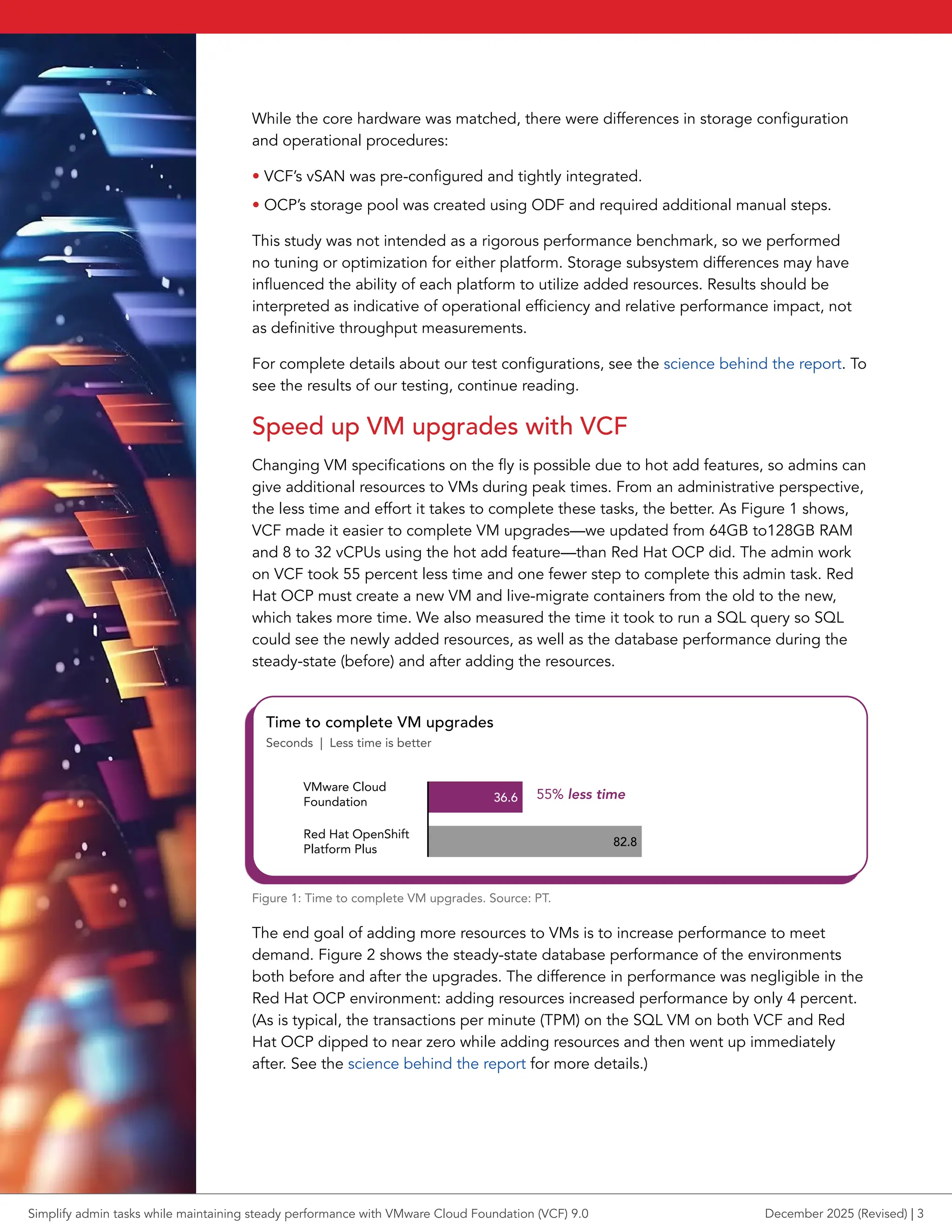
the less time and effort it takes to complete these tasks, the better. As Figure 1 shows,
VCF made it easier to complete VM upgrades—we updated from 64GB to128GB RAM
and 8 to 32 vCPUs using the hot add feature—than Red Hat OCP did. The admin work
on VCF took 55 percent less time and one fewer step to complete this admin task. Red
Hat OCP must create a new VM and live-migrate containers from the old to the new,
which takes more time. We also measured the time it took to run a SQL query so SQL
could see the newly added resources, as well as the database performance during the
steady-state (before) and after adding the resources.
36.6
82.8
VMware Cloud
Foundation
Red Hat OpenShift
Platform Plus
Time to complete VM upgrades
Seconds | Less time is better
55% less time
Figure 1: Time to complete VM upgrades. Source: PT.
The end goal of adding more resources to VMs is to increase performance to meet
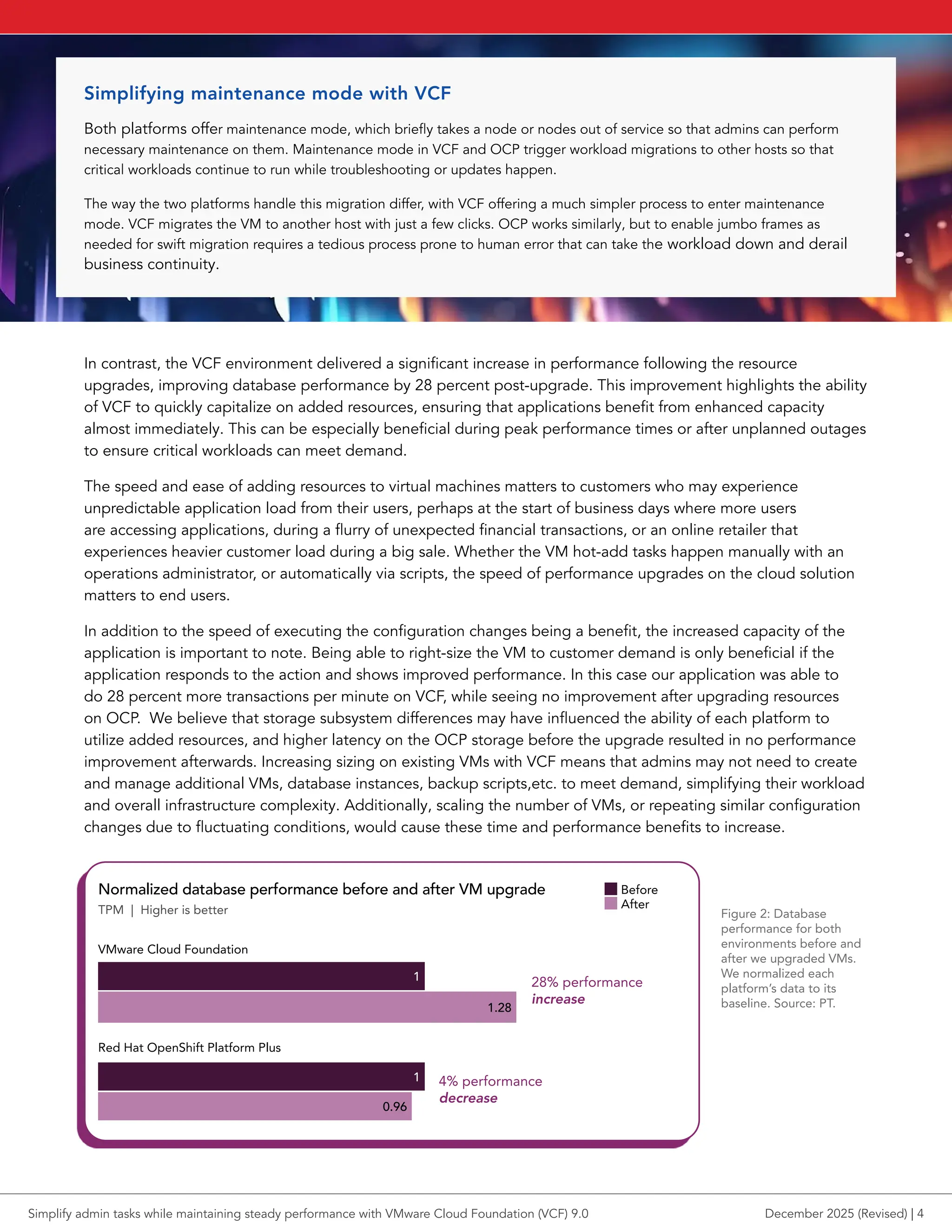
demand. Figure 2 shows the steady-state database performance of the environments
both before and after the upgrades. The difference in performance was negligible in the
Red Hat OCP environment: adding resources increased performance by only 4 percent.
(As is typical, the transactions per minute (TPM) on the SQL VM on both VCF and Red
Hat OCP dipped to near zero while adding resources and then went up immediately
after. See the science behind the report for more details.)
Simplify admin tasks while maintaining steady performance with VMware Cloud Foundation (VCF) 9.0 December 2025 (Revised) | 3
In contrast, the VCF environment delivered a significant increase in performance following the resource
upgrades, improving database performance by 28 percent post-upgrade. This improvement highlights the ability
of VCF to quickly capitalize on added resources, ensuring that applications benefit from enhanced capacity
almost immediately. This can be especially beneficial during peak performance times or after unplanned outages
to ensure critical workloads can meet demand.
The speed and ease of adding resources to virtual machines matters to customers who may experience
unpredictable application load from their users, perhaps at the start of business days where more users
are accessing applications, during a flurry of unexpected financial transactions, or an online retailer that
experiences heavier customer load during a big sale. Whether the VM hot-add tasks happen manually with an
operations administrator, or automatically via scripts, the speed of performance upgrades on the cloud solution
matters to end users.
In addition to the speed of executing the configuration changes being a benefit, the increased capacity of the
application is important to note. Being able to right-size the VM to customer demand is only beneficial if the
application responds to the action and shows improved performance. In this case our application was able to
do 28 percent more transactions per minute on VCF, while seeing no improvement after upgrading resources
on OCP. We believe that storage subsystem differences may have influenced the ability of each platform to
utilize added resources, and higher latency on the OCP storage before the upgrade resulted in no performance
improvement afterwards. Increasing sizing on existing VMs with VCF means that admins may not need to create
and manage additional VMs, database instances, backup scripts,etc. to meet demand, simplifying their workload
and overall infrastructure complexity. Additionally, scaling the number of VMs, or repeating similar configuration
changes due to fluctuating conditions, would cause these time and performance benefits to increase.
Normalized database performance before and after VM upgrade
TPM | Higher is better
1
1
1.28
0.96
Before
After
VMware Cloud Foundation
Red Hat OpenShift Platform Plus
28% performance
increase
4% performance
decrease
Figure 2: Database
performance for both
environments before and
after we upgraded VMs.
We normalized each
platform’s data to its
baseline. Source: PT.
Simplifying maintenance mode with VCF
Both platforms offer maintenance mode, which briefly takes a node or nodes out of service so that admins can perform
necessary maintenance on them. Maintenance mode in VCF and OCP trigger workload migrations to other hosts so that
critical workloads continue to run while troubleshooting or updates happen.
The way the two platforms handle this migration differ, with VCF offering a much simpler process to enter maintenance
mode. VCF migrates the VM to another host with just a few clicks. OCP works similarly, but to enable jumbo frames as
needed for swift migration requires a tedious process prone to human error that can take the workload down and derail
business continuity.
Simplify admin tasks while maintaining steady performance with VMware Cloud Foundation (VCF) 9.0 December 2025 (Revised) | 4
Increasing storage capacity
Admins may need to increase pooled storage capacity while workloads are running to ensure that
critical applications continue to operate without interruption. When business demands grow during
peak times, running out of storage can lead to application slowdowns or outages, which can drive
customers away or hurt employee productivity. By expanding storage capacity on the fly, admins
can accommodate the growth as needed, maintaining availability with no disruptions. In cloud
environments, where high availability and reliability are top priorities, the flexibility to expand
storage capacity becomes essential.
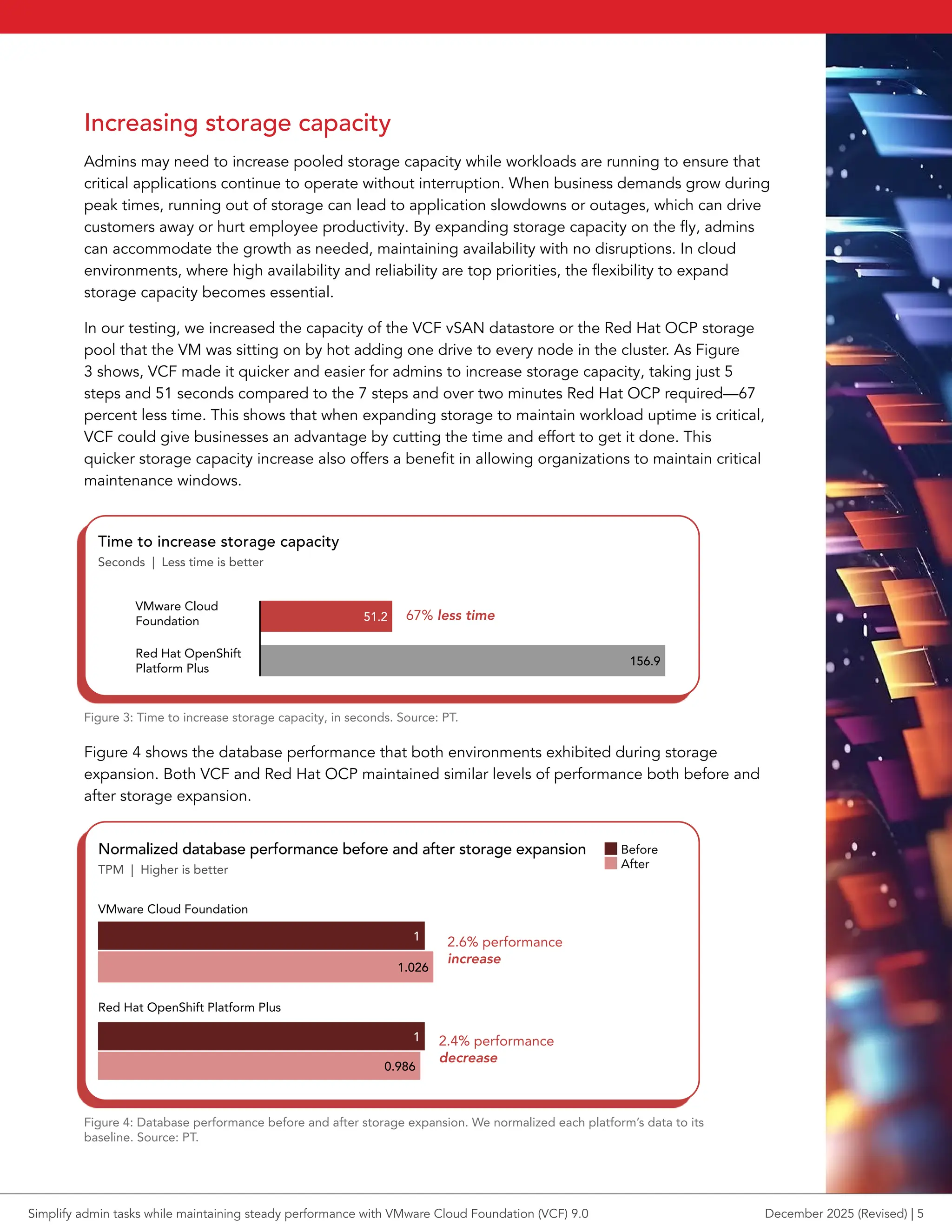
In our testing, we increased the capacity of the VCF vSAN datastore or the Red Hat OCP storage
pool that the VM was sitting on by hot adding one drive to every node in the cluster. As Figure
3 shows, VCF made it quicker and easier for admins to increase storage capacity, taking just 5
steps and 51 seconds compared to the 7 steps and over two minutes Red Hat OCP required—67
percent less time. This shows that when expanding storage to maintain workload uptime is critical,
VCF could give businesses an advantage by cutting the time and effort to get it done. This
quicker storage capacity increase also offers a benefit in allowing organizations to maintain critical
maintenance windows.
VMware Cloud
Foundation
Red Hat OpenShift
Platform Plus
Time to increase storage capacity
Seconds | Less time is better
51.2
156.9
67% less time
Figure 3: Time to increase storage capacity, in seconds. Source: PT.
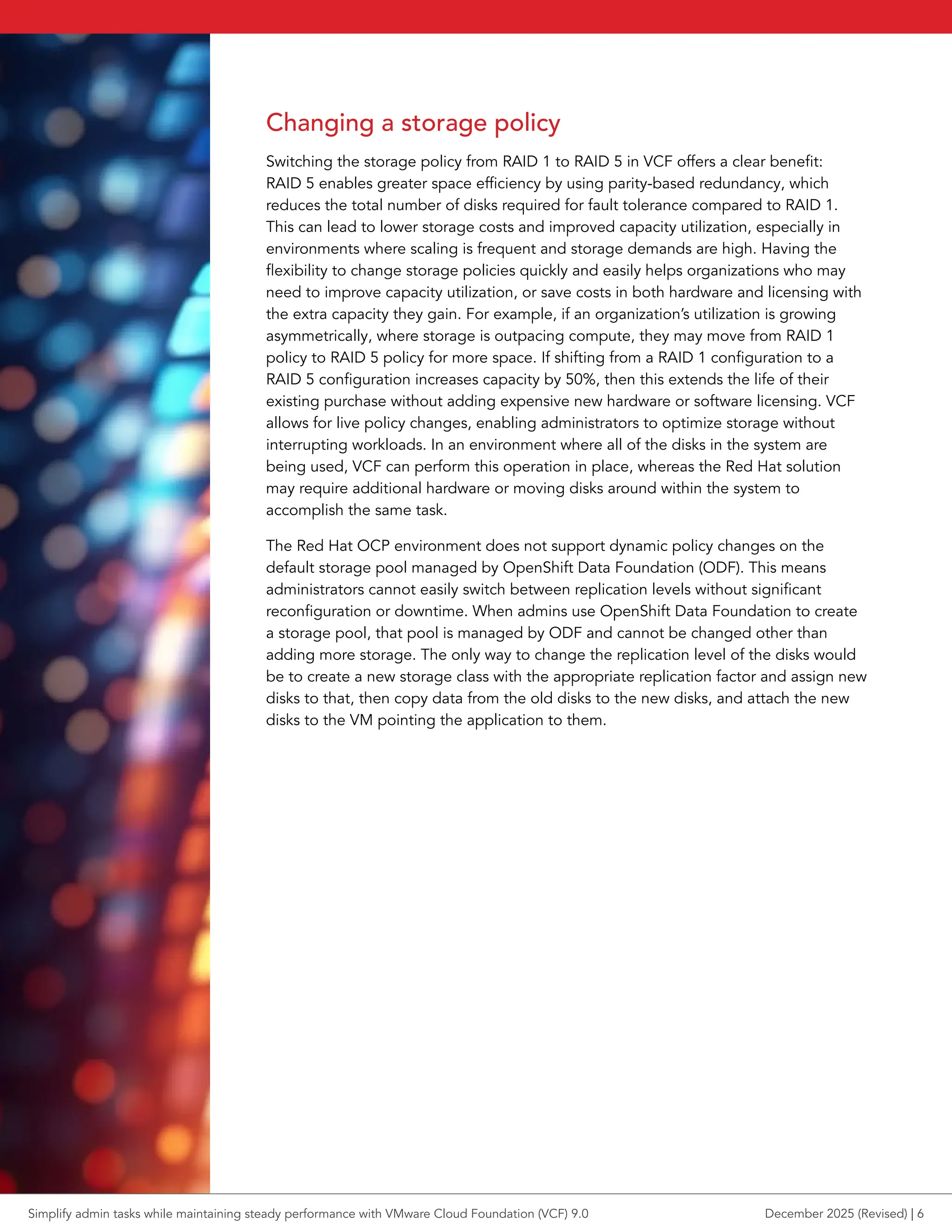
Figure 4 shows the database performance that both environments exhibited during storage
expansion. Both VCF and Red Hat OCP maintained similar levels of performance both before and
after storage expansion.
Normalized database performance before and after storage expansion
TPM | Higher is better
1
1
1.026
0.986
Before
After
VMware Cloud Foundation
Red Hat OpenShift Platform Plus
2.6% performance
increase
2.4% performance
decrease
Figure 4: Database performance before and after storage expansion. We normalized each platform’s data to its
baseline. Source: PT.
Simplify admin tasks while maintaining steady performance with VMware Cloud Foundation (VCF) 9.0 December 2025 (Revised) | 5
Changing a storage policy
Switching the storage policy from RAID 1 to RAID 5 in VCF offers a clear benefit:
RAID 5 enables greater space efficiency by using parity-based redundancy, which
reduces the total number of disks required for fault tolerance compared to RAID 1.
This can lead to lower storage costs and improved capacity utilization, especially in
environments where scaling is frequent and storage demands are high. Having the
flexibility to change storage policies quickly and easily helps organizations who may
need to improve capacity utilization, or save costs in both hardware and licensing with
the extra capacity they gain. For example, if an organization’s utilization is growing
asymmetrically, where storage is outpacing compute, they may move from RAID 1
policy to RAID 5 policy for more space. If shifting from a RAID 1 configuration to a
RAID 5 configuration increases capacity by 50%, then this extends the life of their
existing purchase without adding expensive new hardware or software licensing. VCF
allows for live policy changes, enabling administrators to optimize storage without
interrupting workloads. In an environment where all of the disks in the system are
being used, VCF can perform this operation in place, whereas the Red Hat solution
may require additional hardware or moving disks around within the system to
accomplish the same task.
The Red Hat OCP environment does not support dynamic policy changes on the
default storage pool managed by OpenShift Data Foundation (ODF). This means
administrators cannot easily switch between replication levels without significant
reconfiguration or downtime. When admins use OpenShift Data Foundation to create
a storage pool, that pool is managed by ODF and cannot be changed other than
adding more storage. The only way to change the replication level of the disks would
be to create a new storage class with the appropriate replication factor and assign new
disks to that, then copy data from the old disks to the new disks, and attach the new
disks to the VM pointing the application to them.
Simplify admin tasks while maintaining steady performance with VMware Cloud Foundation (VCF) 9.0 December 2025 (Revised) | 6
Conclusion
As our testing demonstrates, VMware Cloud Foundation 9.0 offers some clear
administrative advantages over Red Hat OpenShift Platform Plus when managing
applications across the tasks that we tested. Looking at three common cluster
administration tasks—VM upgrades, storage expansion, and policy changes—VCF
consistently reduced time and complexity for admins while maintaining strong
database performance. These results suggest that organizations seeking to streamline
operations without compromising critical workload performance should consider
VMware Cloud Foundation 9.0 as a strategic infrastructure solution.
1. Broadcom “What is VMware Cloud Foundation?” accessed October 14, 2025,
https://techdocs.broadcom.com/us/en/vmware-cis/vcf/vcf-9-0-and-later/9-0/overview-of-vm-
ware-cloud-foundation-9/what-is-vmware-cloud-foundation-and-vmware-vsphere-foundation.html.
2. VMware, “VMware Cloud Foundation,” accessed October 14, 2025,
https://www.vmware.com/products/cloud-infrastructure/vmware-cloud-foundation.
3. TechTarget, “Understanding VMware Cloud Foundation components, features,” accessed
October 13, 2025, https://www.techtarget.com/searchdatacenter/feature/Understanding-VM-
ware-Cloud-Foundation-components-features.
4. Broadcom, “VCF Automation Overview,” accessed October 14, 2025,
https://techdocs.broadcom.com/us/en/vmware-cis/vcf/vcf-9-0-and-later/9-0/overview-of-vm-
ware-cloud-foundation-9/what-is-vmware-cloud-foundation-and-vmware-vsphere-foundation/
vcf-automation-overview.html.
5. VMware, “VMware Cloud Foundation,” accessed October 14, 2025,
https://www.vmware.com/products/cloud-infrastructure/vmware-cloud-foundation.
Principled Technologies is a registered trademark of Principled Technologies, Inc.
All other product names are the trademarks of their respective owners.
For additional information, review the science behind this report.
This project was
commissioned by
Broadcom.
Read the science behind this report
Simplify admin tasks while maintaining steady performance with VMware Cloud Foundation (VCF) 9.0 December 2025 (Revised) | 7

Simplify admin tasks while maintaining steady performance with VMware Cloud Foundation (VCF) 9.0

  • 1.
    Simplify admin tasks whilemaintaining steady performance with VMware Cloud Foundation (VCF) 9.0 On three common cluster administration tasks, VCF saved time and effort, streamlining operations compared to Red Hat OpenShift Platform Plus Leading cloud platforms differ in both feature sets and how well they streamline administrative tasks when it comes to managing cloud infrastructure resources. To offer a glimpse into how two such platforms compare, we explored their administrative efficiency for completing three common cluster administration tasks. We compared VMware Cloud Foundation (VCF) 9.0 to Red Hat OpenShift Platform Plus (OPP), with all Red Hat testing performed on OpenShift Container Platform (OCP) 4.19, which includes OpenShift Virtualization and is a core component of OPP. We also wanted to know how application performance might change while these cluster-level tasks occurred, so we ran a database workload on the cluster and monitored its performance. Cluster admins could use these results to help plan cluster updates. Overall, we found that performing admin duties with VCF went off without a hitch—database performance continued apace, maintaining strong performance before, during, and after the cluster administration tasks. We found that, compared to Red Hat OCP, VMware Cloud Foundation: • Took 55 percent less time to upgrade VMs (adding virtual RAM and CPU resources) • Took 67 percent less time and fewer steps to increase storage capacity when adding a local disk • Simplified changing storage policy from RAID 1 to RAID 5, because of the more flexible in-place configuration capabilities of VCF If your organization is searching for a cloud platform that can help relieve the management burden while not taking undue resources from workload performance, these results show that VMware Cloud Foundation 9.0 is a compelling choice. Complete admin tasks in up to 55% less time Increase storage capacity in 67% less time Simplify admin tasks while maintaining steady performance with VMware Cloud Foundation (VCF) 9.0 December 2025 (Revised) A Principled Technologies report: Hands-on testing. Real-world results.
  • 2.
    What is VMwareCloud Foundation? VMware Cloud Foundation is an integrated software platform designed to help organizations deploy and manage hybrid cloud environments. It unifies compute, storage, networking, security, and management into a single stack, streamlining both private and public cloud operations.1 VCF automates some tasks across the entire infrastructure lifecycle, helping businesses reduce complexity, enhance security, and speed up IT service delivery.2 The platform provides a consistent infrastructure and operations model across on-premises and cloud settings, supporting both traditional VMs and modern container-based applications, AI/ML workloads, and more.3 How we tested We set up two environments using identical hardware, changing only the overarching cloud software platform: either VMware Cloud Foundation 9.0 or Red Hat OpenShift Platform Plus, which includes Red Hat OCP 4.19. Because this was not intended to be a performance study we did not primarily focus on optimizing performance for either system, but we did observe performance during our operational tasks. Though admins would use these platforms for many management and workload-related tasks, we selected three common administrative tasks and compared time and steps to complete each task on each platform. We ran a TPROC-C workload (transactional database) from the HammerDB benchmark on a single VM running SQL Server 2022 to show how admin tasks using either platform affected performance. We compared the following tasks: • Upgrading RAM and CPU on the VMs, hot adding these virtual resources • Increasing cluster storage capacity by adding disks to vSAN on VCF and to the OpenShift Data Foundation storage pool on OCP • Changing the availability policy of the distributed storage from RAID 1 to RAID 5 To avoid misleading comparisons, all performance data is presented as relative change from each platform’s baseline. For each scenario, pre-upgrade or pre-change performance is set to 100 percent. Post-upgrade results are shown as percentage increase or decrease. Key features in VCF 9.0 Integrated stack VCF bundles VMware vSphere® for compute, VMware vSAN™ for storage, VMware NSX® for networking, VCF Operations for fleet and lifecycle operations management, and VCF Automation for self- service private cloud. Automation Through VCF Operations/Fleet Manager, VCF handles patching, upgrades, and configuration automatically to minimize manual intervention and errors. According to Broadcom, VCF Automation “enables IT teams and cloud service providers (CSPs) to deliver a self-service private cloud for AI, Kubernetes, and VM-based applications. The solution simplifies the process of provisioning and scaling a multi- tenant private cloud with out-of- the-box Infrastructure as a Service (IaaS) offerings, accelerating the time to market for applications while maintaining control using policy-based governance.”4 Hybrid cloud support Delivers consistent infrastructure and operations across private, public, and edge cloud environments.5 t Learn more about VMware Cloud Foundation 9.0 Simplify admin tasks while maintaining steady performance with VMware Cloud Foundation (VCF) 9.0 December 2025 (Revised) | 2
  • 3.
    While the corehardware was matched, there were differences in storage configuration and operational procedures: • VCF’s vSAN was pre-configured and tightly integrated. • OCP’s storage pool was created using ODF and required additional manual steps. This study was not intended as a rigorous performance benchmark, so we performed no tuning or optimization for either platform. Storage subsystem differences may have influenced the ability of each platform to utilize added resources. Results should be interpreted as indicative of operational efficiency and relative performance impact, not as definitive throughput measurements. For complete details about our test configurations, see the science behind the report. To see the results of our testing, continue reading. Speed up VM upgrades with VCF Changing VM specifications on the fly is possible due to hot add features, so admins can give additional resources to VMs during peak times. From an administrative perspective, the less time and effort it takes to complete these tasks, the better. As Figure 1 shows, VCF made it easier to complete VM upgrades—we updated from 64GB to128GB RAM and 8 to 32 vCPUs using the hot add feature—than Red Hat OCP did. The admin work on VCF took 55 percent less time and one fewer step to complete this admin task. Red Hat OCP must create a new VM and live-migrate containers from the old to the new, which takes more time. We also measured the time it took to run a SQL query so SQL could see the newly added resources, as well as the database performance during the steady-state (before) and after adding the resources. 36.6 82.8 VMware Cloud Foundation Red Hat OpenShift Platform Plus Time to complete VM upgrades Seconds | Less time is better 55% less time Figure 1: Time to complete VM upgrades. Source: PT. The end goal of adding more resources to VMs is to increase performance to meet demand. Figure 2 shows the steady-state database performance of the environments both before and after the upgrades. The difference in performance was negligible in the Red Hat OCP environment: adding resources increased performance by only 4 percent. (As is typical, the transactions per minute (TPM) on the SQL VM on both VCF and Red Hat OCP dipped to near zero while adding resources and then went up immediately after. See the science behind the report for more details.) Simplify admin tasks while maintaining steady performance with VMware Cloud Foundation (VCF) 9.0 December 2025 (Revised) | 3
  • 4.
    In contrast, theVCF environment delivered a significant increase in performance following the resource upgrades, improving database performance by 28 percent post-upgrade. This improvement highlights the ability of VCF to quickly capitalize on added resources, ensuring that applications benefit from enhanced capacity almost immediately. This can be especially beneficial during peak performance times or after unplanned outages to ensure critical workloads can meet demand. The speed and ease of adding resources to virtual machines matters to customers who may experience unpredictable application load from their users, perhaps at the start of business days where more users are accessing applications, during a flurry of unexpected financial transactions, or an online retailer that experiences heavier customer load during a big sale. Whether the VM hot-add tasks happen manually with an operations administrator, or automatically via scripts, the speed of performance upgrades on the cloud solution matters to end users. In addition to the speed of executing the configuration changes being a benefit, the increased capacity of the application is important to note. Being able to right-size the VM to customer demand is only beneficial if the application responds to the action and shows improved performance. In this case our application was able to do 28 percent more transactions per minute on VCF, while seeing no improvement after upgrading resources on OCP. We believe that storage subsystem differences may have influenced the ability of each platform to utilize added resources, and higher latency on the OCP storage before the upgrade resulted in no performance improvement afterwards. Increasing sizing on existing VMs with VCF means that admins may not need to create and manage additional VMs, database instances, backup scripts,etc. to meet demand, simplifying their workload and overall infrastructure complexity. Additionally, scaling the number of VMs, or repeating similar configuration changes due to fluctuating conditions, would cause these time and performance benefits to increase. Normalized database performance before and after VM upgrade TPM | Higher is better 1 1 1.28 0.96 Before After VMware Cloud Foundation Red Hat OpenShift Platform Plus 28% performance increase 4% performance decrease Figure 2: Database performance for both environments before and after we upgraded VMs. We normalized each platform’s data to its baseline. Source: PT. Simplifying maintenance mode with VCF Both platforms offer maintenance mode, which briefly takes a node or nodes out of service so that admins can perform necessary maintenance on them. Maintenance mode in VCF and OCP trigger workload migrations to other hosts so that critical workloads continue to run while troubleshooting or updates happen. The way the two platforms handle this migration differ, with VCF offering a much simpler process to enter maintenance mode. VCF migrates the VM to another host with just a few clicks. OCP works similarly, but to enable jumbo frames as needed for swift migration requires a tedious process prone to human error that can take the workload down and derail business continuity. Simplify admin tasks while maintaining steady performance with VMware Cloud Foundation (VCF) 9.0 December 2025 (Revised) | 4
  • 5.
    Increasing storage capacity Adminsmay need to increase pooled storage capacity while workloads are running to ensure that critical applications continue to operate without interruption. When business demands grow during peak times, running out of storage can lead to application slowdowns or outages, which can drive customers away or hurt employee productivity. By expanding storage capacity on the fly, admins can accommodate the growth as needed, maintaining availability with no disruptions. In cloud environments, where high availability and reliability are top priorities, the flexibility to expand storage capacity becomes essential. In our testing, we increased the capacity of the VCF vSAN datastore or the Red Hat OCP storage pool that the VM was sitting on by hot adding one drive to every node in the cluster. As Figure 3 shows, VCF made it quicker and easier for admins to increase storage capacity, taking just 5 steps and 51 seconds compared to the 7 steps and over two minutes Red Hat OCP required—67 percent less time. This shows that when expanding storage to maintain workload uptime is critical, VCF could give businesses an advantage by cutting the time and effort to get it done. This quicker storage capacity increase also offers a benefit in allowing organizations to maintain critical maintenance windows. VMware Cloud Foundation Red Hat OpenShift Platform Plus Time to increase storage capacity Seconds | Less time is better 51.2 156.9 67% less time Figure 3: Time to increase storage capacity, in seconds. Source: PT. Figure 4 shows the database performance that both environments exhibited during storage expansion. Both VCF and Red Hat OCP maintained similar levels of performance both before and after storage expansion. Normalized database performance before and after storage expansion TPM | Higher is better 1 1 1.026 0.986 Before After VMware Cloud Foundation Red Hat OpenShift Platform Plus 2.6% performance increase 2.4% performance decrease Figure 4: Database performance before and after storage expansion. We normalized each platform’s data to its baseline. Source: PT. Simplify admin tasks while maintaining steady performance with VMware Cloud Foundation (VCF) 9.0 December 2025 (Revised) | 5
  • 6.
    Changing a storagepolicy Switching the storage policy from RAID 1 to RAID 5 in VCF offers a clear benefit: RAID 5 enables greater space efficiency by using parity-based redundancy, which reduces the total number of disks required for fault tolerance compared to RAID 1. This can lead to lower storage costs and improved capacity utilization, especially in environments where scaling is frequent and storage demands are high. Having the flexibility to change storage policies quickly and easily helps organizations who may need to improve capacity utilization, or save costs in both hardware and licensing with the extra capacity they gain. For example, if an organization’s utilization is growing asymmetrically, where storage is outpacing compute, they may move from RAID 1 policy to RAID 5 policy for more space. If shifting from a RAID 1 configuration to a RAID 5 configuration increases capacity by 50%, then this extends the life of their existing purchase without adding expensive new hardware or software licensing. VCF allows for live policy changes, enabling administrators to optimize storage without interrupting workloads. In an environment where all of the disks in the system are being used, VCF can perform this operation in place, whereas the Red Hat solution may require additional hardware or moving disks around within the system to accomplish the same task. The Red Hat OCP environment does not support dynamic policy changes on the default storage pool managed by OpenShift Data Foundation (ODF). This means administrators cannot easily switch between replication levels without significant reconfiguration or downtime. When admins use OpenShift Data Foundation to create a storage pool, that pool is managed by ODF and cannot be changed other than adding more storage. The only way to change the replication level of the disks would be to create a new storage class with the appropriate replication factor and assign new disks to that, then copy data from the old disks to the new disks, and attach the new disks to the VM pointing the application to them. Simplify admin tasks while maintaining steady performance with VMware Cloud Foundation (VCF) 9.0 December 2025 (Revised) | 6
  • 7.
    Conclusion As our testingdemonstrates, VMware Cloud Foundation 9.0 offers some clear administrative advantages over Red Hat OpenShift Platform Plus when managing applications across the tasks that we tested. Looking at three common cluster administration tasks—VM upgrades, storage expansion, and policy changes—VCF consistently reduced time and complexity for admins while maintaining strong database performance. These results suggest that organizations seeking to streamline operations without compromising critical workload performance should consider VMware Cloud Foundation 9.0 as a strategic infrastructure solution. 1. Broadcom “What is VMware Cloud Foundation?” accessed October 14, 2025, https://techdocs.broadcom.com/us/en/vmware-cis/vcf/vcf-9-0-and-later/9-0/overview-of-vm- ware-cloud-foundation-9/what-is-vmware-cloud-foundation-and-vmware-vsphere-foundation.html. 2. VMware, “VMware Cloud Foundation,” accessed October 14, 2025, https://www.vmware.com/products/cloud-infrastructure/vmware-cloud-foundation. 3. TechTarget, “Understanding VMware Cloud Foundation components, features,” accessed October 13, 2025, https://www.techtarget.com/searchdatacenter/feature/Understanding-VM- ware-Cloud-Foundation-components-features. 4. Broadcom, “VCF Automation Overview,” accessed October 14, 2025, https://techdocs.broadcom.com/us/en/vmware-cis/vcf/vcf-9-0-and-later/9-0/overview-of-vm- ware-cloud-foundation-9/what-is-vmware-cloud-foundation-and-vmware-vsphere-foundation/ vcf-automation-overview.html. 5. VMware, “VMware Cloud Foundation,” accessed October 14, 2025, https://www.vmware.com/products/cloud-infrastructure/vmware-cloud-foundation. Principled Technologies is a registered trademark of Principled Technologies, Inc. All other product names are the trademarks of their respective owners. For additional information, review the science behind this report. This project was commissioned by Broadcom. Read the science behind this report Simplify admin tasks while maintaining steady performance with VMware Cloud Foundation (VCF) 9.0 December 2025 (Revised) | 7