ASP.NET Core
binary-studio.com
Contents
1. Intro
2. Startup
3. Middleware
4. Logging
5. Static files
6. Routing
7. Authentication
8. Configuration
Intro
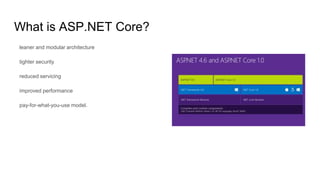
What is ASP.NET Core?
leaner and modular architecture
tighter security
reduced servicing
improved performance
pay-for-what-you-use model.
Why is ASP.NET Core?
Integration of modern client-side frameworks and development workflows
A cloud-ready environment-based configuration system
Built-in dependency injection
New light-weight and modular HTTP request pipeline (No System.Web.dll
Ability to host on IIS or self-host in your own process
Built on .NET Core, which supports true side-by-side app versioning
Ships entirely as NuGet packages
public static void Main(string[] args)
{
var host = new WebHostBuilder()
.UseKestrel() //
.UseServer("Microsoft.AspNet.Server.Kestrel")
.UseContentRoot(Directory.GetCurrentDirectory())
.UseIISIntegration()
.UseStartup<Startup>()
.Build();
host.Run();
}
Startup
Configure - how the ASP.NET application will respond to individual HTTP
requests.
ConfigureServices - method for configuring services that are used by your
application.
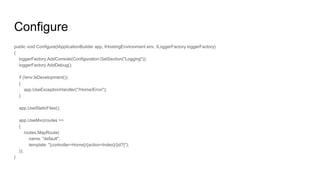
Configure
public void Configure(IApplicationBuilder app, IHostingEnvironment env, ILoggerFactory loggerFactory)
{
loggerFactory.AddConsole(Configuration.GetSection("Logging"));
loggerFactory.AddDebug();
if (!env.IsDevelopment())
{
app.UseExceptionHandler("/Home/Error");
}
app.UseStaticFiles();
app.UseMvc(routes =>
{
routes.MapRoute(
name: "default",
template: "{controller=Home}/{action=Index}/{id?}");
});
}
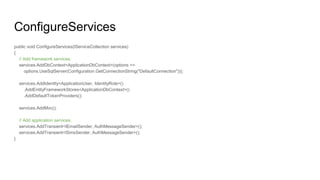
ConfigureServices
public void ConfigureServices(IServiceCollection services)
{
// Add framework services.
services.AddDbContext<ApplicationDbContext>(options =>
options.UseSqlServer(Configuration.GetConnectionString("DefaultConnection")));
services.AddIdentity<ApplicationUser, IdentityRole>()
.AddEntityFrameworkStores<ApplicationDbContext>()
.AddDefaultTokenProviders();
services.AddMvc();
// Add application services.
services.AddTransient<IEmailSender, AuthMessageSender>();
services.AddTransient<ISmsSender, AuthMessageSender>();
}
Middleware
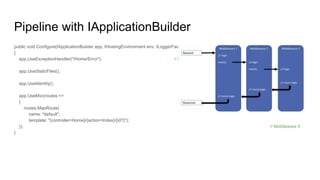
Pipeline with IApplicationBuilder
public void Configure(IApplicationBuilder app, IHostingEnvironment env, ILoggerFactory loggerFactory)
{
app.UseExceptionHandler("/Home/Error"); // Middleware 1
app.UseStaticFiles(); // Middleware 2
app.UseIdentity(); // Middleware 3
app.UseMvc(routes =>
{
routes.MapRoute(
name: "default",
template: "{controller=Home}/{action=Index}/{id?}");
}); // Middleware 4
}
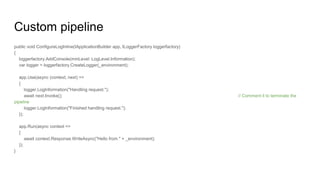
Custom pipeline
public void ConfigureLogInline(IApplicationBuilder app, ILoggerFactory loggerfactory)
{
loggerfactory.AddConsole(minLevel: LogLevel.Information);
var logger = loggerfactory.CreateLogger(_environment);
app.Use(async (context, next) =>
{
logger.LogInformation("Handling request.");
await next.Invoke(); // Comment it to terminate the
pipeline
logger.LogInformation("Finished handling request.");
});
app.Run(async context =>
{
await context.Response.WriteAsync("Hello from " + _environment);
});
}
Logging
Logging
Interfaces:
ILoggerFactory
ILogger
Extension methods:
AddConsole
AddDebug
AddTraceSource
Simple logging
[Route("api/[controller]")]
public class TodoController : Controller
{
private readonly ITodoRepository _todoRepository;
private readonly ILogger<TodoController> _logger;
public TodoController(ITodoRepository todoRepository,
ILogger<TodoController> logger)
{
_todoRepository = todoRepository;
_logger = logger;
}
[HttpGet]
public IEnumerable<TodoItem> GetAll()
{
_logger.LogInformation(LoggingEvents.LIST_ITEMS, "Listing all items");
return _todoRepository.GetAll();
}
}
Thirdparty Providers
elmah.io - provider for the elmah.io service
Loggr - provider for the Loggr service
NLog - provider for the NLog library
Serilog - provider for the Serilog library
your own
Static Files
Set directory to content:
public static void Main(string[] args)
{
var host = new WebHostBuilder()
.UseKestrel()
.UseContentRoot(Directory.GetCurrentDirectory())
.UseIISIntegration()
.UseStartup<Startup>()
.Build();
host.Run();
}
Set static files to pipeline:
public void Configure(IApplicationBuilder app,
IHostingEnvironment env, ILoggerFactory loggerFactory)
{
app.UseStaticFiles();
app.UseStaticFiles(new StaticFileOptions()
{
FileProvider = new PhysicalFileProvider(
Path.Combine(Directory.GetCurrentDirectory(),
@"MyStaticFiles")),
RequestPath = new PathString("/StaticFiles")
});
}
Content type mapping
public void Configure(IApplicationBuilder app)
{
// Set up custom content types -associating file extension to MIME type
var provider = new FileExtensionContentTypeProvider();
// Add new mappings
provider.Mappings[".myapp"] = "application/x-msdownload";
provider.Mappings[".htm3"] = "text/html";
provider.Mappings[".image"] = "image/png";
// Replace an existing mapping
provider.Mappings[".rtf"] = "application/x-msdownload";
// Remove MP4 videos.
provider.Mappings.Remove(".mp4");
app.UseStaticFiles(new StaticFileOptions()
{
FileProvider = new PhysicalFileProvider(
Path.Combine(Directory.GetCurrentDirectory(), @"wwwrootimages")),
RequestPath = new PathString("/MyImages"),
ContentTypeProvider = provider
});
}
Routing
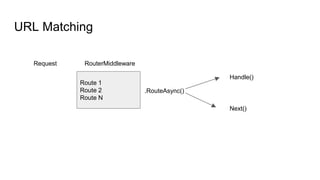
URL Matching
Request
Route 1
Route 2
Route N
RouterMiddleware
.RouteAsync()
Handle()
Next()
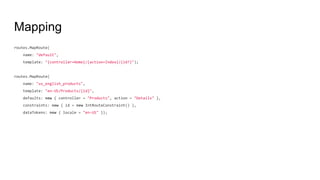
Mapping
routes.MapRoute(
name: "default",
template: "{controller=Home}/{action=Index}/{id?}");
routes.MapRoute(
name: "us_english_products",
template: "en-US/Products/{id}",
defaults: new { controller = "Products", action = "Details" },
constraints: new { id = new IntRouteConstraint() },
dataTokens: new { locale = "en-US" });
Routing Middleware
public void ConfigureServices(
IServiceCollection services)
{
services.AddRouting();
}
public void Configure(IApplicationBuilder app, ILoggerFactory loggerFactory)
{
var trackPackageRouteHandler = new RouteHandler(context =>
{
var routeValues = context.GetRouteData().Values;
return context.Response.WriteAsync(
$"Hello! Route values: {string.Join(", ", routeValues)}");
});
var routeBuilder = new RouteBuilder(app, trackPackageRouteHandler);
routeBuilder.MapRoute(
"Track Package Route",
"package/{operation:regex(^track|create|detonate$)}/{id:int}");
routeBuilder.MapGet("hello/{name}", context =>
{
var name = context.GetRouteValue("name");
return context.Response.WriteAsync($"Hi, {name}!");
});
var routes = routeBuilder.Build();
app.UseRouter(routes);
RouteBuilder methods
MapRoute
MapGet
MapPost
MapPut
MapDelete
MapVerb
Authentication
Identity
// Authentication should be set to Individual User Accounts
// ConfigureServices
services.AddIdentity<ApplicationUser, IdentityRole>()
.AddEntityFrameworkStores<ApplicationDbContext>()
.AddDefaultTokenProviders();
// Configure
app.UserIdentity();
// Manage users
UserManager<ApplicationUser> _usermanager;
// Manage sign in/sign out
SignInManage<ApplicationUser> _signinmanager;
Facebook, Twitter, Google Providers
app.UseFacebookAuthentication(new FacebookOptions()
{
AppId = Configuration["Authentication:Facebook:AppId"],
AppSecret = Configuration["Authentication:Facebook:AppSecret"]
});
// Other providers use similar approach
Other Features
Two-factor authentication with SMS
Supporting Third Party Clients using OAuth 2.0
Azure Active Directory
Securing ASP.NET Core apps with IdentityServer4
Configuration
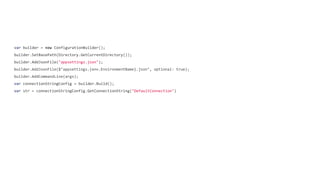
var builder = new ConfigurationBuilder();
builder.SetBasePath(Directory.GetCurrentDirectory());
builder.AddJsonFile("appsettings.json");
builder.AddJsonFile($"appsettings.{env.EnvironmentName}.json", optional: true);
builder.AddCommandLine(args);
var connectionStringConfig = builder.Build();
var str = connectionStringConfig.GetConnectionString("DefaultConnection")
IOptions
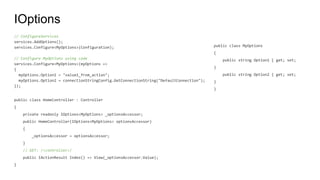
// ConfigureServices
services.AddOptions();
services.Configure<MyOptions>(Configuration);
// Configure MyOptions using code
services.Configure<MyOptions>(myOptions =>
{
myOptions.Option1 = "value1_from_action";
myOptions.Option2 = connectionStringConfig.GetConnectionString("DefaultConnection");
});
public class HomeController : Controller
{
private readonly IOptions<MyOptions> _optionsAccessor;
public HomeController(IOptions<MyOptions> optionsAccessor)
{
_optionsAccessor = optionsAccessor;
}
// GET: /<controller>/
public IActionResult Index() => View(_optionsAccessor.Value);
}
public class MyOptions
{
public string Option1 { get; set;
}
public string Option2 { get; set;
}
}
Error Handling
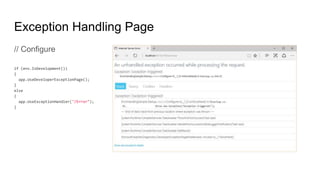
Exception Handling Page
// Configure
if (env.IsDevelopment())
{
app.UseDeveloperExceptionPage();
}
else
{
app.UseExceptionHandler("/Error");
}
Status Code Pages
// Configure
app.UseStatusCodePages();
app.UseStatusCodePages(context =>
context.HttpContext.Response.SendAsync("Handler, status code: " +
context.HttpContext.Response.StatusCode, "text/plain"));
app.UseStatusCodePages("text/plain", "Response, status code: {0}");
app.UseStatusCodePagesWithRedirects("~/errors/{0}");
app.UseStatusCodePagesWithReExecute("/errors/{0}");
ASP.NET MVC Handling
Exception filters
Model validation
Swagger
Swagger is a machine readable representation of a RESTful API
Swashbuckle is an open source project for generating Swagger documents for
Web APIs
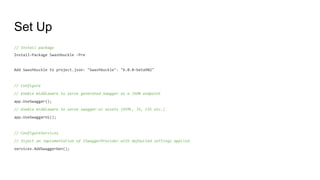
Set Up
// Install package
Install-Package Swashbuckle -Pre
Add Swashbuckle to project.json: "Swashbuckle": "6.0.0-beta902"
// Configure
// Enable middleware to serve generated Swagger as a JSON endpoint
app.UseSwagger();
// Enable middleware to serve swagger-ui assets (HTML, JS, CSS etc.)
app.UseSwaggerUi();
// ConfigureServices
// Inject an implementation of ISwaggerProvider with defaulted settings applied
services.AddSwaggerGen();

Academy PRO: ASP .NET Core

  • 1.
  • 2.
    Contents 1. Intro 2. Startup 3.Middleware 4. Logging 5. Static files 6. Routing 7. Authentication 8. Configuration
  • 3.
  • 4.
    What is ASP.NETCore? leaner and modular architecture tighter security reduced servicing improved performance pay-for-what-you-use model.
  • 5.
    Why is ASP.NETCore? Integration of modern client-side frameworks and development workflows A cloud-ready environment-based configuration system Built-in dependency injection New light-weight and modular HTTP request pipeline (No System.Web.dll Ability to host on IIS or self-host in your own process Built on .NET Core, which supports true side-by-side app versioning Ships entirely as NuGet packages
  • 6.
    public static voidMain(string[] args) { var host = new WebHostBuilder() .UseKestrel() // .UseServer("Microsoft.AspNet.Server.Kestrel") .UseContentRoot(Directory.GetCurrentDirectory()) .UseIISIntegration() .UseStartup<Startup>() .Build(); host.Run(); }
  • 7.
  • 8.
    Configure - howthe ASP.NET application will respond to individual HTTP requests. ConfigureServices - method for configuring services that are used by your application.
  • 9.
    Configure public void Configure(IApplicationBuilderapp, IHostingEnvironment env, ILoggerFactory loggerFactory) { loggerFactory.AddConsole(Configuration.GetSection("Logging")); loggerFactory.AddDebug(); if (!env.IsDevelopment()) { app.UseExceptionHandler("/Home/Error"); } app.UseStaticFiles(); app.UseMvc(routes => { routes.MapRoute( name: "default", template: "{controller=Home}/{action=Index}/{id?}"); }); }
  • 10.
    ConfigureServices public void ConfigureServices(IServiceCollectionservices) { // Add framework services. services.AddDbContext<ApplicationDbContext>(options => options.UseSqlServer(Configuration.GetConnectionString("DefaultConnection"))); services.AddIdentity<ApplicationUser, IdentityRole>() .AddEntityFrameworkStores<ApplicationDbContext>() .AddDefaultTokenProviders(); services.AddMvc(); // Add application services. services.AddTransient<IEmailSender, AuthMessageSender>(); services.AddTransient<ISmsSender, AuthMessageSender>(); }
  • 11.
  • 12.
    Pipeline with IApplicationBuilder publicvoid Configure(IApplicationBuilder app, IHostingEnvironment env, ILoggerFactory loggerFactory) { app.UseExceptionHandler("/Home/Error"); // Middleware 1 app.UseStaticFiles(); // Middleware 2 app.UseIdentity(); // Middleware 3 app.UseMvc(routes => { routes.MapRoute( name: "default", template: "{controller=Home}/{action=Index}/{id?}"); }); // Middleware 4 }
  • 13.
    Custom pipeline public voidConfigureLogInline(IApplicationBuilder app, ILoggerFactory loggerfactory) { loggerfactory.AddConsole(minLevel: LogLevel.Information); var logger = loggerfactory.CreateLogger(_environment); app.Use(async (context, next) => { logger.LogInformation("Handling request."); await next.Invoke(); // Comment it to terminate the pipeline logger.LogInformation("Finished handling request."); }); app.Run(async context => { await context.Response.WriteAsync("Hello from " + _environment); }); }
  • 14.
  • 15.
  • 16.
    Simple logging [Route("api/[controller]")] public classTodoController : Controller { private readonly ITodoRepository _todoRepository; private readonly ILogger<TodoController> _logger; public TodoController(ITodoRepository todoRepository, ILogger<TodoController> logger) { _todoRepository = todoRepository; _logger = logger; } [HttpGet] public IEnumerable<TodoItem> GetAll() { _logger.LogInformation(LoggingEvents.LIST_ITEMS, "Listing all items"); return _todoRepository.GetAll(); } }
  • 17.
    Thirdparty Providers elmah.io -provider for the elmah.io service Loggr - provider for the Loggr service NLog - provider for the NLog library Serilog - provider for the Serilog library your own
  • 18.
  • 19.
    Set directory tocontent: public static void Main(string[] args) { var host = new WebHostBuilder() .UseKestrel() .UseContentRoot(Directory.GetCurrentDirectory()) .UseIISIntegration() .UseStartup<Startup>() .Build(); host.Run(); } Set static files to pipeline: public void Configure(IApplicationBuilder app, IHostingEnvironment env, ILoggerFactory loggerFactory) { app.UseStaticFiles(); app.UseStaticFiles(new StaticFileOptions() { FileProvider = new PhysicalFileProvider( Path.Combine(Directory.GetCurrentDirectory(), @"MyStaticFiles")), RequestPath = new PathString("/StaticFiles") }); }
  • 20.
    Content type mapping publicvoid Configure(IApplicationBuilder app) { // Set up custom content types -associating file extension to MIME type var provider = new FileExtensionContentTypeProvider(); // Add new mappings provider.Mappings[".myapp"] = "application/x-msdownload"; provider.Mappings[".htm3"] = "text/html"; provider.Mappings[".image"] = "image/png"; // Replace an existing mapping provider.Mappings[".rtf"] = "application/x-msdownload"; // Remove MP4 videos. provider.Mappings.Remove(".mp4"); app.UseStaticFiles(new StaticFileOptions() { FileProvider = new PhysicalFileProvider( Path.Combine(Directory.GetCurrentDirectory(), @"wwwrootimages")), RequestPath = new PathString("/MyImages"), ContentTypeProvider = provider }); }
  • 21.
  • 22.
    URL Matching Request Route 1 Route2 Route N RouterMiddleware .RouteAsync() Handle() Next()
  • 23.
    Mapping routes.MapRoute( name: "default", template: "{controller=Home}/{action=Index}/{id?}"); routes.MapRoute( name:"us_english_products", template: "en-US/Products/{id}", defaults: new { controller = "Products", action = "Details" }, constraints: new { id = new IntRouteConstraint() }, dataTokens: new { locale = "en-US" });
  • 24.
    Routing Middleware public voidConfigureServices( IServiceCollection services) { services.AddRouting(); } public void Configure(IApplicationBuilder app, ILoggerFactory loggerFactory) { var trackPackageRouteHandler = new RouteHandler(context => { var routeValues = context.GetRouteData().Values; return context.Response.WriteAsync( $"Hello! Route values: {string.Join(", ", routeValues)}"); }); var routeBuilder = new RouteBuilder(app, trackPackageRouteHandler); routeBuilder.MapRoute( "Track Package Route", "package/{operation:regex(^track|create|detonate$)}/{id:int}"); routeBuilder.MapGet("hello/{name}", context => { var name = context.GetRouteValue("name"); return context.Response.WriteAsync($"Hi, {name}!"); }); var routes = routeBuilder.Build(); app.UseRouter(routes);
  • 25.
  • 26.
  • 27.
    Identity // Authentication shouldbe set to Individual User Accounts // ConfigureServices services.AddIdentity<ApplicationUser, IdentityRole>() .AddEntityFrameworkStores<ApplicationDbContext>() .AddDefaultTokenProviders(); // Configure app.UserIdentity(); // Manage users UserManager<ApplicationUser> _usermanager; // Manage sign in/sign out SignInManage<ApplicationUser> _signinmanager;
  • 28.
    Facebook, Twitter, GoogleProviders app.UseFacebookAuthentication(new FacebookOptions() { AppId = Configuration["Authentication:Facebook:AppId"], AppSecret = Configuration["Authentication:Facebook:AppSecret"] }); // Other providers use similar approach
  • 29.
    Other Features Two-factor authenticationwith SMS Supporting Third Party Clients using OAuth 2.0 Azure Active Directory Securing ASP.NET Core apps with IdentityServer4
  • 30.
  • 31.
    var builder =new ConfigurationBuilder(); builder.SetBasePath(Directory.GetCurrentDirectory()); builder.AddJsonFile("appsettings.json"); builder.AddJsonFile($"appsettings.{env.EnvironmentName}.json", optional: true); builder.AddCommandLine(args); var connectionStringConfig = builder.Build(); var str = connectionStringConfig.GetConnectionString("DefaultConnection")
  • 32.
    IOptions // ConfigureServices services.AddOptions(); services.Configure<MyOptions>(Configuration); // ConfigureMyOptions using code services.Configure<MyOptions>(myOptions => { myOptions.Option1 = "value1_from_action"; myOptions.Option2 = connectionStringConfig.GetConnectionString("DefaultConnection"); }); public class HomeController : Controller { private readonly IOptions<MyOptions> _optionsAccessor; public HomeController(IOptions<MyOptions> optionsAccessor) { _optionsAccessor = optionsAccessor; } // GET: /<controller>/ public IActionResult Index() => View(_optionsAccessor.Value); } public class MyOptions { public string Option1 { get; set; } public string Option2 { get; set; } }
  • 33.
  • 34.
    Exception Handling Page //Configure if (env.IsDevelopment()) { app.UseDeveloperExceptionPage(); } else { app.UseExceptionHandler("/Error"); }
  • 35.
    Status Code Pages //Configure app.UseStatusCodePages(); app.UseStatusCodePages(context => context.HttpContext.Response.SendAsync("Handler, status code: " + context.HttpContext.Response.StatusCode, "text/plain")); app.UseStatusCodePages("text/plain", "Response, status code: {0}"); app.UseStatusCodePagesWithRedirects("~/errors/{0}"); app.UseStatusCodePagesWithReExecute("/errors/{0}");
  • 36.
    ASP.NET MVC Handling Exceptionfilters Model validation
  • 37.
  • 38.
    Swagger is amachine readable representation of a RESTful API Swashbuckle is an open source project for generating Swagger documents for Web APIs
  • 39.
    Set Up // Installpackage Install-Package Swashbuckle -Pre Add Swashbuckle to project.json: "Swashbuckle": "6.0.0-beta902" // Configure // Enable middleware to serve generated Swagger as a JSON endpoint app.UseSwagger(); // Enable middleware to serve swagger-ui assets (HTML, JS, CSS etc.) app.UseSwaggerUi(); // ConfigureServices // Inject an implementation of ISwaggerProvider with defaulted settings applied services.AddSwaggerGen();