Python: Functions and Libraries
Eng. Mohamed Gamal,
Research Assistant, Center for Photonics and Smart Materials, Zewail City
Outline
❖ Python Functions
➢ Basic Syntax, Definitions, and Calling
➢ Function Parameters
➢ Anonymous (Lambda) Functions
➢ Recursion and Nested Functions
❖ Python Libraries
➢ Standard Libraries
➢ Numpy
➢ Pandas
➢ Matplotlib
➢ Scikit-learn
➢ Tensorflow
➢ Keras
➢ Pytorch
➢ OpenAI Gym
Functions: Definition
❏ A function is a block of organized, reusable code that is used to perform a
single, related action.
❏ Functions provides better modularity for your application and a high
degree of code reusing.
❏ As you already know, Python gives you many built-in functions like print()
etc. but you can also create your own functions.
❏ These functions are called user-defined functions.
Python Functions: Basic Syntax
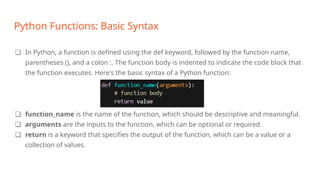
❏ In Python, a function is defined using the def keyword, followed by the function name,
parentheses (), and a colon :. The function body is indented to indicate the code block that
the function executes. Here's the basic syntax of a Python function:
❏ function_name is the name of the function, which should be descriptive and meaningful.
❏ arguments are the inputs to the function, which can be optional or required.
❏ return is a keyword that specifies the output of the function, which can be a value or a
collection of values.
Python Functions: Calling
❖ Function calling is an essential aspect of Python programming and has several benefits,
including:
➢ Code reusability: Functions allow you to reuse code by defining a block of code that
can be called multiple times from within your program. This reduces the amount of
code you need to write and makes your code more modular and maintainable.
➢ Abstraction: Functions provide a level of abstraction that allows you to focus on the
logic or purpose of the function without worrying about the implementation details.
This makes your code more readable and easier to understand.
Python Functions: Calling
❖ Function calling is an essential aspect of Python programming and has several
benefits, including:
➢ Encapsulation: Functions allow you to encapsulate a particular piece of
functionality or logic into a single unit. This helps to separate concerns in
your code and makes it easier to debug and maintain.
➢ Scalability: Functions allow you to break down complex problems into
smaller, more manageable pieces. This makes it easier to scale your code as
your program grows in complexity.
Python Functions: Calling
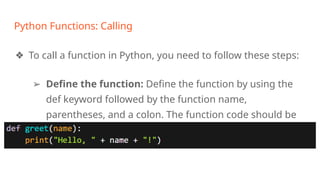
❖ To call a function in Python, you need to follow these steps:
➢ Define the function: Define the function by using the
def keyword followed by the function name,
parentheses, and a colon. The function code should be
indented beneath the function definition line.
Python Functions: Calling
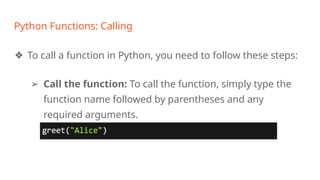
❖ To call a function in Python, you need to follow these steps:
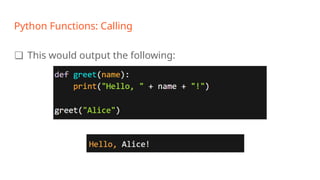
➢ Call the function: To call the function, simply type the
function name followed by parentheses and any
required arguments.
Python Functions: Calling
❏ This would output the following:
Functions Parameters
❖ Function parameters in Python are variables that are defined in the function header and are used to pass
values or data to the function when it is called, allowing for more flexible and dynamic behavior of the
function.
❖ In Python, a function can take zero or more parameters. When a function is called, the values passed to
the function are referred to as arguments.
❖ There are two types of function parameters in Python: positional parameters and keyword parameters.
❖ In addition to these two types of parameters, Python also allows for default parameter values. Default
values are specified in the function header and are used if no value is passed for that parameter when the
function is called.
Functions Parameters: Positional Parameters
❖ In Python, positional parameters are function parameters that are passed to the function in the
order they are defined in the function header. When you call a function with positional
parameters, the values are assigned to the parameters in the order they appear in the function
definition.
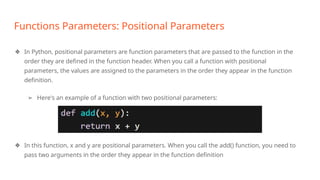
➢ Here's an example of a function with two positional parameters:
❖ In this function, x and y are positional parameters. When you call the add() function, you need to
pass two arguments in the order they appear in the function definition
Functions Parameters: Positional Parameters
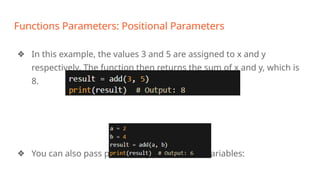
❖ In this example, the values 3 and 5 are assigned to x and y
respectively. The function then returns the sum of x and y, which is
8.
❖ You can also pass positional parameters as variables:
Functions Parameters: Positional Parameters
In addition to the basic functionality of positional parameters in Python, there are a few more
things to keep in mind:
❖ The number of arguments must match the number of parameters: When calling a
function with positional parameters, the number of arguments passed to the function
must match the number of parameters defined in the function header. If you pass too
many or too few arguments, you will get a TypeError.
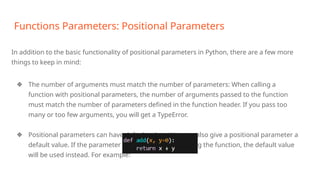
❖ Positional parameters can have default values: You can also give a positional parameter a
default value. If the parameter is not passed when calling the function, the default value
will be used instead. For example:
Functions Parameters: Positional Parameters
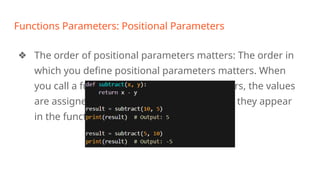
❖ The order of positional parameters matters: The order in
which you define positional parameters matters. When
you call a function with positional parameters, the values
are assigned to the parameters in the order they appear
in the function definition. For example:
Functions Parameters: Keyword Parameters
❖ In Python, keyword parameters are function parameters that are passed to the function using their
names. When calling a function with keyword parameters, the order of the arguments does not matter, as
each argument is associated with a specific parameter name.
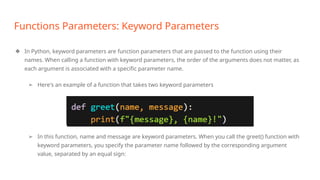
➢ Here's an example of a function that takes two keyword parameters
➢ In this function, name and message are keyword parameters. When you call the greet() function with
keyword parameters, you specify the parameter name followed by the corresponding argument
value, separated by an equal sign:
Functions Parameters: Keyword Parameters
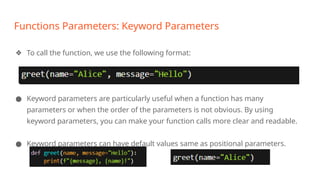
❖ To call the function, we use the following format:
● Keyword parameters are particularly useful when a function has many
parameters or when the order of the parameters is not obvious. By using
keyword parameters, you can make your function calls more clear and readable.
● Keyword parameters can have default values same as positional parameters.
Anonymous Functions
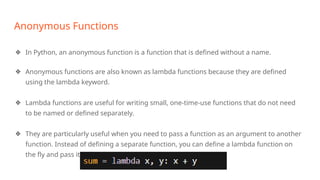
❖ In Python, an anonymous function is a function that is defined without a name.
❖ Anonymous functions are also known as lambda functions because they are defined
using the lambda keyword.
❖ Lambda functions are useful for writing small, one-time-use functions that do not need
to be named or defined separately.
❖ They are particularly useful when you need to pass a function as an argument to another
function. Instead of defining a separate function, you can define a lambda function on
the fly and pass it directly to the other function.
Anonymous Functions
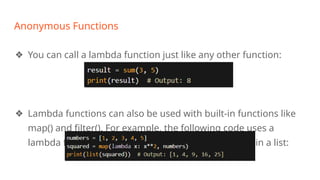
❖ You can call a lambda function just like any other function:
❖ Lambda functions can also be used with built-in functions like
map() and filter(). For example, the following code uses a
lambda function with map() to square each element in a list:
Anonymous Functions: Properties
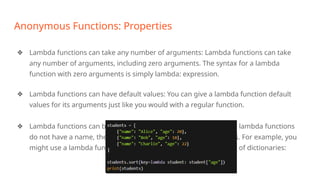
❖ Lambda functions can take any number of arguments: Lambda functions can take
any number of arguments, including zero arguments. The syntax for a lambda
function with zero arguments is simply lambda: expression.
❖ Lambda functions can have default values: You can give a lambda function default
values for its arguments just like you would with a regular function.
❖ Lambda functions can be used as anonymous functions: Because lambda functions
do not have a name, they are often used as anonymous functions. For example, you
might use a lambda function as a key function when sorting a list of dictionaries:
Recursion
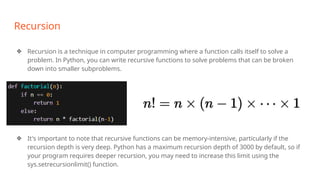
❖ Recursion is a technique in computer programming where a function calls itself to solve a
problem. In Python, you can write recursive functions to solve problems that can be broken
down into smaller subproblems.
❖ It's important to note that recursive functions can be memory-intensive, particularly if the
recursion depth is very deep. Python has a maximum recursion depth of 3000 by default, so if
your program requires deeper recursion, you may need to increase this limit using the
sys.setrecursionlimit() function.
Recursion
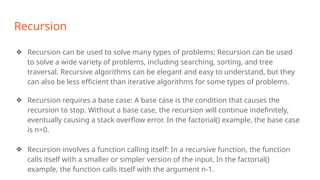
❖ Recursion can be used to solve many types of problems: Recursion can be used
to solve a wide variety of problems, including searching, sorting, and tree
traversal. Recursive algorithms can be elegant and easy to understand, but they
can also be less efficient than iterative algorithms for some types of problems.
❖ Recursion requires a base case: A base case is the condition that causes the
recursion to stop. Without a base case, the recursion will continue indefinitely,
eventually causing a stack overflow error. In the factorial() example, the base case
is n=0.
❖ Recursion involves a function calling itself: In a recursive function, the function
calls itself with a smaller or simpler version of the input. In the factorial()
example, the function calls itself with the argument n-1.
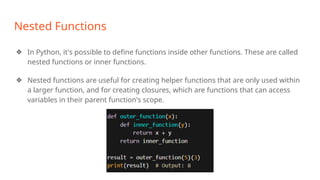
Nested Functions
❖ In Python, it's possible to define functions inside other functions. These are called
nested functions or inner functions.
❖ Nested functions are useful for creating helper functions that are only used within
a larger function, and for creating closures, which are functions that can access
variables in their parent function's scope.
Nested Functions
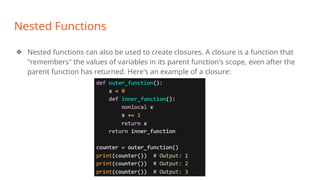
❖ Nested functions can also be used to create closures. A closure is a function that
"remembers" the values of variables in its parent function's scope, even after the
parent function has returned. Here's an example of a closure:
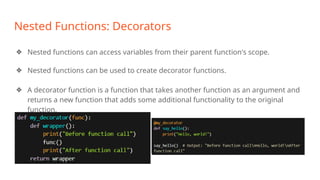
Nested Functions: Decorators
❖ Nested functions can access variables from their parent function's scope.
❖ Nested functions can be used to create decorator functions.
❖ A decorator function is a function that takes another function as an argument and
returns a new function that adds some additional functionality to the original
function.
Nested Functions: Factory Functions
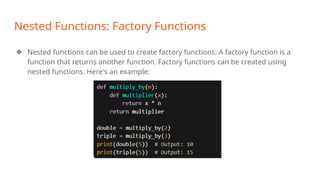
❖ Nested functions can be used to create factory functions: A factory function is a
function that returns another function. Factory functions can be created using
nested functions. Here's an example:
Python Libraries: Standard Libraries
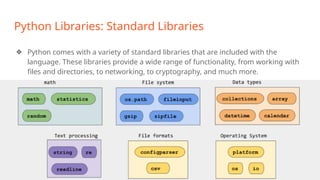
❖ Python comes with a variety of standard libraries that are included with the
language. These libraries provide a wide range of functionality, from working with
files and directories, to networking, to cryptography, and much more.
Python Libraries: os
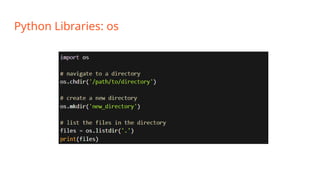
❖ The os library in Python provides a way to interact with the operating system,
such as creating and removing directories, listing directory contents, and getting
information about files. Here are some commonly used functions in the os library:
➢ os.getcwd(): Returns the current working directory.
➢ os.chdir(path): Changes the current working directory to the directory
specified by path.
➢ os.listdir(path): Returns a list of files and directories in the directory specified
by path.
➢ os.mkdir(path, mode=0o777): Creates a new directory with the specified path
and permissions specified by mode.
Python Libraries: os
Python Libraries: sys
❖ The sys module in Python provides access to some variables used or maintained
by the interpreter, as well as functions that interact with the Python runtime
environment. Here are some commonly used functions and variables in the sys
module:
➢ sys.argv: A list of command line arguments passed to the Python script.
sys.argv[0] is usually the name of the script itself.
➢ sys.exit([arg]): Exits the Python interpreter with an optional exit status arg. If
arg is omitted, the exit status is zero.
➢ sys.platform: A string identifying the operating system platform that Python
is running on, such as "win32", "linux", or "darwin".
➢ sys.version: A string containing the version number and build information of
the Python interpreter.
Python Libraries: sys
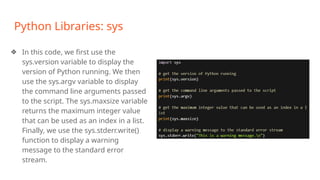
❖ In this code, we first use the
sys.version variable to display the
version of Python running. We then
use the sys.argv variable to display
the command line arguments passed
to the script. The sys.maxsize variable
returns the maximum integer value
that can be used as an index in a list.
Finally, we use the sys.stderr.write()
function to display a warning
message to the standard error
stream.
Python Libraries: math
❖ The math module in Python provides a collection of mathematical functions that
operate on numerical data. Here are some commonly used functions in the math
module:
➢ math.sqrt(x): Returns the square root of x.
➢ math.pow(x, y): Returns x raised to the power of y.
➢ math.exp(x): Returns the exponential of x, e^x.
➢ math.log(x[, base]): Returns the natural logarithm of x if base is not specified.
If base is specified, returns the logarithm of x with respect to base.
➢ math.sin(x), math.cos(x), math.tan(x): Returns the sine, cosine, and tangent
of x, respectively.
➢ math.asin(x), math.acos(x), math.atan(x): Returns the inverse sine, inverse
cosine, and inverse tangent of x, respectively.
Python Libraries: math
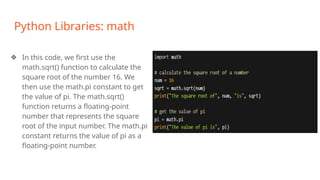
❖ In this code, we first use the
math.sqrt() function to calculate the
square root of the number 16. We
then use the math.pi constant to get
the value of pi. The math.sqrt()
function returns a floating-point
number that represents the square
root of the input number. The math.pi
constant returns the value of pi as a
floating-point number.
Python Libraries: random
❖ The random module in Python provides functions for generating random
numbers and sequences. Here are some commonly used functions in the random
module:
➢ random.random(): Returns a random floating-point number between 0.0 and
1.0 (inclusive).
➢ random.randint(a, b): Returns a random integer between a and b (inclusive).
➢ random.randrange(start, stop[, step]): Returns a random integer from the
range start (inclusive) to stop (exclusive), with an optional step size.
➢ random.choice(seq): Returns a random element from the sequence seq.
➢ random.shuffle(seq): Shuffles the sequence seq in place.
➢ random.sample(population, k): Returns a random sample of k elements from
the population population, without replacement.
Python Libraries: random
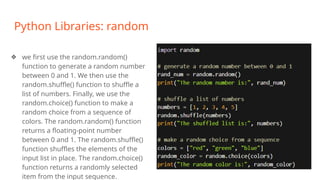
❖ we first use the random.random()
function to generate a random number
between 0 and 1. We then use the
random.shuffle() function to shuffle a
list of numbers. Finally, we use the
random.choice() function to make a
random choice from a sequence of
colors. The random.random() function
returns a floating-point number
between 0 and 1. The random.shuffle()
function shuffles the elements of the
input list in place. The random.choice()
function returns a randomly selected
item from the input sequence.
Python Libraries: re
❖ The re module in Python provides support for regular expressions, which are a
powerful and flexible way to search for and manipulate text. Here are some
commonly used functions in the re module:
➢ re.search(pattern, string[, flags]): Searches for the first occurrence of pattern
in string, and returns a match object if found. flags can be used to modify the
behavior of the search.
➢ re.match(pattern, string[, flags]): Searches for pattern at the beginning of
string, and returns a match object if found. flags can be used to modify the
behavior of the search.
➢ re.findall(pattern, string[, flags]): Searches for all non-overlapping
occurrences of pattern in string, and returns a list of matching strings.
Python Libraries: re
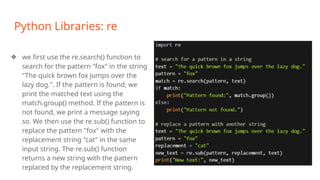
❖ we first use the re.search() function to
search for the pattern "fox" in the string
"The quick brown fox jumps over the
lazy dog.". If the pattern is found, we
print the matched text using the
match.group() method. If the pattern is
not found, we print a message saying
so. We then use the re.sub() function to
replace the pattern "fox" with the
replacement string "cat" in the same
input string. The re.sub() function
returns a new string with the pattern
replaced by the replacement string.
Python Libraries: json
❖ The json module in Python provides functions for encoding and decoding JSON
(JavaScript Object Notation) data. JSON is a lightweight data interchange format
that is easy for humans to read and write, and easy for machines to parse and
generate. Here are some commonly used functions in the json module:
➢ json.dump(obj, fp[, *, skipkeys=False, ensure_ascii=True, check_circular=True,
allow_nan=True, cls=None, indent=None, separators=None, default=None,
sort_keys=False, **kw]): Serializes obj to a JSON formatted str, writing it to a
file-like object fp.
➢ json.load(fp[, *, cls=None, object_hook=None, parse_float=None,
parse_int=None, parse_constant=None, object_pairs_hook=None, **kw]):
Deserializes a JSON formatted str to a Python object from an input file-like
Python Libraries: json
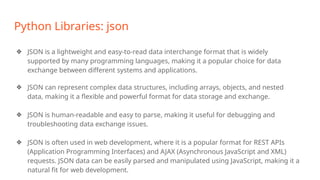
❖ JSON is a lightweight and easy-to-read data interchange format that is widely
supported by many programming languages, making it a popular choice for data
exchange between different systems and applications.
❖ JSON can represent complex data structures, including arrays, objects, and nested
data, making it a flexible and powerful format for data storage and exchange.
❖ JSON is human-readable and easy to parse, making it useful for debugging and
troubleshooting data exchange issues.
❖ JSON is often used in web development, where it is a popular format for REST APIs
(Application Programming Interfaces) and AJAX (Asynchronous JavaScript and XML)
requests. JSON data can be easily parsed and manipulated using JavaScript, making it a
natural fit for web development.
Python Libraries: json
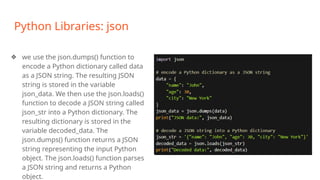
❖ we use the json.dumps() function to
encode a Python dictionary called data
as a JSON string. The resulting JSON
string is stored in the variable
json_data. We then use the json.loads()
function to decode a JSON string called
json_str into a Python dictionary. The
resulting dictionary is stored in the
variable decoded_data. The
json.dumps() function returns a JSON
string representing the input Python
object. The json.loads() function parses
a JSON string and returns a Python
object.
Python Libraries: csv
❖ The csv module in Python provides functions for working with CSV (Comma-
Separated Values) files, which are a common file format for storing and
exchanging tabular data. Here are some commonly used functions in the csv
module:
➢ csv.reader(csvfile[, dialect='excel', **fmtparams]): Returns a reader object
that can be used to iterate over the rows in a CSV file.
➢ csv.writer(csvfile[, dialect='excel', **fmtparams]): Returns a writer object that
can be used to write rows to a CSV file.
➢ csv.DictReader(csvfile[, fieldnames=None, restkey=None, restval=None,
dialect='excel', **fmtparams]): Returns a dictionary-reader object that can be
used to iterate over the rows in a CSV file, where the keys of each dictionary
are the column headers.
Python Libraries: csv
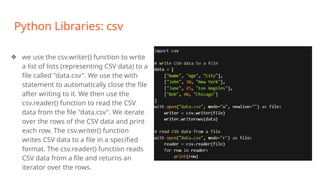
❖ we use the csv.writer() function to write
a list of lists (representing CSV data) to a
file called "data.csv". We use the with
statement to automatically close the file
after writing to it. We then use the
csv.reader() function to read the CSV
data from the file "data.csv". We iterate
over the rows of the CSV data and print
each row. The csv.writer() function
writes CSV data to a file in a specified
format. The csv.reader() function reads
CSV data from a file and returns an
iterator over the rows.
Python Libraries: datetime
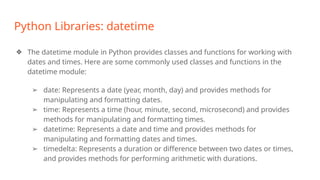
❖ The datetime module in Python provides classes and functions for working with
dates and times. Here are some commonly used classes and functions in the
datetime module:
➢ date: Represents a date (year, month, day) and provides methods for
manipulating and formatting dates.
➢ time: Represents a time (hour, minute, second, microsecond) and provides
methods for manipulating and formatting times.
➢ datetime: Represents a date and time and provides methods for
manipulating and formatting dates and times.
➢ timedelta: Represents a duration or difference between two dates or times,
and provides methods for performing arithmetic with durations.
Python Libraries: datetime
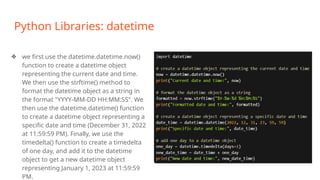
❖ we first use the datetime.datetime.now()
function to create a datetime object
representing the current date and time.
We then use the strftime() method to
format the datetime object as a string in
the format "YYYY-MM-DD HH:MM:SS". We
then use the datetime.datetime() function
to create a datetime object representing a
specific date and time (December 31, 2022
at 11:59:59 PM). Finally, we use the
timedelta() function to create a timedelta
of one day, and add it to the datetime
object to get a new datetime object
representing January 1, 2023 at 11:59:59
PM.
External Libraries: Numpy
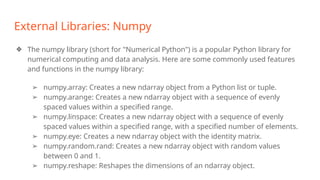
❖ The numpy library (short for "Numerical Python") is a popular Python library for
numerical computing and data analysis. Here are some commonly used features
and functions in the numpy library:
➢ numpy.array: Creates a new ndarray object from a Python list or tuple.
➢ numpy.arange: Creates a new ndarray object with a sequence of evenly
spaced values within a specified range.
➢ numpy.linspace: Creates a new ndarray object with a sequence of evenly
spaced values within a specified range, with a specified number of elements.
➢ numpy.eye: Creates a new ndarray object with the identity matrix.
➢ numpy.random.rand: Creates a new ndarray object with random values
between 0 and 1.
➢ numpy.reshape: Reshapes the dimensions of an ndarray object.
External Libraries: Numpy
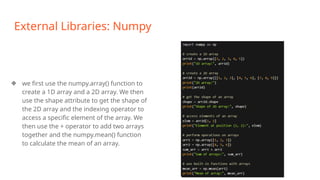
❖ we first use the numpy.array() function to
create a 1D array and a 2D array. We then
use the shape attribute to get the shape of
the 2D array and the indexing operator to
access a specific element of the array. We
then use the + operator to add two arrays
together and the numpy.mean() function
to calculate the mean of an array.
External Libraries: pandas
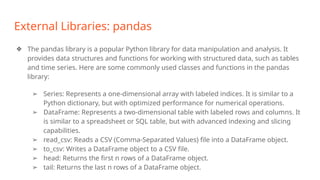
❖ The pandas library is a popular Python library for data manipulation and analysis. It
provides data structures and functions for working with structured data, such as tables
and time series. Here are some commonly used classes and functions in the pandas
library:
➢ Series: Represents a one-dimensional array with labeled indices. It is similar to a
Python dictionary, but with optimized performance for numerical operations.
➢ DataFrame: Represents a two-dimensional table with labeled rows and columns. It
is similar to a spreadsheet or SQL table, but with advanced indexing and slicing
capabilities.
➢ read_csv: Reads a CSV (Comma-Separated Values) file into a DataFrame object.
➢ to_csv: Writes a DataFrame object to a CSV file.
➢ head: Returns the first n rows of a DataFrame object.
➢ tail: Returns the last n rows of a DataFrame object.
External Libraries: Pandas
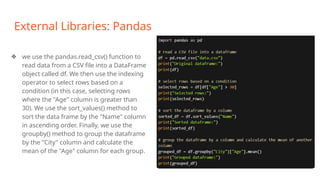
❖ we use the pandas.read_csv() function to
read data from a CSV file into a DataFrame
object called df. We then use the indexing
operator to select rows based on a
condition (in this case, selecting rows
where the "Age" column is greater than
30). We use the sort_values() method to
sort the data frame by the "Name" column
in ascending order. Finally, we use the
groupby() method to group the dataframe
by the "City" column and calculate the
mean of the "Age" column for each group.
External Libraries: matplotlib
❖ matplotlib is a popular Python library for creating data visualizations. It provides a wide
range of functions for creating various types of plots and charts, such as line plots,
scatter plots, bar charts, histograms, and more. Here are some commonly used
features and functions in the matplotlib library:
➢ pyplot: Provides a simple interface for creating and customizing plots and charts.
➢ figure: Creates a new figure for a plot or chart.
➢ subplot: Creates a new subplot within a figure.
➢ plot: Creates a line plot or scatter plot.
➢ scatter: Creates a scatter plot.
➢ bar: Creates a bar chart.
➢ hist: Creates a histogram.
➢ boxplot: Creates a box plot.
➢ set_xlabel/set_ylabel: Sets the labels for the x-axis and y-axis.
External Libraries: matplotlib
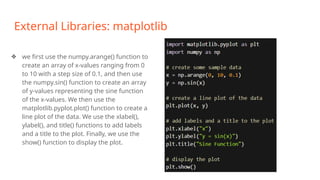
❖ we first use the numpy.arange() function to
create an array of x-values ranging from 0
to 10 with a step size of 0.1, and then use
the numpy.sin() function to create an array
of y-values representing the sine function
of the x-values. We then use the
matplotlib.pyplot.plot() function to create a
line plot of the data. We use the xlabel(),
ylabel(), and title() functions to add labels
and a title to the plot. Finally, we use the
show() function to display the plot.
External Libraries: Scikit-learn
❖ Scikit-learn (also known as sklearn) is a popular Python library for machine learning. It
provides a wide range of algorithms and functions for various machine learning tasks, such
as classification, regression, clustering, and dimensionality reduction. Here are some
commonly used features and functions in the scikit-learn library:
➢ Dataset loading utilities: Provides functions for loading and working with popular
datasets, such as the Iris dataset and the MNIST dataset.
➢ Preprocessing: Provides functions for preprocessing data, such as scaling,
normalization, and feature selection.
➢ Supervised learning algorithms: Provides a wide range of algorithms for supervised
learning, such as linear regression, logistic regression, decision trees, random forests,
and neural networks.
➢ Unsupervised learning algorithms: Provides a wide range of algorithms for
unsupervised learning, such as k-means clustering, hierarchical clustering, and principal
component analysis (PCA).
External Libraries: Tensorflow
❖ TensorFlow is an open-source machine learning library developed by Google. It is designed to
build and train machine learning models for a wide range of applications, including image
and speech recognition, natural language processing, and reinforcement learning.
TensorFlow provides a powerful and flexible platform for building and deploying machine
learning models, with support for both low-level operations and high-level abstractions.
➢ Computation graphs: TensorFlow uses computation graphs to represent machine
learning models as a series of mathematical operations. This allows for efficient
computation on both CPUs and GPUs, and makes it easy to optimize and parallelize the
model.
➢ Automatic differentiation: TensorFlow provides an automatic differentiation feature,
which allows for efficient computation of gradients for backpropagation-based
optimization algorithms.
➢ High-level APIs: TensorFlow provides high-level APIs (such as Keras and Estimators) for
building and training machine learning models, which can simplify the model-building
process for beginners.
External Libraries: Keras
❖ Keras is a high-level neural network API written in Python that runs on top of TensorFlow (as well
as other backends such as Theano and Microsoft Cognitive Toolkit). It was developed with a focus
on enabling fast experimentation with deep neural networks, with the goal of making it easy to
go from idea to result as smoothly as possible.
➢ Modular design: Keras provides a modular design that allows users to easily mix and match
different layers and activation functions to create custom neural network architectures.
➢ Built-in layers and activation functions: Keras provides a range of built-in layers and
activation functions for building custom models, including convolutional layers, recurrent
layers, and fully connected layers.
➢ Customizable loss functions and metrics: Keras allows users to define custom loss functions
and metrics for training and evaluating their models.
➢ Preprocessing and data augmentation: Keras provides a range of utilities for preprocessing
and augmenting data, including image preprocessing and sequence padding.
➢ Model saving and loading: Keras provides utilities for saving and loading trained models,
which can be useful for deploying models in production environments.
External Libraries: Pytorch
❖ PyTorch is an open-source machine learning library developed by Facebook. It provides a
flexible and efficient platform for building and training machine learning models, with
support for both CPU and GPU computation. PyTorch is known for its dynamic computational
graph, which allows for more flexible and efficient computation compared to static
computational graphs used in other libraries like TensorFlow.
➢ Dynamic computational graph: PyTorch uses a dynamic computational graph to
represent machine learning models as a series of mathematical operations. This allows
for more flexible and efficient computation compared to static computational graphs
used in other libraries like TensorFlow.
➢ Automatic differentiation: PyTorch provides an automatic differentiation feature, which
allows for efficient computation of gradients for backpropagation-based optimization
algorithms.
➢ GPU acceleration: PyTorch provides support for GPU acceleration, which can greatly
accelerate the training of large-scale models.
External Libraries: OpenAI Gym
❖ OpenAI Gym is an open-source toolkit for developing and comparing reinforcement learning
algorithms. It provides a wide range of environments for training and testing reinforcement
learning agents, including classic control problems, Atari games, and robotics simulations.
OpenAI Gym is designed to be easy to use, with a simple and consistent interface that allows
for rapid experimentation and prototyping.
➢ A wide range of environments: OpenAI Gym provides a wide range of environments for
training and testing reinforcement learning agents, including classic control problems,
Atari games, and robotics simulations.
➢ Customizable environments: OpenAI Gym allows users to create their own custom
environments, which can be used to test and train reinforcement learning agents on
specific tasks.
➢ Integration with other machine learning libraries: OpenAI Gym integrates with other
popular machine learning libraries, such as TensorFlow and PyTorch, which allows for
seamless integration with other machine learning workflows.
Activity I (2 hrs)
❏ In this link: https://colab.research.google.com/, familiarize yourself with
Google Colab (an open source python compiler created by Google).
❏ Write and run every example code we covered up till now in the training.
❏ Run the pre-existing more complicated code on the website and
examine those codes to better understand them (Classify IMDB movie
reviews as either positive or negative.)
Thank You!

_Python_ Functions _and_ Libraries_.pptx

  • 1.
    Python: Functions andLibraries Eng. Mohamed Gamal, Research Assistant, Center for Photonics and Smart Materials, Zewail City
  • 2.
    Outline ❖ Python Functions ➢Basic Syntax, Definitions, and Calling ➢ Function Parameters ➢ Anonymous (Lambda) Functions ➢ Recursion and Nested Functions ❖ Python Libraries ➢ Standard Libraries ➢ Numpy ➢ Pandas ➢ Matplotlib ➢ Scikit-learn ➢ Tensorflow ➢ Keras ➢ Pytorch ➢ OpenAI Gym
  • 3.
    Functions: Definition ❏ Afunction is a block of organized, reusable code that is used to perform a single, related action. ❏ Functions provides better modularity for your application and a high degree of code reusing. ❏ As you already know, Python gives you many built-in functions like print() etc. but you can also create your own functions. ❏ These functions are called user-defined functions.
  • 4.
    Python Functions: BasicSyntax ❏ In Python, a function is defined using the def keyword, followed by the function name, parentheses (), and a colon :. The function body is indented to indicate the code block that the function executes. Here's the basic syntax of a Python function: ❏ function_name is the name of the function, which should be descriptive and meaningful. ❏ arguments are the inputs to the function, which can be optional or required. ❏ return is a keyword that specifies the output of the function, which can be a value or a collection of values.
  • 5.
    Python Functions: Calling ❖Function calling is an essential aspect of Python programming and has several benefits, including: ➢ Code reusability: Functions allow you to reuse code by defining a block of code that can be called multiple times from within your program. This reduces the amount of code you need to write and makes your code more modular and maintainable. ➢ Abstraction: Functions provide a level of abstraction that allows you to focus on the logic or purpose of the function without worrying about the implementation details. This makes your code more readable and easier to understand.
  • 6.
    Python Functions: Calling ❖Function calling is an essential aspect of Python programming and has several benefits, including: ➢ Encapsulation: Functions allow you to encapsulate a particular piece of functionality or logic into a single unit. This helps to separate concerns in your code and makes it easier to debug and maintain. ➢ Scalability: Functions allow you to break down complex problems into smaller, more manageable pieces. This makes it easier to scale your code as your program grows in complexity.
  • 7.
    Python Functions: Calling ❖To call a function in Python, you need to follow these steps: ➢ Define the function: Define the function by using the def keyword followed by the function name, parentheses, and a colon. The function code should be indented beneath the function definition line.
  • 8.
    Python Functions: Calling ❖To call a function in Python, you need to follow these steps: ➢ Call the function: To call the function, simply type the function name followed by parentheses and any required arguments.
  • 9.
    Python Functions: Calling ❏This would output the following:
  • 10.
    Functions Parameters ❖ Functionparameters in Python are variables that are defined in the function header and are used to pass values or data to the function when it is called, allowing for more flexible and dynamic behavior of the function. ❖ In Python, a function can take zero or more parameters. When a function is called, the values passed to the function are referred to as arguments. ❖ There are two types of function parameters in Python: positional parameters and keyword parameters. ❖ In addition to these two types of parameters, Python also allows for default parameter values. Default values are specified in the function header and are used if no value is passed for that parameter when the function is called.
  • 11.
    Functions Parameters: PositionalParameters ❖ In Python, positional parameters are function parameters that are passed to the function in the order they are defined in the function header. When you call a function with positional parameters, the values are assigned to the parameters in the order they appear in the function definition. ➢ Here's an example of a function with two positional parameters: ❖ In this function, x and y are positional parameters. When you call the add() function, you need to pass two arguments in the order they appear in the function definition
  • 12.
    Functions Parameters: PositionalParameters ❖ In this example, the values 3 and 5 are assigned to x and y respectively. The function then returns the sum of x and y, which is 8. ❖ You can also pass positional parameters as variables:
  • 13.
    Functions Parameters: PositionalParameters In addition to the basic functionality of positional parameters in Python, there are a few more things to keep in mind: ❖ The number of arguments must match the number of parameters: When calling a function with positional parameters, the number of arguments passed to the function must match the number of parameters defined in the function header. If you pass too many or too few arguments, you will get a TypeError. ❖ Positional parameters can have default values: You can also give a positional parameter a default value. If the parameter is not passed when calling the function, the default value will be used instead. For example:
  • 14.
    Functions Parameters: PositionalParameters ❖ The order of positional parameters matters: The order in which you define positional parameters matters. When you call a function with positional parameters, the values are assigned to the parameters in the order they appear in the function definition. For example:
  • 15.
    Functions Parameters: KeywordParameters ❖ In Python, keyword parameters are function parameters that are passed to the function using their names. When calling a function with keyword parameters, the order of the arguments does not matter, as each argument is associated with a specific parameter name. ➢ Here's an example of a function that takes two keyword parameters ➢ In this function, name and message are keyword parameters. When you call the greet() function with keyword parameters, you specify the parameter name followed by the corresponding argument value, separated by an equal sign:
  • 16.
    Functions Parameters: KeywordParameters ❖ To call the function, we use the following format: ● Keyword parameters are particularly useful when a function has many parameters or when the order of the parameters is not obvious. By using keyword parameters, you can make your function calls more clear and readable. ● Keyword parameters can have default values same as positional parameters.
  • 17.
    Anonymous Functions ❖ InPython, an anonymous function is a function that is defined without a name. ❖ Anonymous functions are also known as lambda functions because they are defined using the lambda keyword. ❖ Lambda functions are useful for writing small, one-time-use functions that do not need to be named or defined separately. ❖ They are particularly useful when you need to pass a function as an argument to another function. Instead of defining a separate function, you can define a lambda function on the fly and pass it directly to the other function.
  • 18.
    Anonymous Functions ❖ Youcan call a lambda function just like any other function: ❖ Lambda functions can also be used with built-in functions like map() and filter(). For example, the following code uses a lambda function with map() to square each element in a list:
  • 19.
    Anonymous Functions: Properties ❖Lambda functions can take any number of arguments: Lambda functions can take any number of arguments, including zero arguments. The syntax for a lambda function with zero arguments is simply lambda: expression. ❖ Lambda functions can have default values: You can give a lambda function default values for its arguments just like you would with a regular function. ❖ Lambda functions can be used as anonymous functions: Because lambda functions do not have a name, they are often used as anonymous functions. For example, you might use a lambda function as a key function when sorting a list of dictionaries:
  • 20.
    Recursion ❖ Recursion isa technique in computer programming where a function calls itself to solve a problem. In Python, you can write recursive functions to solve problems that can be broken down into smaller subproblems. ❖ It's important to note that recursive functions can be memory-intensive, particularly if the recursion depth is very deep. Python has a maximum recursion depth of 3000 by default, so if your program requires deeper recursion, you may need to increase this limit using the sys.setrecursionlimit() function.
  • 21.
    Recursion ❖ Recursion canbe used to solve many types of problems: Recursion can be used to solve a wide variety of problems, including searching, sorting, and tree traversal. Recursive algorithms can be elegant and easy to understand, but they can also be less efficient than iterative algorithms for some types of problems. ❖ Recursion requires a base case: A base case is the condition that causes the recursion to stop. Without a base case, the recursion will continue indefinitely, eventually causing a stack overflow error. In the factorial() example, the base case is n=0. ❖ Recursion involves a function calling itself: In a recursive function, the function calls itself with a smaller or simpler version of the input. In the factorial() example, the function calls itself with the argument n-1.
  • 22.
    Nested Functions ❖ InPython, it's possible to define functions inside other functions. These are called nested functions or inner functions. ❖ Nested functions are useful for creating helper functions that are only used within a larger function, and for creating closures, which are functions that can access variables in their parent function's scope.
  • 23.
    Nested Functions ❖ Nestedfunctions can also be used to create closures. A closure is a function that "remembers" the values of variables in its parent function's scope, even after the parent function has returned. Here's an example of a closure:
  • 24.
    Nested Functions: Decorators ❖Nested functions can access variables from their parent function's scope. ❖ Nested functions can be used to create decorator functions. ❖ A decorator function is a function that takes another function as an argument and returns a new function that adds some additional functionality to the original function.
  • 25.
    Nested Functions: FactoryFunctions ❖ Nested functions can be used to create factory functions: A factory function is a function that returns another function. Factory functions can be created using nested functions. Here's an example:
  • 26.
    Python Libraries: StandardLibraries ❖ Python comes with a variety of standard libraries that are included with the language. These libraries provide a wide range of functionality, from working with files and directories, to networking, to cryptography, and much more.
  • 27.
    Python Libraries: os ❖The os library in Python provides a way to interact with the operating system, such as creating and removing directories, listing directory contents, and getting information about files. Here are some commonly used functions in the os library: ➢ os.getcwd(): Returns the current working directory. ➢ os.chdir(path): Changes the current working directory to the directory specified by path. ➢ os.listdir(path): Returns a list of files and directories in the directory specified by path. ➢ os.mkdir(path, mode=0o777): Creates a new directory with the specified path and permissions specified by mode.
  • 28.
  • 29.
    Python Libraries: sys ❖The sys module in Python provides access to some variables used or maintained by the interpreter, as well as functions that interact with the Python runtime environment. Here are some commonly used functions and variables in the sys module: ➢ sys.argv: A list of command line arguments passed to the Python script. sys.argv[0] is usually the name of the script itself. ➢ sys.exit([arg]): Exits the Python interpreter with an optional exit status arg. If arg is omitted, the exit status is zero. ➢ sys.platform: A string identifying the operating system platform that Python is running on, such as "win32", "linux", or "darwin". ➢ sys.version: A string containing the version number and build information of the Python interpreter.
  • 30.
    Python Libraries: sys ❖In this code, we first use the sys.version variable to display the version of Python running. We then use the sys.argv variable to display the command line arguments passed to the script. The sys.maxsize variable returns the maximum integer value that can be used as an index in a list. Finally, we use the sys.stderr.write() function to display a warning message to the standard error stream.
  • 31.
    Python Libraries: math ❖The math module in Python provides a collection of mathematical functions that operate on numerical data. Here are some commonly used functions in the math module: ➢ math.sqrt(x): Returns the square root of x. ➢ math.pow(x, y): Returns x raised to the power of y. ➢ math.exp(x): Returns the exponential of x, e^x. ➢ math.log(x[, base]): Returns the natural logarithm of x if base is not specified. If base is specified, returns the logarithm of x with respect to base. ➢ math.sin(x), math.cos(x), math.tan(x): Returns the sine, cosine, and tangent of x, respectively. ➢ math.asin(x), math.acos(x), math.atan(x): Returns the inverse sine, inverse cosine, and inverse tangent of x, respectively.
  • 32.
    Python Libraries: math ❖In this code, we first use the math.sqrt() function to calculate the square root of the number 16. We then use the math.pi constant to get the value of pi. The math.sqrt() function returns a floating-point number that represents the square root of the input number. The math.pi constant returns the value of pi as a floating-point number.
  • 33.
    Python Libraries: random ❖The random module in Python provides functions for generating random numbers and sequences. Here are some commonly used functions in the random module: ➢ random.random(): Returns a random floating-point number between 0.0 and 1.0 (inclusive). ➢ random.randint(a, b): Returns a random integer between a and b (inclusive). ➢ random.randrange(start, stop[, step]): Returns a random integer from the range start (inclusive) to stop (exclusive), with an optional step size. ➢ random.choice(seq): Returns a random element from the sequence seq. ➢ random.shuffle(seq): Shuffles the sequence seq in place. ➢ random.sample(population, k): Returns a random sample of k elements from the population population, without replacement.
  • 34.
    Python Libraries: random ❖we first use the random.random() function to generate a random number between 0 and 1. We then use the random.shuffle() function to shuffle a list of numbers. Finally, we use the random.choice() function to make a random choice from a sequence of colors. The random.random() function returns a floating-point number between 0 and 1. The random.shuffle() function shuffles the elements of the input list in place. The random.choice() function returns a randomly selected item from the input sequence.
  • 35.
    Python Libraries: re ❖The re module in Python provides support for regular expressions, which are a powerful and flexible way to search for and manipulate text. Here are some commonly used functions in the re module: ➢ re.search(pattern, string[, flags]): Searches for the first occurrence of pattern in string, and returns a match object if found. flags can be used to modify the behavior of the search. ➢ re.match(pattern, string[, flags]): Searches for pattern at the beginning of string, and returns a match object if found. flags can be used to modify the behavior of the search. ➢ re.findall(pattern, string[, flags]): Searches for all non-overlapping occurrences of pattern in string, and returns a list of matching strings.
  • 36.
    Python Libraries: re ❖we first use the re.search() function to search for the pattern "fox" in the string "The quick brown fox jumps over the lazy dog.". If the pattern is found, we print the matched text using the match.group() method. If the pattern is not found, we print a message saying so. We then use the re.sub() function to replace the pattern "fox" with the replacement string "cat" in the same input string. The re.sub() function returns a new string with the pattern replaced by the replacement string.
  • 37.
    Python Libraries: json ❖The json module in Python provides functions for encoding and decoding JSON (JavaScript Object Notation) data. JSON is a lightweight data interchange format that is easy for humans to read and write, and easy for machines to parse and generate. Here are some commonly used functions in the json module: ➢ json.dump(obj, fp[, *, skipkeys=False, ensure_ascii=True, check_circular=True, allow_nan=True, cls=None, indent=None, separators=None, default=None, sort_keys=False, **kw]): Serializes obj to a JSON formatted str, writing it to a file-like object fp. ➢ json.load(fp[, *, cls=None, object_hook=None, parse_float=None, parse_int=None, parse_constant=None, object_pairs_hook=None, **kw]): Deserializes a JSON formatted str to a Python object from an input file-like
  • 38.
    Python Libraries: json ❖JSON is a lightweight and easy-to-read data interchange format that is widely supported by many programming languages, making it a popular choice for data exchange between different systems and applications. ❖ JSON can represent complex data structures, including arrays, objects, and nested data, making it a flexible and powerful format for data storage and exchange. ❖ JSON is human-readable and easy to parse, making it useful for debugging and troubleshooting data exchange issues. ❖ JSON is often used in web development, where it is a popular format for REST APIs (Application Programming Interfaces) and AJAX (Asynchronous JavaScript and XML) requests. JSON data can be easily parsed and manipulated using JavaScript, making it a natural fit for web development.
  • 39.
    Python Libraries: json ❖we use the json.dumps() function to encode a Python dictionary called data as a JSON string. The resulting JSON string is stored in the variable json_data. We then use the json.loads() function to decode a JSON string called json_str into a Python dictionary. The resulting dictionary is stored in the variable decoded_data. The json.dumps() function returns a JSON string representing the input Python object. The json.loads() function parses a JSON string and returns a Python object.
  • 40.
    Python Libraries: csv ❖The csv module in Python provides functions for working with CSV (Comma- Separated Values) files, which are a common file format for storing and exchanging tabular data. Here are some commonly used functions in the csv module: ➢ csv.reader(csvfile[, dialect='excel', **fmtparams]): Returns a reader object that can be used to iterate over the rows in a CSV file. ➢ csv.writer(csvfile[, dialect='excel', **fmtparams]): Returns a writer object that can be used to write rows to a CSV file. ➢ csv.DictReader(csvfile[, fieldnames=None, restkey=None, restval=None, dialect='excel', **fmtparams]): Returns a dictionary-reader object that can be used to iterate over the rows in a CSV file, where the keys of each dictionary are the column headers.
  • 41.
    Python Libraries: csv ❖we use the csv.writer() function to write a list of lists (representing CSV data) to a file called "data.csv". We use the with statement to automatically close the file after writing to it. We then use the csv.reader() function to read the CSV data from the file "data.csv". We iterate over the rows of the CSV data and print each row. The csv.writer() function writes CSV data to a file in a specified format. The csv.reader() function reads CSV data from a file and returns an iterator over the rows.
  • 42.
    Python Libraries: datetime ❖The datetime module in Python provides classes and functions for working with dates and times. Here are some commonly used classes and functions in the datetime module: ➢ date: Represents a date (year, month, day) and provides methods for manipulating and formatting dates. ➢ time: Represents a time (hour, minute, second, microsecond) and provides methods for manipulating and formatting times. ➢ datetime: Represents a date and time and provides methods for manipulating and formatting dates and times. ➢ timedelta: Represents a duration or difference between two dates or times, and provides methods for performing arithmetic with durations.
  • 43.
    Python Libraries: datetime ❖we first use the datetime.datetime.now() function to create a datetime object representing the current date and time. We then use the strftime() method to format the datetime object as a string in the format "YYYY-MM-DD HH:MM:SS". We then use the datetime.datetime() function to create a datetime object representing a specific date and time (December 31, 2022 at 11:59:59 PM). Finally, we use the timedelta() function to create a timedelta of one day, and add it to the datetime object to get a new datetime object representing January 1, 2023 at 11:59:59 PM.
  • 44.
    External Libraries: Numpy ❖The numpy library (short for "Numerical Python") is a popular Python library for numerical computing and data analysis. Here are some commonly used features and functions in the numpy library: ➢ numpy.array: Creates a new ndarray object from a Python list or tuple. ➢ numpy.arange: Creates a new ndarray object with a sequence of evenly spaced values within a specified range. ➢ numpy.linspace: Creates a new ndarray object with a sequence of evenly spaced values within a specified range, with a specified number of elements. ➢ numpy.eye: Creates a new ndarray object with the identity matrix. ➢ numpy.random.rand: Creates a new ndarray object with random values between 0 and 1. ➢ numpy.reshape: Reshapes the dimensions of an ndarray object.
  • 45.
    External Libraries: Numpy ❖we first use the numpy.array() function to create a 1D array and a 2D array. We then use the shape attribute to get the shape of the 2D array and the indexing operator to access a specific element of the array. We then use the + operator to add two arrays together and the numpy.mean() function to calculate the mean of an array.
  • 46.
    External Libraries: pandas ❖The pandas library is a popular Python library for data manipulation and analysis. It provides data structures and functions for working with structured data, such as tables and time series. Here are some commonly used classes and functions in the pandas library: ➢ Series: Represents a one-dimensional array with labeled indices. It is similar to a Python dictionary, but with optimized performance for numerical operations. ➢ DataFrame: Represents a two-dimensional table with labeled rows and columns. It is similar to a spreadsheet or SQL table, but with advanced indexing and slicing capabilities. ➢ read_csv: Reads a CSV (Comma-Separated Values) file into a DataFrame object. ➢ to_csv: Writes a DataFrame object to a CSV file. ➢ head: Returns the first n rows of a DataFrame object. ➢ tail: Returns the last n rows of a DataFrame object.
  • 47.
    External Libraries: Pandas ❖we use the pandas.read_csv() function to read data from a CSV file into a DataFrame object called df. We then use the indexing operator to select rows based on a condition (in this case, selecting rows where the "Age" column is greater than 30). We use the sort_values() method to sort the data frame by the "Name" column in ascending order. Finally, we use the groupby() method to group the dataframe by the "City" column and calculate the mean of the "Age" column for each group.
  • 48.
    External Libraries: matplotlib ❖matplotlib is a popular Python library for creating data visualizations. It provides a wide range of functions for creating various types of plots and charts, such as line plots, scatter plots, bar charts, histograms, and more. Here are some commonly used features and functions in the matplotlib library: ➢ pyplot: Provides a simple interface for creating and customizing plots and charts. ➢ figure: Creates a new figure for a plot or chart. ➢ subplot: Creates a new subplot within a figure. ➢ plot: Creates a line plot or scatter plot. ➢ scatter: Creates a scatter plot. ➢ bar: Creates a bar chart. ➢ hist: Creates a histogram. ➢ boxplot: Creates a box plot. ➢ set_xlabel/set_ylabel: Sets the labels for the x-axis and y-axis.
  • 49.
    External Libraries: matplotlib ❖we first use the numpy.arange() function to create an array of x-values ranging from 0 to 10 with a step size of 0.1, and then use the numpy.sin() function to create an array of y-values representing the sine function of the x-values. We then use the matplotlib.pyplot.plot() function to create a line plot of the data. We use the xlabel(), ylabel(), and title() functions to add labels and a title to the plot. Finally, we use the show() function to display the plot.
  • 50.
    External Libraries: Scikit-learn ❖Scikit-learn (also known as sklearn) is a popular Python library for machine learning. It provides a wide range of algorithms and functions for various machine learning tasks, such as classification, regression, clustering, and dimensionality reduction. Here are some commonly used features and functions in the scikit-learn library: ➢ Dataset loading utilities: Provides functions for loading and working with popular datasets, such as the Iris dataset and the MNIST dataset. ➢ Preprocessing: Provides functions for preprocessing data, such as scaling, normalization, and feature selection. ➢ Supervised learning algorithms: Provides a wide range of algorithms for supervised learning, such as linear regression, logistic regression, decision trees, random forests, and neural networks. ➢ Unsupervised learning algorithms: Provides a wide range of algorithms for unsupervised learning, such as k-means clustering, hierarchical clustering, and principal component analysis (PCA).
  • 51.
    External Libraries: Tensorflow ❖TensorFlow is an open-source machine learning library developed by Google. It is designed to build and train machine learning models for a wide range of applications, including image and speech recognition, natural language processing, and reinforcement learning. TensorFlow provides a powerful and flexible platform for building and deploying machine learning models, with support for both low-level operations and high-level abstractions. ➢ Computation graphs: TensorFlow uses computation graphs to represent machine learning models as a series of mathematical operations. This allows for efficient computation on both CPUs and GPUs, and makes it easy to optimize and parallelize the model. ➢ Automatic differentiation: TensorFlow provides an automatic differentiation feature, which allows for efficient computation of gradients for backpropagation-based optimization algorithms. ➢ High-level APIs: TensorFlow provides high-level APIs (such as Keras and Estimators) for building and training machine learning models, which can simplify the model-building process for beginners.
  • 52.
    External Libraries: Keras ❖Keras is a high-level neural network API written in Python that runs on top of TensorFlow (as well as other backends such as Theano and Microsoft Cognitive Toolkit). It was developed with a focus on enabling fast experimentation with deep neural networks, with the goal of making it easy to go from idea to result as smoothly as possible. ➢ Modular design: Keras provides a modular design that allows users to easily mix and match different layers and activation functions to create custom neural network architectures. ➢ Built-in layers and activation functions: Keras provides a range of built-in layers and activation functions for building custom models, including convolutional layers, recurrent layers, and fully connected layers. ➢ Customizable loss functions and metrics: Keras allows users to define custom loss functions and metrics for training and evaluating their models. ➢ Preprocessing and data augmentation: Keras provides a range of utilities for preprocessing and augmenting data, including image preprocessing and sequence padding. ➢ Model saving and loading: Keras provides utilities for saving and loading trained models, which can be useful for deploying models in production environments.
  • 53.
    External Libraries: Pytorch ❖PyTorch is an open-source machine learning library developed by Facebook. It provides a flexible and efficient platform for building and training machine learning models, with support for both CPU and GPU computation. PyTorch is known for its dynamic computational graph, which allows for more flexible and efficient computation compared to static computational graphs used in other libraries like TensorFlow. ➢ Dynamic computational graph: PyTorch uses a dynamic computational graph to represent machine learning models as a series of mathematical operations. This allows for more flexible and efficient computation compared to static computational graphs used in other libraries like TensorFlow. ➢ Automatic differentiation: PyTorch provides an automatic differentiation feature, which allows for efficient computation of gradients for backpropagation-based optimization algorithms. ➢ GPU acceleration: PyTorch provides support for GPU acceleration, which can greatly accelerate the training of large-scale models.
  • 54.
    External Libraries: OpenAIGym ❖ OpenAI Gym is an open-source toolkit for developing and comparing reinforcement learning algorithms. It provides a wide range of environments for training and testing reinforcement learning agents, including classic control problems, Atari games, and robotics simulations. OpenAI Gym is designed to be easy to use, with a simple and consistent interface that allows for rapid experimentation and prototyping. ➢ A wide range of environments: OpenAI Gym provides a wide range of environments for training and testing reinforcement learning agents, including classic control problems, Atari games, and robotics simulations. ➢ Customizable environments: OpenAI Gym allows users to create their own custom environments, which can be used to test and train reinforcement learning agents on specific tasks. ➢ Integration with other machine learning libraries: OpenAI Gym integrates with other popular machine learning libraries, such as TensorFlow and PyTorch, which allows for seamless integration with other machine learning workflows.
  • 55.
    Activity I (2hrs) ❏ In this link: https://colab.research.google.com/, familiarize yourself with Google Colab (an open source python compiler created by Google). ❏ Write and run every example code we covered up till now in the training. ❏ Run the pre-existing more complicated code on the website and examine those codes to better understand them (Classify IMDB movie reviews as either positive or negative.)
  • 56.