Distributed Operating
Systems
Processes and Processors in Distributed Systems

Sandeep Kumar Poonia
Head of Dept. CS/IT
B.E., M.Tech., UGC-NET
LM-IAENG, LM-IACSIT,LM-CSTA, LM-AIRCC, LM-SCIEI, AM-UACEE
Processes and processors in distributed systems










Threads,
system model,
processor allocation,
scheduling in distributed systems
Load balancing and
sharing approach,
fault tolerance,
Real time distributed systems,
Process migration and related issues
Sandeep Kumar Poonia, Jagannath University, Jaipur
 In most traditional OS, each process has an

address space and a single thread of control.
 It is desirable to have multiple threads of control
sharing one address space but running in quasiparallel.

Sandeep Kumar Poonia, Jagannath University, Jaipur
Introduction to threads
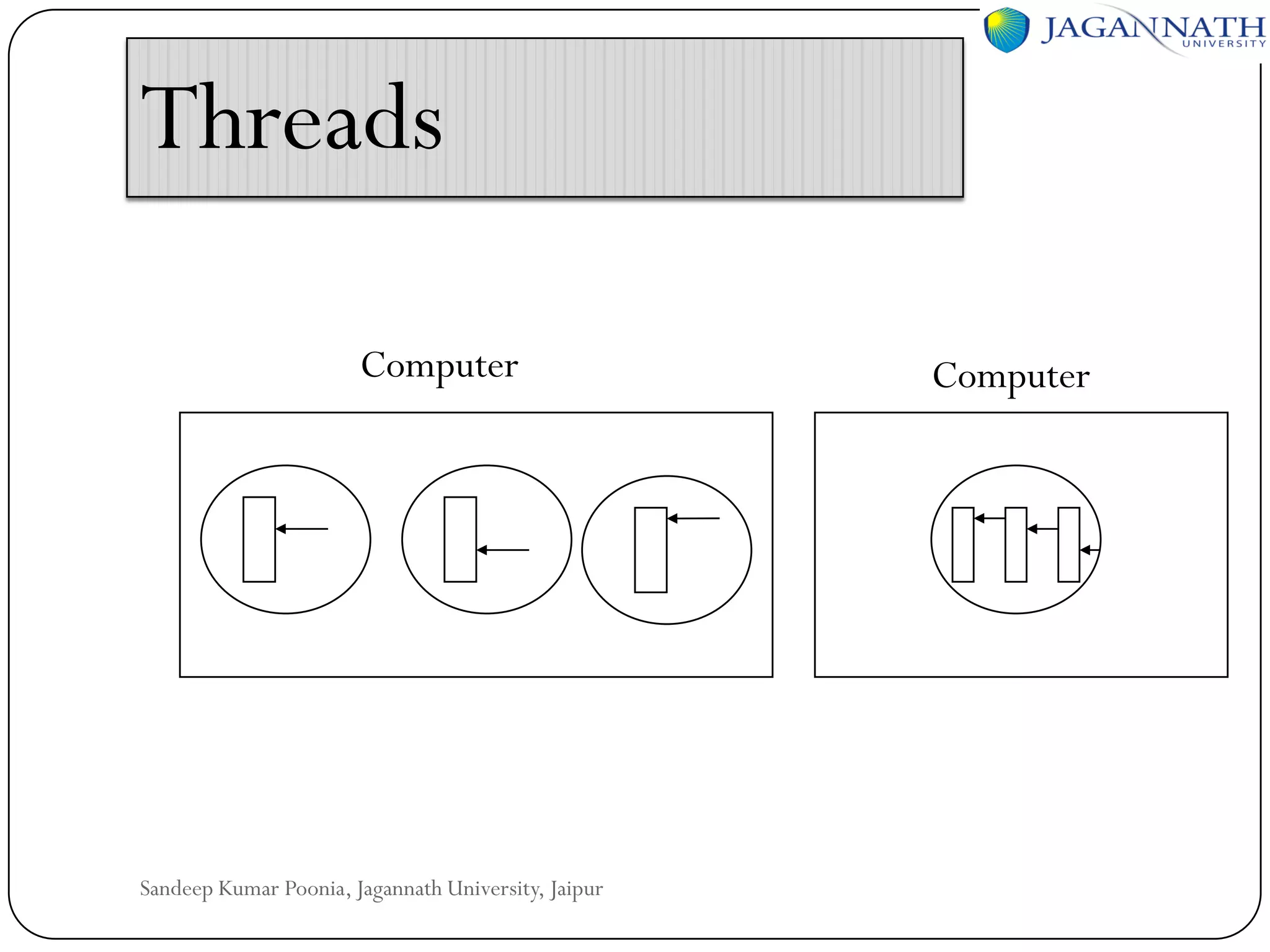
 Thread is a light weighted process.
 The analogy: thread is to process as process is to

machine.
• Each thread runs strictly sequentially and has its
own program counter and stack to keep track of
where it is.
• Threads share the CPU just as processes do: first
one thread runs, then another does.
• Threads can create child threads and can block
waiting for system calls to complete.
Sandeep Kumar Poonia, Jagannath University, Jaipur
Introduction to threads
 All threads have exactly the same address space. They

share code section, data section, and OS resources (open
files & signals). They share the same global variables. One
thread can read, write, or even completely wipe out
another thread’s stack.
 Threads can be in any one of several states: running,
blocked, ready, or terminated.

Sandeep Kumar Poonia, Jagannath University, Jaipur
Introduction to threads
 There is no protection between threads:

(1) it is impossible
(2) it should not be necessary: a process is always owned
by a single user, who has created multiple threads so that
they can cooperate, not fight.
 In addition to sharing an address space all threads share :
 Set of open files
 Child processes

 Timers and Signals etc.

Sandeep Kumar Poonia, Jagannath University, Jaipur
Threads
Computer

Sandeep Kumar Poonia, Jagannath University, Jaipur

Computer
Thread usage
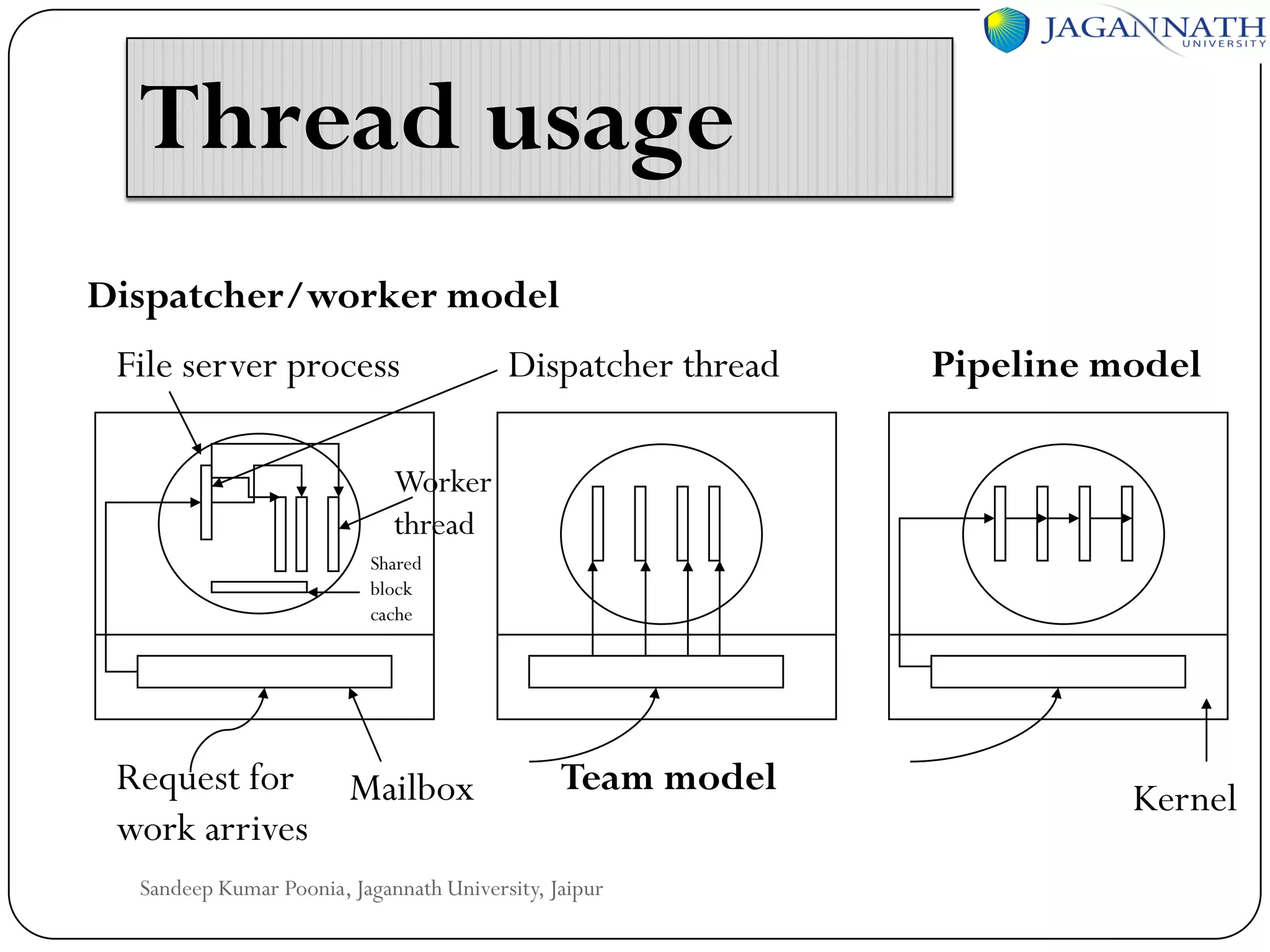
Dispatcher/worker model
File server process

Dispatcher thread

Pipeline model

Worker
thread
Shared
block
cache

Request for Mailbox
work arrives

Team model

Sandeep Kumar Poonia, Jagannath University, Jaipur

Kernel
Advantages of using threads
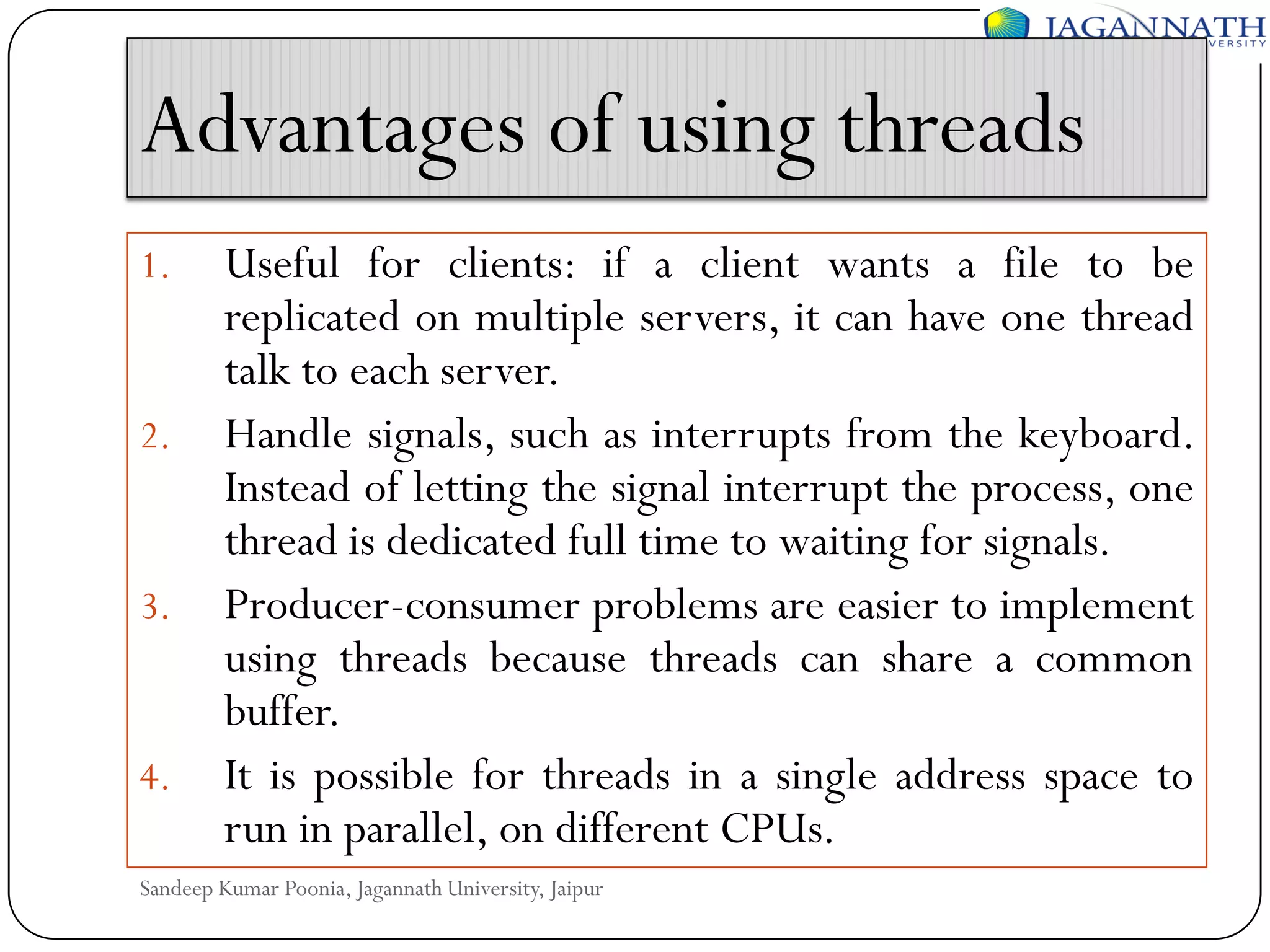
1.

2.

3.

4.

Useful for clients: if a client wants a file to be
replicated on multiple servers, it can have one thread
talk to each server.
Handle signals, such as interrupts from the keyboard.
Instead of letting the signal interrupt the process, one
thread is dedicated full time to waiting for signals.
Producer-consumer problems are easier to implement
using threads because threads can share a common
buffer.
It is possible for threads in a single address space to
run in parallel, on different CPUs.

Sandeep Kumar Poonia, Jagannath University, Jaipur
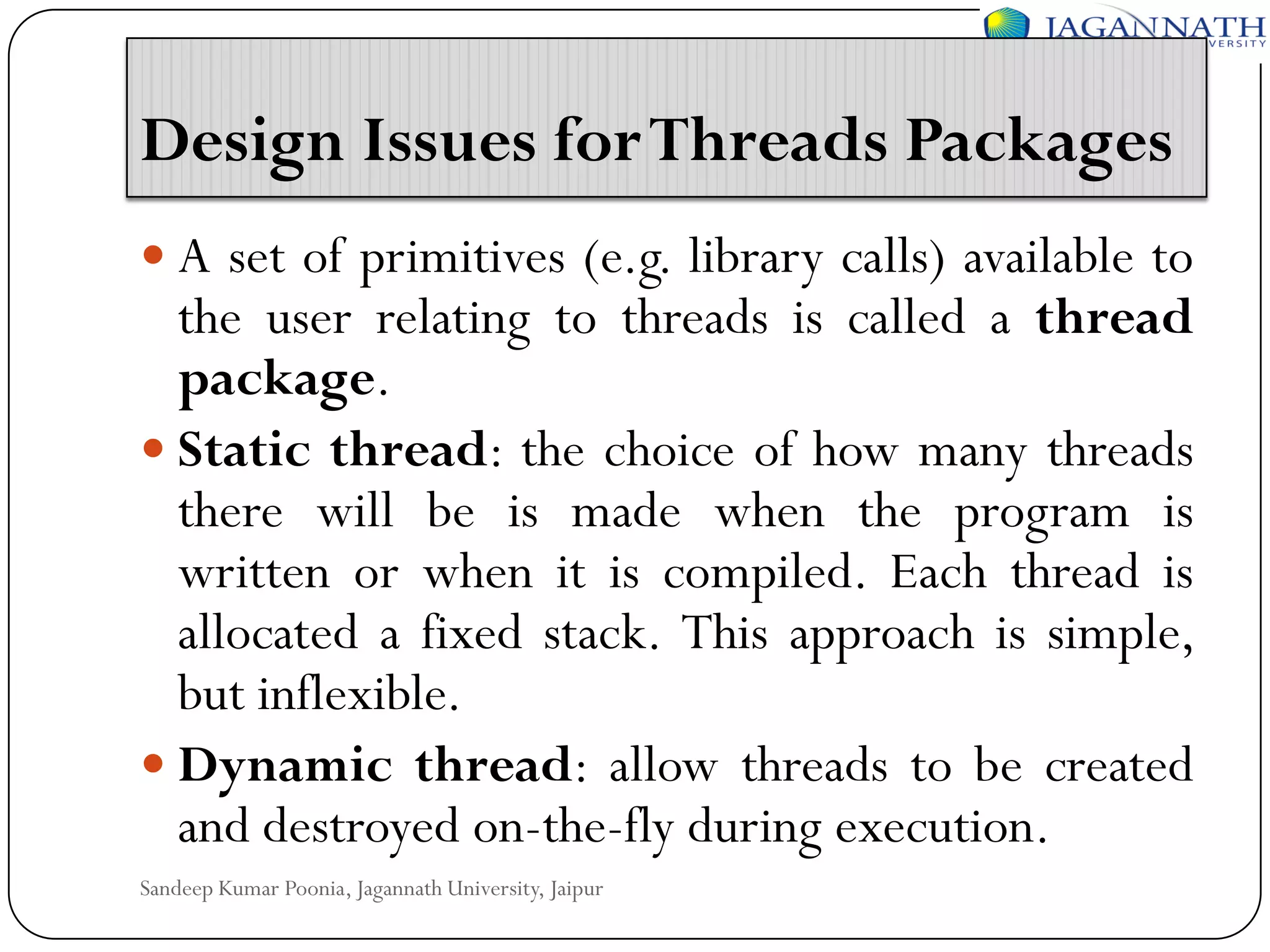
Design Issues for Threads Packages
 A set of primitives (e.g. library calls) available to

the user relating to threads is called a thread
package.
 Static thread: the choice of how many threads
there will be is made when the program is
written or when it is compiled. Each thread is
allocated a fixed stack. This approach is simple,
but inflexible.
 Dynamic thread: allow threads to be created
and destroyed on-the-fly during execution.
Sandeep Kumar Poonia, Jagannath University, Jaipur
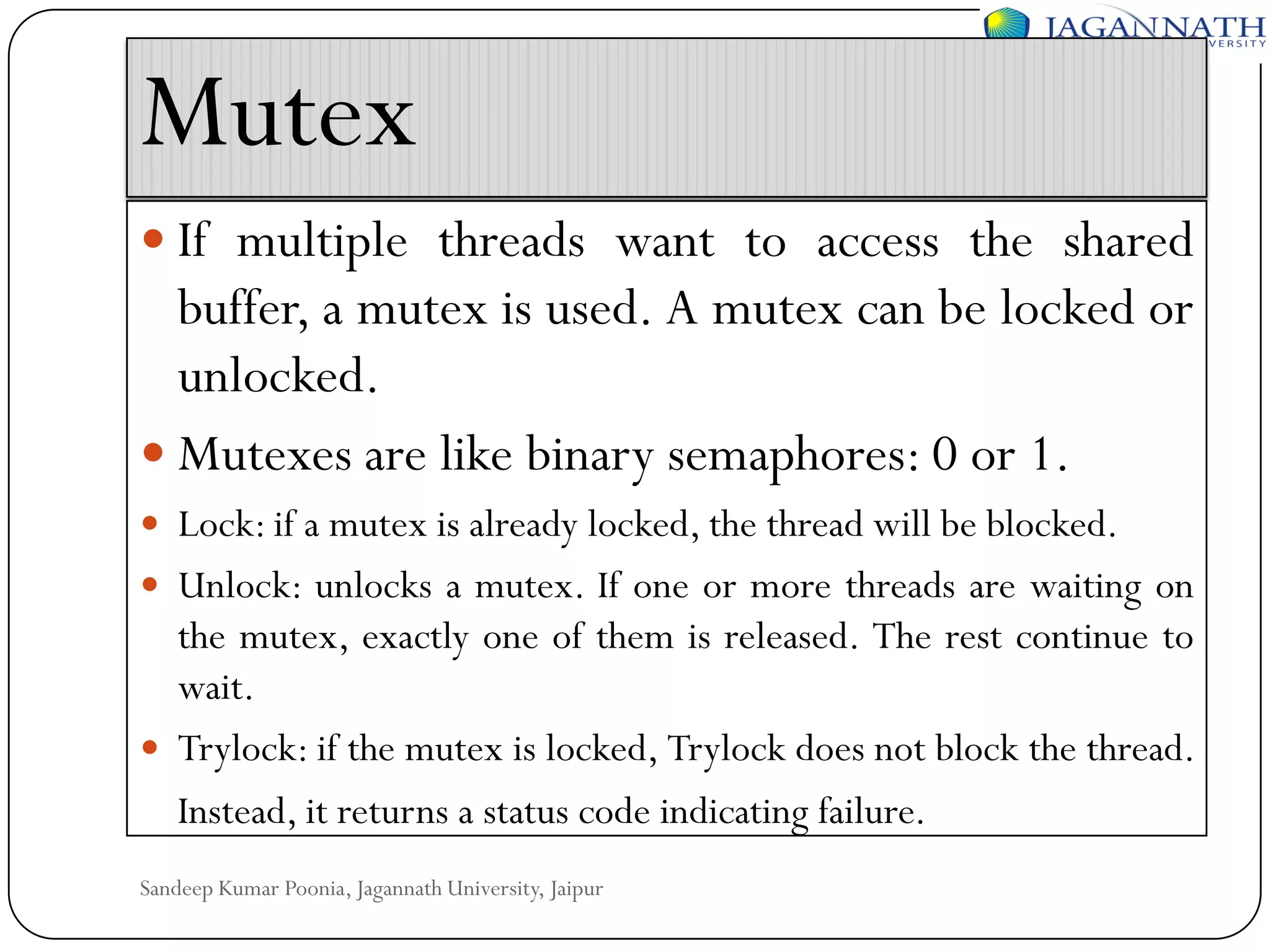
Mutex
 If multiple threads want to access the shared

buffer, a mutex is used. A mutex can be locked or
unlocked.
 Mutexes are like binary semaphores: 0 or 1.
 Lock: if a mutex is already locked, the thread will be blocked.
 Unlock: unlocks a mutex. If one or more threads are waiting on

the mutex, exactly one of them is released. The rest continue to
wait.
 Trylock: if the mutex is locked, Trylock does not block the thread.
Instead, it returns a status code indicating failure.
Sandeep Kumar Poonia, Jagannath University, Jaipur
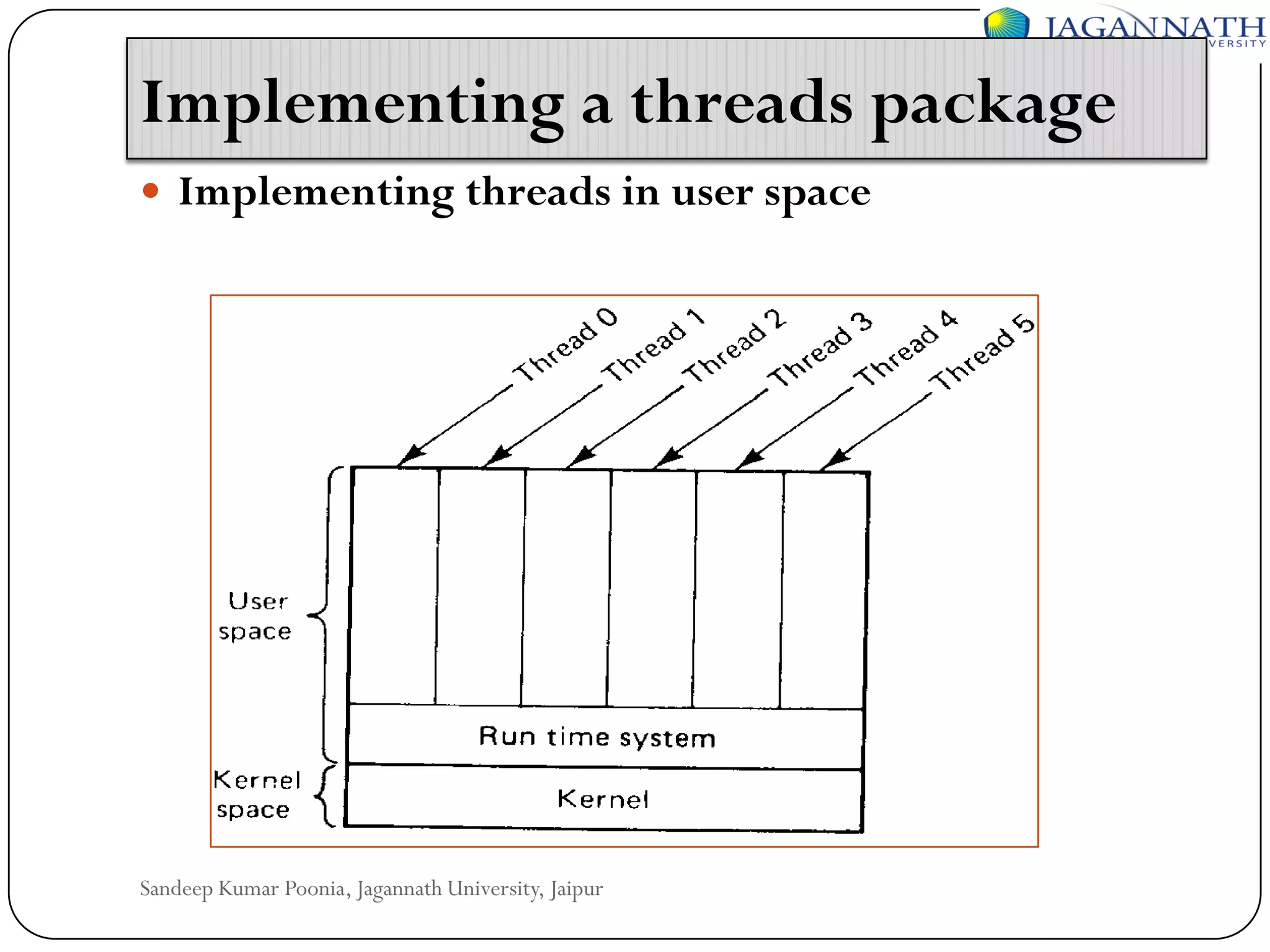
Implementing a threads package
 Implementing threads in user space

Sandeep Kumar Poonia, Jagannath University, Jaipur
Advantage
 User-level threads package can be implemented on an

operating system that does not support threads. For
example, the UNIX system.
 The threads run on top of a runtime system, which is a
collection of procedures that manage threads. The
runtime system does the thread switch. Store the old
environment and load the new one. It is much faster than
trapping to the kernel.
 User-level threads scale well. Kernel threads require
some table space and stack space in the kernel, which
can be a problem if there are a very large number of
threads.
Sandeep Kumar Poonia, Jagannath University, Jaipur
Disadvantage
 Blocking system calls are difficult to implement. Letting one thread

make a system call that will block the thread will stop all the threads.
 Page faults. If a thread causes a page faults, the kernel does not know
about the threads. It will block the entire process until the page has
been fetched, even though other threads might be runnable.
 If a thread starts running, no other thread in that process will ever run
unless the first thread voluntarily gives up the CPU.
 For the applications that are essentially CPU bound and rarely block,
there is no point of using threads. Because threads are most useful if
one thread is blocked, then another thread can be used.

Sandeep Kumar Poonia, Jagannath University, Jaipur
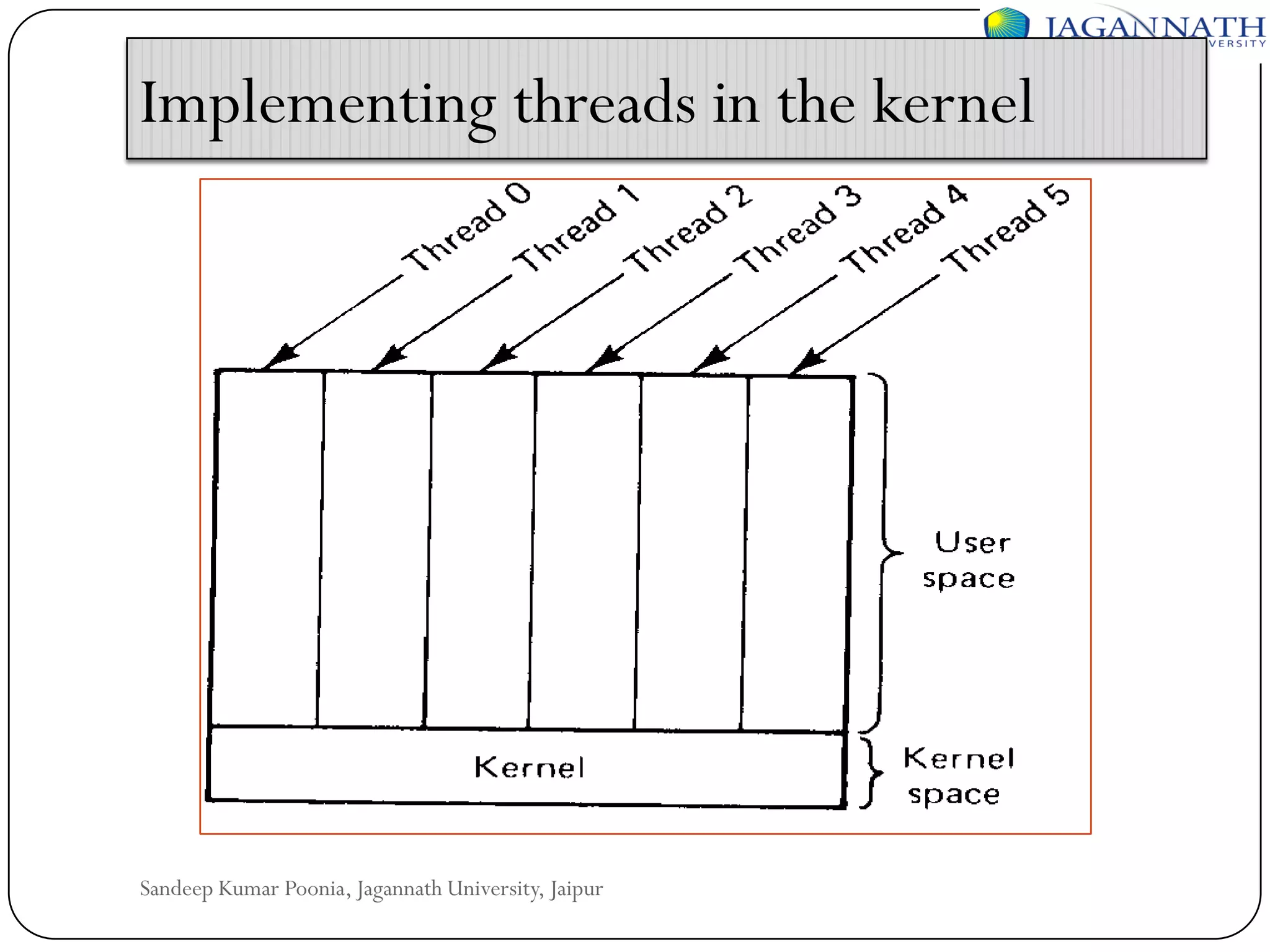
Implementing threads in the kernel

Sandeep Kumar Poonia, Jagannath University, Jaipur
 The kernel knows about and manages the threads. No

runtime system is needed. When a thread wants to create
a new thread or destroy an existing thread, it makes a
kernel call, which then does the creation and
destruction.
 To manage all the threads, the kernel has one table per
process with one entry per thread.
 When a thread blocks, the kernel can run either another
thread from the same process or a thread from a
different process.

Sandeep Kumar Poonia, Jagannath University, Jaipur
Scheduler Activations
 Scheduler activations combine the advantage of user

threads (good performance) and kernel threads.
 The goals of the scheduler activation are to mimic the
functionality of kernel threads, but with the better
performance and greater flexibility usually associated
with threads packages implemented in user space.
 Efficiency is achieved by avoiding unnecessary transitions
between user and kernel space. If a thread blocks, the
user-space runtime system can schedule a new one by
itself.
Sandeep Kumar Poonia, Jagannath University, Jaipur
 Disadvantage:

Upcall from the kernel to the runtime system violates the
structure in the layered system.

Sandeep Kumar Poonia, Jagannath University, Jaipur
System Models
 The workstation model:

the system consists of workstations scattered throughout
a building or campus and connected by a high-speed
LAN.
The systems in which workstations have local disks are
called diskful workstations. Otherwise, diskless
workstations.

Sandeep Kumar Poonia, Jagannath University, Jaipur
Why diskless workstation?
 If the workstations are diskless, the file system must be

implemented by one or more remote file servers.
Diskless workstations are cheaper.
 Ease of installing new release of program on several
servers than on hundreds of machines. Backup and
hardware maintenance is also simpler.
 Diskless does not have fans and noises.
 Diskless provides symmetry and flexibility. You can use
any machine and access your files because all the files are
in the server.
Sandeep Kumar Poonia, Jagannath University, Jaipur
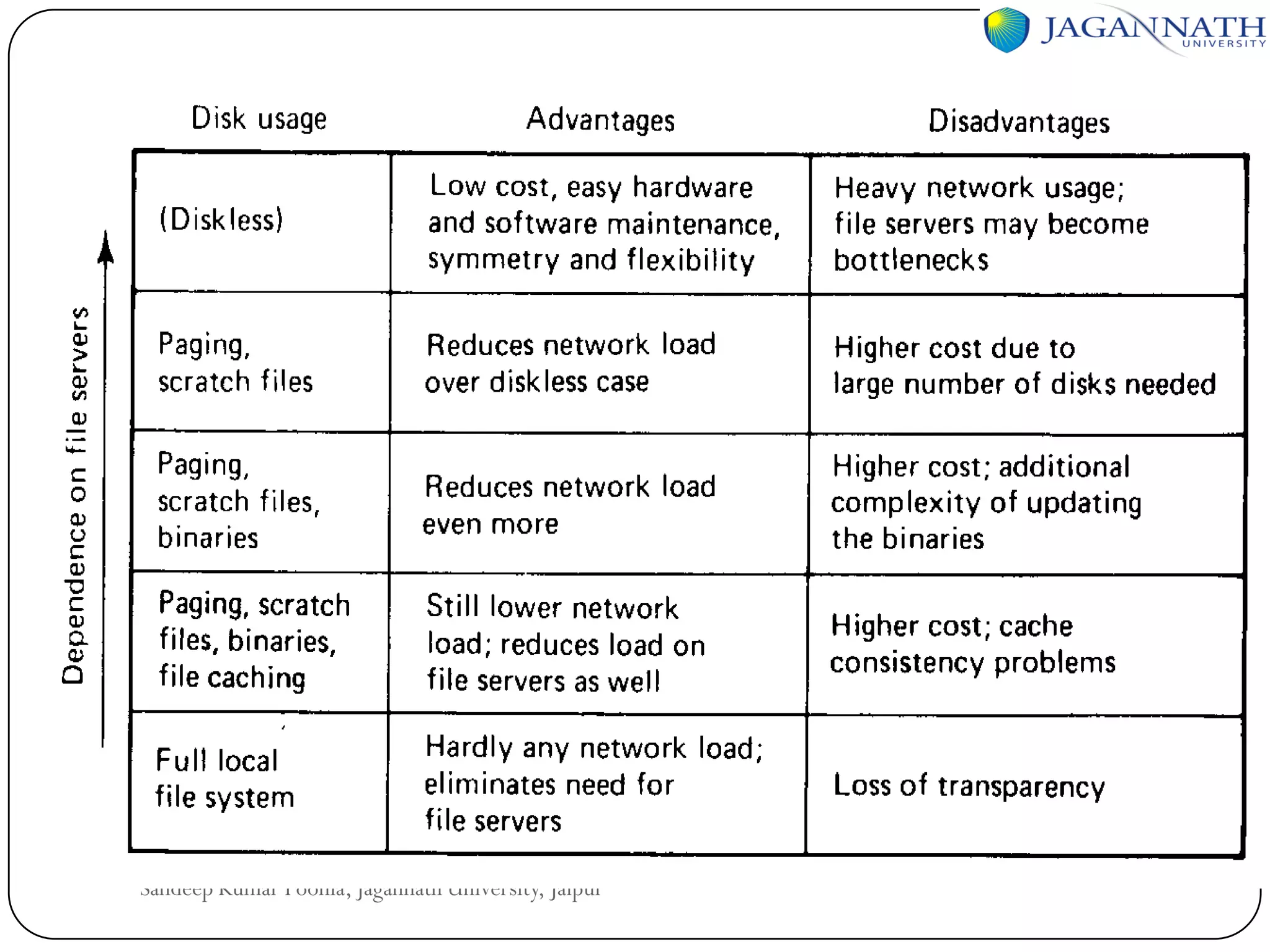
 Advantage: low cost, easy hardware and software

maintenance, symmetry and flexibility.
 Disadvantage: heavy network usage; file servers may
become bottlenecks.

Sandeep Kumar Poonia, Jagannath University, Jaipur
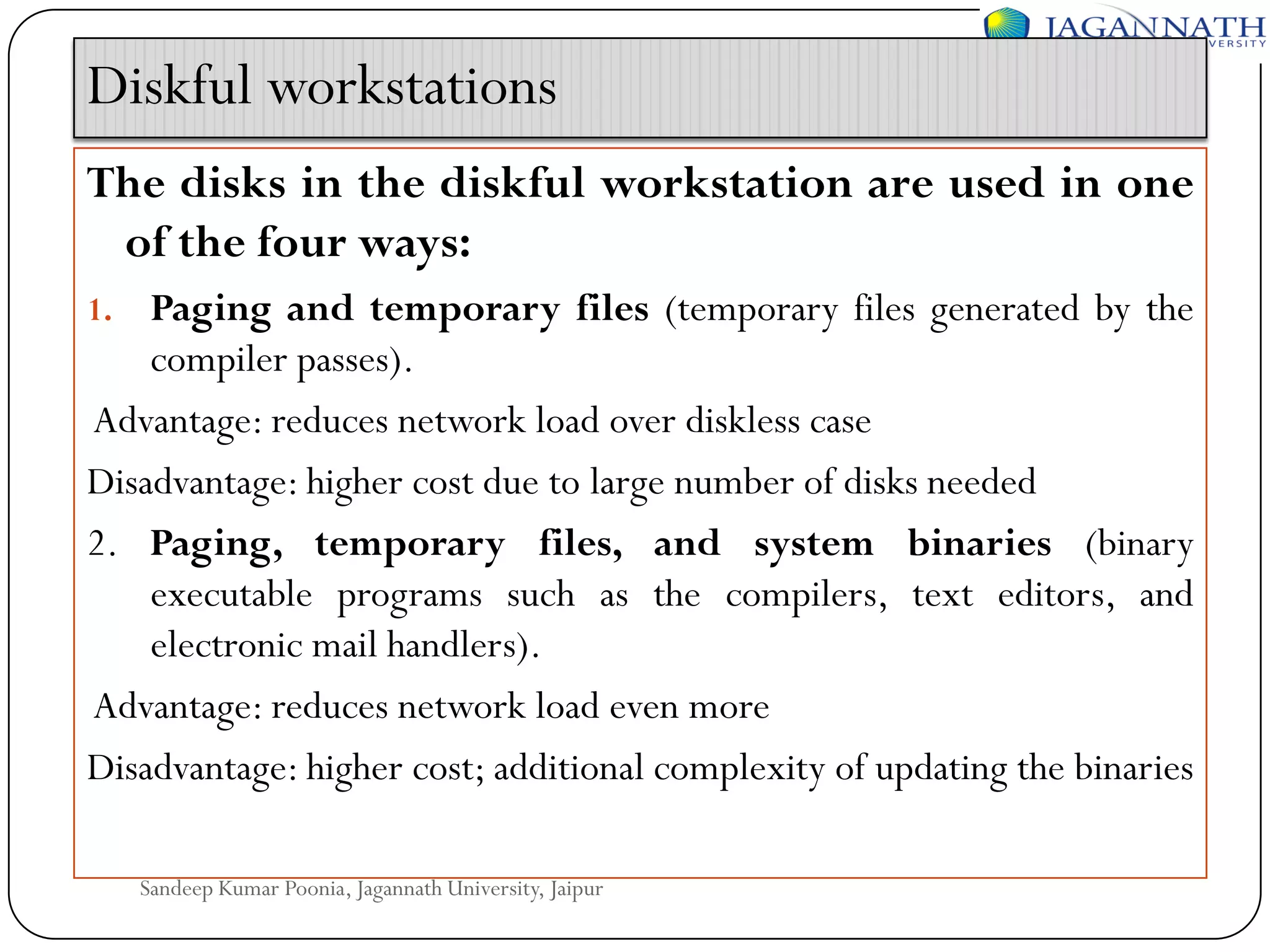
Diskful workstations
The disks in the diskful workstation are used in one
of the four ways:
Paging and temporary files (temporary files generated by the
compiler passes).
Advantage: reduces network load over diskless case
Disadvantage: higher cost due to large number of disks needed
2. Paging, temporary files, and system binaries (binary
executable programs such as the compilers, text editors, and
electronic mail handlers).
Advantage: reduces network load even more
Disadvantage: higher cost; additional complexity of updating the binaries
1.

Sandeep Kumar Poonia, Jagannath University, Jaipur
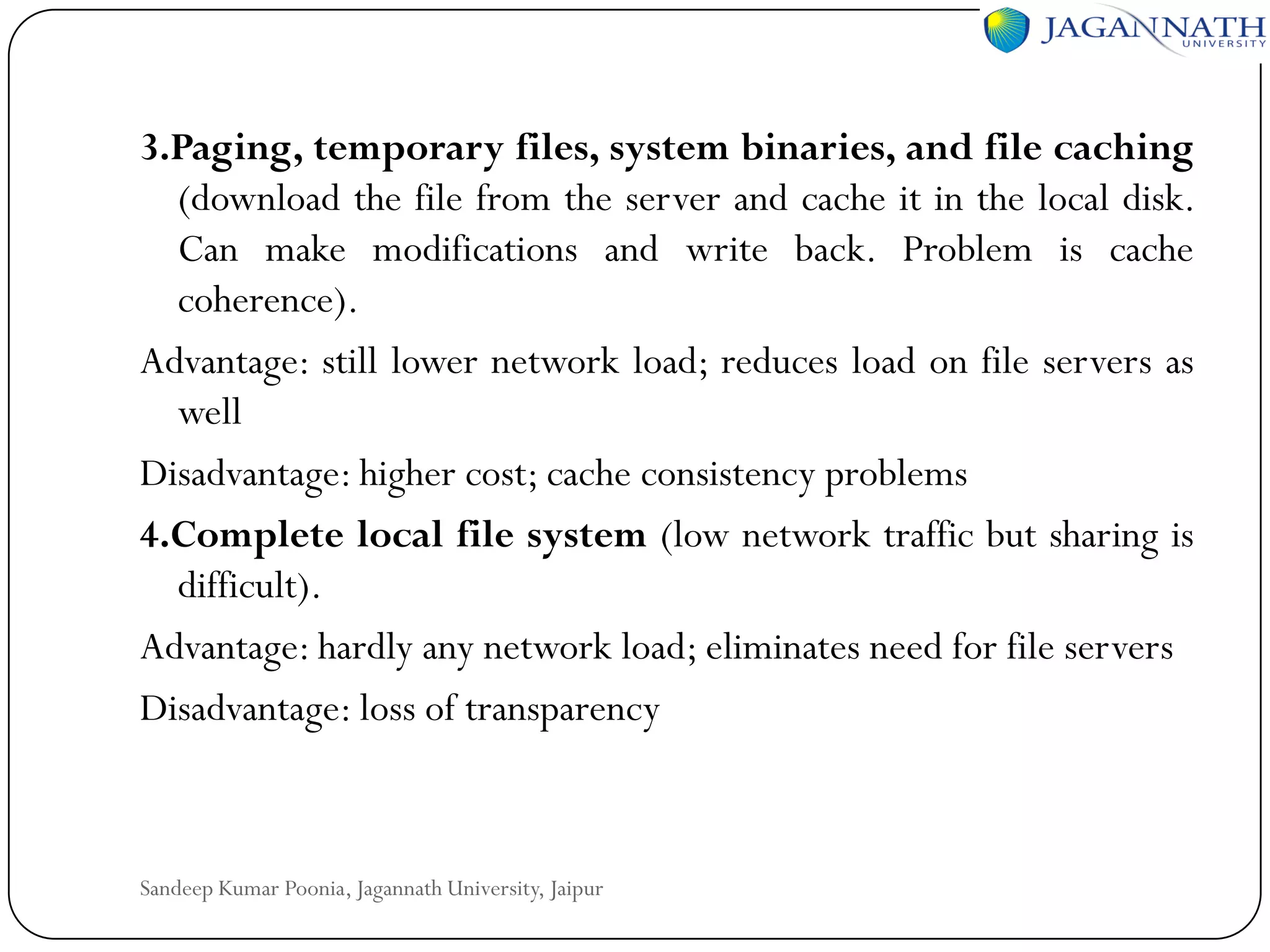
3.Paging, temporary files, system binaries, and file caching
(download the file from the server and cache it in the local disk.
Can make modifications and write back. Problem is cache
coherence).
Advantage: still lower network load; reduces load on file servers as
well
Disadvantage: higher cost; cache consistency problems
4.Complete local file system (low network traffic but sharing is
difficult).
Advantage: hardly any network load; eliminates need for file servers
Disadvantage: loss of transparency

Sandeep Kumar Poonia, Jagannath University, Jaipur
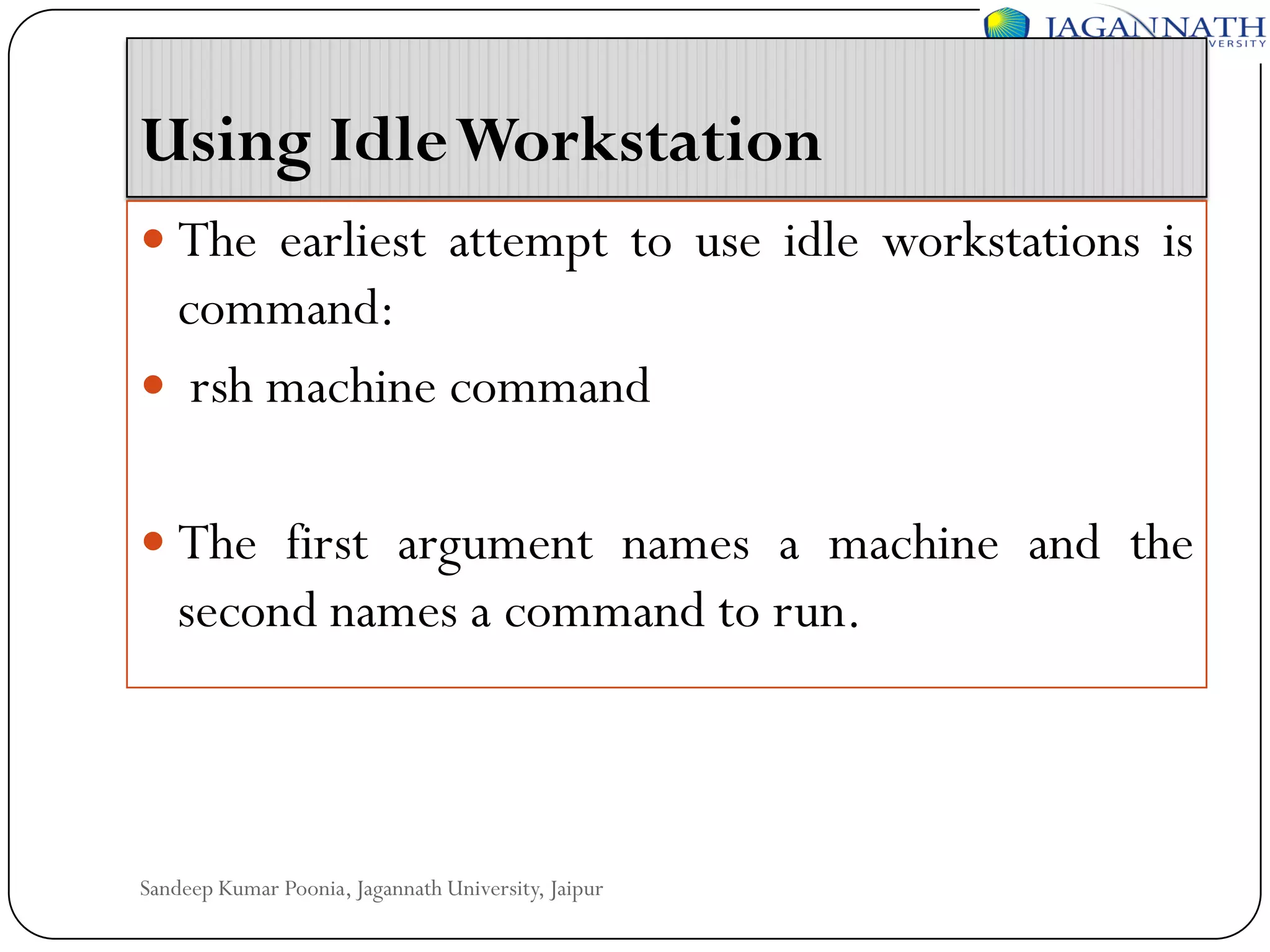
Using Idle Workstation
 The earliest attempt to use idle workstations is

command:
 rsh machine command
 The first argument names a machine and the

second names a command to run.

Sandeep Kumar Poonia, Jagannath University, Jaipur
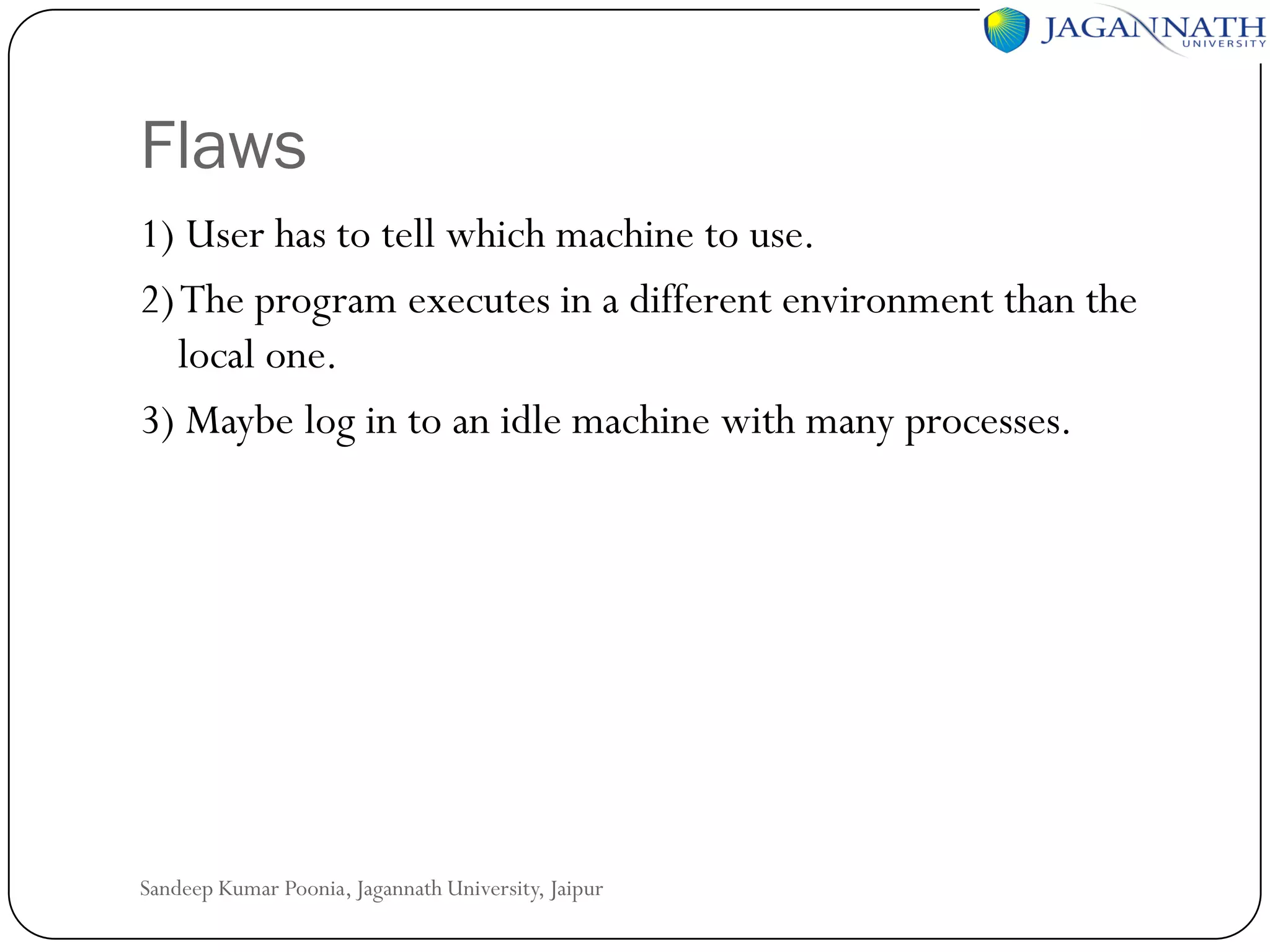
Flaws
1) User has to tell which machine to use.
2) The program executes in a different environment than the
local one.
3) Maybe log in to an idle machine with many processes.

Sandeep Kumar Poonia, Jagannath University, Jaipur
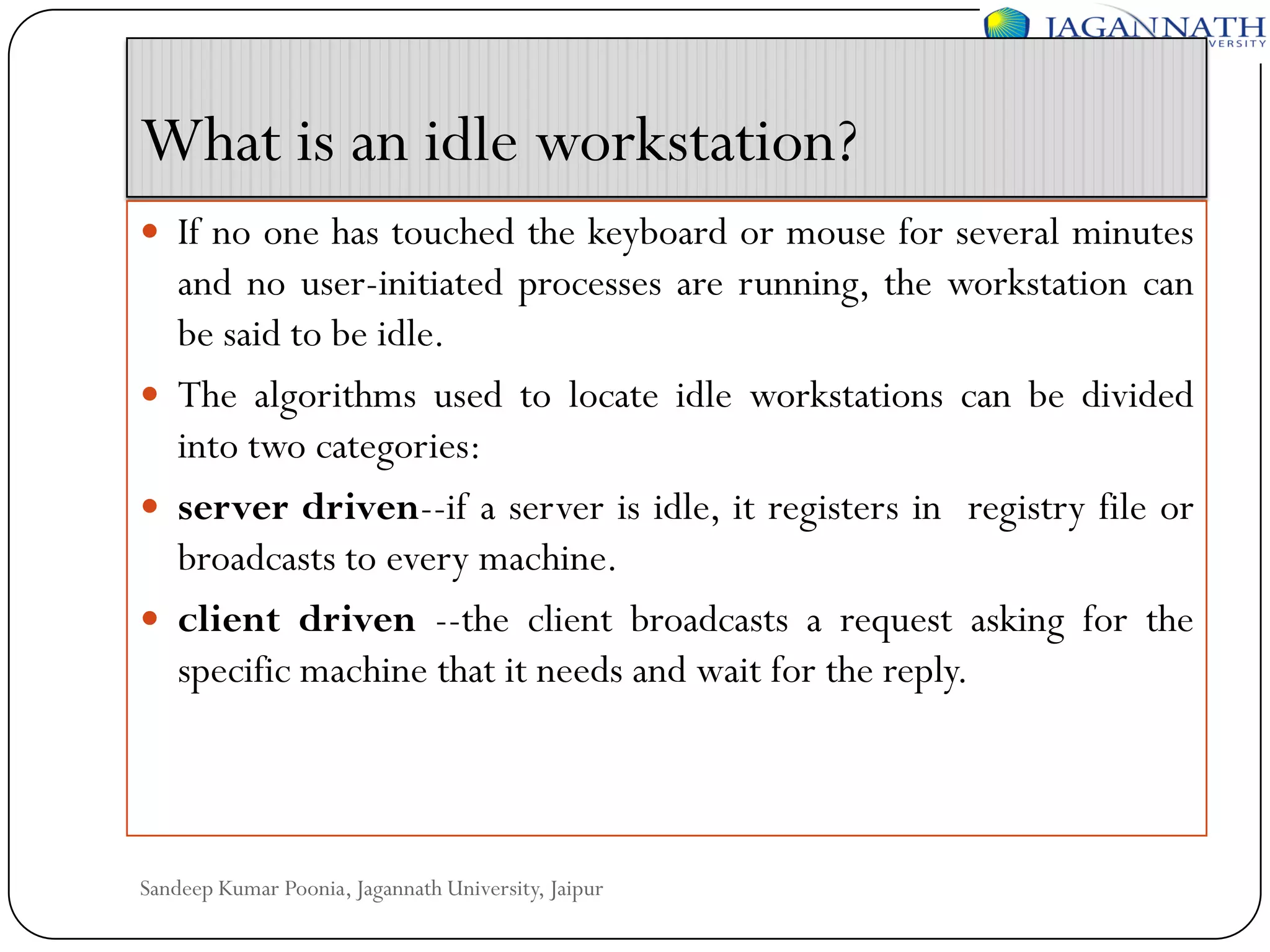
What is an idle workstation?
 If no one has touched the keyboard or mouse for several minutes

and no user-initiated processes are running, the workstation can
be said to be idle.
 The algorithms used to locate idle workstations can be divided
into two categories:
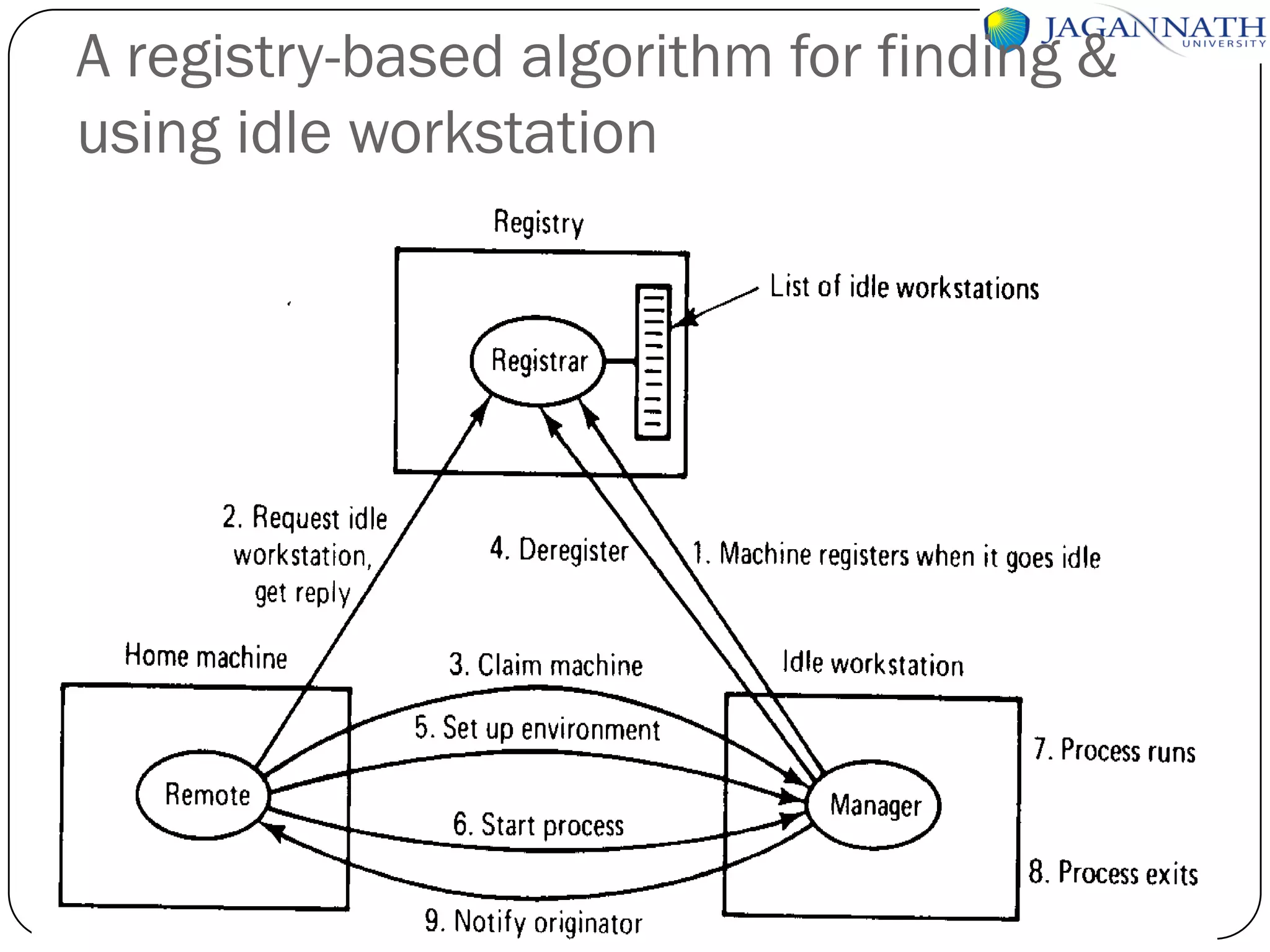
 server driven--if a server is idle, it registers in registry file or
broadcasts to every machine.
 client driven --the client broadcasts a request asking for the
specific machine that it needs and wait for the reply.

Sandeep Kumar Poonia, Jagannath University, Jaipur
A registry-based algorithm for finding &
using idle workstation

Sandeep Kumar Poonia, Jagannath University, Jaipur
How to run the process remotely?
 To start with, it needs the same view of the file system, the

same working directory, and the same environment
variables.
 Some system calls can be done remotely but some can not.
For example, read from keyboard and write to the screen
can never be carried out on remote machine. (All system
calls that query the state of machine)
 Some must be done remotely, such as the UNIX system calls
SBRK (adjust the size of the data segment), NICE (set CPU
scheduling priority), and PROFIL (enable profiling of the
program counter).
Sandeep Kumar Poonia, Jagannath University, Jaipur
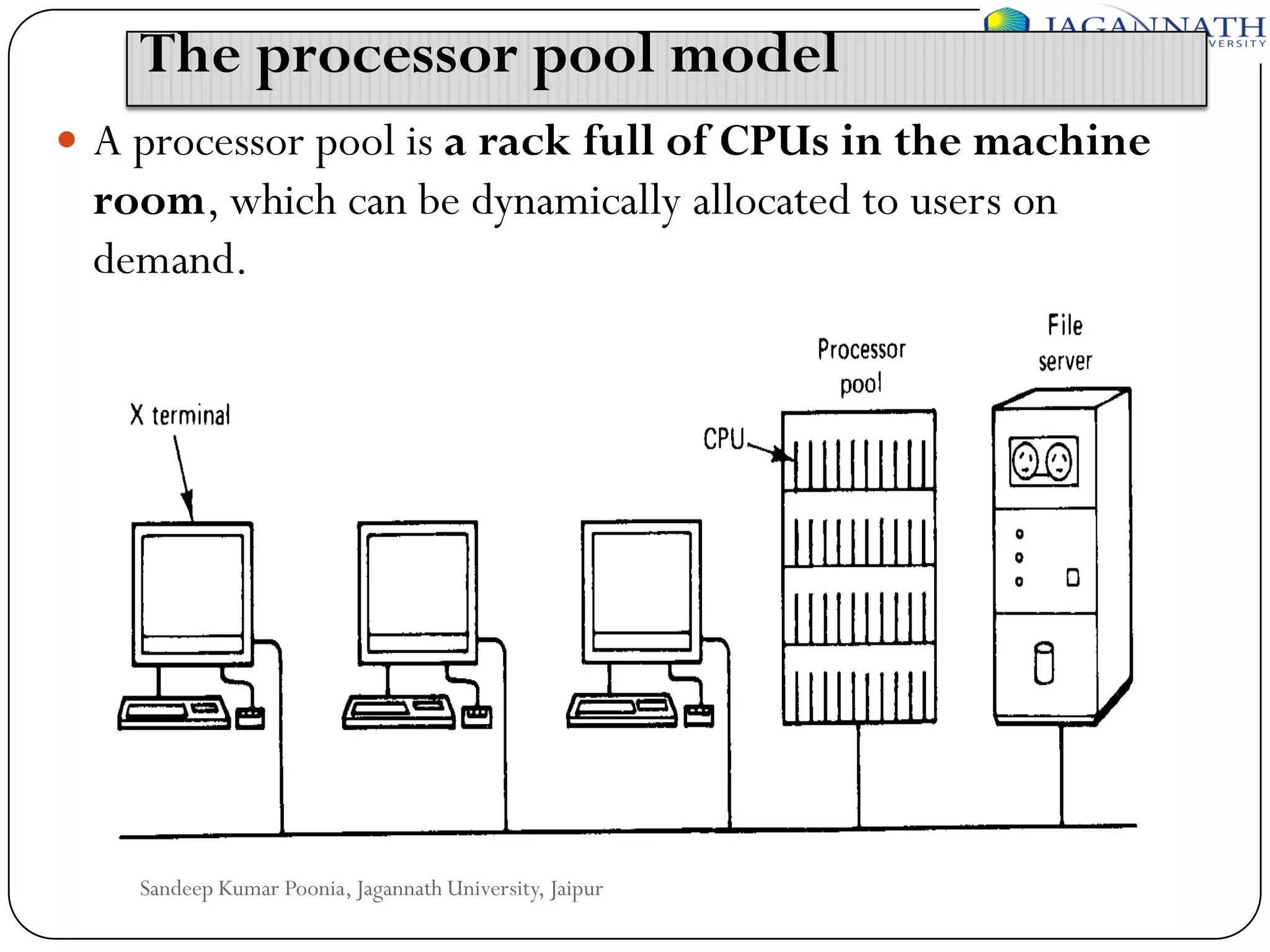
The processor pool model
 A processor pool is a rack full of CPUs in the machine

room, which can be dynamically allocated to users on
demand.

Sandeep Kumar Poonia, Jagannath University, Jaipur
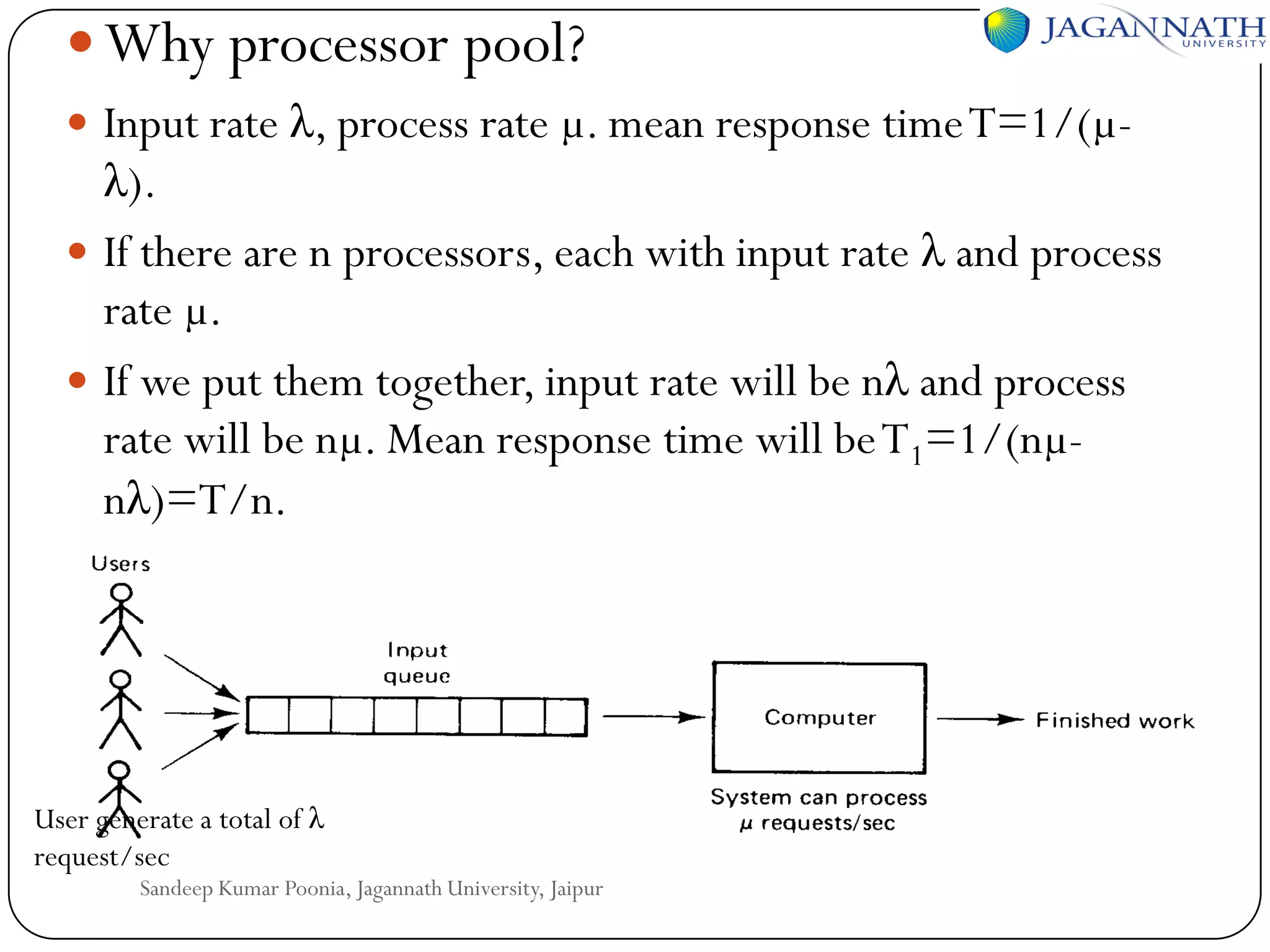
 Why processor pool?
 Input rate λ, process rate µ. mean response time T=1/(µ-

λ).
 If there are n processors, each with input rate λ and process
rate µ.
 If we put them together, input rate will be nλ and process
rate will be nµ. Mean response time will be T1=1/(nµnλ)=T/n.

User generate a total of λ
request/sec

Sandeep Kumar Poonia, Jagannath University, Jaipur
Example
 Consider a file server that is handling 50

request/sec (µ)
 But get only 40 request/sec(λ)
 The Mean Response time?
 If λ

go to 0 (no load)
 What will be response time?

Sandeep Kumar Poonia, Jagannath University, Jaipur
A hybrid model
 A possible compromise is to provide each user

with a personal workstation and to have a
processor pool in addition.
 For the hybrid model, even if you can not get any
processor from the processor pool, at least you
have the workstation to do the work.

Sandeep Kumar Poonia, Jagannath University, Jaipur
Processor Allocation
Determine which process is assigned to which
processor. Also called load distribution.
Two categories:
 Static load distribution-nonmigratory, once
allocated, can not move, no matter how
overloaded the machine is.
 Dynamic load distribution-migratory, can move
even if the execution started. But algorithm is
complex.
Sandeep Kumar Poonia, Jagannath University, Jaipur
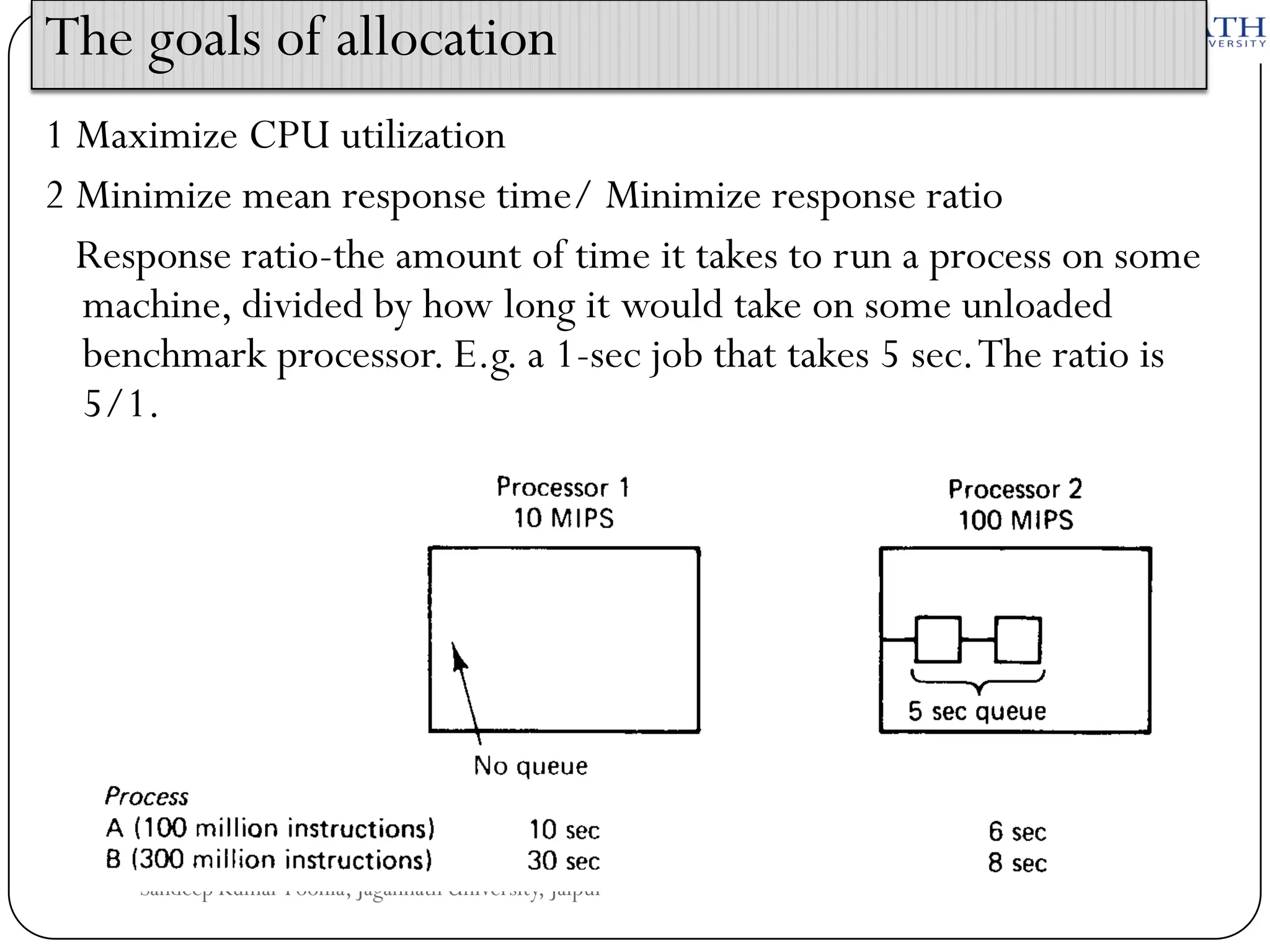
The goals of allocation
1 Maximize CPU utilization
2 Minimize mean response time/ Minimize response ratio
Response ratio-the amount of time it takes to run a process on some
machine, divided by how long it would take on some unloaded
benchmark processor. E.g. a 1-sec job that takes 5 sec. The ratio is
5/1.

Sandeep Kumar Poonia, Jagannath University, Jaipur
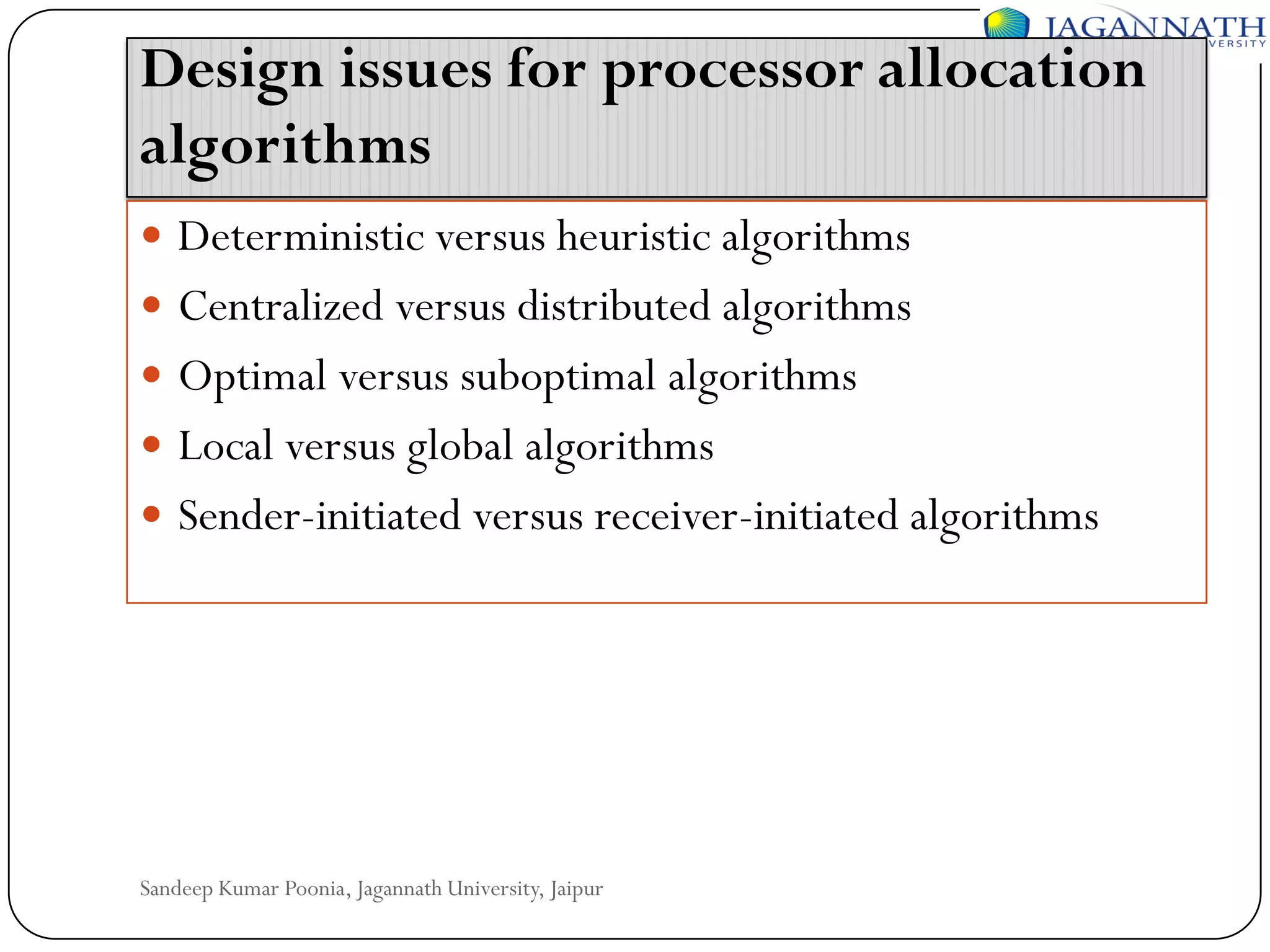
Design issues for processor allocation
algorithms
 Deterministic versus heuristic algorithms

 Centralized versus distributed algorithms
 Optimal versus suboptimal algorithms
 Local versus global algorithms

 Sender-initiated versus receiver-initiated algorithms

Sandeep Kumar Poonia, Jagannath University, Jaipur
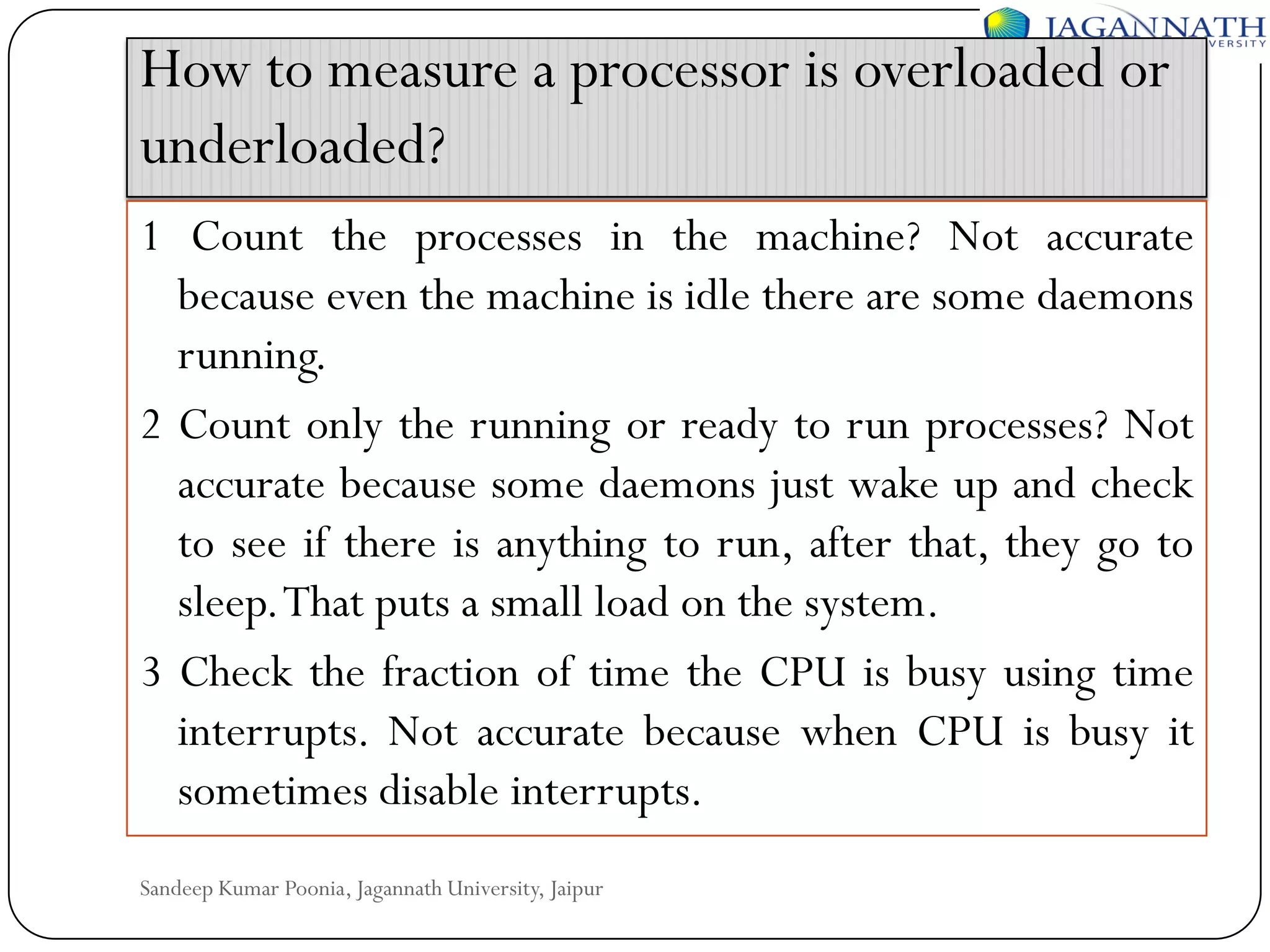
How to measure a processor is overloaded or
underloaded?
1 Count the processes in the machine? Not accurate
because even the machine is idle there are some daemons
running.
2 Count only the running or ready to run processes? Not
accurate because some daemons just wake up and check
to see if there is anything to run, after that, they go to
sleep.That puts a small load on the system.
3 Check the fraction of time the CPU is busy using time
interrupts. Not accurate because when CPU is busy it
sometimes disable interrupts.
Sandeep Kumar Poonia, Jagannath University, Jaipur
 How to deal with overhead?
A proper algorithm should take into account the CPU time,
memory usage, and network bandwidth consumed by the
processor allocation algorithm itself.

 How to calculate complexity?
If an algorithm performs a little better than others but requires
much complex implementation, better use the simple one.

 How to deal with stability?
Problems can arise if the state of the machine is not stable yet,
still in the process of updating.
Sandeep Kumar Poonia, Jagannath University, Jaipur
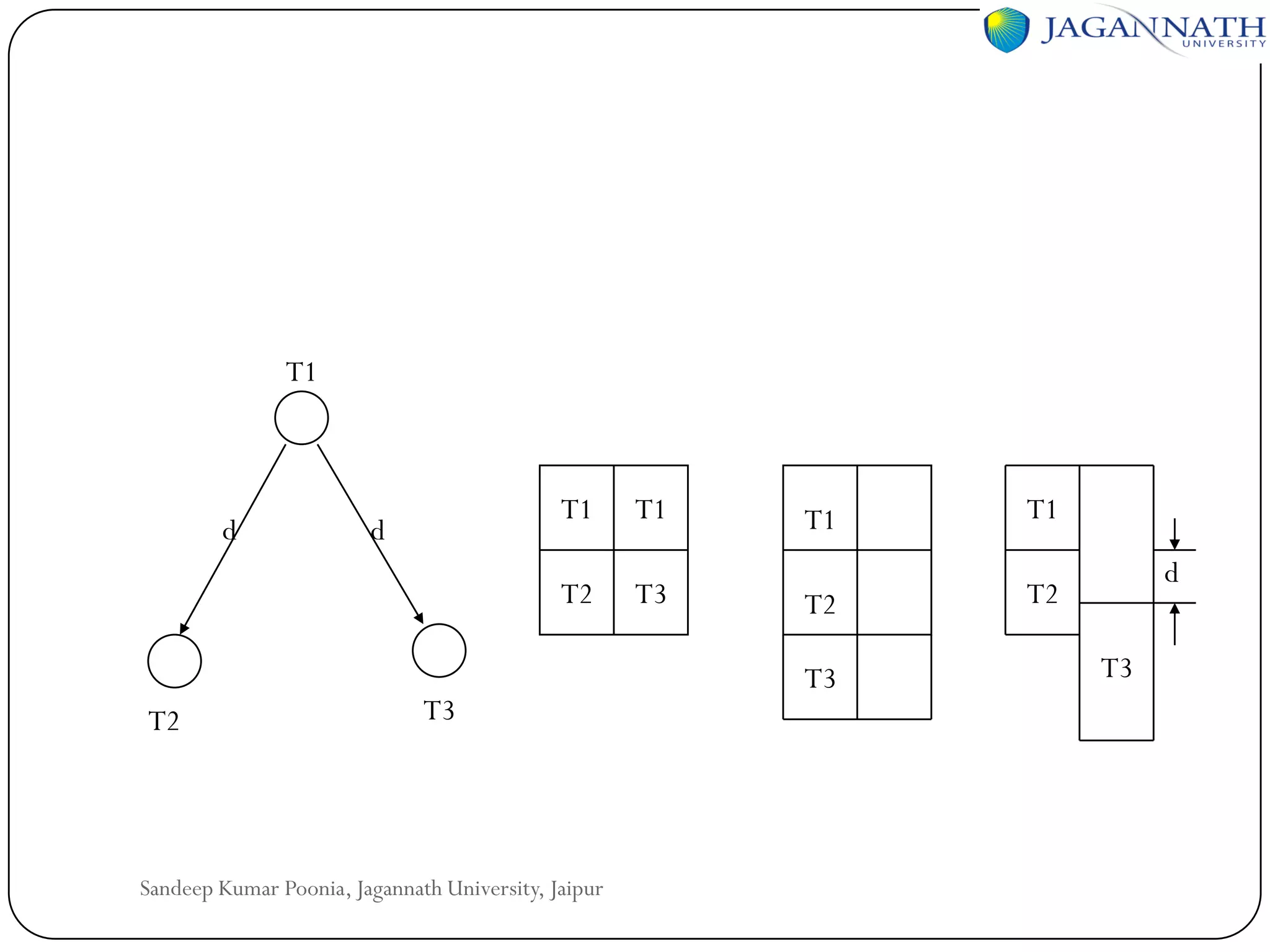
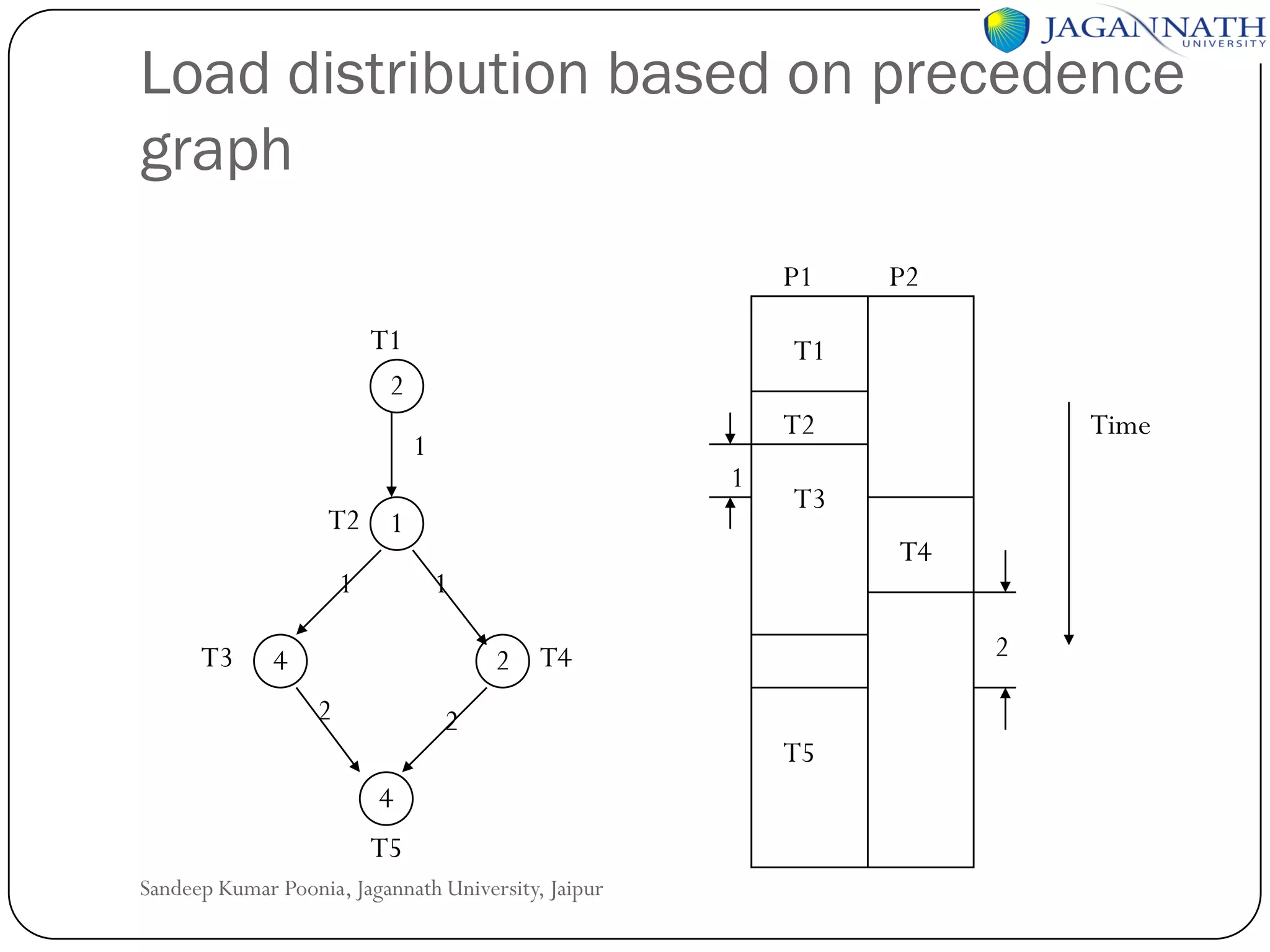
Load distribution based on precedence
graph
P1
T1
2

T1
T2

1

1

T2 1
1
T3

T4
2

2 T4

4

Time

T3

1

2

P2

2
4
T5

Sandeep Kumar Poonia, Jagannath University, Jaipur

T5
T1

T2

T1

d

T1

T2

d

T3

T3

Sandeep Kumar Poonia, Jagannath University, Jaipur

T1

T1

T2

T2

T3

d
T3
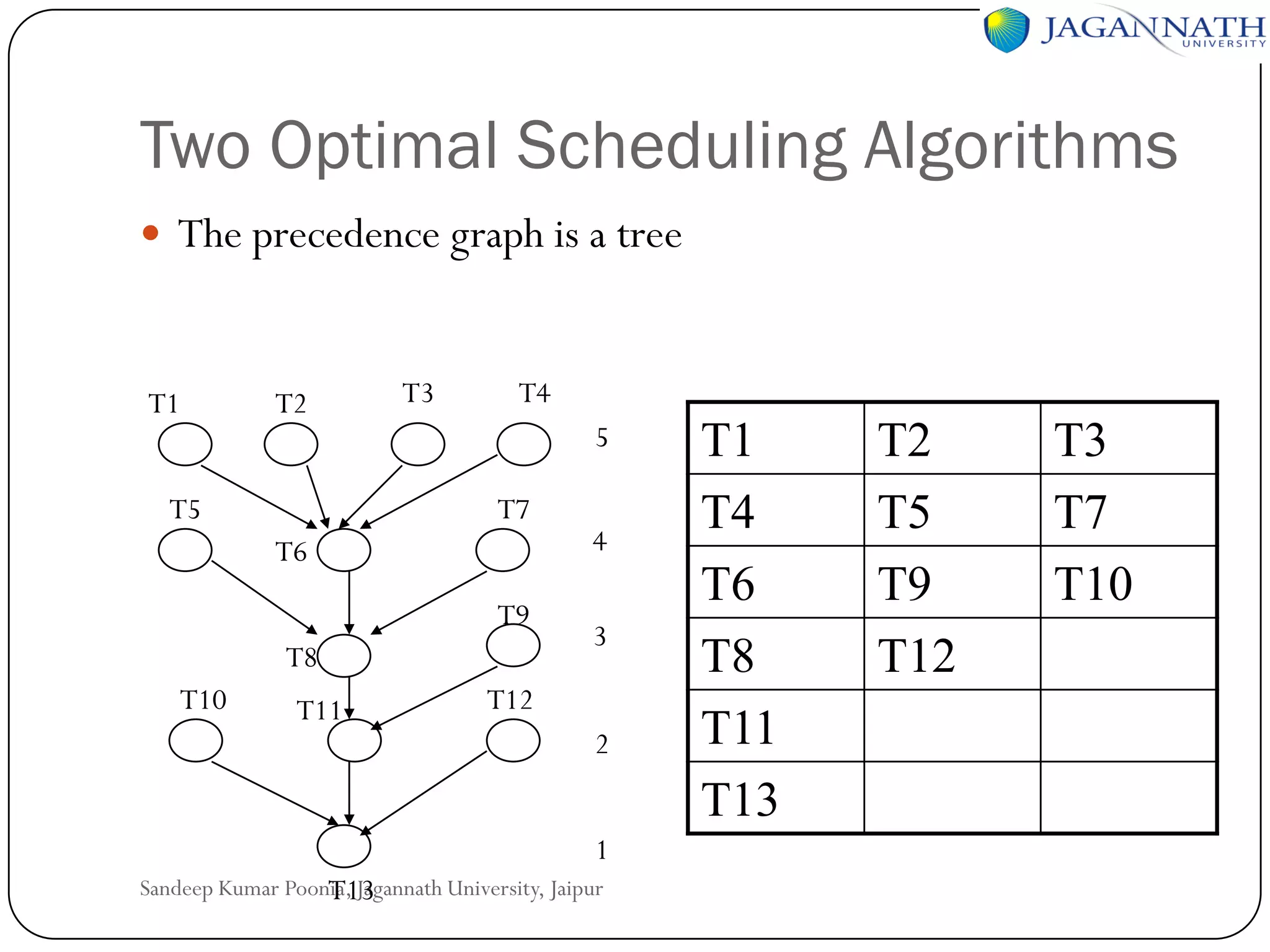
Two Optimal Scheduling Algorithms
 The precedence graph is a tree

T1

T2

T5

T3

T4
5
T7

T6
T9
T8

T10

T11

4
3

T12
2
1

Sandeep Kumar Poonia, Jagannath University, Jaipur
T13

T1
T4
T6
T8
T11
T13

T2
T5
T9
T12

T3
T7
T10
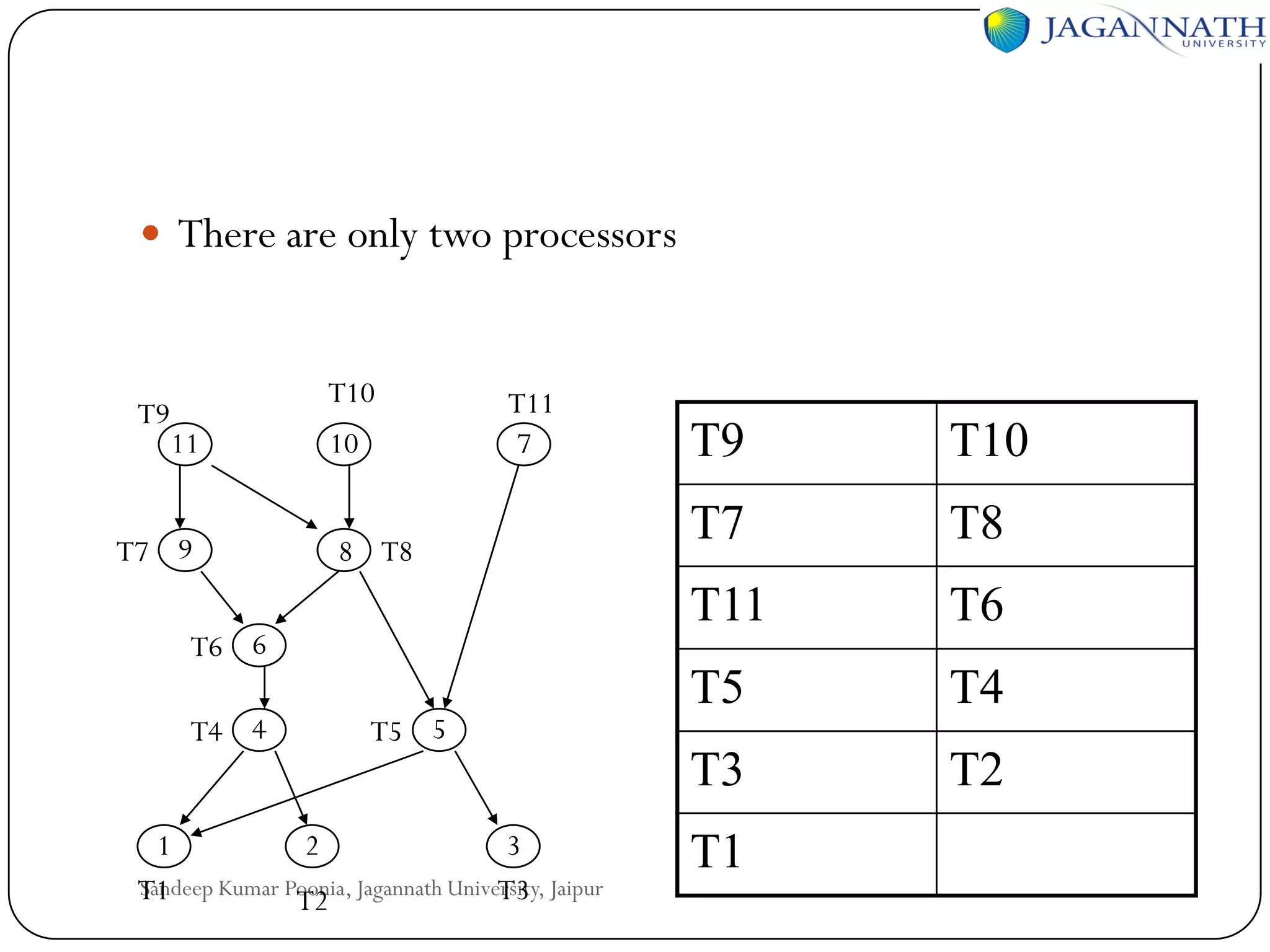
 There are only two processors

T9

T10

T11
7

T7 9

8 T8

T6 6
T4 4

T5 5

1
2
3
Sandeep Kumar Poonia, Jagannath University, Jaipur
T1
T3
T2

T10

T7

T8

T11

10

T9

T6

T5

T4

T3

11

T2

T1
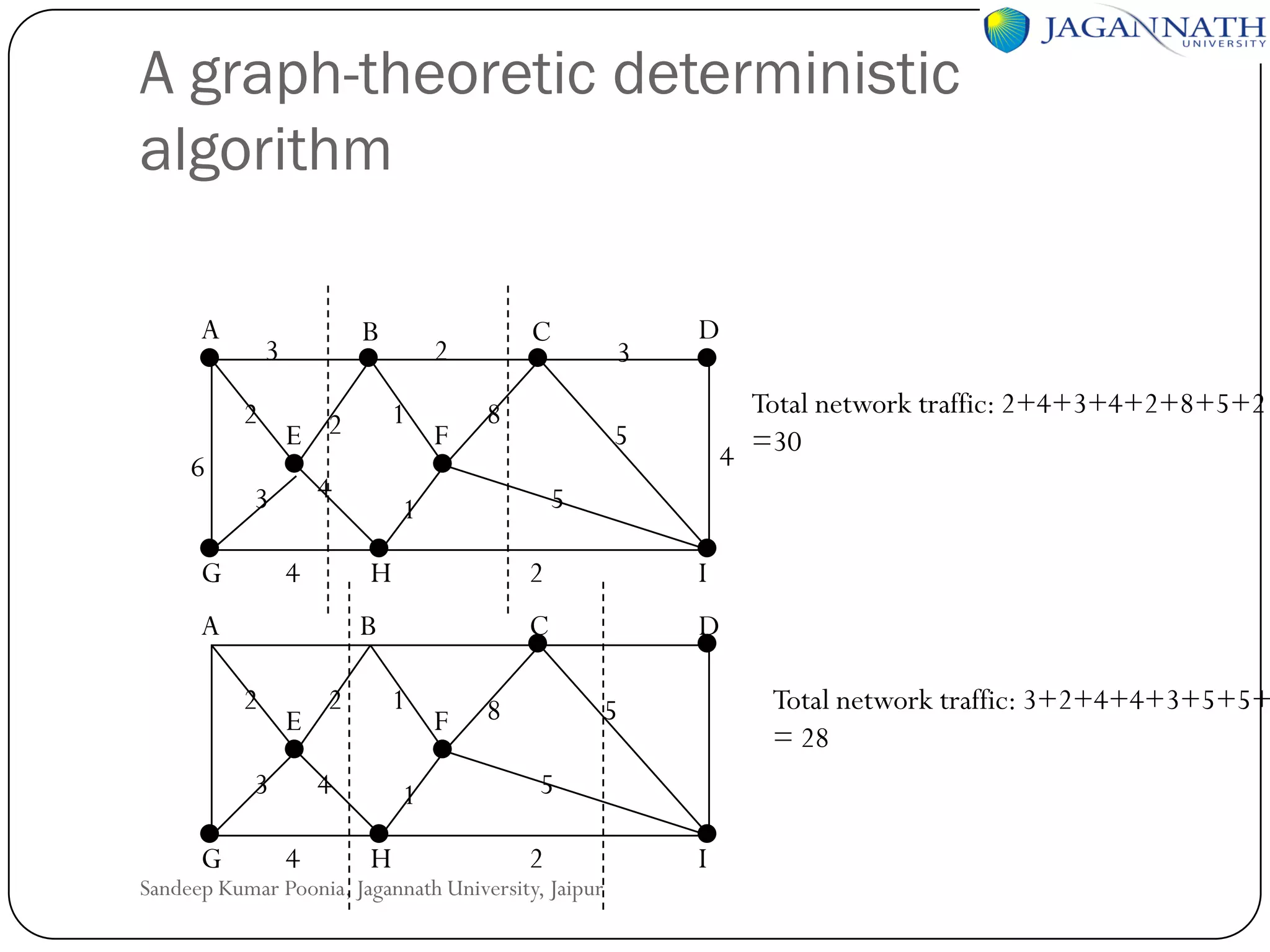
A graph-theoretic deterministic
algorithm
A
2
6

B

3

4

3

G

4

F

E

3

2

Total network traffic: 2+4+3+4+2+8+5+2
4 =30

5
2

1
1
H

F

I

C

4
4

D

5

1

B

2

3

8

H

A

G

1

E 2

C

2

D

8

Total network traffic: 3+2+4+4+3+5+5+
= 28

5
5
2

Sandeep Kumar Poonia, Jagannath University, Jaipur

I

Processes and Processors in Distributed Systems

  • 1.
    Distributed Operating Systems Processes andProcessors in Distributed Systems Sandeep Kumar Poonia Head of Dept. CS/IT B.E., M.Tech., UGC-NET LM-IAENG, LM-IACSIT,LM-CSTA, LM-AIRCC, LM-SCIEI, AM-UACEE
  • 2.
    Processes and processorsin distributed systems          Threads, system model, processor allocation, scheduling in distributed systems Load balancing and sharing approach, fault tolerance, Real time distributed systems, Process migration and related issues Sandeep Kumar Poonia, Jagannath University, Jaipur
  • 3.
     In mosttraditional OS, each process has an address space and a single thread of control.  It is desirable to have multiple threads of control sharing one address space but running in quasiparallel. Sandeep Kumar Poonia, Jagannath University, Jaipur
  • 4.
    Introduction to threads Thread is a light weighted process.  The analogy: thread is to process as process is to machine. • Each thread runs strictly sequentially and has its own program counter and stack to keep track of where it is. • Threads share the CPU just as processes do: first one thread runs, then another does. • Threads can create child threads and can block waiting for system calls to complete. Sandeep Kumar Poonia, Jagannath University, Jaipur
  • 5.
    Introduction to threads All threads have exactly the same address space. They share code section, data section, and OS resources (open files & signals). They share the same global variables. One thread can read, write, or even completely wipe out another thread’s stack.  Threads can be in any one of several states: running, blocked, ready, or terminated. Sandeep Kumar Poonia, Jagannath University, Jaipur
  • 6.
    Introduction to threads There is no protection between threads: (1) it is impossible (2) it should not be necessary: a process is always owned by a single user, who has created multiple threads so that they can cooperate, not fight.  In addition to sharing an address space all threads share :  Set of open files  Child processes  Timers and Signals etc. Sandeep Kumar Poonia, Jagannath University, Jaipur
  • 7.
    Threads Computer Sandeep Kumar Poonia,Jagannath University, Jaipur Computer
  • 8.
    Thread usage Dispatcher/worker model Fileserver process Dispatcher thread Pipeline model Worker thread Shared block cache Request for Mailbox work arrives Team model Sandeep Kumar Poonia, Jagannath University, Jaipur Kernel
  • 9.
    Advantages of usingthreads 1. 2. 3. 4. Useful for clients: if a client wants a file to be replicated on multiple servers, it can have one thread talk to each server. Handle signals, such as interrupts from the keyboard. Instead of letting the signal interrupt the process, one thread is dedicated full time to waiting for signals. Producer-consumer problems are easier to implement using threads because threads can share a common buffer. It is possible for threads in a single address space to run in parallel, on different CPUs. Sandeep Kumar Poonia, Jagannath University, Jaipur
  • 10.
    Design Issues forThreads Packages  A set of primitives (e.g. library calls) available to the user relating to threads is called a thread package.  Static thread: the choice of how many threads there will be is made when the program is written or when it is compiled. Each thread is allocated a fixed stack. This approach is simple, but inflexible.  Dynamic thread: allow threads to be created and destroyed on-the-fly during execution. Sandeep Kumar Poonia, Jagannath University, Jaipur
  • 11.
    Mutex  If multiplethreads want to access the shared buffer, a mutex is used. A mutex can be locked or unlocked.  Mutexes are like binary semaphores: 0 or 1.  Lock: if a mutex is already locked, the thread will be blocked.  Unlock: unlocks a mutex. If one or more threads are waiting on the mutex, exactly one of them is released. The rest continue to wait.  Trylock: if the mutex is locked, Trylock does not block the thread. Instead, it returns a status code indicating failure. Sandeep Kumar Poonia, Jagannath University, Jaipur
  • 12.
    Implementing a threadspackage  Implementing threads in user space Sandeep Kumar Poonia, Jagannath University, Jaipur
  • 13.
    Advantage  User-level threadspackage can be implemented on an operating system that does not support threads. For example, the UNIX system.  The threads run on top of a runtime system, which is a collection of procedures that manage threads. The runtime system does the thread switch. Store the old environment and load the new one. It is much faster than trapping to the kernel.  User-level threads scale well. Kernel threads require some table space and stack space in the kernel, which can be a problem if there are a very large number of threads. Sandeep Kumar Poonia, Jagannath University, Jaipur
  • 14.
    Disadvantage  Blocking systemcalls are difficult to implement. Letting one thread make a system call that will block the thread will stop all the threads.  Page faults. If a thread causes a page faults, the kernel does not know about the threads. It will block the entire process until the page has been fetched, even though other threads might be runnable.  If a thread starts running, no other thread in that process will ever run unless the first thread voluntarily gives up the CPU.  For the applications that are essentially CPU bound and rarely block, there is no point of using threads. Because threads are most useful if one thread is blocked, then another thread can be used. Sandeep Kumar Poonia, Jagannath University, Jaipur
  • 15.
    Implementing threads inthe kernel Sandeep Kumar Poonia, Jagannath University, Jaipur
  • 16.
     The kernelknows about and manages the threads. No runtime system is needed. When a thread wants to create a new thread or destroy an existing thread, it makes a kernel call, which then does the creation and destruction.  To manage all the threads, the kernel has one table per process with one entry per thread.  When a thread blocks, the kernel can run either another thread from the same process or a thread from a different process. Sandeep Kumar Poonia, Jagannath University, Jaipur
  • 17.
    Scheduler Activations  Scheduleractivations combine the advantage of user threads (good performance) and kernel threads.  The goals of the scheduler activation are to mimic the functionality of kernel threads, but with the better performance and greater flexibility usually associated with threads packages implemented in user space.  Efficiency is achieved by avoiding unnecessary transitions between user and kernel space. If a thread blocks, the user-space runtime system can schedule a new one by itself. Sandeep Kumar Poonia, Jagannath University, Jaipur
  • 18.
     Disadvantage: Upcall fromthe kernel to the runtime system violates the structure in the layered system. Sandeep Kumar Poonia, Jagannath University, Jaipur
  • 19.
    System Models  Theworkstation model: the system consists of workstations scattered throughout a building or campus and connected by a high-speed LAN. The systems in which workstations have local disks are called diskful workstations. Otherwise, diskless workstations. Sandeep Kumar Poonia, Jagannath University, Jaipur
  • 20.
    Why diskless workstation? If the workstations are diskless, the file system must be implemented by one or more remote file servers. Diskless workstations are cheaper.  Ease of installing new release of program on several servers than on hundreds of machines. Backup and hardware maintenance is also simpler.  Diskless does not have fans and noises.  Diskless provides symmetry and flexibility. You can use any machine and access your files because all the files are in the server. Sandeep Kumar Poonia, Jagannath University, Jaipur
  • 21.
     Advantage: lowcost, easy hardware and software maintenance, symmetry and flexibility.  Disadvantage: heavy network usage; file servers may become bottlenecks. Sandeep Kumar Poonia, Jagannath University, Jaipur
  • 22.
    Diskful workstations The disksin the diskful workstation are used in one of the four ways: Paging and temporary files (temporary files generated by the compiler passes). Advantage: reduces network load over diskless case Disadvantage: higher cost due to large number of disks needed 2. Paging, temporary files, and system binaries (binary executable programs such as the compilers, text editors, and electronic mail handlers). Advantage: reduces network load even more Disadvantage: higher cost; additional complexity of updating the binaries 1. Sandeep Kumar Poonia, Jagannath University, Jaipur
  • 23.
    3.Paging, temporary files,system binaries, and file caching (download the file from the server and cache it in the local disk. Can make modifications and write back. Problem is cache coherence). Advantage: still lower network load; reduces load on file servers as well Disadvantage: higher cost; cache consistency problems 4.Complete local file system (low network traffic but sharing is difficult). Advantage: hardly any network load; eliminates need for file servers Disadvantage: loss of transparency Sandeep Kumar Poonia, Jagannath University, Jaipur
  • 24.
    Sandeep Kumar Poonia,Jagannath University, Jaipur
  • 25.
    Using Idle Workstation The earliest attempt to use idle workstations is command:  rsh machine command  The first argument names a machine and the second names a command to run. Sandeep Kumar Poonia, Jagannath University, Jaipur
  • 26.
    Flaws 1) User hasto tell which machine to use. 2) The program executes in a different environment than the local one. 3) Maybe log in to an idle machine with many processes. Sandeep Kumar Poonia, Jagannath University, Jaipur
  • 27.
    What is anidle workstation?  If no one has touched the keyboard or mouse for several minutes and no user-initiated processes are running, the workstation can be said to be idle.  The algorithms used to locate idle workstations can be divided into two categories:  server driven--if a server is idle, it registers in registry file or broadcasts to every machine.  client driven --the client broadcasts a request asking for the specific machine that it needs and wait for the reply. Sandeep Kumar Poonia, Jagannath University, Jaipur
  • 28.
    A registry-based algorithmfor finding & using idle workstation Sandeep Kumar Poonia, Jagannath University, Jaipur
  • 29.
    How to runthe process remotely?  To start with, it needs the same view of the file system, the same working directory, and the same environment variables.  Some system calls can be done remotely but some can not. For example, read from keyboard and write to the screen can never be carried out on remote machine. (All system calls that query the state of machine)  Some must be done remotely, such as the UNIX system calls SBRK (adjust the size of the data segment), NICE (set CPU scheduling priority), and PROFIL (enable profiling of the program counter). Sandeep Kumar Poonia, Jagannath University, Jaipur
  • 30.
    The processor poolmodel  A processor pool is a rack full of CPUs in the machine room, which can be dynamically allocated to users on demand. Sandeep Kumar Poonia, Jagannath University, Jaipur
  • 31.
     Why processorpool?  Input rate λ, process rate µ. mean response time T=1/(µ- λ).  If there are n processors, each with input rate λ and process rate µ.  If we put them together, input rate will be nλ and process rate will be nµ. Mean response time will be T1=1/(nµnλ)=T/n. User generate a total of λ request/sec Sandeep Kumar Poonia, Jagannath University, Jaipur
  • 32.
    Example  Consider afile server that is handling 50 request/sec (µ)  But get only 40 request/sec(λ)  The Mean Response time?  If λ go to 0 (no load)  What will be response time? Sandeep Kumar Poonia, Jagannath University, Jaipur
  • 33.
    A hybrid model A possible compromise is to provide each user with a personal workstation and to have a processor pool in addition.  For the hybrid model, even if you can not get any processor from the processor pool, at least you have the workstation to do the work. Sandeep Kumar Poonia, Jagannath University, Jaipur
  • 34.
    Processor Allocation Determine whichprocess is assigned to which processor. Also called load distribution. Two categories:  Static load distribution-nonmigratory, once allocated, can not move, no matter how overloaded the machine is.  Dynamic load distribution-migratory, can move even if the execution started. But algorithm is complex. Sandeep Kumar Poonia, Jagannath University, Jaipur
  • 35.
    The goals ofallocation 1 Maximize CPU utilization 2 Minimize mean response time/ Minimize response ratio Response ratio-the amount of time it takes to run a process on some machine, divided by how long it would take on some unloaded benchmark processor. E.g. a 1-sec job that takes 5 sec. The ratio is 5/1. Sandeep Kumar Poonia, Jagannath University, Jaipur
  • 36.
    Design issues forprocessor allocation algorithms  Deterministic versus heuristic algorithms  Centralized versus distributed algorithms  Optimal versus suboptimal algorithms  Local versus global algorithms  Sender-initiated versus receiver-initiated algorithms Sandeep Kumar Poonia, Jagannath University, Jaipur
  • 37.
    How to measurea processor is overloaded or underloaded? 1 Count the processes in the machine? Not accurate because even the machine is idle there are some daemons running. 2 Count only the running or ready to run processes? Not accurate because some daemons just wake up and check to see if there is anything to run, after that, they go to sleep.That puts a small load on the system. 3 Check the fraction of time the CPU is busy using time interrupts. Not accurate because when CPU is busy it sometimes disable interrupts. Sandeep Kumar Poonia, Jagannath University, Jaipur
  • 38.
     How todeal with overhead? A proper algorithm should take into account the CPU time, memory usage, and network bandwidth consumed by the processor allocation algorithm itself.  How to calculate complexity? If an algorithm performs a little better than others but requires much complex implementation, better use the simple one.  How to deal with stability? Problems can arise if the state of the machine is not stable yet, still in the process of updating. Sandeep Kumar Poonia, Jagannath University, Jaipur
  • 39.
    Load distribution basedon precedence graph P1 T1 2 T1 T2 1 1 T2 1 1 T3 T4 2 2 T4 4 Time T3 1 2 P2 2 4 T5 Sandeep Kumar Poonia, Jagannath University, Jaipur T5
  • 40.
    T1 T2 T1 d T1 T2 d T3 T3 Sandeep Kumar Poonia,Jagannath University, Jaipur T1 T1 T2 T2 T3 d T3
  • 41.
    Two Optimal SchedulingAlgorithms  The precedence graph is a tree T1 T2 T5 T3 T4 5 T7 T6 T9 T8 T10 T11 4 3 T12 2 1 Sandeep Kumar Poonia, Jagannath University, Jaipur T13 T1 T4 T6 T8 T11 T13 T2 T5 T9 T12 T3 T7 T10
  • 42.
     There areonly two processors T9 T10 T11 7 T7 9 8 T8 T6 6 T4 4 T5 5 1 2 3 Sandeep Kumar Poonia, Jagannath University, Jaipur T1 T3 T2 T10 T7 T8 T11 10 T9 T6 T5 T4 T3 11 T2 T1
  • 43.
    A graph-theoretic deterministic algorithm A 2 6 B 3 4 3 G 4 F E 3 2 Totalnetwork traffic: 2+4+3+4+2+8+5+2 4 =30 5 2 1 1 H F I C 4 4 D 5 1 B 2 3 8 H A G 1 E 2 C 2 D 8 Total network traffic: 3+2+4+4+3+5+5+ = 28 5 5 2 Sandeep Kumar Poonia, Jagannath University, Jaipur I