2
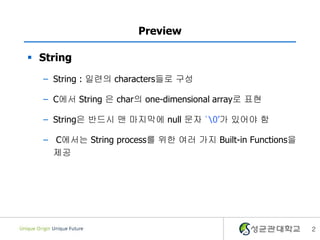
Preview
String
– String: 일련의 characters들로 구성
– C에서 String 은 char의 one-dimensional array로 표현
– String은 반드시 맨 마지막에 null 문자 ‘0’가 있어야 함
– C에서는 String process를 위한 여러 가지 Built-in Functions을
제공
3.
3
The End-of-String Sentinel‘0’
String 정의 방법
– 3글자를 저장했지만, 실제로는 4bytes가 필요하다.
char word[100];
word[0] = ‘a’;
word[1] = ‘b’;
word[2] = ‘c’;
word[3] = ‘0’; /* string의 끝표시를 위해 null char 삽입*/
4.
4
Initialization of Strings
Use array name
– String의 process를 위해 char array를 사용
[Ex] char word[4] = “abc”;
[Ex] char word[4] = {‘a’, ‘b’, ‘c’, ‘0’ };
[Ex] char word[] = {‘a’, ‘b’, ‘c’, ‘0’ };
[Ex] char word[] = “abc”; compiler에 의해 자동으로
4 char를 위한 array생성
5.
5
Displaying String andcharacters
printf()
– String출력을 위해서는 %s 를 사용
– 출력이 성공적이면 출력된 글자 수 반환, 그렇지
않으면 -1 반환
[Ex] int nchars;
char p[ ] = “Hello! the world”;
nchars = printf(“%s”, p);
printf(“nnum of chars=%dn”, nchars);
Hello! the world
num of chars = 16
6.
6
Displaying String andcharacters
puts()
– printf()보다 fast, simple
– String의 출력 후, next line으로 자동 이동
int puts(char *str); /*function prototype */
return
- no. of chars written if successful
- EOF(-1) if not
[Ex] char p[ ] = “Hi !!”;
puts(p);
puts(“Hello!!”); Hi !!
Hello!!
7.
7
Reading Strings fromthe KB
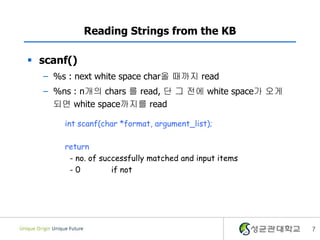
scanf()
– %s : next white space char올 때까지 read
– %ns : n개의 chars 를 read, 단 그 전에 white space가 오게
되면 white space까지를 read
int scanf(char *format, argument_list);
return
- no. of successfully matched and input items
- 0 if not
8.
8
Reading Strings fromthe KB
[Ex] char name[80];
scanf(“%s”, name); /* name <- SKKU */
SKKU Univ. 입력 시
[Ex] char name[80];
scanf(“%3s”, name); /* name <= C-P */
scanf(“%8s”, name); /* name <= rogram */
C-Program is 입력 시
White space올 때까지 read
3개의 char를 read
9.
9
Reading Strings fromthe KB
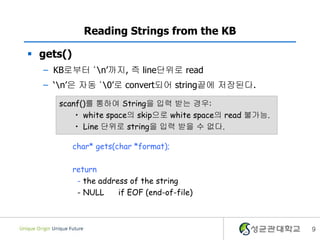
gets()
– KB로부터 ‘n’까지, 즉 line단위로 read
– ‘n’은 자동 ‘0’로 convert되어 string끝에 저장된다.
char* gets(char *format);
return
- the address of the string
- NULL if EOF (end-of-file)
scanf()를 통하여 String을 입력 받는 경우:
• white space의 skip으로 white space의 read 불가능.
• Line 단위로 string을 입력 받을 수 없다.
10.
10
Reading Strings fromthe KB
[Ex] char data[81], *P;
while( gets(data) != NULL) {
printf(“%sn”, data);
}
or while(gets(data) != 0)
^D를 입력할 때까지 line단위로
read하여 그대로 화면에 출력
하는 program
<blank line> 입력 시 혹은
<[ctrl] + D> 입력 시 종료
11.
11
Reading Strings fromthe KB
char a[5], b[4]=“1234”;
scanf(“%s”, a);
printf( “%s %sn”, a, b ) ;
Array크기보다 더 많은 문자를 입력한 경우
– “abcde”를 입력하면 출력 값은?

![3
The End-of-String Sentinel ‘0’
String 정의 방법
– 3글자를 저장했지만, 실제로는 4bytes가 필요하다.
char word[100];
word[0] = ‘a’;
word[1] = ‘b’;
word[2] = ‘c’;
word[3] = ‘0’; /* string의 끝표시를 위해 null char 삽입*/](https://image.slidesharecdn.com/5-2-140406045922-phpapp01/85/5-2-string-processing-3-320.jpg)
![4
Initialization of Strings
Use array name
– String의 process를 위해 char array를 사용
[Ex] char word[4] = “abc”;
[Ex] char word[4] = {‘a’, ‘b’, ‘c’, ‘0’ };
[Ex] char word[] = {‘a’, ‘b’, ‘c’, ‘0’ };
[Ex] char word[] = “abc”; compiler에 의해 자동으로
4 char를 위한 array생성](https://image.slidesharecdn.com/5-2-140406045922-phpapp01/85/5-2-string-processing-4-320.jpg)
![5
Displaying String and characters
printf()
– String출력을 위해서는 %s 를 사용
– 출력이 성공적이면 출력된 글자 수 반환, 그렇지
않으면 -1 반환
[Ex] int nchars;
char p[ ] = “Hello! the world”;
nchars = printf(“%s”, p);
printf(“nnum of chars=%dn”, nchars);
Hello! the world
num of chars = 16](https://image.slidesharecdn.com/5-2-140406045922-phpapp01/85/5-2-string-processing-5-320.jpg)
![6
Displaying String and characters
puts()
– printf()보다 fast, simple
– String의 출력 후, next line으로 자동 이동
int puts(char *str); /*function prototype */
return
- no. of chars written if successful
- EOF(-1) if not
[Ex] char p[ ] = “Hi !!”;
puts(p);
puts(“Hello!!”); Hi !!
Hello!!](https://image.slidesharecdn.com/5-2-140406045922-phpapp01/85/5-2-string-processing-6-320.jpg)
![8
Reading Strings from the KB
[Ex] char name[80];
scanf(“%s”, name); /* name <- SKKU */
SKKU Univ. 입력 시
[Ex] char name[80];
scanf(“%3s”, name); /* name <= C-P */
scanf(“%8s”, name); /* name <= rogram */
C-Program is 입력 시
White space올 때까지 read
3개의 char를 read](https://image.slidesharecdn.com/5-2-140406045922-phpapp01/85/5-2-string-processing-8-320.jpg)
![10
Reading Strings from the KB
[Ex] char data[81], *P;
while( gets(data) != NULL) {
printf(“%sn”, data);
}
or while(gets(data) != 0)
^D를 입력할 때까지 line단위로
read하여 그대로 화면에 출력
하는 program
<blank line> 입력 시 혹은
<[ctrl] + D> 입력 시 종료](https://image.slidesharecdn.com/5-2-140406045922-phpapp01/85/5-2-string-processing-10-320.jpg)
![11
Reading Strings from the KB
char a[5], b[4]=“1234”;
scanf(“%s”, a);
printf( “%s %sn”, a, b ) ;
Array크기보다 더 많은 문자를 입력한 경우
– “abcde”를 입력하면 출력 값은?](https://image.slidesharecdn.com/5-2-140406045922-phpapp01/85/5-2-string-processing-11-320.jpg)
![12
String-Handling Functions
String Assign 함수
[Ex] char str1[10] = “abc”, str2[10];
str1 = “123” ;
str2 = str1 ;
OK?? Why not??](https://image.slidesharecdn.com/5-2-140406045922-phpapp01/85/5-2-string-processing-12-320.jpg)
![13
String-Handling Functions
char *strcpy(char *s1, const char *s2);
– s1에 s2의 문자열의 내용을 복사
– Return 값은 s1의 주소값
– s1은 문자열을 저장할 수 있는 충분한 메모리를 확보해야 함
[Ex] char str1[10] = “abc”, str2[10];
strcpy( str1, “abc” ) ;
strcpy( str2, str1 ) ;](https://image.slidesharecdn.com/5-2-140406045922-phpapp01/85/5-2-string-processing-13-320.jpg)
![14
String-Handling Functions
String 비교 함수
[Ex] char str1[10], str2[10];
scanf( “%s”, str1 ) ;
scanf( “%s”, str2 ) ;
if( str1 == str2 ) printf( “Same!!n” ) ;
OK?? Why not??](https://image.slidesharecdn.com/5-2-140406045922-phpapp01/85/5-2-string-processing-14-320.jpg)
![15
String-Handling Functions
int strcmp(const char *s1, const char *s2);
– string을 구성하는 char의 ascii code값을 하나 씩 비교
– return value < 0 : s1 이 s2 보다 ASCII 값이 작을 때
– return value = 0 : s1 과 s2가 같을 때
– return value > 0 : s1 이 s2 보다 ASCII 값이 클 때
[Ex] …
#include <string.h>
…
char str1[10], str2[10];
scanf( “%s”, str1 ) ;
scanf( “%s”, str2 ) ;
if( strcmp(str1,str2) == 0 ) printf( “Same!!n” ) ;](https://image.slidesharecdn.com/5-2-140406045922-phpapp01/85/5-2-string-processing-15-320.jpg)
![16
String-Handling Functions
String Length
– 몇 글자가 str1에 있을까?
[Ex] char str1[10] ;
scanf( “%s”, str1 ) ;
[Ex] char str1[10] ;
int length ;
scanf( “%s”, str1 ) ;
for( length = 0 ; str[length] != NULL ; length++ ) ;
printf( “The length of string: %dn”, length ) ;](https://image.slidesharecdn.com/5-2-140406045922-phpapp01/85/5-2-string-processing-16-320.jpg)
![17
String-Handling Functions
int strlen(const char *s1);
– String의 길이를 return
[Ex] char str1[10] ;
int length ;
scanf( “%s”, str1 ) ;
printf( “The length of string: %dn”, strlen(str1) ) ;](https://image.slidesharecdn.com/5-2-140406045922-phpapp01/85/5-2-string-processing-17-320.jpg)
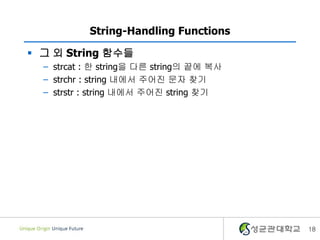
![19
String-Handling Functions
char *strcat(char *s1, const char *s2);
– s1의 문자열 뒤에 s2의 문자열을 추가
– Return값은 s1
– s1은 문자열을 저장할 수 있는 충분한 메모리를 확보해야 함
char str1[10]="1234";
char str2[10]="abcd";
strcat(str1, str2);
printf(“%s, %sn", str1, str2);
strcat(str2, “efgh” ) ;
printf(“%sn", str2);](https://image.slidesharecdn.com/5-2-140406045922-phpapp01/85/5-2-string-processing-19-320.jpg)
![20
String-Handling Functions
char* strchr(const char *s1, char c1);
– s1의 문자열중에서 가장 먼저 나타나는 문자 c1의 pointer를
return
– c1이 나타내는 문자가 없을 경우 null pointer를 return
[Ex] char str[10] ;
scanf( “%s”, str ) ;
if( strchr(str, ‘e’ ) != NULL )
printf( “e is foundn” );
else
printf( “e is not foundn” ) ;](https://image.slidesharecdn.com/5-2-140406045922-phpapp01/85/5-2-string-processing-20-320.jpg)
![21
String-Handling Functions
char* strstr(const char *s1, char* s2);
– strchr과 유사하지만 문자대신 sub-String을 search
– 없는 경우 null pointer를 return
[Ex] char str[10] ;
scanf( “%s”, str ) ;
if( strchr(str, “” ) != NULL )
printf( “hi is foundn” );
else
printf( “hi is not foundn” ) ;](https://image.slidesharecdn.com/5-2-140406045922-phpapp01/85/5-2-string-processing-21-320.jpg)
![[Swift] Data Structure - Graph(DFS)](https://cdn.slidesharecdn.com/ss_thumbnails/swiftdatastructure-graphdfs-200603005720-thumbnail.jpg?width=640&height=640&fit=bounds)


![[devil's camp] - 알고리즘 대회와 STL (박인서)](https://cdn.slidesharecdn.com/ss_thumbnails/stl-160830021024-thumbnail.jpg?width=640&height=640&fit=bounds)

![[TechDays Korea 2015] 녹슨 C++ 코드에 모던 C++로 기름칠하기](https://cdn.slidesharecdn.com/ss_thumbnails/techdayskorea2015cc-151029112639-lva1-app6891-thumbnail.jpg?width=640&height=640&fit=bounds)


![[방송통신대 컴퓨터과학과] C 프로그래밍 과제물 작성](https://cdn.slidesharecdn.com/ss_thumbnails/knoucomputersciencecprogrammingreportcommit-190903164910-thumbnail.jpg?width=640&height=640&fit=bounds)


