PREVIOUS TOPIC (RECAP_ACTIVITY)
Serial communication is best described as:
A) Transmission of multiple bits simultaneously using multiple lines
B)Transmission of data one bit at a time over a single channel
C) Transmission of data only using clock pulses
Which of the following is a key feature of asynchronous communication?
A) Data is transmitted in a steady continuous stream
B) Start and stop bits are not required
C) Data can be transmitted intermittently
In asynchronous data transfer, the problem of knowing whether data has
been received correctly is solved by:
A) Strobe control
B) Programmed I/O
C) Handshaking control
MEMORY
•Memory is likethe human brain, used to store data and
instructions.
•It is divided into a large number of small storage units called
memory cells.
•Each memory cell has a unique address to identify its
location.
•Memory addresses start from 0 and go up to (memory size −
1).
•For a 64K-word memory, there are 64 × 1024 = 65,536
locations.
•Therefore, the address range is from 0 to 65,535, and
memory stores instructions and data during execution.
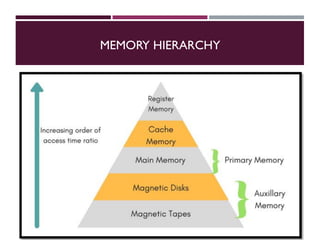
MEMORY HIERARCHY
•A memoryunit is an essential part of a digital computer used to
store programs and data.
•Memory is mainly classified into two categories: Main
Memory and Auxiliary Memory.
•Main Memory communicates directly with the CPU and is
commonly called RAM (Random Access Memory).
•Auxiliary Memory is used for backup and long-term storage of
data and programs.
•Examples of auxiliary memory include magnetic disks and
magnetic tapes.
9.
CHARACTERISTICS OF MAINMEMORY
•Primary memory stores the data and instructions currently
in use by the computer.
•It has limited storage capacity and is volatile (data is lost
when power is off).
•It is made using semiconductor devices.
•Primary memory is slower than CPU registers.
•Data and instructions to be processed must reside in main
memory.
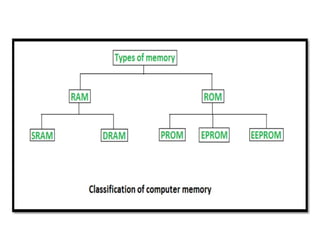
•It is divided into RAM and ROM, also called
semiconductor memories.
10.
I/O Device
CPU
Data valid
Dataaccepted
Data bus
Interface
I/O Read
Data bus
Data Register
Status
Register
F
Address bus
I/O Write
11.
RAM AND ROMMEMORIES
RAM (Random Access Memory)
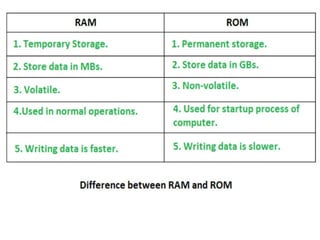
Stores data and instructions currently in use by the CPU.
Information is stored in binary form (0s and 1s).
Divided into fixed-size memory cells, each with a unique
address.
Allows random access to any memory location.
Volatile memory – data is lost when power is switched off.
Faster than secondary storage but slower than CPU registers.
12.
RAM AND ROMMEMORIES
ROM (Read Only Memory)
Non-volatile memory – retains data even when power is off.
Stores permanent programs and instructions.
Contains the bootstrap loader to start the operating system.
Data can only be read, not modified during normal operation.
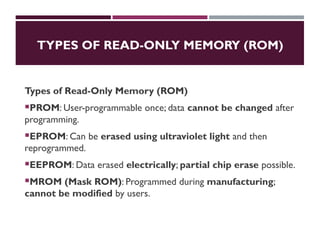
Types include PROM, EPROM, and EEPROM.
Used mainly for firmware and system initialization.
14.
TYPES OF READ-ONLYMEMORY (ROM)
Types of Read-Only Memory (ROM)
PROM: User-programmable once; data cannot be changed after
programming.
EPROM: Can be erased using ultraviolet light and then
reprogrammed.
EEPROM: Data erased electrically; partial chip erase possible.
MROM (Mask ROM): Programmed during manufacturing;
cannot be modified by users.
16.
2D AND 2.5DMEMORY ORGANIZATION
2D Memory Organization
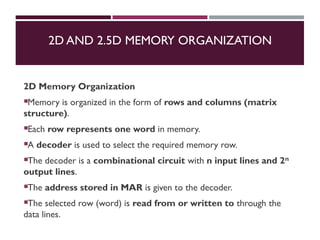
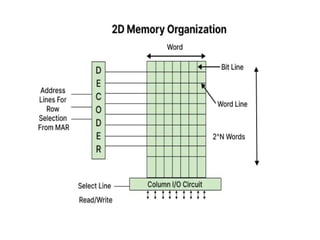
Memory is organized in the form of rows and columns (matrix
structure).
Each row represents one word in memory.
A decoder is used to select the required memory row.
The decoder is a combinational circuit with n input lines and 2ⁿ
output lines.
The address stored in MAR is given to the decoder.
The selected row (word) is read from or written to through the
data lines.
17.
DIRECT MEMORY ACCESS(DMA)
Direct Memory Access (DMA) means CPU
grants I/O module authority to read from or
write to memory without involvement.
DMA module itself controls exchange of data
between main memory and the I/O device.
CPU is only involved at the beginning and
end of the transfer and interrupted only after
entire block has been transferred.
18.
2.5D MEMORY ORGANIZATION
2.5DMemory Organization
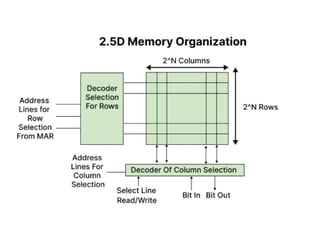
Memory is organized in the form of rows and columns.
Two separate decoders are used: Row decoder and Column decoder.
The row decoder selects the required row, and the column
decoder selects the required column.
The address from the MAR is given as input to both decoders.
The selected memory cell is identified through bit lines and word
lines.
Data is read from or written to the selected memory location.
20.
SUMMARY
•Computer memory isorganized in a hierarchy to balance
speed, cost, and capacity.
•Main memory includes RAM and ROM, each serving
different purposes.
•ROM stores permanent system programs, while RAM stores
temporary working data.
•2D and 2.5D memory organizations improve efficient
access to memory locations.
•Efficient memory organization and transfer methods enhance
overall system performance.
21.
ACTIVITY: THINK –PAIR – SHARE
THINK (3 minutes)
THINK (3 minutes)(Students work individually)
Why is primary memory required during program execution?
Why is RAM called volatile memory, while ROM is non-volatile
PAIR (4 minutes)(Students discuss in pairs)
Compare RAM and ROM based on speed, volatility, and usage.
Discuss the difference between 2D and 2.5D memory organization.
SHARE (3–5 minutes)
One pair explains a real-life analogy for memory hierarchy.
Another pair describes where ROM is used during system startup




![18. Booths Algorithm in computer [Autosaved].pptx](https://cdn.slidesharecdn.com/ss_thumbnails/18-251214092304-35cbd543-thumbnail.jpg?width=640&height=640&fit=bounds)


