Future
Now
Creative
Comparison
Slides
Creative Comparison Slides
01
Future
02
03
Now
01
02
03
Provide an overview of the
current state of the industry or
sector of focus.
Discuss the current technologies
and practices prevalent in the
industry.
Highlight the opportunities and
threats present in the current
state.
Highlight the emerging technologies
and trends that are likely to shape the
future of the industry.
Explore potential disruptive
innovations that could reshape the
industry landscape.
Discuss how businesses need to adapt
to meet changing customer needs and
preferences.
Creative Comparison Slides
01
03
02
01
02
03
Future
Now
Provide an overview of the
current state of the industry or
sector of focus.
Discuss the current technologies
and practices prevalent in the
industry.
Highlight the opportunities and
threats present in the current
state.
Highlight the emerging technologies
and trends that are likely to shape the
future of the industry.
Explore potential disruptive
innovations that could reshape
the industry landscape.
Discuss how businesses need to adapt
to meet changing customer needs and
preferences.
Creative Comparison Slides
01
Provide an overview of the current
state of the industry or sector of
focus.
01
Highlight the emerging technologies
and trends that are likely to shape the
future of the industry.
02
Discuss the current technologies
and practices prevalent in the
industry.
02
Explore potential disruptive
innovations that could reshape
the industry landscape.
03
Highlight the opportunities and
threats present in the current
state.
03
Discuss how businesses need to adapt
to meet changing customer needs
and preferences.
Future
Now
Creative Comparison Slides
01
02
03
01
02
03
Provide an overview of the current
state of the industry or sector of
focus.
Discuss the current technologies and
practices prevalent in the industry.
Highlight the opportunities and
threats present in the current state.
Highlight the emerging technologies
and trends that are likely to shape
the future of the industry.
Explore potential disruptive
innovations that could reshape the
industry landscape.
Discuss how businesses need to
adapt to meet changing customer
needs and preferences.
Future
Now
Creative Comparison Slides
Highlight the emerging technologies
and trends that are likely to shape the
future of the industry.
Explore potential disruptive
innovations that could reshape
the industry landscape.
Discuss how businesses need to adapt
to meet changing customer needs and
preferences.
Analyze the shifts in consumer behavior
and expectations that are expected to
influence the future state.
Future
Provide an overview of the
current state of the industry or
sector of focus.
Discuss the current technologies
and practices prevalent in the
industry.
Highlight the opportunities and
threats present in the current
state.
Identify the strengths, limitations,
and areas for improvement in the
current state.
Now
Creative Comparison Slides
01
02
03
04
01
02
03
04
Highlight the emerging technologies and trends
that are likely to shape the future of the industry.
Provide an overview of the current state of
the industry or sector of focus.
Explore potential disruptive innovations
that could reshape the industry landscape.
Discuss the current technologies and
practices prevalent in the industry.
Discuss how businesses need to adapt to meet
changing customer needs and preferences.
Highlight the opportunities and threats
present in the current state.
Analyze the shifts in consumer behavior and
expectations that are expected to influence the future
state.
Identify the strengths, limitations, and areas
for improvement in the current state.
Future
Now
Icons
Icons
How To Edit Shapes
You can add and edit some shapes to your presentation to present your data in a visual way.
• Choose your favourite infographic and insert it in your presentation using Ctrl C + Ctrl V or
Cmd C + Cmd V in Mac.
• Select one of the parts and ungroup it by right-clicking and choosing “Ungroup”.
• Change the color by clicking on the paint bucket.
• Then resize the element by clicking and dragging one of the square-shaped points of its
bounding box (the cursor should look like a double-headed arrow). Remember to hold Shift
while dragging to keep the proportions.
• Group the elements again by selecting them, right-clicking and choosing “Group”.
• Repeat the steps above with the other parts and when you’re done editing, copy the end
result and paste it into your presentation.
• Remember to choose the “Keep source formatting” option so that it keeps the design. For
more info, please visit Slideegg (Tips & Tricks).
Terms Of Use (Free Users)
If you are a free subscriber, you should credit SlideEgg by keeping the “ThankYou” slide.
Kindly refer to the following slide for the Terms of Use for premium users.
You can:
• Customize or edit this template
• Use this template for both business and personal endeavors.
You can not:
• Sell, rent, or second-license SlideEgg content or its altered version.
Promulgate, unless explicitly permitted, SlideEgg content, by SlideEgg.
• Incorporate SlideEgg content in any database or file online or offline.
• Obtain SlideEgg content’s copyright.
Kindly refer to our Tutorial page or FAQ for advanced slide modification guidelines.
Terms Of Use (Premium Users)
Being a premium subscriber, you have the privilege of using this PPT template
without giving attribution to SlideEgg or keeping the “ThankYou” slide.
You can:
• Customize or edit this template.
• Use this template for both business and personal endeavors.
• Circulate or share the editable format of this template with anyone you want.
You can not:
• Sell, rent or second-license SlideEgg content or the altered version of it.
Promulgate or include the templates in any other services database
• that performs as distribution or resale platform, unless explicitly permitted, by SlideEgg.
• Incorporate the elements used in SlideEgg’s templates separately.
• Obtain SlideEgg’s copyright for the elements used in this template as a logo or trademark.
Kindly refer to our Tutorial page or FAQ for advanced slide modification guidelines.
www.slideegg.com
Thank You!
We respect your valuable time with SlideEgg!
If you have any questions, please reach us
CREDIT: SlideEgg created this PowerPoint template.
Let this slide be kept for attribution.
Do you have a design request, please visit our redesign page.

47360-Creative Comparison Slides power point

  • 1.
  • 2.
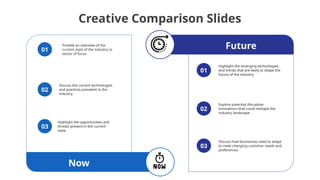
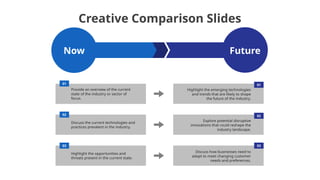
    Creative Comparison Slides 01 Future 02 03 Now 01 02 03 Providean overview of the current state of the industry or sector of focus. Discuss the current technologies and practices prevalent in the industry. Highlight the opportunities and threats present in the current state. Highlight the emerging technologies and trends that are likely to shape the future of the industry. Explore potential disruptive innovations that could reshape the industry landscape. Discuss how businesses need to adapt to meet changing customer needs and preferences.
  • 3.
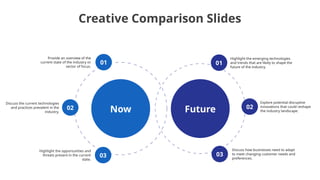
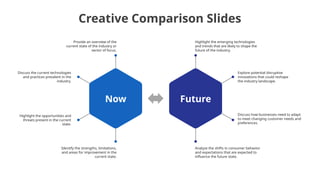
    Creative Comparison Slides 01 03 02 01 02 03 Future Now Providean overview of the current state of the industry or sector of focus. Discuss the current technologies and practices prevalent in the industry. Highlight the opportunities and threats present in the current state. Highlight the emerging technologies and trends that are likely to shape the future of the industry. Explore potential disruptive innovations that could reshape the industry landscape. Discuss how businesses need to adapt to meet changing customer needs and preferences.
  • 4.
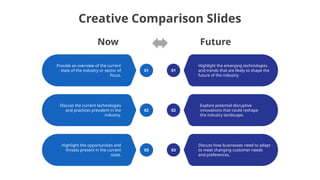
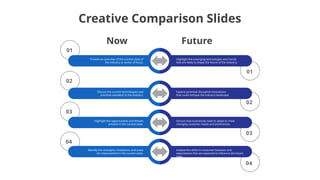
    Creative Comparison Slides 01 Providean overview of the current state of the industry or sector of focus. 01 Highlight the emerging technologies and trends that are likely to shape the future of the industry. 02 Discuss the current technologies and practices prevalent in the industry. 02 Explore potential disruptive innovations that could reshape the industry landscape. 03 Highlight the opportunities and threats present in the current state. 03 Discuss how businesses need to adapt to meet changing customer needs and preferences. Future Now
  • 5.
    Creative Comparison Slides 01 02 03 01 02 03 Providean overview of the current state of the industry or sector of focus. Discuss the current technologies and practices prevalent in the industry. Highlight the opportunities and threats present in the current state. Highlight the emerging technologies and trends that are likely to shape the future of the industry. Explore potential disruptive innovations that could reshape the industry landscape. Discuss how businesses need to adapt to meet changing customer needs and preferences. Future Now
  • 6.
    Creative Comparison Slides Highlightthe emerging technologies and trends that are likely to shape the future of the industry. Explore potential disruptive innovations that could reshape the industry landscape. Discuss how businesses need to adapt to meet changing customer needs and preferences. Analyze the shifts in consumer behavior and expectations that are expected to influence the future state. Future Provide an overview of the current state of the industry or sector of focus. Discuss the current technologies and practices prevalent in the industry. Highlight the opportunities and threats present in the current state. Identify the strengths, limitations, and areas for improvement in the current state. Now
  • 7.
    Creative Comparison Slides 01 02 03 04 01 02 03 04 Highlightthe emerging technologies and trends that are likely to shape the future of the industry. Provide an overview of the current state of the industry or sector of focus. Explore potential disruptive innovations that could reshape the industry landscape. Discuss the current technologies and practices prevalent in the industry. Discuss how businesses need to adapt to meet changing customer needs and preferences. Highlight the opportunities and threats present in the current state. Analyze the shifts in consumer behavior and expectations that are expected to influence the future state. Identify the strengths, limitations, and areas for improvement in the current state. Future Now
  • 8.
  • 9.
  • 10.
    How To EditShapes You can add and edit some shapes to your presentation to present your data in a visual way. • Choose your favourite infographic and insert it in your presentation using Ctrl C + Ctrl V or Cmd C + Cmd V in Mac. • Select one of the parts and ungroup it by right-clicking and choosing “Ungroup”. • Change the color by clicking on the paint bucket. • Then resize the element by clicking and dragging one of the square-shaped points of its bounding box (the cursor should look like a double-headed arrow). Remember to hold Shift while dragging to keep the proportions. • Group the elements again by selecting them, right-clicking and choosing “Group”. • Repeat the steps above with the other parts and when you’re done editing, copy the end result and paste it into your presentation. • Remember to choose the “Keep source formatting” option so that it keeps the design. For more info, please visit Slideegg (Tips & Tricks).
  • 11.
    Terms Of Use(Free Users) If you are a free subscriber, you should credit SlideEgg by keeping the “ThankYou” slide. Kindly refer to the following slide for the Terms of Use for premium users. You can: • Customize or edit this template • Use this template for both business and personal endeavors. You can not: • Sell, rent, or second-license SlideEgg content or its altered version. Promulgate, unless explicitly permitted, SlideEgg content, by SlideEgg. • Incorporate SlideEgg content in any database or file online or offline. • Obtain SlideEgg content’s copyright. Kindly refer to our Tutorial page or FAQ for advanced slide modification guidelines.
  • 12.
    Terms Of Use(Premium Users) Being a premium subscriber, you have the privilege of using this PPT template without giving attribution to SlideEgg or keeping the “ThankYou” slide. You can: • Customize or edit this template. • Use this template for both business and personal endeavors. • Circulate or share the editable format of this template with anyone you want. You can not: • Sell, rent or second-license SlideEgg content or the altered version of it. Promulgate or include the templates in any other services database • that performs as distribution or resale platform, unless explicitly permitted, by SlideEgg. • Incorporate the elements used in SlideEgg’s templates separately. • Obtain SlideEgg’s copyright for the elements used in this template as a logo or trademark. Kindly refer to our Tutorial page or FAQ for advanced slide modification guidelines.
  • 13.
    www.slideegg.com Thank You! We respectyour valuable time with SlideEgg! If you have any questions, please reach us CREDIT: SlideEgg created this PowerPoint template. Let this slide be kept for attribution. Do you have a design request, please visit our redesign page.