Moyra Torphins
Scottish Castles 1
Look on last slide for Summary Page
Slide Comments:
Slide master title text should be "Sky Blue, Accent 3" (see step 2)
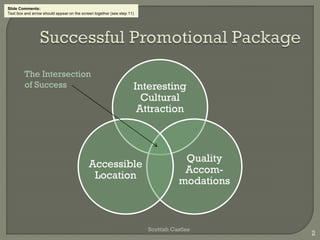
Interesting
Cultural
Attraction
Quality
Accom-
modations
Accessible
Location
Scottish Castles
2
The Intersection
of Success
Slide Comments:
Text box and arrow should appear on the screen together (see step 11)
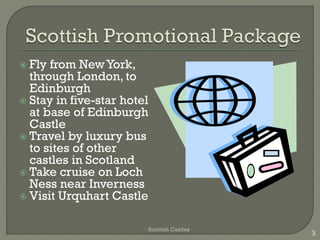
 Fly from NewYork,
through London, to
Edinburgh
 Stay in five-star hotel
at base of Edinburgh
Castle
 Travel by luxury bus
to sites of other
castles in Scotland
 Take cruise on Loch
Ness near Inverness
 Visit Urquhart Castle
Scottish Castles
3
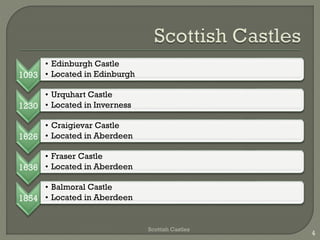
1093
• Edinburgh Castle
• Located in Edinburgh
1230
• Urquhart Castle
• Located in Inverness
1626
• Craigievar Castle
• Located in Aberdeen
1636
• Fraser Castle
• Located in Aberdeen
1854
• Balmoral Castle
• Located in Aberdeen
Scottish Castles
4
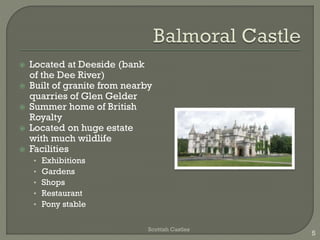
 Located at Deeside (bank
of the Dee River)
 Built of granite from nearby
quarries of Glen Gelder
 Summer home of British
Royalty
 Located on huge estate
with much wildlife
 Facilities
• Exhibitions
• Gardens
• Shops
• Restaurant
• Pony stable
Scottish Castles
5
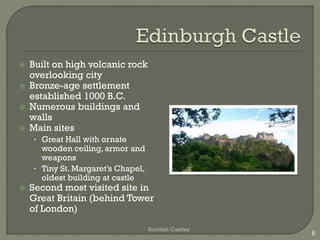
 Built on high volcanic rock
overlooking city
 Bronze-age settlement
established 1000 B.C.
 Numerous buildings and
walls
 Main sites
• Great Hall with ornate
wooden ceiling, armor and
weapons
• Tiny St. Margaret’s Chapel,
oldest building at castle
 Second most visited site in
Great Britain (behind Tower
of London)
Scottish Castles
6
Edinburgh 330 miles
Aberdeen 400 miles
Inverness 440 miles
Scottish Castles
7
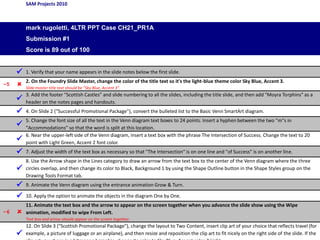
SAM Projects 2010
mark rugoletti, 4LTR PPT Case CH21_PR1A
Submission #1
Score is 89 out of 100
 1. Verify that your name appears in the slide notes below the first slide.
–5  2. On the Foundry Slide Master, change the color of the title text so it's the light-blue theme color Sky Blue, Accent 3.
Slide master title text should be "Sky Blue, Accent 3".

3. Add the footer "Scottish Castles" and slide numbering to all the slides, including the title slide, and then add "Moyra Torphins" as a
header on the notes pages and handouts.
 4. On Slide 2 ("Successful Promotional Package"), convert the bulleted list to the Basic Venn SmartArt diagram.

5. Change the font size of all the text in the Venn diagram text boxes to 24 points. Insert a hyphen between the two "m"s in
"Accommodations" so that the word is split at this location.

6. Near the upper-left side of the Venn diagram, insert a text box with the phrase The Intersection of Success. Change the text to 20
point with Light Green, Accent 2 font color.
 7. Adjust the width of the text box as necessary so that "The Intersection" is on one line and "of Success" is on another line.

8. Use the Arrow shape in the Lines category to draw an arrow from the text box to the center of the Venn diagram where the three
circles overlap, and then change its color to Black, Background 1 by using the Shape Outline button in the Shape Styles group on the
Drawing Tools Format tab.
 9. Animate the Venn diagram using the entrance animation Grow & Turn.
 10. Apply the option to animate the objects in the diagram One by One.
–6 
11. Animate the text box and the arrow to appear on the screen together when you advance the slide show using the Wipe
animation, modified to wipe From Left.
Text box and arrow should appear on the screen together.

12. On Slide 3 ("Scottish Promotional Package"), change the layout to Two Content, insert clip art of your choice that reflects travel (for
example, a picture of luggage or an airplane), and then resize and reposition the clip art to fit nicely on the right side of the slide. If the

4 ltr powerpoint2010_ch21_pr1a_markrugoletti_1_3

  • 1.
    Moyra Torphins Scottish Castles1 Look on last slide for Summary Page Slide Comments: Slide master title text should be "Sky Blue, Accent 3" (see step 2)
  • 2.
    Interesting Cultural Attraction Quality Accom- modations Accessible Location Scottish Castles 2 The Intersection ofSuccess Slide Comments: Text box and arrow should appear on the screen together (see step 11)
  • 3.
     Fly fromNewYork, through London, to Edinburgh  Stay in five-star hotel at base of Edinburgh Castle  Travel by luxury bus to sites of other castles in Scotland  Take cruise on Loch Ness near Inverness  Visit Urquhart Castle Scottish Castles 3
  • 4.
    1093 • Edinburgh Castle •Located in Edinburgh 1230 • Urquhart Castle • Located in Inverness 1626 • Craigievar Castle • Located in Aberdeen 1636 • Fraser Castle • Located in Aberdeen 1854 • Balmoral Castle • Located in Aberdeen Scottish Castles 4
  • 5.
     Located atDeeside (bank of the Dee River)  Built of granite from nearby quarries of Glen Gelder  Summer home of British Royalty  Located on huge estate with much wildlife  Facilities • Exhibitions • Gardens • Shops • Restaurant • Pony stable Scottish Castles 5
  • 6.
     Built onhigh volcanic rock overlooking city  Bronze-age settlement established 1000 B.C.  Numerous buildings and walls  Main sites • Great Hall with ornate wooden ceiling, armor and weapons • Tiny St. Margaret’s Chapel, oldest building at castle  Second most visited site in Great Britain (behind Tower of London) Scottish Castles 6
  • 7.
    Edinburgh 330 miles Aberdeen400 miles Inverness 440 miles Scottish Castles 7
  • 8.
    SAM Projects 2010 markrugoletti, 4LTR PPT Case CH21_PR1A Submission #1 Score is 89 out of 100  1. Verify that your name appears in the slide notes below the first slide. –5  2. On the Foundry Slide Master, change the color of the title text so it's the light-blue theme color Sky Blue, Accent 3. Slide master title text should be "Sky Blue, Accent 3".  3. Add the footer "Scottish Castles" and slide numbering to all the slides, including the title slide, and then add "Moyra Torphins" as a header on the notes pages and handouts.  4. On Slide 2 ("Successful Promotional Package"), convert the bulleted list to the Basic Venn SmartArt diagram.  5. Change the font size of all the text in the Venn diagram text boxes to 24 points. Insert a hyphen between the two "m"s in "Accommodations" so that the word is split at this location.  6. Near the upper-left side of the Venn diagram, insert a text box with the phrase The Intersection of Success. Change the text to 20 point with Light Green, Accent 2 font color.  7. Adjust the width of the text box as necessary so that "The Intersection" is on one line and "of Success" is on another line.  8. Use the Arrow shape in the Lines category to draw an arrow from the text box to the center of the Venn diagram where the three circles overlap, and then change its color to Black, Background 1 by using the Shape Outline button in the Shape Styles group on the Drawing Tools Format tab.  9. Animate the Venn diagram using the entrance animation Grow & Turn.  10. Apply the option to animate the objects in the diagram One by One. –6  11. Animate the text box and the arrow to appear on the screen together when you advance the slide show using the Wipe animation, modified to wipe From Left. Text box and arrow should appear on the screen together.  12. On Slide 3 ("Scottish Promotional Package"), change the layout to Two Content, insert clip art of your choice that reflects travel (for example, a picture of luggage or an airplane), and then resize and reposition the clip art to fit nicely on the right side of the slide. If the