Introduction to 3D Graphics
John E. Laird
Basic Issues
Given a internal model of a 3D world, with
textures and light sources how do you project it on
the screen from any perspective fast.
• Restrictions on geometry
• Restrictions on viewing perspective
• Lots of algorithms
Questions
• How do I draw polygons on the screens?
• Which polygons should I draw?
• How should I rasterize them (for lighting and texture)?
Overview: simple 3D graphics
3D space
Points, Lines, Polygons, and Objects in 3D
Coordinate Systems
Translation, Scaling, and Rotation in 3D
Projections
Solid Modeling
Hidden-surface removal
Painter’s Algorithm
Z-Buffering
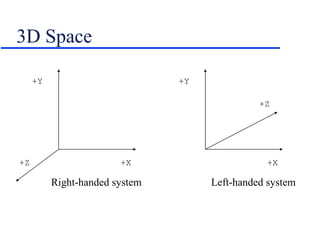
3D Space
+Y
+Z +X
+Y
+Z
+X
Right-handed system Left-handed system
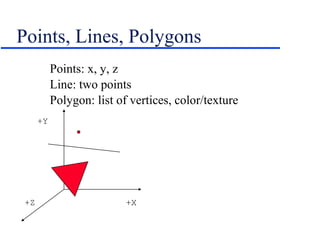
Points, Lines, Polygons
Points: x, y, z
Line: two points
Polygon: list of vertices, color/texture
+Y
+Z +X
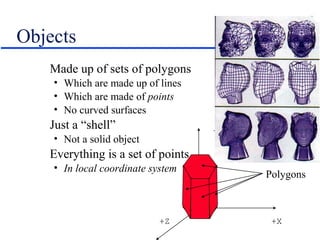
Objects
Made up of sets of polygons
• Which are made up of lines
• Which are made of points
• No curved surfaces
Just a “shell”
• Not a solid object
Everything is a set of points
• In local coordinate system
+Y
+Z +X
Polygons
Object Transformations
Since all objects are just sets of points, we just
need to translate, scale, rotate the points.
To manipulate a 3D point, use matrix
multiplication.
Translation:
[x’ y’ z’ 1] = [x y z 1] | 1 0 0 0 |
| 0 1 0 0 |
| 0 0 1 0 |
| dx dy dz 1 |
Scaling
Constant Axis Scaling
[x’ y’ z’ 1] = [x y z 1] | s 0 0 0 |
| 0 s 0 0 |
| 0 0 s 0 |
| 0 0 0 1 |
Variable Axis Scaling
[x’ y’ z’ 1] = [x y z 1] | sx 0 0 0 |
| 0 sy 0 0 |
| 0 0 sz 0 |
| 0 0 0 1 |
Rotation
Parallel to x-axis
[x’ y’ z’ 1] = [x y z 1] | 1 0 0 0 |
| 0 cos r sin r 0 |
| 0 -sin r cos r 0 |
| 0 0 0 1 |
Parallel to y-axis
[x’ y’ z’ 1] = [x y z 1] | cos r 0 -sin r 0 |
| 0 1 0 0 |
| sin r 0 cos r 0 |
| 0 0 0 1 |
Parallel to z-axis
[x’ y’ z’ 1] = [x y z 1] | cos r sin r 0 0 |
|-sin r cos r 0 0 |
| 0 0 1 0 |
| 0 0 0 1 |
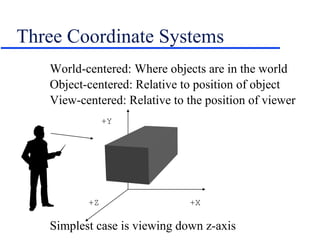
Three Coordinate Systems
World-centered: Where objects are in the world
Object-centered: Relative to position of object
View-centered: Relative to the position of viewer
Simplest case is viewing down z-axis
+Y
+Z +X
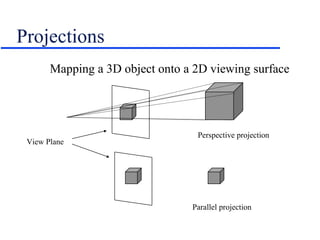
Projections
Mapping a 3D object onto a 2D viewing surface
View Plane
Perspective projection
Parallel projection
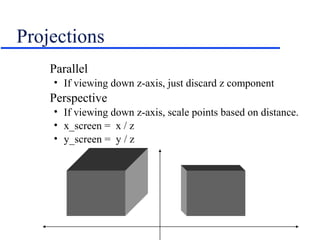
Projections
Parallel
• If viewing down z-axis, just discard z component
Perspective
• If viewing down z-axis, scale points based on distance.
• x_screen = x / z
• y_screen = y / z
Projections
Usually not viewing down center of z axis.
Usually x = 0 and y = 0 at bottom left
Correct by adding 1/2 screen size
• x_screen = x/z + 1/2 screen width
• y_screen = y/z + 1/2 screen height
To get perspective right, need to now field of
view, distance to screen, aspect ratio.
• Often add scaling factor to get it to look right
• x_screen = x*scale /z + 1/2 screen width
Field of View
To simulate human vision:
• 110-120 degrees horizontally
• < 90 vertically
Think of the viewing pyramid or frustum
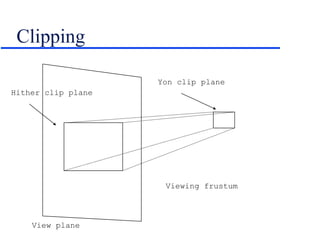
Clipping
View plane
Viewing frustum
Yon clip plane
Hither clip plane
Drawing the Surface
Split triangles and fill in as described earlier
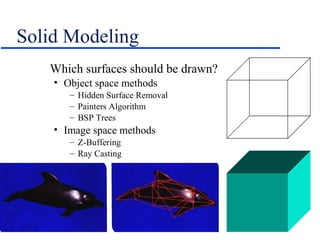
Solid Modeling
Which surfaces should be drawn?
• Object space methods
– Hidden Surface Removal
– Painters Algorithm
– BSP Trees
• Image space methods
– Z-Buffering
– Ray Casting
Hidden Surface Removal
Step 1:
• Remove all polygons outside of viewing frustum
Step 2:
• Remove all polygons that are facing away from the
viewer
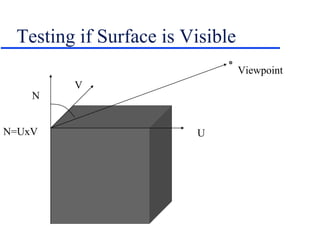
• If the dot product of the view vector and the surface
normal is >= 90 degrees, it is facing away.
– Surface normal = cross product of two co-planar edges.
– View vector from normal point to viewpoint
Step 3:
• Draw the visible faces in an order so the object looks
right.
Testing if Surface is Visible
N
V
UN=UxV
Viewpoint
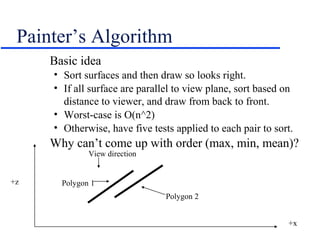
Painter’s Algorithm
Basic idea
• Sort surfaces and then draw so looks right.
• If all surface are parallel to view plane, sort based on
distance to viewer, and draw from back to front.
• Worst-case is O(n^2)
• Otherwise, have five tests applied to each pair to sort.
Why can’t come up with order (max, min, mean)?
+z
+x
Polygon 2
Polygon 1
View direction
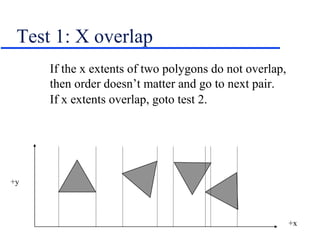
Test 1: X overlap
If the x extents of two polygons do not overlap,
then order doesn’t matter and go to next pair.
If x extents overlap, goto test 2.
+y
+x
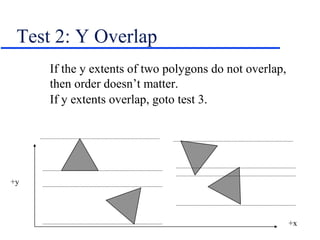
Test 2: Y Overlap
If the y extents of two polygons do not overlap,
then order doesn’t matter.
If y extents overlap, goto test 3.
+y
+x
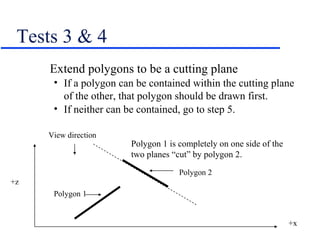
Tests 3 & 4
Extend polygons to be a cutting plane
• If a polygon can be contained within the cutting plane
of the other, that polygon should be drawn first.
• If neither can be contained, go to step 5.
+z
+x
Polygon 2
Polygon 1
View direction
Polygon 1 is completely on one side of the
two planes “cut” by polygon 2.
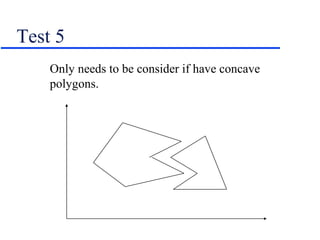
Test 5
Only needs to be consider if have concave
polygons.
How to make it easier
Use convex objects
Avoid long objects (like walls) that can overlap
each other in multiple dimensions
Avoid intersecting objects and polygons
Z-buffer
Z-buffer holds the z-coordinate of ever pixel
• Usually 16 or 32-bits/pixel
Initialize all values to maximum depth
Compute the z value of every point of every non-
back facing polygon
• Not too hard if all polygons are triangles or rectangles
• Do this during the filling of the triangles
If z of point < z in Z-buffer, save the color of the
current point and update Z-buffer
• otherwise throw away point and move on
Expect z-buffers on all PC in a few years
Ray Tracing
Image space technique that mimics physical
processes of light
Extremely computationally intensive, but beautiful
• Hidden surface removal
• Transparency
• Reflections
• Refraction
• Ambient lighting
• Point source lighting
• Shadows
Ray Tracing
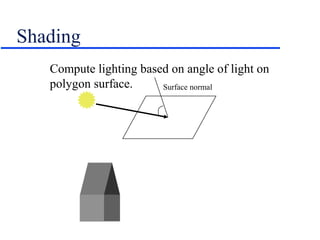
Shading
Compute lighting based on angle of light on
polygon surface. Surface normal
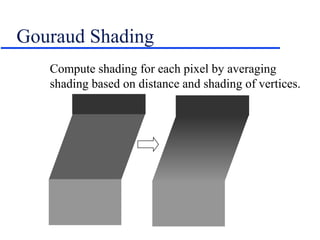
Gouraud Shading
Compute shading for each pixel by averaging
shading based on distance and shading of vertices.
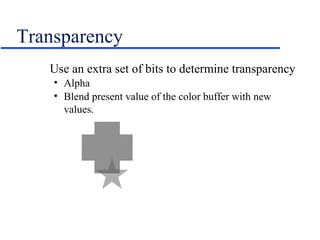
Transparency
Use an extra set of bits to determine transparency
• Alpha
• Blend present value of the color buffer with new
values.
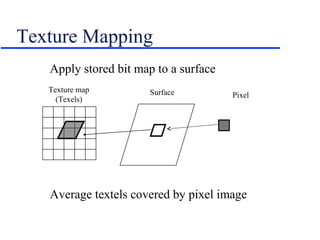
Texture Mapping
Apply stored bit map to a surface
Average textels covered by pixel image
Texture map
(Texels)
PixelSurface
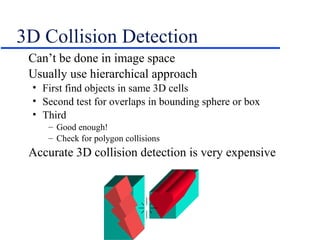
3D Collision Detection
Can’t be done in image space
Usually use hierarchical approach
• First find objects in same 3D cells
• Second test for overlaps in bounding sphere or box
• Third
– Good enough!
– Check for polygon collisions
Accurate 3D collision detection is very expensive

3 d

  • 1.
    Introduction to 3DGraphics John E. Laird
  • 2.
    Basic Issues Given ainternal model of a 3D world, with textures and light sources how do you project it on the screen from any perspective fast. • Restrictions on geometry • Restrictions on viewing perspective • Lots of algorithms Questions • How do I draw polygons on the screens? • Which polygons should I draw? • How should I rasterize them (for lighting and texture)?
  • 3.
    Overview: simple 3Dgraphics 3D space Points, Lines, Polygons, and Objects in 3D Coordinate Systems Translation, Scaling, and Rotation in 3D Projections Solid Modeling Hidden-surface removal Painter’s Algorithm Z-Buffering
  • 4.
    3D Space +Y +Z +X +Y +Z +X Right-handedsystem Left-handed system
  • 5.
    Points, Lines, Polygons Points:x, y, z Line: two points Polygon: list of vertices, color/texture +Y +Z +X
  • 6.
    Objects Made up ofsets of polygons • Which are made up of lines • Which are made of points • No curved surfaces Just a “shell” • Not a solid object Everything is a set of points • In local coordinate system +Y +Z +X Polygons
  • 7.
    Object Transformations Since allobjects are just sets of points, we just need to translate, scale, rotate the points. To manipulate a 3D point, use matrix multiplication. Translation: [x’ y’ z’ 1] = [x y z 1] | 1 0 0 0 | | 0 1 0 0 | | 0 0 1 0 | | dx dy dz 1 |
  • 8.
    Scaling Constant Axis Scaling [x’y’ z’ 1] = [x y z 1] | s 0 0 0 | | 0 s 0 0 | | 0 0 s 0 | | 0 0 0 1 | Variable Axis Scaling [x’ y’ z’ 1] = [x y z 1] | sx 0 0 0 | | 0 sy 0 0 | | 0 0 sz 0 | | 0 0 0 1 |
  • 9.
    Rotation Parallel to x-axis [x’y’ z’ 1] = [x y z 1] | 1 0 0 0 | | 0 cos r sin r 0 | | 0 -sin r cos r 0 | | 0 0 0 1 | Parallel to y-axis [x’ y’ z’ 1] = [x y z 1] | cos r 0 -sin r 0 | | 0 1 0 0 | | sin r 0 cos r 0 | | 0 0 0 1 | Parallel to z-axis [x’ y’ z’ 1] = [x y z 1] | cos r sin r 0 0 | |-sin r cos r 0 0 | | 0 0 1 0 | | 0 0 0 1 |
  • 10.
    Three Coordinate Systems World-centered:Where objects are in the world Object-centered: Relative to position of object View-centered: Relative to the position of viewer Simplest case is viewing down z-axis +Y +Z +X
  • 11.
    Projections Mapping a 3Dobject onto a 2D viewing surface View Plane Perspective projection Parallel projection
  • 12.
    Projections Parallel • If viewingdown z-axis, just discard z component Perspective • If viewing down z-axis, scale points based on distance. • x_screen = x / z • y_screen = y / z
  • 13.
    Projections Usually not viewingdown center of z axis. Usually x = 0 and y = 0 at bottom left Correct by adding 1/2 screen size • x_screen = x/z + 1/2 screen width • y_screen = y/z + 1/2 screen height To get perspective right, need to now field of view, distance to screen, aspect ratio. • Often add scaling factor to get it to look right • x_screen = x*scale /z + 1/2 screen width
  • 14.
    Field of View Tosimulate human vision: • 110-120 degrees horizontally • < 90 vertically Think of the viewing pyramid or frustum
  • 15.
    Clipping View plane Viewing frustum Yonclip plane Hither clip plane
  • 16.
    Drawing the Surface Splittriangles and fill in as described earlier
  • 17.
    Solid Modeling Which surfacesshould be drawn? • Object space methods – Hidden Surface Removal – Painters Algorithm – BSP Trees • Image space methods – Z-Buffering – Ray Casting
  • 18.
    Hidden Surface Removal Step1: • Remove all polygons outside of viewing frustum Step 2: • Remove all polygons that are facing away from the viewer • If the dot product of the view vector and the surface normal is >= 90 degrees, it is facing away. – Surface normal = cross product of two co-planar edges. – View vector from normal point to viewpoint Step 3: • Draw the visible faces in an order so the object looks right.
  • 19.
    Testing if Surfaceis Visible N V UN=UxV Viewpoint
  • 20.
    Painter’s Algorithm Basic idea •Sort surfaces and then draw so looks right. • If all surface are parallel to view plane, sort based on distance to viewer, and draw from back to front. • Worst-case is O(n^2) • Otherwise, have five tests applied to each pair to sort. Why can’t come up with order (max, min, mean)? +z +x Polygon 2 Polygon 1 View direction
  • 21.
    Test 1: Xoverlap If the x extents of two polygons do not overlap, then order doesn’t matter and go to next pair. If x extents overlap, goto test 2. +y +x
  • 22.
    Test 2: YOverlap If the y extents of two polygons do not overlap, then order doesn’t matter. If y extents overlap, goto test 3. +y +x
  • 23.
    Tests 3 &4 Extend polygons to be a cutting plane • If a polygon can be contained within the cutting plane of the other, that polygon should be drawn first. • If neither can be contained, go to step 5. +z +x Polygon 2 Polygon 1 View direction Polygon 1 is completely on one side of the two planes “cut” by polygon 2.
  • 24.
    Test 5 Only needsto be consider if have concave polygons.
  • 25.
    How to makeit easier Use convex objects Avoid long objects (like walls) that can overlap each other in multiple dimensions Avoid intersecting objects and polygons
  • 26.
    Z-buffer Z-buffer holds thez-coordinate of ever pixel • Usually 16 or 32-bits/pixel Initialize all values to maximum depth Compute the z value of every point of every non- back facing polygon • Not too hard if all polygons are triangles or rectangles • Do this during the filling of the triangles If z of point < z in Z-buffer, save the color of the current point and update Z-buffer • otherwise throw away point and move on Expect z-buffers on all PC in a few years
  • 27.
    Ray Tracing Image spacetechnique that mimics physical processes of light Extremely computationally intensive, but beautiful • Hidden surface removal • Transparency • Reflections • Refraction • Ambient lighting • Point source lighting • Shadows
  • 28.
  • 29.
    Shading Compute lighting basedon angle of light on polygon surface. Surface normal
  • 30.
    Gouraud Shading Compute shadingfor each pixel by averaging shading based on distance and shading of vertices.
  • 31.
    Transparency Use an extraset of bits to determine transparency • Alpha • Blend present value of the color buffer with new values.
  • 32.
    Texture Mapping Apply storedbit map to a surface Average textels covered by pixel image Texture map (Texels) PixelSurface
  • 33.
    3D Collision Detection Can’tbe done in image space Usually use hierarchical approach • First find objects in same 3D cells • Second test for overlaps in bounding sphere or box • Third – Good enough! – Check for polygon collisions Accurate 3D collision detection is very expensive