
This presentation is available under the Creative Commons
Attribution-ShareAlike 3.0 Unported License. Please refer to
http://www.bits.vib.be/ if you use this presentation or parts
hereof.
Introduction to Linux for
bioinformatics
Getting software
Joachim Jacob
5 and 12 May 2014
Figure:
http://worldofdtcmarketing.com/website-content-now-critical-for-search-engine-performance-pharma/health-information-online/
2 of 32

Just like Linux, most software written for Linux is
open source and free (e.g. GNU software).

Depending on your chosen distribution, it is
easier/harder to install packages (=another name
for software).
Software for Linux
http://www.makeuseof.com/pages/best-linux-software
3 of 32
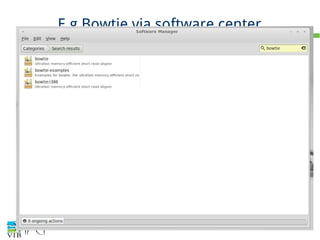
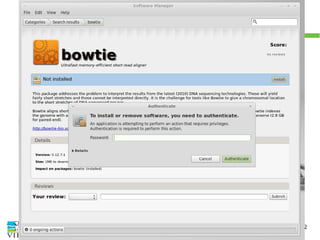
Installing: use the software center
PREFERRED WAY to install
Software center (= 'app' or 'application' store)
every distribution as some kind of software manager :
search for software and click to install. The software
is automatically updated by the update manager.
Depending on the distro, a lot of bioinformatics
packages are available.
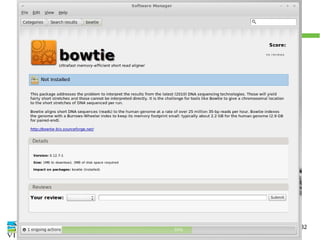
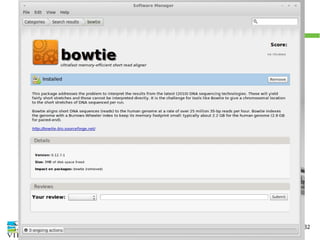
Example in Linux Mint
4 of 32
E.g Bowtie via software center
5 of 32
E.g Bowtie via software center
6 of 32
E.g Bowtie via software center
7 of 32
E.g Bowtie via software center
8 of 32
E.g Bowtie via software center
9 of 32
E.g Bowtie via software center
10 of 32
E.g Bowtie via software center
11 of 32
E.g Bowtie via software center
12 of 32
Software is fetched from repositories
http://en.wikipedia.org/wiki/Software_repository
https://help.ubuntu.com/community/Repositories/Ubuntu
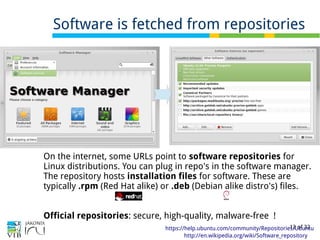
On the internet, some URLs point to software repositories for
Linux distributions. You can plug in repo's in the software manager.
The repository hosts installation files for software. These are
typically .rpm (Red Hat alike) or .deb (Debian alike distro's) files.
Official repositories: secure, high-quality, malware-free !
13 of 32
Example: the Debian Med repo
→ exercise at the end of this section
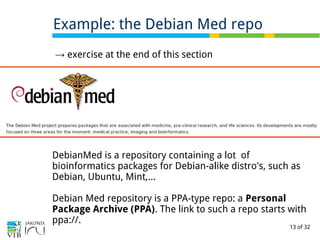
DebianMed is a repository containing a lot of
bioinformatics packages for Debian-alike distro's, such as
Debian, Ubuntu, Mint,...
Debian Med repository is a PPA-type repo: a Personal
Package Archive (PPA). The link to such a repo starts with
ppa://.
14 of 32
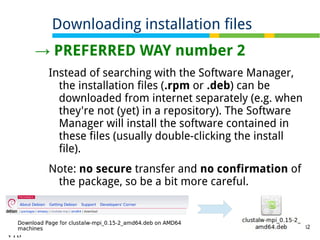
→ PREFERRED WAY number 2
Instead of searching with the Software Manager,
the installation files (.rpm or .deb) can be
downloaded from internet separately (e.g. when
they're not (yet) in a repository). The Software
Manager will install the software contained in
these files (usually double-clicking the install
file).
Note: no secure transfer and no confirmation of
the package, so be a bit more careful.
Downloading installation files
15 of 32
Dependencies
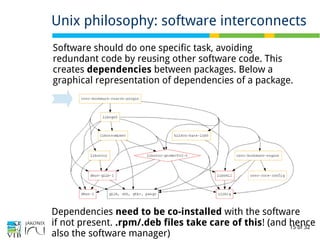
Unix philosophy: software interconnects
Software should do one specific task, avoiding
redundant code by reusing other software code. This
creates dependencies between packages. Below a
graphical representation of dependencies of a package.
Dependencies need to be co-installed with the software
if not present. .rpm/.deb files take care of this! (and hence
also the software manager)
16 of 32
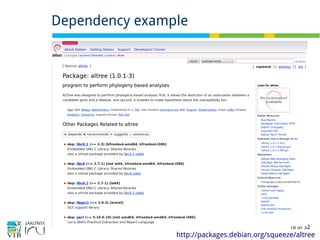
Dependency example
http://packages.debian.org/squeeze/altree
17 of 32
Exercise: example of installing a .deb file
http://packages.debian.org/squeeze/altree
→ Exercise link: 2 exercises!
1. install the multiple sequence alignment tool ClustalW.
2. install Gk-arrays
18 of 32
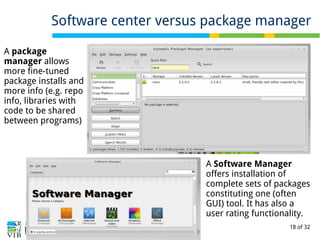
Software center versus package manager
A package
manager allows
more fine-tuned
package installs and
more info (e.g. repo
info, libraries with
code to be shared
between programs)
A Software Manager
offers installation of
complete sets of packages
constituting one (often
GUI) tool. It has also a
user rating functionality.
19 of 32
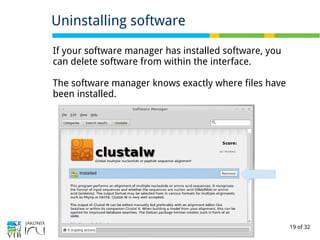
Uninstalling software
If your software manager has installed software, you
can delete software from within the interface.
The software manager knows exactly where files have
been installed.
20 of 32
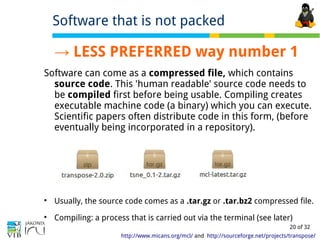
→ LESS PREFERRED way number 1
Software can come as a compressed file, which contains
source code. This 'human readable' source code needs to
be compiled first before being usable. Compiling creates
executable machine code (a binary) which you can execute.
Scientific papers often distribute code in this form, (before
eventually being incorporated in a repository).

Usually, the source code comes as a .tar.gz or .tar.bz2 compressed file.

Compiling: a process that is carried out via the terminal (see later)
Software that is not packed
http://www.micans.org/mcl/ and http://sourceforge.net/projects/transpose/
21 of 32
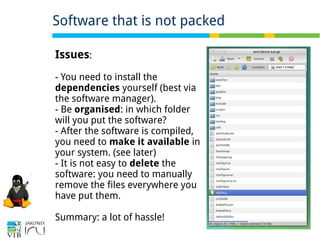
Software that is not packed
Issues:
- You need to install the
dependencies yourself (best via
the software manager).
- Be organised: in which folder
will you put the software?
- After the software is compiled,
you need to make it available in
your system. (see later)
- It is not easy to delete the
software: you need to manually
remove the files everywhere you
have put them.
Summary: a lot of hassle!
22 of 32
→ LESS PREFERRED way number 2
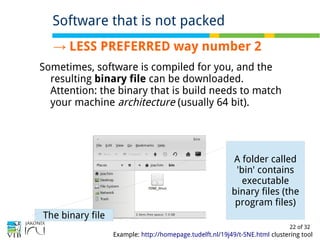
Sometimes, software is compiled for you, and the
resulting binary file can be downloaded.
Attention: the binary that is build needs to match
your machine architecture (usually 64 bit).
Software that is not packed
Example: http://homepage.tudelft.nl/19j49/t-SNE.html clustering tool
A folder called
'bin' contains
executable
binary files (the
program files)
The binary file
23 of 32

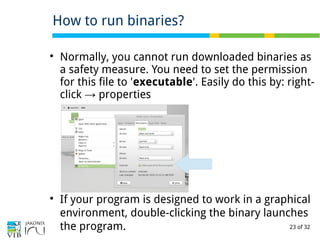
Normally, you cannot run downloaded binaries as
a safety measure. You need to set the permission
for this file to 'executable'. Easily do this by: right-
click properties→

If your program is designed to work in a graphical
environment, double-clicking the binary launches
the program.
How to run binaries?
24 of 32
●
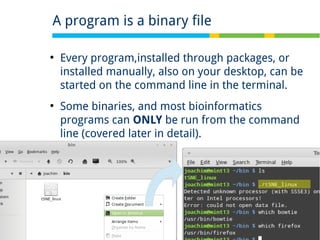
Every program,installed through packages, or
installed manually, also on your desktop, can be
started on the command line in the terminal.
●
Some binaries, and most bioinformatics
programs can ONLY be run from the command
line (covered later in detail).
A program is a binary file
25 of 32
●
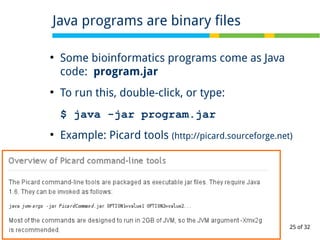
Some bioinformatics programs come as Java
code: program.jar
●
To run this, double-click, or type:
$ java -jar program.jar
●
Example: Picard tools (http://picard.sourceforge.net)
Java programs are binary files
26 of 32

Commercial software is usually binary only
(protection of the source code) – installation
instructions are provided by the vendor.

Free (Open Source) Software is usually
distributed in source packages.

Packaging, the process of creating .rpm or .deb
packages takes a lot of time, therefor often the
source code to compile for yourself is provided.
Why different methods of distributing?
27 of 32

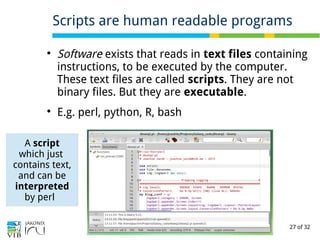
Software exists that reads in text files containing
instructions, to be executed by the computer.
These text files are called scripts. They are not
binary files. But they are executable.

E.g. perl, python, R, bash
Scripts are human readable programs
A script
which just
contains text,
and can be
interpreted
by perl
28 of 32
Scripts are human readable programs
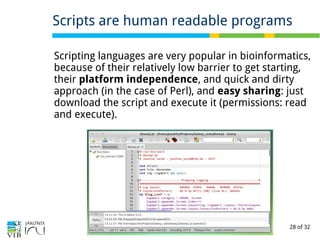
Scripting languages are very popular in bioinformatics,
because of their relatively low barrier to get starting,
their platform independence, and quick and dirty
approach (in the case of Perl), and easy sharing: just
download the script and execute it (permissions: read
and execute).
29 of 32

Software manager...

… taps software from different places,
called repositories.

You can add repositories by adding the
URL

Software is compiled and installed on your
machine, either by the manager, or
manually.

… or it consists of scripts, which are
interpreted by an interpreter real-time.
Summary of this section
30 of 32
Keywords of this section
software center
package manager
Repositories / software sources
dependencies
RPM and deb files
compiling of source code
binaries
packaging
executable
scripts
Write in your own words what the terms mean
31 of 32
Exercise: Getting software
→ Adding software sources containing bioinformatics packages
→ Install software from a package file graphically.
→ Install the very good text editor Geany (PPA exercise)
→ Install the very good terminal program Terminator (Software
center)
→ Good bioinformatics packages: Ugene – interface to many
algorithms.
32 of 32

Part 2 of 'Introduction to Linux for bioinformatics': Installing software

  • 1.
    This presentation isavailable under the Creative Commons Attribution-ShareAlike 3.0 Unported License. Please refer to http://www.bits.vib.be/ if you use this presentation or parts hereof. Introduction to Linux for bioinformatics Getting software Joachim Jacob 5 and 12 May 2014 Figure: http://worldofdtcmarketing.com/website-content-now-critical-for-search-engine-performance-pharma/health-information-online/
  • 2.
    2 of 32  Justlike Linux, most software written for Linux is open source and free (e.g. GNU software).  Depending on your chosen distribution, it is easier/harder to install packages (=another name for software). Software for Linux http://www.makeuseof.com/pages/best-linux-software
  • 3.
    3 of 32 Installing:use the software center PREFERRED WAY to install Software center (= 'app' or 'application' store) every distribution as some kind of software manager : search for software and click to install. The software is automatically updated by the update manager. Depending on the distro, a lot of bioinformatics packages are available. Example in Linux Mint
  • 4.
    4 of 32 E.gBowtie via software center
  • 5.
    5 of 32 E.gBowtie via software center
  • 6.
    6 of 32 E.gBowtie via software center E.g Bowtie via software center
  • 7.
    7 of 32 E.gBowtie via software center
  • 8.
    8 of 32 E.gBowtie via software center
  • 9.
    9 of 32 E.gBowtie via software center
  • 10.
    10 of 32 E.gBowtie via software center
  • 11.
    11 of 32 E.gBowtie via software center
  • 12.
    12 of 32 Softwareis fetched from repositories http://en.wikipedia.org/wiki/Software_repository https://help.ubuntu.com/community/Repositories/Ubuntu On the internet, some URLs point to software repositories for Linux distributions. You can plug in repo's in the software manager. The repository hosts installation files for software. These are typically .rpm (Red Hat alike) or .deb (Debian alike distro's) files. Official repositories: secure, high-quality, malware-free !
  • 13.
    13 of 32 Example:the Debian Med repo → exercise at the end of this section DebianMed is a repository containing a lot of bioinformatics packages for Debian-alike distro's, such as Debian, Ubuntu, Mint,... Debian Med repository is a PPA-type repo: a Personal Package Archive (PPA). The link to such a repo starts with ppa://.
  • 14.
    14 of 32 →PREFERRED WAY number 2 Instead of searching with the Software Manager, the installation files (.rpm or .deb) can be downloaded from internet separately (e.g. when they're not (yet) in a repository). The Software Manager will install the software contained in these files (usually double-clicking the install file). Note: no secure transfer and no confirmation of the package, so be a bit more careful. Downloading installation files
  • 15.
    15 of 32 Dependencies Unixphilosophy: software interconnects Software should do one specific task, avoiding redundant code by reusing other software code. This creates dependencies between packages. Below a graphical representation of dependencies of a package. Dependencies need to be co-installed with the software if not present. .rpm/.deb files take care of this! (and hence also the software manager)
  • 16.
    16 of 32 Dependencyexample http://packages.debian.org/squeeze/altree
  • 17.
    17 of 32 Exercise:example of installing a .deb file http://packages.debian.org/squeeze/altree → Exercise link: 2 exercises! 1. install the multiple sequence alignment tool ClustalW. 2. install Gk-arrays
  • 18.
    18 of 32 Softwarecenter versus package manager A package manager allows more fine-tuned package installs and more info (e.g. repo info, libraries with code to be shared between programs) A Software Manager offers installation of complete sets of packages constituting one (often GUI) tool. It has also a user rating functionality.
  • 19.
    19 of 32 Uninstallingsoftware If your software manager has installed software, you can delete software from within the interface. The software manager knows exactly where files have been installed.
  • 20.
    20 of 32 →LESS PREFERRED way number 1 Software can come as a compressed file, which contains source code. This 'human readable' source code needs to be compiled first before being usable. Compiling creates executable machine code (a binary) which you can execute. Scientific papers often distribute code in this form, (before eventually being incorporated in a repository).  Usually, the source code comes as a .tar.gz or .tar.bz2 compressed file.  Compiling: a process that is carried out via the terminal (see later) Software that is not packed http://www.micans.org/mcl/ and http://sourceforge.net/projects/transpose/
  • 21.
    21 of 32 Softwarethat is not packed Issues: - You need to install the dependencies yourself (best via the software manager). - Be organised: in which folder will you put the software? - After the software is compiled, you need to make it available in your system. (see later) - It is not easy to delete the software: you need to manually remove the files everywhere you have put them. Summary: a lot of hassle!
  • 22.
    22 of 32 →LESS PREFERRED way number 2 Sometimes, software is compiled for you, and the resulting binary file can be downloaded. Attention: the binary that is build needs to match your machine architecture (usually 64 bit). Software that is not packed Example: http://homepage.tudelft.nl/19j49/t-SNE.html clustering tool A folder called 'bin' contains executable binary files (the program files) The binary file
  • 23.
    23 of 32  Normally,you cannot run downloaded binaries as a safety measure. You need to set the permission for this file to 'executable'. Easily do this by: right- click properties→  If your program is designed to work in a graphical environment, double-clicking the binary launches the program. How to run binaries?
  • 24.
    24 of 32 ● Everyprogram,installed through packages, or installed manually, also on your desktop, can be started on the command line in the terminal. ● Some binaries, and most bioinformatics programs can ONLY be run from the command line (covered later in detail). A program is a binary file
  • 25.
    25 of 32 ● Somebioinformatics programs come as Java code: program.jar ● To run this, double-click, or type: $ java -jar program.jar ● Example: Picard tools (http://picard.sourceforge.net) Java programs are binary files
  • 26.
    26 of 32  Commercialsoftware is usually binary only (protection of the source code) – installation instructions are provided by the vendor.  Free (Open Source) Software is usually distributed in source packages.  Packaging, the process of creating .rpm or .deb packages takes a lot of time, therefor often the source code to compile for yourself is provided. Why different methods of distributing?
  • 27.
    27 of 32  Softwareexists that reads in text files containing instructions, to be executed by the computer. These text files are called scripts. They are not binary files. But they are executable.  E.g. perl, python, R, bash Scripts are human readable programs A script which just contains text, and can be interpreted by perl
  • 28.
    28 of 32 Scriptsare human readable programs Scripting languages are very popular in bioinformatics, because of their relatively low barrier to get starting, their platform independence, and quick and dirty approach (in the case of Perl), and easy sharing: just download the script and execute it (permissions: read and execute).
  • 29.
    29 of 32  Softwaremanager...  … taps software from different places, called repositories.  You can add repositories by adding the URL  Software is compiled and installed on your machine, either by the manager, or manually.  … or it consists of scripts, which are interpreted by an interpreter real-time. Summary of this section
  • 30.
    30 of 32 Keywordsof this section software center package manager Repositories / software sources dependencies RPM and deb files compiling of source code binaries packaging executable scripts Write in your own words what the terms mean
  • 31.
    31 of 32 Exercise:Getting software → Adding software sources containing bioinformatics packages → Install software from a package file graphically. → Install the very good text editor Geany (PPA exercise) → Install the very good terminal program Terminator (Software center) → Good bioinformatics packages: Ugene – interface to many algorithms.
  • 32.