ROHINI COLLEGE OFENGINEERING&
TECHNOLOGY
24CA206-FULL STACK WEB DEVELOPMENT
I YEAR-IISEM –COMPUTER APPLICATION
By,
Mrs. R.S.RAMYA DEVI
2.
Adding and RetrievingData in MongoDB with Node.js
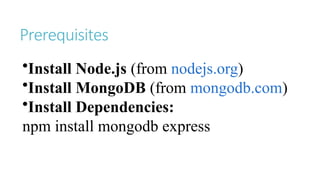
•What is MongoDB?
A NoSQL database for storing JSON-like documents
•What is Node.js?
A JavaScript runtime for building backend applications
•Purpose of the Presentation
How to connect, insert, and retrieve data in MongoDB
using Node.js
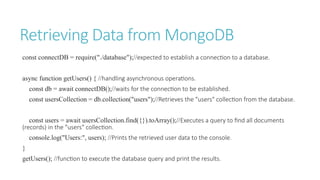
Retrieving Data fromMongoDB
const connectDB = require("./database");//expected to establish a connection to a database.
async function getUsers() { //handling asynchronous operations.
const db = await connectDB();//waits for the connection to be established.
const usersCollection = db.collection("users");//Retrieves the "users" collection from the database.
const users = await usersCollection.find({}).toArray();//Executes a query to find all documents
(records) in the "users" collection.
console.log("Users:", users); //Prints the retrieved user data to the console.
}
getUsers(); //function to execute the database query and print the results.
7.
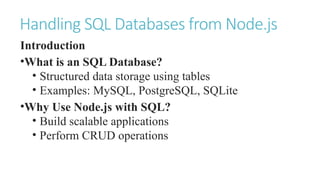
Handling SQL Databasesfrom Node.js
Introduction
•What is an SQL Database?
• Structured data storage using tables
• Examples: MySQL, PostgreSQL, SQLite
•Why Use Node.js with SQL?
• Build scalable applications
• Perform CRUD operations
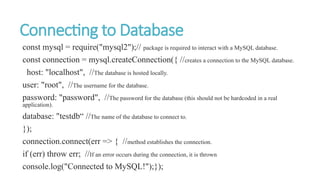
Connecting to Database
constmysql = require("mysql2");// package is required to interact with a MySQL database.
const connection = mysql.createConnection({ //creates a connection to the MySQL database.
host: "localhost", //The database is hosted locally.
user: "root", //The username for the database.
password: "password", //The password for the database (this should not be hardcoded in a real
application).
database: "testdb“ //The name of the database to connect to.
});
connection.connect(err => { //method establishes the connection.
if (err) throw err; //If an error occurs during the connection, it is thrown
console.log("Connected to MySQL!");});
10.
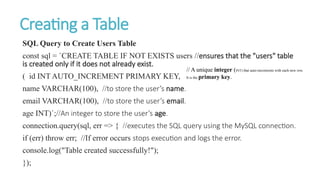
Creating a Table
SQLQuery to Create Users Table
const sql = `CREATE TABLE IF NOT EXISTS users //ensures that the "users" table
is created only if it does not already exist.
( id INT AUTO_INCREMENT PRIMARY KEY,
name VARCHAR(100), //to store the user’s name.
email VARCHAR(100), //to store the user’s email.
age INT)`;//An integer to store the user’s age.
connection.query(sql, err => { //executes the SQL query using the MySQL connection.
if (err) throw err; //If error occurs stops execution and logs the error.
console.log("Table created successfully!");
});
// A unique integer (INT) that auto-increments with each new row.
It is the primary key.
11.
Inserting Data
SQL Queryto Insert Data
const sql = "INSERT INTO users (name, email, age) VALUES (?, ?, ?)"; //This is an SQL
INSERT statement that inserts data into the
const values = ["John Doe", "john@example.com", 30];
connection.query(sql, values, (err, result) => {
if (err) throw err; //If error occurs stops execution and logs the error.
console.log("Data inserted successfully!", result.insertId);
});
12.
Retrieving Data
SQL Queryto Retrieve Data
connection.query("SELECT * FROM users", (err, results) => {
if (err) throw err; //If error occurs stops execution and logs the error
console.log("Users:", results);
});
SQL Query to Update Data
const sql = "UPDATE users SET age = ? WHERE name = ?";
const values = [35, "John Doe"];
connection.query(sql, values, (err, result) => {
if (err) throw err; //If error occurs stops execution and logs the error.
console.log("Data updated successfully!");
});
13.
SQL Query toDelete Data
const sql = "DELETE FROM users WHERE name = ?";
connection.query(sql, ["John Doe"], (err, result) => {
if (err) throw err; //If error occurs stops execution and logs the error
console.log("Data deleted successfully!");
});
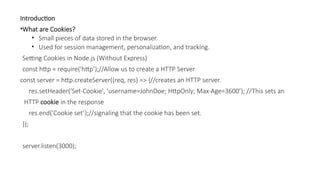
Introduction
•What are Cookies?
•Small pieces of data stored in the browser.
• Used for session management, personalization, and tracking.
Setting Cookies in Node.js (Without Express)
const http = require('http’);//Allow us to create a HTTP Server
const server = http.createServer((req, res) => {//creates an HTTP server.
res.setHeader('Set-Cookie', 'username=JohnDoe; HttpOnly; Max-Age=3600’); //This sets an
HTTP cookie in the response
res.end('Cookie set’);//signaling that the cookie has been set.
});
server.listen(3000);
16.
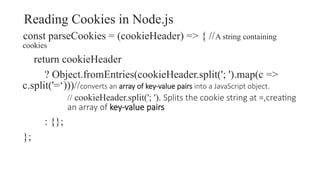
Reading Cookies inNode.js
const parseCookies = (cookieHeader) => { //A string containing
cookies
return cookieHeader
? Object.fromEntries(cookieHeader.split('; ').map(c =>
c.split('=‘)))//converts an array of key-value pairs into a JavaScript object.
// cookieHeader.split('; '). Splits the cookie string at =,creating
an array of key-value pairs
: {};
};
17.
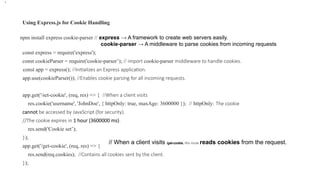
Using Express.js forCookie Handling
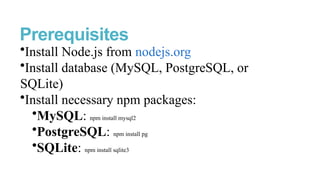
npm install express cookie-parser // express → A framework to create web servers easily.
cookie-parser → A middleware to parse cookies from incoming requests
const express = require('express');
const cookieParser = require('cookie-parser’); // import cookie-parser middleware to handle cookies.
const app = express(); //Initializes an Express application.
app.use(cookieParser()); //Enables cookie parsing for all incoming requests.
app.get('/set-cookie', (req, res) => { //When a client visits
res.cookie('username', 'JohnDoe', { httpOnly: true, maxAge: 3600000 }); // httpOnly: The cookie
cannot be accessed by JavaScript (for security).
//The cookie expires in 1 hour (3600000 ms).
res.send('Cookie set’);
});
app.get('/get-cookie', (req, res) => {
res.send(req.cookies); //Contains all cookies sent by the client.
});
•.
// When a client visits /get-cookie, this route reads cookies from the request.



![Inserting Data
SQL Query to Insert Data
const sql = "INSERT INTO users (name, email, age) VALUES (?, ?, ?)"; //This is an SQL
INSERT statement that inserts data into the
const values = ["John Doe", "john@example.com", 30];
connection.query(sql, values, (err, result) => {
if (err) throw err; //If error occurs stops execution and logs the error.
console.log("Data inserted successfully!", result.insertId);
});](https://image.slidesharecdn.com/24ca206unitiii-260121155953-13a0af55/85/24CA206-Full-Stack-Web-Development-mongodb-11-320.jpg)
![Retrieving Data
SQL Query to Retrieve Data
connection.query("SELECT * FROM users", (err, results) => {
if (err) throw err; //If error occurs stops execution and logs the error
console.log("Users:", results);
});
SQL Query to Update Data
const sql = "UPDATE users SET age = ? WHERE name = ?";
const values = [35, "John Doe"];
connection.query(sql, values, (err, result) => {
if (err) throw err; //If error occurs stops execution and logs the error.
console.log("Data updated successfully!");
});](https://image.slidesharecdn.com/24ca206unitiii-260121155953-13a0af55/85/24CA206-Full-Stack-Web-Development-mongodb-12-320.jpg)
![SQL Query to Delete Data
const sql = "DELETE FROM users WHERE name = ?";
connection.query(sql, ["John Doe"], (err, result) => {
if (err) throw err; //If error occurs stops execution and logs the error
console.log("Data deleted successfully!");
});](https://image.slidesharecdn.com/24ca206unitiii-260121155953-13a0af55/85/24CA206-Full-Stack-Web-Development-mongodb-13-320.jpg)




![[2015/2016] Local data storage for web-based mobile apps](https://cdn.slidesharecdn.com/ss_thumbnails/06localstorage-160413121847-thumbnail.jpg?width=640&height=640&fit=bounds)


![Internet and Web Technology (CLASS-10) [Node.js] | NIC/NIELIT Web Technology](https://cdn.slidesharecdn.com/ss_thumbnails/iwtclass-10-200727152931-thumbnail.jpg?width=640&height=640&fit=bounds)


