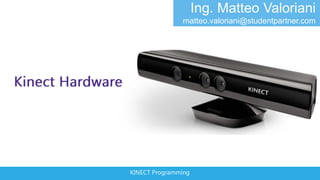


Ing. Matteo Valoriani
               matteo.valoriani@studentpartner.com


KINECT Programming
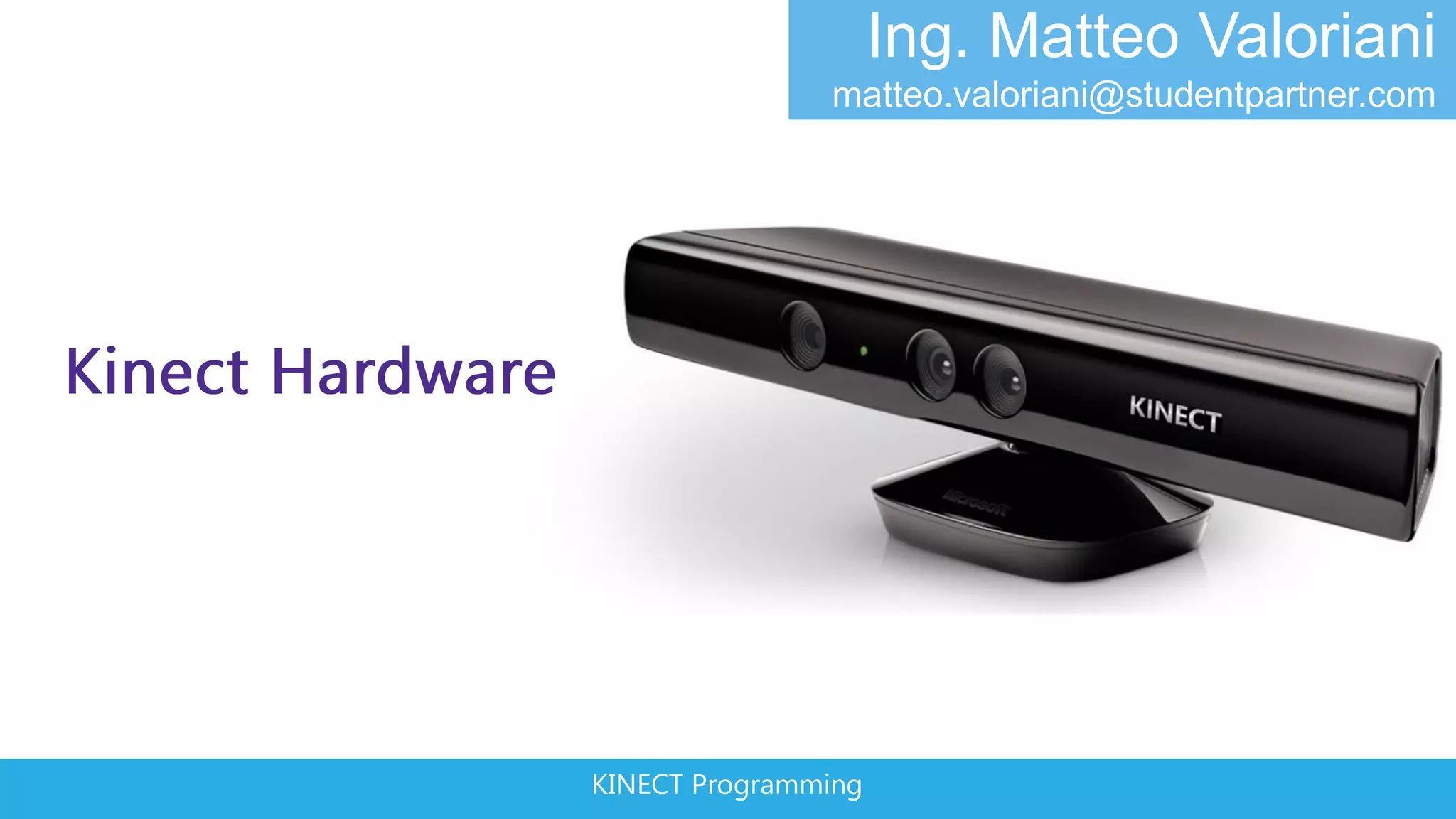
KINECT SENSORS
                  IR Emitter       Color Sensor
                                                    IR Depth Sensor
                                                                      Tilt Motor


• Depth resolution:
  640x480 px
• RGB resolution:
  1600x1200 px
                               Microphone Array
• 60 FPS
                               KINECT Programming
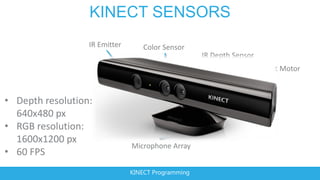
KINECT SENSORS (2)


http://www.ifixit.com/Teardown/Microsoft-
Kinect-Teardown/4066/1
                                    KINECT Programming
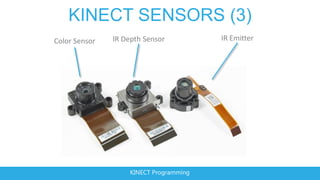
KINECT SENSORS (3)
Color Sensor   IR Depth Sensor          IR Emitter


                   KINECT Programming
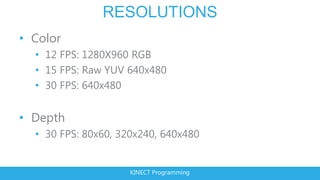
RESOLUTIONS
• Color
  • 12 FPS: 1280X960 RGB
  • 15 FPS: Raw YUV 640x480
  • 30 FPS: 640x480


• Depth
  • 30 FPS: 80x60, 320x240, 640x480


                     KINECT Programming
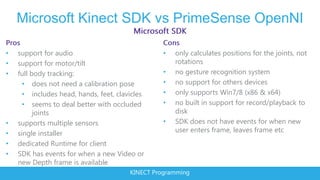
Microsoft Kinect SDK vs PrimeSense OpenNI

•   support for audio                             •   only calculates positions for the joints, not
•   support for motor/tilt                            rotations
•   full body tracking:                           •   no gesture recognition system
      • does not need a calibration pose          •   no support for others devices
      • includes head, hands, feet, clavicles     •   only supports Win7/8 (x86 & x64)
      • seems to deal better with occluded        •   no built in support for record/playback to
          joints                                      disk
•   supports multiple sensors                     •   SDK does not have events for when new
•   single installer                                  user enters frame, leaves frame etc
•   dedicated Runtime for client
•   SDK has events for when a new Video or
    new Depth frame is available
                                        KINECT Programming
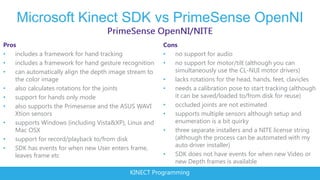
Microsoft Kinect SDK vs PrimeSense OpenNI
Pros                                                    Cons
•   includes a framework for hand tracking              •  no support for audio
•   includes a framework for hand gesture recognition   •  no support for motor/tilt (although you can
•   can automatically align the depth image stream to      simultaneously use the CL-NUI motor drivers)
    the color image                                     •  lacks rotations for the head, hands, feet, clavicles
•   also calculates rotations for the joints            •  needs a calibration pose to start tracking (although
•   support for hands only mode                            it can be saved/loaded to/from disk for reuse)
•   also supports the Primesense and the ASUS WAVI      •  occluded joints are not estimated
    Xtion sensors                                       •  supports multiple sensors although setup and
•   supports Windows (including Vista&XP), Linux and       enumeration is a bit quirky
    Mac OSX                                             •  three separate installers and a NITE license string
•   support for record/playback to/from disk               (although the process can be automated with my
•   SDK has events for when new User enters frame,         auto driver installer)
    leaves frame etc                                    •  SDK does not have events for when new Video or
                                                           new Depth frames is available
                                            KINECT Programming
KINECT Programming
GET STARTED
• http://kinectforwindows.org
  • Order Kinect Hardware
  • Download Kinect SDK


                    KINECT Programming
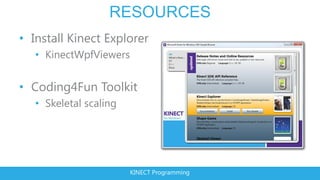
RESOURCES
• Install Kinect Explorer
   • KinectWpfViewers


• Coding4Fun Toolkit
   • Skeletal scaling


                        KINECT Programming
KINECT Programming
KINECT API BASICS
• Manage Kinect state
  • Connected
  • Enable Color, Depth, Skeleton
  • Start Kinect


• Get Data
  • Events – AllFramesReady
  • Polling – OpenNextFrame

                     KINECT Programming
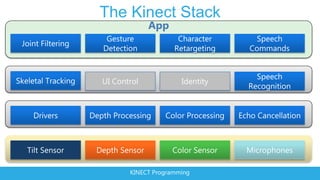
The Kinect Stack
         App


    KINECT Programming
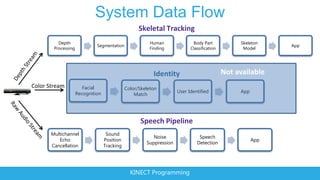
System Data Flow
                                             Skeletal Tracking
   Depth                                         Human               Body Part            Skeleton
                       Segmentation                                                                   App
 Processing                                      Finding            Classification         Model


                                                   Identity                          Not available
                 Facial                Color/Skeleton
              Recognition                                     User Identified             App
                                           Match


                                              Speech Pipeline
Multichannel                 Sound
                                                   Noise                Speech
   Echo                     Position                                                            App
                                                Suppression            Detection
Cancellation                Tracking


                                         KINECT Programming
KINECT Programming
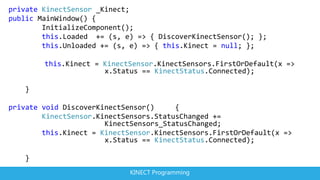
private KinectSensor _Kinect;
public MainWindow() {
        InitializeComponent();
        this.Loaded += (s, e) => { DiscoverKinectSensor(); };
        this.Unloaded += (s, e) => { this.Kinect = null; };

        this.Kinect = KinectSensor.KinectSensors.FirstOrDefault(x =>
                      x.Status == KinectStatus.Connected);

   }

private void DiscoverKinectSensor()     {
        KinectSensor.KinectSensors.StatusChanged +=
                       KinectSensors_StatusChanged;
        this.Kinect = KinectSensor.KinectSensors.FirstOrDefault(x =>
                       x.Status == KinectStatus.Connected);

   }
                             KINECT Programming
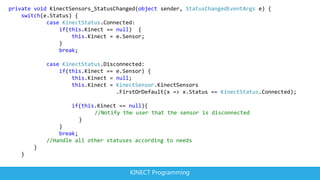
private void KinectSensors_StatusChanged(object sender, StatusChangedEventArgs e) {
    switch(e.Status) {
            case KinectStatus.Connected:
                if(this.Kinect == null) {
                    this.Kinect = e.Sensor;
                }
                break;

           case KinectStatus.Disconnected:
               if(this.Kinect == e.Sensor) {
                   this.Kinect = null;
                   this.Kinect = KinectSensor.KinectSensors
                                 .FirstOrDefault(x => x.Status == KinectStatus.Connected);

                   if(this.Kinect == null){
                          //Notify the user that the sensor is disconnected
                     }
               }
               break;
           //Handle all other statuses according to needs
       }
   }


                                      KINECT Programming
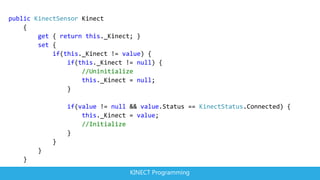
public KinectSensor Kinect
    {
        get { return this._Kinect; }
        set {
            if(this._Kinect != value) {
                if(this._Kinect != null) {
                    //Uninitialize
                    this._Kinect = null;
                }

                if(value != null && value.Status == KinectStatus.Connected) {
                    this._Kinect = value;
                    //Initialize
                }
            }
        }
    }
                                 KINECT Programming
KinectStatus VALUES
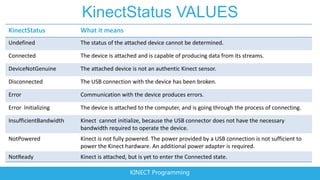
KinectStatus            What it means
Undefined               The status of the attached device cannot be determined.

Connected               The device is attached and is capable of producing data from its streams.

DeviceNotGenuine        The attached device is not an authentic Kinect sensor.

Disconnected            The USB connection with the device has been broken.

Error                   Communication with the device produces errors.

Error Initializing      The device is attached to the computer, and is going through the process of connecting.

InsufficientBandwidth   Kinect cannot initialize, because the USB connector does not have the necessary
                        bandwidth required to operate the device.
NotPowered              Kinect is not fully powered. The power provided by a USB connection is not sufficient to
                        power the Kinect hardware. An additional power adapter is required.
NotReady                Kinect is attached, but is yet to enter the Connected state.

                                            KINECT Programming
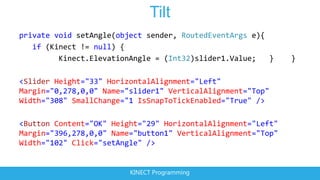
Tilt
private void setAngle(object sender, RoutedEventArgs e){
   if (Kinect != null) {
         Kinect.ElevationAngle = (Int32)slider1.Value;   }    }

<Slider Height="33" HorizontalAlignment="Left"
Margin="0,278,0,0" Name="slider1" VerticalAlignment="Top"
Width="308" SmallChange="1 IsSnapToTickEnabled="True" />

<Button Content="OK" Height="29" HorizontalAlignment="Left"
Margin="396,278,0,0" Name="button1" VerticalAlignment="Top"
Width="102" Click="setAngle" />


                         KINECT Programming

2 track kinect@Bicocca - hardware e funzinamento

  • 1.
    Ing. Matteo Valoriani matteo.valoriani@studentpartner.com KINECT Programming
  • 2.
    KINECT SENSORS IR Emitter Color Sensor IR Depth Sensor Tilt Motor • Depth resolution: 640x480 px • RGB resolution: 1600x1200 px Microphone Array • 60 FPS KINECT Programming
  • 3.
  • 4.
    KINECT SENSORS (3) ColorSensor IR Depth Sensor IR Emitter KINECT Programming
  • 5.
    RESOLUTIONS • Color • 12 FPS: 1280X960 RGB • 15 FPS: Raw YUV 640x480 • 30 FPS: 640x480 • Depth • 30 FPS: 80x60, 320x240, 640x480 KINECT Programming
  • 6.
    Microsoft Kinect SDKvs PrimeSense OpenNI • support for audio • only calculates positions for the joints, not • support for motor/tilt rotations • full body tracking: • no gesture recognition system • does not need a calibration pose • no support for others devices • includes head, hands, feet, clavicles • only supports Win7/8 (x86 & x64) • seems to deal better with occluded • no built in support for record/playback to joints disk • supports multiple sensors • SDK does not have events for when new • single installer user enters frame, leaves frame etc • dedicated Runtime for client • SDK has events for when a new Video or new Depth frame is available KINECT Programming
  • 7.
    Microsoft Kinect SDKvs PrimeSense OpenNI Pros Cons • includes a framework for hand tracking • no support for audio • includes a framework for hand gesture recognition • no support for motor/tilt (although you can • can automatically align the depth image stream to simultaneously use the CL-NUI motor drivers) the color image • lacks rotations for the head, hands, feet, clavicles • also calculates rotations for the joints • needs a calibration pose to start tracking (although • support for hands only mode it can be saved/loaded to/from disk for reuse) • also supports the Primesense and the ASUS WAVI • occluded joints are not estimated Xtion sensors • supports multiple sensors although setup and • supports Windows (including Vista&XP), Linux and enumeration is a bit quirky Mac OSX • three separate installers and a NITE license string • support for record/playback to/from disk (although the process can be automated with my • SDK has events for when new User enters frame, auto driver installer) leaves frame etc • SDK does not have events for when new Video or new Depth frames is available KINECT Programming
  • 8.
  • 9.
    GET STARTED • http://kinectforwindows.org • Order Kinect Hardware • Download Kinect SDK KINECT Programming
  • 10.
    RESOURCES • Install KinectExplorer • KinectWpfViewers • Coding4Fun Toolkit • Skeletal scaling KINECT Programming
  • 11.
  • 12.
    KINECT API BASICS •Manage Kinect state • Connected • Enable Color, Depth, Skeleton • Start Kinect • Get Data • Events – AllFramesReady • Polling – OpenNextFrame KINECT Programming
  • 13.
    The Kinect Stack App KINECT Programming
  • 14.
    System Data Flow Skeletal Tracking Depth Human Body Part Skeleton Segmentation App Processing Finding Classification Model Identity Not available Facial Color/Skeleton Recognition User Identified App Match Speech Pipeline Multichannel Sound Noise Speech Echo Position App Suppression Detection Cancellation Tracking KINECT Programming
  • 15.
  • 16.
    private KinectSensor _Kinect; publicMainWindow() { InitializeComponent(); this.Loaded += (s, e) => { DiscoverKinectSensor(); }; this.Unloaded += (s, e) => { this.Kinect = null; }; this.Kinect = KinectSensor.KinectSensors.FirstOrDefault(x => x.Status == KinectStatus.Connected); } private void DiscoverKinectSensor() { KinectSensor.KinectSensors.StatusChanged += KinectSensors_StatusChanged; this.Kinect = KinectSensor.KinectSensors.FirstOrDefault(x => x.Status == KinectStatus.Connected); } KINECT Programming
  • 17.
    private void KinectSensors_StatusChanged(objectsender, StatusChangedEventArgs e) { switch(e.Status) { case KinectStatus.Connected: if(this.Kinect == null) { this.Kinect = e.Sensor; } break; case KinectStatus.Disconnected: if(this.Kinect == e.Sensor) { this.Kinect = null; this.Kinect = KinectSensor.KinectSensors .FirstOrDefault(x => x.Status == KinectStatus.Connected); if(this.Kinect == null){ //Notify the user that the sensor is disconnected } } break; //Handle all other statuses according to needs } } KINECT Programming
  • 18.
    public KinectSensor Kinect { get { return this._Kinect; } set { if(this._Kinect != value) { if(this._Kinect != null) { //Uninitialize this._Kinect = null; } if(value != null && value.Status == KinectStatus.Connected) { this._Kinect = value; //Initialize } } } } KINECT Programming
  • 19.
    KinectStatus VALUES KinectStatus What it means Undefined The status of the attached device cannot be determined. Connected The device is attached and is capable of producing data from its streams. DeviceNotGenuine The attached device is not an authentic Kinect sensor. Disconnected The USB connection with the device has been broken. Error Communication with the device produces errors. Error Initializing The device is attached to the computer, and is going through the process of connecting. InsufficientBandwidth Kinect cannot initialize, because the USB connector does not have the necessary bandwidth required to operate the device. NotPowered Kinect is not fully powered. The power provided by a USB connection is not sufficient to power the Kinect hardware. An additional power adapter is required. NotReady Kinect is attached, but is yet to enter the Connected state. KINECT Programming
  • 20.
    Tilt private void setAngle(objectsender, RoutedEventArgs e){ if (Kinect != null) { Kinect.ElevationAngle = (Int32)slider1.Value; } } <Slider Height="33" HorizontalAlignment="Left" Margin="0,278,0,0" Name="slider1" VerticalAlignment="Top" Width="308" SmallChange="1 IsSnapToTickEnabled="True" /> <Button Content="OK" Height="29" HorizontalAlignment="Left" Margin="396,278,0,0" Name="button1" VerticalAlignment="Top" Width="102" Click="setAngle" /> KINECT Programming